
5X Magnifying Glass with Clip for Reading
3.6Editor score
Large 10×6 inch viewing area
Flexible 360-degree gooseneck
Lightweight detachable clip design
Finding the right magnifying glasses for computer monitors can transform your digital experience. Whether you struggle with small text or need clearer visuals for detailed tasks, the right tool makes a significant difference in comfort and productivity.
We evaluated ten top-rated screen amplifiers and desktop magnifiers based on clarity, adjustability, and ease of use. Our comparison covers clip-on options, headset magnifiers, and full-screen monitors designed for various needs.
Each product entry highlights key specifications, pros, cons, and real-world performance insights. Remember that product availability and pricing may change over time, so check the latest details before purchasing.
3.6Editor score

4.5Editor score
3.4Editor score
As an Amazon Associate we earn from qualifying purchases.
The following table provides a side-by-side overview of the key features and specifications for each of the ten magnifying glasses and screen amplifiers evaluated in this guide.


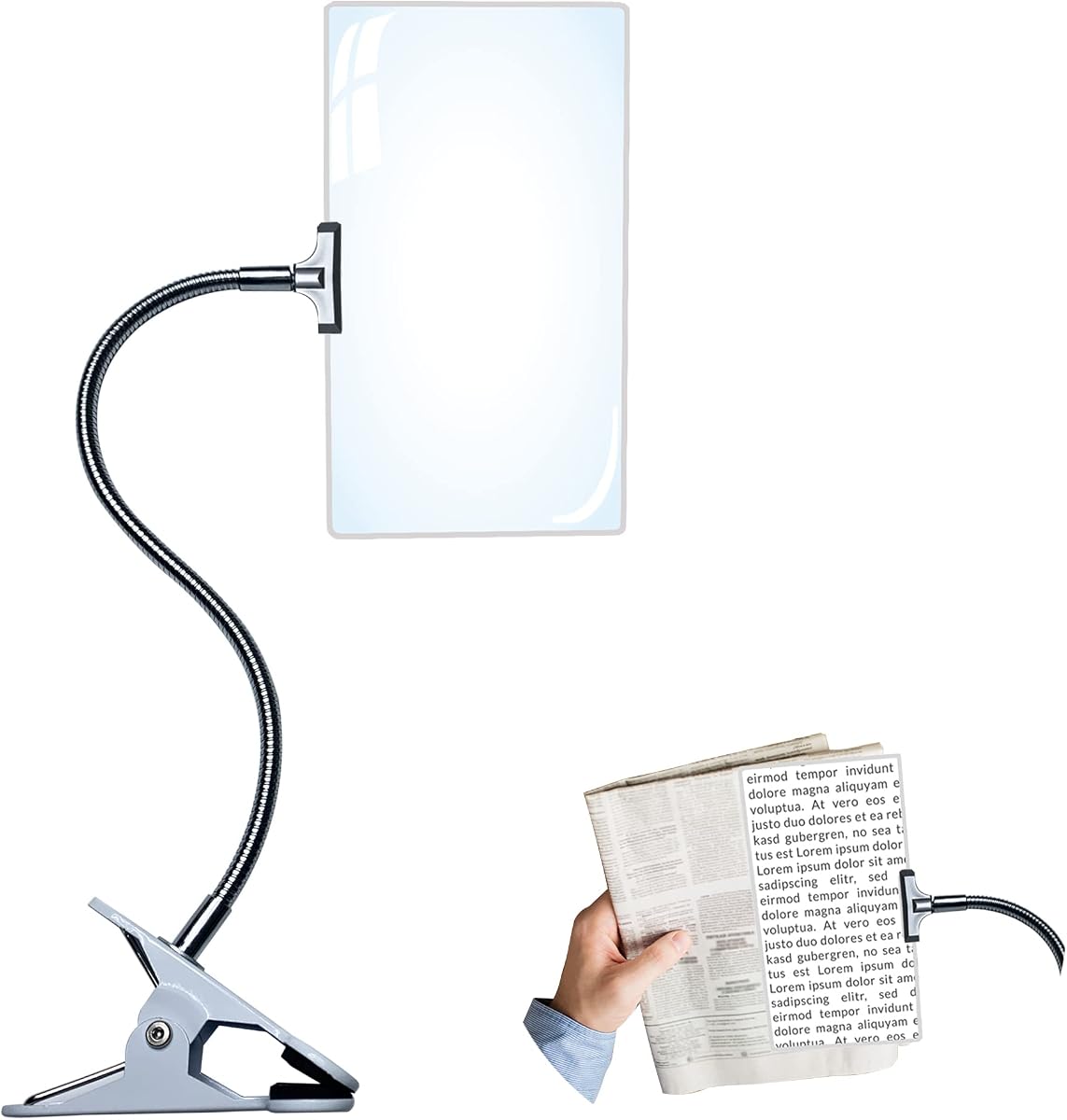
This 5X magnifying glass stands out as an affordable option for those needing a large viewing area. The 10×6 inch lens covers significant screen space, making it ideal for reading small text or examining detailed work without excessive eye strain.
We may earn a commission when you buy through this link, at no additional cost to you.
The flexible gooseneck allows for 360-degree adjustment, enabling users to position the lens exactly where needed. Its lightweight design and detachable clip feature mean it can be easily moved between desk use and handheld tasks like crafts or embroidery.
While the lens is made of optical grade PVC rather than glass, it provides clear images with minimal distortion. The main trade-off is durability, as plastic lenses are more prone to scratching compared to glass alternatives.
This product is best suited for hobbyists or seniors seeking an economical solution for daily reading and detailed tasks. It offers excellent value for money by combining a large magnification area with versatile mounting options.
The 10×6 inch viewing area ensures that users can see entire lines of text or large sections of documents without constantly moving the magnifier.
The adjustable gooseneck allows for precise angle control, which is crucial for reducing glare and finding the most comfortable viewing position for individual users.
We may earn a commission when you buy through this link, at no additional cost to you.
This 21-inch screen magnifier is designed to fit over laptop and desktop displays, providing a 3D HD viewing experience. It claims to magnify the screen content by 3 to 5 times, which is particularly beneficial for seniors or anyone struggling with small fonts.
We may earn a commission when you buy through this link, at no additional cost to you.
The HD acrylic Fresnel lens helps to reduce radiation and provides eye protection against blue light. Its adjustable angle design allows users to switch between standing and lying reading positions, making it versatile for home or office environments.
While it is lightweight and easy to transport, its performance is best in low light environments. Direct sunlight or strong backlighting can reduce the viewing effect, which limits its usability in certain outdoor or brightly lit settings.
It serves as an effective screen enlarger for daily computer use, gaming, and movie watching. Users who prioritize portability and ease of setup without needing external power will find this option convenient and practical.
The unique lens design offers a 3D viewing effect that enhances immersion when watching videos or playing games on the computer screen.
With angle adjustments ranging from 0 to 90 degrees, users can customize the magnifier to suit their preferred sitting or reclining positions.
We may earn a commission when you buy through this link, at no additional cost to you.
This computer screen magnifier supports a wide range of devices including laptops and phones with screen sizes from 14 to 21 inches. The high definition optical lens ensures clear visibility, while the wooden frame bracket adds a touch of elegance to its functional design.
We may earn a commission when you buy through this link, at no additional cost to you.
The six branch points on the screen magnifier allow for multiple viewing configurations. Users can rotate pivot points over 180 degrees to achieve the best angle for reading newspapers, viewing piano scores, or examining detailed documents.
While the product promises high definition zoom technology, the absence of user ratings makes it difficult to gauge real-world satisfaction. The wooden material is environmentally friendly but may add weight compared to purely plastic alternatives.
It is a strong candidate for those needing a stable and adjustable magnifier for various tasks. The design aims to protect eyes from close viewing distances, making it suitable for prolonged periods of screen time.
Supporting screens from 14 to 21 inches ensures that most users can find a fit for their laptop or tablet needs.
The multiple pivot points allow the magnifier to be positioned for reading, gaming, or detailed work in a variety of settings.
We may earn a commission when you buy through this link, at no additional cost to you.
The YOCTOSUN Magnifying Glasses offer an impressive range of magnification from 0.75X to 4.0X with interchangeable lenses. This versatility makes them highly rated for various tasks including jewelry making, watch repair, and detailed crafts.
We may earn a commission when you buy through this link, at no additional cost to you.
Equipped with three LED lights and adjustable brightness levels, these glasses ensure sufficient illumination for dark workspaces. The rechargeable lithium battery eliminates the need for disposable batteries, providing long-lasting bright light for extended sessions.
The ergonomic design features a flexible nose bridge and a rubber head strap that distributes pressure evenly. While they are perfect for close work, users should note they are not intended for medical vision correction.
These glasses are ideal for hobbyists and professionals who need hands-free magnification. The combination of clear optics, adjustable lighting, and comfortable wear makes them a top pick for precision tasks.
Users can switch between five optical lenses using a simple click and release system to match the required magnification for the task at hand.
Three LED lights provide excellent visibility on detailed surfaces, reducing eye strain and allowing users to work comfortably for longer periods.
We may earn a commission when you buy through this link, at no additional cost to you.
This magnifying glass offers four interchangeable lenses ranging from 1.5X to 5.0X, providing strong magnification for detailed close work. The acrylic resin lenses are scratch-resistant and high definition, ensuring clear visibility during tasks like beading or sewing.
We may earn a commission when you buy through this link, at no additional cost to you.
The rechargeable LED headlight can be adjusted up and down to focus illumination exactly where needed. With a battery life of up to 7 hours, it offers reliable lighting for long projects without frequent recharging.
The ergonomic silicone-coated nose bracket helps distribute pressure comfortably across the nose and temples. Users should note that each lens has a fixed focal length, so careful adjustment of distance is required for optimal clarity.
It is a practical choice for those who need hands-free magnification with adjustable lighting. The durable construction and thoughtful design features make it suitable for hobbyists and professionals alike.
The ability to adjust the direction of the LED light allows users to eliminate shadows and focus precisely on the work area.
With lenses going up to 5X, this model supports tasks that require extreme close-up views and high levels of detail.
We may earn a commission when you buy through this link, at no additional cost to you.
These magnifying glasses provide a 200% magnification which is suitable for reading small text and general detailed work. The lightweight design ensures they remain comfortable during extended use without causing fatigue on the face.
We may earn a commission when you buy through this link, at no additional cost to you.
Built-in LED lighting on both sides of the frame enhances visibility and reduces eye strain. The blue light blocking technology offers additional eye protection when using these glasses with electronic devices or artificial light sources.
The rechargeable battery charges quickly via USB in about 1.5 hours, making it convenient for daily use. While effective for many tasks, the fixed 200% magnification may limit use for those needing higher levels of clarity.
This product is ideal for users seeking a simple, practical magnifying solution for crafts, repairs, or reading. The added benefits of blue light blocking and easy recharging make it a thoughtful choice for screen users.
Built-in blue light blocking technology helps reduce eye strain and headaches caused by exposure to electronic screens and artificial lighting.
Integrated LEDs provide essential illumination for close work, ensuring that users can see details clearly in various lighting conditions.
We may earn a commission when you buy through this link, at no additional cost to you.
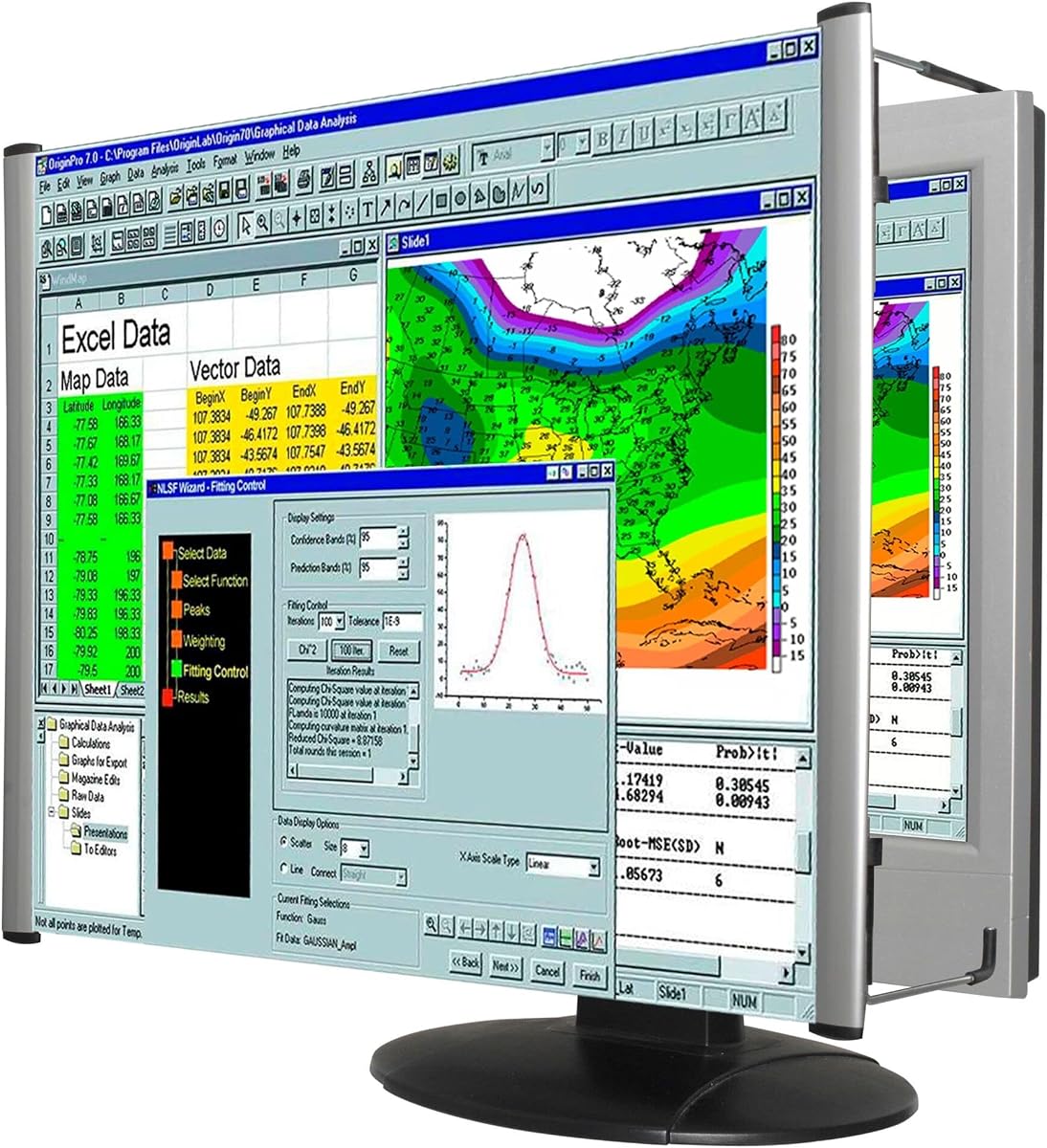
The Kantek LCD Monitor Magnifier is designed specifically for 22-inch widescreen monitors with standard aspect ratios. It is fully assembled and installs quickly, making it a convenient option for office or home users seeking better screen visibility.
We may earn a commission when you buy through this link, at no additional cost to you.
Its adjustable magnification allows users to customize the level of zoom to their specific needs. The Fresnel lens with antiglare coating helps to reduce reflections and improve contrast, which is useful in brightly lit environments.
The lightweight construction ensures that the monitor does not bear excessive weight, protecting the device from strain. However, the price point is higher than basic clip-on magnifiers, reflecting its specialized design and professional quality.
This product is best suited for professional environments or users with specific monitor sizes. It provides a stable and effective solution for reducing eye strain during long periods of computer work.
Users can adjust the magnification level to suit their viewing preferences, allowing for flexible use across different tasks and content types.
The lens incorporates antiglare coating to minimize reflections and enhance image clarity, which is particularly beneficial for reading text on screens.
We may earn a commission when you buy through this link, at no additional cost to you.
This large clip-on magnifier features a sturdy alloy spring clamp that secures it to desks or monitor edges. The high-definition lens provides up to 5x magnification, making it a reliable tool for reading, repair work, and other close tasks.
We may earn a commission when you buy through this link, at no additional cost to you.
The bendable hose design allows users to change the angle and height with ease. This flexibility ensures that the lens can be positioned optimally for different tasks without needing to move the entire base.
It is designed to sit stably on a desktop, taking up minimal space while providing a convenient magnifying setup. The clear detail view helps users complete tasks more comfortably, reducing eye strain significantly.
This magnifier is an excellent choice for those needing a reliable hands-free solution. Its stability and adjustable design make it suitable for a wide range of daily activities from reading to intricate repairs.
The durable alloy spring clamp ensures the magnifier stays securely in place without slipping, providing stability during use.
Users can bend the hose to adjust the lens angle and height, offering flexible viewing positions that suit individual preferences.
We may earn a commission when you buy through this link, at no additional cost to you.
This 10×6 inch magnifying glass is designed to help seniors and those with low vision read full pages easily. The 4X magnification ensures that text is enlarged without distortion, making it a supportive tool for daily reading and crafts.
We may earn a commission when you buy through this link, at no additional cost to you.
The plastic Fresnel lens is lightweight and durable, reducing the risk of breakage compared to glass. It can be clamped on beds, desks, or chairs, offering versatile placement options for different activities and locations.
The flexible gooseneck adapts to complex scenarios and can be adjusted to display the viewing area perfectly. While the plastic lens is practical, it is less durable than glass and may show scratches over extended use.
It is an ideal gift for seniors needing assistive reading tools. The hands-free design and large viewing area make it a practical and supportive option for maintaining independence in daily tasks.
The large 10×6 inch size covers full pages of text, allowing users to read without frequent movements or adjustments.
The non-glass Fresnel lens is lightweight and less prone to breaking, making it safer for home use and travel.
We may earn a commission when you buy through this link, at no additional cost to you.
This MAXVIEW magnifier is engineered for 21.5 to 22-inch widescreen monitors, offering an optical grade acrylic Fresnel lens. The lens includes a light tint to enhance contrast and increase image size up to double for better readability.
We may earn a commission when you buy through this link, at no additional cost to you.
The patented design allows for adjustable magnification by changing the distance between the magnifier and the display. This flexibility lets users find the ideal zoom level for their specific visual needs without compromising image quality.
Its lightweight and elegant design makes it an alternative to heavy glass optical lenses. However, users must avoid intense perimeter lighting as reflections in the Fresnel grooves can be distracting during use.
This product is a premium solution for office environments requiring stable monitor magnification. While not intended for the visually impaired, it provides a solid improvement in readability for general users.
The lens is manufactured with optical grade acrylic to enhance contrast and readability, ensuring a clear and distortion-free viewing experience.
Moving the magnifier closer or farther from the display adjusts the magnification level, giving users control over the image size.
We may earn a commission when you buy through this link, at no additional cost to you.
Selecting the right magnifying tool depends on your specific needs, screen size, and preferred usage scenario. This guide outlines the key factors to consider.
Magnification power determines how much larger the screen content appears. Models range from 2x to 5x or more, and choosing the right level depends on your visual acuity and the size of the text you need to read.
Select a magnification level that provides clarity without distorting the image excessively or requiring extreme close-up positioning.
Lens materials include optical grade acrylic, glass, and plastic. Acrylic is lightweight and durable but can scratch, while glass offers clarity but is heavier and more fragile. Plastic options are affordable but may distort image quality over time.
Choose a material that balances durability with optical clarity based on your frequency of use and handling habits.
Integrated lighting such as LEDs can significantly improve visibility in dim environments. Look for adjustable brightness levels and rechargeable batteries to ensure consistent illumination without needing extra desk lights.
Prioritize models with adjustable lighting to reduce eye strain during long viewing sessions.
Different mounting styles include clip-on, desktop stands, and headset designs. Adjustable goosenecks or hinges allow you to position the lens exactly where needed, which is crucial for ergonomic comfort and effective viewing.
Ensure the mounting system is stable and can be adjusted easily to fit your workspace and posture preferences.
Verify that the magnifier is compatible with your monitor size and type. Some models are designed specifically for laptops, while others suit desktop screens. Checking the dimensions helps avoid fit issues.
Match the product specifications with your device dimensions to ensure a secure fit.
If you plan to move the magnifier between locations, lightweight and collapsible designs are preferable. Heavy models may cause fatigue or be difficult to transport.
Consider the weight and size if you need to carry the magnifier regularly.
User-friendly features such as easy lens replacement, intuitive controls, and clear instructions make daily usage more convenient. Ergonomic designs reduce physical strain during extended periods.
Choose products with features that match your comfort and skill levels.
Long-lasting products often come with warranties or guarantees. Check the build quality and customer feedback to ensure the product will withstand regular use.
Invest in a durable option to avoid frequent replacements.
Position the magnifier securely on your monitor or desk according to the manufacturer's instructions. Ensure that the lens is clean and free of dust before use to avoid scratches or image distortion.
Adjust the magnification level and angle until you find a comfortable position. Take regular breaks during extended use to reduce eye fatigue and maintain focus.
Clean the lenses gently with a soft cloth to prevent scratches. If the product is rechargeable, ensure the battery is charged regularly for optimal performance.
Not all magnifiers fit every screen size. Check the product specifications to ensure compatibility with your monitor dimensions. Many models specify ranges such as 21 to 22 inches.
Yes, using a magnifier can help reduce eye strain by enlarging text and details so you do not have to strain to read small content. Proper lighting and positioning further minimize fatigue.
Some models come with rechargeable batteries for built-in lighting. Others are passive and do not require power. Always check the product details to confirm battery requirements.
Use a soft, lint-free cloth to wipe the lenses gently. Avoid using harsh chemicals that could damage the lens coating or material.
Many magnifiers are versatile and can be used for reading books, sewing, or detailed work. Check the mounting options to ensure they can be positioned for reading purposes.
Yes, many designs are specifically created to assist seniors with low vision. Look for models with large viewing areas and easy mounting options for added convenience.
Fresnel lenses are made from lightweight materials like acrylic that can be thin and durable. Glass lenses offer clarity but are heavier and more prone to breakage.
Most are designed for indoor use. Outdoor lighting such as direct sunlight may cause glare or reflection that affects performance.
Choosing the right magnifying glasses for computer monitors depends on your specific needs and preferences. Whether you opt for a budget-friendly clip-on or a premium adjustable model, clarity and ergonomics are essential.
Focus on factors such as magnification power, lighting options, and device compatibility to find a solution that enhances your digital experience. Proper use and maintenance will ensure longevity and comfort.
Remember that availability and pricing may change over time. Always check the latest details and customer feedback before making your final decision.