
Digital Calendar 10.1 Touchscreen
4.4Editor score
Affordable price point
Weekly meal manager included
Simple setup process
Finding the right digital touchscreen organizer can transform how your household manages schedules and tasks. These smart devices replace cluttered paper planners with vibrant displays that sync with your favorite calendar apps. They offer interactive features like chore charts and meal planning to keep everyone on the same page.
We have evaluated ten leading models based on screen quality, connectivity, ease of use, and overall value. Our comparison focuses on devices that offer reliable syncing without hidden subscription fees. Each product brings unique strengths to family organization, whether you need a compact desk unit or a large wall display.
Every pick in this list highlights specific benefits and potential trade-offs to help you decide. We explore how each device handles photo sharing, task management, and daily reminders. Keep in mind that prices and availability may change, so verify current details before making your final purchase decision.
4.4Editor score

4.4Editor score

4.6Editor score
As an Amazon Associate we earn from qualifying purchases.
Below you will find a side-by-side comparison of all ten digital touchscreen organizers we reviewed. This table highlights key specifications and unique features to help you quickly identify which model fits your home setup and budget needs.



This 15.6-inch digital organizer stands out as a top choice for families seeking a central command hub. With a 4.4-star rating, it offers a large glare-free touchscreen that displays schedules and photos vividly. The device transforms a wall into a smart interface for daily life management.
We may earn a commission when you buy through this link, at no additional cost to you.
The real-time sync feature allows seamless integration with Google, Outlook, and iCloud calendars. This ensures that every family member sees the latest updates without manual entry. The interactive chore chart adds a fun layer by letting kids earn reward points for completed tasks.
While the unit requires a power outlet and mounting hardware, the convenience outweighs these minor setup steps. The absence of monthly subscription fees makes it a cost-effective long-term solution for busy households needing coordination.
It is ideal for parents who want to reduce clutter and keep everyone informed. The combination of planning tools and a digital photo frame makes it a versatile addition to any kitchen or hallway space.
This device centralizes calendars, meal plans, and chores into one view. It reduces the need for multiple tools and keeps the whole family coordinated efficiently.
When idle, the screen cycles through family photos with AI enhancement. This adds warmth to your home and strengthens emotional connections through shared memories.
We may earn a commission when you buy through this link, at no additional cost to you.
The Skylight Calendar offers a premium experience with its sleek white design and HD display. Rated 4.4 stars, it is built to keep busy families in sync with effortless connectivity. The device is a central hub for schedules, chores, and shared information.
We may earn a commission when you buy through this link, at no additional cost to you.
Its ability to sync with various platforms like Google and iCloud ensures data consistency. The interactive chore chart and meal planning features reduce daily mental load significantly. Disney mode adds a playful element that encourages kids to engage with the device.
Some advanced features like Magic Import require a Plus subscription, which adds to the cost. However, the core functionality remains robust and useful for daily household management without extra fees.
This calendar is perfect for households that value design and engagement. It fits well on countertops or walls and provides a reliable way to manage family logistics.
Connectivity is instant with Wi-Fi setup. Updates appear on all connected devices, keeping everyone aligned without manual effort.
Users can adjust layouts and themes to match their space. The device adapts to different home styles effortlessly.
We may earn a commission when you buy through this link, at no additional cost to you.
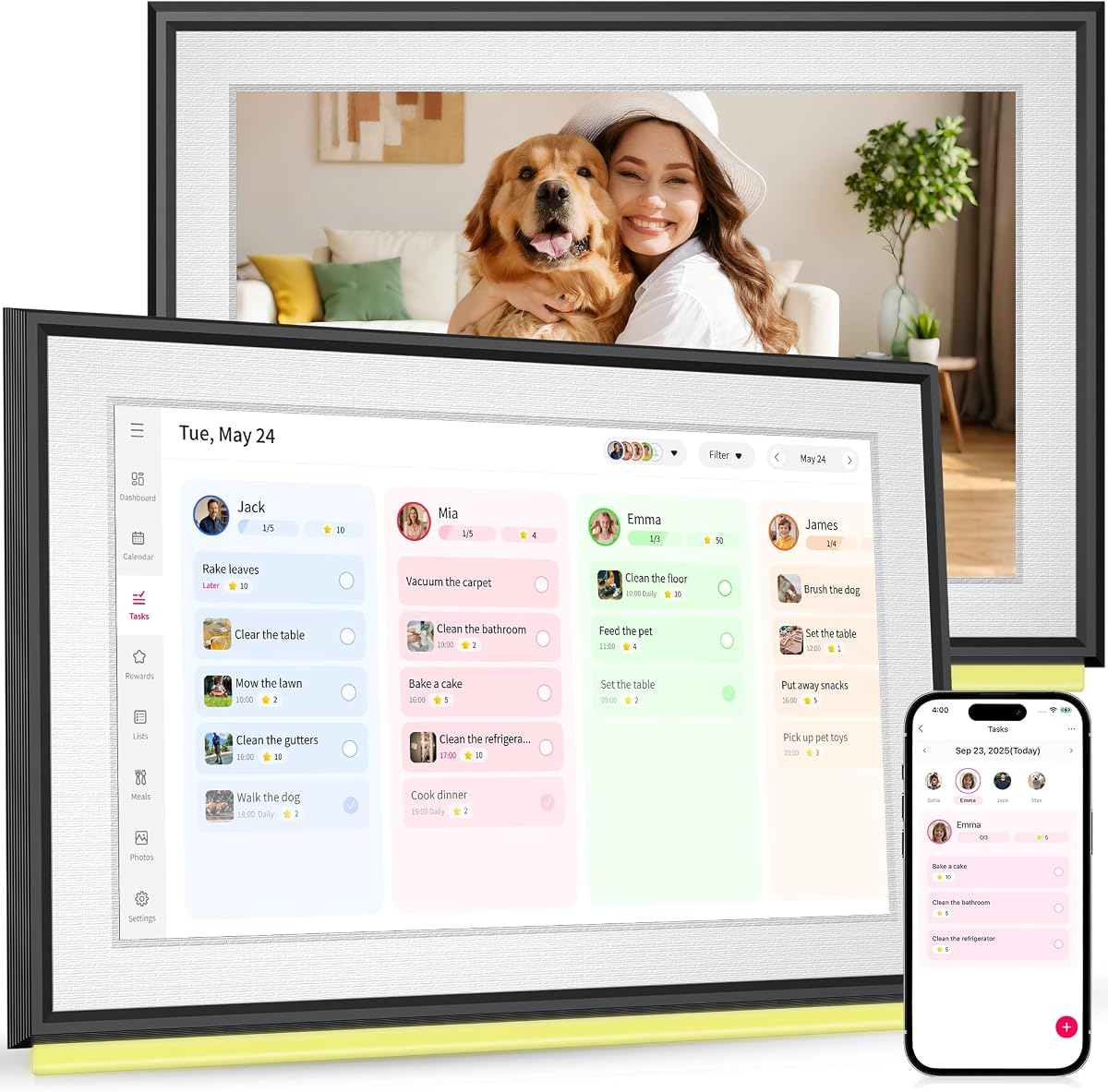
This 10.1-inch organizer delivers exceptional value without sacrificing essential features. With a 4.4-star rating, it provides a complete hub for scheduling and task management. It is designed to simplify daily routines for busy parents and partners.
We may earn a commission when you buy through this link, at no additional cost to you.
The weekly meal manager stands out by automatically generating grocery lists. This saves time and reduces stress during shopping trips. All features including sync and photo sharing are unlocked without any hidden fees.
The smaller screen size is a trade-off for the lower price point. It may not be ideal for large walls but works perfectly on desks or smaller spaces. The interface is simple enough for all ages to use effectively.
It is an excellent choice for those seeking an affordable entry into smart organization. The device helps maintain order and keeps the family on track with minimal investment.
Upload recipes and let the system build a shopping list automatically. This feature streamlines dinner planning significantly.
The built-in to-do list helps prioritize daily activities. It keeps work and home tasks visible at a glance.
We may earn a commission when you buy through this link, at no additional cost to you.
This model brings high resolution and ample storage to the mid-range segment. Rated 4.4 stars, it combines a sharp display with extensive storage for photos. It is designed to be both a planner and a memory keeper.
We may earn a commission when you buy through this link, at no additional cost to you.
The 1080P HD touchscreen ensures clear visibility of text and images. With 32GB of storage, families can store thousands of memories without running out of space. The weather updates add a practical touch to daily checking.
While it supports both wall and desk mounting, the setup might require patience for first-time users. The interface is straightforward but lacks some deep customization options found in premium models.
It suits families who prioritize clear visuals and storage capacity. The device helps organize schedules and preserve memories effectively in one unit.
The generous storage allows for a rich photo library. Memories are preserved and displayed in high quality.
Weather information is displayed alongside schedules. This helps with daily planning and preparation.
We may earn a commission when you buy through this link, at no additional cost to you.
This digital planner stands out with a perfect 5.0-star rating from users. It offers a large 15.6-inch display that fits various spaces well. The device is built to be simple for seniors and children to use equally.
We may earn a commission when you buy through this link, at no additional cost to you.
Color-coded tasks make it easy to distinguish between family members' duties. The sleep wake mode saves energy while keeping the screen ready for use. It is a robust tool for keeping daily routines organized.
Availability might be limited compared to other brands, and the power cord could be short for some setups. However, the high satisfaction rate suggests quality performance and reliability for daily use.
It is a top pick for anyone seeking a reliable and highly rated organizer. The device simplifies life and adds a touch of technology to home planning.
A perfect rating indicates consistent performance and quality. Users find it easy and effective for their needs.
Different colors represent different people or tasks. This visual aid improves clarity and reduces confusion.
We may earn a commission when you buy through this link, at no additional cost to you.
This model focuses on remote sharing to connect distant family members. With a 4.5-star rating, it offers a unique way to share photos across locations. It serves as a warm digital frame for grandparents and relatives.
We may earn a commission when you buy through this link, at no additional cost to you.
The color-coded chore system helps manage tasks scientifically and clearly. Recipe storage adds a practical benefit for meal planning. The 1-year warranty provides peace of mind for new owners.
Setting up the app requires a few steps but is manageable. The smaller screen might not show as much detail as larger models. However, the sharing features are its main strength for maintaining connections.
It is best for households wanting to share photos with distant family. The device bridges the gap with visual updates and shared schedules.
Remote sharing allows relatives to see updates without visiting. This keeps everyone connected regardless of distance.
Color coding organizes tasks efficiently. It prevents confusion about who is responsible for what.
We may earn a commission when you buy through this link, at no additional cost to you.
This massive 21.5-inch device is the ultimate home command center. Rated 4.6 stars, it offers dual modes for simple scheduling or full Android apps. It is built for those who want complete customization and control.
We may earn a commission when you buy through this link, at no additional cost to you.
Voice assistant integration allows hands-free control of schedules and smart home devices. The widget support enables a truly personalized dashboard. This is a high-end solution for a fully connected home.
The premium price and weight are significant considerations. It requires a sturdy mount and enough wall space. However, the functionality and display quality justify the investment for tech-savvy users.
It is ideal for large families or smart home enthusiasts. The device brings powerful tech to everyday planning.
Access to Google Play expands what the device can do. This offers endless possibilities for customization.
Check schedules without touching the screen. This adds convenience for busy mornings.
We may earn a commission when you buy through this link, at no additional cost to you.
This 15.6-inch model brings premium dual-mode capabilities to a smaller footprint. Rated 4.4 stars, it balances simplicity and advanced features well. The included stand offers flexibility for desk or wall use.
We may earn a commission when you buy through this link, at no additional cost to you.
The Android mode allows downloading apps to customize the dashboard. This makes it versatile for different household needs. Voice commands further enhance ease of use for busy individuals.
The price is higher than basic models and setup involves a learning curve. However, the flexibility and app support make it a powerful tool for management.
It is great for those wanting a desk-friendly smart hub. The device adapts to various workflows efficiently.
The stand makes it easy to use on counters. This adds versatility to home layouts.
Choose apps that fit your specific workflow. This personalizes the device for better utility.
We may earn a commission when you buy through this link, at no additional cost to you.
This desktop-focused organizer is ideal for smaller spaces. Rated 4.0 stars, it offers essential features for planning and photos. It is designed to be a simple companion for family coordination.
We may earn a commission when you buy through this link, at no additional cost to you.
The software update ensures access to newer features like rewards. The live screensaver keeps the screen active and engaging. Syncing with Google and iCloud is straightforward for most users.
It cannot be mounted on a wall, limiting placement options. The hardware is basic but functional. For the price, it provides a reliable way to manage daily tasks.
It is best for desks or small kitchens. The device offers essential tools without complex installation.
Regular updates improve functionality over time. This ensures long-term utility and new features.
Designed for flat surfaces without needing tools. This simplifies the initial setup process.
We may earn a commission when you buy through this link, at no additional cost to you.
This 21.5-inch calendar offers a large display for clear visibility. Rated 4.0 stars, it includes specific features like reward points for kids. It is designed for households needing robust organizational tools.
We may earn a commission when you buy through this link, at no additional cost to you.
Font customization makes it accessible for grandparents with vision needs. The reward system helps motivate children to complete tasks. US-based customer support adds confidence to the purchase decision.
The high price and setup complexity are downsides for some users. However, the large screen and accessibility features offer unique value. It serves as a strong command center for busy homes.
It is best for large families or those needing accessibility features. The device supports organization and connection.
Adjustable fonts help everyone read schedules clearly. This makes the device inclusive for all ages.
Earning points encourages good habits in children. This simplifies task management for parents.
We may earn a commission when you buy through this link, at no additional cost to you.
Selecting the right digital organizer involves understanding your specific needs and home setup.
Screen size affects visibility and placement options. Larger screens like 15 or 21 inches work well on walls while smaller units fit on desks.
Check if features require monthly fees. Some models offer full access without subscriptions while others charge for premium features.
Ensure the device syncs with apps you use. Compatibility with Google, iCloud, or Outlook is crucial for seamless updates.
Look for interactive tools to manage tasks. Reward systems or color coding can help kids stay motivated and involved.
Many organizers double as digital frames. Check for storage capacity and ease of photo sharing via mobile apps.
Voice assistants allow hands-free management. This is useful for updating tasks quickly without using the touchscreen.
Consider if the device can be wall mounted or placed on a desk. Some units include stands while others only fit flat surfaces.
Check warranty terms and support availability. Longer warranties provide peace of mind for tech investments.
Begin by connecting the device to Wi-Fi and installing any required apps. Download the companion app on your phone to sync accounts easily. Follow on-screen instructions to finalize setup.
Add family calendars and tasks immediately to start getting value. Share the access code with household members so everyone can edit schedules. Use the interactive tools like meal planners to reduce daily stress.
Clean the screen with a soft cloth to avoid scratches. Keep the device away from direct sunlight to prevent glare. Update software regularly to ensure optimal performance and features.
Most models in this guide operate without monthly subscription fees. Core features like syncing and task management are typically included for free. Some brands offer optional premium tiers with extra features.
Yes, most devices support syncing with multiple accounts like Google and iCloud. This ensures all family events appear in one place automatically. Check compatibility before purchasing.
Setup is designed to be simple with plug-and-play functionality. Most units connect to Wi-Fi in minutes. Apps guide you through the final configuration steps.
Many models include interactive tools like points for kids. These gamified systems help children learn responsibility. It is a helpful addition for busy households.
Yes, almost all these organizers double as digital photo frames. They display family photos when not in use. This adds a personal touch to your space.
Many models support wall mounting with provided hardware. Check the product details to confirm mounting options. Some devices are desktop-only so always verify specs.
Use the companion app to upload photos from your phone. This allows you to share images instantly. Remote access makes keeping the display updated easy.
This guide highlights ten top contenders for organizing family life. Whether you need a large wall display or a compact desk unit there is a match for you.
Prioritize screen size and syncing needs when making your decision. Ensure the device offers the essential features you value most.
Always check current prices and availability before purchasing. Technology and offers change so verifying details helps secure the best value.