
SANSUI 24 Inch Curved 160Hz Gaming Monitor
4.4Editor score
160Hz refresh rate
1500R curvature
110% sRGB
Finding the right curved 160Hz gaming monitor can transform your setup into a competitive edge. These displays offer smoother motion and deeper immersion for FPS and racing titles.
We evaluated ten models based on panel quality, refresh rates, connectivity, and ergonomic design. Our analysis focuses on real-world performance and value for money.
Each pick highlights key strengths and trade-offs to help you choose quickly. Note that pricing and availability fluctuate, so check current listings before buying.
4.4Editor score
4.5Editor score

4.6Editor score
As an Amazon Associate we earn from qualifying purchases.
The following table compares specifications and key features across all ten monitors. Use this to quickly identify resolution, refresh rates, and port options.






This SANSUI 24-inch monitor delivers exceptional value for budget gamers seeking smooth performance. It features a 160Hz refresh rate and 1500R curvature for immersive gameplay at an accessible price point.
We may earn a commission when you buy through this link, at no additional cost to you.
The VA panel provides deep blacks and vibrant colors thanks to 110% sRGB coverage. You can toggle various game modes like FPS and RTS to optimize visuals for specific titles without fiddling with settings.
While it lacks premium ergonomics like height adjustment, the basic tilt function suffices for most desks. The absence of speakers means you may need external audio, but this keeps costs down.
Ideal for students or casual gamers, this monitor balances performance and price well. It offers reliable FreeSync support and quick response times that minimize blur during fast action sequences.
The 1500R curve wraps around your field of view reducing eye strain during long sessions.
With 110% sRGB the display renders rich and accurate colors suitable for media consumption.
We may earn a commission when you buy through this link, at no additional cost to you.
The SANSUI 27-inch model expands your workspace with a bigger screen while maintaining the fast refresh rates you need. It supports up to 160Hz and includes features like crosshair overlays for tactical shooters.
We may earn a commission when you buy through this link, at no additional cost to you.
Its high contrast ratio and HDR mode enhance dark scenes making details easier to spot in competitive games. The anti-glare coating helps reduce reflections in bright rooms.
At 27 inches the pixel density of FHD is acceptable but not razor sharp. You might notice individual pixels up close which some users may find distracting compared to QHD panels.
This model suits gamers who prioritize screen real estate over resolution fidelity. It remains a strong budget option for those wanting more immersion without spending heavily on premium tech.
Features like timer and black level adjustment help you gain an edge in competitive matches.
Both HDMI 2.0 and DP 1.4 ensure you can reach full refresh rates with modern PCs.
We may earn a commission when you buy through this link, at no additional cost to you.
This 24-inch SANSUI monitor earns high marks for reliable performance and color accuracy. It supports 160Hz and includes advanced color metrics like 97% DCI-P3 coverage for vibrant visuals.
We may earn a commission when you buy through this link, at no additional cost to you.
The wide viewing angle ensures colors stay consistent even when viewed from the side which helps in multiplayer setups. Flicker-free technology reduces eye fatigue during marathon gaming sessions.
It is a solid choice for desks with limited depth since 24 inches is compact. However those seeking more screen space might find it too small for multitasking.
Overall this monitor delivers consistent quality at an affordable price. Its Kensington lock adds security for shared workspaces making it versatile for home or office use.
With high DCI-P3 coverage images pop with vivid colors suitable for creative tasks.
Blue light reduction and flicker-free tech make long viewing sessions more comfortable.
We may earn a commission when you buy through this link, at no additional cost to you.
The CRUA 32-inch monitor brings 4K resolution to the gaming space offering incredibly sharp and detailed visuals. It combines this with a 160Hz refresh rate for smooth high-fidelity gameplay.
We may earn a commission when you buy through this link, at no additional cost to you.
Built-in speakers reduce cable clutter and are adequate for casual listening though external audio is better for immersive sound. The vibrant color output makes it great for streaming media as well.
Running 4K at high refresh rates demands a powerful graphics card so ensure your PC can handle the load. If your GPU struggles you might drop settings or resolution affecting performance.
This model is perfect for content creators who game who need high pixel counts. It offers a premium experience at a mid-range price point compared to brand-name equivalents.
The 4K resolution provides crisp text and fine detail perfect for productivity and gaming.
Built-in speakers save desk space and simplify setup for quick gaming sessions.
We may earn a commission when you buy through this link, at no additional cost to you.
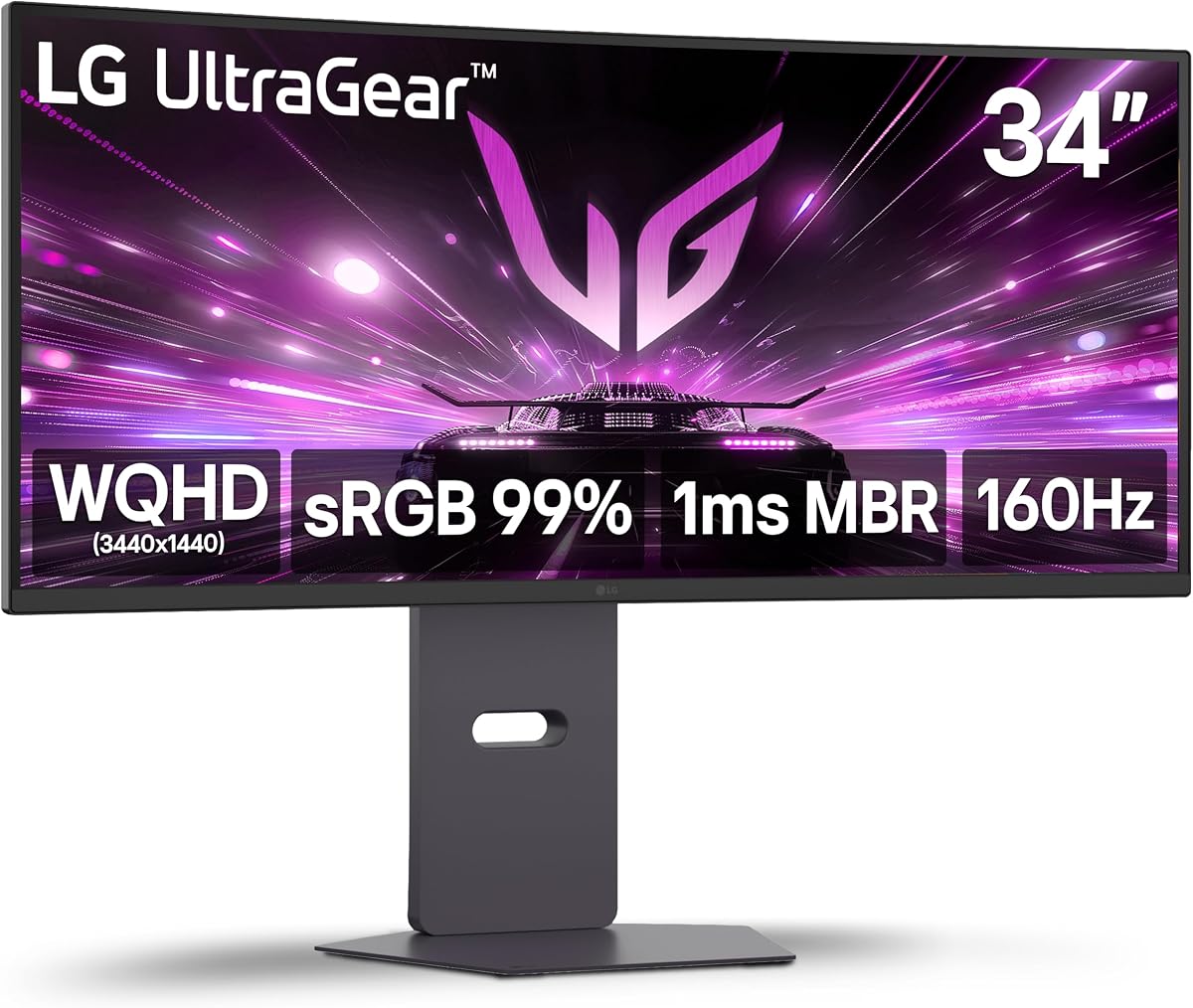
LG's UltraGear line is renowned for quality and this 34-inch model delivers immersive gameplay with its WQHD resolution. The ergonomic stand allows precise positioning which reduces neck strain over long periods.
We may earn a commission when you buy through this link, at no additional cost to you.
FreeSync Premium ensures smooth visuals without tearing while HDR10 support enhances contrast and color depth. The included speakers powered by Waves MaxxAudio offer decent quality for a monitor integrated system.
You will pay a premium for the brand reliability and advanced features but the value is clear. The build quality feels robust and the design fits well in modern setups.
For serious gamers needing a blend of productivity and performance this is a top contender. It handles everything from fast shooters to creative tasks with ease and reliability.
Height tilt and swivel adjustments let you customize the view to your comfort.
The 21:9 ultrawide aspect expands your field of view in supported games.
We may earn a commission when you buy through this link, at no additional cost to you.
Buying renewed offers significant savings while retaining the core benefits of the new UltraGear model. Users report flawless condition making this an attractive route for budget conscious buyers seeking premium specs.
We may earn a commission when you buy through this link, at no additional cost to you.
You get the same WQHD resolution and 160Hz performance with full height adjust stand included. It is ideal for those who want top-tier performance without paying full retail price.
Be sure to verify the warranty terms when purchasing renewed items to ensure peace of mind. Some renewed units might have minor cosmetic imperfections though functionality remains intact.
This represents one of the best ways to enter high-end gaming without overspending. If you find a quality unit it delivers nearly identical performance to the brand new version.
Renewed units allow access to premium features at a fraction of the original cost.
Check the condition notes carefully to ensure it meets your expectations before buying.
We may earn a commission when you buy through this link, at no additional cost to you.
The Odyssey G55C stands out with its aggressive 1000R curvature which wraps tightly around your vision for maximum immersion. QHD resolution offers a sharp image suitable for modern gaming and productivity.
We may earn a commission when you buy through this link, at no additional cost to you.
Its Eye Saver Mode minimizes blue light making it friendly for long work sessions. The high refresh rate ensures fluid motion reducing blur in fast-paced competitive titles.
Some users might find the deep curve too pronounced for desk setups far from the screen. Additionally lack of USB ports means you must manage cables for other peripherals separately.
This monitor excels at pure gaming immersion where focus is key. If you want to feel completely surrounded by your game this model delivers that effect effectively.
The 1000R curvature matches the human eye curvature for a natural viewing feel.
Blue light reduction helps reduce strain during extended daily usage hours.
We may earn a commission when you buy through this link, at no additional cost to you.
Sceptre offers a compelling feature set with high refresh rates and an ultrawide panel that boosts multitasking efficiency. The dual DisplayPort options allow flexible multi-source connectivity for advanced setups.
We may earn a commission when you buy through this link, at no additional cost to you.
Unique LED backcover lighting adds a modern touch to your desk aesthetic. The 1ms response time helps eliminate ghosting ensuring clean images during rapid movement.
While performance is strong build consistency can be mixed compared to premium brands. OSD controls are basic and might require time to navigate for precise adjustments.
This monitor is great for users wanting ultrawide benefits without a high price. It balances raw specs well though it may lack the polish of higher tier competitors.
Ultrawide screens allow side-by-side windows for efficient multitasking and coding.
Dual DisplayPort inputs facilitate easy switching between different PCs or consoles.
We may earn a commission when you buy through this link, at no additional cost to you.
Alienware delivers top-tier performance with this 34-inch model offering 180Hz refresh rates for ultra-smooth visuals. Its iconic design and build quality set a benchmark for premium gaming monitors.
We may earn a commission when you buy through this link, at no additional cost to you.
With HDR400 certification and wide color coverage visuals pop with vibrant clarity. The console mode ensures compatibility with latest generations optimizing performance for mixed use cases.
The cost is high but justified by reliability and advanced features. If you want a future-proof monitor that looks great and performs flawlessly this is a top choice.
It suits enthusiasts who demand the best in aesthetics and function. Despite the price it remains a strong long-term investment for serious gaming rigs.
Dedicated console modes ensure compatibility with modern gaming hardware setups.
Wide color coverage ensures images look vibrant and true to life.
We may earn a commission when you buy through this link, at no additional cost to you.
AOC pushes the envelope with a 200Hz refresh rate and 0.3ms response time for competitive gaming. This combination minimizes blur allowing precise tracking during rapid action.
We may earn a commission when you buy through this link, at no additional cost to you.
The height adjustable stand adds ergonomics often missing in speed-focused models. Multiple HDMI and DP ports ensure you can connect various devices without adapters.
VA panels can sometimes show color shifts at angles though brightness and contrast remain strong. HDR support is present but basic compared to dedicated HDR panels.
If raw speed is your priority this monitor offers unmatched value. It is tailored for players where split-second reactions define the difference between victory and defeat.
The 200Hz rate provides exceptional smoothness in high frame rate games.
Adaptive sync ensures smooth visuals by syncing refresh rate with GPU output.
We may earn a commission when you buy through this link, at no additional cost to you.
Choosing the right monitor involves balancing resolution, refresh rate, and ergonomics. Consider these factors to find a screen that meets your gaming and work needs.
Resolution affects image clarity while size impacts immersion. Full HD (1080p) works well on 24 to 27 inch screens but larger sizes benefit from QHD or 4K to avoid pixelation.
Choose a resolution that matches your GPU capabilities to maintain high frame rates.
Refresh rate determines how many frames per second the monitor can display impacting motion smoothness. Higher rates like 160Hz or 200Hz are ideal for competitive shooters.
Look for low response times under 5ms to reduce blur and ghosting during fast movements.
Curved monitors wrap the screen around your view for better immersion. A 1500R or 1800R curve works well for gaming while 1000R is extreme for total immersion.
VA panels offer high contrast while IPS provides better viewing angles. Choose based on your need for dark detail or color accuracy.
Adaptive sync like FreeSync or G Sync matches monitor refresh rate with GPU output to prevent screen tearing. This creates a smoother visual experience during variable frame rate games.
Ensure your graphics card supports the specific sync tech chosen for the monitor.
Adjustable stands with height tilt and swivel help maintain a healthy posture during long sessions. Wall mount compatibility (VESA) is useful for flexible desk arrangements.
Prioritize ergonomic features to reduce strain and keep your focus on the game.
Modern gaming monitors should include HDMI 2.1 and DisplayPort 1.4 to support high refresh rates and resolutions. USB hubs and audio jacks add convenience for peripherals and sound.
Verify ports match your console or PC output capabilities to avoid bottlenecks.
High sRGB and DCI-P3 coverage ensures vibrant colors. HDR support enhances contrast and brightness in supported content though basic HDR can be disappointing.
Check color specs if you need accurate visuals for content creation tasks.
Prices range widely from affordable entry models to premium choices. Determine your must-have features and compromise on less critical aspects like built-in speakers to stay within budget.
Balance performance with cost by focusing on specs that directly impact gameplay.
Connect your PC to the monitor using a DisplayPort or HDMI 2.0 cable to ensure full refresh rates are available. Check your graphics settings to select the highest resolution and refresh rate options.
Clean the screen with a soft microfiber cloth and mild solution to avoid damaging the coating. Keep the vents clear to prevent overheating during extended usage sessions.
Adjust brightness and contrast to match your room lighting. Enable blue light filters during evening use to minimize eye strain and improve sleep quality.
Yes 160Hz offers slightly smoother motion than 144Hz especially in fast-paced games. The difference is noticeable to competitive players who prioritize fluid visuals and quick reactions.
Curved screens can reduce eye movement when multitasking by wrapping content closer to your view. They are particularly helpful for wide spreadsheets and coding workflows.
You typically need a DisplayPort 1.2 or higher cable to achieve 160Hz at 1080p or 1440p. HDMI 2.0 may work depending on the monitor resolution and port speed.
Curved monitors enhance peripheral awareness which can help in FPS games. However some competitive players prefer flat screens for minimal distortion on aiming targets.
FreeSync Premium is an AMD technology that ensures high refresh rates with HDR support and variable refresh rate. It reduces tearing and stuttering for smoother gameplay.
Use a dry microfiber cloth or slightly dampen it with water. Avoid harsh chemicals and excessive pressure to protect the anti-glare coating on the surface.
We highlighted top picks like the SANSUI 24-inch for budget buyers and the LG UltraGear for all-round excellence. Each monitor offers unique strengths depending on your size and performance needs.
Prioritize refresh rate and resolution based on your PC power. Consider ergonomics and color accuracy to ensure comfort and visual quality over time.
Prices fluctuate frequently so check the current listings before purchasing to secure the best deal available for your chosen model.