
Nyko Charging Station for Xbox Series XS & Charge Base for 2 Controllers
4.2Editor score
Dual Drop Charge Design
Includes 1100 mAh Batteries
Extra USB Port Included
This guide compares the top controller charging stations for Xbox to help you choose the best dual dock or stand with batteries for your setup.
Finding a reliable controller charging station for Xbox ensures your games never stop due to dead batteries. The right dock keeps your setup tidy and your controllers ready for action whenever you need them most.
We evaluated ten top-rated models based on charging speed, battery capacity, design, and compatibility. Each product offers unique features like LED indicators, rechargeable packs, and sleek aesthetics to match your gaming gear.
Every pick includes detailed specs and pros to help you decide. Note that availability and pricing may vary over time, so check current listings before making your final purchase decision.
4.2Editor score

4.6Editor score

4.4Editor score
Compare the top ten models side by side to find the perfect fit for your console and controller type.


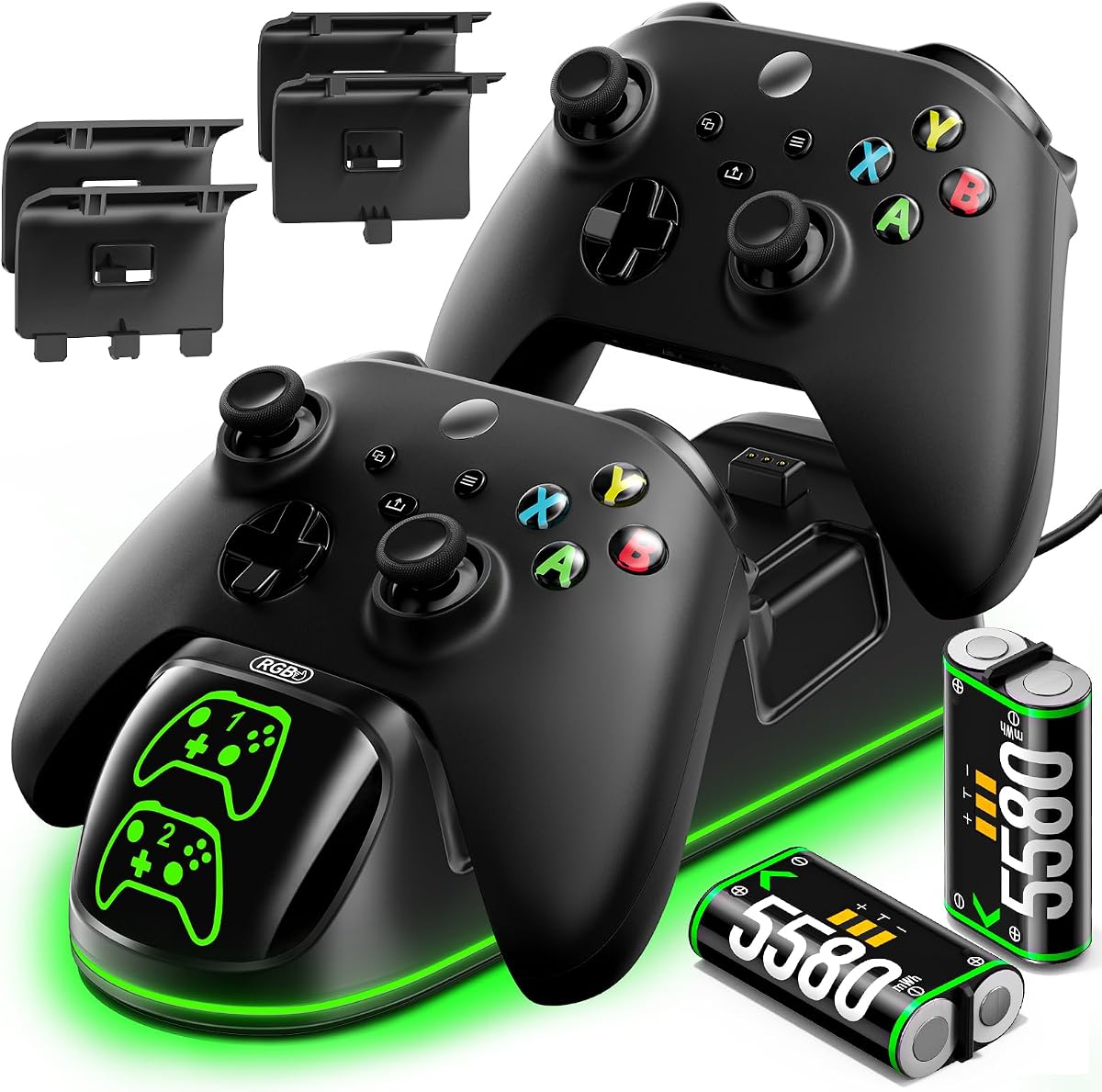


This dual charging station offers exceptional value with high-capacity batteries designed to extend your gaming sessions. Its visualized LED indicators make it easy to track power levels at a glance without distracting from gameplay.
We may earn a commission when you buy through this link, at no additional cost to you.
The rechargeable packs support over 2000 charge cycles, significantly reducing waste and long-term costs compared to disposable options. Built-in protection safeguards against overcharging, overheating, and short circuits for reliable daily use.
While the batteries are integrated into the dock design for simplicity, this limits flexibility if you need to swap them mid-session. However, the extended playtime means interruptions are rare during typical gaming marathons.
It is an ideal choice for budget-conscious gamers seeking performance and convenience. Its robust design ensures your controllers stay powered and ready whenever you want to pick up your Xbox again.
The 6200mWh batteries provide up to 25 hours of gameplay on a single charge, minimizing interruptions during critical game moments.
Unique X-shaped LEDs show red when charging and green when ready, offering clear feedback without bright glare in dark rooms.
We may earn a commission when you buy through this link, at no additional cost to you.
Fosmon delivers an impressive charging solution with batteries that offer up to 45 hours of play per charge. The SGS certification adds a layer of trust regarding safety and performance standards for your electronics.
We may earn a commission when you buy through this link, at no additional cost to you.
Its intelligent charging board manages power flow efficiently, preventing overcharging and cutting power automatically when batteries are full. This extends battery life and reduces energy waste when devices are left docked overnight.
The limitation on Xbox Elite 2 controllers means serious gamers using premium gear may need to look elsewhere. Still, for standard Series X or One controllers, the performance and reliability are top-tier.
Ideal for households with multiple players who need dependable power, this dock ensures you are always ready to game. Its comprehensive warranty coverage further supports long-term satisfaction with your purchase.
SGS certification ensures the product meets rigorous international standards for safety, giving peace of mind during extended charging sessions.
With 5280mWh capacity per battery, users can expect over 40 hours of continuous play, making it one of the longest-lasting options available.
We may earn a commission when you buy through this link, at no additional cost to you.
PowerA brings official Xbox licensing to a simple, effective single controller charging stand. It is perfect for players who need a dedicated spot for their main controller without taking up much space.
We may earn a commission when you buy through this link, at no additional cost to you.
The included 1100 mAh battery offers a decent amount of playtime for casual sessions. Being officially licensed means it integrates seamlessly with your console's aesthetic and ensures compatibility with current and previous generation controllers.
While it lacks the dual-slot convenience of other models, its streamlined design fits well on smaller desks or shelves. It is a great entry-level option for those just starting to explore rechargeable controller accessories.
For users prioritizing brand reliability and simplicity, this stand delivers consistent performance. The included cable and battery door covers make it a complete out-of-box solution for Xbox wireless controllers.
As an officially licensed product, it guarantees compatibility and design alignment with Microsoft's hardware standards for peace of mind.
The compact form factor allows it to fit easily on crowded desks while keeping your controller visible and charged.
We may earn a commission when you buy through this link, at no additional cost to you.
OlVO stands out with a rapid 2.5-hour charge cycle that gets you back into the game faster than many competitors. The high 3000-cycle battery life ensures these packs endure heavy usage over years of gaming.
We may earn a commission when you buy through this link, at no additional cost to you.
It supports a wide range of controllers including Elite versions, making it versatile for serious gamers who need advanced features. The kit includes covers for multiple console generations, ensuring you have the right fit for any setup.
Installation requires attention to battery polarity to avoid damage, which might be a minor hurdle for some users. Once set up correctly, however, the system operates smoothly and reliably without needing constant attention.
This dock is ideal for gamers who value speed and longevity in their accessories. Its comprehensive package and fast charging make it a strong contender for those with busy schedules or intense play habits.
Charges two batteries in just 2.5 hours, significantly reducing downtime between gaming sessions compared to standard slow chargers.
Designed to withstand over 3000 recharge cycles, offering long-term reliability that outperforms standard disposable or lower-quality battery packs.
We may earn a commission when you buy through this link, at no additional cost to you.
8BitDo combines style and function with a dock that uses magnetic connections to secure your controller firmly while it charges. Its sleek black finish matches Xbox hardware perfectly for a cohesive setup look.
We may earn a commission when you buy through this link, at no additional cost to you.
The built-in storage compartment allows you to keep spare cables or accessories neatly organized alongside your docked controller. This thoughtful design helps reduce desk clutter and keeps essential gear within reach.
Like many single-slot docks, it is best suited for primary controller users rather than those who need to switch frequently between two. However, the magnetic alignment ensures you never have to fiddle with ports or cables.
For gamers who value aesthetics and convenience, this dock provides a premium experience. The official license assures quality, and the magnetic charging system adds a modern touch to your Xbox peripheral collection.
Magnets hold the controller in place during charging, preventing accidental dislodging that could interrupt the power process.
Hidden storage compartments let you tuck away small accessories, maintaining a tidy appearance on your gaming desk or shelf.
We may earn a commission when you buy through this link, at no additional cost to you.
This charging station features a bold robot helmet-inspired design that adds a unique touch to your gaming room. It is paired with solid performance metrics that ensure your controllers stay powered through long sessions.
We may earn a commission when you buy through this link, at no additional cost to you.
The inclusion of four battery covers means you can switch between Xbox One and Series X controllers without hassle. USB-C connectivity provides faster charging speeds compared to older USB-A standards used in many competitors.
While the aesthetic is polarizing, it adds character to setups that embrace bold visual styles. The LED indicators are user-friendly and can be toggled off if you prefer a cleaner look during nighttime gaming.
It is a great option for players who want customization and capacity in one package. The combination of design and functionality makes it a standout choice for those looking to personalize their Xbox accessories.
The robot helmet theme gives the dock a unique look that appeals to gamers who want their gear to stand out visually.
With 5520mWh per battery, it delivers enough power for hours of uninterrupted play, reducing the need for frequent recharging.
We may earn a commission when you buy through this link, at no additional cost to you.
Nyko offers a budget-conscious solution for charging two controllers simultaneously without breaking the bank. The drop-in design makes it easy to dock your gear quickly after a gaming session.
We may earn a commission when you buy through this link, at no additional cost to you.
Its built-in USB port adds extra utility by allowing you to charge other devices like headsets or phone cables without occupying console ports. This practical feature enhances the dock's versatility in a crowded setup.
The included batteries are standard capacity, which may require more frequent recharging compared to higher-capacity models. For casual gamers who play in shorter bursts, this is usually sufficient to keep things running smoothly.
Ideal for those seeking a no-frills, functional option, this station delivers core performance at a lower price. Its straightforward design ensures you can get back to gaming with minimal setup time or complexity.
The additional USB port lets you charge peripheral devices directly from the dock, freeing up ports on your console for other needs.
Priced lower than premium competitors, it provides essential dual charging functionality for users with tighter accessory budgets.
We may earn a commission when you buy through this link, at no additional cost to you.
Designed specifically to match the Xbox Pulse Red controller, this stand creates a cohesive and polished look for your setup. The magnetic contact system ensures a stable connection during charging without needing precise cable alignment.
We may earn a commission when you buy through this link, at no additional cost to you.
Its ergonomic shape allows you to navigate the dashboard with one hand even while the controller is docked. This feature adds a layer of convenience for multitasking without needing to fully power down or unplug your gear.
As an officially licensed product, it guarantees the fit and finish Microsoft expects from accessories. While it is a single-slot dock, the premium materials justify the higher price for those focused on aesthetics and build quality.
It is best suited for gamers who want their peripherals to look as good as they perform. The seamless integration with your controller color scheme makes it a stylish choice for dedicated Xbox setups.
Manufactured with the exact color and finish as Pulse Red controllers, it creates a unified visual theme for your gaming gear.
The stand is engineered to allow navigation while charging, offering practical convenience during system updates or menu browsing.
We may earn a commission when you buy through this link, at no additional cost to you.
Razer delivers a premium charging experience with a stand that offers rapid charging and robust build quality. Its universal compatibility ensures it works with nearly all current Xbox controllers without complex setup steps.
We may earn a commission when you buy through this link, at no additional cost to you.
The magnetic contact system secures the controller firmly, preventing accidental drops or disconnections during use. Overcharge protection safeguards your battery health, ensuring your controller remains reliable over years of regular usage.
While the price is higher than average, the brand reputation and design quality justify the cost for dedicated gamers. It fits well into high-end setups where aesthetics and performance are equally important priorities.
Ideal for those seeking a top-tier docking solution, this stand combines style with practical charging efficiency. Its durable construction ensures it stands the test of time alongside your console and accessories.
Full charges in under three hours, significantly faster than many standard chargers, reducing wait times before your next gaming session.
Supports both current and legacy controllers, making it a versatile investment for players who upgrade consoles over time.
We may earn a commission when you buy through this link, at no additional cost to you.
This dock distinguishes itself with customizable RGB lighting that lets you match your setup color scheme. The dual 6200mWh batteries offer extended playtime, ensuring you stay in the game without constant interruptions.
We may earn a commission when you buy through this link, at no additional cost to you.
The charging system adjusts output power to protect controllers from overcharging and short circuits. This safety feature provides confidence that your valuable hardware remains secure even when left plugged in for long periods.
While the RGB lights add flair, the physical design is slightly larger to accommodate both the tech and battery storage. Users should ensure their desk space can handle the footprint before purchasing.
It is an excellent choice for gamers who want style and substance in their accessories. The combination of lighting options and reliable power makes it a versatile dock for varied gaming environments.
Nine distinct lighting modes let you personalize your setup colors, enhancing the visual appeal of your gaming station.
Dual 6200mWh packs provide up to 30 hours of play per charge, reducing the frequency of recharging significantly.
We may earn a commission when you buy through this link, at no additional cost to you.
Selecting the right charging station involves considering battery type, capacity, speed, and compatibility with your specific Xbox controllers.
Battery capacity is measured in milliamp hours (mAh) or milliwatt hours (mWh). Higher numbers like 6200mWh mean longer playtime per charge, sometimes up to 30 hours. This is vital for marathon gaming sessions where swapping disposable batteries is inconvenient.
Look for capacity ratings above 5000mWh to ensure you get through long gaming nights without needing a recharge. Always check the stated playtime hours in the product description to match your usage habits.
Fast chargers can fill batteries in under three hours while standard ones may take five or more. Recharge cycle life indicates how many times you can use the battery before it degrades, with high-quality models offering over 2000 cycles.
Prioritize models that support fast charging and high cycle counts to reduce downtime and extend the overall lifespan of your battery investment.
Dual stations let you charge two controllers at once, perfect for households with multiple players. Single docks are smaller and cheaper but may require rotation if you have more than one controller.
Choose dual if you need both controllers ready immediately. Single docks work well for casual solo players who prioritize desk space over convenience.
Ensure the dock supports your exact controller model, including Elite variants or older Xbox One versions. Some docks have unique connectors that might not fit third-party or older controllers.
Check the product description for listed compatible devices before buying. Most modern stations support Series X/S and Xbox One, but Elite models often require specific connectors.
Look for features like overcharge protection, overheating safeguards, and short circuit prevention. These features protect your controller's internal battery from damage caused by leaving it plugged in too long.
Certifications from bodies like SGS add an extra layer of trust regarding electrical safety and compliance with industry standards.
Designs range from sleek black stands to RGB-lit docks that match gaming setups. Consider the footprint and whether the dock fits on your desk or shelf space.
RGB options add style but may be distracting in dark rooms. Simple stands blend in better and often cost less than those with complex lighting features.
Some stations come with battery covers for different controller models or extra cables. Others might include USB-C cables for faster connectivity and power delivery.
Check what is in the box to avoid extra purchases. Comprehensive kits save time and money compared to basic models that lack accessories.
A solid warranty, often two years or more, reflects confidence in the product's durability. Limited lifetime warranties are rare but offer great peace of mind for long-term users.
Verify the warranty terms on the manufacturer website. Reliable support ensures you can resolve issues quickly if the dock malfunctions or batteries degrade prematurely.
Place the dock on a stable, dry surface near your console or power outlet. Ensure the USB cable is securely connected to both the dock and a functioning USB port on your Xbox or wall adapter.
Align the bottom of your controller with the charging contacts and gently press it into place. LED indicators will typically turn red to show charging has begun and green when the battery is full.
Avoid exposing the dock to moisture or extreme heat, which can damage internal components. Periodically check the charging contacts for dust buildup to maintain efficient power transfer between dock and controller.
Most modern stations support Xbox Series X, Series S, and Xbox One controllers. However, Elite controllers often require specific contacts that not all docks include, so check the product description carefully before purchasing.
Charging times vary by battery capacity and charger speed. Standard docks may take four to five hours, while faster models can fully charge batteries in as little as 2.5 hours depending on the pack size.
Yes, if using removable battery packs, insert them into the dock instead of inside the controller. If using integrated battery designs, the controller itself docks directly without removing internal components.
Yes, most modern docks have overcharge protection that stops power flow when the battery is full. This makes it safe to leave your controller on the dock without damaging the battery life over time.
Check that the USB cable is firmly connected and the power source is active. Also ensure the controller is properly aligned on the contacts so the dock can recognize it and begin charging.
Most docks include safety features like auto-shutoff when batteries are full, making overnight charging safe. However, unplugging the dock when not in use can further reduce energy consumption and protect against power surges.
The Upgraded Controller Charger Station and Fosmon Fast Charging Dock offer exceptional capacity and safety for serious gamers. For premium users, the Razer Universal Quick Charging Stand provides speed and design excellence.
Prioritize battery life and safety certifications when making your selection. These factors ensure your gear stays reliable and protected through years of use.
Remember to check current availability and specs before buying since models may update over time. A quality dock keeps your gaming experience smooth and uninterrupted.