
4K Vlogging Camera Pocket Digital Camera
4.4Editor score
4K video resolution support
WiFi wireless transfer to phone
330 degree rotating lens
This comprehensive guide compares the top ten cameras for social media content creation, evaluating features like resolution, stabilization, and portability
Creating engaging video content requires the right tools to capture high-quality footage that resonates with audiences across various platforms today.
We evaluated ten top-rated cameras based on their video capabilities, ease of use, and suitability for different types of social media creators.
Each pick highlights specific strengths for vlogging or streaming while noting that actual prices may vary depending on current market availability and deals.
4.4Editor score

4.5Editor score

4.3Editor score
The following table provides a quick side-by-side comparison of the key specifications and features for each of the ten selected cameras.


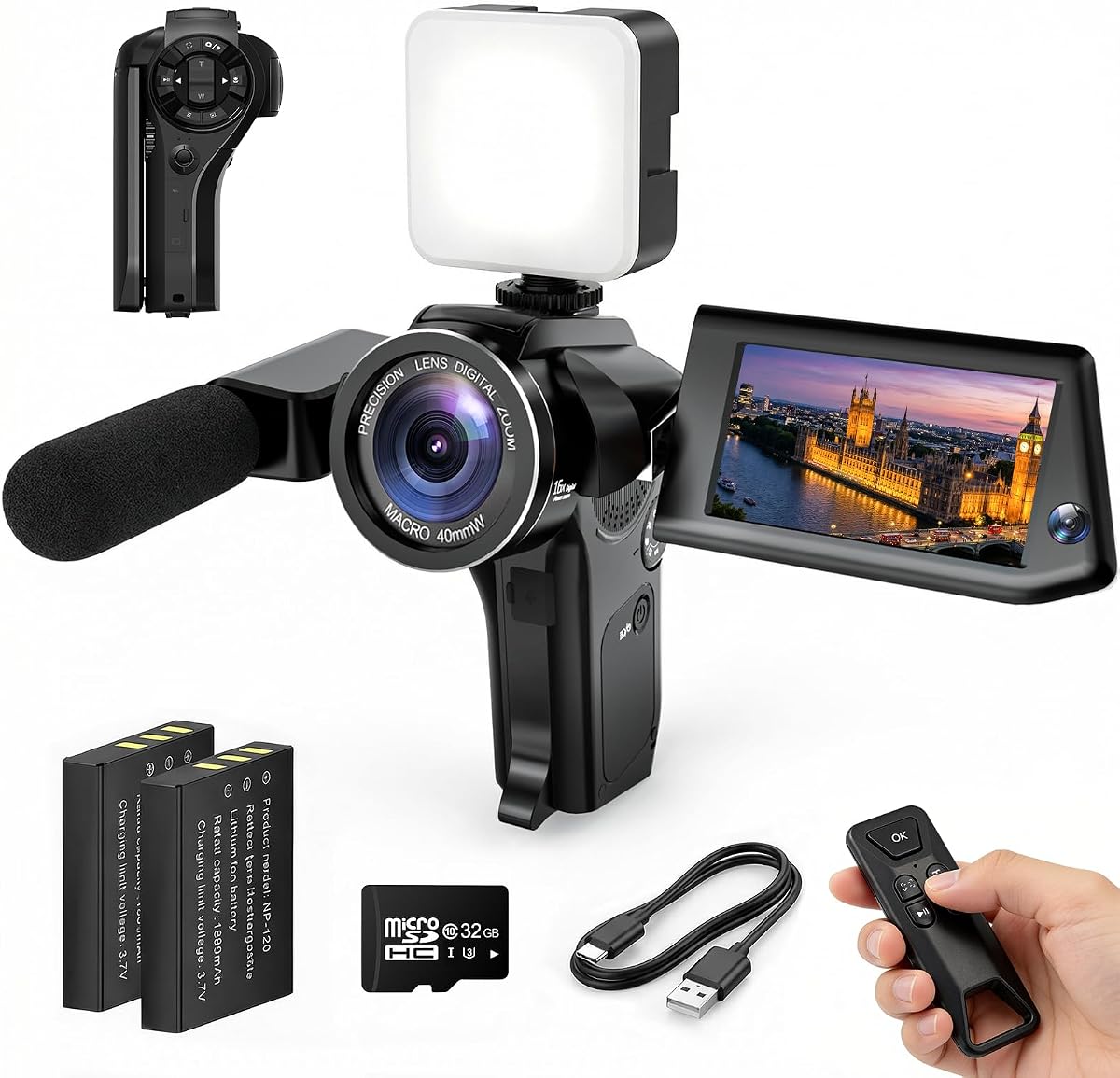


This camera is designed for beginners who want to start creating content without a steep learning curve or high financial commitment to their work.
We may earn a commission when you buy through this link, at no additional cost to you.
It offers solid 4K video and supports 75MP photos which provides enough detail for most social media platforms and casual editing workflows daily.
While the low-light performance is not as strong as larger sensor cameras, the WiFi connectivity allows for quick sharing which is crucial for social creators.
It is an excellent choice for entry-level creators who need a reliable pocket camera to document daily life or travel without complex settings.
The compact size ensures you can carry it everywhere to capture spontaneous moments during travel or daily routines without feeling weighed down.
The rotating lens allows for unique framing angles that help solo creators maintain eye contact and proper composition while filming themselves.
We may earn a commission when you buy through this link, at no additional cost to you.
This device sets a high standard for portable creators with its large sensor and advanced stabilization system that keeps footage smooth in motion.
We may earn a commission when you buy through this link, at no additional cost to you.
The 1-inch CMOS captures incredible detail and color depth which is perfect for creators who want professional-looking results from a compact package.
While it comes at a higher cost, the included accessories like the microphone and handle justify the investment for those serious about content quality.
It is the top recommendation for creators who prioritize video quality and ease of use without needing to carry bulky traditional camera gear.
This feature keeps you in focus and centered automatically so you can move freely while recording without needing an assistant or tripod.
Direct connection to DJI Micro transmitters ensures clear audio recording which is essential for high quality vlogs and interviews on the go.
We may earn a commission when you buy through this link, at no additional cost to you.
This camera offers high resolution recording options including 8K video which provides significant cropping flexibility for editors working on YouTube content.
We may earn a commission when you buy through this link, at no additional cost to you.
The inclusion of IR night vision and an external microphone allows for diverse recording conditions and better audio quality compared to built-in alternatives.
While the menu system is complex, the features available such as the webcam mode make it a versatile tool for streaming and traditional recording.
It suits creators who need advanced features and high resolution output and are willing to learn the setup for maximum creative flexibility.
Connecting to a PC allows it to function as a high-quality webcam for streaming or video calls using standard UVC settings easily.
The package includes stabilizers and remote controls which reduce the need to buy extra gear immediately to start filming effectively.
We may earn a commission when you buy through this link, at no additional cost to you.
This camera combines high resolution still photography with video capabilities making it a strong hybrid tool for creators who need both formats often.
We may earn a commission when you buy through this link, at no additional cost to you.
The flip screen and WiFi transfer make it very convenient for vloggers who need to see themselves and share content quickly to mobile platforms.
While not the fastest for action, the HDR support improves image quality in high contrast scenes ensuring details are preserved in shadows and highlights.
It is a solid choice for creators who need a versatile camera that handles both photography and video tasks with reasonable ease and detail.
High Dynamic Range imaging helps capture better detail in difficult lighting conditions which results in more balanced and realistic photos.
The digital zoom allows for framing distant subjects without moving closer though it does crop the image slightly compared to optical zoom.
We may earn a commission when you buy through this link, at no additional cost to you.
This is a highly portable option that prioritizes simplicity and convenience over advanced features making it great for spontaneous travel videos.
We may earn a commission when you buy through this link, at no additional cost to you.
The long battery life allows for extended recording sessions without needing to swap batteries or find a power source frequently during the day.
It lacks advanced controls but includes a memory card so users can start recording immediately which is ideal for quick casual video capture needs.
It is best for casual users who want to record memories without worrying about technical settings or carrying heavy equipment on their trips.
Starting a recording is instant without menus or app downloads which helps capture fleeting moments before they disappear from view.
The lens rotation allows for basic self-framing although it requires manual adjustment which can be slightly cumbersome during movement.
We may earn a commission when you buy through this link, at no additional cost to you.
This model mirrors the capabilities of the first budget option providing a reliable entry point for creators starting their social media journey.
We may earn a commission when you buy through this link, at no additional cost to you.
It offers essential tools like the tripod and SD card which ensures you have everything needed to begin filming right out of the box.
The WiFi function simplifies the workflow by allowing direct transfers to mobile devices for editing on apps like TikTok or Instagram easily.
It is a practical choice for beginners who need a dependable camera that covers basic vlogging requirements without complex configuration steps.
The lightweight design makes it easy to pack for vacations ensuring you never miss capturing memorable moments due to bulky gear.
Wireless transfer reduces the time between shooting and posting which is crucial for keeping content fresh and relevant for audiences.
We may earn a commission when you buy through this link, at no additional cost to you.
This camera stands out with its Picture-in-Picture mode which allows creators to show both the scene and their reaction simultaneously in one video.
We may earn a commission when you buy through this link, at no additional cost to you.
This feature is particularly useful for reaction videos and tutorials where showing the creator's facial expressions adds context to the content being recorded.
While it is from a less known brand, the high user rating suggests reliable performance and a user-friendly interface that works well for creators.
It is a strong option for creators who want to add a personal touch to their videos by sharing their immediate reactions to events.
The PiP mode lets you film what you are watching and your reaction at the same time making it perfect for unboxing or review content.
You can film events like birthdays while capturing your own joy in the corner creating more personal and complete family memories.
We may earn a commission when you buy through this link, at no additional cost to you.
This kit is designed to upgrade your phone into a professional vlogging station by providing essential accessories that improve stability and audio quality.
We may earn a commission when you buy through this link, at no additional cost to you.
The wireless microphone ensures your voice is clear while the RGB light helps balance lighting in indoor environments where natural light is scarce.
It is highly compatible with iPhones and Android devices making it a versatile solution for creators who already own a good smartphone for video.
It is the ideal choice for creators who prefer using their phones but want better gear to stabilize shots and enhance sound quality easily.
The microphone offers a good range so you can move around while recording without losing connection or audio quality during the shoot.
Adjustable RGB lighting helps you set the mood or improve brightness which is essential for making videos look polished and professional.
We may earn a commission when you buy through this link, at no additional cost to you.
This kit includes a specialized tripod with face tracking capabilities which helps keep you in focus even when you move around the frame during recording.
We may earn a commission when you buy through this link, at no additional cost to you.
The gesture control allows for hands-free operation meaning you can start and stop tracking without touching the phone or the tripod physically.
The tall tripod height offers flexibility for shooting from various angles which is useful for tutorials or demonstrations where overhead views are needed.
It is best for creators who want to move freely while filming without needing an operator to adjust the camera or phone constantly during the shoot.
You can use hand signals to control tracking functions which makes the process intuitive and removes the need to unlock the phone repeatedly.
The dual microphones reduce noise and ensure your voice is picked up clearly even in noisy environments or when you are further away.
We may earn a commission when you buy through this link, at no additional cost to you.
This webcam is a top choice for stationary creators who stream from a desk or office and need reliable video quality without complex camera setups.
We may earn a commission when you buy through this link, at no additional cost to you.
The auto-light balance technology adjusts brightness automatically which ensures you look good even if the room lighting changes during a live stream.
It includes a privacy cover which is a practical feature for anyone who values their security when not actively using the camera for calls.
It is the best solution for creators who primarily broadcast from a fixed location and need consistent high definition video for professional streams.
The auto-light feature boosts brightness to reduce shadows which helps maintain a professional appearance without needing ring lights or extra gear.
It connects easily via USB and works immediately with standard apps so there is no need for difficult software installation or configuration steps.
We may earn a commission when you buy through this link, at no additional cost to you.
Choosing the right camera depends on your specific needs such as where you shoot, what platform you use, and how much you can invest.
Resolution determines how clear your video and images look on screens. Higher resolution like 4K or 8K allows for better cropping and detail but requires more storage.
Look for cameras that support at least 4K to ensure your content looks sharp on modern devices.
Stabilization reduces shake in your footage which is crucial for handheld vlogging or moving shots. Mechanical stabilization is often better than digital options.
Prioritize cameras with good stabilization to avoid shaky videos that can distract viewers.
A camera that fits easily in your bag or pocket encourages you to film more often. Lightweight designs are ideal for travel and daily vlogging.
Choose a compact model if you plan to carry your camera everywhere with you.
Good audio is just as important as video. Some cameras have built-in mics while others support external microphones for better sound quality.
Check if the camera supports external audio inputs if you plan to use a mic.
WiFi or Bluetooth transfer speeds up sharing your content. A camera with app support allows you to move files to your phone quickly.
Ensure the device has easy connectivity options to simplify your editing workflow.
Long battery life means less downtime for charging. Look for cameras with at least several hours of recording time for full day use.
Consider cameras that come with spare batteries for extended shooting sessions.
Automatic settings make it easier for beginners to get good results without manual adjustments. A user interface matters for quick setup.
Pick a camera with intuitive controls if you are new to video creation.
Some kits include tripods or microphones which saves money. Check what comes in the box to avoid buying extra gear immediately.
A complete kit can help you start filming right away without extra costs.
Always clean the lens with a microfiber cloth before filming to ensure your footage is free of smudges and dust marks.
Update the firmware on your camera regularly to ensure you have the latest features and bug fixes for the best performance.
Store your camera in a cool dry place when not in use to protect the internal electronics from humidity or extreme temperatures.
4K is generally the best choice as it provides high quality and allows for cropping without losing clarity. Most platforms now support 4K uploads effectively.
While built-in mics work for casual shots, an external mic improves sound quality significantly. It helps reduce background noise for a clearer audio experience.
Yes many of these cameras support webcam modes or can be connected to computers for livestreaming. Check the specifications for compatibility with your platform.
Compact cameras like the pocket models are ideal for travel due to their lightweight design. They fit easily in bags so you can carry them everywhere.
Most modern cameras have built-in WiFi to connect to a phone app. This allows you to download videos directly for editing on mobile.
Not always. Expensive cameras offer more features but beginners might not need them. A budget camera can produce great content for social media.
These top picks cover a wide range of needs from budget friendly options to premium gear for high-end creators.
Prioritize features like stabilization and connectivity that match your specific style of content creation.
Always check current availability as models may change quickly in the competitive technology market.