
2PCS Blue 1602 LCD Module Dot Matrix Display Compatible with Controllers and 1×16 Interfaces
4.1Editor score
Two piece pack included
Standard 1602 display
Blue backlight option
This comprehensive guide compares the top 10 LCD dot matrix modules for Arduino and microcontrollers, evaluating display quality, interface compatibility, and
LCD dot matrix modules are essential components for embedded projects requiring clear text or graphical output. Whether you are building a weather station or a custom control panel, choosing the right display ensures reliability and readability in various lighting conditions.
We evaluated ten highly rated modules based on resolution, backlight quality, interface types, and community support. Our comparison focuses on practical usability for hobbyists and professionals alike, ensuring each pick offers distinct advantages for specific application scenarios.
Each selection below highlights key specifications and ideal use cases to help you make an informed decision. Please note that product availability and pricing can change rapidly, so verify current details before finalizing your purchase for your next electronics project.
4.1Editor score

4.1Editor score

4.5Editor score
The following table provides a side-by-side comparison of the ten selected LCD dot matrix modules. It highlights key specifications such as display format, interface type, and unique features to help you quickly identify the best option for your specific needs.



The Ximimark 12864 module stands out for its graphical capabilities, offering a resolution of 128 by 64 dots. With a rating of 4.1, it is well-received by users who need more than just simple text on their screens. Its blue backlight ensures readability in low light environments.
We may earn a commission when you buy through this link, at no additional cost to you.
This module includes an integrated potentiometer for fine-tuning display contrast, which is a significant advantage over cheaper alternatives. The availability of an Arduino library and examples simplifies the coding process, making it accessible even for those new to embedded systems. The bright LED backlight is dimmable, adding flexibility to your project.
However, the module requires a separate controller board typically, which might add to the complexity of your setup. You may also need to solder pin headers depending on your specific hardware requirements. These trade-offs are acceptable given the superior graphical resolution compared to standard character displays.
If you are building a project that requires icons, custom fonts, or small graphs, this module is the ideal choice. It balances performance and ease of use effectively, making it a top recommendation for hobbyists and professionals alike seeking detailed visual output.
Unlike standard character displays, this module allows you to draw custom shapes and images, expanding your creative possibilities significantly.
Pre-written libraries mean you can focus on your application logic rather than low-level display management, saving development time.
We may earn a commission when you buy through this link, at no additional cost to you.
This graphical display module offers a resolution of 128 by 64 pixels, making it suitable for displaying complex information. It is designed with a wide viewing angle and bright high contrast screen, ensuring clarity from different positions. The module comes with 2pcs 1×20 pin headers, which simplifies physical connection to your microcontroller.
We may earn a commission when you buy through this link, at no additional cost to you.
Perfectly compatible with the MEGA 2560, Nano Due, and other similar controllers, it integrates smoothly into existing Arduino projects. The blue backlight enhances visibility, allowing users to read data effectively even in dimly lit rooms. Its full graphic capability supports custom characters and symbols beyond standard ASCII sets.
One potential drawback is the lack of specific rating data, which might make it harder to gauge long-term reliability compared to top-rated products. Additionally, documentation may not be as extensive as leading brands, requiring some experimentation during setup. However, the hardware quality appears solid based on user descriptions.
This module is an excellent choice for those who need a reliable graphical display without breaking the budget. It is particularly well-suited for projects where the viewing angle is critical, such as public kiosks or handheld devices where the screen is viewed from various angles.
Designed specifically to work seamlessly with popular boards like the Mega 2560, reducing the risk of hardware incompatibility issues.
High contrast and blue backlight ensure that text and graphics remain sharp and readable in varying ambient light conditions.
We may earn a commission when you buy through this link, at no additional cost to you.
This package includes two blue 1602 LCD modules, offering excellent value for builders who need multiple displays for different parts of a project. Each module features 16 characters per line across two lines, providing a standard format for most basic text applications. The blue backlight ensures good contrast for reading characters clearly.
We may earn a commission when you buy through this link, at no additional cost to you.
The operating voltage is 5V, and it supports a wide operating temperature range from -20 degrees Celsius to 70 degrees Celsius, making it robust for various environments. It uses a parallel port interface, which is widely supported by Arduino and other microcontrollers. The dimensions are compact at 80mm by 36mm, fitting easily into small enclosures.
While the display size is limited to 32 characters total, this is sufficient for simple status indicators or data logs. The lack of a dedicated backlight driver in some configurations might require external resistors for dimming. However, for basic text output, this module performs reliably and consistently.
If you are working on a project that requires multiple display units or need a spare, this two-pack is the most cost-effective solution. It is ideal for beginners who want to learn the basics of interfacing LCDs without a significant financial investment.
Receiving two modules in one package allows you to use one for the main display and another for a backup or secondary readout.
Built to withstand a wide range of temperatures, ensuring functionality even in non-climate controlled environments or outdoor setups.
We may earn a commission when you buy through this link, at no additional cost to you.
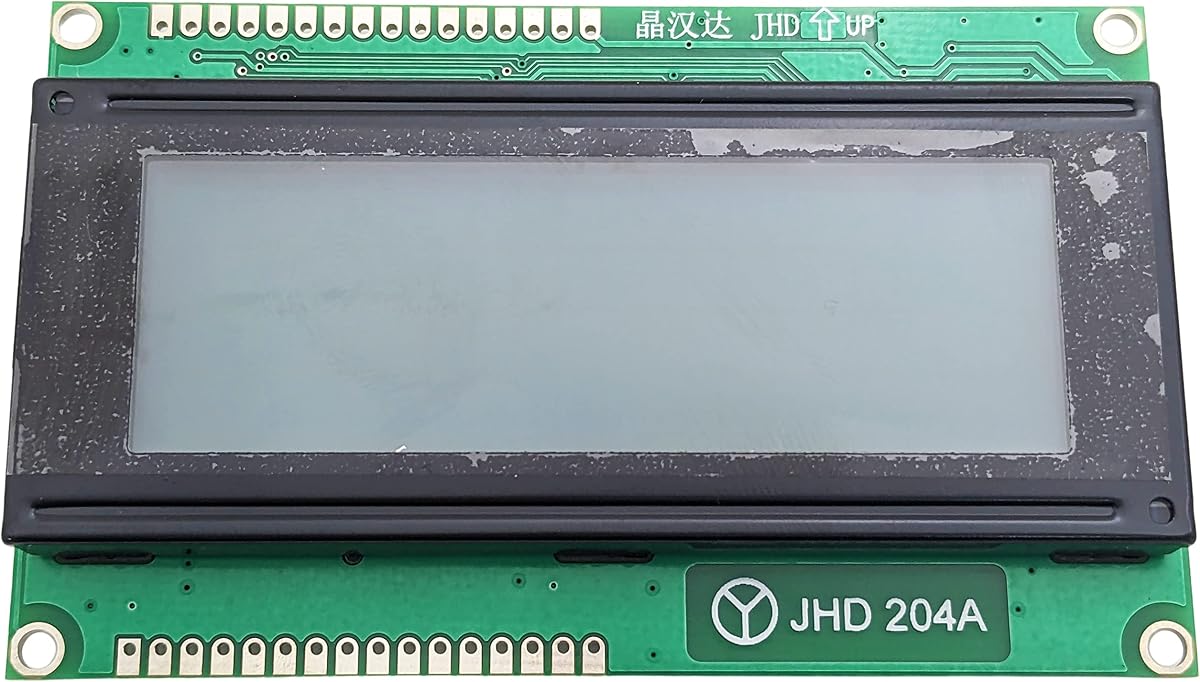
This module offers a display format of 20 characters by 4 lines, providing a total of 80 characters for detailed information display. It features a reflective gray display, which is highly visible in bright ambient light conditions. The module size measures 98 by 60 by 9.5mm, offering a substantial presence on a project panel.
We may earn a commission when you buy through this link, at no additional cost to you.
The character size is 2.95 by 4.75mm, ensuring that text remains readable even at a distance. With a duty cycle of 1/16 and 5×7 dots per character, it balances resolution and refresh rate effectively. This type of display is often preferred for industrial panels where sunlight readability is a priority.
Unlike blue backlight modules, this reflective type relies on external light, which might be a disadvantage in dark environments. The larger physical size also means it requires more space in your enclosure. However, the clarity and capacity for text make it a strong contender for professional applications.
If your project involves displaying long logs or multiple data lines, this high-capacity module is ideal. It is particularly suitable for industrial control panels or outdoor equipment where bright light conditions require a reflective screen rather than a backlit one.
With four lines of twenty characters, you can display complex data sets or multiple status messages simultaneously without scrolling.
The reflective nature of the screen ensures that text remains sharp and clear even under direct sunlight or bright overhead lighting.
We may earn a commission when you buy through this link, at no additional cost to you.
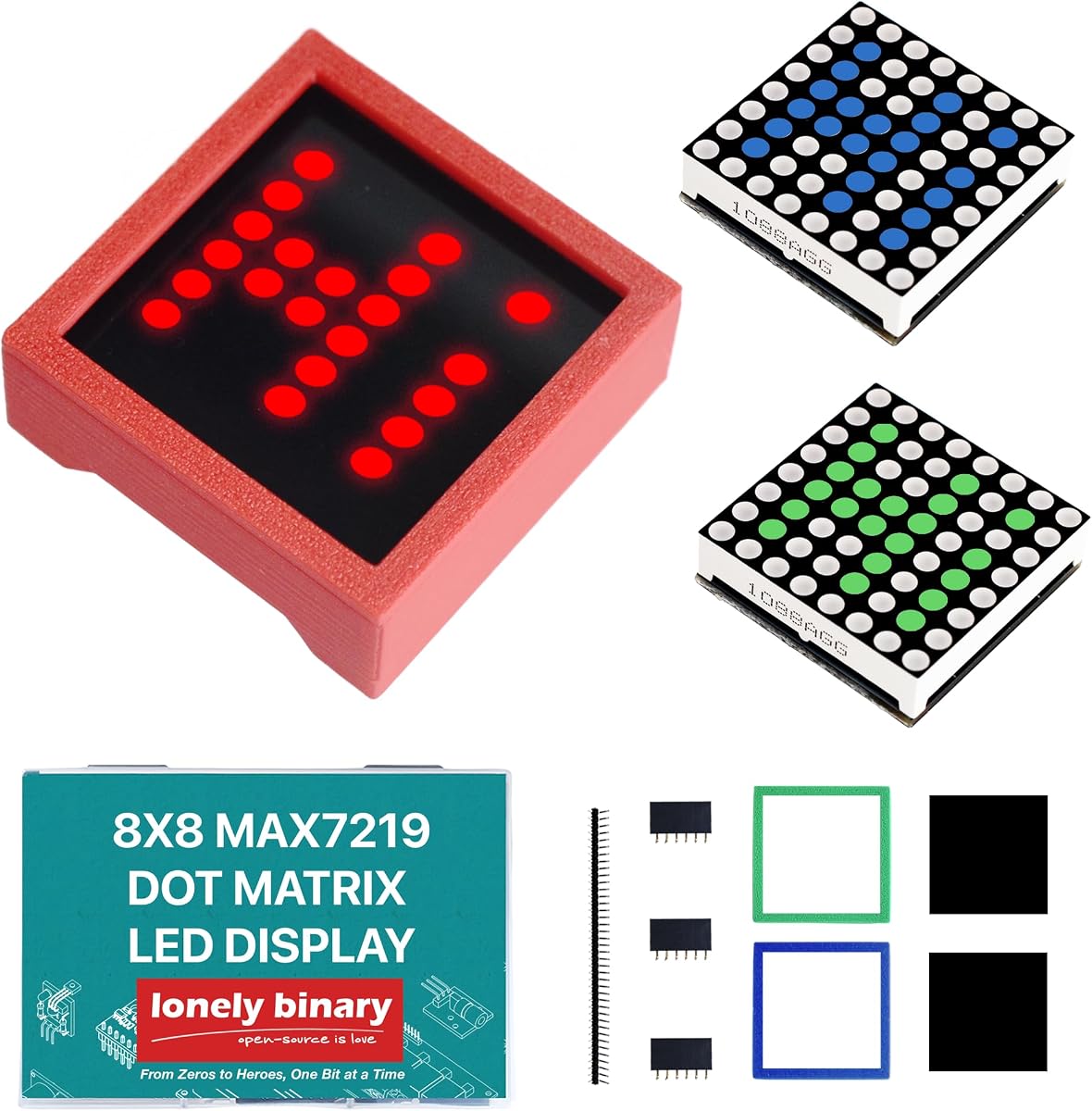
This pack includes one red, one green, and one blue 8×8 dot matrix LED display module, offering variety for your project aesthetics. Each module features an onboard MAX7219 IC with software-adjustable brightness and low-power shutdown capabilities. It is designed to be chainable, allowing you to build wider displays like 24×8 scrolling text easily.
We may earn a commission when you buy through this link, at no additional cost to you.
The kit includes three custom-fit 3D-printed PLA cases that match the module colors, providing a finished look without exposed PCB. It works with ESP32, ESP8266, Raspberry Pi Pico, and various microcontrollers using C++, MicroPython, or CircuitPython. The simple 5-pin SPI control makes wiring straightforward for beginners.
Basic soldering is required to connect pin headers between modules, which might be a barrier for complete novices. Additionally, the brightness might not be as high as dedicated commercial displays in extremely bright rooms. However, the inclusion of enclosures and open-source support is a significant plus.
If you are looking to create pixel art, retro games, or notification tickers, this kit provides all the necessary hardware. It is an excellent choice for hobbyists who want to add a unique visual element to their projects without complex wiring or external controllers.
Mixing red, green, and blue modules allows for unique color combinations and animations that standard single-color displays cannot achieve.
The included PLA cases protect the electronics and give your project a polished, professional appearance suitable for display.
We may earn a commission when you buy through this link, at no additional cost to you.
This module integrates four 8×8 dot matrix displays into a single compact unit, ideal for creating larger graphical surfaces. It operates at 5V and uses a 5pin line interface for easy connection to microcontrollers like Arduino. The common cathode design ensures reliable LED control through the driver chip.
We may earn a commission when you buy through this link, at no additional cost to you.
The dimensions are 12.8cm by 12.8cm by 1.3cm, making it a manageable size for desktop projects. Fixing screws with 64 holes allow for secure mounting in enclosures. This setup is great for displaying animations or scrolling text without needing complex wiring for each pixel.
You may need to solder headers to connect the pins properly, which requires some basic electronics skills. Powering four matrices can draw more current than a single module, so ensure your power supply is adequate. However, the consolidated design saves pin space on your microcontroller.
For those needing a larger visual area without wiring multiple boards, this 4-in-1 module is a practical solution. It simplifies the wiring process while providing the graphical flexibility of a larger matrix display for visual indicators or games.
Integrating four matrices into one board reduces the number of connection points required, simplifying your wiring layout significantly.
The multiple fixing holes allow for rigid installation, preventing the display from shifting or vibrating during use.
We may earn a commission when you buy through this link, at no additional cost to you.
This module is optimized for 8-digit 7-segment displays, bar graphs, or up to 64 individual LEDs, offering versatile display options. It simplifies interfacing with microcontrollers via a simple 4-wire SPI interface, allowing for quick setup and individual digit control. The MAX7219 driver includes advanced control features like scan limit settings.
We may earn a commission when you buy through this link, at no additional cost to you.
With a 150uA shutdown mode and analog/digital brightness adjustment, this IC ensures energy efficiency while maintaining high performance. It supports both BCD decoding and direct segment control, providing flexibility for custom display configurations. This makes it ideal for numeric readouts in energy-constrained devices.
While excellent for numbers and simple graphs, it cannot display custom shapes like dot matrices. The fixed segments mean you are limited to what the 7-segment layout supports. However, for clocks or counters, this limitation is acceptable given the simplicity.
If your primary need is displaying numbers or simple status bars efficiently, this module is a top choice. It combines low power consumption with robust driver features, making it suitable for battery-powered projects that require clear numerical readouts.
The low-power shutdown mode allows your device to conserve battery life when the display is not actively showing data.
Designed specifically for 7-segment logic, this module renders numbers with perfect clarity and consistency for any user.
We may earn a commission when you buy through this link, at no additional cost to you.
The SunFounder LCD2004 module displays 20 characters including letters, numbers, and symbols in 4 lines on a large screen. It features a working voltage of 5V and includes a 50K potentiometer on the side for easy contrast adjustment. The bright backlight ensures characters are displayed clearly in various conditions.
We may earn a commission when you buy through this link, at no additional cost to you.
With module dimensions of 97 by 59 by 12 mm and a viewing area of 71 by 21 mm, it offers substantial space for data display. It is fully compatible with Arduino and other micro-controllers, making it a versatile choice for hobbyist projects. The white on blue color scheme provides high contrast.
The large number of lines allows for more information to be shown at once compared to 1602 displays. However, it requires a parallel interface and might need additional resistors for backlight brightness control if not included. This adds a small step to the assembly process.
If you need to display multiple lines of text, such as logs or menus, this module is the best option. It offers the perfect balance of size and readability, making it a premium choice for projects requiring significant visual output space.
The large character size and high contrast white-on-blue color scheme ensure that text is readable even from a distance.
The included potentiometer allows you to fine-tune the display contrast without needing complex software or external resistors.
We may earn a commission when you buy through this link, at no additional cost to you.
This kit offers three 32×8 dot matrix LED display modules in red, green, and blue, providing a wide display resolution of 256 LEDs each. It includes a standard MAX7219 chaining via DOUT to DIN ports, enabling you to build wider displays for scrolling banners. The kit also includes color-matched 3D-printed PLA cases for protection.
We may earn a commission when you buy through this link, at no additional cost to you.
It works with ESP32, ESP8266, Raspberry Pi Pico, and Micro:bit using various programming languages. The onboard driver supports 16-level brightness adjustment and low-power shutdown, ensuring energy efficiency. Complete DIY kits include pin headers for breadboard or wired use.
Soldering headers is necessary for a permanent connection, which might require extra tools or skills. The wide size means you will need a larger enclosure for your project. However, the ability to mix colors and create wide animations is unmatched in this price range.
For large-scale visual projects like scoreboards or audio visualizers, this wide display is ideal. It offers the best combination of size, color variety, and flexibility for advanced hobbyists looking to create impressive visual effects.
The 32×8 resolution allows for scrolling text or animations that are long enough to be visible without rapid cycling.
Mixing red, green, and blue modules allows for a vibrant spectrum of effects without using complex RGB controllers.
We may earn a commission when you buy through this link, at no additional cost to you.
This package includes two 4-in-1 dot matrix modules, providing ample display real estate for complex graphical projects. Each module operates at 5V and uses a common-cathode design for reliable control. The compact footprint is slim with a 13mm profile, making it space-efficient for embedded displays.
We may earn a commission when you buy through this link, at no additional cost to you.
Universal mounting design includes 64 pre-drilled 3mm holes for secure panel installation. The SPI interface supports daisy-chaining multiple modules for expanded display configurations. It integrates easily with Arduino and other 5V microcontroller systems for direct power integration.
The 2-pack allows you to build two separate displays or one very large one. However, the layout is fixed, so you cannot reconfigure the LEDs individually outside the 4×16 block. This might limit flexibility if you need irregular shapes.
If you need a high-volume kit for a batch of projects, this is the most cost-effective option. It provides robust hardware with secure mounting options, making it perfect for production runs or classroom use where durability is key.
With 64 pre-drilled holes, you can mount the module securely to a panel, preventing any movement or vibration.
The daisy-chain ready SPI interface allows you to combine modules easily for even larger custom display shapes.
We may earn a commission when you buy through this link, at no additional cost to you.
Selecting the right LCD dot matrix module requires balancing technical specifications with project requirements. This guide outlines the essential factors to consider before making your purchase.
Resolution determines the number of pixels available for text and graphics. Higher resolutions like 128×64 allow for complex graphics, while 16×2 or 20×4 formats are better for text. Consider how much detail you need to show on the screen.
Choose a resolution that matches your content needs to avoid underutilized resources or limited display capability.
Backlights are crucial for reading in low light. Blue backlights are common for LCDs, while some models use white for better contrast. LED matrices typically have built-in LEDs that serve as their own backlight source.
Select a backlight color and intensity that ensures readability in your specific lighting environment.
Most modules use parallel or SPI interfaces. Parallel is standard for character LCDs, while SPI is common for LED matrices. Ensure your microcontroller supports the required interface type to avoid extra hardware.
Verify that your microcontroller has enough pins and supports the specific communication protocol of the module.
A good module should have driver libraries available for platforms like Arduino or Python. This simplifies coding and allows you to focus on project logic rather than display control. Popular drivers include HD44780 for LCDs and MAX7219 for LED matrices.
Look for modules with extensive community support and available libraries to streamline your development process.
Most modules operate at 5V, which is standard for many microcontrollers. However, LED matrices may draw more current due to the number of LEDs. Check the voltage requirements and ensure your power supply can handle the total load.
Ensure your power source matches the module's voltage rating to prevent damage or performance issues.
The physical size of the module must fit your enclosure or panel. Larger modules offer more screen real estate but require more space. Measure your available area and compare it with the module's dimensions before purchasing.
Check the exact measurements to ensure the module fits comfortably within your project casing.
Operating temperature ranges vary by model. Standard ranges are often between -20°C and 70°C, which is suitable for most indoor environments. Industrial grades may offer wider ranges for extreme conditions.
Select a module with a temperature rating that suits the environment where your project will be used.
Some modules come with pre-drilled holes or mounting brackets, while others require custom mounting. A secure mounting design prevents vibration and ensures longevity. Check if the package includes screws or mounting hardware.
Look for features like universal mounting holes to simplify the installation process into your project.
Connect the module to your microcontroller using the specified interface pins. For parallel LCDs, connect data lines to GPIO pins; for SPI LED matrices, use DIN, CS, and CLK pins. Ensure power lines are connected correctly to avoid short circuits.
Install the appropriate driver library in your development environment. Write code to initialize the display and send text or graphics. Adjust contrast settings using the potentiometer or software to optimize readability for your specific use case.
Keep the display clean and free from dust. Avoid exposing the module to excessive moisture or extreme temperatures beyond its rated range. Use the included or custom enclosures to protect the screen from physical damage during operation.
Character LCDs display predefined letters and numbers, often with a fixed number of lines like 16×2. Graphical LCDs allow you to draw pixels individually, enabling custom icons, shapes, and images. Choose based on whether you need standard text or custom visuals.
Connect the VCC and GND pins to the Arduino's power supply. For parallel displays, link the data pins to digital GPIOs. For SPI displays, connect the DIN, CS, and CLK pins to the Arduino's SPI pins. Use the appropriate library to initialize the connection.
Many modules have a built-in potentiometer to adjust contrast and brightness. Some advanced models support software dimming via PWM. Check your specific model's documentation to see if software or hardware dimming is supported.
Most LCD dot matrix modules operate at 5V DC. Some advanced models support 3.3V logic levels. Always check the datasheet to ensure you are powering the module with the correct voltage to prevent damage.
Use the potentiometer typically found on the back of the module to adjust the contrast. Turning it clockwise or counter-clockwise changes the voltage to the LCD liquid crystal. Ensure you see clear characters without ghosting.
Yes, most modules are compatible with ESP32 and ESP8266 via SPI or parallel interfaces. Ensure the logic levels match; use a level shifter if using 5V displays with 3.3V controllers. Libraries often support these boards natively.
Yes, modules with MAX7219 drivers support daisy-chaining via DIN and DOUT ports. This allows you to connect multiple modules to create wider displays. Simply connect the output of one module to the input of the next and configure the software accordingly.
For LCDs, the LiquidCrystal library is standard. For LED matrices, use the LedControl or MD_MAX7219 libraries. These libraries simplify the process of sending characters and graphics to the display without needing low-level code.
In this guide, we compared the top 10 LCD dot matrix modules based on resolution, interface, and features. The Ximimark 12864 offers a great balance for graphical needs, while the SunFounder LCD2004 excels in text capacity for larger displays.
When choosing a module, prioritize interface compatibility and backlight visibility. Ensure your microcontroller can drive the display easily. Consider the physical size and mounting options to guarantee it fits your project enclosure without issue.
Remember that pricing and availability can change. Always verify the latest specifications and stock status on the product page before ordering. This ensures you get the right component for your project without any unexpected delays.