
ASUS VM670 27 All-in-One
5.0Editor score
32GB DDR5 RAM
AMD Ryzen AI 7 350
1TB SSD Storage
This guide compares the top 10 All in One Desktop PC with Touchscreen models for performance, display quality, and value to help you find the perfect device.
All in one desktop PCs with touchscreens combine powerful computing with intuitive interaction for modern workspaces. These sleek devices eliminate cable clutter while offering vibrant displays that respond to your finger taps or stylus input for seamless navigation.
We evaluated ten leading models based on processor speed, memory capacity, storage options, and display fidelity. Our analysis focuses on real-world productivity, creative capabilities, and everyday usability to ensure you select a machine that meets your specific workflow demands effectively.
Each pick highlights unique strengths like AI acceleration, premium build quality, or exceptional value for money. Prices fluctuate often so please verify current listings before purchasing to secure the best deal available for your chosen all in one desktop PC with touchscreen today.
5.0Editor score

4.5Editor score

4.7Editor score
Explore the detailed side-by-side comparison of the top ten all in one desktop PCs with touchscreens available today. This overview highlights key specifications including processor type, memory size, storage capacity, and display dimensions to help you make an informed decision quickly.


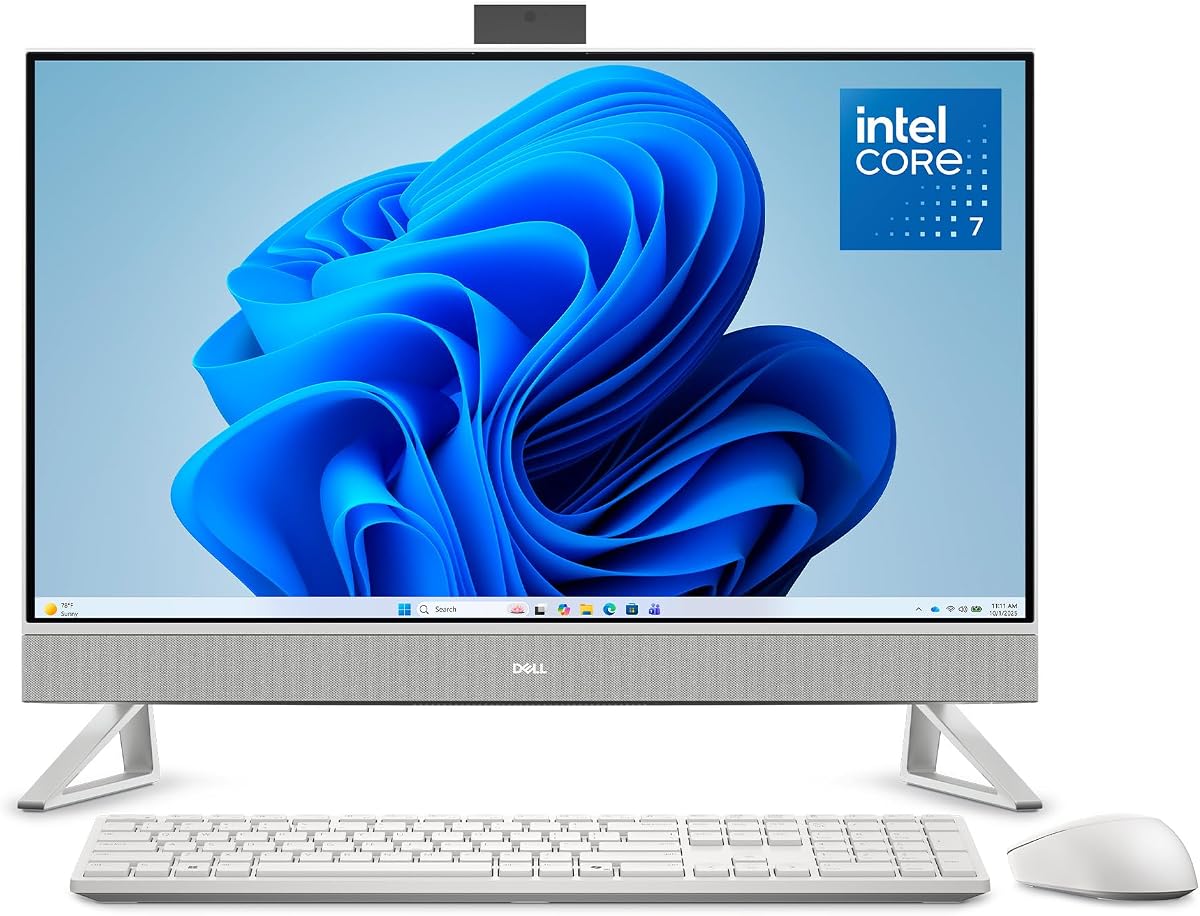


This Dell all in one desktop PC with touchscreen delivers impressive performance and visual fidelity for both home and office environments. Its 23.8 inch display offers vibrant colors and sharp text that make working on documents or watching videos a pleasure.
We may earn a commission when you buy through this link, at no additional cost to you.
The Intel Core 5 processor handles everyday multitasking with ease while the high contrast screen ensures content pops even in bright rooms. Users will appreciate the built-in comfort features that reduce eye strain during extended work sessions significantly.
While the base storage is adequate for most users heavy media hoarders might need external solutions. The webcam and audio systems are robust enough for professional calls but may not match top-tier dedicated conference equipment.
Ideal for families and professionals seeking a reliable all in one desktop PC with touchscreen this model balances performance with visual comfort effectively.
The 99% sRGB coverage ensures accurate color reproduction essential for designers and photographers working daily.
Dell ComfortView Plus reduces harmful blue light emissions to protect eyes during long viewing periods.
We may earn a commission when you buy through this link, at no additional cost to you.
The ASUS VM670 stands out as a powerhouse all in one desktop PC with touchscreen designed for demanding workflows and creative professionals. Its 27 inch display provides ample screen real estate for complex tasks without cluttering your workspace.
We may earn a commission when you buy through this link, at no additional cost to you.
With 32GB of DDR5 RAM and a dedicated NPU this machine accelerates AI workloads and keeps multiple applications running smoothly. The 1TB SSD ensures quick boot times and fast file access which boosts productivity throughout the day.
The price reflects the high-end components but the value is undeniable for power users. Connectivity options including HDMI-in and out allow flexible setups that adapt to changing work needs efficiently.
Best suited for creatives and professionals needing top-tier performance this all in one desktop PC with touchscreen sets a new standard.
The 50-TOPS NPU enables on-device AI acceleration for faster processing of complex creative tools.
Multiple USB-C and HDMI ports support diverse peripherals and external display configurations easily.
We may earn a commission when you buy through this link, at no additional cost to you.
HP delivers exceptional value with this 27 inch all in one desktop PC with touchscreen that balances cost and capability. It features the latest Ryzen AI processor ensuring future-proof performance for daily tasks and light creative work.
We may earn a commission when you buy through this link, at no additional cost to you.
The 16GB DDR5 RAM handles multitasking efficiently while the 1TB SSD provides ample space for files and applications. The included pen and keyboard bundle makes it ready to use immediately upon unboxing saving extra accessory costs.
While the stand is not fully adjustable the anti-glare coating helps reduce reflections during use. The Windows 11 Pro license adds business features often missing in consumer models enhancing security and management.
Perfect for budget-conscious buyers this all in one desktop PC with touchscreen offers premium features at a competitive price.
The dedicated Copilot key provides instant access to AI tools boosting workflow efficiency daily.
Anti-glare panels prevent eye strain during long viewing sessions in bright office environments.
We may earn a commission when you buy through this link, at no additional cost to you.
This Dell model packs significant power into a compact 24-inch chassis making it ideal for smaller desks. The Intel Core 7 processor with ten cores ensures smooth operation even when handling heavy spreadsheets or multiple browser tabs.
We may earn a commission when you buy through this link, at no additional cost to you.
Windows 11 Pro offers advanced security and management features valuable for small businesses. The webcam includes a physical privacy shutter which provides peace of mind during video calls and remote work sessions.
Storage is slightly limited compared to larger models but external drives can easily expand capacity. The port layout is user-friendly allowing quick connections to peripherals without struggling with tight spaces.
Best for those needing power without bulk this all in one desktop PC with touchscreen is a practical choice.
Ten processing cores enable rapid execution of complex tasks and multitasking without slowdowns.
Push-down camera covers ensure privacy when the webcam is not in active use.
We may earn a commission when you buy through this link, at no additional cost to you.
Featuring the newest Intel Ultra processor this all in one desktop PC with touchscreen offers cutting-edge connectivity and speed. Wi-Fi 7 ensures ultra-low latency for video calls and cloud syncing which is crucial for remote workers.
We may earn a commission when you buy through this link, at no additional cost to you.
The 32GB DDR5 memory handles heavy multitasking effortlessly while the pen support allows precise input for sketches or signatures. Windows 11 Pro for Business adds enterprise-level security tools protecting sensitive corporate data effectively.
This model is designed for forward-thinking organizations investing in longevity. While expensive the future-proof components reduce the need for upgrades in the near future saving long-term costs.
Top tier for business adoption this all in one desktop PC with touchscreen bridges current needs with future demands.
Wi-Fi 7 delivers unprecedented bandwidth for seamless high-definition streaming and large file transfers.
Stylus support enhances productivity for note-taking and detailed design work on screen.
We may earn a commission when you buy through this link, at no additional cost to you.
This HP model balances efficiency and performance well for general office tasks. The 27 inch display with high color accuracy makes it suitable for light design work or detailed photo editing without dedicated monitors.
We may earn a commission when you buy through this link, at no additional cost to you.
LPDDR5 memory offers fast speeds but is soldered which limits future upgrades. The 1TB SSD provides plenty of storage space reducing the need for cloud subscriptions during routine daily usage.
Build quality feels solid and the anti-glare coating helps in bright environments. It serves as a reliable workhorse for teams needing consistent performance without excessive power consumption.
Ideal for home offices this all in one desktop PC with touchscreen offers a dependable computing experience.
99% sRGB ensures colors look consistent across different applications and media types.
Optimized processor design reduces power usage while maintaining steady performance levels.
We may earn a commission when you buy through this link, at no additional cost to you.
If you crave screen real estate this 27 inch all in one desktop PC with touchscreen delivers without external monitors. The wide view angles allow comfortable sharing with colleagues during collaborative meetings.
We may earn a commission when you buy through this link, at no additional cost to you.
The 32GB RAM ensures smooth performance across multiple applications and browser windows. A unique stand design allows keyboard storage underneath saving valuable desk space in compact home offices.
Eye comfort features protect against strain during long work days. While it runs Windows Home the hardware capabilities support professional workflows effectively if additional licenses are needed.
Best for visual tasks this all in one desktop PC with touchscreen expands your digital workspace effectively.
Keyboard tray integration keeps desks tidy while maintaining easy access to inputs.
Wide viewing angles maintain color accuracy even when viewed from the side.
We may earn a commission when you buy through this link, at no additional cost to you.
Designed with education in mind this all in one desktop PC with touchscreen handles online learning and basic productivity tasks effortlessly. The touchscreen interface is intuitive for students making it easier to navigate educational apps.
We may earn a commission when you buy through this link, at no additional cost to you.
While the processor is entry-level it manages web browsing and document editing smoothly. The 1TB SSD ensures students have enough room for projects and media files without relying on external drives.
Build quality is sturdy enough to withstand daily classroom or home use. It represents a smart investment for families needing multiple devices without breaking the budget significantly.
Perfect for students this all in one desktop PC with touchscreen supports digital learning effectively.
Touchscreen input simplifies navigation for younger students learning basic computer skills.
WiFi 6 ensures stable connections for video classes and streaming educational content.
We may earn a commission when you buy through this link, at no additional cost to you.
This ASUS model prioritizes AI-driven workflows making it ideal for users who want the latest intelligent features. The dedicated NPU accelerates local AI tasks reducing reliance on cloud services for faster privacy.
We may earn a commission when you buy through this link, at no additional cost to you.
The 27 inch display is anti-glare and bright ensuring visibility in any lighting. Combined with 32GB RAM this machine stays responsive even during complex data analysis or video editing projects.
Windows 11 Pro provides necessary security for professional environments. While the price is premium the advanced hardware delivers a tangible productivity boost for power users.
Top for AI tasks this all in one desktop PC with touchscreen modernizes your office setup.
On-device NPU processing speeds up generative AI tasks significantly.
Anti-glare coating reduces distractions during long work sessions indoors.
We may earn a commission when you buy through this link, at no additional cost to you.
This MSI unit is built for versatile business needs with strong connectivity options. It supports two external monitors alongside the built-in display expanding your workspace for complex data management.
We may earn a commission when you buy through this link, at no additional cost to you.
The storage capacity is generous allowing users to store large archives locally. However the included 8GB RAM may need upgrading for heavy multitasking tasks to maintain peak performance.
It includes wireless peripherals to ensure a clean desk immediately. For small businesses needing a compact yet expandable solution this model offers practical value.
Best for office setups this all in one desktop PC with touchscreen offers flexible connectivity.
Dual monitor support lets you keep multiple apps visible without constant switching.
RAM slots allow future upgrades to handle more demanding applications easily.
We may earn a commission when you buy through this link, at no additional cost to you.
Selecting the right all in one desktop PC with touchscreen requires balancing processing power display quality and connectivity. This guide breaks down the essential factors to consider ensuring you choose a machine that aligns perfectly with your daily needs.
The processor is the brain of your all in one desktop PC with touchscreen. Look for models with Intel Core i5/i7 or AMD Ryzen 5/7 for smooth multitasking. These chips handle daily applications and media consumption without lag.
Prioritize a modern CPU with at least six cores to ensure longevity and efficient performance for years.
Memory determines how many apps you can run at once. Aim for 16GB of RAM for comfortable multitasking while 32GB is ideal for creative work. Storage should be a 512GB SSD or larger for fast boot times.
Ensure the device has sufficient SSD space to store files locally without relying heavily on external drives.
The screen is the primary interface of an all in one desktop PC with touchscreen so quality matters. Seek IPS panels with 99% sRGB for accurate colors and anti-glare coatings to reduce eye strain.
Higher contrast ratios and brightness levels ensure clear visibility even in well-lit rooms.
Touch sensitivity and responsiveness vary by manufacturer. Test the interface if possible to ensure it registers gestures like zooming and swiping accurately without delay.
A responsive touch layer enhances navigation speed and makes the device more intuitive for daily tasks.
Check for USB-C Thunderbolt ports and HDMI inputs to connect external monitors and peripherals. Wi-Fi 6 support ensures stable internet for video conferencing and large downloads.
Sufficient ports eliminate the need for dongles and make connecting devices hassle-free.
For remote work a high-definition camera with noise cancellation is vital. Look for built-in microphones and speakers that support clear calls without needing external headsets.
Privacy features like physical shutters add security for professional environments using video tools.
Windows 11 Pro offers advanced security and management features valuable for businesses. Home versions suffice for personal use but consider licensing needs before purchasing.
Ensure the OS supports your necessary software applications and security protocols.
A sturdy stand allows easy angle adjustments for ergonomic comfort. Compact designs save desk space while high-quality materials ensure durability in busy environments.
Ergonomic stands reduce neck strain and help maintain good posture during long work hours.
To maximize the lifespan of your all in one desktop PC with touchscreen avoid placing it in direct sunlight. Excessive heat can warp the chassis and damage internal components over time causing premature failure.
Clean the screen with a soft microfiber cloth and specialized screen cleaner rather than household chemicals. These agents can strip anti-glare coatings and leave streaks that affect visibility.
Keep the vents free of dust by vacuuming them gently every few months. Proper airflow prevents overheating and ensures the cooling fans operate quietly and efficiently.
For smaller workspaces a 23.8 inch or 24 inch model offers the best balance of screen real estate and physical footprint. These sizes provide enough room for multitasking without crowding your desk or blocking wall outlets.
Yes many models include HDMI-out or USB-C ports that support external displays. This allows you to expand your workspace for complex tasks while keeping the main unit compact and clutter-free.
Modern touch panels are designed with scratch-resistant glass to withstand frequent use. Using a stylus or gentle finger taps ensures longevity without risking damage to the sensitive underlying components.
Many business-focused models come with Windows 11 Pro pre-installed for enhanced security and management features. Home editions are common in consumer models but licenses can be upgraded if professional tools are required.
Use a lint-free microfiber cloth and a small amount of distilled water or screen cleaner spray directly on the cloth. Avoid spraying liquid directly on the screen to prevent seepage into sensitive internal electronics.
Sixteen gigabytes of RAM is sufficient for most office tasks and web browsing. Heavy multitasking and creative editing benefit from 32GB to prevent slowdowns when multiple applications run simultaneously.
Choosing the right all in one desktop PC with touchscreen depends on your specific needs whether it is for home office or enterprise use. Our top picks range from budget-friendly options to premium AI-enabled models covering diverse requirements.
Prioritize performance factors like processor speed and memory if you handle heavy tasks. Visual quality and touchscreen responsiveness are key for creative work while connectivity options ensure seamless integration with existing tools.
Prices for these devices change regularly so check current listings to confirm availability and deals. Investing in the right features now will provide years of reliable productivity and entertainment value.