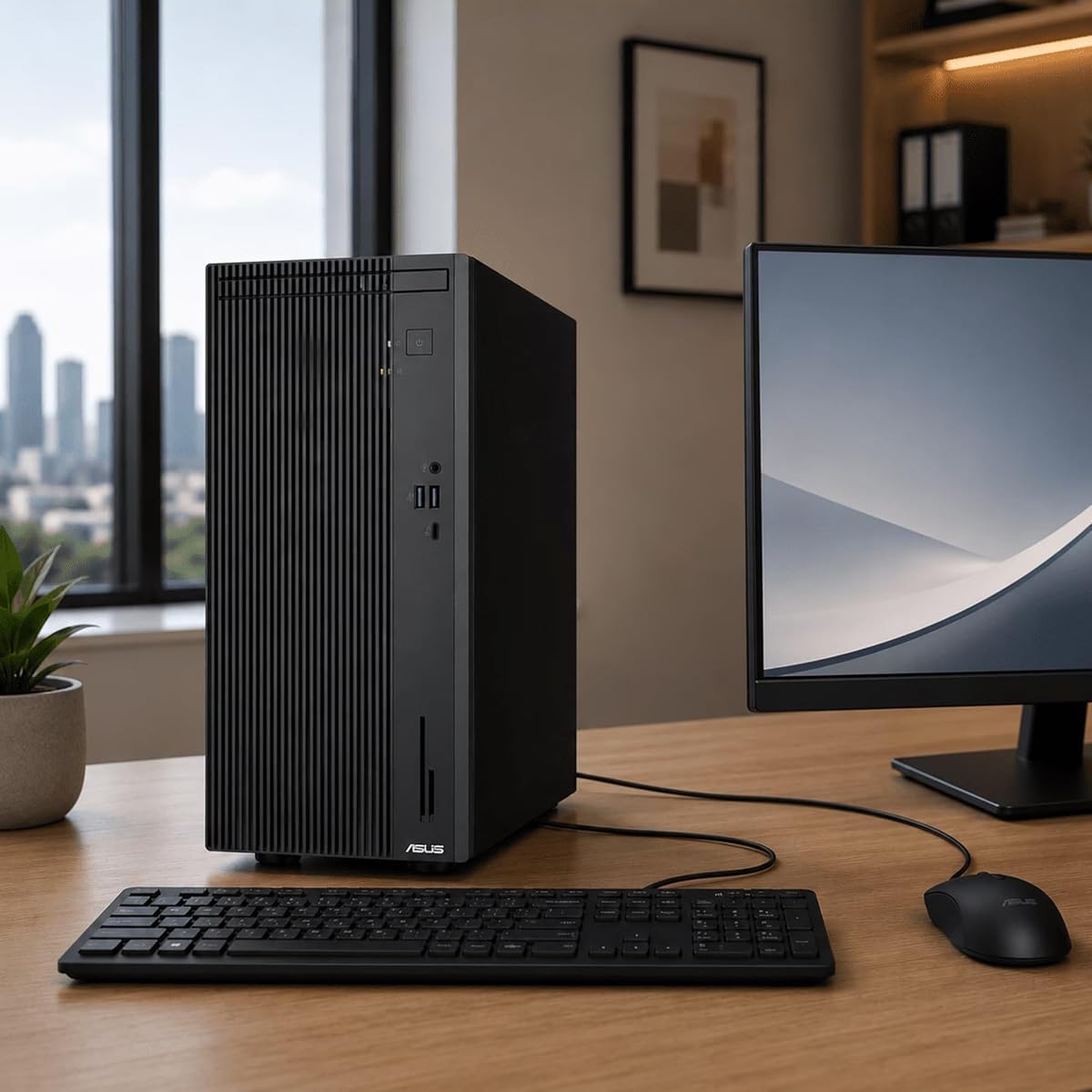
ASUS V500 Business Tower
5.0Editor score
10-core i7 processor
16GB DDR5 RAM
Wi-Fi 6 support
This guide compares the top ten ASUS desktop PCs for 2026, covering business towers and gaming rigs to help you choose the right system.
Finding the right desktop computer can be challenging with so many options available today. ASUS offers a wide range of powerful machines designed for everything from office work to high-end gaming. We have selected the most capable models to simplify your search.
Our team evaluated these systems based on performance, build quality, connectivity, and overall value. We looked closely at processor speeds, memory capacities, and storage options to ensure each pick delivers reliable results. This list covers both compact towers and full-size gaming rigs.
Each review highlights key strengths and potential trade-offs to help you make an informed decision. Prices and availability can change frequently, so always check the latest details before purchasing. Our goal is to provide clear, honest insights for every type of user.
5.0Editor score

4.7Editor score

4.2Editor score
The following table provides a side-by-side look at the core specifications for each of the ten selected ASUS desktop computers. This comparison helps you quickly identify which model fits your specific needs for speed, storage, and display support.


The ASUS V500 Business Tower stands out as an excellent entry-level option for small offices or home users seeking reliable performance. With a perfect 5.0 rating from users, it delivers on its promise of fast multitasking capabilities thanks to the 10-core Intel Core i7 processor. This system is designed to handle daily productivity tasks without breaking a sweat.
We may earn a commission when you buy through this link, at no additional cost to you.
Its standout quality lies in the balance between cost and capability. The 16GB of DDR5 memory ensures that switching between applications remains smooth, while the 1TB of total storage provides ample room for documents and media. The inclusion of a wired keyboard and mouse bundle makes it ready to use immediately upon unboxing, which is a nice touch for budget-conscious buyers.
One trade-off to consider is the storage configuration, which splits capacity between an SSD and external storage rather than offering a single fast drive. However, for general office work, this is often acceptable. The wired peripherals ensure zero input lag, which is crucial for precise work tasks.
This desktop is ideal for users who need a dependable machine for web browsing, document editing, and light content creation. If you are looking for the best budget ASUS desktop PC that does not sacrifice core performance, this model is a strong recommendation for any small business or family setup.
The 10-core processor ensures smooth multitasking even when running multiple business applications simultaneously.
Including a keyboard and mouse bundle saves additional costs and gets you started right away.
We may earn a commission when you buy through this link, at no additional cost to you.
The ASUS ROG G700 Gaming Desktop is our Editor's Choice for those seeking a powerful rig for competitive gaming and content creation. Boasting a 4.7 rating, this system combines the next-generation Intel Core Ultra 7 265F processor with a capable NVIDIA GeForce RTX 5060 graphics card to deliver high frame rates in modern titles.
We may earn a commission when you buy through this link, at no additional cost to you.
Its key strengths include the generous 32GB of DDR5 RAM, which allows users to stream, record, and game simultaneously without performance hits. The advanced cooling system maintains stable performance under heavy loads, while the 600W Gold PSU ensures efficient power delivery. The included RGB keyboard and mouse add to the immersive gaming setup right out of the box.
The trade-off here is the price and size, as this is a premium unit that requires more space and investment. However, the inclusion of a 12-month CPS protection plan adds significant value by covering mechanical failures beyond the standard warranty. This makes the long-term ownership cost more predictable for serious gamers.
If you want a balanced gaming experience that handles AAA titles and productivity work equally well, this model is the top pick. It represents the sweet spot for performance and features in the current market of ASUS desktop computers, making it a compelling choice for enthusiasts.
The RTX 5060 paired with the Ultra 7 ensures smooth gameplay at 1440p resolutions with ray tracing.
The 12-month extended plan provides peace of mind for users concerned about potential hardware issues.
We may earn a commission when you buy through this link, at no additional cost to you.
The ASUS ROG GM700 2025 represents the pinnacle of current gaming technology, earning its spot as our Best Premium pick. With a 4.2 rating, this system features the AMD Ryzen 7 9800X3D processor and AMD Radeon RX 9070 XT Prime OC GPU, designed to tackle the most demanding workloads and AAA games with ease.
We may earn a commission when you buy through this link, at no additional cost to you.
Its standout qualities include the immense 2TB of PCIe Gen 4.0 SSD storage, which ensures near-instant load times for games and applications. The 32GB of DDR5 RAM supports heavy multitasking, making it perfect for content creators who need to edit and stream simultaneously. The advanced features like AV1 encoding and enhanced ray tracing deliver stunning visuals.
The primary trade-off is the price, as this is a high-cost investment meant for power users who need the absolute best performance. However, the ability to game, stream, and create without breaking a sweat justifies the cost for professionals and competitive gamers. The system is built to keep you ahead of the competition in any scenario.
For those who demand top performance and do not want to compromise on speed or storage, this is the ideal choice. It pushes the boundaries of what an ASUS desktop PC can do, offering a premium experience that is unmatched by other options in this list for serious enthusiasts.
The Ryzen 7 9800X3D processor delivers the fastest processing speeds for gaming and content creation tasks.
The 2TB PCIe Gen 4.0 SSD keeps your entire game library ready to launch instantly without long waits.
We may earn a commission when you buy through this link, at no additional cost to you.
The ASUS S501MER Desktop brings modern 14th Gen Intel power to a sleek, compact chassis suitable for home offices and living rooms. With a 4.2 rating, it offers a strong balance of performance and connectivity features that appeal to users needing a reliable daily driver without a bulky tower footprint.
We may earn a commission when you buy through this link, at no additional cost to you.
Its key strengths include the latest i7-14700 processor, which provides significant speed improvements over previous generations for multitasking and light productivity work. The inclusion of Wi-Fi 6E ensures faster wireless speeds and stable connections, while the wide array of front and rear I/O ports supports various peripherals and monitors easily.
One trade-off is that while it supports memory expansion up to 64GB, it ships with 16GB which may limit heavy workloads initially. However, the system is designed to be upgraded later as needs grow. The compact dimensions make it easy to place in tight spaces without sacrificing essential connectivity options for modern devices.
This desktop is best suited for users who need a modern machine for office tasks, web browsing, and media consumption. If you prefer a system that balances space efficiency with strong wireless and wired connectivity, this model is a solid choice for your home setup.
The i7-14700 ensures smooth handling of modern applications and future software updates with ease.
Wi-Fi 6E delivers faster and more reliable internet connections for streaming and online meetings.
We may earn a commission when you buy through this link, at no additional cost to you.
The ASUS V500 Home & Business Desktop Computer offers a perfect blend of business readiness and home utility with a solid 5.0 rating. It stands out by including 32GB of RAM as standard, which significantly boosts multitasking capabilities compared to typical 16GB systems in this price range for office work.
We may earn a commission when you buy through this link, at no additional cost to you.
Its key strengths include robust support for dual monitors with 4K resolution, making it ideal for professionals who need a wide workspace. The 1TB PCIe SSD ensures fast boot times and rapid file transfers, while the included keyboard and mouse bundle provides a complete solution. The integrated graphics handle smooth streaming and visuals efficiently.
One trade-off is that this system relies on integrated Intel UHD graphics, meaning it is not designed for heavy gaming. However, for business applications, content creation, and general entertainment, the performance is more than adequate. The reliable connectivity and stable Windows 11 experience make it a trustworthy daily driver.
If you need a desktop that excels at multitasking and multi-monitor productivity without a high cost, this is the right choice. It balances memory capacity and storage speed to deliver a smooth experience for any business or home user requiring consistent performance.
32GB of RAM allows you to run many applications simultaneously without any lag or slowdowns.
HDMI and DisplayPort outputs enable an efficient dual-monitor setup for increased productivity.
We may earn a commission when you buy through this link, at no additional cost to you.
The ASUS ROG G700 2026 represents the latest evolution in gaming desktop technology, bringing cutting-edge specs to the table. While it has not yet accumulated user reviews, its specifications promise fearless performance with the Intel Core Ultra 7 265KF processor and NVIDIA GeForce RTX 5070 GPU for top-tier gaming capabilities.
We may earn a commission when you buy through this link, at no additional cost to you.
Its standout qualities include the dual-glass chassis design that showcases internal lighting and components, along with tool-less access for future upgrades. This forward-thinking design ensures the system remains relevant for years to come. The quad-fan cooling system and dust filters maintain optimal temperatures and reliability over long gaming sessions.
One trade-off is the lack of user reviews at this stage, which means real-world feedback is limited. However, the ROG brand reputation and the robust specs suggest a high-quality product. The 1TB PCIe 4.0 SSD provides ample space and speed for modern game libraries and applications.
This desktop is ideal for gamers who want the latest tech and the ability to upgrade easily. If you are looking for a future-proof machine with excellent aesthetics and performance, this model is a compelling option for your gaming setup.
The chassis features iconic ROG styling and lighting that looks great in any gaming space.
Tool-less access makes swapping out components easy to ensure long-term performance and flexibility.
We may earn a commission when you buy through this link, at no additional cost to you.
The ASUS V500 Tower Bundle offers a practical solution for users who need immediate portable storage alongside their desktop. With a 3.0 rating, it provides reliable performance for daily operations thanks to the Intel Core i7-13620H processor and 16GB DDR5 RAM which supports smooth system performance.
We may earn a commission when you buy through this link, at no additional cost to you.
Its key strengths include the inclusion of a 64GB USB flash drive, which offers convenient data transfer and extra storage for backups. The system runs Windows 11 Pro for enhanced security and business-grade productivity tools. The HDMI and DisplayPort outputs enable connection to multiple monitors for an efficient workstation.
One trade-off is the mixed user feedback regarding build consistency, though the core specs remain solid for the price. The 1-year warranty on upgraded components provides some peace of mind for maintenance. The secure OS version ensures better control over business environments compared to Home editions.
If you need a business-ready machine with a bonus portable drive for data management, this is a functional choice. It suits office environments where reliable multitasking and secure system management are prioritized over gaming capabilities.
The included USB drive provides a quick and easy way to transfer files or create backups on the go.
Windows 11 Pro offers advanced security and management tools ideal for professional environments.
We may earn a commission when you buy through this link, at no additional cost to you.
The ASUS ROG Strix G700 is an absolute powerhouse for users who need massive storage and RAM capacity without compromise. With a perfect 5.0 rating, it features an extreme Intel 15th gen Core Ultra 9 processor and an incredible 128GB of DDR5 RAM to handle the most demanding professional workloads effortlessly.
We may earn a commission when you buy through this link, at no additional cost to you.
Its standout qualities include the enormous 11TB total storage, combining SSD and HDD drives for both speed and volume. This makes it ideal for media editors and data hoarders who need to keep vast libraries accessible. The full suite of ports ensures compatibility with virtually any peripheral or external device you might need.
One trade-off is the cost, which is significantly higher than standard desktops. Additionally, while the GPU is powerful, the focus here is on CPU and storage capacity. However, for professional rendering and multi-tasking, the performance is unmatched in this lineup of computers.
If you require the ultimate in storage and memory for professional work, this is the definitive choice. It represents the top end of what is available for raw power and capacity in an ASUS desktop configuration.
128GB of RAM supports heavy virtualization and simultaneous rendering tasks without any bottlenecks.
The 11TB storage ensures you never run out of space for projects, media, and data archives.
We may earn a commission when you buy through this link, at no additional cost to you.
The ASUS V500 with 64GB RAM configuration delivers maximum memory capacity for demanding professional workflows. This variant is designed for users who need to run heavy virtual machines or extensive datasets locally. It builds upon the reliable V500 base with upgraded memory to ensure long-lasting performance.
We may earn a commission when you buy through this link, at no additional cost to you.
Its key strengths include the 64GB of DDR5 memory which supports smooth multitasking without lag even with many applications open. The 1TB PCIe SSD provides fast bootups and file access, while the included keyboard and mouse ensure readiness. The 4K dual-monitor support expands your visual workspace significantly for efficiency.
One trade-off is the premium price associated with maxed-out configurations. However, the ability to handle complex business tasks and heavy workloads without upgrading later makes it a sound investment. The integrated graphics support clear visuals for everyday computing needs.
If you need a business desktop with the highest memory capacity available in this range, this is the ideal choice. It ensures you have the resources needed for professional productivity and future software demands.
64GB of RAM ensures you can run complex business software and tools simultaneously without slowdown.
Support for two 4K monitors helps you organize complex projects and data more effectively.
We may earn a commission when you buy through this link, at no additional cost to you.
The ASUS Business Desktop Computer PC is a reliable workstation designed to handle modern office environments effectively. With a perfect 5.0 rating, it offers a stable and secure computing experience thanks to Windows 11 Pro and the powerful Intel Core i7-13620H processor for everyday computing.
We may earn a commission when you buy through this link, at no additional cost to you.
Its key strengths include a compact tower design that balances performance and space efficiency. The 16GB of DDR5 memory ensures fast file access and smooth multitasking for business workloads. The versatile graphics and display support make it suitable for data management and daily business tasks.
One trade-off is that it focuses strictly on business utility without extra gaming or creative features. However, for standard office productivity and network tasks, this focus ensures stability and efficiency. The rich connectivity options allow flexible connection to networks and external devices.
If you need a stable and secure desktop for business productivity, this is the top recommendation. It provides all the necessary features for a smooth professional workflow without unnecessary bloat or cost.
Windows 11 Pro ensures advanced security and system management tools for any business environment.
The compact tower design fits easily into modern offices while maintaining robust performance.
We may earn a commission when you buy through this link, at no additional cost to you.
Selecting the right desktop involves balancing performance needs, budget, and form factor. We break down the essential factors to consider before making your final decision for your specific use case.
The processor is the brain of your computer and determines how well it handles multitasking and heavy workloads. Look for Intel Core i7 or Ultra 7 chips for modern productivity and gaming. For extreme tasks like video editing, newer 14th or 15th Gen models offer better speeds and efficiency.
Prioritize processors with higher core counts and turbo frequencies for smoother performance over time.
Random Access Memory or RAM is critical for running multiple applications simultaneously. Most business desktops come with 16GB of DDR5 RAM which is sufficient for standard tasks. Power users and gamers should consider models with 32GB or even 64GB to ensure future-proofing.
Select at least 32GB if you plan to edit video or run virtual machines regularly.
Solid State Drives or SSDs are now the standard for boot drives due to their speed. Look for NVMe PCIe Gen 4 SSDs for the fastest load times and file transfers. If you need massive storage for media, consider models with additional HDD options or large capacity SSDs.
Ensure your main drive is at least 1TB to accommodate your files and software comfortably.
Integrated graphics are sufficient for office work and media streaming. However, gamers and 3D designers need dedicated NVIDIA or AMD GPUs for high frame rates and rendering. Check for recent GPU models that support ray tracing and high resolution output.
Choose a dedicated graphics card if you plan to play modern games or create 3D content.
Modern computers need various ports to connect monitors, printers, and storage devices. Look for USB-C ports for fast data transfer and modern peripherals. HDMI and DisplayPort outputs are essential for multi-monitor setups common in productivity environments.
Verify that the desktop has enough USB and video ports for all your planned devices.
Windows 11 Home is standard for personal use, while Windows 11 Pro offers advanced security and management tools. Business environments benefit from the Pro version for better network integration and encryption. Check which version is pre-installed to meet your security and workflow needs.
Opt for Windows 11 Pro if you need enterprise-grade features for your work.
Desktop towers vary in size from compact mini units to large gaming chassis. Compact models save space but may have limited upgradeability. Larger towers usually offer better cooling and more room for future component additions.
Measure your available space before buying to ensure the physical dimensions fit your desk.
A solid warranty protects your investment against hardware failures. Some models include extended protection plans that cover accidental damage or mechanical issues. Check the duration and coverage details before finalizing your purchase to ensure peace of mind.
Look for extended warranty options if you rely on your desktop for critical daily work.
Set up your desktop on a stable, flat surface to ensure proper ventilation and safety. Connect all peripheral cables such as power, HDMI, and USB to the correct ports before turning on the system. Make sure the power outlet is grounded to protect sensitive internal components.
Keep the area around your computer clean and free of dust to maintain optimal airflow. Use a microfiber cloth to wipe the exterior surfaces regularly to remove dust and smudges. Do not use liquid cleaners directly on the chassis to avoid damage.
Schedule regular software updates and run disk cleanups to keep the system running smoothly. Monitor your storage usage to ensure you always have free space for temporary files and updates. Proper care will extend the lifespan of your ASUS desktop PC significantly.
Yes, ASUS offers a wide range of gaming desktops specifically designed with dedicated GPUs and powerful processors. Models like the ROG series provide excellent performance for modern games and streaming.
Most ASUS desktops allow memory upgrades to expand capacity. However, you should check the specific motherboard specifications and available slots before purchasing to confirm compatibility.
The Pro version includes advanced security and management tools like BitLocker encryption and remote desktop support. Home is generally sufficient for personal use while Pro suits business environments.
Many models in this list include wired keyboard and mouse bundles out of the box. Always verify the product details or bundle description to confirm accessories are included.
1TB is a standard amount that fits most users' needs for files and software. If you store large media files or many games, consider models with 2TB or more for ample capacity.
Most modern units feature 80 Plus Gold power supplies and efficient processors that reduce energy consumption. Look for energy-saving features in the technical specs to minimize power costs.
Yes, ASUS provides standard manufacturer warranties and technical support for their products. Extended protection plans may be available for purchase to cover additional repairs or replacements.
Most models support dual or triple monitor setups via HDMI and DisplayPort connections. Check the specific model's port availability to ensure it meets your multi-display requirements.
Choosing the right ASUS desktop PC depends largely on your specific needs and budget constraints. We found excellent options ranging from reliable business towers to powerful gaming rigs that meet diverse user requirements effectively.
For productivity, prioritize models with higher RAM and faster SSDs to ensure smooth multitasking. For gaming, look for dedicated graphics cards and robust cooling systems to maintain stable performance over time.
Prices and availability change frequently so always verify the latest details before purchasing. Check current deals and bundle offers to get the best value for your investment in a new system.