EG Starts Kaby Intel CPU Delid
4.6Editor score
Safest method for Intel CPUs
Compatible with Kaby Coffee Lake
Includes relid tool for reuse
Explore our expert guide on the best delidding kits for 2026. We compare top tools for CPU GPU and console repairs to help you choose the right kit.
Delidding kits are essential for enthusiasts looking to improve thermal performance in CPUs and consoles. These specialized tools allow you to safely remove the integrated heat spreader for direct die cooling. Choosing the right kit ensures precision and minimizes the risk of damaging expensive hardware during the process.
We evaluated ten top-rated delidding kits based on build quality, compatibility, ease of use, and user feedback. Our comparison covers tools designed for Intel processors, PlayStation consoles, and general BGA repair tasks. This guide helps you find the most reliable option for your specific hardware needs and skill level.
Each pick in this list highlights key features, pros, cons, and ideal use cases to streamline your decision. Remember that product availability and pricing can change frequently, so check current listings before purchasing. We aim to provide clear, actionable insights for both DIY hobbyists and professional repair technicians.
4.6Editor score

4.5Editor score

4.1Editor score
This side-by-side comparison highlights the key specifications and capabilities of each kit to help you decide quickly.


The Thermal Grizzly Delid-Die-Mate stands out as a top choice for enthusiasts seeking reliable CPU delidding tools. It carries a strong 4.5 star rating and is specifically developed for modern Intel Core generations. The tool enables efficient direct die cooling which can lead to noticeable temperature reductions.
We may earn a commission when you buy through this link, at no additional cost to you.
Its standout feature is the collaboration with Roman der8auer Hartung ensuring professional-grade engineering. The anodized aluminum body offers durability while maintaining a sleek appearance. Users appreciate how it simplifies the removal of the heatspreader facilitating better thermal paste application.
However potential buyers should note that removing the heatspreader may affect cooler mounting height. It is crucial to verify your cooler compatibility before proceeding with the delid. Despite this minor tradeoff the performance gains are well worth the careful preparation.
This kit is ideal for users who prioritize quality and ease of use over budget constraints. Whether you are aiming for better overclocking headroom or just lower idle temps this tool delivers consistently. We highly recommend it for anyone ready to take their cooling setup to the next level.
Removing the integrated heatspreader allows thermal paste to contact the die directly reducing heat transfer resistance and lowering temperatures by up to twenty degrees.
Developed in partnership with a renowned overclocking expert the tool ensures precision engineering that minimizes risk during the delicate delidding process.
We may earn a commission when you buy through this link, at no additional cost to you.
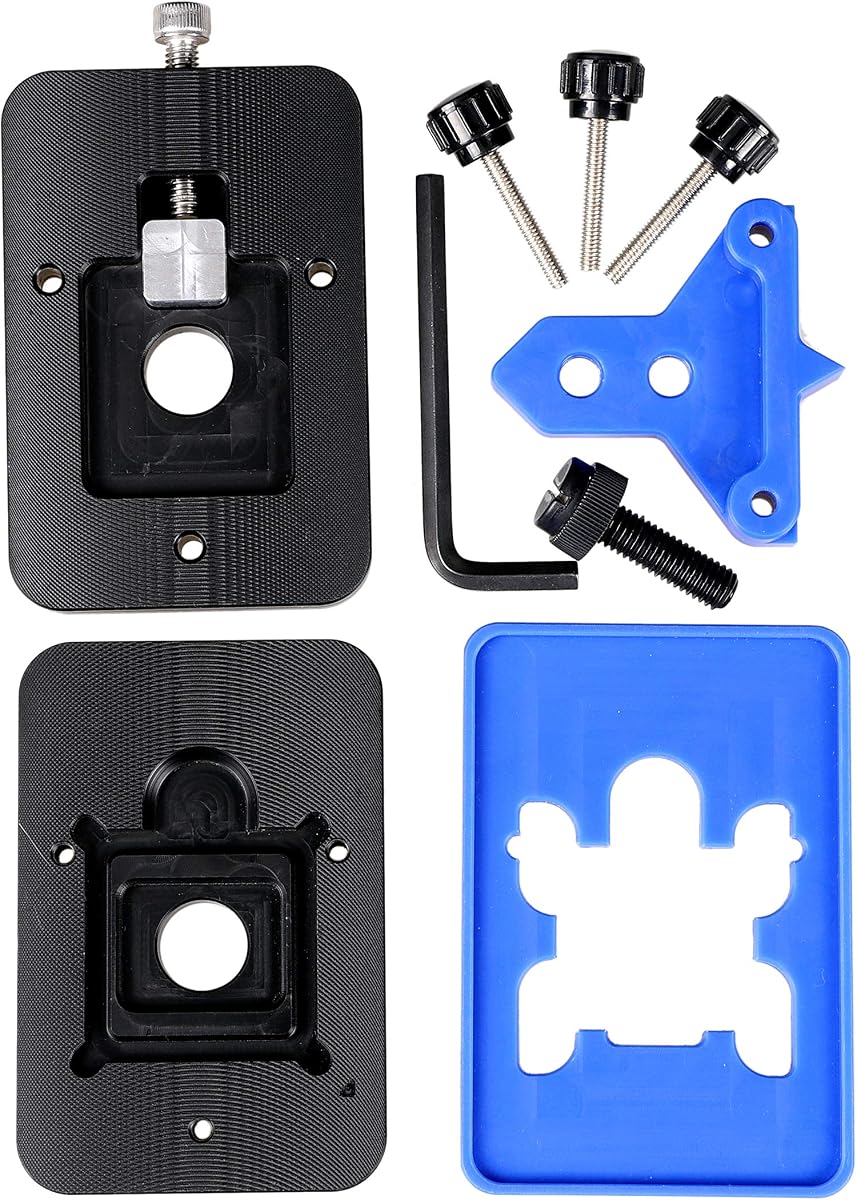
The EG Starts Kaby Intel CPU Delid kit is a fantastic choice for budget-conscious users who want to improve thermal performance. It has earned a solid 4.6 star rating from users who value its safety features. The kit is designed to be the safest method to delid your Intel CPU.
We may earn a commission when you buy through this link, at no additional cost to you.
It supports a wide range of Intel sockets including LGA 775 1150 1151 and more. This versatility makes it suitable for owners of older systems looking to extend their life. The inclusion of a relid tool ensures you can safely reinstall the heatspreader if needed.
Users must ensure the square aluminum block is positioned correctly below the plastic plane to avoid damaging the CPU board. While this requires attention to detail the design prioritizes safety throughout the process. The affordable price makes it accessible to a broader audience.
We recommend this kit for those working with legacy Intel processors who need a reliable and cost effective solution. It balances ease of use with essential safety features. With proper care this tool can significantly enhance the thermal efficiency of your system.
Supporting sockets from LGA 775 through 1151 this tool covers a broad range of Intel Core processors making it versatile for older system upgrades.
Unlike some basic tools this kit includes a relid cap allowing you to restore the original heatspreader after applying new thermal interface material.
We may earn a commission when you buy through this link, at no additional cost to you.
The der8auer Delid-Die-Mate X is a premium tool designed for serious enthusiasts working with high-end Intel X series processors. It holds a 4.1 star rating and reflects the reputation of Roman der8auer Hartung in the overclocking community. The tool ensures safety during the removal of the integrated heatspreader.
We may earn a commission when you buy through this link, at no additional cost to you.
It is specifically compatible with Skylake-X and Kaby Lake-X processors using socket 2066. The construction features aluminium and stainless steel for durability and longevity. Users can expect precise control when removing the heat spreader to prepare for direct die cooling.
A notable feature is the slight reduction in cooler mounting height which may require verification of your cooling solution. This tradeoff is often acceptable given the performance benefits of direct die application. The price point is higher but justified for professional use.
We suggest this tool for those owning socket 2066 CPUs who demand top-tier quality and precision. It transforms a risky task into a routine operation with the right precautions. Investing in this kit ensures you have a reliable companion for advanced thermal tuning.
Tailored for socket 2066 processors this tool ensures compatibility with Skylake-X and Kaby Lake-X CPUs for premium thermal optimization.
Constructed from robust aluminium and stainless steel the tool maintains its integrity through multiple uses offering long-term reliability for professionals.
We may earn a commission when you buy through this link, at no additional cost to you.
The Delid Tool V3 is a specialized kit designed to address overheating issues in the PlayStation 3 console. It has received a strong 4.6 star rating from users looking to repair their gaming systems. The tool includes three blades specifically made for accurate delidding on the console.
We may earn a commission when you buy through this link, at no additional cost to you.
This tool is purpose-built to reduce risks compared to improvised alternatives often used for console repairs. The version 3 design features a sharper and more flexible blade to improve durability. Users appreciate the replaceable blade ensuring long-term usability without buying new tools.
While it is highly effective for the PS3 it is not compatible with PC CPUs or other consoles. This specificity ensures that the tool fits the unique requirements of the PlayStation hardware. It is an essential addition for anyone attempting a deep thermal repair.
We recommend this kit for PS3 owners dealing with thermal throttling or system failures. It provides the necessary precision to safely remove the lid and replace thermal paste. With proper use this tool can restore your console to optimal performance conditions.
Engineered specifically for the PlayStation 3 this tool addresses the unique geometry of the console CPU and GPU to prevent damage.
Includes three replaceable blades to maintain cutting precision over time without needing to purchase a new tool after minor wear.
We may earn a commission when you buy through this link, at no additional cost to you.
The Knife Repair Kit is designed for professionals needing precision tools for circuit board and BGA chip repairs. It has a 3.6 star rating reflecting its specialized nature which requires careful handling. The kit features ultra-thin blades suitable for delicate tasks.
We may earn a commission when you buy through this link, at no additional cost to you.
Its main strength is the 0.38mm blade design that fits between chips and baseplates easily. Constructed from SK5 steel it offers high heat tolerance and oxidation resistance. This durability ensures the blades remain sharp through extended repair sessions without degrading quickly.
While versatile this tool requires a steady hand and experience to avoid damaging surrounding components. It is not a plug-and-play solution for beginners but rather a professional tool. The ergonomic handle helps reduce fatigue during detailed work on motherboards.
We suggest this kit for technicians performing advanced electronics repair on motherboards and smartphones. It provides the surgical precision needed for chip restoration tasks. With practice and care this tool can significantly enhance your repair capabilities.
The ultra-thin blade design allows seamless movement between chips and baseplates enabling safe removal without damaging sensitive surrounding components.
SK5 steel construction offers exceptional durability and heat tolerance ensuring the blades stay sharp for extended professional repair sessions.
We may earn a commission when you buy through this link, at no additional cost to you.
The Thermal Grizzly TG Scraper is an essential companion tool for cleaning adhesive after delidding. It holds an impressive 4.8 star rating and is made from safe acrylic material. This kit includes three precision scrapers ideal for removing residue from processors.
We may earn a commission when you buy through this link, at no additional cost to you.
Its narrow tip is designed specifically to remove silicone adhesive and indium solder residue cleanly. The ergonomic design allows you to maintain control even on very small electronic components. Users appreciate that it reduces the risk of scratching or damaging the CPU package.
While it does not remove the heatspreader itself it is vital for preparing the die for new thermal paste. This makes it a perfect supplement to any delidding kit you might purchase. The material choice ensures safety during delicate maintenance tasks.
We recommend adding this to your cart if you are performing any CPU maintenance or repair. It ensures a clean surface for optimal thermal transfer. With its high rating and reasonable price it is a reliable addition to your repair toolkit.
Made from premium acrylic the scraper minimizes the risk of scratching delicate CPU surfaces while providing enough rigidity to remove stubborn adhesive.
The narrow tip design targets small areas like adhesive residue ensuring precise cleaning without affecting the surrounding CPU structure.
We may earn a commission when you buy through this link, at no additional cost to you.
The QianLi ToolPlus 009 is a comprehensive set designed for tackling a wide range of delicate repair tasks. While it lacks a specific rating it is engineered for professionals needing multiple tools in one handle. This kit covers everything from removing adhesive to cleaning solder pads.
We may earn a commission when you buy through this link, at no additional cost to you.
Its surgical precision comes from ultra-thin blades crafted from high-grade steel. These blades slide effortlessly under chips without damaging sensitive underlying components. The sturdy metal handle provides perfect balance reducing fatigue during intricate work like CPU or motherboard repairs.
This tool is particularly effective for iPhone and advanced micro-soldering tasks where precision is key. The ability to swap blades quickly means you can handle different stages of a project efficiently. It is a robust choice for technicians managing multiple device types.
We suggest this kit for repair stations that need versatility beyond just CPU delidding. It elevates your repair workflow with professional-grade tools. If you work on various electronics this set offers significant value and reliability.
With twelve different tools included this kit streamlines workflows allowing technicians to handle glue removal cutting and cleaning with one handle.
Constructed from high-grade steel the blades maintain sharpness and durability ensuring consistent performance across repeated professional repair sessions.
We may earn a commission when you buy through this link, at no additional cost to you.
The RSX GPU Delid Tool is a specialized instrument designed for removing the integrated heat spreader from the PS3 RSX chip. It has no specific rating listed but is essential for console repair professionals. The tool is tailored to ensure safety during the delidding process.
We may earn a commission when you buy through this link, at no additional cost to you.
It is compatible with PlayStation 3 Fat and Slim models but not the Super Slim variant. This specificity allows it to address thermal paste aging which is a common cause of performance issues. The design helps keep the working edge away from the main board.
While it focuses on the GPU it is part of a broader thermal maintenance strategy for the console. Users should be cautious as delidding carries a risk of damaging the chip if not done correctly. It provides the necessary access to clean and replace old paste.
We recommend this tool for anyone restoring a PS3 to factory thermal performance levels. It ensures you have the right leverage for the RSX chip specifically. With careful use it can significantly extend the lifespan of your console hardware.
Tailored for Fat and Slim models this tool ensures compatibility with the RSX chip geometry allowing safe removal of the IHS.
Provides critical access for thermal paste replacement ensuring the RSX GPU maintains optimal heat transfer after years of operation.
We may earn a commission when you buy through this link, at no additional cost to you.
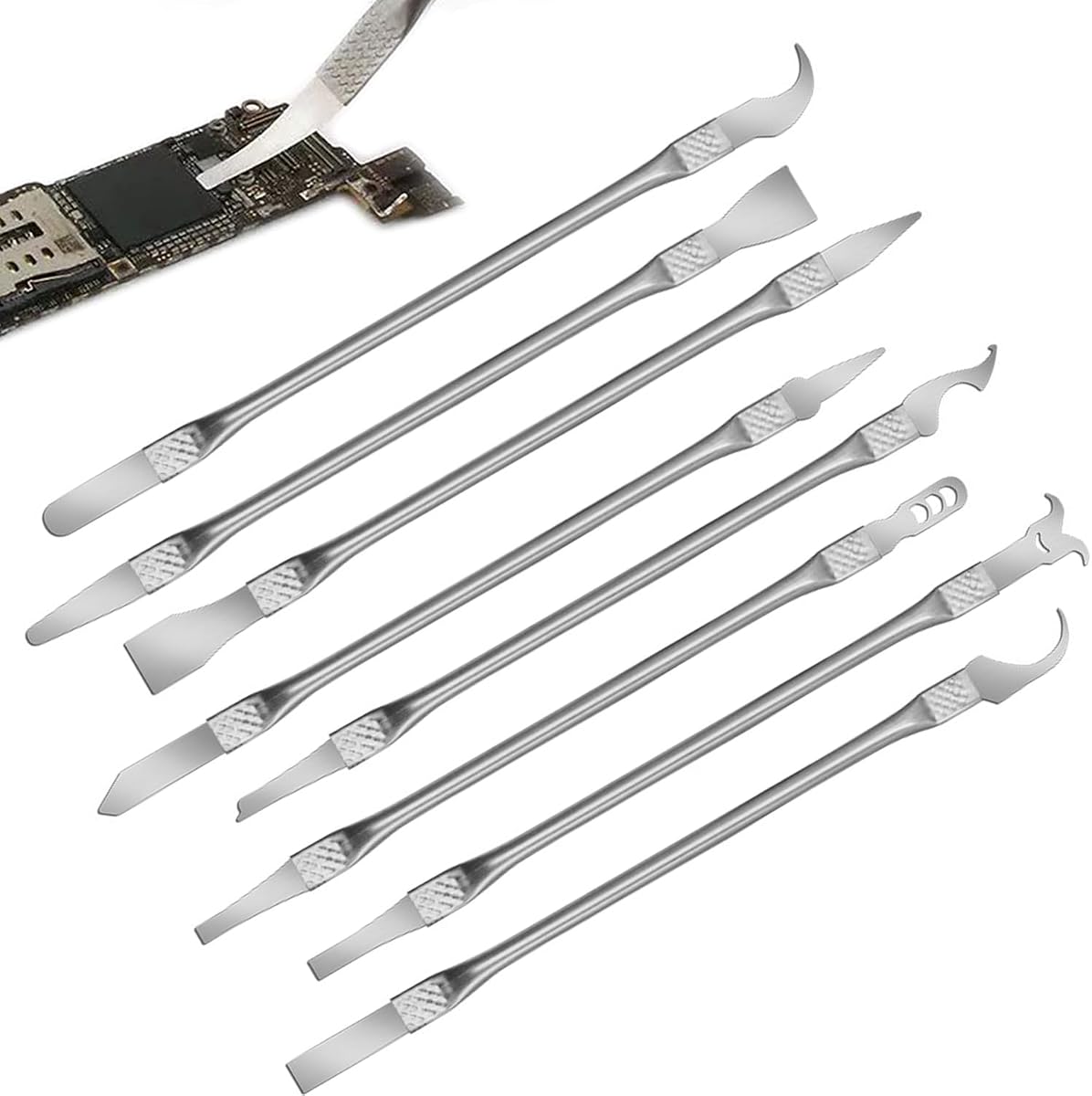
The 8 Piece Set Multi-Function CPU Removal Tool Set offers a versatile approach for safe component removal. It has a 4.0 star rating from users who value its broad application. The set includes ultra-thin tools ideal for maneuvering between chips.
We may earn a commission when you buy through this link, at no additional cost to you.
Made from high-quality alloy these tools are resistant to corrosion and bending. The integrated blade and handle design saves time by eliminating assembly. Users appreciate the ergonomic grip that reduces hand fatigue during extended repair sessions on motherboards.
While it is not as specialized as other kits it serves well for general repairs and entry-level enthusiasts. The tools are durable enough for routine maintenance tasks without requiring expensive equipment. It balances affordability with functional design.
We suggest this kit for beginners looking to start repairing smartphones or small computer components. It provides a solid foundation of tools for common tasks. With proper care these tools can assist in many routine maintenance projects.
This set supports removal of BGA chips and other small components making it a practical choice for general electronics repair.
High-quality alloy ensures resistance to corrosion and bending providing reliable performance for repeated use in various repair scenarios.
We may earn a commission when you buy through this link, at no additional cost to you.
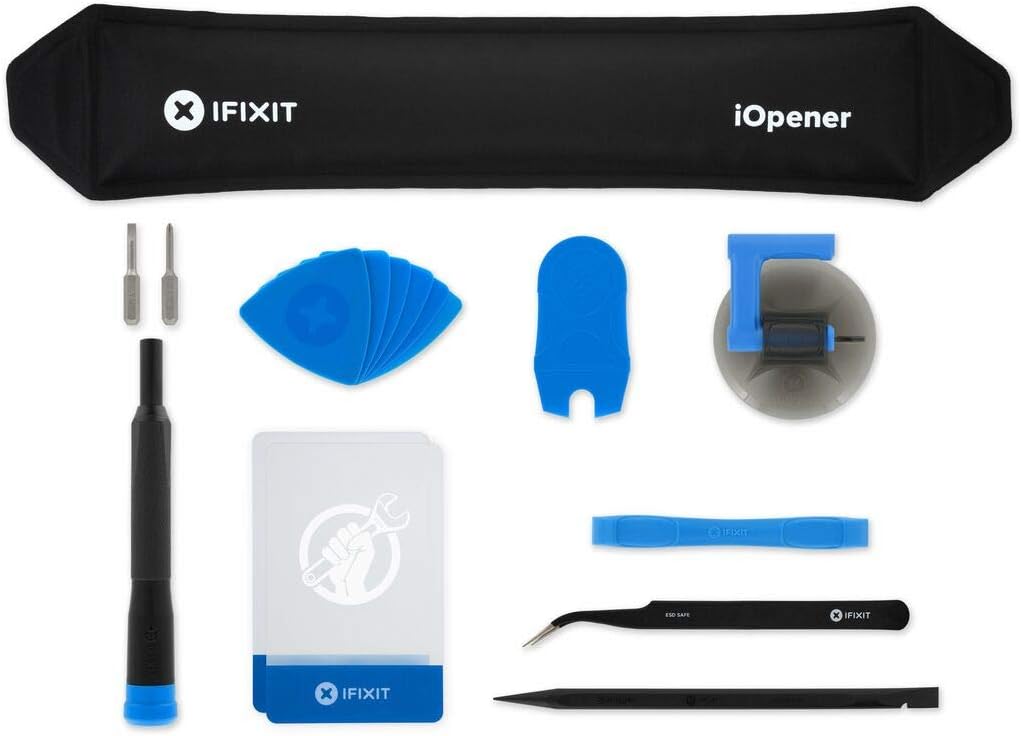
The iFixit iOpener is a heat pad designed to apply heat evenly to loosen adhesive during repairs. It has a strong 4.5 star rating and is known for safety with non-toxic materials. This tool is ideal for phones laptops and other electronics requiring heating.
We may earn a commission when you buy through this link, at no additional cost to you.
Its universal nature allows it to work on a wide range of devices. The design ensures that heat is applied safely without toxic risks. Users find it easy to handle and compatible with many repair workflows needing temperature application.
While it does not directly remove lids it is crucial for opening cases safely. It is often used alongside delidding tools to prepare surfaces. The food safe aspect makes it a trusted choice for consumer electronics maintenance.
We recommend this tool for any repair station dealing with screens or adhesive components. It enhances safety and efficiency in disassembly tasks. With its reputation and performance it is a valuable addition to your repair toolkit.
The heat pad loosens adhesive evenly enabling safe removal of screens and panels without the damage from physical force.
Made from food-safe non-toxic materials the iOpener ensures a safe repair environment for both users and sensitive electronics.
We may earn a commission when you buy through this link, at no additional cost to you.
Choosing the right delidding kit requires attention to compatibility and quality to ensure safe hardware modification.
Compatibility is the most critical factor when selecting a delidding kit. You must ensure the tool fits your specific CPU socket or console model. For example Intel LGA 2066 CPUs need specialized tools like the delid-Die-Mate X. Using a tool not designed for your hardware can lead to irreversible damage.
Always verify the socket type and processor generation before purchasing. Check product descriptions for supported models to avoid buying an incompatible tool.
Build quality determines the safety and durability of the tool. High-grade materials such as stainless steel or anodized aluminum provide better precision and longevity. Cheaper plastic tools may bend or break applying excessive force that risks the CPU die.
Invest in tools made from durable alloys to ensure they perform consistently without wear affecting your results over time.
Ease of use impacts how smoothly you can perform the delid process. Tools with ergonomic handles and clear alignment features reduce the risk of user error. Beginners should prioritize kits that include step-by-step instructions or safety mechanisms.
Look for designs that simplify the removal and replacement process to minimize the time and effort required.
Price varies significantly between budget and premium kits. While affordable options exist they may lack precision or safety features. Premium kits often offer better build materials and specialized designs that justify the cost for frequent users.
Consider how often you will use the tool. For single use a budget option might suffice but for pros a reliable kit saves costs long term.
User reviews offer real-world insights into tool performance and reliability. High ratings often indicate consistent quality and user satisfaction. Reading feedback helps identify potential issues not listed in the product description.
Prioritize products with verified purchase reviews to get honest feedback on durability and ease of use.
Established brands often have a history of quality and support. Reputable manufacturers like Thermal Grizzly or iFixit invest in research and testing. This history can provide confidence in the tool's safety and performance.
Stick with known brands to reduce the risk of defects or poor customer support in case of issues.
Additional accessories like replacement blades or cleaning tools add value to the kit. Kits that include relid caps allow you to reinstall the heatspreader after applying new paste. This feature is essential for users who may revert changes later.
Check what is included in the box to ensure you have everything needed for a complete repair workflow.
Safety features such as non-slip grips or protective pads help prevent accidental slips. Delidding carries risks of damaging the chip or board so these features are vital. Look for designs that minimize contact with the main PCB.
Prioritize tools that are explicitly marketed as safe or designed by experts to reduce these risks.
To use a delidding kit properly first ensure your system is powered off and cooled down completely. Disassemble the cooler to expose the heatspreader and verify compatibility with your chosen tool.
Apply steady gentle pressure when inserting the tool into the seam of the heatspreader. Avoid forcing the tool as this can crack the silicon die. Once the heatspreader is loose lift it carefully to avoid tearing the adhesive.
After delidding clean the surface using an acrylic scraper to remove residue before applying new thermal paste. Store your tools in a dry place to prevent corrosion and keep blades sharp for future use.
Delidding carries inherent risks but using a dedicated tool minimizes them. Always follow guidelines and proceed at your own risk as it voids warranty.
A delidding kit allows you to remove the metal heatspreader from the CPU to apply thermal paste directly on the die for better cooling.
No, you can reinstall the heatspreader using a relid tool after applying new thermal paste. This restores the original look and protection.
The Thermal Grizzly Delid-Die-Mate is compatible with 12th and 13th Gen Intel Core processors using modern sockets.
Some kits like the Delid Tool V3 are specifically designed for PlayStation 3 consoles to address overheating issues safely.
Delidding reduces cooler mounting height slightly. Check if your cooler supports the lower height before proceeding with the modification.
We have reviewed the top ten delidding kits available in November 2026 offering options for various budgets and hardware types. From the Thermal Grizzly tool to console-specific sets there is a reliable solution for every need.
When choosing prioritize compatibility and build quality to ensure safe and effective results. Consider the additional features like relid tools or blade replacement to add long-term value.
Please verify current pricing and availability before purchasing as these details change frequently. We hope this guide helps you find the perfect tool to optimize your system.