
Redragon K618 PRO Wireless Ultra-Thin Gaming Keyboard
4.1Editor score
Tri-mode connectivity
On-the-fly macros
Slim 30% profile
This guide compares the top 10 low profile mechanical keyboards for speed, comfort, and build quality to help you choose the best option for your workflow.
Low profile mechanical keyboards offer a unique blend of tactile feedback and ergonomic comfort that traditional full-height boards cannot match. Their slim design reduces wrist strain during long typing sessions while maintaining the responsiveness gamers and writers demand. Choosing the right one involves balancing switch type, connectivity options, and build materials.
We evaluated ten leading models based on actuation speed, key travel distance, wireless stability, and overall durability. Each product was analyzed for its unique features, such as customizable macros, multi-device switching, and acoustic dampening. Our goal is to provide a clear comparison to help you find the perfect fit.
Each pick highlights specific strengths like budget-friendly options, premium wireless performance, or unique display integrations. These selections cover various layouts and use cases to ensure broad relevance. Note that prices and availability change frequently, so always verify current details before purchasing to ensure you get the best value.
4.1Editor score

4.7Editor score

4.4Editor score
This side-by-side comparison breaks down the essential specifications of each model to help you quickly identify the best fit for your needs.




The Keychron K1 Ultra 8K stands out as the top recommendation for those seeking speed and versatility. With a 4.7 rating, it balances productivity and performance through its 80% TKL layout and high-speed polling capabilities.
We may earn a commission when you buy through this link, at no additional cost to you.
Its standout feature is the support for 8K polling rates over wired connections, ensuring minimal latency for competitive gaming. The inclusion of hot-swappable low-profile POM switches allows users to customize tactile feel without soldering, enhancing longevity and user satisfaction.
While it excels in build quality and connectivity, the higher price may deter budget-conscious buyers. Additionally, leveraging the full potential of the ZMK firmware requires some technical know-how, which could be a barrier for casual users.
We recommend this model for professionals and enthusiasts who demand reliable wireless performance and tactile customization. It offers a robust platform that grows with your needs, making it a worthwhile investment for long-term use.
Hot-swappable sockets allow you to change switches to match your preferred force and sound profile easily.
Hardwood side panels and double-shot keycaps ensure the keyboard looks and feels high-quality over years of use.
We may earn a commission when you buy through this link, at no additional cost to you.
The Redragon K618 PRO is an excellent choice for users needing a functional low-profile keyboard without breaking the bank. Its 4.1 rating reflects solid performance for the price, offering essential features like macros and multi-device support.
We may earn a commission when you buy through this link, at no additional cost to you.
The dedicated 4×5 macro zone lets you record combos without software, which is rare at this price tier. Tri-mode connectivity ensures you can jump between PC, laptop, and tablet seamlessly, maintaining workflow efficiency across different devices.
However, the construction is primarily plastic, which may feel less durable than metal alternatives. The battery life is shorter compared to competitors, requiring frequent charging if used wirelessly for extended periods.
Ideal for students or entry-level gamers, this keyboard delivers immediate value. It provides the core benefits of low-profile typing at an accessible cost, making it a practical starting point for new users.
Physical macro keys let you execute complex sequences instantly without needing driver installation or background software.
A one-touch switch lets you toggle between Windows and Mac layouts effortlessly to match your current system.
We may earn a commission when you buy through this link, at no additional cost to you.
The Keychron K17 Max represents the high end of low-profile keyboards, combining a dense 96% layout with premium QMK customization. Its 4.4 rating highlights its reliability and professional appeal for power users.
We may earn a commission when you buy through this link, at no additional cost to you.
This model integrates QMK firmware via a web app, allowing deep customization of keys and macros. The aluminum frame adds structural rigidity, preventing flex during rapid typing, while the double-shot PBT keycaps resist shine and wear over time.
Its weight and complexity might be overwhelming for casual users who just want plug-and-play functionality. Also, the 96% layout can feel cramped for those accustomed to full-sized boards or dedicated number pads.
Best suited for professionals with large workflows, this keyboard maximizes desk real estate without sacrificing functionality. It offers the tactile satisfaction of high-end peripherals while maintaining the ergonomic benefits of a low-profile design.
QMK firmware transparency allows for secure and highly flexible key mapping that respects user privacy.
At 31% thinner than standard switches, the keyboard sits low to the desk, reducing wrist extension strain.
We may earn a commission when you buy through this link, at no additional cost to you.
The Keychron K3 V2 is a staple in the low-profile market due to its reliable Bluetooth connectivity and Mac compatibility. With a 4.3 rating, it proves that functionality can be maintained in a slim, portable form factor.
We may earn a commission when you buy through this link, at no additional cost to you.
Connecting up to three devices via Bluetooth 5.1 ensures seamless transitions between devices. The included Mac-specific keycaps simplify layout changes, and the aluminum top frame provides a premium feel despite the plastic base.
It lacks full hot-swap support, limiting switch replacement options without modification. Additionally, the plastic bottom may transmit more vibration than all-metal designs, though this is minor for most users.
Perfect for creatives and office workers, this keyboard blends utility with style. Its lightweight build makes it ideal for remote workers who travel frequently and need a compact solution that works with their existing setup.
Dedicated function keys align with macOS shortcuts, making it a natural choice for Apple ecosystem users.
The thin profile allows for easy sliding into laptop sleeves, enhancing mobility for digital nomads.
We may earn a commission when you buy through this link, at no additional cost to you.
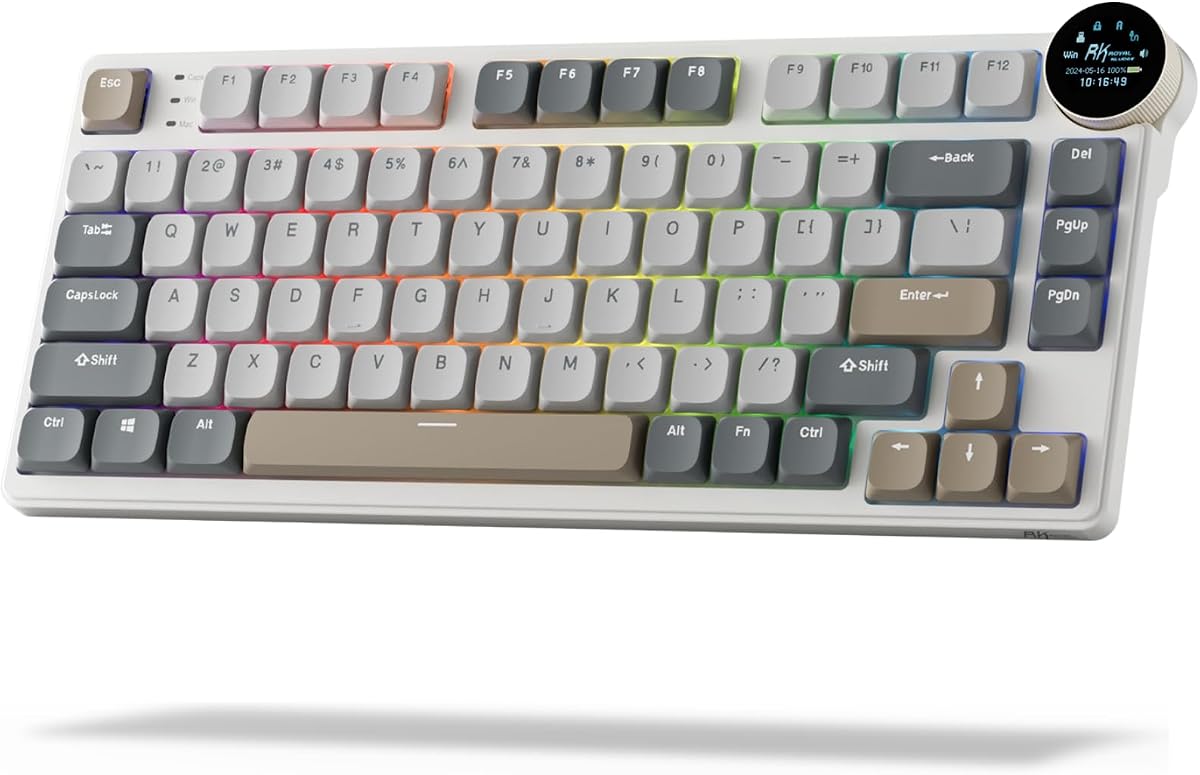
The RK ROYAL KLUDGE N80 introduces an innovative smart screen that adds a unique visual layer to typing. Rated at 4.1, it stands out for its combination of customization and performance features.
We may earn a commission when you buy through this link, at no additional cost to you.
The small screen can display GIFs or battery status, adding personality to your setup. Combined with a volume knob, the user interface becomes tactile and intuitive, reducing reliance on software menus for basic adjustments.
However, the screen adds power consumption which may slightly reduce battery life. Also, its visibility can be poor in direct sunlight or extremely dark environments depending on the brightness settings.
For users who value personalization and modern aesthetics, this keyboard is a standout. It bridges the gap between standard productivity tools and interactive tech, making typing a more dynamic experience.
A physical knob adjusts volume or brightness instantly, offering a smoother workflow than key combinations.
The screen displays connection modes and status, ensuring you always know which device is active at a glance.
We may earn a commission when you buy through this link, at no additional cost to you.
The Flow Lite 84 focuses heavily on comfort, utilizing a gasket mount to soften the typing feel. Its 4.3 rating reflects high satisfaction among users seeking relief from wrist strain during long sessions.
We may earn a commission when you buy through this link, at no additional cost to you.
The 40gf switches reduce finger joint fatigue significantly. A gasket design enhances the sound and feel by dampening impact, and a 2000mAh battery ensures days of usage without needing a recharge.
The transition from aluminum to ABS in the body may not appeal to those seeking a metal chassis. Furthermore, the specific switch options are limited to the Specter line, which restricts customization.
This keyboard is ideal for writers or coders prioritizing comfort. Its ergonomic design encourages healthier typing habits, making it a superior choice for those who spend hours at a desk daily.
Lower operating force means less physical effort per keystroke, extending comfort during extended work periods.
Sound-dampening layers enrich the acoustic output, delivering a soft thock rather than a harsh click.
We may earn a commission when you buy through this link, at no additional cost to you.
The Cherry MX 10.0N brings trusted MX switch technology to a low-profile form factor. Its 4.3 rating indicates reliable performance, particularly for gamers who need speed and precision.
We may earn a commission when you buy through this link, at no additional cost to you.
Cherry MX Low Profile Speed switches offer a linear and quiet feedback loop, ideal for rapid inputs. The aluminum housing adds a premium, durable touch, while the integrated stand ensures ergonomic positioning.
It lacks modern wireless connectivity, relying on wired connections for stability. The software is also less customizable compared to open-source options, which limits advanced users looking to tweak layouts.
Best for competitive gamers who value raw performance over features, this keyboard delivers the essential speed needed for high-level play. Its sturdy build ensures it withstands intense sessions without degradation.
Designed for rapid actuation, these switches minimize the delay between press and response in fast-paced games.
An integrated fold-out stand provides the best typing angle without needing external accessories.
We may earn a commission when you buy through this link, at no additional cost to you.
The Flow Lite 100 Keys expands on the comfort features of its 84-key sibling with additional function keys. With a 4.4 rating, it balances full functionality with the ergonomic benefits of a low-profile design.
We may earn a commission when you buy through this link, at no additional cost to you.
The 3000mAh battery significantly extends usage time compared to smaller models. The gasket mount ensures every keystroke feels consistent and cushioned, while the textured surface prevents sliding on desk surfaces.
Its larger footprint means it requires more desk space than compact boards. Additionally, the ABS body is lighter than metal, which some users might find less premium during typing.
This keyboard suits users who need numeric input or extra macros without sacrificing comfort. It bridges the gap between productivity and ergonomics, making it a solid choice for office environments.
The extra keys provide quick access to media controls and system functions without sacrificing typing comfort.
A 3000mAh cell supports over 100 hours of usage, reducing the need for frequent charging.
We may earn a commission when you buy through this link, at no additional cost to you.
The Keychron K3 Max SE improves on the K3 with modern features like hot-swap capability. Its 4.6 rating highlights strong satisfaction among users who want both performance and customization in a compact form.
We may earn a commission when you buy through this link, at no additional cost to you.
It supports QMK firmware for deep customization, while acoustic foams reduce noise for a quieter environment. The redesigned stabilizers ensure larger keys like spacebar do not wobble, offering a consistent typing experience.
The 75% layout might be too compact for users needing dedicated navigation keys. Also, the price sits in the mid-high range, which might be a consideration for budget shoppers.
Perfect for professionals and hybrid workers, this keyboard delivers a premium wireless experience. It balances tradition with modern tech, ensuring reliability across different operating systems and daily tasks.
Acoustic foam layers minimize sound, making it suitable for shared offices or late-night sessions.
Hot-swappable sockets allow quick changes to switches, letting you experiment with different tactile feels.
We may earn a commission when you buy through this link, at no additional cost to you.
The Razer Ornata V3 uses mecha-membrane switches to bridge the gap between membrane and mechanical. With a 4.5 rating, it offers a satisfying typing experience for gamers who prefer a quiet, low-profile option.
We may earn a commission when you buy through this link, at no additional cost to you.
The wrist rest provides essential support for long sessions, while UV-coated keycaps resist fading and wear. Dedicated media keys add convenience for controlling playback without interrupting gameplay or work.
It lacks true mechanical switches, which might disappoint purists seeking specific tactile feedback. The design is also proprietary, limiting third-party customization options.
Ideal for casual gamers and office users, this keyboard provides comfort and utility without the noise of mechanical switches. It is an accessible entry point for those looking to upgrade from standard membrane keyboards.
The included wrist rest is soft and magnetic, ensuring it stays attached and provides ergonomic alignment.
UV-coated caps ensure the legends stay clear and the surface remains resistant to oils and scratches.
We may earn a commission when you buy through this link, at no additional cost to you.
Selecting the right low profile mechanical keyboard requires understanding your specific needs regarding size, switches, and connectivity. This guide breaks down the critical factors to help you make an informed decision.
Low profile switches typically have a shorter travel distance than standard mechanical switches, often around 3.2mm. This results in faster actuation and less finger movement, which can reduce fatigue. When choosing, consider whether you prefer linear switches for smooth typing or tactile ones for feedback. Some keyboards also offer hot-swappable options, allowing you to change switches later without soldering.
Prioritize switches that match your typing style. If you type quickly, low travel speeds may feel too sensitive, while tactile switches can help prevent errors.
Low profile keyboards come in various layouts, from compact 60% to full-sized with numpads. A 75% or 80% TKL layout is a popular choice as it balances compactness with necessary function keys. Consider how much desk space you have and whether you rely on dedicated arrow keys or numpads for work.
Choose a layout that fits your workflow. Compact boards save space for mouse movement, while larger layouts reduce the need for function layer shortcuts.
Many modern low profile keyboards offer tri-mode connectivity: wired USB-C, Bluetooth, and 2.4GHz wireless. Wired modes are essential for gaming to ensure zero latency, while Bluetooth allows multiple device switching. 2.4GHz receivers provide stable wireless connections for general use without Bluetooth latency.
Ensure the keyboard supports the devices you use daily. If you switch between Mac and Windows, check for layout compatibility or physical keycap switches.
Build materials significantly impact durability and typing feel. Aluminum frames provide stability and reduce flex, while plastic bodies can be lighter but may vibrate. Look for high-quality keycaps like PBT, which resist shine and feel textured compared to ABS. Gasket mounts also add cushioning for a softer sound.
Invest in a board with robust construction to ensure it lasts longer. Metal cases generally offer better weight distribution and resistance to wear over time.
For wireless models, battery life is crucial. High-capacity batteries, often ranging from 1000mAh to 3000mAh, can provide weeks of usage on a single charge. Check if the keyboard offers power-saving features like dimmable backlighting to extend battery life when using RGB or white LED lighting.
Prioritize keyboards with longer battery life if you use wireless modes frequently. A battery that lasts days without charging reduces interruptions to your workflow.
Customization features like QMK firmware or proprietary software allow you to remap keys and create macros. Open-source solutions offer more control and privacy, while proprietary apps may be easier to use. Look for on-the-fly macro capabilities if you do not want to install drivers.
Choose software that fits your technical comfort level. Open-source firmware offers endless possibilities for advanced users, while simple apps help casual users customize quickly.
Low profile keyboards range from affordable options to premium models. While expensive boards offer better build materials and features like hot-swap sockets, budget boards can still provide good typing experiences. Determine which features are non-negotiable to find the best value.
Focus on core needs like connectivity and switch type rather than aesthetics. A mid-range board with practical features often offers better value than an expensive model with unnecessary add-ons.
To maximize the ergonomic benefits of a low profile keyboard, ensure your wrists rest naturally on a flat surface. Adjust your monitor height so you do not have to look down, maintaining a neutral posture. This setup reduces the strain on your wrists and shoulders during long sessions.
Keep the keyboard clean by regularly brushing away dust and debris between keys. Use compressed air to clear the space around switches and avoid spills. If you have a removable wrist rest, clean it separately with mild soap and water to maintain hygiene.
Update firmware periodically to access new features and improve connectivity stability. For wireless models, charge the battery before it fully depletes to maintain battery health. Avoid exposing the keyboard to direct sunlight or heat sources to prevent damage to the plastic or metal components.
Yes, low profile keyboards often enable faster typing because the keys have shorter travel distances. This allows for quicker actuation and requires less physical movement per keystroke. However, speed also depends on the switch type and user familiarity with the layout.
Most modern low profile keyboards offer dedicated Mac layouts or compatibility modes. Products like Keychron models include specific Mac keycaps and shortcuts. Always check the product details to confirm support for macOS functions and media keys.
Yes, they typically produce less noise due to shorter travel and sound-dampening layers. While they are quieter than loud mechanical switches, they still offer tactile feedback that can be satisfying. Adding foam or using O-rings can further reduce noise if desired.
Quality low profile keyboards are built to be durable, often featuring metal frames and reinforced switches. However, the shorter key height means that switches can sometimes be more sensitive to dust. Regular cleaning helps maintain long-term durability and consistent performance.
Many low profile keyboards function immediately without software, but advanced customization often requires drivers or web apps. Open-source options like QMK use web-based tools for configuration. Basic models may rely on onboard memory for saving settings without extra software.
A wrist rest is not always necessary but can enhance comfort during extended use. Low profile keyboards reduce wrist strain by design, but a soft rest can provide additional support. Some models include magnetic wrist rests for convenience and stability.
The 10 low profile mechanical keyboards reviewed here offer a range of options for different needs and budgets. From the versatile Keychron K1 Ultra 8K to the budget-friendly Redragon K618 PRO, each model brings unique strengths to the table.
Prioritize features that align with your primary use case, such as wireless stability for multitasking or speed for gaming. Consider the layout and build materials that will serve you best over time.
Prices and availability fluctuate, so checking current details ensures you get the best value. Investing in a quality low profile keyboard can significantly improve your daily workflow and typing comfort.