
MACHINIST X99 V9S
3.7Editor score
Triple M.2 Slots
WiFi M.2 Ready
Affordable Price Point
This guide compares the best Lga 3 X99 Motherboard options for high performance and reliability across diverse computing needs and budget ranges.
Finding the right Lga 3 X99 Motherboard is crucial for building a powerful workstation or gaming rig. These boards support high core count processors and offer extensive connectivity options for modern storage and graphics cards.
We evaluated ten top models based on socket compatibility, memory support, expansion slots, and build quality. Our analysis focuses on real world performance capabilities and the features that matter most to enthusiasts and professionals alike.
Each pick highlights key strengths and potential trade-offs to help you choose wisely. Keep in mind that stock and pricing fluctuate frequently so verify current availability before making your final purchase decision today.
3.7Editor score

4.1Editor score

2.9Editor score
The following table provides a side-by-side comparison of all ten selected motherboards to help you quickly identify the model that best fits your specific hardware requirements and budget constraints.


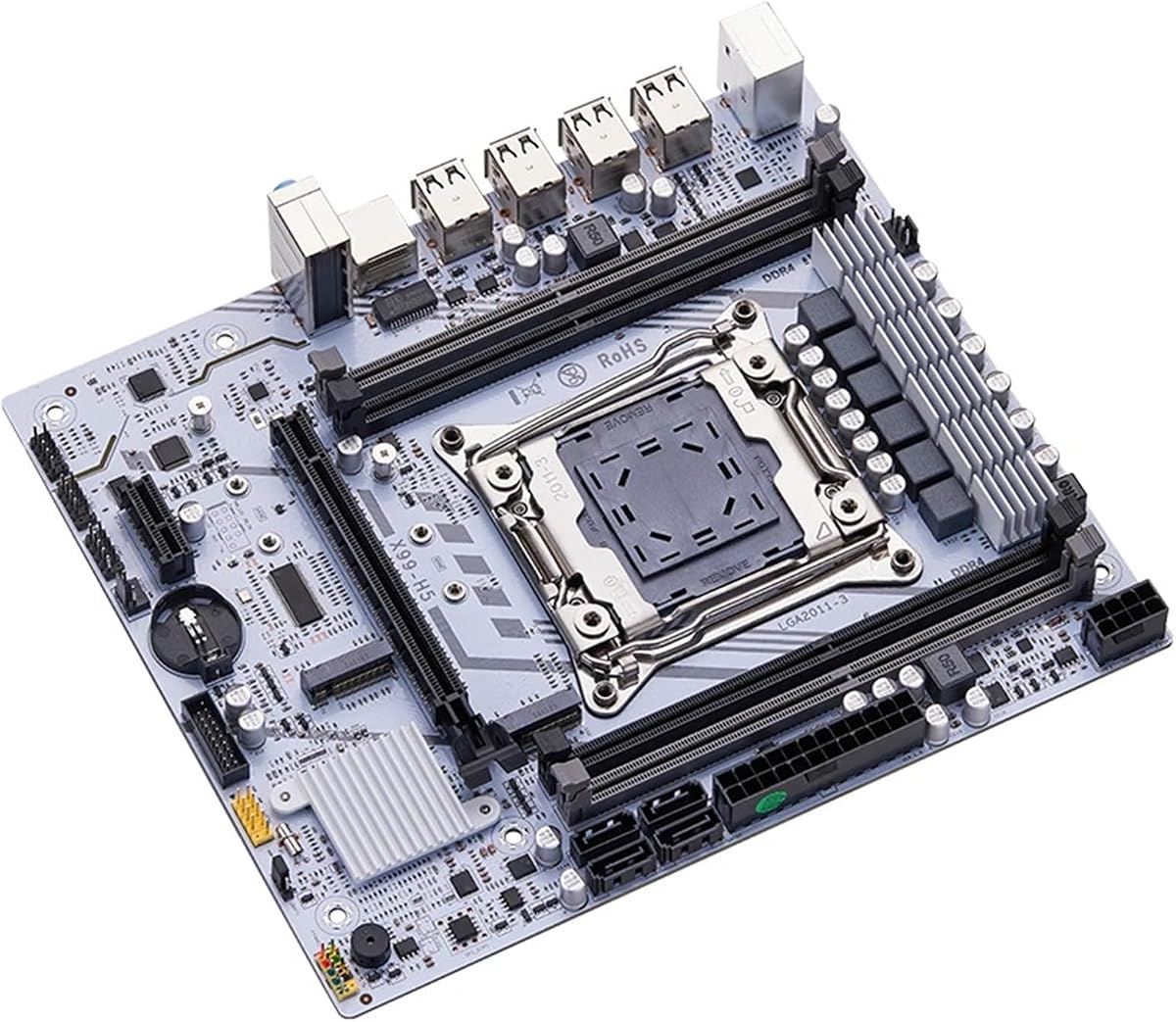

The MACHINIST X99 V9S stands out as an accessible entry point for those seeking high core count computing power without breaking the bank. Its compatibility with both Xeon and Core i7 processors makes it versatile for various build scenarios including virtualization and media centers.
We may earn a commission when you buy through this link, at no additional cost to you.
A standout feature is the inclusion of three NVME M.2 slots which allows for extensive high speed storage configurations. The board also supports up to 128 gigabytes of DDR4 memory in a four channel configuration ensuring ample room for data intensive tasks.
While the board offers impressive connectivity and power delivery through its six phase design users should note that the manual and battery are not included in the box. This might require extra preparation during the build process but does not hinder overall performance capabilities.
This motherboard is ideal for builders who prioritize raw specs and storage options over brand prestige. It delivers solid value for workstations needing multiple M.2 drives and support for server grade memory modules at a fraction of the cost of premium brands.
With three NVME M.2 slots you can run multiple high speed SSDs simultaneously for caching or massive storage pools.
The support for ECC RECC and non ECC DDR4 means you can use cheap server RAM for stability and capacity.
We may earn a commission when you buy through this link, at no additional cost to you.
The X99 PR9-H White brings a unique aesthetic appeal with its white PCB while maintaining strong functional specs for demanding workloads. It supports a wide range of LGA 2011-3 processors making it a flexible choice for custom server builds.
We may earn a commission when you buy through this link, at no additional cost to you.
Audio performance is a highlight with the Realtek ALC897 codec providing studio grade sound quality. This makes it a great option for home studios or entertainment centers where sound fidelity matters alongside computational power.
Build quality is reinforced by a six layer PCB and full solid capacitors ensuring stable power delivery. However like many budget options it excludes the CR2032 battery and manual which requires some extra effort from the user during setup.
This board is perfect for users who want a clean look without sacrificing core performance features. It balances affordability with necessary high end specs like gigabit LAN and robust memory support for multitasking environments.
The ALC897 codec supports 2.1 channel output delivering clear and detailed sound for music and gaming.
The white PCB design offers a distinctive look that stands out from standard green or black motherboards.
We may earn a commission when you buy through this link, at no additional cost to you.
The ASUS X99-E WS is a top tier workstation motherboard designed for users who need maximum graphics and storage flexibility. It supports up to four graphics cards and features industry leading USB 3.1 technology for fast data transfer speeds.
We may earn a commission when you buy through this link, at no additional cost to you.
Its 5-Way Optimization by Dual Intelligent Processors 5 makes tuning the system easy with one click total system optimization. This is particularly useful for professionals who need consistent performance without constant manual tweaking of BIOS settings.
The board also includes excellent maintenance tools like the Q Code Logger and Dr. Power LED which help diagnose power issues quickly. These features significantly reduce downtime and make troubleshooting much more straightforward for IT professionals and enthusiasts.
While it comes at a higher price point the extensive features and premium build quality justify the cost for serious users. If you need to run multiple GPUs or require the fastest USB connections this board is a reliable choice.
Quad-way PCIe Gen3 x16 links allow for serious graphics rendering or AI workloads with multiple cards.
USB 3.1 provides twice the speed of USB 3.0 ensuring quick transfers for large external drives.
We may earn a commission when you buy through this link, at no additional cost to you.
The ASUS X99-A is designed with gamers in mind offering specific features like the OC Socket to drive CPU and DDR4 performance beyond expectations. It combines robust power delivery with high quality audio components for an immersive experience.
We may earn a commission when you buy through this link, at no additional cost to you.
The 5-Way Optimization simplifies overclocking and cooling adjustments with just one click. This ensures your system runs efficiently without requiring deep technical knowledge of BIOS tuning which is a significant advantage for average users.
Audio quality is enhanced by the Crystal Sound 2 technology which isolates the codec for clearer sound. This is paired with Intel Gigabit Ethernet to ensure smooth online gaming without latency issues during critical moments.
Overall this board offers a balanced mix of features that appeal to gaming enthusiasts. While it may lack some of the extensive storage options of other models it excels in performance tuning and audio quality.
The OC Socket allows you to push your processor to its limits with optimized voltage and timing settings.
Crystal Sound 2 uses physical isolation to reduce electrical noise for crystal clear sound output.
We may earn a commission when you buy through this link, at no additional cost to you.
This motherboard is built for extreme workloads offering support for two Xeon processors simultaneously. With eight DDR4 slots it can accommodate up to 256 gigabytes of RAM making it ideal for virtualization servers or heavy data processing tasks.
We may earn a commission when you buy through this link, at no additional cost to you.
The inclusion of two PCIe X16 slots ensures you can install high performance graphics cards or storage controllers without bandwidth bottlenecks. This flexibility is rare in budget X99 boards and adds significant value for specialized applications.
While the board offers impressive hardware capabilities it may require more careful BIOS configuration to ensure both CPUs are recognized and running correctly. Users should be prepared for a more complex build process compared to single CPU boards.
This is a specialized choice for those who truly need dual CPU power. If you are building a high end server or rendering farm this board provides the necessary expandability and raw capacity.
Support for dual LGA 2011-3 processors allows for massive parallel processing capabilities in a single chassis.
Eight DDR4 slots mean you can max out memory capacity for demanding enterprise level applications.
We may earn a commission when you buy through this link, at no additional cost to you.
The Tangxi X99 Gaming board distinguishes itself with an eight layer PCB and robust power delivery system. These features contribute to greater stability and longevity which are critical for systems that run at high loads for extended periods.
We may earn a commission when you buy through this link, at no additional cost to you.
Its six phase power supply with solid capacitors ensures stable voltage to the CPU reducing the risk of system crashes under load. The thermal design includes effective heat dissipation components to keep temperatures low during intensive gaming or rendering sessions.
While user ratings vary the build quality materials used on this board suggest a focus on durability. It supports high frequency DDR4 memory up to 3200MHz allowing users to squeeze more performance out of their installed RAM modules.
This motherboard is a strong contender for those who prioritize build quality over brand recognition. It offers a reliable platform for E5 and i7 CPUs with enough connectivity for most gaming and professional needs.
Eight layers provide better signal integrity and power distribution which helps in overclocking scenarios.
Advanced heat dissipation keeps critical components cool preventing thermal throttling during long sessions.
We may earn a commission when you buy through this link, at no additional cost to you.
Similar to other dual CPU boards this model offers extensive memory support with eight DDR4 slots allowing for massive capacity configurations. It is designed for workloads that require significant RAM such as virtualization or large database management.
We may earn a commission when you buy through this link, at no additional cost to you.
The board supports dual Xeon processors enabling users to scale compute power effectively without building multiple systems. This centralization can save space and reduce power consumption for high performance computing environments.
While it provides powerful hardware features users should expect to spend time configuring the BIOS to optimize dual CPU performance. The lower rating suggests potential quirks that might require troubleshooting during initial setup or operation.
This board is suitable for specialized builds where memory capacity is the primary concern. It offers a path to high performance workstation capabilities at a reasonable cost point for those willing to invest time in setup.
Running two CPUs allows for parallel processing of complex tasks efficiently in a single build.
Eight DIMM slots ensure you can upgrade to high memory configurations easily as your needs grow.
We may earn a commission when you buy through this link, at no additional cost to you.
This motherboard stands out by supporting both DDR3 and DDR4 memory modules giving users more flexibility when choosing RAM. It is an excellent option for those looking to upgrade existing DDR3 systems to the X99 platform without replacing all memory.
We may earn a commission when you buy through this link, at no additional cost to you.
The board includes dual M.2 NVME slots which provide fast storage connectivity for modern operating systems and applications. It also features Core Boost technology designed to support more cores with better performance for intensive tasks.
Thermal management is handled with aluminum heatsinks which help dissipate heat effectively. This contributes to stable operation even when running high frequency memory or pushing CPU limits with demanding workloads.
The ability to use DDR3 memory can significantly lower the overall cost of a build. If you already have DDR3 RAM this board offers a cost effective way to access the performance benefits of X99 sockets.
Support for DDR3 allows you to repurpose existing memory modules saving money on the initial build.
Dual M.2 slots mean you can boot from an NVME drive while storing large media on a second one.
We may earn a commission when you buy through this link, at no additional cost to you.
Designed with a Micro ATX form factor this board fits into smaller cases while still offering essential features for high performance computing. It supports the full range of E5 V3 and V4 processors ensuring compatibility with powerful hardware.
We may earn a commission when you buy through this link, at no additional cost to you.
The inclusion of NVME M.2 and PCIe 3.0 support ensures you can utilize modern storage and expansion options. This allows for a balanced build that is compact enough for tight spaces without sacrificing speed.
Because of the smaller size there are fewer expansion slots compared to full ATX models. However for users who do not need multiple GPUs this compact footprint makes it easier to manage airflow and cable routing.
This motherboard is a great fit for compact workstations or home servers where space is a premium. It delivers the necessary connectivity and CPU support in a size that keeps your build footprint small.
The M-ATX layout allows for a smaller case while maintaining support for large Xeon processors.
NVME support ensures fast boot times and rapid application loading even in a compact chassis.
We may earn a commission when you buy through this link, at no additional cost to you.
The E5 MR9A V1.0 focuses on reliability and stability with multiple safety protections and a solid power supply. It ensures stable low temperatures under full load which is critical for systems that run continuously without interruption.
We may earn a commission when you buy through this link, at no additional cost to you.
High frequency memory support allows for smooth multitasking and faster data processing speeds. This makes it suitable for office and gaming environments where responsiveness is key to user satisfaction and productivity.
Complete external interfaces mean you can connect a wide range of peripherals without adapters or hubs. This convenience simplifies the setup process and ensures you have all necessary ports available for your daily use.
This board is a safe choice for users who prioritize system stability and reliability. It offers a balanced feature set that covers the basics well without unnecessary complexities that might complicate the build.
Multiple safety protections ensure your hardware is safe from power surges or electrical inconsistencies.
A complete set of external interfaces makes connecting all your devices straightforward and easy.
We may earn a commission when you buy through this link, at no additional cost to you.
Selecting the right Lga 3 X99 Motherboard involves evaluating several key factors that affect performance and compatibility. Understanding these elements will help you avoid costly mistakes and ensure a smooth build experience.
Ensure the motherboard supports your specific processor model such as Xeon E5 V3 V4 or Core i7 5th or 6th gen. The LGA 2011-3 socket is standard but chipsets vary so check manufacturer specs carefully before purchasing.
Always verify the CPU list provided by the vendor to confirm your specific processor is supported to avoid boot issues.
Look for boards that support the type of RAM you plan to use such as ECC RECC or non ECC DDR4. The number of slots dictates how much memory you can install with some boards supporting up to 256GB total.
Choose a board with enough slots to reach your target memory capacity in the future without replacing the entire unit.
Check the number of NVME M.2 slots available since this impacts how many fast SSDs you can install. SATA ports are also important for traditional hard drives ensuring you have enough connections for all storage needs.
Prioritize boards with multiple NVME slots if you need high speed storage for multiple operating systems or applications.
If you plan to use multiple graphics cards or capture cards ensure the board has enough PCIe slots. Verify the lane distribution so that adding cards does not throttle performance unnecessarily.
Count your current and future expansion needs to select a board that leaves room for upgrades down the line.
A robust VRM design with solid capacitors ensures stable voltage delivery especially under high load. Look for boards with adequate heatsinks on power phases to prevent overheating during intensive tasks.
Good power delivery is essential for overclocking or running high wattage processors without system instability.
Choose between ATX or Micro ATX based on your case size and required expansion slots. ATX boards offer more features while Micro ATX saves space and fits smaller enclosures easily.
Measure your case and plan your build to ensure the board fits without conflicting with other components.
Ensure the board includes a gigabit LAN port for fast internet connections and decent audio codecs if you need good sound. Check if you need WiFi capabilities built in or if you will use an adapter.
High quality audio and networking are often overlooked but critical for daily productivity and entertainment.
Review customer feedback and ratings to gauge reliability and manufacturer support quality. Boards with better reputations usually have fewer defects and better driver support for long term stability.
A board with good community support makes troubleshooting easier and ensures you can find help if issues arise.
Install the motherboard carefully in a static free environment using the provided standoffs. Ensure all power connectors and data cables are firmly plugged in before powering on the system for the first time.
Update the BIOS to the latest version immediately after booting to ensure maximum compatibility and stability. Use the manufacturer's provided tools to flash the firmware safely without interruptions during the process.
Keep the system clean by regularly removing dust from heatsinks and fans to maintain airflow and cooling efficiency. Avoid touching the circuitry directly and use a soft brush or compressed air for cleaning the motherboard periodically.
Most standard X99 boards support only DDR4 but some models explicitly support both DDR3 and DDR4. Always check the product specifications before purchasing if you plan to reuse existing DDR3 RAM modules.
Yes many Lga 3 X99 Motherboards support ECC and RECC memory modules. However compatibility depends on the specific CPU and board so verify the product details before buying memory.
Modern X99 boards typically include M.2 slots for NVME but older or budget models may not. Check the number of NVME M.2 slots listed in the specs to ensure you get the speed you need.
These boards generally support Intel Xeon E5 V3 and V4 series as well as Core i7 5th and 6th generation processors. Verify your specific processor model against the supported CPU list on the product page.
It depends on the board model with some supporting dual or even quad graphics cards via PCIe slots. Review the PCIe lane configuration to confirm how many cards can run at full speed simultaneously.
Most budget X99 boards do not include the CR2032 CMOS battery so you may need to purchase one separately. Be prepared to install it yourself before powering on your new system.
While some boards offer excellent features reliability can vary by manufacturer. Check customer reviews and ratings to ensure the model you choose has a track record of stable performance.
Yes most X99 boards support overclocking of supported CPUs like the Core i7 series. However server grade Xeon CPUs usually have locked multipliers and cannot be overclocked.
Choosing the right Lga 3 X99 Motherboard depends on your specific performance needs and budget constraints. The top picks offer a mix of high capacity memory support robust storage options and strong power delivery for demanding tasks.
Consider whether you need specialized features like dual CPU support or multiple NVME slots before deciding. A balanced board with good build quality will serve you well for years of productive computing.
Always double check current availability and prices before purchasing as these fluctuate regularly. Ensuring you have the right parts ready will help you complete your build quickly without delays.