
darkFlash V92 9.2" PC Case Screen, 1920×462 IPS Sensor Panel Monitor, Black
4.1Editor score
9.2 inch ultra-wide panel
USB-C or 9-pin connect
Free Station Space software
Adding an LCD screen for PC case builds transforms how you monitor your system. These displays show real time stats, custom animations, and system health without needing extra desktop space.
We evaluated ten top models based on resolution, software support, mounting flexibility, and display quality. Our list covers everything from compact sensor panels to full secondary monitors designed for gaming rigs.
Each pick highlights unique strengths like touchscreen support, ARGB lighting, or easy internal mounting. Prices vary by features and size, so check current listings before deciding on your ideal display solution.
4.1Editor score

4.4Editor score

4.2Editor score
As an Amazon Associate we earn from qualifying purchases.
This side-by-side comparison evaluates all ten LCD screens for PC cases across key criteria. We look at resolution, connection types, mounting options, and software features to help you find the right fit for your setup.




The Lian Li SM088X stands out as a top choice for PC case LCD screens. With its 8.8-inch display and ARGB frame, it delivers vibrant visuals and seamless integration into your build. Rated highly by users, it offers a polished look and robust functionality.
We may earn a commission when you buy through this link, at no additional cost to you.
Its L-Connect 3 software allows deep customization, including preset themes and custom uploads. The USB-powered design means you can use it as a secondary monitor without draining GPU ports. The diffused ARGB lighting enhances aesthetics without glare.
While the mounting requires specific screws and attention to detail, the flexible brackets make positioning easy. The screen tilt and height adjustments ensure optimal viewing angles. Users note that setup takes time but results are worth it.
If you prioritize aesthetics and control, this screen is ideal. It suits enthusiasts who want a cohesive RGB ecosystem. The secondary monitor feature adds versatility. Check compatibility with your case before buying.
L-Connect 3 enables modular layouts, video uploads, and theme sharing for a unique display style.
The screen functions independently via USB, displaying hardware stats or media without HDMI connections.
We may earn a commission when you buy through this link, at no additional cost to you.
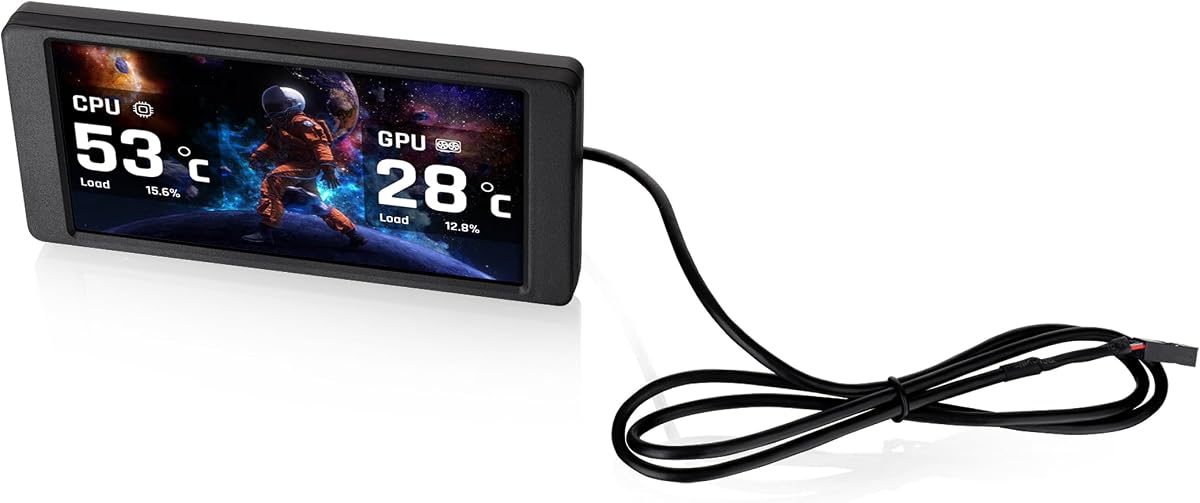
The darkFlash V92 offers exceptional value for budget-conscious builders. Its 9.2-inch IPS panel provides sharp visuals and wide viewing angles suitable for internal case displays. Rated solidly by users, it balances cost and performance effectively.
We may earn a commission when you buy through this link, at no additional cost to you.
Connection options include USB-C or 9-pin headers, keeping GPU ports free. The Station Space software is free and supports various widget types like weather and news. It runs smoothly on Windows 10 and 11.
Some users note the software must stay running in the background. Also, it lacks macOS compatibility. The slim design fits well but check clearance before purchase. Overall, it is a reliable entry point.
Choose this if you want a cost-effective solution with decent resolution. It works well for monitoring hardware stats. The mounting bracket is included. Verify your case size before ordering.
External USB or internal 9-pin connection options allow flexible integration without HDMI cables.
Station Space provides plugins, themes, and live widgets without extra subscription costs.
We may earn a commission when you buy through this link, at no additional cost to you.
The wisecoco 12.6 Inch screen is a premium option for Hyte Y60 cases. It delivers a wide, high-resolution display with built-in speakers for audio feedback. Rated well by users, it combines utility with immersive gaming visuals.
We may earn a commission when you buy through this link, at no additional cost to you.
HDMI input lets it function as a secondary monitor on any PC. The speakers add multimedia capability without extra hardware. Installation is straightforward with included cables and screwdriver. It fits the Y60 panel precisely.
Users mention the screen requires external power via DC or USB A. The HDMI cable is included but check length for your setup. It shines as a desktop extension or case display. Build quality is robust.
If you own a Hyte Y60, this screen is a perfect match. It offers the largest display in the list. The speakers enhance experience. Verify HDMI compatibility with your GPU before buying.
Dual speakers provide sound output directly from the screen, saving space in compact builds.
HDMI input enables use as an external monitor beyond internal PC case display functions.
We may earn a commission when you buy through this link, at no additional cost to you.
The WOWNOVA 8 Inch screen focuses on simplicity and ease of use. Its 8-inch IPS panel offers wide viewing angles and dynamic theme support. Rated highly for setup speed, it appeals to builders wanting quick deployment.
We may earn a commission when you buy through this link, at no additional cost to you.
Desktop mode allows it to act as an extended screen. Only one USB-C or 9-pin cable is needed. The software is user-friendly with drag-and-drop layouts. Auto-start and brightness controls improve daily usability.
Users note that the software is optimized for minimal resource usage. However, only white casing is available. Linux or macOS users may find limited support. The screen quality remains vibrant and responsive.
This screen suits those prioritizing quick installation. It is great for temperature monitoring and custom themes. Check OS compatibility before purchasing. The single cable design reduces clutter.
Single USB-C or 9-pin cable handles both power and data for simplified wiring.
Switch to extended screen mode for full display tasks beyond system stats monitoring.
We may earn a commission when you buy through this link, at no additional cost to you.
The Hosyond 8.8 Inch screen stands out with its touchscreen feature. It allows direct interaction for system monitoring and content control. Rated well by users, it is versatile for PC cases and Raspberry Pi projects.
We may earn a commission when you buy through this link, at no additional cost to you.
HDMI input enables touch functionality, making it a true secondary display. USB-C powers it with minimal wattage. The driver-free design simplifies installation on Windows and Linux systems. Brightness and colors are vibrant.
Users note that for PC case use, AIDA64 must be installed separately. Mounting is less specialized than other models. It works best when placed externally or on a desk. Touch response is smooth.
Select this if touch control is important for your workflow. It is great for Pi or mini PCs. Verify HDMI support for touch. The low power draw is a bonus.
Capacitive touch allows direct interaction with widgets, themes, and monitoring panels.
Consumes only 3.8W via USB-C, ideal for low energy builds and Pi setups.
We may earn a commission when you buy through this link, at no additional cost to you.
The Thermalright Trofeo Vision offers a sleek 9.16-inch display with excellent resolution. It is built to fit inside cases or attach externally. Rated positively by users, it provides a clean, functional look.
We may earn a commission when you buy through this link, at no additional cost to you.
TRCC software supports preset themes and custom designs. The USB-C connection ensures quick setup. Dimensions are compact at 251x68x17mm, making it unobtrusive. Display quality is sharp and color-accurate.
Users mention software interface is simple but effective. Mounting requires careful alignment. It lacks advanced features like ARGB lighting. However, it balances size and performance well.
Choose this for minimalist builds needing a compact display. It suits cases with limited internal space. Verify clearance before mounting. TRCC customization adds personalization.
Slim dimensions allow placement in tight spaces without compromising on screen size.
Software enables dynamic image switching and personal theme creation easily.
We may earn a commission when you buy through this link, at no additional cost to you.
The Thermaltake 6.0 Inch screen is made for View 370 and 390 cases. It delivers sharp 720p visuals and supports TT RGB PLUS 3.0. Rated moderately by users, it integrates well with Thermaltake ecosystems.
We may earn a commission when you buy through this link, at no additional cost to you.
Users can upload custom graphics and view system stats. The resolution is sharp for its size. It supports multiple file formats. Setup requires TT RGB software integration.
Non-Thermaltake cases may not fit properly. The price is higher compared to generic models. However, for View owners, it offers seamless hardware and software integration.
Select this if you own a compatible Thermaltake case. It enhances build aesthetics with high-res images. Check case model compatibility before buying. TT RGB sync adds value.
Specifically designed for Thermaltake View series chassis panels and brackets.
Upload JPG, GIF, or MP4 files for personalized backgrounds and animations.
We may earn a commission when you buy through this link, at no additional cost to you.
The GeeekPi 12.6 Inch screen is designed for Hyte Y60 cases with touch support. It offers 10-point multi-touch and integrated speakers. Rated solidly by users, it merges utility with interactive features.
We may earn a commission when you buy through this link, at no additional cost to you.
Installation is easy with included screwdriver. The IPS panel provides wide viewing angles and bright colors. Touch works well with Windows and macOS systems. Speakers allow audio feedback.
Users note to remove protective film before use. Setup requires connecting HDMI and power. The touch sensitivity is responsive. It serves well as a secondary monitor.
Choose this for interactive Hyte Y60 builds. It adds value with touch and sound. Check power requirements. The large size is ideal for detailed stats.
Up to 10-point touch support allows gestures and direct control on screen.
Dual built-in speakers remove need for external audio hardware in builds.
We may earn a commission when you buy through this link, at no additional cost to you.
The Thermalright TV 9.16 features a magnetic mounting system for effortless installation. It offers an IPS panel with solid color reproduction. Rated well by users, it provides flexibility in placement.
We may earn a commission when you buy through this link, at no additional cost to you.
TRCC software manages display functions and auto-starts with Windows. USB-C handles power and data. The metal frame feels durable. It supports video playback and dynamic themes.
Users note that magnetic strength may vary by surface. Software setup is essential for full function. It is not ideal for internal case use without support. External mounting is best.
Select this for quick, tool-free placement. It suits modders wanting adjustable positions. Ensure compatible surfaces. TRCC software is easy to use.
Magnetic design removes need for screws, allowing rapid installation and relocation.
TRCC software starts automatically with system for continuous monitoring.
We may earn a commission when you buy through this link, at no additional cost to you.
The Thermalrlght Trofeo Vision 6.86 is a compact display option for tight cases. It features a magnetic panel and full-color IPS. Rated modestly by users, it works well for small builds.
We may earn a commission when you buy through this link, at no additional cost to you.
TRCC software enables dynamic image switching. The USB-C connection simplifies setup. It fits on coolers or cases. The resolution is decent but not high-end. It provides functional stats.
Users find it good for basic monitoring. It lacks advanced features like touch or speakers. However, it is cost-effective and easy to install. Placement flexibility is high.
Choose this for compact setups needing basic display. It is affordable and functional. Check resolution needs before buying. The magnetic panel is convenient.
Small dimensions allow placement on small areas like liquid coolers.
Software supports user-generated images and animations for personalized displays.
We may earn a commission when you buy through this link, at no additional cost to you.
Selecting an LCD screen for PC case requires considering size, software, mounting, and connection options. This guide outlines key factors to ensure the best fit for your setup.
Larger screens like 12.6 inches provide more detail but require space. Resolution affects clarity for stats. Choose based on available case area and readability needs.
Balance size with your case layout. High resolution improves text clarity.
Software controls customization. Options include TRCC, Station Space, or L-Connect 3. Check OS support for Windows or Linux and available widgets.
Prioritize software that offers easy theme and and stable background operation.
USB-C and 9-pin headers allow GPU-free connection. HDMI offers secondary monitor use. Confirm your motherboard and GPU have compatible ports.
Choose USB-C for power simplicity. HDMI adds display flexibility.
Magnetic mounts offer flexibility, screw mounts ensure stability. Verify case compatibility and clearance. Some screens need specific brackets.
Ensure mounting is secure to prevent vibration issues.
Touchscreens enable direct control of stats and themes. They usually require HDMI. Consider usability vs cost impact.
Touch is beneficial for external displays or Pi projects.
Most screens draw from USB-C or 9-pin. High brightness may need extra power. Confirm wattage matches your system.
USB-powered screens are easiest to integrate without extra adapters.
RGB lighting and slim profiles enhance look. Match case colors. Some screens offer ARGB sync.
Choose designs that align with your build theme.
Prices vary by features. Premium screens include audio or touch. Budget options focus on stats display.
Prioritize must-have features over extras to save money.
Start by installing the required software and connecting via USB-C or 9-pin. Adjust mounting brackets for optimal viewing angle.
Regularly update software themes to keep display fresh. Clean the screen gently with a microfiber cloth to avoid scratches.
Avoid excessive heat near the screen. Ensure cables are secured to prevent disconnection during maintenance.
Most screens use USB-C or motherboard 9-pin headers to avoid HDMI. However, touch models often need HDMI for touch functionality. Verify your model specs.
Yes, most rely on motherboard USB or 9-pin headers for power and data. This keeps GPU ports free for displays.
Some models like GeeekPi support macOS but many are Windows-only. Check compatibility before purchase.
Most use dedicated software like TRCC or L-Connect to design layouts. Upload custom images or select presets.
Magnetic mounts work best on metal surfaces. For internal cases, ensure sufficient contact area or use brackets.
They are low power, typically under 5W. USB-C power is sufficient for most models.
8 to 9.2 inches suits most internal cases. Larger 12.6 inch models fit Y60 or external setups.
Yes, all models support real-time CPU and GPU stats via software integration.
Top picks like Lian Li SM088X, darkFlash V92, and wisecoco 12.6 Inch cover diverse needs from budget to premium.
Prioritize software support and connection options. Touch and HDMI add versatility. Ensure mounting fits your case.
Check current prices and availability. Small differences in features can justify higher cost for your build.