
MokerLink 8 Port 10G Managed Ethernet Switch
4.3Editor score
8 x 10G Auto-Adaptive Ports
Web and CLI Management Interface
Metal Desktop or Rack Design
This guide compares the top Layer 3 Network Switch options for enterprise and home lab use, detailing routing features, port speeds, and management tools.
Layer 3 Network Switch options provide essential routing capabilities for modern networks. They enable efficient traffic segmentation and inter-VLAN routing without relying on external routers for performance and flexibility.
We compared ten top-rated models based on port configurations, management interfaces, and routing protocols. Each selection offers distinct advantages for specific network sizes and technical requirements across various environments.
Each pick highlights key strengths and limitations to help you decide. Prices fluctuate frequently, so verify current offers before purchasing. Our analysis focuses on performance, reliability, and ease of use for buyers.
4.3Editor score

4.7Editor score

4.3Editor score
This side-by-side comparison highlights the core specifications of each model. Review port counts, speed capabilities, and management features to find the best fit for your network infrastructure needs.
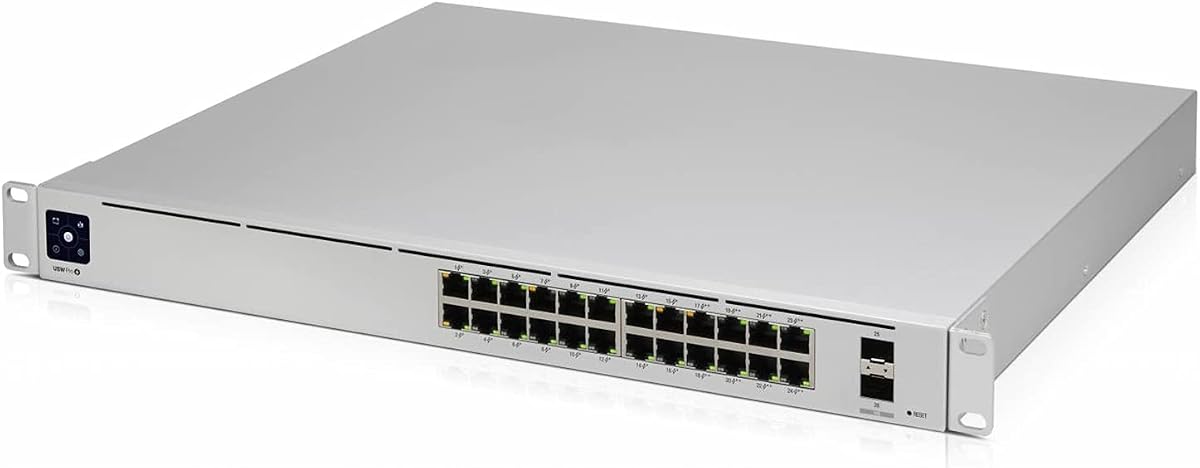


This switch delivers robust Layer 3 switching capabilities alongside PoE support. With a 4.7 rating, it stands out for its reliability and ecosystem integration in professional setups.
We may earn a commission when you buy through this link, at no additional cost to you.
Its 24 ports allow extensive device connectivity while the built-in routing reduces external hardware needs. The UniFi controller offers intuitive management for VLANs and QoS configurations efficiently.
While the price is premium, the feature set justifies the cost for businesses needing advanced control. Dependency on the controller can be a minor hurdle for isolated network environments.
Ideal for growing businesses or advanced users who value unified network management. It remains a top choice for those requiring both power and intelligent traffic handling in one unit.
The UniFi controller provides a single dashboard for monitoring traffic and managing VLANs seamlessly.
Built-in PoE simplifies cabling for cameras and access points without additional injectors.
We may earn a commission when you buy through this link, at no additional cost to you.
This model offers a cost-effective entry into 10G networking with Layer 3 capabilities. Its 4.3 rating reflects strong performance for home labs and small offices needing speed.
We may earn a commission when you buy through this link, at no additional cost to you.
All eight ports support auto-adaptive speeds from 10G down to 100M. This flexibility ensures compatibility with older devices while future-proofing connections for high-speed NAS systems.
Though the web interface lacks polish, CLI access provides deep control for experts. The metal case ensures stability and heat dissipation during continuous high-bandwidth transfers.
Perfect for budget-conscious tech enthusiasts needing high throughput. If you require extensive port counts, this is a great starter unit for your 10G network expansion.
Auto-adaptive ports eliminate the need for manual speed configuration on every device.
Industrial grade casing protects internal components while aiding heat dissipation.
We may earn a commission when you buy through this link, at no additional cost to you.
MikroTik delivers a high-performance unit designed for professionals who demand granular control. With a 4.3 rating, it suits advanced users comfortable with complex network configurations.
We may earn a commission when you buy through this link, at no additional cost to you.
The mix of four 10G SFP+ ports and eight copper ports allows versatile topologies. RouterOS provides features like MPLS and VLAN routing that competitors often lack at this price.
While powerful, the interface demands technical knowledge to utilize fully. The white chassis fits discreetly into racks, though fan noise may be noticeable in quiet environments.
Recommended for ISPs or data centers needing robust routing. If you have the expertise, this unit offers unmatched flexibility for custom network designs.
RouterOS supports complex routing setups including BGP and OSPF.
Combined copper and fiber ports reduce the need for multiple devices.
We may earn a commission when you buy through this link, at no additional cost to you.
This switch combines high power delivery with modern 2.5G speeds for demanding environments. A 4.6 rating highlights its reliability for powering next-gen Wi-Fi access points.
We may earn a commission when you buy through this link, at no additional cost to you.
Ports support up to 90W per port, ideal for pan-tilt-zoom cameras. The console port ensures direct CLI access for IT pros managing traffic without extra hardware.
The active cooling keeps temperatures stable but may be loud in quiet offices. While powerful, its bulk might require specific rack space planning for 1U mounts.
Excellent for tech enthusiasts building smart homes or studios. Its power headroom ensures connected devices never face bottlenecks during peak usage times.
90W per port capability supports high-end wireless and video devices.
A physical console port enables secure, direct configuration without a network link.
We may earn a commission when you buy through this link, at no additional cost to you.
Designed for fiber-heavy environments, this switch offers sixteen SFP+ ports for scalable connectivity. Its 4.4 rating confirms solid performance in data transfer and routing tasks.
We may earn a commission when you buy through this link, at no additional cost to you.
The 1G uplink provides a secure backbone connection while L3 features handle internal routing efficiently. Ideal for ISPs or businesses needing extensive optical links in a compact chassis.
However, the lack of copper ports means additional hardware for standard Ethernet devices. Transceivers add to the total cost, so budgeting for optics is essential.
Best suited for fiber-centric network cores. If your infrastructure relies on SFP+ links, this unit delivers the density and routing power needed for growth.
Sixteen SFP+ slots enable high-bandwidth optical connections.
Advanced routing protocols ensure optimal path selection across the network.
We may earn a commission when you buy through this link, at no additional cost to you.
This 48-port switch offers massive connectivity for large offices or data centers. A 3.7 rating indicates potential issues with heat or power efficiency compared to smaller models.
We may earn a commission when you buy through this link, at no additional cost to you.
The included touchscreen simplifies local monitoring without a controller. Four 10G SFP+ ports support high-speed uplinks for aggregate traffic flow from connected clients.
Note that PoE requires an external power source, which adds complexity. While the display is convenient, fans may spin loudly under heavy load in sensitive environments.
Ideal for environments needing extensive wired connections. It remains a viable option if you need high port counts without complex external management systems.
The 1.3 inch touchscreen allows status checks without a controller.
RPS support enables redundant power inputs for critical uptime.
We may earn a commission when you buy through this link, at no additional cost to you.
Designed for quiet spaces, this fanless switch delivers 10G performance silently. A 4.7 rating confirms its reliability for home studios and professional creative workstations.
We may earn a commission when you buy through this link, at no additional cost to you.
Eight SFP+ ports support fiber or DAC connections for low latency. Advanced DAI and ACL features secure the network against spoofing attempts effectively.
The global rate mode means all ports switch together, requiring careful planning. Lack of RJ45 ports limits use to fiber-based devices only.
Perfect for noise-sensitive environments needing fiber links. If your setup is all-fiber, this switch offers premium features without disturbing the workspace.
Fanless design ensures zero noise during video editing or calls.
Dynamic ARP Inspection protects against internal network spoofing threats.
We may earn a commission when you buy through this link, at no additional cost to you.
This model balances speed and size for mid-sized networks requiring some 2.5G links. A 4.5 rating reflects its reliability for managing modern device traffic flows efficiently.
We may earn a commission when you buy through this link, at no additional cost to you.
Sixteen ports allow connecting multiple computers and NAS devices simultaneously. The 2.5G speeds future-proof connections without the cost of full 10G hardware.
Lack of PoE requires separate injectors for wireless access points. It serves well as a distribution layer switch in UniFi environments.
Ideal for small offices needing mixed speeds. It fits neatly into tight spaces while providing essential routing and management capabilities.
Mix of 2.5G and 1G ports accommodates diverse device needs.
UniFi software offers deep visibility into connected client activity.
We may earn a commission when you buy through this link, at no additional cost to you.
This model introduces Etherlighting ports for instant visual status checks. With a 4.7 rating, it excels in professional setups where cable management and power are key.
We may earn a commission when you buy through this link, at no additional cost to you.
Sixteen ports with 180W budget support a mix of devices and cameras. The silent design makes it ideal for office environments where noise is a concern.
The premium cost may be high for smaller setups. However, the visual indicators save time during troubleshooting and maintenance cycles.
Perfect for IT managers needing clear visibility. It simplifies installation and maintenance while delivering robust Layer 3 routing capabilities.
Etherlighting ports show link status through integrated LED rings.
180W total output supports various PoE devices simultaneously.
We may earn a commission when you buy through this link, at no additional cost to you.
This model provides reliable connectivity without power delivery, reducing cost for non-PoE environments. A 4.4 rating indicates steady performance for general office networking tasks.
We may earn a commission when you buy through this link, at no additional cost to you.
Built-in power supply ensures consistent operation without external bricks. It supports fiber uplinks, enabling flexible connectivity to wider network segments.
The lack of PoE limits device types to PCs and printers. Still, it remains an efficient choice for structured data transmission needs.
Ideal for offices with separate PoE needs. If you only need data routing, this unit offers excellent value and manageable complexity.
Without PoE, this model offers a more affordable entry point.
Optical media support ensures reliable long-distance connections.
We may earn a commission when you buy through this link, at no additional cost to you.
Selecting the right Layer 3 Network Switch requires evaluating your specific network demands and technical expertise level.
Assess the number of ports needed and the desired speeds for your devices. Most models offer mix of 1G, 2.5G, and 10G speeds to balance cost and performance.
Choose a switch with enough high-speed ports to handle your most demanding applications without bottlenecks.
Ensure the switch supports necessary protocols like Static Routing, OSPF, or VLAN routing. This reduces reliance on external routers for traffic segmentation.
Look for hardware that handles inter-VLAN routing internally to maintain high throughput.
Determine if you prefer a Web UI, CLI, or full ecosystem controller. Some switches require external software for full functionality.
Select an interface that matches your technical comfort level for efficient daily management.
Check if you need to power devices like cameras or access points. PoE switches simplify cabling but often cost more.
If you do not need power delivery, a non-PoE model saves significant budget.
Consider rack-mount versus desktop designs. Rack units fit better in server rooms, while desktops are flexible for smaller spaces.
Fanless designs are quieter but may struggle with heat under heavy loads.
Advanced models offer ACLs, port security, and diagnostic tools like Ping and Traceroute. These features protect against unauthorized access.
Prioritize switches with built-in security measures to safeguard sensitive network traffic.
Look for SFP+ slots or upgradeable firmware to support future network expansions. This ensures longevity as your infrastructure grows.
A switch with uplink slots allows easy connection to high-speed networks later.
Some brands require specific software for full features. Evaluate if you are willing to maintain that environment.
Consistent software updates ensure long-term security and feature availability for your devices.
Begin by installing the device in a well-ventilated area. Connect your uplink cable to the designated port and then attach your end devices.
Access the management interface using a web browser or console cable. Set up VLANs and static routes to segment traffic effectively for your network.
Regularly update firmware to maintain security. Monitor port status indicators to quickly identify any connection issues.
A Layer 3 Network Switch handles both switching and routing functions. It allows traffic segmentation between VLANs without needing a separate router, improving speed and efficiency.
If your home lab involves complex networking or VLANs, a Layer 3 switch is valuable. For basic connectivity, a Layer 2 switch may suffice.
Most models offer both, but some require CLI for advanced routing. Choose based on your technical comfort and required configuration depth.
PoE switches deliver power over data cables. Choose one if you connect IP cameras or access points; otherwise, standard switches are cheaper.
Fanless units are silent and ideal for quiet spaces. Active cooling handles high heat loads better but creates noise.
SFP+ slots support fiber or copper optical transceivers for high-speed uplinks. They provide flexible connectivity for server connections.
Most support basic VLANs. Ensure your model supports inter-VLAN routing for seamless communication between segments.
Costs vary by features and brand. Entry-level models start lower while high-end units with PoE cost more.
We reviewed ten top Layer 3 Network Switch options for performance and flexibility. Each model offers distinct strengths for specific professional and personal needs.
Prioritize port speed, PoE needs, and management ease. Ensure your choice aligns with your current setup and future expansion plans.
Verify current prices before purchasing since they fluctuate. Select a unit that balances cost with long-term network reliability.