
2 in 2 Out USB 3.0 Switch
4.6Editor score
Aluminum alloy build shell
LED active indicator light
Two included USB cables
This guide compares the top keyboard and mouse switch for 2 computers to help you share peripherals efficiently across dual workstations or home office setups.
Managing multiple computers often requires swapping cables constantly. A keyboard and mouse switch for 2 computers lets you share peripherals seamlessly without physical reconnection efforts.
We evaluated ten real products based on port counts, data speeds, build quality, and user feedback. This list covers USB switches and KVM options for diverse workflow needs.
Each pick highlights key features, pros, and cons to help you choose wisely. Prices and availability change frequently, so verify details before purchasing your preferred model.
4.6Editor score

4.1Editor score

4.3Editor score
This comparison table outlines key specifications across all ten models. Review port counts, transfer speeds, included accessories, and compatibility notes to find the right fit for your dual PC environment.



This UGREEN USB 3.0 switch is designed for users who need to share multiple peripherals between two computers. It supports four USB ports including one USB C port for modern devices.
We may earn a commission when you buy through this link, at no additional cost to you.
Data transfer speeds reach up to five gigabits per second which is excellent for large file transfers between systems. The unit includes a controller for convenient switching without reaching behind devices.
While it is not a KVM switch and does not support video output it excels at sharing input devices and printers efficiently. Power supply is optional but recommended for high power devices like external hard drives.
This switch is ideal for office workers or home users managing two PCs who need reliable and fast peripheral sharing. It offers flexibility with both button and controller switching modes for different workflows.
The inclusion of a USB C port allows you to connect newer devices without needing additional adapters on your computers.
You can switch between computers using the button on the unit or the included controller depending on your desk setup needs.
We may earn a commission when you buy through this link, at no additional cost to you.
The BENFEI USB 3.0 switch provides a cost effective solution for sharing four USB devices between two computers. It supports keyboards, mice, printers, and more with plug and play ease.
We may earn a commission when you buy through this link, at no additional cost to you.
Data transfer speeds reach up to five gigabits per second allowing quick file sharing between systems. The LED indicator clearly shows which computer is currently active for convenience.
Although it does not support video output and the power adapter is not included it remains a solid choice for basic peripheral sharing. You may need to supply your own power adapter for high power devices.
This switch is well suited for users who want reliable USB sharing without breaking the bank. It is compatible with Windows, Mac, and Linux systems making it versatile for various environments.
You get four USB ports and fast data speeds at a very affordable price compared to other switches in the market.
The LED indicator light makes it easy to know which computer you are currently connected to at a glance.
We may earn a commission when you buy through this link, at no additional cost to you.
This 2 in 2 out USB 3.0 switch is designed for users who need to share two devices between two computers. It features a sturdy aluminum alloy shell for durability and heat dissipation.
We may earn a commission when you buy through this link, at no additional cost to you.
Data transfer speeds reach up to five gigabits per second which is fast enough for most peripheral and file sharing tasks. It includes two USB 3.0 cables for immediate setup.
While it only supports two ports it is perfect for sharing just a keyboard and mouse between work and personal computers. The one button toggle with LED indicator makes switching straightforward.
This switch is ideal for minimalists who do not need multiple ports and want a reliable compact solution. It is compatible with Windows, Mac, Linux and Chrome OS systems seamlessly.
The aluminum alloy shell provides a durable build that helps with heat dissipation during extended use.
Everything you need is included in the box with cables and a user manual for easy plug and play use.
We may earn a commission when you buy through this link, at no additional cost to you.
This UGREEN USB 3.0 switch is designed to share two devices such as a keyboard, mouse, or printer between two computers. It supports plug and play setup without drivers.
We may earn a commission when you buy through this link, at no additional cost to you.
Data transfer speeds reach up to five gigabits per second allowing quick file transfers between your systems. The one button toggle with LED indicator makes switching clear and easy.
It is not a KVM switch so it does not support video or monitor sharing. However it works well for sharing input devices and printers effectively between two PCs.
This switch is best for users who want a simple solution for printer or peripheral sharing without complexity. It is compatible with Windows, Mac, Chrome OS, and Linux.
The switch acts as a printer splitter allowing two computers to share one printer efficiently without conflicts.
No drivers or software installation is required to get started with your USB switching setup.
We may earn a commission when you buy through this link, at no additional cost to you.
This Hearvo HDMI KVM switch allows you to share a single monitor along with keyboard and mouse between two computers. It supports 4K resolution at 60Hz for sharp visuals.
We may earn a commission when you buy through this link, at no additional cost to you.
It includes four USB 3.0 ports for connecting various peripherals like keyboards, mice, scanners, printers, and webcams. A wired remote switch is included for convenient desk switching.
It supports Adaptive EDID for stable image transmission and requires no external power supply for operation. It is compatible with Windows, Mac, Linux, and other operating systems.
This is an ideal choice for users who want full control over both computers including video on one monitor. It provides a complete KVM experience with high resolution support.
Enjoy stunning visuals with support for 4K resolution at 60Hz ensuring crystal clear detailed images on your monitor.
This switch combines HDMI and USB switching into one device saving you from needing separate adapters or hubs.
We may earn a commission when you buy through this link, at no additional cost to you.
This UGREEN USB switch selector provides a simple way to share four USB 2.0 peripheral devices between two computers. It supports keyboards, mice, printers, scanners, and more.
We may earn a commission when you buy through this link, at no additional cost to you.
Data transfer speeds are up to 480 megabits per second which is suitable for standard peripherals and moderate file sharing. It includes two USB A to A cables for setup.
It is not a KVM switch and does not support video output. The micro USB power port ensures stable operation especially when using multiple devices simultaneously.
This switch is ideal for users who have older USB devices and do not need high speed transfers. It is compatible with Windows, Mac, Linux and Chrome OS systems.
The micro USB power port helps maintain stable connections when multiple devices are connected to the switch.
One button swapping between computers makes it simple to switch devices without unplugging cables manually.
We may earn a commission when you buy through this link, at no additional cost to you.
This UGREEN USB 3.0 switch is designed to share four USB devices between two computers with fast data transfer speeds. It supports keyboards, mice, printers, scanners, and more.
We may earn a commission when you buy through this link, at no additional cost to you.
Data transfer speeds reach up to five gigabits per second for quick file sharing between systems. The USB C power port allows connection of high power devices like external hard drives.
It is not a KVM switch so it does not support video or monitor sharing. However it works well for sharing input devices and printers effectively between two PCs.
This switch is best for users who want fast and reliable USB sharing with support for high power peripherals. It is compatible with Windows, Mac, Chrome OS and Linux.
The USB C power port helps ensure stable performance when connecting devices that draw more power.
LED indicator clearly shows which computer is active making switching simple and intuitive.
We may earn a commission when you buy through this link, at no additional cost to you.
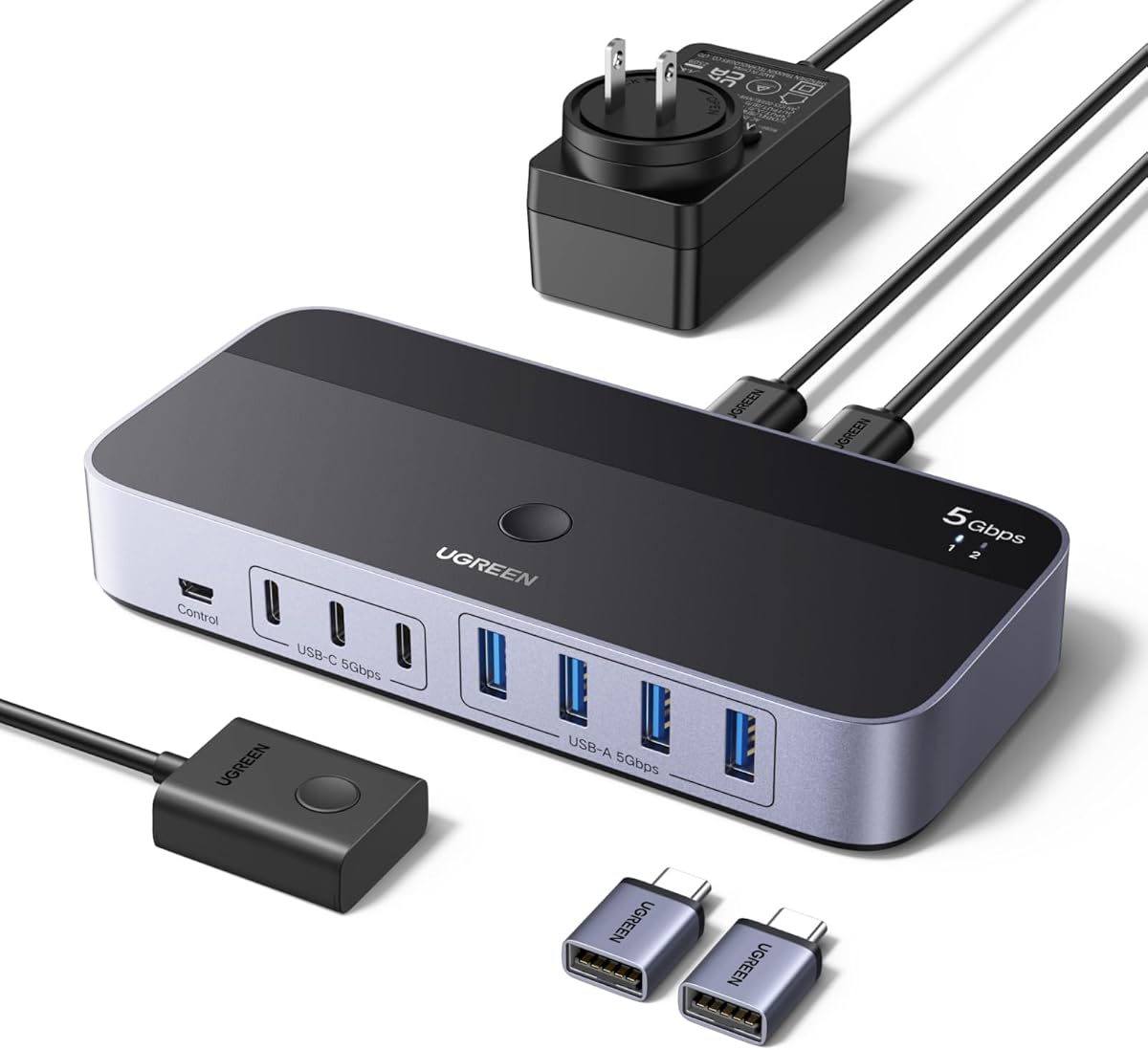
This UGREEN USB switch allows you to share up to seven USB devices between two computers. It has four USB A ports and three USB C ports for maximum device compatibility.
We may earn a commission when you buy through this link, at no additional cost to you.
Data transfer speeds reach up to five gigabits per second for fast file sharing. It includes a power adapter and USB C to A adapter for versatile setup.
It is not a KVM switch and does not support video output. However it is excellent for users with many peripherals who need to switch between computers.
This switch is ideal for power users with mixed USB A and C devices. It keeps your workspace tidy with easy switching via button or controller.
With both USB A and C ports you can connect a wide variety of peripherals without extra adapters.
The package includes power adapter and USB C adapter so you have everything needed for setup.
We may earn a commission when you buy through this link, at no additional cost to you.
This USB switch provides a simple way to share two devices such as keyboard and mouse between two computers. It supports plug and play setup without drivers.
We may earn a commission when you buy through this link, at no additional cost to you.
Data transfer speeds are suitable for standard peripherals and file sharing. It includes two USB cables for immediate setup and works with multiple operating systems.
It is not a KVM switch and does not support video output. The external controller helps keep your desk tidy with easy switching.
This switch is best for users who want a basic solution for keyboard and mouse sharing without extra complexity. It is compatible with Windows, Mac, Linux and Chrome OS.
This switch is designed for simplicity allowing you to share essential peripherals between two PCs easily.
The external controller keeps your desktop neat and provides easy access to switching functions.
We may earn a commission when you buy through this link, at no additional cost to you.
This UGREEN USB switch offers the fastest transfer speeds available with USB 3.2 Gen 2 ports supporting up to ten gigabits per second. It has four USB A and three USB C ports.
We may earn a commission when you buy through this link, at no additional cost to you.
Data transfer is extremely fast allowing you to move large files in seconds. It includes a power adapter and USB C adapter for complete setup.
It is not a KVM switch and does not support video output. However it is excellent for users who need high speed sharing of multiple devices.
This switch is ideal for power users and professionals who need the fastest possible transfer speeds between computers. It supports Windows, Mac, Linux and Chrome OS seamlessly.
Transfer one gigabyte files in 1.5 seconds improving efficiency without waiting on large file transfers.
Includes power adapter and USB C adapter so you have everything needed to start switching immediately.
We may earn a commission when you buy through this link, at no additional cost to you.
Choosing the right switch depends on your number of devices, speed needs, and whether you need video sharing. This guide covers key factors to consider.
Determine how many devices you need to share between computers. Switches range from two ports for basic setups to seven or more for complex environments.
Choose a switch with enough ports for your keyboard, mouse, and any additional peripherals like printers or scanners.
USB 3.0 switches support up to 5Gbps while USB 3.2 Gen 2 can reach 10Gbps. Faster speeds matter for transferring large files between computers.
For basic input devices USB 2.0 or 3.0 is sufficient but high performance tasks benefit from faster speeds.
Most switches offer a button on the device for toggling. Some include external controllers or remotes for easier access on your desk.
Choose a method that fits your workspace layout and convenience needs.
High power devices like external hard drives may need external power. Check if the switch includes a power adapter or has a power port.
Some switches are bus powered which limits device types. Consider power needs before buying.
If you need to share a monitor or video signal look for a KVM switch with HDMI ports. Standard USB switches do not support video transmission.
Decide if you need full KVM or just peripheral sharing to pick the right model.
Ensure the switch supports your device connectors. Some offer USB C and USB A ports for modern and legacy devices.
Check compatibility with your computers especially if using modern laptops with USB C ports.
Most USB switches are plug and play with Windows, Mac, Linux and Chrome OS. Drivers are usually not required.
Verify compatibility with your specific OS versions to avoid setup issues.
Durable materials like aluminum alloy shells improve heat dissipation and longevity. Check user reviews for reliability.
A sturdy build ensures the switch lasts through frequent use in work environments.
Connect your computer to the switch input ports and peripherals to output ports. Use the included cables for reliable connections.
Toggle between computers using the button or remote controller as needed. The LED indicator shows which computer is active.
Avoid overloading the switch with too many high power devices. Use external power adapters if provided for stability.
No standard USB switches do not support video transmission. To share a monitor you need a KVM switch with HDMI or display ports.
Many switches offer USB C ports or include adapters for compatibility. Check specific product details for USB C support.
It depends on the switch. Some support two devices while others support seven or more. Choose based on your needs.
No most USB switches are plug and play and do not require drivers. They work with Windows, Mac, Linux, and Chrome OS.
Yes you can connect multiple input devices but only one set will be active on a computer at a time.
It depends on the devices. High power peripherals like hard drives may need external power adapters for stable operation.
Yes most switches work with gaming keyboards and mice but ensure transfer speed and power meet device needs.
Budget friendly options include USB 2.0 or USB 3.0 models with two to four ports. Check product ratings and features for value.
We reviewed ten top models ranging from simple two port switches to advanced multi port high speed options. Our top picks balance performance value and features.
Prioritize port count transfer speed and power support based on your device needs. Consider video sharing if you need a KVM switch for monitors.
Prices and availability change frequently so check current product details before purchasing. Choose a switch that fits your workflow and budget.