
HDMI Splitter 1 in 3 Out, 4K HDMI Distributor for Triple Monitors
4.6Editor score
Affordable price point option
Supports 4K@30Hz and 3D
Aluminum alloy stable heat case
Compare the top HDMI Splitter for 3 Monitors models to find the best device for dual display setups, video distribution, and seamless connectivity needs.
Finding the right HDMI Splitter for 3 Monitors is essential for modern workspaces and entertainment setups. A good splitter ensures stable signals and supports high resolutions for seamless viewing across multiple screens.
We evaluated ten top-rated models based on resolution support, build quality, and compatibility. This list covers various budgets and use cases to help you find the perfect device for your specific multi-monitor setup.
Each pick includes detailed specs, pros, cons, and usage tips to guide your decision. Please note that prices and availability change frequently, so check current listings before purchasing your new splitter.
4.6Editor score

4.4Editor score

4.2Editor score
This side-by-side comparison highlights key differences across all ten models, helping you choose based on resolution, input type, and specific feature needs.



The UANTIN DisplayPort to HDMI Splitter stands out as a top choice for users needing to expand a single DisplayPort signal to three HDMI monitors. With a rating of 4.4, it offers robust performance for both home and office setups.
We may earn a commission when you buy through this link, at no additional cost to you.
This device supports resolutions up to 4K@60Hz, making it ideal for design work, gaming, and multitasking. Its all-aluminum casing ensures efficient heat dissipation, maintaining stable operation even during extended use. The gold-plated interfaces further reduce signal interference for clear visuals.
While it requires a power adapter and does not support Mac OS, the trade-off is worth it for the reliable multi-screen expansion it provides. The included power cable makes setup straightforward without needing extra adapters or complex configurations.
If you need to connect three monitors to a single DP output and value stability and high resolution, this splitter is an excellent pick. It simplifies complex setups while keeping costs reasonable for the performance you get.
With 4K@60Hz support and 18Gbps bandwidth requirements, this splitter handles high-quality video without dropping frames or causing lag in your display setup.
The all-aluminum casing and gold-plated interfaces ensure long-term reliability and reduce signal interference, keeping your displays stable and flicker-free.
We may earn a commission when you buy through this link, at no additional cost to you.
The NEWCARE 4K@60Hz HDMI Splitter is an affordable solution for duplicating a single HDMI source to three screens. It is perfect for scenarios where all monitors need to show the same content simultaneously without any lag.
We may earn a commission when you buy through this link, at no additional cost to you.
It supports UHD 4K@60Hz, Full HD 1080P, and 3D formats, ensuring vivid visuals for gaming or presentations. The built-in auto downscaler allows mixed-resolution displays to work under the same refresh rate, adding flexibility to your setup.
However, it mirrors content only and does not support extending screens. Additionally, you cannot connect external audio devices directly. These limits are acceptable if your goal is simple duplication across identical screens.
For users looking for an entry-level splitter with solid 4K performance, this device delivers good value. It is easy to set up with included cables and power, making it suitable for home and office use.
Ideal for retail signs or meeting rooms where all displays must show identical content without any delay or distortion.
The downscaling feature helps when your monitors have different resolutions, allowing them to run smoothly under one refresh rate.
We may earn a commission when you buy through this link, at no additional cost to you.
The MT-ViKI 4K HDMI Splitter is a robust device designed to split one HDMI signal into four outputs. Its durable metal design and included power adapter make it reliable for long hours of operation without flickering.
We may earn a commission when you buy through this link, at no additional cost to you.
It supports up to 4K@30Hz, 1080P@60Hz, and 3D video with deep color support. The built-in amplifier allows transmission up to 100ft total, which is great for setups where displays are far from the source device.
Because it only mirrors content and does not support extended displays, it is best suited for applications like retail displays or home theaters. The lack of built-in speakers means you rely on your monitors or external audio.
For those needing a stable and affordable way to mirror video across multiple displays, this splitter delivers consistent performance. It is ideal for conference rooms or schools where reliable signal transmission is key.
With support for up to 100ft transmission, this splitter handles large setups without losing video quality or causing signal drops.
The included 5V/2A AC adapter ensures consistent performance even when using long cables or multiple displays simultaneously.
We may earn a commission when you buy through this link, at no additional cost to you.
The THANDBLE DisplayPort to HDMI MST Hub allows you to connect one DP device to three monitors with support for both extended and mirrored modes. It is built with high-quality materials to ensure stable signal transmission.
We may earn a commission when you buy through this link, at no additional cost to you.
It supports 4K@60Hz resolution and is backward compatible with lower refresh rates. The aluminum alloy shell improves heat dissipation, while the nylon braided cable increases durability against wear and tear over time.
However, it does not work with Mac OS and requires a 5V 1A power supply. PCs with integrated GPUs might have limited support. These are minor trade-offs considering the flexibility it offers for extended display setups.
For Windows users who need to expand their workspace across three screens, this hub is a solid choice. It provides reliable multi-monitor functionality without needing multiple cable outputs from your graphics card.
Unlike standard splitters, this MST hub supports extended modes, letting you use each monitor independently for more productivity.
The aluminum shell and nylon cable ensure the device lasts longer and performs well even under frequent usage conditions.
We may earn a commission when you buy through this link, at no additional cost to you.
This HDMI Splitter 1 in 3 Out is an excellent budget-friendly option for users who need to duplicate a single video source across three displays. Its rating of 4.6 reflects strong customer satisfaction with its reliability and ease of use.
We may earn a commission when you buy through this link, at no additional cost to you.
It supports 4K@30Hz and is backward compatible with 1080P@60Hz. The aluminum alloy casing provides excellent heat dissipation, ensuring the device runs cool even during 24/7 operation. Each port includes an LED indicator for quick status checks.
While it does not support extended modes and requires power to be connected, these are standard limitations for this price range. It works with consoles, laptops, and streaming devices, making it versatile for home entertainment.
If you want an affordable splitter that delivers stable mirror performance without breaking the bank, this device is a top pick. It is easy to set up and offers great value for its price point.
For users on a tight budget, this splitter offers reliable 4K mirroring across multiple screens without compromising on basic quality.
Each output port has its own LED, making it easy to see at a glance if a display is connected and working.
We may earn a commission when you buy through this link, at no additional cost to you.
This HDMI splitter is designed to mirror one source across three screens with zero latency and perfect synchronization. It is ideal for trading desks or retail walls where every monitor must show identical content in real time.
We may earn a commission when you buy through this link, at no additional cost to you.
With 4K@30Hz support and 3D capability, it provides crisp visuals for gaming or movies. The aluminum alloy casing ensures the device runs cool and blocks electromagnetic interference for stable signals without flickering.
However, it does not support extended displays or audio output. The power cable must be connected during use for it to function correctly. These are acceptable trade-offs for the simplicity it brings to multi-screen setups.
If you need a reliable and compact splitter for mirroring video content, this model delivers consistent results. Its 12-month warranty and 24/7 support provide additional peace of mind after purchase.
The zero-latency design ensures every display updates simultaneously, making it perfect for live data or synchronized content.
Measuring just 3.26 x 2.16 x 0.78 inches, this device fits easily on any desk without taking up much room.
We may earn a commission when you buy through this link, at no additional cost to you.
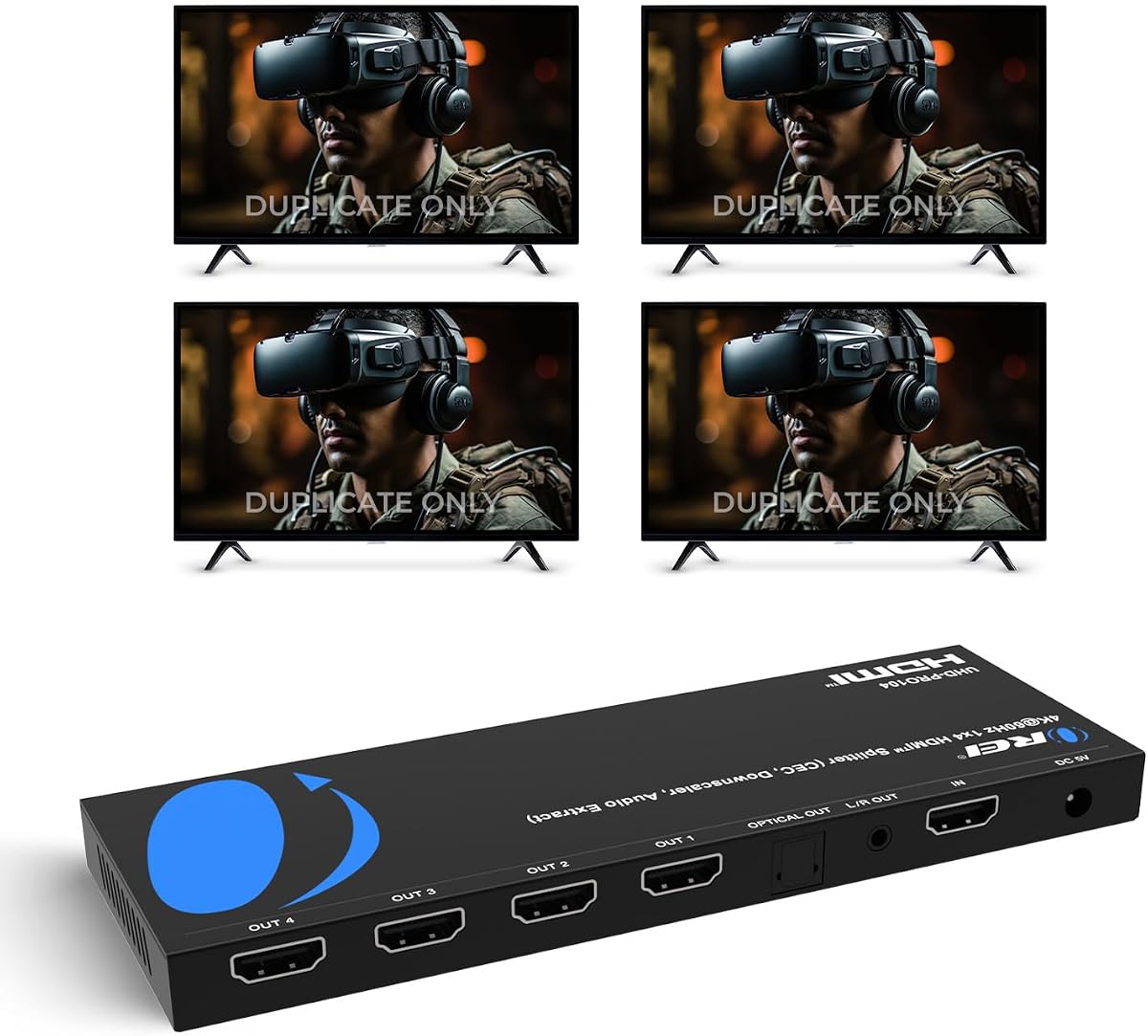
The OREI UltraHD 1×4 HDMI Splitter delivers high-quality video distribution with support for 4K@60Hz and 18Gbps bandwidth. It is perfect for retail displays, classrooms, or home entertainment setups needing reliable mirror mode.
We may earn a commission when you buy through this link, at no additional cost to you.
It supports multiple audio formats like Dolby TrueHD and DTS-HD Master Audio, ensuring immersive sound along with video. The heavy-duty metal enclosure helps dissipate heat and protects the device during long-term use.
While it is limited to one HDMI input and does not extend displays, its focus on stable mirroring makes it ideal for specific use cases. The plug-and-play design requires no drivers, simplifying installation for any user.
For those needing high-resolution output and audio compatibility across multiple screens, this splitter is a strong choice. It balances performance, durability, and ease of use well within its category.
The splitter supports formats like LPCM, Dolby TrueHD, and DTS-HD, delivering rich sound quality for home theater setups.
With 4K@60Hz support and HDCP 2.0 compliance, it provides stable video for modern TVs and projectors.
We may earn a commission when you buy through this link, at no additional cost to you.
The OREI 1×4 HDMI Splitter offers advanced features like audio extraction, downscaling, and HDR10+ support. It distributes one HDMI source to four displays with high-quality video and flexible audio options.
We may earn a commission when you buy through this link, at no additional cost to you.
It supports 4K@60Hz resolution with 4:4:4 chroma sampling and includes downscaling for mixed-resolution displays. The built-in audio extractor allows you to route sound to optical or analog outputs separately from video.
With configurable CEC control and EDID management, it ensures stable signal communication with various devices. While pricier and limited to mirror mode, the extra features make it worth the investment for complex setups.
If you need audio extraction and HDR support in a single device, this splitter is an excellent choice. It brings versatility to home theater and conference room installations.
Extract audio to optical or analog outputs, allowing flexible integration with external sound systems or speakers.
Downscaling and HDR10+ support ensure compatibility with different displays while maintaining high-quality visuals.
We may earn a commission when you buy through this link, at no additional cost to you.
This HDMI 2.1 splitter is built for future-ready setups, supporting 8K@60Hz and 4K@120Hz with VRR and HDR10+. It is the best choice for gamers or professionals wanting top-tier video performance across three screens.
We may earn a commission when you buy through this link, at no additional cost to you.
Its Smart EDID management offers multiple switching modes to optimize output signals for different displays. With support for Dolby Atmos and wide audio formats, it ensures immersive sound alongside stunning visuals.
However, it only mirrors screens and requires an HDMI 2.1 source to reach max resolution. While pricey, its feature set is unmatched for high-bandwidth needs and advanced HDR support.
If you demand the highest resolution and refresh rates available, this splitter is worth the investment. It is perfect for PS5 setups or high-end multimedia environments.
Supporting up to 8K@60Hz and 4K@120Hz, this device is ready for next-gen consoles and high-performance PCs.
Flexible EDID switching lets you set the best signal for your displays, improving compatibility and stability.
We may earn a commission when you buy through this link, at no additional cost to you.
The UGREEN HDMI Splitter is a reliable solution for distributing a single HDMI source to four displays. It supports 4K@60Hz and comes with features like EDID control to prevent flickering or black screens.
We may earn a commission when you buy through this link, at no additional cost to you.
Its USB-powered design ensures stable video transmission without complex wiring. Compatible with a wide range of devices from consoles to streaming sticks, it fits well into home entertainment or office setups.
While it only mirrors content and must remain powered during use, these are minor trade-offs for its versatility. The ability to connect higher-resolution displays to output 1 helps avoid compatibility issues.
If you need a trusted device for mirror-mode display distribution, this splitter offers strong performance. It is an excellent pick for users seeking reliability and ease of use.
The EDID settings help prevent black screens by matching output signals to your display's capabilities.
No drivers or complex setup are needed; just connect the HDMI cables and power to start using it.
We may earn a commission when you buy through this link, at no additional cost to you.
Selecting the right HDMI splitter requires understanding your setup needs, resolution requirements, and budget constraints.
Determine if you need HDMI to HDMI or DisplayPort to HDMI. Many splitters are HDMI-only, while others convert DP signals for triple-monitor setups.
Match the input port on your source device to the splitter's input type to ensure proper signal transmission.
Choose a splitter that supports your desired resolution, such as 4K@60Hz or 8K@60Hz. Higher refresh rates matter for gaming or video editing.
Ensure your source and displays match the splitter's capabilities to avoid downscaling or signal drops.
Most splitters mirror content, meaning all screens show the same image. Some MST hubs extend displays for multiple independent windows.
Decide if you need to expand your workspace or simply duplicate video content across screens.
Metal enclosures help dissipate heat during long use, preventing overheating and signal loss. Look for durable materials and braided cables.
A solid build ensures long-term reliability, especially in 24/7 commercial or office environments.
Some splitters need external power adapters, while others run on USB power. External power ensures stable signals for higher resolutions.
Check if cables and adapters are included or if you need to buy them separately.
Not all splitters pass audio or offer audio extraction. Ensure your model supports your audio needs for surround sound or speakers.
Advanced models include audio extractors for separate audio outputs alongside video signals.
Check cable lengths included and whether you need extenders. Longer cables can reduce signal quality, especially at high resolutions.
Use HDMI 2.0 or 2.1 certified cables for 4K or 8K setups to maintain stability.
Choose trusted brands with customer support and warranties. A good warranty protects your investment against defects or failures.
Reading reviews can help confirm the device works reliably for setups like yours.
First, connect the power adapter or USB cable to the splitter and plug it into a power source. Then connect your source device, such as a PC or console, to the HDMI or DP input using a quality cable.
Next, connect all monitors to the splitter's output ports using HDMI cables. Turn on all displays and your source device. If your screens flicker, check cable connections and power stability.
To care for the device, avoid bending cables sharply or exposing it to moisture. Keep the casing clean and ensure it has airflow to prevent overheating during use.
Most HDMI splitters mirror content across all screens, showing the same image. Only DisplayPort MST hubs support extended modes. Check the product description for extended display support.
Many splitters for 4K resolutions require an external power adapter to maintain stable signal. USB-powered ones may work for lower resolutions. Always check power requirements before buying.
Yes, splitters that support HDMI 2.0 or 2.1 work with PS5. Ensure the model supports the required refresh rates like 4K@120Hz for full console performance.
Use a splitter with auto-downscaling or set the source output to match the lowest resolution. Advanced models offer EDID settings to manage mixed-resolution displays.
Only splitters with audio extraction support separate audio outputs. Otherwise, audio plays through monitors. Check for optical or analog ports if needed.
Many splitters, especially DP to HDMI, do not support Mac OS MST. macOS often mirrors only or needs specific models. Verify compatibility before purchasing.
Check cables and power connections first. Update GPU drivers and use EDID settings if available. Ensure all displays are set to the same resolution and refresh rate.
Use HDMI 2.0 or 2.1 certified cables rated for 18Gbps or 48Gbps. High-quality HDMI cables ensure stable video transmission at higher resolutions.
We reviewed ten top HDMI splitters for three monitors, ranging from budget-friendly options to high-end HDMI 2.1 models. Each offers unique benefits depending on your need for resolution, durability, or features.
Focus on what matters most to you. If you want extended displays, look for MST hubs. For pure mirroring, budget splitters work well. Gamers should prioritize refresh rates and VRR support.
Prices change often so check current listings before purchasing. With the right splitter, you can transform your workspace or entertainment setup into a seamless multi-screen experience.