
Dell 24 Monitor
4.7Editor score
144Hz refresh rate
IPS color accuracy
Dual HDMI ports
Finding a gaming monitor without PC needed changes how you play. These screens connect directly to consoles or phones for instant action. You get high refresh rates and vivid colors without a bulky tower setup.
We evaluated ten models based on portability, response time, and connection options. Each pick delivers smooth motion and wide compatibility. Our list covers everything from compact travel displays to immersive curved panels.
Every product shows key specs, pros, and real-world use cases. Prices fluctuate often so check current listings before buying. Use this guide to match the right screen to your gaming style.
4.7Editor score

4.4Editor score

4.4Editor score
As an Amazon Associate we earn from qualifying purchases.
This side-by-side comparison highlights key specs across all ten models. Check resolution, refresh rates, and input options to find the best fit for your console or mobile setup.



The 2K 180Hz Portable Gaming Monitor delivers top-tier visuals for console gamers. Its 2K QHD resolution and 180Hz refresh rate ensure sharp, fluid gameplay. Rated 4.4 stars it balances performance and portability well.
We may earn a commission when you buy through this link, at no additional cost to you.
Key strengths include the integrated adjustable stand and dual connectivity options. The IPS panel offers 100% sRGB for accurate colors. FreeSync and HDR reduce tearing for smoother sessions on PS5 or Xbox.
Trade-offs involve the need for external power during extended use. It is also slightly heavier than pocket-size models. These are acceptable for users prioritizing screen real estate over travel.
Buyers seeking a near-desktop experience on the go will love this pick. It suits home setups and travel alike. This monitor is the best overall choice for versatility and quality.
The 2K resolution provides crisp details for both games and media. This extra pixel density improves immersion on a 23.8-inch screen.
The built-in stand adjusts from 0 to 180 degrees. This allows comfortable viewing in horizontal or vertical orientations without extra mounts.
We may earn a commission when you buy through this link, at no additional cost to you.
The EVICIV Portable Monitor 18.5 inch is ideal for travel gaming. It features a 120Hz refresh rate and 1ms response time for quick reactions. The included sleeve case protects the screen during transit.
We may earn a commission when you buy through this link, at no additional cost to you.
Its ultra-thin bezels and lightweight build make it easy to pack. The VESA mount option adds versatility for fixed setups. FreeSync support ensures smooth gameplay on compatible consoles.
The 18.5 inch size is smaller than most desktop monitors. This might limit immersion for some games. Still, it offers excellent value for portable productivity and play.
Travelers and students will appreciate the portability and included case. It fits easily in backpacks for quick gaming sessions. This model is a smart pick for on-the-go needs.
The included sleeve case has shock-absorbing foam. This keeps the screen safe during commutes or flights.
The 1ms response time minimizes motion blur. This enhances competitive play with precise visual feedback.
We may earn a commission when you buy through this link, at no additional cost to you.
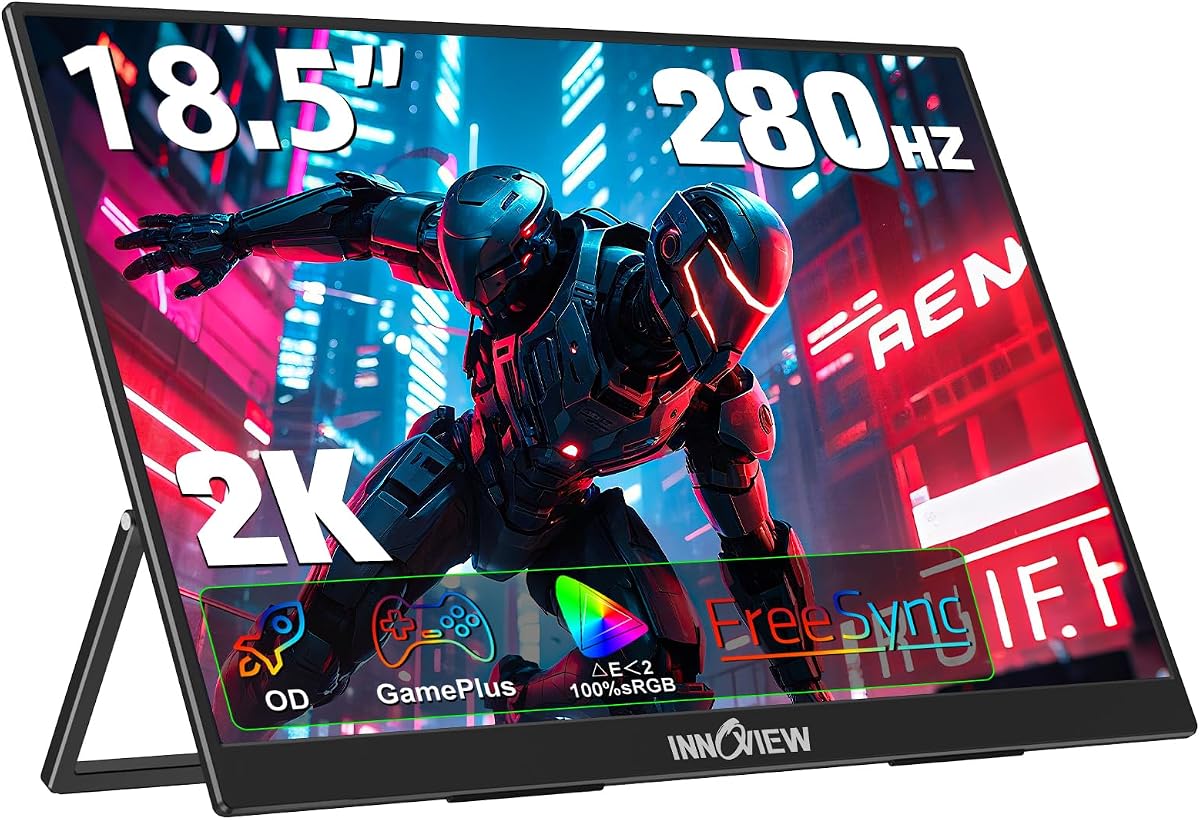
The InnoView 18.5 Inch 280Hz monitor pushes refresh rates to extremes. It supports 2K QHD for sharp visuals and 280Hz for ultra-smooth motion. Gameplus features add crosshairs and FPS modes for gamers.
We may earn a commission when you buy through this link, at no additional cost to you.
Multiple mounting options include VESA and adjustable stands. This flexibility suits desktop and vertical setups. The 100% sRGB ensures vibrant colors for media and games.
Achieving 280Hz requires a high-power source. Some devices may flicker without enough wattage. Users must check compatibility before relying on top speeds.
Competitive gamers seeking high-speed visuals will benefit most. It balances performance with portability well. This model is great for tech-savvy users who need speed.
Customizable crosshairs and FPS modes help players aim better. These tools provide a tactical edge during matches.
The 280Hz rate reduces motion blur significantly. This keeps fast scenes clear and responsive during gameplay.
We may earn a commission when you buy through this link, at no additional cost to you.
The ViewSonic VX1654 16 Inch monitor prioritizes lightweight portability. Weighing only 1.5 pounds it slips into any bag easily. The 144Hz IPS panel delivers smooth motion and accurate colors.
We may earn a commission when you buy through this link, at no additional cost to you.
Single-cable USB-C connectivity simplifies setups and charges devices. The kickstand supports both landscape and portrait modes. This makes it versatile for gaming and work tasks.
The smaller 16 inch size reduces immersion compared to larger screens. It also uses standard FHD rather than higher resolutions. These trade-offs are acceptable for ultra-portable needs.
Mobile professionals and casual gamers will find this model handy. It offers reliable performance in a compact form. Choose this for simplicity and weight savings.
USB-C handles both video and 60W power. This reduces clutter and keeps laptops charged during use.
The 0.7 inch thickness fits easily in sleeves. This ensures the monitor stays protected and space-saving.
We may earn a commission when you buy through this link, at no additional cost to you.
The ARZOPA 16.1 inch 144Hz monitor offers impressive value. It features a built-in kickstand and 106% sRGB coverage for vibrant visuals. The 144Hz refresh rate ensures smooth motion for most games.
We may earn a commission when you buy through this link, at no additional cost to you.
Plug-and-play connectivity supports laptops and consoles directly. The lightweight design makes it easy to carry anywhere. This model suits budget-conscious users needing reliable performance.
It lacks adaptive sync features like FreeSync or G-Sync. The screen size is also smaller than average. These limitations are minor considering the competitive pricing.
Students and casual gamers looking for affordable options should consider this. It delivers solid performance without breaking the bank. This is the top budget-friendly portable gaming solution.
The integrated stand allows tilt adjustment out of the box. This removes the need for extra accessories or mounts.
106% sRGB gamut provides rich and accurate colors. This enhances visual quality for games and streaming content.
We may earn a commission when you buy through this link, at no additional cost to you.
The SANSUI 32 Inch Curved monitor wraps viewers in action. Its 1500R curve enhances immersion for single-player games. The 240Hz refresh rate delivers ultra-fast response for competitive play.
We may earn a commission when you buy through this link, at no additional cost to you.
Built-in FreeSync and HDR support smooth out gameplay. The VESA compatibility allows flexible wall or arm mounting. This model suits home setups where portability is less critical.
The 32 inch size makes it less travel-friendly than smaller options. It also lacks built-in speakers for audio output. These factors are acceptable for stationary desktop environments.
Gamers prioritizing immersion and screen real estate will enjoy this. It offers near-desktop quality with high refresh speeds. This monitor excels for home entertainment and gaming.
The 1500R curve fills peripheral vision naturally. This draws players deeper into the game environment.
The 240Hz rate keeps action scenes fluid and clear. This reduces motion blur for precise aiming and tracking.
We may earn a commission when you buy through this link, at no additional cost to you.
The SANSUI 24 Inch Curved monitor balances size and speed. It features a 160Hz refresh rate and VA panel for deep blacks. The curved screen adds immersion without extreme bulk.
We may earn a commission when you buy through this link, at no additional cost to you.
Multiple game modes customize visuals for different titles. The high contrast ratio enhances shadow detail in dark scenes. VESA compatibility supports flexible mounting options for desks.
VA panels may show slower motion response than IPS. It lacks a built-in stand for travel use. These are minor drawbacks for a fixed desktop setup.
Home gamers seeking an affordable curved screen will like this. It offers strong performance for the price. This model is great for casual and competitive play.
Settings like FPS and RTS optimize visuals for genre. This improves visibility and targeting during specific games.
The VA panel delivers deep blacks and rich shadows. This adds depth and detail to dark game environments.
We may earn a commission when you buy through this link, at no additional cost to you.
The UPERFECT 18 inch QLED monitor sets a premium standard. It offers 2K resolution and 100% DCI-P3 coverage for vivid colors. The 400 nits brightness ensures clarity even in bright rooms.
We may earn a commission when you buy through this link, at no additional cost to you.
HDR support and eye-care tech enhance viewing comfort. The slim bezel design maximizes screen-to-body ratio. This model suits creators and gamers wanting top-tier visuals.
Optimal performance requires a 30W or higher adapter. The price is higher than budget portable screens. These requirements are justified by the superior display quality.
Buyers needing accurate color and high brightness will appreciate this. It excels for design work and immersive gaming. This is the best premium portable monitor available.
100% DCI-P3 covers professional color standards. This delivers true-to-life visuals for media and design.
The 400 nits brightness supports HDR content well. This enhances contrast and detail in bright scenes.
We may earn a commission when you buy through this link, at no additional cost to you.
The Samsung 32 inch Odyssey G55C offers deep immersion. Its 1000R curve matches human vision for natural viewing. The QHD resolution ensures sharp and detailed gameplay.
We may earn a commission when you buy through this link, at no additional cost to you.
FreeSync and Eye Saver Mode protect against tearing and strain. HDR10 enhances color depth for cinematic experiences. This model suits users prioritizing comfort and visual depth.
Its weight and size make it less portable than smaller monitors. It also relies on a base stand for stability. These are acceptable for stationary desktop use.
Users seeking a deeply immersive home gaming setup will love this. It delivers comfort and clarity during long sessions. This monitor is ideal for dedicated gaming stations.
The tight 1000R curve fills peripheral vision. This creates a wrap-around effect for immersive gaming.
This mode reduces blue light to lower eye strain. It allows longer gaming without discomfort.
We may earn a commission when you buy through this link, at no additional cost to you.
The Dell 24 Monitor offers top-rated value for gaming. It combines a 144Hz IPS panel with TÜV eye comfort certification. This makes it ideal for long, clear viewing sessions.
We may earn a commission when you buy through this link, at no additional cost to you.
Dual HDMI inputs support multiple devices simultaneously. The thin bezels maximize viewing space and reduce clutter. This model is perfect for home setups needing reliability.
It lacks USB-C and a portable stand for travel. The design focuses on desktop utility. These are minor limitations for budget buyers.
Users seeking quality and comfort at a great price should choose this. It suits home use and shared setups. This monitor is the best budget pick available.
The TÜV Rheinland 3-star cert reduces blue light. This protects vision during extended gaming.
In-Plane Switching delivers consistent colors across angles. This ensures visuals look good from any seat.
We may earn a commission when you buy through this link, at no additional cost to you.
Choosing the right gaming monitor without PC needed means balancing features with mobility. Consider these factors to match your console or mobile setup.
Resolution determines image clarity while size affects immersion. Portable monitors range from 16 to 32 inches. Higher resolutions like 2K offer sharp visuals but demand more power.
Pick a size that fits your travel needs. Larger screens look better but are harder to carry. Balance clarity with portability based on usage.
Refresh rates above 144Hz keep fast action smooth. Response time below 1ms reduces motion blur. These specs are critical for competitive gaming or high-speed titles.
Look for 120Hz or higher for best results. Faster rates enhance fluidity in racing or shooters. Ensure your device supports the refresh rate.
IPS panels provide accurate colors and wide viewing angles. VA panels offer deeper blacks and contrast. OLED or QLED deliver the best color accuracy and brightness.
Choose IPS for color accuracy or VA for contrast. Consider QLED or OLED for premium visuals. Match the panel type to your content needs.
Check for USB-C or HDMI ports. USB-C simplifies connections and can power devices. Dual HDMI supports multiple consoles without constant cable changes.
Prioritize USB-C for single-cable setups. Ensure compatibility with your laptop or console. More ports mean greater flexibility.
Built-in stands or kickstands ease setup. Included cases protect screens during travel. Lightweight builds make carrying easier for daily use.
Look for adjustable stands and protective cases. Weight matters if you travel often. These features improve convenience significantly.
Some monitors need external power or adapters. USB-C power delivery can charge devices while displaying. Check wattage needs to avoid flicker.
Ensure your device provides enough power. Carry adapters for high-refresh models. Proper power ensures stable visuals.
TÜV certifications reduce blue light and flicker. These features protect vision during long sessions. Anti-glare screens help in bright rooms.
Prioritize eye comfort if you game often. Low blue light tech helps avoid fatigue. This matters for daily use.
Price varies widely across portable monitors. Warranty terms differ by brand. Check return policies for peace of mind.
Compare cost to performance and reliability. Longer warranties reduce long-term risk. Choose trusted brands for better support.
Connect your console or laptop via HDMI or USB-C. Select the right input source on the monitor. Ensure your device supports the refresh rate for smooth gameplay.
Adjust the stand or mount for comfortable viewing. Tilt the screen to reduce glare. Use external power if the device cannot provide enough wattage.
Clean the screen with a soft microfiber cloth. Avoid harsh chemicals that damage coatings. Store in a protective case when traveling to prevent scratches.
Yes most models connect via HDMI or USB-C. The Switch outputs video through its dock which works with these monitors. Ensure the adapter provides enough power for stable visuals.
No most portable monitors are plug-and-play. They work with Windows Mac Linux and consoles. Drivers are only needed for advanced features or firmware updates.
Sixteen inches offer better portability but smaller viewing. Eighteen inches give more screen space and better immersion. Choose based on how often you carry the monitor.
One hundred twenty to one hundred forty-four Hz balances performance and power. Higher rates help on PS5 or Xbox Series X. Check your console output to match the refresh rate.
Use HDMI or USB-C cables directly from your console. Ensure your device supports video output through the port. Power the monitor via adapter or USB-C PD if needed.
USB-C simplifies connections by carrying power and video. HDMI provides broad compatibility with older consoles. Choose USB-C for laptops and HDMI for most game consoles.
Use a dry microfiber cloth to wipe the screen. Avoid using water or chemicals directly. Dust and scratches reduce clarity and viewing comfort.
Many models include VESA mounts for wall or arm setups. Check the package for included screws. Wall mounting saves desk space for permanent setups.
We compared ten gaming monitors without PC needed to find top options. From portable QLED displays to curved 24-inch screens this guide covers diverse needs.
Prioritize refresh rate and connectivity based on your console or device. Portability matters for travel while screen size influences immersion. Match features to how and where you play.
Prices change frequently so check current listings before buying. Use our comparison table and reviews to confirm the best fit. These screens deliver console-quality gaming on the go.