
ACEMAX 4K@60Hz Offline Media Player with HDD Enclosure
3.5Editor score
Includes 2.5 inch HDD enclosure
Offline 4K media playback
Auto play and resume modes
This guide compares ten top external hard drive media players for 4K playback, USB connectivity, and digital signage use to help you choose the right device.
Finding the right external hard drive media player can transform your entertainment setup into a versatile hub for photos, music, and high definition videos without relying on internet streaming services.
We have carefully evaluated ten models based on playback quality, format support, storage connectivity, and ease of use to ensure you get reliable performance for home or commercial displays.
Each pick below highlights key strengths and trade-offs so you can match a device to your needs while noting that availability and pricing may shift over time as products update.
3.5Editor score

4.1Editor score
4.3Editor score
This table presents a side by side look at every model we reviewed so you can quickly see how each device handles resolution, storage connections, and media formats.


The Micca 4K Ultra-HD media player stands out as a top choice for anyone wanting to turn any TV into a local playback hub without relying on streaming apps. It carries a solid rating among users who appreciate its ability to handle large USB drives and micro SD cards effortlessly.
We may earn a commission when you buy through this link, at no additional cost to you.
Its standout quality lies in the dual USB and micro SD reader which allows you to connect external hard drives up to eight terabytes and play high resolution content directly. The device supports a wide array of video formats including MKV MP4 and AVI with codecs like H.265 and H.264 ensuring smooth playback on both old and new displays.
Trade-offs include the lack of Wi-Fi which means you cannot stream from the cloud or your phone but this keeps costs down and reduces potential interference. The interface is functional but not flashy so you may need a moment to navigate menus compared to more modern smart devices.
We recommend this player for households or small businesses that want reliable offline playback for videos photos and music. It is especially useful for digital signage tasks like restaurant menus where looping content without interruption is key to maintaining professionalism and customer engagement.
The inclusion of both USB and micro SD slots means you can switch between storage types quickly without needing extra adapters or hubs.
Automatic looping and resume features let you set up professional displays with minimal configuration or ongoing oversight.
We may earn a commission when you buy through this link, at no additional cost to you.
This mini HDMI media player is designed for portability making it ideal for travelers or those with limited desk space who still want reliable local media playback. Its small form factor fits in a palm and comes housed in durable aluminum alloy to withstand bumps during transit.
We may earn a commission when you buy through this link, at no additional cost to you.
The device delivers full HD 1080p video at sixty hertz and supports most common video decoding formats including AVI MKV and MP4. It also handles audio and image files with features like zoom rotation and breakpoint playback so you can tailor how content is viewed on different screens.
The main limitation is that it does not support 4K resolution which may matter if you own a new television capable of higher definition. However for older displays or projectors the 1080p output is sharp and clear while keeping power consumption and heat generation low.
We suggest this unit for people who need a dependable secondary player for vacations or temporary setups. The included AV cable ensures you can connect to analog TVs as well making it a versatile backup when HDMI ports are unavailable or insufficient.
The aluminum alloy construction protects internal components during transport so you can take your media library anywhere without worry.
Both HDMI and composite AV outputs let you match the device to whatever screen or sound system you have on hand.
We may earn a commission when you buy through this link, at no additional cost to you.
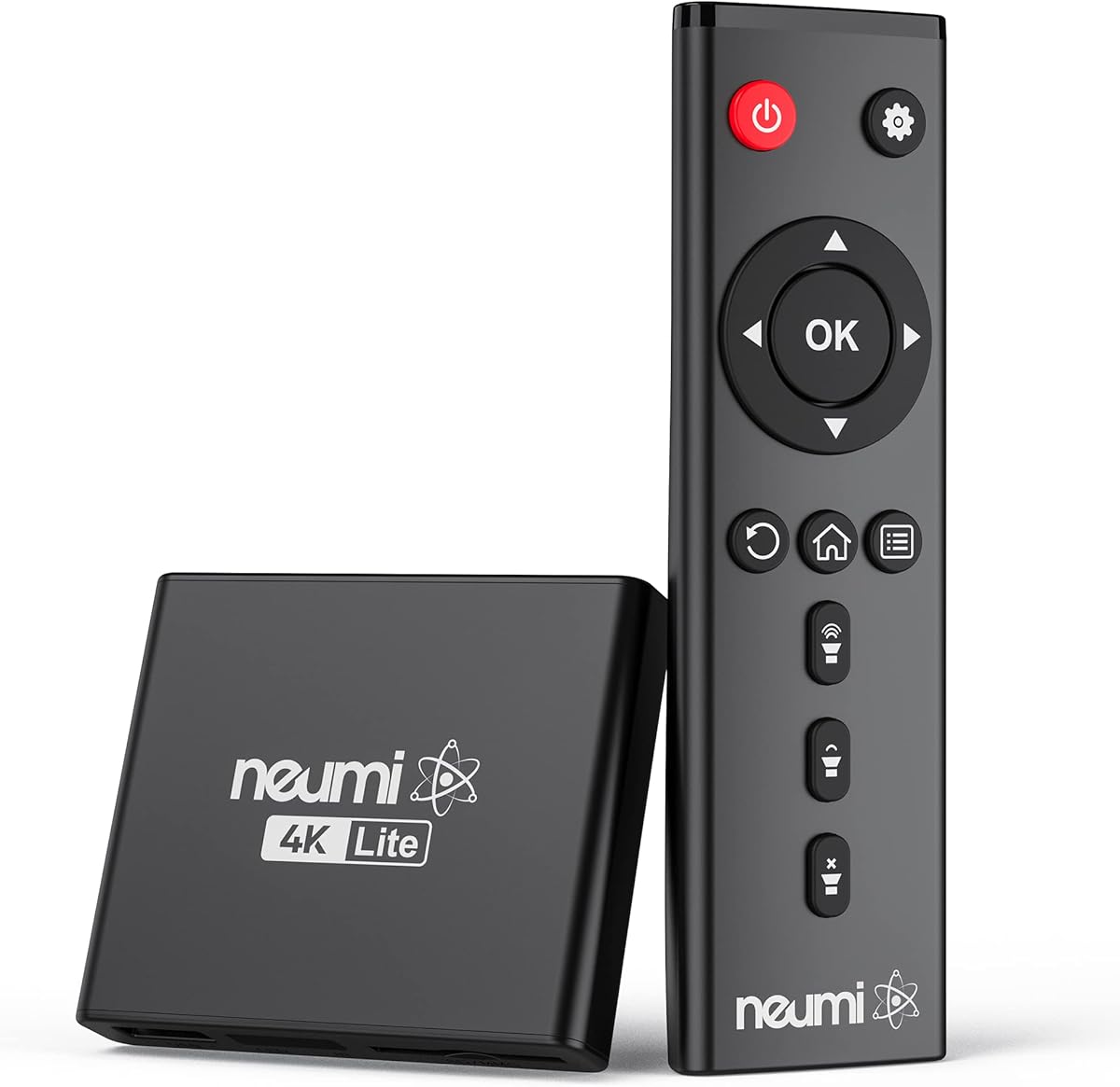
The NEUMI Atom 4K Lite is a powerhouse in a tiny package that excels at interactive installations where you want content to start based on motion or button presses. It carries one of the highest ratings among its peers for reliability and performance in home theater or gallery settings.
We may earn a commission when you buy through this link, at no additional cost to you.
Its premium edge comes from the trigger sensor input which lets you loop a base video and switch to a different clip when activated by an optional push button or motion sensor. The player also delivers stunning HDMI video quality up to 2160p with support for H.265 decoding and digital surround sound.
While the device is compact and easy to hide it does require you to buy separate sensors if you want the interactive feature. Additionally it relies on HDMI for best video quality so you may need adapters for older displays which can add to the total setup cost.
We recommend this player for art galleries museums or home users who want a dynamic touchless experience. It shines where you need to engage viewers with on demand content without them having to interact with a remote or touchscreen interface directly.
Connect a motion or button sensor to start specific clips automatically creating an engaging experience for visitors or residents.
Its size is smaller than a deck of playing cards so it blends into tight corners or shelves without drawing attention.
We may earn a commission when you buy through this link, at no additional cost to you.
The ACEMAX player offers a two in one solution that combines a 4K media player with a 2.5 inch SATA HDD or SSD enclosure. This makes it a compelling budget choice for users who want to store media locally without buying a separate drive box.
We may earn a commission when you buy through this link, at no additional cost to you.
It supports H.265 ten bit playback and outputs up to 4K at sixty hertz through HDMI which ensures sharp visuals on modern screens. The unit also includes basic signage features like automatic playback looping and resume so you can set it and forget it in retail or office settings.
Keep in mind that you must install a drive inside the enclosure yourself and format it correctly based on your operating system to ensure recognition. Some users report needing to reformat drives and while this is manageable it adds a small step to setup compared to plug and play USB drives.
We recommend this model for cost conscious shoppers who need 4K performance and built in storage expansion. It works well for unattended displays where reliability and heat dissipation matter due to its metal housing and steady playback modes.
Use the built in enclosure to install any compatible SATA drive and play media directly without extra cables.
Loop and auto play modes mean you can run the device for hours without manual intervention or remote control.
We may earn a commission when you buy through this link, at no additional cost to you.
This 4K media player is built for home theater enthusiasts who prioritize audio quality and presentation features alongside video playback. It supports up to seven point one surround sound through HDMI which enhances immersive experiences for movies and music files.
We may earn a commission when you buy through this link, at no additional cost to you.
The device uses H.265 decoding to load files faster with less bandwidth and it can display PPT documents directly which is handy for office or classroom use. It also supports vertical screen modes so you can match content orientation to specific display setups without cropping.
A minor trade-off is that although there are dual USB ports only one can be read at a time so you cannot plug in both a drive and a mouse simultaneously. Also the refresh rate caps at thirty hertz for 4K which is standard for media but not ideal for gaming.
We suggest this player for home theaters or classrooms where audio fidelity and document display matter. It brings extra polish to presentations and movies without requiring extra hardware for sound or content rotation.
HDMI up to 7.1 surround sound lets you connect to soundbars or receivers for a richer listening experience.
PPT document support and vertical screen options make it easy to show slides on any orientation screen.
We may earn a commission when you buy through this link, at no additional cost to you.
This HDMI media player is geared toward advertising and multimedia playback where flexible connectivity and format support are essential. It offers a broad range of outputs including HDMI optical AV and VGA so you can connect to many types of displays or projectors.
We may earn a commission when you buy through this link, at no additional cost to you.
The device supports ISO files and allows direct playback from Blu ray 4K ultra high definition discs when placed in the first level directory. It also includes H.265 decoding and subtitle support like SRT PGS and IDX to ensure your content looks and sounds as intended.
One consideration is that some Blu ray features require files to be in the root directory so you may need to organize your storage before use. The player does not have internal storage so you must rely on external drives or cards for all content.
We recommend this unit for commercial displays or home users with large disc rips. The multiple outputs make it adaptable for complex setups and the auto playback ensures continuous play for advertising or background visuals.
Use HDMI optical AV or VGA to match whatever display you have whether it is modern or legacy.
Direct ISO support means you can play ripped Blu ray content without conversion steps.
We may earn a commission when you buy through this link, at no additional cost to you.
The WD Elements portable hard drive is a reliable storage companion to pair with any media player when you need to carry large libraries of movies and photos. It offers high capacities in a lightweight design and works plug and play with most computers and devices.
We may earn a commission when you buy through this link, at no additional cost to you.
It uses SuperSpeed USB 3.2 Gen 1 for fast data transfer so you can load content quickly and then unplug it to take with you. The drive is formatted for easy use and supports up to six terabytes which is enough for thousands of high resolution files.
Keep in mind this drive does not decode video so it must be used with a separate media player like the ones reviewed earlier. It is purely a storage unit meaning you rely on another device to read and display content from the drive.
We recommend this drive for anyone who wants to centralize their media library and move it between TVs or players. It is simple fast and dependable making it a solid backbone for offline playback setups.
USB 3.2 Gen 1 ensures you can move large video files quickly without long wait times.
Compatible with both Mac and PC so you can swap drives between computers without extra tools.
We may earn a commission when you buy through this link, at no additional cost to you.
This 2 in 1 unit combines a 4K media player with a SATA HDD enclosure so you can install a drive and play files directly without extra boxes. It has earned a perfect score among early users for stable performance and clean integration of storage and playback.
We may earn a commission when you buy through this link, at no additional cost to you.
It supports 4K at sixty hertz with H.265 decoding and includes a Type-C cable for easy data transfers to laptops. Playback modes like auto loop and shuffle help tailor content for home theaters or signage scenarios where continuous play is expected.
The drive itself is not included so you must purchase a compatible 2.5 inch SATA HDD or SSD separately. Installation is straightforward but does require opening the enclosure which may be daunting for less technical users.
We suggest this model for those who want an integrated solution and minimal cable clutter. It works well for permanent installations where reliability and high refresh rates matter.
The enclosure and player in one reduce cable mess and simplify your media setup.
Auto loop and shuffle modes help you customize how media plays for different audiences.
We may earn a commission when you buy through this link, at no additional cost to you.
This device is tailored for commercial signage like restaurant menus or lobby videos where consistent looping and reliability matter. It integrates an internal hard disk drive enclosure so you can store content locally and reduce dependency on external drives.
We may earn a commission when you buy through this link, at no additional cost to you.
The player supports 4K at sixty hertz with smooth playback and includes shuffle and sequence modes for photos and audio. It comes with a one year warranty and includes a Type-C cable to modify data on the internal drive from a laptop.
Note that the remote requires AA batteries which are not included so you will need to purchase them separately. Also the device has no battery so it must stay plugged into power to operate which limits mobility.
We recommend this player for businesses that need steady unattended playback. The integrated enclosure reduces points of failure and the warranty provides extra peace of mind for commercial use.
Auto play and resume features keep your displays running smoothly through power cycles.
A one year warranty supports long term use in demanding business environments.
We may earn a commission when you buy through this link, at no additional cost to you.
This player is designed with digital signage in mind offering features like video rotation and auto resume for unattended displays. It supports a wide range of formats and includes an internal hard drive enclosure for local storage.
We may earn a commission when you buy through this link, at no additional cost to you.
You can configure video to rotate ninety one hundred eighty or two hundred seventy degrees which helps fit vertical displays. The device resumes playback where it left off so if power is lost the loop continues without manual resetting.
It lacks advanced network features so all content must come from local storage. Also the remote is basic and may not offer deep control over settings beyond standard playback.
We recommend this player for shops or museums where simple signage and low cost are priorities. The rotation and resume features make it easy to adapt to odd shaped screens.
Rotate video to match vertical displays without needing custom content layouts.
Resume from the last stop ensures your content stays on track after outages.
We may earn a commission when you buy through this link, at no additional cost to you.
Choosing the right external hard drive media player depends on your content needs display type and whether you want simple offline playback or interactive features.
Look for devices that support 4K Ultra HD or at least 1080p depending on your TV. Higher resolution ensures sharp visuals for photos and videos especially on newer screens.
Choose 4K if you have a modern display but 1080p may suffice for older TVs or projectors.
Check how many USB ports and card slots the player has and whether it supports FAT32 exFAT or NTFS formats. Some models include built in HDD enclosures for internal drives.
Ensure the player can read drives up to your desired capacity so you do not face limits later.
Review supported containers like MKV MP4 and AVI and codecs such as H.265 or H.264. Broad support prevents issues when playing files from different sources.
Wide codec support means you can use files as they are without conversion software.
HDMI is standard but consider if you also need AV VGA or optical audio outputs for older equipment or surround sound. Multiple options increase flexibility.
Multiple outputs let you connect to different displays and sound systems without extra adapters.
If you plan commercial use look for auto play loop and resume features that run content continuously. Some units include rotation settings for vertical displays.
These features ensure your display runs unattended and professionally without manual control.
Metal enclosures help dissipate heat during long sessions so the device stays stable. Compact designs are easier to hide but ensure airflow is adequate.
Good build quality reduces failure risk especially for extended commercial use.
A remote control with clear navigation helps you manage files quickly. Some players allow USB mouse or keyboard input for easier menus.
User friendly controls save time when setting up playlists or changing settings.
Consider if you need a plug in unit or a portable battery powered one. Most players require constant power so ensure outlets are nearby for unattended displays.
Power needs determine where you can install the player and whether it can travel with you.
Plug the player into your TV using HDMI or AV and connect your external hard drive or SD card to the USB port. Power on the device and use the remote to navigate menus and select files to play.
Format drives in compatible file systems like NTFS or exFAT before use and ensure video files are stored in accessible folders. Avoid removing drives during playback to prevent data corruption.
Keep the unit in a well ventilated area to avoid overheating and dust accumulation. Clean ports periodically and store drives safely when not in use to extend the lifespan of your setup.
Most players in this roundup do not have Wi-Fi and focus on offline playback from USB or SD media. This ensures stable performance without network interference. If you need streaming choose a smart TV or streaming stick instead.
Drives formatted in FAT32 exFAT or NTFS are widely supported but check your player's manual for limits. Some units cannot read drives larger than 8TB or may need reformatting. Test your drive before buying a new player.
Many support 4K resolution but HDR support varies by model. Check product specs for HDR10 or Dolby Vision if you need color fidelity. Standard 4K players may not display HDR correctly even on HDR capable TVs.
Enable loop or auto play modes in the player settings before starting media. Some devices resume or repeat on their own. This is ideal for signage where you want constant playback without interruptions.
Yes most devices support MP3 FLAC and WAV files for pure audio playback. You can connect to external speakers via optical or AV outputs. This makes the player useful for background music as well.
Most units ship with a basic infrared remote but range depends on line of sight. Some players allow USB mice for navigation if the remote is lost. Check listings if you need a wireless air remote.
We recommend the Micca 4K Ultra-HD for home users seeking balanced features and the NEUMI Atom for those wanting interactive signage. Budget shoppers may prefer the ACEMAX unit which includes an internal enclosure for storage.
Prioritize resolution support and file format compatibility to match your existing media library. Also consider how often you need to move the device since compact models suit travel better than stationary ones.
Always verify current availability and check user reviews before buying since models can update. These players deliver reliable offline playback to keep your local media accessible and easy to enjoy.