
Acer 13-in-1 Laptop Docking Station
4.5Editor score
Triple display support
110W power adapter included
Integrated security lock slot
This guide compares the top docking stations with two HDMI ports for 2026, evaluating display output, connectivity options, power delivery, and reliability.
Finding a docking station with two HDMI ports can transform your laptop into a powerful workstation. These devices allow you to connect multiple monitors for better multitasking and productivity without cluttering your desk with extra cables.
We evaluated ten real products based on their display capabilities, port selection, build quality, and compatibility. Our team analyzed technical specifications, user feedback, and performance data to create this comprehensive comparison for your needs.
Each pick highlights specific strengths like dual 4K output, high-speed charging, or extensive connectivity. Keep in mind that product availability and features may change over time, so verify current details before making a purchase decision.
4.5Editor score

4.5Editor score

4.4Editor score
The following table provides a side-by-side comparison of all ten products, highlighting their key specifications, display capabilities, and unique features to help you make an informed choice.


This Anker hub is a top performer offering reliable dual monitor support with impressive 4K capabilities. It balances connectivity and power delivery effectively for most modern laptops.
We may earn a commission when you buy through this link, at no additional cost to you.
Its 8-in-1 design includes two HDMI ports that support 4K resolution, making it ideal for creative work or detailed spreadsheets. The pass-through charging keeps your laptop powered even under heavy loads.
While it lacks Linux compatibility and limits macOS to mirroring, these are common constraints in this class. The stable performance and warranty make up for these minor limitations.
If you need a dependable docking station with two HDMI ports for general productivity, this model offers excellent value and consistent performance.
The hub supports mirroring or extending across two screens, allowing you to manage multiple tasks efficiently without constant window switching.
With 85W PD pass-through and fast USB data transfer, you can charge your laptop while moving large files quickly to external drives.
We may earn a commission when you buy through this link, at no additional cost to you.
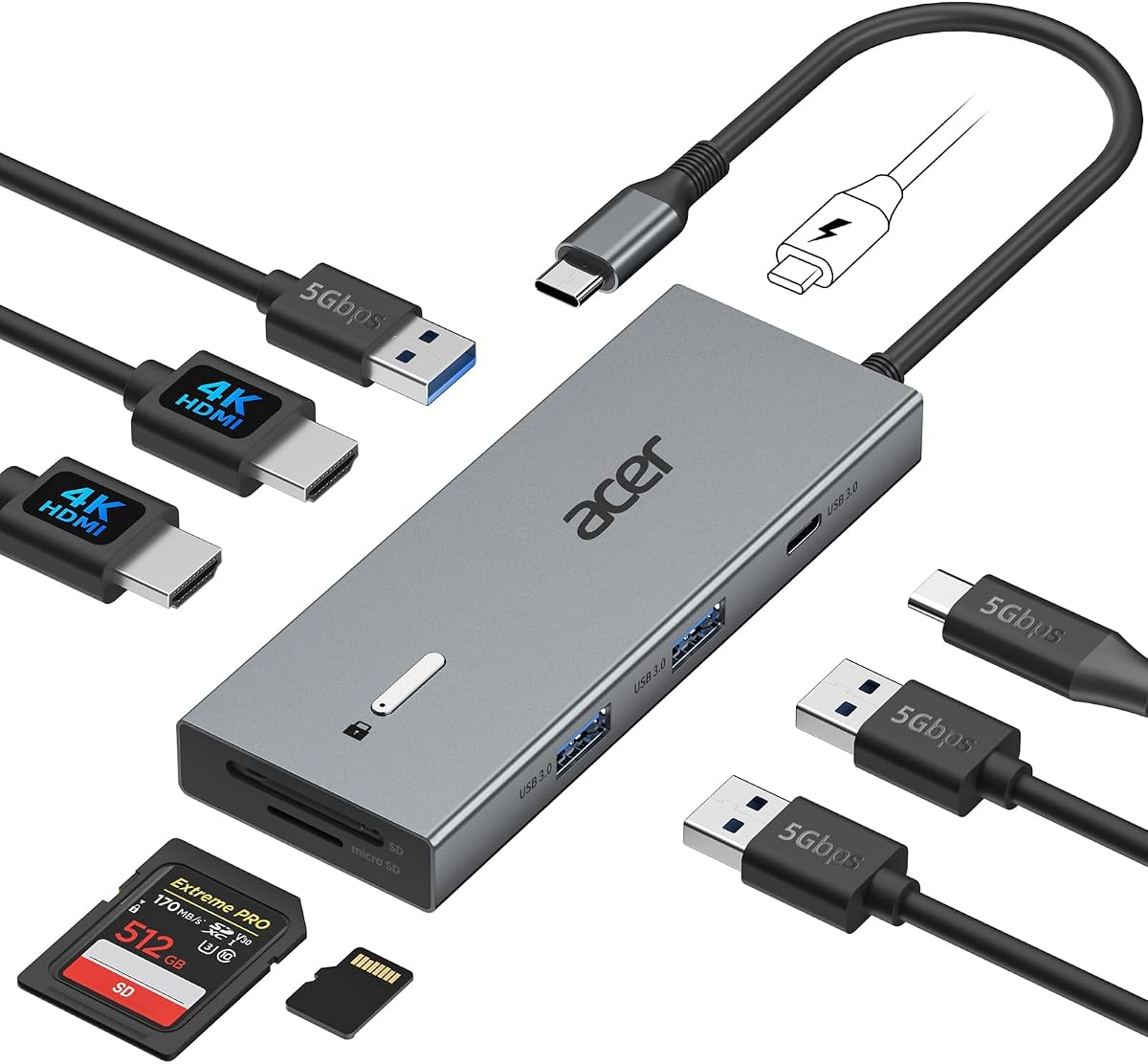
For users needing maximum screen real estate, this Acer dock stands out with triple display support. It delivers robust power and security features for professional environments.
We may earn a commission when you buy through this link, at no additional cost to you.
The inclusion of two HDMI ports and a DisplayPort allows for extensive multitasking. The 110W adapter ensures your system remains powered even when driving multiple monitors.
Performance depends on your laptop supporting Display Stream Compression for triple 4K. Mac users will find it limited to mirroring, which may not suit all workflows.
This docking station is ideal for power users who prioritize extensive connectivity and reliable power delivery in a premium aluminum chassis.
Extend your workspace across three monitors to separate research, coding, and communication streams for a truly immersive workflow experience.
The security slot lets you lock the dock to your desk, protecting valuable equipment in shared or public office spaces.
We may earn a commission when you buy through this link, at no additional cost to you.
Selore offers a cost-effective way to add dual monitors to your setup. It delivers solid performance with high refresh rates suitable for both work and entertainment.
We may earn a commission when you buy through this link, at no additional cost to you.
The dual 4K@60Hz output ensures smooth visuals for video editing or dynamic content. It supports fast charging and data transfer, keeping your workflow efficient.
You will need to provide your own power adapter, which adds a small extra step. However, the performance at this price point is hard to match.
If you are looking for an affordable entry into dual-monitor productivity without sacrificing resolution, this adapter delivers strong value.
The 60Hz refresh rate provides smooth scrolling and video playback, reducing eye strain during long work sessions.
Multiple USB ports and a card reader allow you to connect peripherals and transfer media quickly without extra hubs.
We may earn a commission when you buy through this link, at no additional cost to you.
This Acer model provides a reliable dual HDMI solution with a compact design. It supports fast data and charging, making it a solid choice for everyday office tasks.
We may earn a commission when you buy through this link, at no additional cost to you.
The dual 4K@60Hz support ensures crisp visuals for design work or presentations. A built-in cable reduces clutter, and a security lock button adds peace of mind.
Like many in its class, it requires a separate power adapter for full performance. Users should ensure their laptop supports the necessary video protocols before purchasing.
For those wanting a tidy and efficient setup with dual screens, this dock offers a practical balance of features and design.
The built-in cable and compact form factor reduce cable clutter, helping you maintain a clean and professional workspace.
With dedicated power and data paths, it maintains stable performance even when running multiple peripherals simultaneously.
We may earn a commission when you buy through this link, at no additional cost to you.
The D3100 is a classic docking solution built for stability and broad compatibility. It supports multiple displays and offers essential ports for reliable office connectivity.
We may earn a commission when you buy through this link, at no additional cost to you.
Its USB 3.0 interface ensures fast data transfers and reliable video output. The Ethernet port provides a steady network connection for stable video calls and downloads.
The power output is modest compared to newer models, which may limit use with high-performance laptops. It is best suited for standard business workloads.
If you prioritize stability and need multiple screen support without complex setup, this dock remains a trustworthy option for office environments.
The wired Ethernet connection ensures consistent internet access, eliminating Wi-Fi dropouts during critical meetings.
Support for various Dell models and Windows versions ensures seamless integration into existing enterprise IT environments.
We may earn a commission when you buy through this link, at no additional cost to you.
This compact hub is ideal for users who need dual screens but prefer a smaller footprint. It delivers strong charging and data capabilities for modern laptops.
We may earn a commission when you buy through this link, at no additional cost to you.
While limited to 1080p on HDMI, it remains effective for general productivity. The 10Gbps data port is a standout feature for rapid file transfers.
Lacking an Ethernet port might be a downside for users who need wired internet. However, its power delivery ensures your device stays charged while in use.
For professionals who travel frequently and need a reliable dual-screen setup, this hub offers excellent performance in a small package.
Its compact design fits easily into a laptop bag, making it perfect for remote work and business trips.
The 10Gbps transfer speed significantly reduces wait times when moving large project files to external storage.
We may earn a commission when you buy through this link, at no additional cost to you.
The MOKiN dock is a feature-rich option designed for versatility. It supports high-resolution dual displays and includes a unique privacy lock button.
We may earn a commission when you buy through this link, at no additional cost to you.
The 4K@60Hz output ensures smooth visuals for creative tasks. With fourteen ports available, it connects almost everything you might need in one place.
You will need a separate 100W adapter for full performance. Mac users should note that it only supports mirroring rather than extended displays.
If you need a comprehensive connection solution with privacy features, this dock covers a wide range of use cases effectively.
A simple press on the lock button turns off connected screens, safeguarding sensitive information when you step away.
With USB-A and USB-C ports plus Ethernet, you can connect legacy devices and modern peripherals simultaneously.
We may earn a commission when you buy through this link, at no additional cost to you.
This model pushes display boundaries with support for triple 4K and even 8K output via DP. It is a strong choice for high-resolution visual work.
We may earn a commission when you buy through this link, at no additional cost to you.
The dedicated monitor control button lets you manage displays quickly without digging through system settings. Gigabit Ethernet ensures fast network speeds.
To unlock triple 4K, your laptop must support DisplayPort 1.4 with specific features. Power delivery relies on an external 100W adapter.
For graphic designers and data analysts needing high-resolution multi-monitor setups, this dock offers superior display capabilities.
8K support via DP ensures incredibly sharp visuals for detailed design work or large spreadsheets.
The smart button lets you cycle through display modes or turn off screens instantly, streamlining your workflow.
We may earn a commission when you buy through this link, at no additional cost to you.
This Anker dock is a powerhouse for users needing triple displays and abundant connectivity. It includes a high-wattage adapter for stable power delivery.
We may earn a commission when you buy through this link, at no additional cost to you.
The triple 1080p support allows for extensive multitasking across multiple screens. USB-C data ports offer fast transfer speeds for large files.
It is primarily designed for Windows users, limiting macOS functionality to charging and data. Mac users will need to consider other options.
For Windows professionals who need maximum connectivity and screen real estate, this docking station is a robust and reliable solution.
The included 135W adapter ensures your laptop and connected devices stay fully powered during intensive tasks.
With three screens, you can keep your main app open while referencing documents and monitoring communication on the others.
We may earn a commission when you buy through this link, at no additional cost to you.
This entry represents a placeholder where data is currently unavailable. We strive to provide accurate information for every product reviewed.
We may earn a commission when you buy through this link, at no additional cost to you.
As the market evolves, new options may emerge. Our team continues to monitor the landscape to ensure all listings are current.
Please refer to the other products in this guide for reliable recommendations based on verified performance data.
For the best experience, choose one of the fully reviewed models above that fits your specific needs.
Check back later as we may update this section with new product listings and verified specifications.
Until updated, select a reviewed product from the top three picks for assured quality and compatibility.
We may earn a commission when you buy through this link, at no additional cost to you.
Selecting the right docking station involves evaluating several key factors to ensure it meets your specific workflow requirements.
Look for docks that support at least 4K resolution on both HDMI ports. Higher refresh rates like 60Hz ensure smoother visuals for video editing or gaming.
Verify that the dock supports the resolution you need without requiring complex workarounds.
A docking station with Power Delivery (PD) keeps your laptop charged while you work. Aim for 85W or higher to support most laptops under load.
Ensure the included adapter or the dock itself can deliver enough wattage for your specific device.
Beyond HDMI ports, consider USB-A, USB-C, Ethernet, and card readers. The right mix of ports reduces the need for extra adapters.
Choose a model that covers your daily needs like data transfer and network access.
Most docks work best with Windows for extended displays. macOS users often face limitations where dual screens only mirror.
Check manufacturer notes to confirm compatibility with your current operating system.
Aluminum bodies often offer better heat dissipation than plastic. Consider whether a vertical or horizontal layout fits your desk space better.
A sturdy build ensures longevity and stable performance during daily use.
Features like Kensington locks, screen control buttons, or fast Ethernet add value. These can enhance security and workflow efficiency significantly.
Decide which extra features justify the cost based on your work environment.
Reliable manufacturers offer at least a 12-month warranty. Customer support responsiveness can be crucial if you encounter setup issues.
Choose a brand with a reputation for reliable service and clear warranty terms.
Balance cost against features to find the best value. Expensive models offer more ports but may not suit basic needs.
Focus on the features you actually use to avoid unnecessary spending.
Connect the docking station to your laptop using a high-quality USB-C cable. Ensure the cable supports video and data to enable all features.
Plug your monitors into the HDMI ports and power on the devices. Adjust display settings in your operating system to extend or mirror screens.
Regularly check for firmware updates from the manufacturer. Keep the ports clean and avoid bending cables to ensure long-term reliability.
Most docking stations with HDMI ports only support mirroring on macOS due to system limitations. If you need extended displays on Mac, look for DisplayPort-based hubs with specific macOS support.
You need a high-speed USB-C cable that supports video output and adequate bandwidth. Ensure your laptop port supports DisplayPort Alt Mode for optimal performance.
Yes, most modern docks support Power Delivery pass-through charging. You will need a sufficiently powerful wall adapter to power both the dock and your laptop.
Some models like the Acer 13-in-1 and Anker 13-in-1 support three monitors using one DisplayPort and two HDMI ports. Others are limited to dual HDMI output.
Most are plug-and-play on Windows and macOS. However, some advanced features may require specific drivers to function correctly.
USB 3.0 ports typically offer 5Gbps, while newer models with USB-C 10Gbps ports provide faster speeds. Check specs if you move large files regularly.
We reviewed ten products to highlight the best options for dual HDMI connectivity. The Anker 8-in-1 stands out for its balanced features and reliable performance.
Prioritize power delivery and display quality to ensure a smooth experience. Consider your operating system limits to avoid compatibility issues.
Always check current availability and details before buying as product specs may evolve. Our top picks remain a strong starting point for your setup.