
Switch Dock for Nintendo Switch/Switch OLED
4.2Editor score
3-in-1 port design
100W PD input
Compact travel base
This guide compares the top 10 docks for Nintendo Switch portable play, evaluating HDMI output, charging, port compatibility, and travel design for 2026 gamers.
Finding the right dock for your Nintendo Switch is essential for seamless TV mode gaming. A portable dock should offer reliable HDMI output, fast charging support, and a compact design that fits easily into your travel bag or backpack without adding bulk.
We compared ten top-rated travel docks based on user feedback, build quality, port selection, and compatibility with Switch OLED and upcoming models. Each option was evaluated for real-world performance during long sessions and ease of setup in different environments.
Each pick in this guide highlights specific strengths and trade-offs to help you choose the best fit for your setup. Keep in mind that prices and availability may change, so verify details on the product page before making your final purchase decision today.
4.2Editor score

4.4Editor score

4.4Editor score
Below is a side-by-side comparison of all ten portable dock options, showing key features like resolution support, charging capabilities, and physical size to help you quickly identify the best match for your needs.

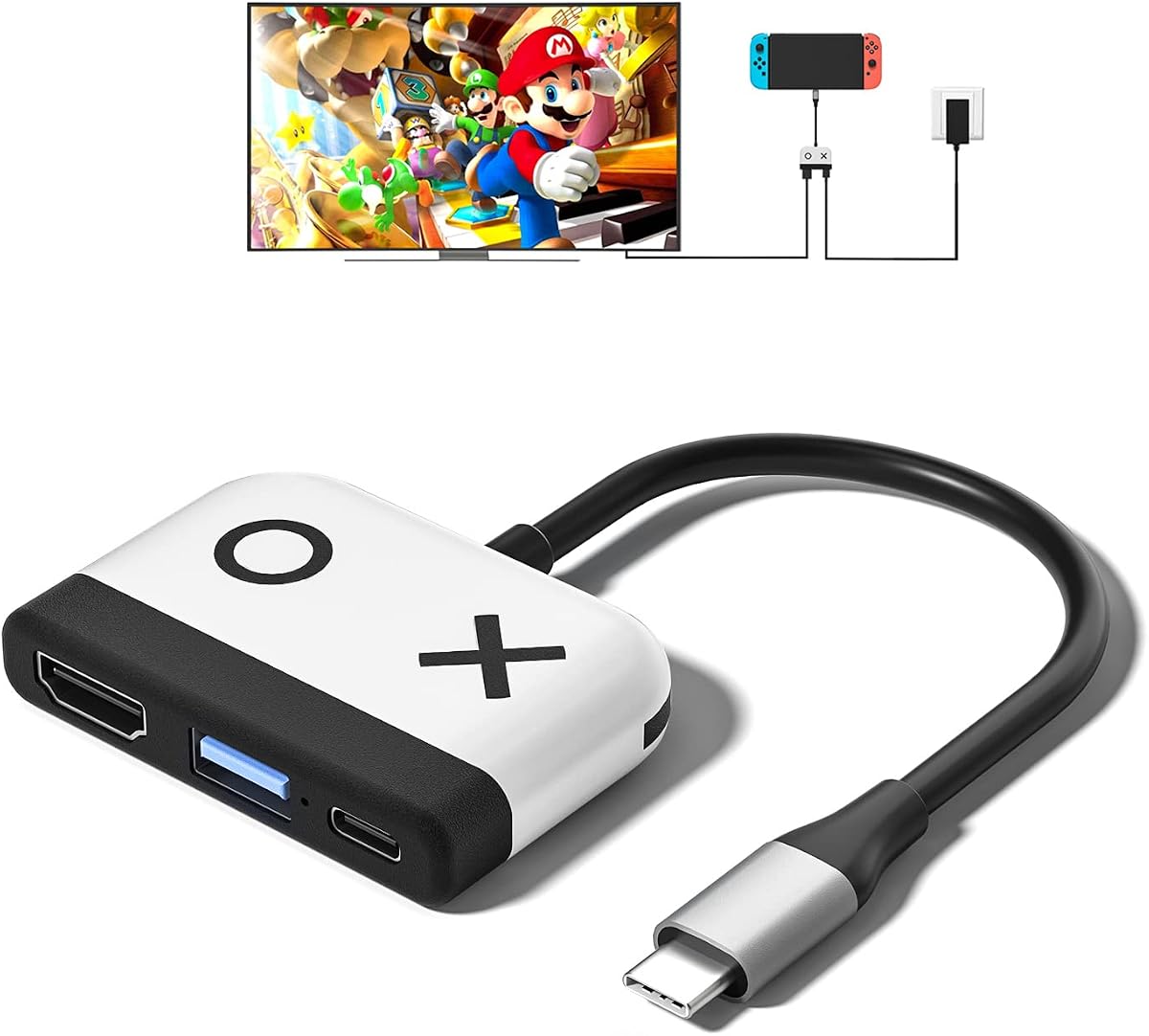


The pdobq Switch Dock is a solid portable option designed for Nintendo Switch and Switch OLED owners. It supports 1080P at 60Hz HDMI output, which delivers smooth gameplay when connected to an external display. The build is compact and fits easily into travel bags.
We may earn a commission when you buy through this link, at no additional cost to you.
It includes a USB 3.0 port for connecting peripherals like flash drives or mice. The design allows you to charge your Switch while playing in TV mode. It is lightweight and avoids the bulk of the official dock.
One limitation is that it does not support the Switch Lite. You must also use the official switch charger to ensure stable power delivery in TV mode. The HDMI output caps at 1080P for Switch models, which is standard for these consoles.
This dock is a good choice for budget-conscious travelers who want reliable HDMI output without extra bulk. It fits well in a backpack and provides stable connections for gaming at home or on the go.
The dock supports 1080P video output at 60Hz, ensuring smooth visuals during gameplay on compatible TVs or monitors.
The included USB 3.0 port lets you connect external devices without needing an additional hub.
We may earn a commission when you buy through this link, at no additional cost to you.
The RREAKA TV Dock stands out with its support for 4K at 60Hz, making it one of the few portable options that promise ultra-high definition output. It is extremely lightweight at 1.5 ounces and uses an aluminium alloy build for durability.
We may earn a commission when you buy through this link, at no additional cost to you.
It features four ports including USB 3.0 and USB 2.0, plus a 100W PD charging port. This allows you to charge your device while gaming in TV mode. The compact design fits easily into backpacks for travel.
The device supports a wide range of USB-C products including Switch OLED, Steam Deck, and laptops. You may need to tweak HDR settings on your TV for best picture quality. It requires an official charger for consistent activation in TV mode.
This dock is ideal for gamers who want high-resolution output without carrying a large brick. It balances performance and portability better than most competitors and offers excellent value for its price point.
Supports 4K at 60Hz and 1080P resolutions for crisp and smooth visuals on large screens.
Multiple USB ports let you connect peripherals and charge your device at the same time.
We may earn a commission when you buy through this link, at no additional cost to you.
This Kstkry Switch Dock uses high-quality wear-resistant silicone material, making it tough against scratches and drops during travel. It supports 4K, 1080P, and 720P video output. The design is lightweight and fits easily into pockets or bags.
We may earn a commission when you buy through this link, at no additional cost to you.
It includes an HDMI port, USB 3.0, and a USB-C charging port. The USB 3.0 port offers super high-speed data transmission up to 5Gbps. It is compatible with many USB-C devices beyond the Switch, such as laptops and tablets.
You can continue to charge your Nintendo Switch while playing on a big screen. It is recommended to use the original charger for best results. The compact size saves space and replaces the original dock for travel use.
This dock is a practical choice for users who prioritize durability and compactness. It offers strong compatibility with various USB-C devices and keeps your setup simple while protecting your console during transit.
Made from wear-resistant silicone to prevent damage during travel and daily use.
USB 3.0 port supports up to 5Gbps for fast data transfer with external drives.
We may earn a commission when you buy through this link, at no additional cost to you.
The iPLYGAM Switch Dock features an upgraded 6-IN-1 multi-port design that includes two USB 2.0 ports and one HDMI 2.0 port. It supports 4K and 1080P output for enhanced gaming experiences. The unit is lightweight at 2.6 ounces.
We may earn a commission when you buy through this link, at no additional cost to you.
It includes a built-in smart chip that provides overcharge, overheat, and short-circuit protection. The dock has a blue LED light indicator and anti-skidpad on the bottom. It works with Nintendo Switch 1 and OLED models.
You can charge your Switch while the TV is playing. The dock allows you to switch between TV and tabletop modes with a single key. It includes a user manual and comes in a color box suitable for gifting.
This dock is a good fit for users who want extra USB ports without buying a separate hub. The safety protections and multi-mode button add convenience for home and travel use.
Built-in smart chip protects against overheat, overcharge, and short circuits during use.
Press one button to switch easily between TV mode and tabletop mode.
We may earn a commission when you buy through this link, at no additional cost to you.
The Travel Portable Switch 2 Dock is designed for the Nintendo Switch 2 released in 2025. It supports 4K at 60Hz resolution and includes a 100W PD fast-charging port. This allows you to charge while in TV or tabletop mode.
We may earn a commission when you buy through this link, at no additional cost to you.
The cable design supports most HDTVs, monitors, and projectors with HDMI ports. You can use the official power adapter for consistent activation. The unit is lightweight and replaces the standard dock during travel.
Steps to use involve powering the adapter, connecting the HDMI cable, and waking the console. It works with OLED and other game consoles but does not support Switch Lite. The package includes only the dock and manual.
This dock is the best choice for early adopters of the Switch 2 who need a travel-friendly replacement. It delivers high-resolution output and fast charging while remaining compact enough for on-the-go sessions.
Built specifically to work with the Nintendo Switch 2 from 2025 and earlier models.
100W PD port keeps your device powered even during extended TV mode sessions.
We may earn a commission when you buy through this link, at no additional cost to you.
This Switch Dock is a budget-friendly 3-in-1 docking station with a 100W PD input port. It supports 4K at 60Hz HDMI output for ultra HD casting. The USB 3.0 data port lets you connect peripherals like controllers.
We may earn a commission when you buy through this link, at no additional cost to you.
It is compatible with Nintendo Switch, Steam Deck, ROG Ally, and Legion Go. The base is sleek and slips easily into bags for gaming on the go. Setup is plug-and-play without drivers.
The PD input port delivers up to 100W to keep your device fully powered while docked. This ensures uninterrupted gaming sessions. You will need to connect your own HDMI cable for video output.
This dock is perfect for travelers who want a reliable HDMI output without spending extra. It balances cost and performance well, offering fast charging and high-resolution output in a compact package.
Works with multiple devices including Steam Deck, ROG Ally, and Legion Go.
The compact base fits easily into any travel bag for portable gaming.
We may earn a commission when you buy through this link, at no additional cost to you.
The BIYTC Switch Dock is a lightweight and compact adapter suitable for travel. It is compatible with Switch 1 and Switch 2. The dock features three ports: USB 3.0, HDMI 2.0 output, and a PD charging port.
We may earn a commission when you buy through this link, at no additional cost to you.
It supports 1080P at 30Hz for video output. The design is pocket-size and fits easily into handbags or backpacks. It provides a bigger screen for a better gaming experience when connected.
To use, power by a 15V 2.6A adapter and connect the HDMI cable. Wake up the switch and plug the USB-C output. Wait a few seconds for TV mode to activate.
This dock is a solid compact solution for casual travelers. It supports common Switch models and keeps your setup minimal. Ensure you use the correct adapter to avoid connection issues.
Fits into handbags or backpacks easily without taking up much room.
Follow clear steps to activate TV mode and start playing on a larger screen.
We may earn a commission when you buy through this link, at no additional cost to you.
The AHGEIIY Switch 2 Dock is a lightweight travel dock weighing only 39 grams. It supports 4K at 60Hz HDMI output and includes a 100W PD charging port. This lets you charge while playing in TV mode.
We may earn a commission when you buy through this link, at no additional cost to you.
It is compatible with Switch 1, OLED, Steam Deck, and devices with USB-C ports supporting DP Alt Mode. The USB 3.0 port offers high-speed stable data transfer. You can use Samsung DEX Mode with the right power source.
To activate, connect to power source first then HDMI. The host will be black initially. It is recommended to use the original charger or one with output greater than 39W to avoid issues.
This dock is ideal for users who want a minimal footprint on the road. It delivers high-resolution output and fast charging while weighing less than most competitors.
Weighs only 39 grams to fit easily in pockets or laptop bags.
Provides stable and fast data transfer without lag during file transfers.
We may earn a commission when you buy through this link, at no additional cost to you.
This Aluminum Alloy Switch 2 Dock weighs only 45 grams and uses a classic black and white color match. It supports 4K at 60Hz HDMI output and includes a 100W PD fast charging port for uninterrupted sessions.
We may earn a commission when you buy through this link, at no additional cost to you.
The dock works with Switch 1, OLED, and Switch 2 from 2025. It is compatible with iPhone, MacBook, iPad, and Samsung DEX station. You will need to use the official power adapter and HDMI cable for best results.
Follow the steps to use: power the adapter, connect HDMI, and wake the switch. Wait 2 to 8 seconds for the TV to light auto. The screen of Switch 2 is black in TV mode.
This dock is a reliable travel companion for gamers who want a durable alloy build. It supports high-resolution output and fast charging while remaining compact and easy to carry.
Made from aluminum alloy to withstand travel wear and tear.
Supports Switch series, iPhones, MacBooks, and Android DEX devices.
We may earn a commission when you buy through this link, at no additional cost to you.
This Portable Dock Station includes a built-in smart protection chip and advanced cooling design to prevent overheating. It features multiple ventilation openings and a flexible spring stand for the Type-C connector. It supports 4K, 1080P, and 720P video output.
We may earn a commission when you buy through this link, at no additional cost to you.
The Switch can sit on top for easier placement instead of sliding in. You can play while charging in tabletop mode. The dock includes multiple USB ports for device connection.
To use, slide your device on top. Connect the HDMI cable and use the official power adapter. The anti-slip pads keep it stable on flat surfaces. The cooling system helps prevent overheating during long sessions.
This dock is a great choice for users concerned about heat. It offers a unique top-loading design and strong safety features. Make sure to use the correct adapter to ensure stable performance.
Ventilation openings and smart protection chip prevent overheating.
Place the console on top for quick setup and removal.
We may earn a commission when you buy through this link, at no additional cost to you.
Selecting the right dock involves considering HDMI output, charging capabilities, physical size, and build quality. Here are key factors to help you decide.
Look for docks that support at least 1080P 60Hz for smooth gameplay. Some models offer 4K 60Hz for ultra-high definition output. Ensure the dock matches your console capabilities and external display requirements.
Prioritize 1080P 60Hz or 4K 60Hz for the best visual experience.
Choose a dock with a PD charging port that supports your console's power needs. Most models support play while charging. Verify it requires your existing charger or includes one for convenience.
A 100W PD input port is a safe bet for most setups.
Check for USB 3.0 or 2.0 ports to connect peripherals like controllers or drives. Ensure compatibility with your console models and other devices such as Steam Deck or laptops.
Make sure the dock supports your console and any extra devices you own.
Portable docks should be compact and lightweight to fit in backpacks. Look for models under 5 ounces with durable builds. Small size helps reduce bulk while traveling.
Aim for models under 5 ounces for easy travel.
Materials like silicone or aluminium alloy provide durability against wear. Good builds include anti-skid pads and protective features to keep your device safe during use.
Aluminium or silicone builds protect your console during travel.
Some docks include cooling systems or ventilation to prevent overheating during long sessions. This helps maintain stable performance and protects the console from heat buildup.
Look for vents or cooling designs if you game for long periods.
Choose a dock with plug-and-play setup that does not need drivers. Simple mode switching buttons or clear connection steps help you start gaming quickly.
A plug-and-play dock saves time when setting up at a new location.
Review warranty terms and customer support options provided by the manufacturer. Good support ensures you get help if issues arise with your connection or device.
Check the warranty length and support contact options before buying.
Connect the dock to a reliable power source using a compatible charger before plugging in your console. Ensure the power adapter matches the dock's input specifications to prevent connection issues.
Plug an HDMI cable from the dock into your TV or monitor. Select the correct HDMI input on your display to see the output from your Switch or other device.
Clean the ports and surfaces regularly with a dry cloth. Store the dock in a protective case when not in use to prevent scratches and damage to the connectors.
Most portable docks in this guide do not support Nintendo Switch Lite since Lite does not support video output. Please check product descriptions carefully before purchasing to confirm device compatibility.
Ensure you are using the correct power adapter with sufficient wattage to activate TV mode. Some docks require at least 60W output. Also check that the HDMI connection is secure and your display input is correct.
It is recommended to use the official Switch charger or one with sufficient output for stable performance. Using a lower wattage charger may prevent TV mode from activating or cause unstable connections.
Yes many docks support 4K output but your Switch console may limit output to 1080P. You can still benefit from crisp visuals on a 4K display. Check the dock's HDMI specifications to confirm support.
Most models in this guide do not include HDMI cables. You will need to use your own HDMI cable to connect the dock to your TV or monitor. Verify this detail before ordering.
Yes most docks include a PD charging port that allows play while charging. Ensure you use the correct power adapter to maintain stable power delivery during long gaming sessions.
This guide reviewed ten top docks for portable Nintendo Switch play, highlighting models like the RREAKA TV Dock and pdobq Switch Dock. Each offers unique strengths from compact designs to high-resolution output support.
Prioritize ports, thermal management, and build quality when choosing. Ensure your dock supports your console model and preferred accessories for smooth gameplay on the go.
Prices and availability may change over time. Always check the current product page for the latest details before finalizing your purchase decision.