This guide compares the top ten BIOS flash tools for programmers and technicians seeking reliable hardware to read write and recover memory chips efficiently.
As an Amazon Associate we earn from qualifying purchases. We may earn a commission when you buy through links on this page, at no additional cost to you. Read our affiliate disclosure.As an Amazon Associate we earn from qualifying purchases.Purchases through our links may earn us a commission, at no extra cost to you. Read our affiliate disclosure.
Choosing the right BIOS flash tool is essential for technicians and hobbyists who need to recover or update system firmware. A reliable programmer ensures safe operations on various chip series without damaging delicate components during the process.
We evaluated ten highly rated products based on compatibility, speed, and ease of use to help you make an informed decision. Each option supports different chip types and voltage requirements to meet diverse repair and development needs effectively.
Every pick highlights key specifications and real-world performance traits to guide your selection. Please note that product availability and pricing may vary over time so verify current details before placing your order.
This side-by-side comparison highlights the key specifications and capabilities of each BIOS flash tool to help you choose the best match for your specific repair or programming requirements.
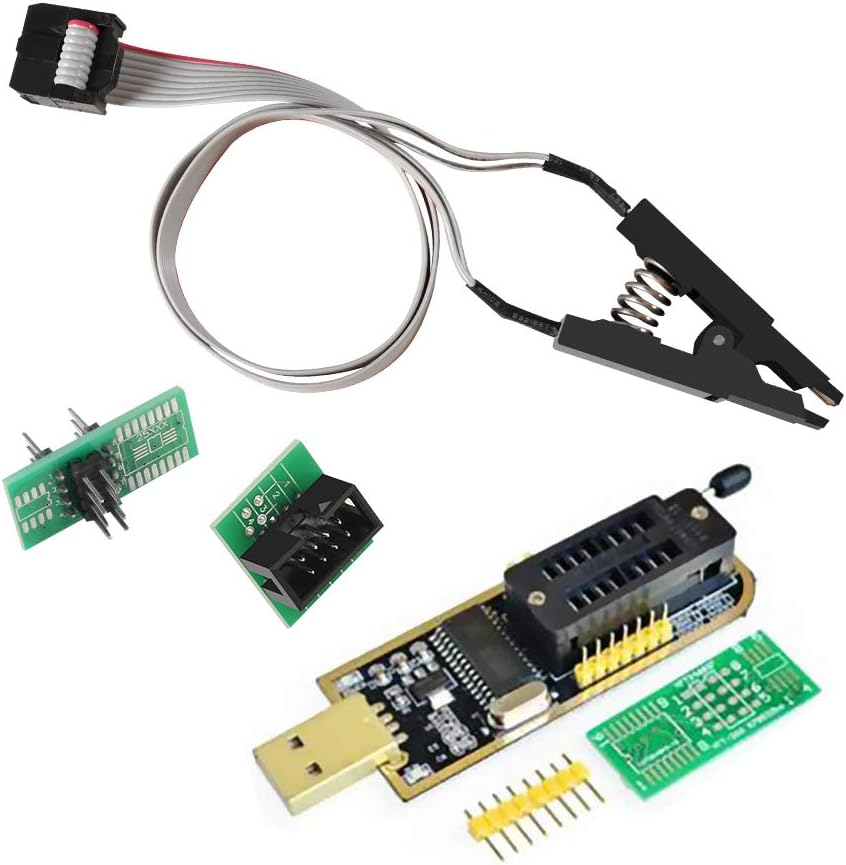
The WWZMDiB CH341A EEPROM BIOS Programmer is a budget-friendly solution designed to backup erase and program various software on memory chips. With a solid rating of 4.1 stars it offers essential features for hobbyists and entry-level technicians who need reliable performance without breaking the bank.
Pros
Affordable price point for beginners
No welding required for clip use
Includes SOP8 SOP16 conversion plate
Direct clamp connection to chips
Wide chip compatibility out of box
Cons
Must confirm chip voltage to avoid burns
Limited to specific voltage switching options
We may earn a commission when you buy through this link, at no additional cost to you.
This unit stands out for its ease of use since it requires no welding to connect to chips. You can directly clamp it using the included test clip which simplifies the process significantly. It supports most 24 and 25 series SOP8 and SOP16 chips ensuring broad compatibility across many devices.
While it is an excellent choice for most tasks users must confirm the chip voltage before starting to avoid burning the chip. The product only supports 3.3V and 5V switching which may limit its use on devices requiring other voltages. However for standard operations these constraints are usually acceptable.
Anyone looking for an affordable entry into BIOS programming will find this tool highly valuable. It provides the core functionality needed for common repair tasks while keeping costs low. We recommend it for users who prioritize simplicity and cost-effectiveness over advanced features.
No Soldering Required
The included test clip allows you to connect directly to the chip without soldering which saves time and reduces risk of damage to the board.
Wide Chip Compatibility
Support for most 24 and 25 series chips means you can use this tool on a variety of devices including routers and motherboards.
The ACEIRMC SOIC8 SOP8 Flash Chip IC Test Clips kit is our top pick because it combines ease of use with broad compatibility. Rated at 4.4 stars this product empowers technicians to flash BIOS chips without disassembling them saving valuable time during repairs.
Pros
Enables in-circuit programming without disassembly
Includes double clip for added flexibility
High rating indicates user satisfaction
Simplifies BIOS flashing process significantly
Works with wide range of EEPROM chips
Cons
Some chips affected by peripheral circuits may fail
ESMT SST class 25 chip read only
We may earn a commission when you buy through this link, at no additional cost to you.
Its primary strength lies in enabling in-circuit programming through the SOP8 clip which allows direct access to EEPROM chips. This feature makes the flashing process much simpler and more efficient. It supports most 24 and 25 series SOP8 SOP16 chips found on the market ensuring versatility.
While highly effective users should note that some chips are affected by peripheral circuits and cannot be clipped directly. Additionally ESMT SST class 25 chips can only be read and not written with this tool. These limitations are minor but important to consider before purchase.
We recommend this kit for technicians and hobbyists who need a reliable solution for common BIOS tasks. The included double clip offers flexibility and the overall design promotes efficiency. It is an excellent balance of performance and price for most users.
In-Circuit Programming
The SOP8 clip allows you to program chips while they are still on the board which eliminates the need for desoldering and rework.
Double Clip Included
Having two clips means you can swap them out if one gets damaged or use them on different chips simultaneously for faster workflow.
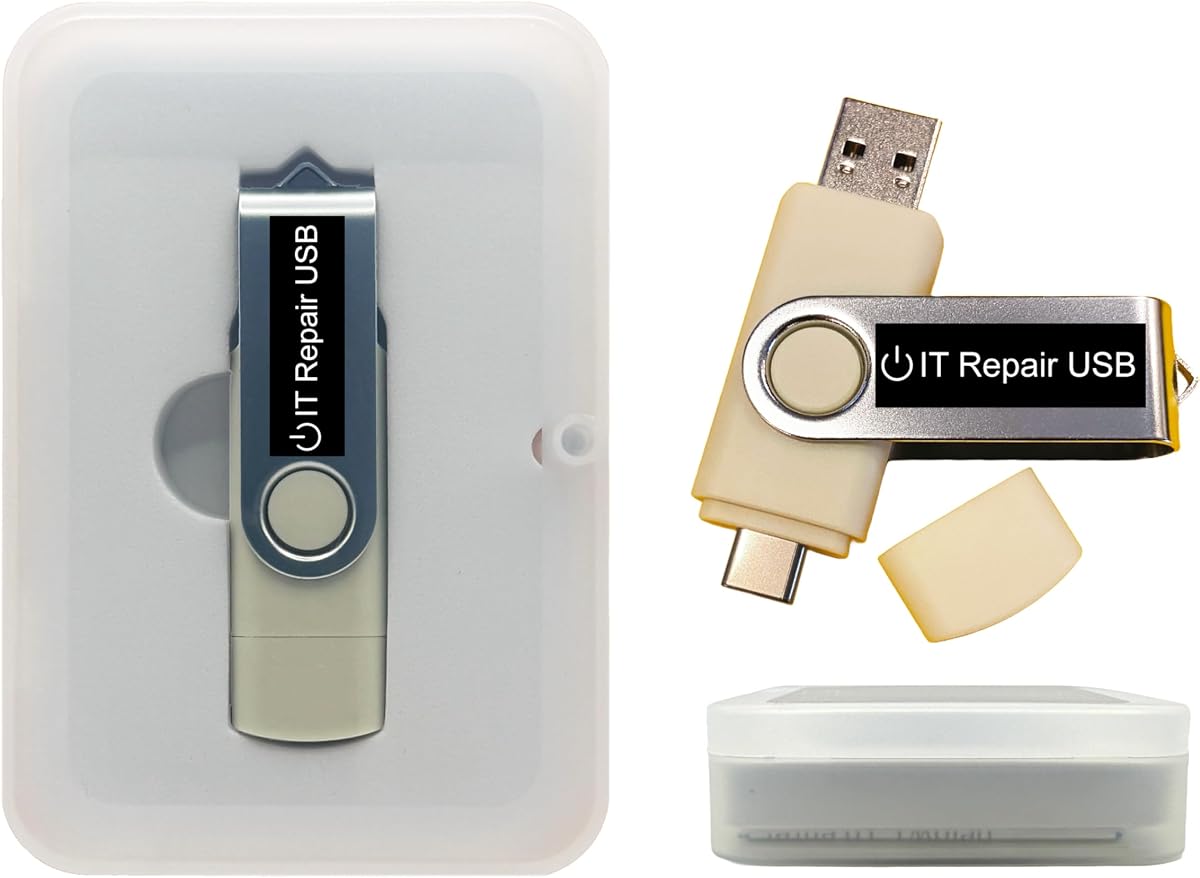
The Password Reset Bootable USB for Windows is designed to unlock forgotten user accounts on Windows and Linux systems. With a rating of 3.6 stars it offers a straightforward solution for those locked out of their devices without needing to reinstall the operating system.
Pros
Supports Legacy BIOS and UEFI boot modes
Compatible with nearly all laptops and desktops
No internet connection required to use
User-friendly interface with step-by-step instructions
Trusted by IT professionals for access
Cons
Rating is lower than flash programmers
Specific to password recovery tasks
We may earn a commission when you buy through this link, at no additional cost to you.
This tool features a dual USB-A and USB-C interface ensuring compatibility with nearly all laptops and desktops. It supports both Legacy BIOS and UEFI boot modes which broadens its reach. The interface is simple and secure with on-screen guidance to help users complete the reset quickly.
While it is effective for password recovery it is not a general purpose flash tool for BIOS chips. The rating is lower than dedicated programmers which may reflect its narrower scope. Users should verify their system compatibility before purchasing to ensure success.
IT professionals and power users will find this useful for restoring system access quickly and safely. It is an essential addition to any toolkit focused on user account recovery. We recommend it for those who frequently manage multiple systems and need a reliable password reset solution.
Broad OS Compatibility
Support for Windows versions from 2000 to 11 and most Linux distributions ensures you can use this tool on almost any modern or older system.
No Internet Required
You can operate this tool without an internet connection which is helpful in secure environments or when network access is unavailable during recovery.
This USB reinstalls repairs Windows operating system only
Not for all devices like Chromebooks or Macs
No product key included with purchase
Your computer must power on to use
The Bootable USB Drive for Windows 11 provides a straightforward way to reinstall or repair your operating system. With a rating of 4.0 stars it offers relief for users facing software issues without needing complex tools or technical knowledge.
Pros
No TPM requirement for installation
UEFI and Legacy compatible
Rein & and recovery capabilities
Simple setup for Windows users
Made by family owned business in Texas
Cons
Cannot fix failing hardware or dead motherboards
Requires PC to enter BIOS before use
We may earn a commission when you buy through this link, at no additional cost to you.
This drive stands out by not requiring TPM which allows it to work on older hardware that may not meet standard Windows 11 requirements. It is compatible with both UEFI and Legacy boot modes ensuring flexibility across different systems. The installer is designed for ease of use.
Users should note that this tool cannot fix failing hardware such as dead motherboards or bad RAM. If your computer cannot power on or access BIOS this drive will not resolve the issue. Always verify your PC state before purchasing to manage expectations.
We recommend this product for those needing a reliable Windows installation source without TPM restrictions. It is particularly useful for upgrades or clean installs on supported machines. The support from the maker adds a layer of trust for buyers seeking quality.
No TPM Required
By removing the TPM requirement this drive allows installation on older hardware that would otherwise be blocked from running Windows 11 updates or setups.
UEFI Legacy Compatible
Support for both boot modes means you can use this on newer UEFI systems and older Legacy BIOS machines without configuration hurdles.
The ACEIRMC SOIC8 SOP8 Test Clip Kit offers faster programming speeds compared to standard alternatives. With a rating of 4.4 stars it appeals to amateur programmers and repair technicians who need efficiency without investing in enterprise grade hardware.
Pros
Up to 2-3 times faster programming
Includes 1.8V adapter for iPhone
Suitable for amateur programmers
Used for TVs routers and set-top boxes
Supports unlocking backup and repair tasks
Cons
Not ideal for professional high volume work
Limited to specific chip series support
We may earn a commission when you buy through this link, at no additional cost to you.
This unit is designed to program 24 and 25 series FLASH chips quickly. It uses a specially produced CH341A USB chip which enables faster erase and write operations. The package includes an 1.8V adapter which adds versatility for devices requiring lower voltage like mobile phones.
While it is efficient for typical tasks it may not suit professional high volume work environments. The focus is on hobbyist and small scale repair needs such as unlocking software or fixing routers. Users should choose this based on their specific project requirements.
We recommend this kit for those who need a compact and fast solution for common flash tasks. The inclusion of adapters makes it a complete package for varied use cases. It is a practical choice for anyone working on consumer electronics repair.
Enhanced Speed
The CH341A chip allows for erase speeds of 2-3 Mbit per minute which is significantly faster than older programmer designs for typical tasks.
Includes Voltage Adapter
The 1.8V adapter enables support for iPhone or motherboard memory chips that operate at lower voltages than the standard 3.3V or 5V.
The EZP2023 USB Programmer for EEPROM Flash is a high-performance tool that sets a new standard for speed in its class. With a rating of 4.3 stars it is marketed as the fastest BIOS chip programmer on the market making it ideal for professionals who value efficiency.
Pros
Fastest read and write speeds available
Automatically selects chip supply voltage
Includes fifteen adapters for broad support
Better than EZP2019 model
Fully supports multiple EEPROM series
Cons
Higher price point than basic models
Manual selection needed for 24 93 series
We may earn a commission when you buy through this link, at no additional cost to you.
It automatically identifies chip models and selects supply voltage which reduces human error during operations. The read and write speeds are exceptional with tasks like reading EN25T80 taking only three seconds. This speed significantly improves workflow for high volume repair work.
While it supports most 25 series automatically some 24 and 93 series chips require manual selection. This small manual step is a minor trade-off for the overall performance gain. The higher price is justified by the robust feature set and speed advantages.
We recommend this programmer for technicians who handle diverse and time-sensitive repair jobs. The included adapters ensure compatibility with a wide range of chips. It is a premium investment that pays off in productivity and reliability for serious users.
Automated Detection
The ability to automatically detect chip placement and voltage reduces the risk of incorrect setup and speeds up the preparation phase of programming.
Broad Series Support
Full support for 24 25 93 and 95 EEPROM series means you can use one device for nearly all common flash memory chip types.
The Windows PC Repair Bootable USB Toolkit is designed to handle a wide range of system issues from startup errors to password recovery. With a rating of 3.5 stars it is a software focused solution that complements hardware tools in a comprehensive repair strategy.
Pros
Works with both UEFI and Legacy BIOS
Fully customizable with compatible bootable ISO apps
All-in-one toolkit with user-friendly interface
Can run Live without modifying PC
Revives old or slow PCs easily
Cons
Rating is lower than flash programmers
Not a dedicated hardware flash tool
We may earn a commission when you buy through this link, at no additional cost to you.
This drive features dual USB-A and USB-C ports ensuring broad compatibility with modern and older devices. Its key advantage is the ability to run Live without modifying the PC which is ideal for diagnostics. The interface is user-friendly and guides users through complex repair steps.
While versatile it is not a direct replacement for hardware flash tools that write directly to chip memory. Users looking for firmware updates should pair this with a dedicated programmer. The customization options allow for adding custom ISOs to fit specific needs.
We recommend this toolkit for technicians who need a portable recovery solution for various operating system issues. It is particularly useful for reviving old machines without permanent changes. It serves as a great addition to a repair lab.
Live Operation
You can run diagnostics and repair tools directly from the USB without touching the hard drive which preserves data integrity during troubleshooting.
Customizable Setup
The drive allows you to add replace or upgrade bootable ISOs which lets you tailor the toolkit to your specific workflow or client requirements.
The SOP16 IC Test Clip is a specialized accessory designed to make BIOS refreshing easier and more efficient. With a rating of 4.3 stars it provides a reliable connection point for flash chip programmers that need to interface with SOP16 packages.
Pros
Makes refreshing the Programmer easier and more efficient
Supports 25 Series Wide and Narrow Body Chips
Hardened clip with gold-plated pins
Includes 40cm connection line for flexibility
Compatible with common programmer brands
Cons
Chip on circuit board may be affected by peripheral circuits
Unrecognized boards may require chip removal
We may earn a commission when you buy through this link, at no additional cost to you.
Its hardened construction with gold-plated pins ensures stable connections during programming. The 40cm connection line gives you flexibility in positioning the clip on a crowded motherboard. It supports both wide and narrow body chips which covers most common 25 series parts.
Users should note that peripheral circuits on the board can interfere with in-circuit programming. If the board is unrecognized you may need to remove the chip for successful programming. This is a standard limitation for clip-based tools.
We recommend this clip for users who frequently work with SOP16 chips. It is a durable and practical accessory that enhances your existing programmer setup. It is a cost-effective way to expand your chip compatibility.
Gold-Plated Pins
The thick gold-plated layer on the pins ensures a reliable electrical connection which reduces the risk of intermittent contact during writes.
Flexible Connection Line
The 40cm line gives you enough slack to position the clip comfortably even on large boards where the socket is far from the USB port.
The Bootable USB for Windows 11 and 10 is a modern recovery solution that works with Secure Boot enabled. With no rating available it positions itself as a reliable option for users who need the latest official Windows versions without complex setups.
Pros
Works with Secure Boot enabled
Downloads genuine Windows directly from Microsoft
Clear on-screen instructions included
No BIOS changes needed
US-based support via live chat
Cons
No product key included
Legacy BIOS not supported
We may earn a commission when you buy through this link, at no additional cost to you.
This tool stands out by not requiring changes to BIOS settings to bypass Secure Boot which simplifies the process. It downloads genuine Windows directly from Microsoft ensuring you get an updated and authentic installation. The user interface is clear and guides you through steps.
While it is convenient it does not include a product key so you must have your own license or purchase one separately. Also it is designed only for 64-bit systems with UEFI BIOS which may exclude older machines. These constraints should be verified before buying.
We recommend this tool for users with modern systems who need a hassle-free way to reinstall Windows. The US-based support adds value for those who prefer human assistance. It is a solid choice for straightforward OS recovery tasks.
Secure Boot Support
Unlike many recovery tools this drive works with Secure Boot enabled so you do not have to disable security features to boot from USB.
Official Windows Download
By downloading Windows directly from Microsoft you avoid outdated ISOs or pirated copies ensuring a clean and official installation on your machine.
The Kali Linux Bootable USB is a specialized tool for ethical hacking and cybersecurity professionals. With a rating of 4.1 stars it provides a portable environment loaded with tools for vulnerability assessment forensics and digital investigation.
Pros
Includes over 600 pre-installed tools
Trusted by IT experts and security researchers
Dual USB-A and USB-C support
Customizable with compatible bootable ISO apps
Runs or installs Kali on supported PCs
Cons
Not a BIOS flash tool
Specific to ethical hacking use
We may earn a commission when you buy through this link, at no additional cost to you.
This drive features dual USB-A and USB-C support making it compatible with almost any desktop or laptop. It includes over 600 pre-installed penetration testing tools which are essential for network web and wireless auditing. You can run Kali directly or install it permanently.
While highly useful for security tasks it is not a BIOS flash tool and should not be used for that purpose. The focus is on security auditing and system testing. Users should select this only if they need a security toolkit specifically.
We recommend this product for cybersecurity professionals and enthusiasts who need a ready-to-use testing environment. Its customization options allow you to adapt the setup for specific projects. It is a powerful addition for security audits.
Pre-installed Tools
Having 600 tools pre-installed saves you the effort of configuring a security environment from scratch and lets you start auditing immediately.
Cross-Architecture Support
Support for both Intel AMD and ARM architectures ensures you can run this on a wide variety of hardware including modern ARM-based PCs.
We may earn a commission when you buy through this link, at no additional cost to you.
Buying Guide – How to Choose the Best Bios Flash Tool
Selecting the right BIOS flash tool depends on your specific needs and the types of chips you plan to work with.
Chip Compatibility
Ensure the tool supports the chip series you work with such as 24 25 or 93 series. This ensures that you can read and write to the specific memory types on your devices without needing extra adapters.
Verify that the programmer handles the required voltages and physical package sizes for your projects.
Ease of Use
Tools that offer in-circuit programming without disassembly save time and reduce the risk of damaging components. Clips that clamp directly to the chip are more efficient than those requiring soldering or removal.
Look for intuitive interfaces and clear instructions to streamline your workflow.
Speed and Performance
Faster read and write speeds significantly improve your efficiency especially if you handle multiple devices. Higher quality chips in the programmer can reduce wait times during operations.
Choose a model with proven speed metrics if you value productivity in your repairs.
Adapters and Accessories
Programmers that come with multiple adapters for different package types like SOP8 SOP16 or DIP offer better value. Having these included saves you from buying separate components later.
Check what is included in the package to ensure it meets your specific adapter needs.
Build Quality
Durable clips and reliable connection lines prevent intermittent errors during programming. Gold-plated pins and hardened clips ensure consistent contact over time.
Invest in a tool that feels sturdy and is designed for repeated use.
Voltage Support
Many chips operate at different voltages such as 1.8V 3.3V or 5V. A good tool supports these variations automatically or through adapters to prevent damage.
Always confirm voltage compatibility before attempting to program any chip.
User Feedback
Check ratings and reviews to see how well the tool performs in real-world scenarios. Other users can highlight issues that are not obvious from the product description.
Choose models with consistent positive feedback for reliability.
Price and Value
Balance the cost of the tool against its features to ensure you get the best value. Budget models may lack features but still work well for basic needs.
Consider long-term value rather than just the initial price tag.
How to Use and Care for Your Bios Flash Tool
Always verify the voltage requirements of the chip before connecting it to the programmer. Using the wrong voltage can permanently damage the chip and the device.
Use the clips to secure connections and avoid using excessive force. This helps prevent bending pins or damaging the solder points on the board.
Store the programmer and clips in a dry and clean place. Keeping your tools organized and protected will extend their lifespan and reliability.
Frequently Asked Questions
What is a BIOS flash tool used for?
A BIOS flash tool is used to read write and update the firmware stored on memory chips. This is essential for recovering lost data or updating system software on devices like motherboards routers and embedded systems.
Do I need to remove the chip to program it?
Not always. Many tools come with clips that enable in-circuit programming so you can work without removing the chip. However some situations may require removal for accurate results.
Can these tools work with any chip series?
No. Most tools are designed for specific series such as 24 25 or 93. Always check the compatibility list to ensure the tool supports the chips you intend to use.
How do I know if my chip is supported?
Check the manufacturer datasheet for the chip series and voltage. Compare this with the tool's supported list. Some tools automatically detect the model to simplify this process.
Is soldering required for most programmers?
Most modern programmers use clips that clamp directly to the chip without soldering. This reduces the skill level needed for use. Soldering may be required only for specialized adapters.
Why is my chip not being recognized?
Peripheral circuits on the board can interfere with detection. Try removing the chip for programming. Ensure the voltage settings match the chip's requirements to avoid errors.
Final Thoughts on Choosing the Best Bios Flash Tool
We reviewed ten tools that cover a range of needs from budget-friendly clips to high-speed premium programmers. Each has unique strengths that suit different repair scenarios and user levels.
Prioritize compatibility and ease of use when selecting a tool for your work. Consider the chip types you handle most often to find the right fit for your toolkit.
Always verify current availability and details before purchasing. Prices and product offerings can change so checking the latest info ensures you get the right tool.