
4K AI-Powered Conference Webcam
4.1Editor score
Zoom Certified for reliable calls
120 degree wide angle lens
Physical lens cover included
This guide compares the top 10 Auto Tracking Conference Camera models for video quality, AI tracking accuracy, and audio performance to help you choose the
Modern meetings demand crystal clear visuals and seamless audio to keep remote participants engaged. An Auto Tracking Conference Camera automates framing, ensuring every speaker stays centered without manual adjustments. This technology transforms standard rooms into professional broadcast-ready spaces for any organization.
We evaluated ten leading systems based on resolution, zoom capabilities, and AI tracking algorithms. Our analysis focuses on real-world performance in diverse settings like boardrooms, churches, and classrooms. Each model was reviewed for ease of setup, compatibility with major platforms, and build quality.
Every pick below highlights specific strengths such as optical zoom range or microphone array quality. Note that availability and stock levels change frequently across different retailers. Always verify current specs and warranty terms before finalizing your purchase decision today.
4.1Editor score

4.8Editor score

4.6Editor score
The following table provides a side-by-side comparison of key specifications for all ten models reviewed in this guide. Use this data to quickly identify which camera meets your specific room size and connectivity needs.




This system stands out for its comprehensive bundle that includes both a high resolution camera and a speakerphone. It earned top marks for its ability to handle medium conference rooms with ease. The 4K sensor provides sharp images that make remote participants feel present.
We may earn a commission when you buy through this link, at no additional cost to you.
The AI auto tracking algorithm focuses on humanoids and faces with impressive precision. It maintains a perfect view of the speaker even as they move around the room. This feature is crucial for keeping the focus on the right person during dynamic discussions.
While the tracking is excellent, the battery life on the speakerphone is a moderate constraint. It supports six to eight hours of continuous use which covers most meetings. Users should plan recharging cycles for longer events or ensure constant power access.
Buyers looking for an all-in-one solution for small to medium spaces will find this ideal. It works seamlessly with major platforms like Zoom and Teams. The variety of installation options ensures it fits any office layout comfortably.
The kit combines a PTZ camera with a Bluetooth speakerphone to ensure both sides are heard clearly. This eliminates the need for separate audio devices that often complicate setup.
You can mount the camera on a desk wall tripod or ceiling. This flexibility allows you to adapt the system to existing infrastructure without major renovations.
We may earn a commission when you buy through this link, at no additional cost to you.
This webcam offers a cost effective entry into high quality video conferencing. Its Zoom certification ensures reliability for teams that depend on the platform daily. The wide angle lens captures the entire room without needing multiple devices.
We may earn a commission when you buy through this link, at no additional cost to you.
AI auto framing helps group meetings by detecting and framing all attendees automatically. This is particularly useful for small team discussions where everyone needs to be visible. The dual microphones reduce background noise effectively for clearer calls.
The lens cover adds a necessary layer of privacy for shared office environments. It is a simple feature that builds trust among users concerned about security. However the zoom capabilities are less extensive than PTZ models.
For small rooms needing a reliable camera without complex controls this is a great choice. It avoids the clutter of external speakers by integrating basic audio. Just plug it in via USB and start your meeting instantly.
Being certified for Zoom means the device undergoes rigorous testing for performance. Users can expect stable connections and optimized audio visual synchronization.
A physical lens cover protects privacy when the camera is not in use. This prevents accidental recording and ensures visual security in shared spaces.
We may earn a commission when you buy through this link, at no additional cost to you.
This model prioritizes smooth motion with its 60 frames per second video output. While it uses HD resolution the high frame rate reduces blur during movement. It is an excellent choice for rooms where presenters move frequently around a whiteboard.
We may earn a commission when you buy through this link, at no additional cost to you.
The AI tracking system improves on previous versions by recognizing both faces and bodies. It ensures the camera locks onto the speaker accurately without losing focus. This precision enhances the professional look of any recorded or live meeting.
Audio performance is strong with a full duplex system that allows simultaneous talking and listening. The speakerphone connects via Bluetooth 5.0 for stable wireless performance. Users should note the battery life is similar to other models in this range.
Buyers who prefer smooth video over 4K resolution will appreciate this option. It works well for online courses and remote training sessions. The plug and play setup means IT staff can deploy it quickly across multiple rooms.
The 60fps rate ensures fluid video that minimizes motion blur. This is critical when tracking moving speakers or fast paced presentations.
Recognition algorithms handle both human faces and body shapes effectively. This dual approach keeps the subject centered even if posture changes.
We may earn a commission when you buy through this link, at no additional cost to you.
This system introduces a unique feature set that includes six distinct gesture controls. Users can start tracking or zoom with simple hand signals. This adds a layer of modern convenience that is rare in standard conference cameras.
We may earn a commission when you buy through this link, at no additional cost to you.
The AI auto tracking works reliably to keep the active speaker in focus. Combined with the wide angle lens it covers the full room efficiently. The 4K resolution ensures crisp visuals for detailed presentations.
Control flexibility is high with options for remote software and preset positions. The menu on the remote allows deep customization of camera parameters. However the digital zoom may reduce image clarity compared to optical alternatives.
Presenters who want interactive control without touching a device will love this feature. It supports a range of software platforms including OBS and Teams. The included remote makes setup intuitive for technical teams.
Hand signals allow users to toggle tracking or zoom without physical contact. This enhances hygiene and convenience in high traffic meeting rooms.
Users can manage the camera via remote control software or joystick. This variety ensures the system fits into existing operational workflows easily.
We may earn a commission when you buy through this link, at no additional cost to you.
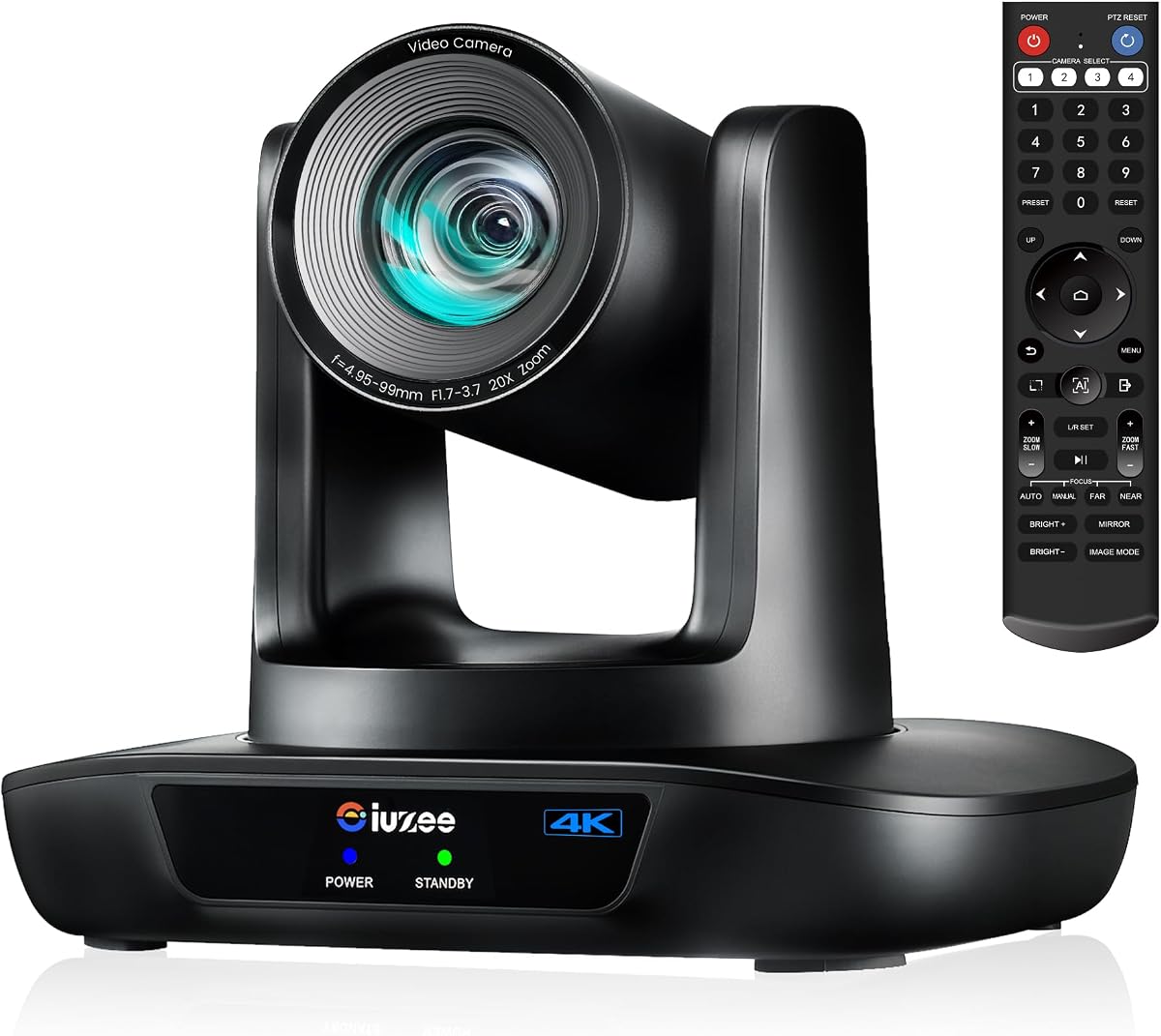
This model is designed for large spaces like churches or auditoriums where zoom is critical. Its 20X optical zoom captures clear details from the back of the room. The AI tracking ensures the presenter stays centered during movement.
We may earn a commission when you buy through this link, at no additional cost to you.
The system includes a wireless speakerphone for a complete audio solution. It supports PoE power which simplifies cabling for network connected cameras. This is a significant advantage for installations where power outlets are scarce.
Users can enjoy stable streaming and smooth pan tilt operations. The 4K resolution provides clarity that is essential for large scale productions. The all-in-one nature reduces compatibility issues during setup.
Large organizations needing to broadcast from a distance will find this essential. It handles diverse use cases from education to live events effectively. The reliable support ensures long term satisfaction for professional users.
With 20X optical zoom you can capture subjects from far away. This is vital for worship services or large stage presentations.
Power over Ethernet support reduces the need for extra power outlets. This simplifies installation in professional and commercial environments.
We may earn a commission when you buy through this link, at no additional cost to you.
This camera is built for professional broadcast applications requiring direct streaming. It supports IP protocols like RTMP and SRT for seamless online integration. The 4K sensor delivers stunning clarity for high-end production needs.
We may earn a commission when you buy through this link, at no additional cost to you.
The advanced AI tracking includes both face and figure recognition. It handles temporary obsclusions smoothly ensuring continuous focus on the subject. This reliability is key for uninterrupted live streams or recordings.
Users can manage presets and settings via a web browser interface. The 255 preset positions allow for complex multi-camera setups. However note that it does not include a built-in microphone for audio capture.
Broadcasters and IT teams will appreciate the extensive configuration options. It is perfect for events that require long cable runs or network power. The strong warranty gives confidence for critical live streaming deployments.
Direct support for IP streaming protocols simplifies production workflows. You can stream directly to platforms without extra encoders.
With 255 presets you can save many different camera angles. This is useful for complex productions with multiple fixed positions.
We may earn a commission when you buy through this link, at no additional cost to you.
This premium camera stands out for its official NDI license which simplifies network workflows. It allows seamless integration with professional broadcasting software like vMix. The SDI output ensures reliable signals over long cable runs up to 300ft.
We may earn a commission when you buy through this link, at no additional cost to you.
The AI tracking uses both face and body recognition for high precision. It can resume tracking even if the face is briefly obstructed. This intelligent behavior keeps the subject framed perfectly at all times.
4K resolution is available via HDMI and USB connections for maximum quality. While IP streaming is limited to 1080P the direct outputs remain top tier. This balance suits hybrid setups needing both network and direct feeds.
Studios and broadcast teams will value the extensive connectivity options. The browser control allows remote management for multi-camera productions. It is a robust tool for high-end live events and streaming.
Official NDI support means effortless integration into existing production pipelines. No extra licensing is required for network streaming capabilities.
SDI output supports runs up to 300 feet without signal loss. This is essential for large venues or remote camera placements.
We may earn a commission when you buy through this link, at no additional cost to you.
Designed for professional use this camera offers a durable build for daily operations. Its 4K resolution ensures that distant students can see board content clearly. The 20X zoom allows close-up views of specific classroom materials.
We may earn a commission when you buy through this link, at no additional cost to you.
Tracking is fully automatic to keep the focus on the teacher or speaker. Users can control pan tilt and zoom via web software or joystick. This flexibility makes it adaptable to various teaching styles and setups.
Plug and play setup simplifies deployment in educational environments. Just connect via USB or LAN and start streaming. Note that HDMI output defaults to 30Hz so checks may be needed for specific monitors.
Schools and training centers will benefit from the reliable performance. It supports hybrid education by bridging remote and in-person learners. The support team provides prompt assistance for any technical issues.
The construction is built to withstand daily use in high traffic classrooms. It ensures consistent performance for long semesters without maintenance.
Control options include software web interfaces and optional joysticks. This variety suits both novice users and advanced technical staff.
We may earn a commission when you buy through this link, at no additional cost to you.
This system targets medium and large conference rooms with an all-in-one design. It combines camera microphones and speakers into a single device. This reduces cable clutter and simplifies the physical setup significantly.
We may earn a commission when you buy through this link, at no additional cost to you.
The 120 degree lens covers wide tables without losing detail. AI auto framing adjusts the view in real time to include all participants. This ensures no one is cut off during large group discussions.
Four microphones with noise reduction capture clear audio across the table. Built-in speakers eliminate the need for external audio equipment in most cases. This makes it ideal for quick business meetings without extra gear.
Organizations seeking simplicity and strong audio visual integration should consider this. It supports all major platforms without needing drivers. The unified design streamlines IT deployment across multiple offices.
By combining camera and audio into one unit installation is simpler. This reduces the time needed to set up a new meeting room.
AI framing detects participants and adjusts view instantly. Everyone stays centered without manual camera adjustments.
We may earn a commission when you buy through this link, at no additional cost to you.
This webcam is a complete desk solution combining lens mic and speaker. It delivers 4K video for crisp personal meetings. The adjustable field of view lets you choose wide or narrow angles via remote.
We may earn a commission when you buy through this link, at no additional cost to you.
Auto framing tracks attendees and centers them for group calls. Voice tracking focuses on the active speaker within seconds. The built-in 3W speaker provides clear audio without external devices.
Privacy is protected with a sliding cover on the lens. This adds a necessary security layer for sensitive work environments. The 360-degree microphones ensure clear sound from any angle in the room.
Home workers or small office desks will appreciate this compact design. It avoids the clutter of separate speakers or mics. Just connect via USB and start your conference immediately.
All audio and video needs are met by this single unit. It keeps your workspace organized and free of extra cables.
You can switch between wide medium and narrow views easily. This lets you frame solo shots or large group views.
We may earn a commission when you buy through this link, at no additional cost to you.
Selecting the right camera requires balancing resolution zoom and control features. This section breaks down the key factors to consider before purchasing.
Higher resolution like 4K ensures clear details for remote participants. It is essential for presentations where text must be readable. HD is acceptable for smaller teams but 4K future proofs your setup.
Prioritize 4K if you need sharp text or complex visuals during meetings.
Optical zoom maintains image quality when magnifying the subject. Digital zoom crops the image and reduces sharpness. For large rooms 20X optical zoom provides the best reach.
Choose optical zoom to avoid blurry close-ups during presentations.
AI algorithms vary in their ability to recognize faces and bodies. Advanced models keep tracking stable even if someone stands up. Look for dual recognition systems for smoother framing.
Ensure the tracking logic handles both faces and full bodies effectively.
Most cameras use USB but some support HDMI LAN or PoE. Network connections simplify cabling in professional installs. Check if your room has Ethernet ports for PoE support.
PoE support reduces power outlet needs and simplifies cable management.
Integrated speakers and mics vary in range and clarity. Full duplex audio allows simultaneous speaking and listening. Noise cancellation is key for open office environments.
Verify microphone range covers the whole table size you need.
All major models work with Zoom Teams and Google Meet. Some offer certifications that optimize performance on specific apps. Ensure your primary software is supported officially.
Choose a camera certified for your primary meeting platform.
Mounts like wall or ceiling offer flexible placement options. Desktop stands are easiest for quick setup. Verify the included kit supports your intended location.
Check if wall or ceiling mounts are included for your setup.
Remote control software or touch panels allow easy operation. Gesture controls add a modern interactive element. Choose based on your comfort with technology.
Select control methods that fit your team's technical comfort.
Start by connecting the camera to your computer or network. Use USB for simple setups or LAN for advanced control. Ensure the lens is clean before starting any session.
Use the included software or remote to adjust settings. Set presets for common meeting angles to save time. Test the tracking feature by moving around the room.
Protect the lens with a cover when not in use. Keep the firmware updated for best performance. Regular cleaning with a soft cloth maintains image quality.
Optical zoom uses the lens to magnify the image without losing quality. Digital zoom simply crops the image which can make it blurry. For best results always choose a camera with optical zoom capabilities.
Most cameras work with standard modern computers. You need USB 3.0 for high resolution video. Check your system specs to ensure it can handle 4K streaming smoothly.
Yes all models reviewed are compatible with major platforms like Zoom and Teams. Some even offer specific certifications for optimized performance. Just ensure your software is updated to the latest version.
Most models offer pickup range up to 16.4 feet or 5 meters. This covers small to medium rooms effectively. Check specific specs if you have a very large table setup.
Some advanced models support PoE which allows power via the network cable. This simplifies installation in large rooms. Verify the specific model supports PoE before purchasing.
Advanced systems use both face and body recognition. If the face is blocked briefly it will resume tracking once visible. This keeps the subject centered during normal movement.
You can usually update firmware via the web interface or remote. Check the manufacturer website for the latest files. Keep it updated for security and performance improvements.
Most brands offer a limited warranty for one to three years. Check the product details for specific terms. Technical support is usually available for setup help.
We reviewed ten top models ranging from budget webcams to professional broadcast solutions. The TONGVEO 4K Conference Room Camera System stands out as the best overall for its balance of features.
If you need high-end production features consider the NDI PTZ Camera. For smaller offices the 4K AI-Powered Webcam offers a cost effective entry point.
Always check current stock and warranty terms before finalizing your order. These technologies evolve quickly so selecting the right fit ensures long-term value.