
Newmen GM326 Mechanical Keyboard
4.4Editor score
Compact 75 percent layout
Hot swappable linear switches
Multi function control knob
This guide compares the top 75 Percent Percent Mechanical Keyboard options for performance and value across ten models tested for features.
Finding the right 75 Percent Percent Mechanical Keyboard can transform your workspace efficiency. These compact boards save desk space while keeping essential keys for gaming and typing. You need reliable switches and sturdy construction for daily use.
We compared ten top models based on build quality, connectivity options, and customization features. Each product offers unique benefits like gasket mounting or hot-swappable switches. Our analysis highlights performance strengths and practical trade-offs for every budget.
Each pick shows detailed specs and real-world usage insights for informed choices. Prices change frequently so verify current listings before purchasing your new setup. Use this guide to match the perfect keyboard to your workflow needs.
4.4Editor score

4.6Editor score

4.7Editor score
This side-by-side comparison highlights key features across all ten models so you can quickly identify which option fits your needs best.


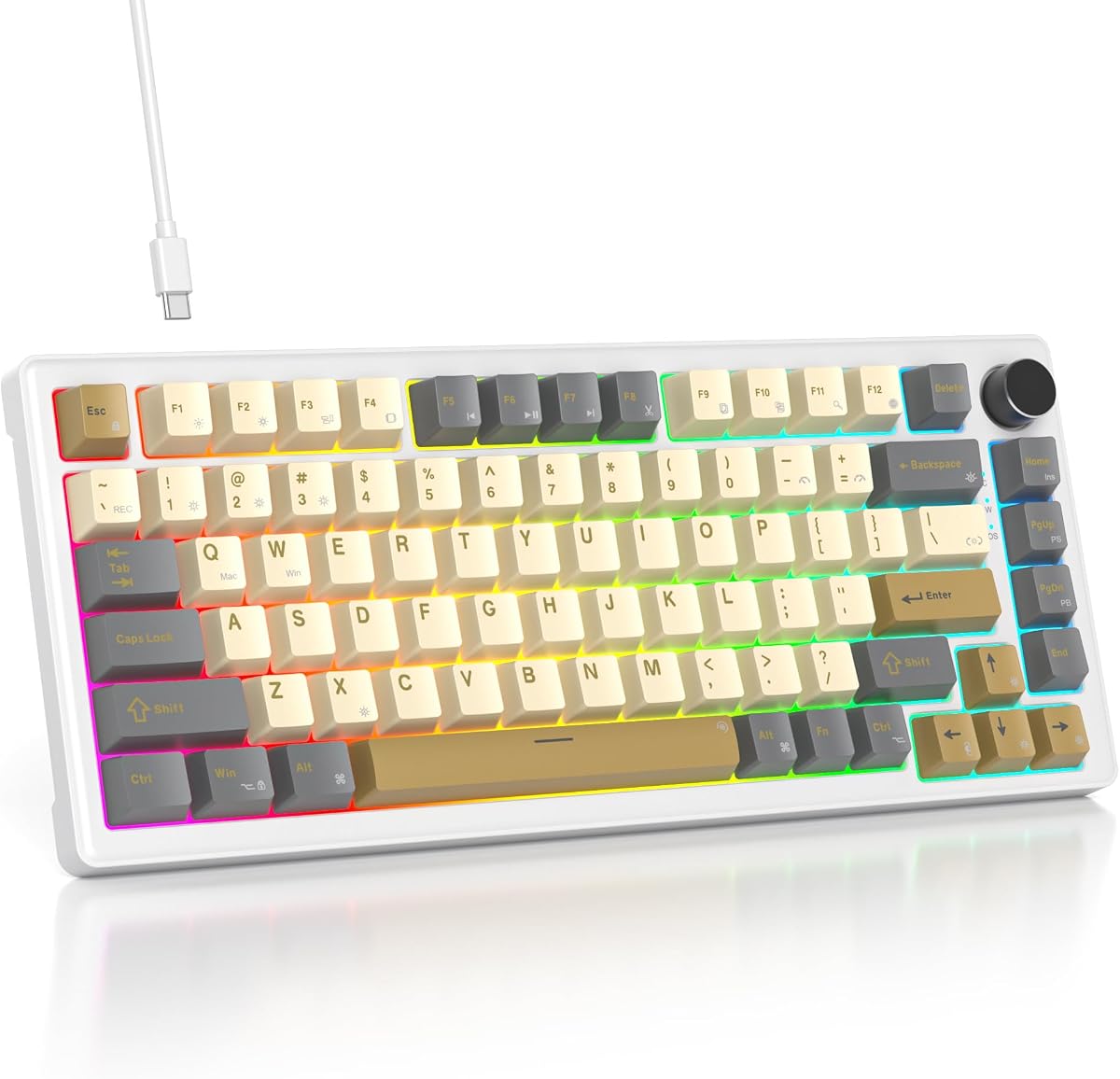

The Newmen GM326 offers an affordable entry into 75 Percent Mechanical keyboards with solid performance. It features hot-swappable linear switches for a smooth typing experience right out of the box. The compact layout saves desk space while keeping essential arrow keys.
We may earn a commission when you buy through this link, at no additional cost to you.
Its rainbow LED backlight adds visual flair with twenty modes to choose from. The multi-function knob controls volume seamlessly without needing software. Two-stage tilt legs allow you to adjust typing angles for comfort during long sessions.
While ABS keycaps may show shine over time compared to PBT, they provide better light diffusion for the RGB. The lack of wireless connectivity limits portability but ensures zero latency for gaming. This trade-off suits budget-conscious users.
Choose this keyboard if you want a compact mechanical setup without breaking the bank. Its compatibility with Mac and Windows makes it versatile for mixed environments. Ideal for students or home office workers.
The mini size and detachable USB-C cable make this keyboard easy to move between locations or pack for travel.
Linear switches deliver fast actuation with minimal resistance, perfect for rapid key presses in games.
We may earn a commission when you buy through this link, at no additional cost to you.
The Womier SK80 stands out with its vibrant color multimedia screen displaying gifs and system stats. Its gasket mount design provides a premium typing feel with reduced noise and enhanced stability. This model targets users wanting advanced customization options.
We may earn a commission when you buy through this link, at no additional cost to you.
South-facing transparent light diffusers ensure crisp RGB lighting across all keycaps. The hot-swappable PCB supports both 3-pin and 5-pin switches for easy upgrades. Software allows deep macro and lighting control for tailored workflows.
The price reflects these premium features but may be steep for basic users. Some reliance on driver software for full functionality adds complexity to initial setup. However the visual benefits justify the cost for enthusiasts.
Select this keyboard if you value unique visuals and top-tier typing quality. The display adds personality to your desk while maintaining professional functionality. Best for gamers and creatives alike.
The screen shows custom images and system status allowing you to personalize your workspace in real time.
Gasket mount combined with EVA padding creates a soft yet responsive feel that reduces finger fatigue.
We may earn a commission when you buy through this link, at no additional cost to you.
The AULA F75 Pro combines wireless freedom with robust build quality. Its tri-mode connection supports Bluetooth 5.0, 2.4GHz, and USB-C for versatile device pairing. Side-printed PBT keycaps resist wear and look stylish with gradient black finish.
We may earn a commission when you buy through this link, at no additional cost to you.
Five layers of sound dampening fill the internal structure to reduce noise and improve the thocky sound. Pre-lubed stabilizers and switches deliver a creamy typing feel immediately. The large battery ensures weeks of use on a single charge.
Its weight might feel heavy for frequent travel but adds stability to the desk. Charging takes time due to battery size which could interrupt long sessions. These minor issues do not outweigh the performance benefits.
This keyboard is ideal for multi-device users seeking high-end features. It balances gaming responsiveness with office utility efficiently. Perfect for professionals and gamers needing reliability.
Connect up to five devices and switch instantly between PC tablet and phone for seamless multitasking.
Integrated silencers and single-key slotting minimize hollow sounds for a solid and professional typing tone.
We may earn a commission when you buy through this link, at no additional cost to you.
The RK ROYAL KLUDGE R75 Wireless offers premium features at a reasonable price. It uses a gasket mount with five layers of sound dampening for a quiet and solid feel. The CNC metal knob adds a tactile control element for media and volume.
We may earn a commission when you buy through this link, at no additional cost to you.
Pre-lubed cream switches provide smooth keystrokes that are quiet enough for shared spaces. Triple mode connectivity supports Bluetooth 5.1, 2.4GHz, and USB-C for flexible setups. PBT keycaps ensure durability against wear over time.
Programming the knob requires software which adds a step to setup. Limited switch variants mean fewer customization choices out of the box. These limitations are minor compared to the overall value provided.
Pick this keyboard for a quiet wireless option with tactile controls. It suits office environments where noise matters. Great for remote workers needing reliability.
Sound absorbing layers reduce key noise so typing does not disturb colleagues or family members nearby.
Replace the knob with standard switches for unique layouts or keep it for quick media adjustments.
We may earn a commission when you buy through this link, at no additional cost to you.
This wired variant prioritizes tactile feedback with pre-lubed brown switches. It shares the same gasket mount design for stability and quiet typing. The south-facing RGB lighting shines through transparent keycaps for vibrant effects without blocking switches.
We may earn a commission when you buy through this link, at no additional cost to you.
Hot-swappable PCB allows you to change switches later to suit evolving preferences. Detachable USB-C cable ensures portability and easy replacements when needed. Triple absorption layers reduce vibration for enhanced comfort.
Lack of wireless means you must keep your desk tidy to avoid cable clutter. Weight increases slightly due to lack of battery but adds to durability. These trade-offs ensure zero latency performance.
Choose this for dedicated desktop setups where tactile feel matters. It is perfect for coders and writers needing feedback. Excellent for long typing sessions.
Brown switches offer a subtle bump that confirms keypresses without loud clicks for balanced typing.
RGB LEDs face down to shine through legends clearly even with non-standard switches installed.
We may earn a commission when you buy through this link, at no additional cost to you.
The EPOMAKER x Aula F75 focuses on acoustic excellence with five-layer internal padding. This structure significantly reduces resonance and hollow sounds common in plastic cases. Factory-lubricated switches ensure smooth actuation without squeaks or clicks.
We may earn a commission when you buy through this link, at no additional cost to you.
Cherry profile double-shot PBT keycaps provide textured surfaces that resist shine and oils. Hot-swap functionality invites experimentation with different switch types freely. Multimedia knob allows quick adjustments without software interruptions.
RGB brightness levels may not satisfy extreme lighting enthusiasts but remain effective. Higher price reflects quality components compared to budget rivals. These costs are justified for noise-sensitive environments.
Opt for this keyboard if audio quality is a priority. It suits recording studios or quiet offices. Best for purists seeking sound quality.
Five layers of sound foam eliminate internal resonance so every keystroke sounds deep and clear.
Double-shot legends stay sharp forever and PBT material prevents oils from smoothing the surface.
We may earn a commission when you buy through this link, at no additional cost to you.
The DIERYA DK81E simplifies customization with its browser-based driver. You can remap keys and record macros directly in Chrome or Edge without downloading software. The gasket mount delivers creamy typing similar to high-end boards.
We may earn a commission when you buy through this link, at no additional cost to you.
Six layers of sound-dampening material create a rich and soft sound profile. The white chassis offers a clean look that fits modern minimalist desks. Volume knob provides tactile control for media tasks efficiently.
White keycaps attract dirt faster than black ones so cleaning is required frequently. Lack of wireless limits mobility but ensures consistent performance. These are minor drawbacks compared to usability benefits.
Select this keyboard for easy setup and sleek aesthetics. It works well for users avoiding desktop software. Ideal for office environments.
Access customization tools in any browser on any OS without installing programs that clutter storage.
Dampening layers absorb sound so typing feels soft and satisfying without disturbing others.
We may earn a commission when you buy through this link, at no additional cost to you.
The MageGee MK Star offers straightforward functionality without software complexity. It uses standard red switches for linear fast input. The compact layout maximizes space for mouse movement during competitive games.
We may earn a commission when you buy through this link, at no additional cost to you.
Blue LED backlighting creates an immersive vibe with multiple modes. N-key rollover ensures all presses register simultaneously without conflicts. ABS keycaps are durable enough for casual daily use.
Blue lighting may limit aesthetic choices for RGB fans who prefer multi-color. Build quality is adequate but lacks premium feel of gasket boards. These trade-offs fit budget constraints well.
Buy this keyboard for basic gaming needs on a tight budget. It suits students or secondary setups. Great for entry-level users.
Plug and play design means no drivers are needed so you start typing immediately after connection.
Removing numpad frees up room for mouse movement so gamers can make large sweeps easily.
We may earn a commission when you buy through this link, at no additional cost to you.
The V500 Retro Mechanical blends style with functional comfort using gasket mount. Pre-lubed white switches deliver smooth keystrokes ideal for office use. Five-layer padding enhances acoustic quality for a solid feel.
We may earn a commission when you buy through this link, at no additional cost to you.
Full-key macro programmability lets you automate tasks for higher productivity. RGB lighting supports music rhythm modes for dynamic effects. Knob controls volume and media functions quickly without software.
Driver requirement adds setup steps for full feature access. Switch variety is limited to white options out of box. These limitations do not hinder core usability significantly.
Choose this keyboard for style and productivity features. It fits modern clean setups well. Best for design-focused users.
Program single keys to trigger sequences saving time on repetitive tasks like coding or data entry.
Backlight responds to audio output creating immersive visuals during gaming or media playback sessions.
We may earn a commission when you buy through this link, at no additional cost to you.
The Carbon Gasket Wired focuses on comfort with sound-absorbing pads under the PCB. This reduces hollow noise so typing remains pleasant over time. PBT keycaps provide textured surfaces resistant to wear and oils.
We may earn a commission when you buy through this link, at no additional cost to you.
Full-key anti-ghosting ensures accurate input during complex gaming combos. Hot-swap sockets allow easy switch replacements for customization. Gasket structure creates a floating feel that reduces wrist fatigue.
RGB lighting lacks depth compared to full-featured models but remains vibrant. Wired connection ensures zero lag for responsive gameplay. These trade-offs prioritize durability and silence.
Opt for this keyboard if noise and comfort are critical. It works for shared offices. Best for quiet work environments.
Premium material resists fading and oils so legends remain legible even after heavy daily typing.
Floating mounting reduces vibration so hands stay steady and precise during extended typing sessions.
We may earn a commission when you buy through this link, at no additional cost to you.
Choosing the right 75 Percent Mechanical Keyboard requires evaluating connectivity build and customization needs.
The 75 percent layout balances compactness and function by keeping arrow keys and delete in a small space. It saves desk room while retaining necessary navigation keys for productivity. Check if your workflow needs these keys before committing.
Select 75 percent if you need arrow keys but want space for mouse movement.
Mechanical switches come in linear tactile and clicky variants affecting sound and feedback. Linear switches suit gaming for smooth fast presses while tactile suits typing for confirmation bumps. Test samples if possible to find your preference.
Pick linear for gaming and tactile for typing tasks based on feedback needs.
Wired USB-C offers zero latency for competitive gaming while wireless adds freedom from cable clutter. Dual mode keyboards support both so you can switch as needed. Battery capacity matters for wireless longevity.
Choose wired for gaming and wireless for multi device office setups.
Materials like aluminum or plastic determine durability and typing feel. Gasket mounted designs reduce vibration for softer tactile feedback over hard plate mounts. Heavier keyboards stay stable during intense typing.
Look for gasket mounts and sturdy frames for long term comfort.
Hot-swappable boards let you change switches without soldering for future upgrades. RGB lighting and macro support allow visual and functional personalization. Software ease of use impacts your ability to configure settings.
Prioritize hot-swap and RGB if you plan to customize later.
PBT keycaps resist wear and shine better than ABS for lasting texture. Double-shot legends prevent fading over time. Profile shapes like OEM or Cherry affect finger position comfort.
Select PBT keycaps for durability and comfort in long sessions.
Sound dampening foam and lubricated switches reduce noise for quieter typing. Noise levels matter in shared offices. Check reviews for acoustic quality before buying.
Choose dampened options if noise control is a priority.
Prices range from affordable entry-level models to premium feature-rich boards. Decide which features justify extra cost. Higher cost often means better switches and build quality.
Balance price against required features to avoid overspending.
Begin by connecting your keyboard to your device using the provided USB-C cable or Bluetooth. Pair Bluetooth devices via system settings and switch modes using shortcut keys.
Use the software or driver to customize RGB lighting and key mappings. Configure macros for common tasks to improve efficiency.
Clean regularly with compressed air and mild cloths to prevent dust buildup. Avoid spills and replace keycaps as needed to maintain texture.
Most modern 75 percent mechanical keyboards include a physical switch for Mac Windows compatibility. Ensure the model explicitly states Mac support to avoid layout issues.
The 75 percent layout saves desk space while retaining essential keys like arrows and delete. It provides a balance between compactness and productivity for better ergonomics.
Yes because the compact design allows more mouse movement room without losing essential keys. Mechanical switches also offer faster actuation for responsive gameplay.
Many models feature hot-swappable sockets allowing you to replace switches without soldering. Check product details to confirm compatibility with 3-pin or 5-pin switches.
Several models offer Bluetooth and 2.4GHz wireless connectivity for cable free use. Wired options remain available for zero latency gaming.
Clean regularly with compressed air and soft brushes to prevent dust. Avoid food and drinks to protect electronics.
This guide compared ten top 75 Percent Mechanical Keyboard models offering features from wireless freedom to sound dampening. Each option suits different needs for gaming or productivity.
Prioritize connectivity and switch types to match your daily workflow requirements. Quality construction ensures long-term reliability across all budgets.
Prices change frequently so check current listings before purchasing. Verify features meet your expectations to make a smart choice.