
NOYAFA NF-488 POE Cable Tester
4.5Editor score
Multifunctional network continuity testing
Backlit LCD screen for dark areas
Supports standard and non-standard PoE
This guide compares the top 10 inline POE testers for network professionals, covering features like OLED displays, battery-free operation, and IEEE 802.3af at
Inline POE testers are essential tools for network installers and IT professionals who need to verify power over Ethernet delivery quickly. They help diagnose issues with cameras, phones, and access points by measuring voltage, current, and wattage directly on the cable without interrupting data flow.
We evaluated ten top-rated models based on their testing modes, display clarity, portability, and compatibility with various PoE standards. Our comparison includes devices that support passive PoE, 802.3af/at/bt, and even 4PPoE to ensure you find the right tool for your specific infrastructure needs.
Each pick below highlights key specifications, pros, cons, and ideal use cases to help you make an informed decision. Keep in mind that product availability and pricing can change frequently, so check current listings before purchasing to ensure you get the best value for your investment.
4.5Editor score

4.1Editor score

4.1Editor score
The following table provides a side-by-side comparison of all ten inline POE testers we reviewed. It highlights key specifications and unique features to help you quickly identify which model best fits your networking requirements and budget constraints.


The PoE-T100 is a robust tool designed for modern network environments that require precise power data. With its bright OLED display, it stands out for readability in various lighting conditions while providing real-time measurements of voltage, current, and power.
We may earn a commission when you buy through this link, at no additional cost to you.
Its self-powered operation ensures you never have to stop work to charge or replace batteries. The tool draws power directly from the PoE line, making it ideal for field technicians who need reliability. It supports IEEE 802.3af/at/bt and 4PPoE standards.
While the price is higher than basic testers, the OLED display and comprehensive mode selection justify the investment. Some users might find the form factor slightly larger than pocket-sized options, but the ergonomic design ensures it remains comfortable during extended use.
This tool is perfect for network engineers and installers who need accurate diagnostics on the fly. Its ability to differentiate between standard and non-standard passive PoE makes it a versatile choice for mixed infrastructure environments.
The OLED screen provides crisp, high-contrast readings that are easy to see even in bright sunlight or dark server rooms.
From standard 802.3af to 4PPoE and DC sources, this tester handles a wide range of power configurations without needing adapters.
We may earn a commission when you buy through this link, at no additional cost to you.
The TRENDnet TC-NTP1 is a premium choice for professionals working on secure or government contracts. Its NDAA compliance ensures it meets strict requirements for network installations in public sectors. The device is built to last with a robust chassis and clear display.
We may earn a commission when you buy through this link, at no additional cost to you.
It features three dedicated modes for T, N, and I testing, allowing you to verify PSE devices, non-standard passive PoE, and inline power simultaneously. The Gigabit ports ensure compatibility with high-speed network equipment without bottlenecks.
While it does not offer an OLED screen like some competitors, the LCD is clear and functional. The step button allows easy cycling through voltage, amperage, and wattage readouts, though you cannot lock specific values as easily as other models.
This tester is highly recommended for government IT teams or contractors needing compliance. The two-year warranty and dedicated tech support add significant value, ensuring you can rely on it for critical deployments.
NDAA compliance makes this tool essential for securing network infrastructure projects that require adherence to federal procurement regulations.
Built-in Gigabit ports ensure that you can test high-speed networks without worrying about speed limitations affecting power delivery.
We may earn a commission when you buy through this link, at no additional cost to you.
The NOYAFA NF-488 offers incredible value for those who need a reliable tester without breaking the budget. It handles continuity checks and PoE detection seamlessly, making it a versatile tool for general network maintenance. The large backlit LCD ensures readability in dim areas.
We may earn a commission when you buy through this link, at no additional cost to you.
It automatically identifies standard and non-standard PoE information, including voltage standards and polarity. The remote wiring function helps troubleshoot open or short circuits efficiently, saving time during complex installations where cable integrity is paramount.
While it lacks the advanced features of higher-end models like battery-free operation, it remains effective for most tasks. The anti-slip casing provides a secure grip, and the lightweight design makes it easy to carry in a toolkit for on-site work.
Ideal for small business owners or entry-level technicians, this tester covers all the basics well. It provides accurate data for voltage and power, ensuring your devices receive the correct energy supply without requiring expensive equipment.
Priced significantly lower than competitors, this tool delivers essential PoE and continuity testing functions that meet basic professional needs.
The clear backlit LCD ensures you can read measurements in dark server rooms or outdoor installations without needing extra lighting.
We may earn a commission when you buy through this link, at no additional cost to you.
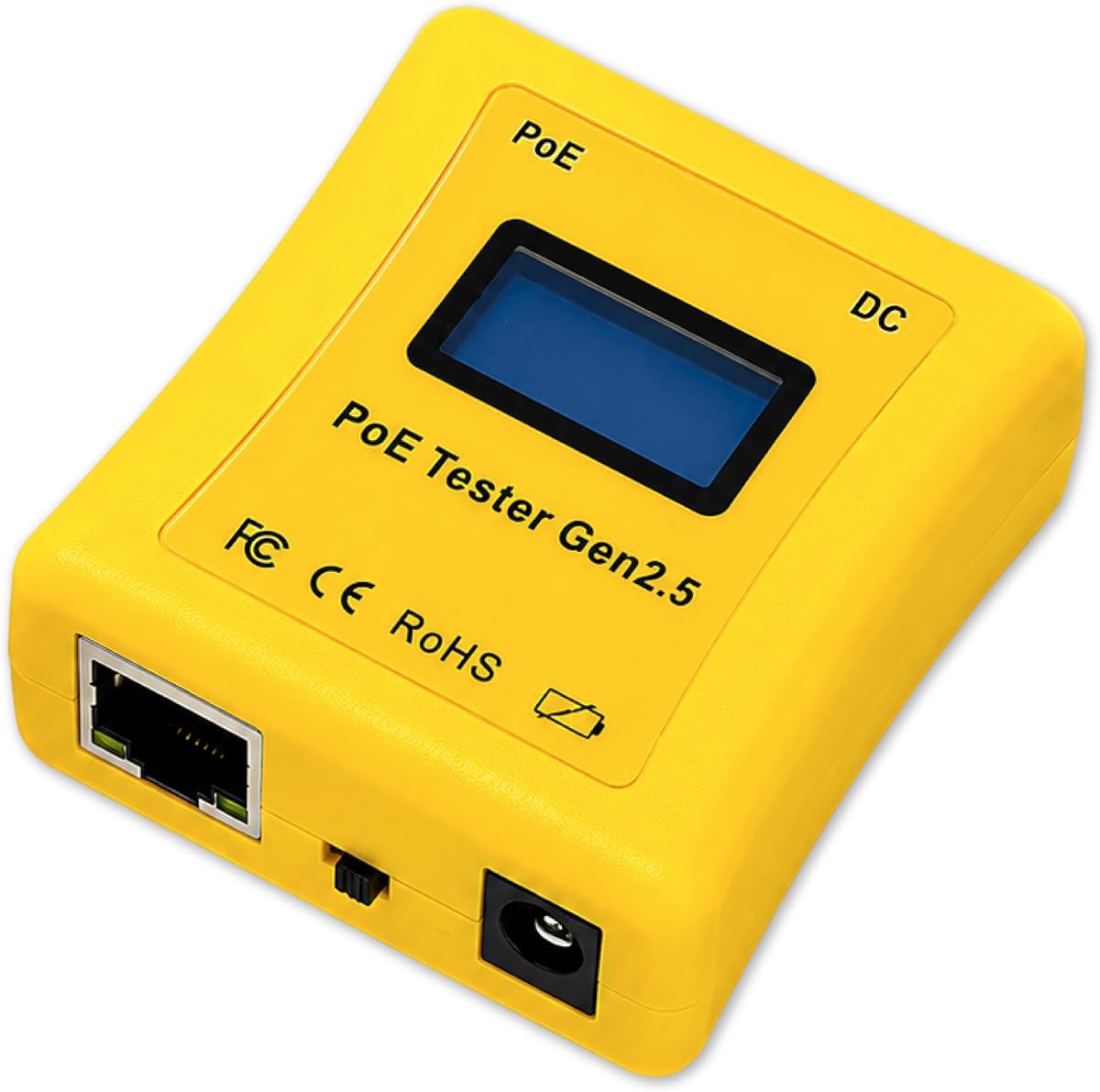
The PoE Texas tester is designed for professionals who prioritize portability without sacrificing accuracy. Its ergonomic, pocket-sized body fits easily in your hand, making it ideal for quick checks during installations. It draws power directly from the PoE line, ensuring you never run out of battery.
We may earn a commission when you buy through this link, at no additional cost to you.
It features a unique mode to simulate a PoE device, allowing you to test managed switches effectively without needing an actual powered device. This feature is invaluable for verifying PSE output before connecting expensive endpoints, reducing the risk of damage during setup.
While it is compact, it still provides detailed measurements for current and power draw. The LCD cycles automatically through voltage and current readings, though the interface is less customizable than premium models. It is a solid choice for technicians on the move.
Best suited for field technicians who need a tool they can keep in their pocket. Its simplicity ensures it is easy to use, while the self-powered nature eliminates maintenance hassles associated with battery replacements.
Curved and 25% smaller than previous generations, this tool fits comfortably in a pocket for easy access during any job.
The ability to simulate a powered device helps verify switch functionality before committing to a full deployment, saving time and resources.
We may earn a commission when you buy through this link, at no additional cost to you.
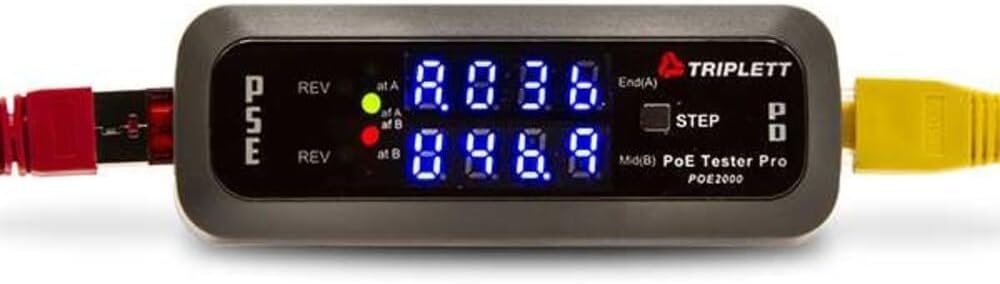
The Triplett POE2000 is a classic tool known for its visual clarity through LED indicators. It helps you identify power sources and polarity instantly without squinting at a small screen. The dual 7-digit LEDs show whether power is coming from an end span or mid span.
We may earn a commission when you buy through this link, at no additional cost to you.
It determines standard and non-standard PoE effectively, making it useful for older network setups. The yellow LEDs specifically indicate reversed polarity, which is a critical safety feature to prevent damage to connected devices during installation or troubleshooting tasks.
While it lacks modern displays, its simplicity is its strength. The step button lets you switch between voltage, current, and power, providing the necessary data for basic diagnostics. However, users might find the design less intuitive than newer models with digital screens.
This model works well for maintenance crews who prefer tactile feedback. It offers reliable detection for common scenarios, ensuring you can quickly verify power status without relying on complex interfaces or digital readouts.
Large LEDs provide immediate visual confirmation of power status, reducing the need to interpret complex numbers on a small screen.
Reversed polarity indicators help prevent accidental damage to sensitive network equipment during connection and testing processes.
We may earn a commission when you buy through this link, at no additional cost to you.
The Triplett POE3000 builds on the brand's reputation for reliable network tools. It offers a versatile testing setup that includes visual indicators for port status and power levels. The display alternates to show voltage, current, and power, keeping you informed without complex menus.
We may earn a commission when you buy through this link, at no additional cost to you.
It supports detection of end span, midspan, and four-pair power, which is essential for identifying how power is delivered across your network. The yellow LEDs for reversed polarity add an extra layer of safety and clarity when working with unknown sources.
While it does not have a rating yet due to its newer status, it follows the proven format of previous models. The inline power level monitoring allows you to track consumption changes, which is useful for optimizing network energy usage during maintenance.
This is a strong candidate for users who trust established brands and need robust detection features. Its focus on visual cues ensures you can get quick answers without needing to dig through settings or menus during urgent troubleshooting tasks.
Alternating displays let you monitor power consumption dynamically, helping you understand how devices draw energy during different load conditions.
Visual LED indicators provide immediate feedback on port activity, making it easy to confirm connections without checking the switch.
We may earn a commission when you buy through this link, at no additional cost to you.
Jonard Tools POE-1 stands out for its comprehensive approach to cable testing. It not only checks for PoE voltage but also verifies resistance to ensure flawless data transmission. This dual function helps you find wiring issues that could degrade performance over time.
We may earn a commission when you buy through this link, at no additional cost to you.
The package includes a remote and a female-female adapter, making it a complete kit for various testing scenarios. You can use it with a battery for unpowered cables or draw power from PoE lines for active testing, offering significant flexibility on the job site.
Its design is lightweight and includes a belt clip for easy carrying. While it does not have a display as fancy as OLED options, the core functions of testing continuity and power are handled reliably. It is great for general maintenance.
Ideal for technicians who need to confirm cable integrity before applying power. The included accessories reduce the need for extra tools, making it a convenient one-stop solution for both power and data line verification in the field.
Measuring resistance alongside voltage helps you confirm cable quality and identify potential issues that might affect data transmission speeds.
The included remote and adapter mean you have everything you need to perform tests without purchasing additional components separately.
We may earn a commission when you buy through this link, at no additional cost to you.
This network tester includes a valuable feature for installation verification: cable length measurement. It can estimate lengths from 5 to 300 meters, helping you confirm if a run meets standards before connecting devices. This reduces guesswork when dealing with long cable runs.
We may earn a commission when you buy through this link, at no additional cost to you.
It also features port flash detection to locate active ports and validate power load. With a rechargeable battery and auto-shutoff options, it balances convenience and energy efficiency. The clear indicators make it easy to see if a device is receiving stable power.
While it requires charging, the included 1500mAh battery supports extended sessions without worrying about AA replacements. The device works with both STP and UTP cables, ensuring broad compatibility across different network infrastructures and environments.
Best for installers who need to verify cable lengths and power integrity in one tool. The combination of length measurement and power validation makes it a comprehensive choice for ensuring quality installations without multiple devices.
Measuring cable length helps you ensure compliance with network standards and avoid potential issues caused by excessive signal attenuation.
Load testing ensures your connected devices receive stable and adequate power, reducing the risk of interruptions due to weak supply.
We may earn a commission when you buy through this link, at no additional cost to you.
The Inline Cat5/6 Dvm is designed as a specialized tool for specific power panel needs. It combines DVM functionality with network PoE testing, making it unique for scenarios where you need to check both power and data connections simultaneously.
We may earn a commission when you buy through this link, at no additional cost to you.
It supports Cat5 and Cat6 cables, ensuring it fits into modern network infrastructures. The inline testing feature allows you to monitor connections without disrupting service, which is crucial for busy environments where downtime is not an option for maintenance.
While the product description is limited, the inclusion of DVM panel capabilities suggests it serves a niche professional market. It likely provides detailed measurements that standard testers do not, catering to users who need deeper insight into power delivery.
This tool is recommended for advanced users who require detailed panel integration. It offers specialized features that go beyond basic detection, making it a valuable addition to a professional toolkit where precision and multifunctionality are required.
The ability to function as a DVM panel tester adds significant versatility, allowing for detailed electrical checks within network setups.
Built for specific network scenarios, this tool addresses complex needs that general-purpose testers might not fully support or measure accurately.
We may earn a commission when you buy through this link, at no additional cost to you.
The NF-488 provides a reliable solution for diagnosing loop issues in network cabling. Its loop-back test helps you identify whether a problem exists with the loop itself, which is essential for stable connections in complex wired networks.
We may earn a commission when you buy through this link, at no additional cost to you.
It supports voltage detection from 0 to 60V and includes an LED lamp for low-light areas, adding practical utility to the testing experience. The tool is backed by lifetime customer service, giving you peace of mind when you purchase this device.
While it shares similarities with other testers, its focus on loop diagnostics sets it apart for specific troubleshooting needs. The ability to test DC appliances for current and power makes it useful beyond just network cables, adding to its versatility.
This tester is best for users who face recurring loop issues and need a dedicated tool. Its comprehensive support and utility features make it a dependable choice for maintaining network integrity across various environments and setups.
The loop-back test is essential for pinpointing physical layer issues, ensuring your data path remains uninterrupted and stable.
Lifetime customer service ensures you always have access to help if you need advice or support while using the product effectively.
We may earn a commission when you buy through this link, at no additional cost to you.
Selecting the right inline POE tester requires understanding your specific network requirements and the environments in which you work. Here are key factors to consider to ensure you choose a tool that delivers accuracy and reliability.
Ensure the tester supports the specific standards used in your network, such as IEEE 802.3af, at, or bt, as well as 4PPoE and passive PoE. Compatibility with these standards guarantees that you can verify power delivery accurately across different device types and switch configurations.
Look for models that explicitly list compatibility with the standards you encounter most often to avoid testing errors.
Many modern testers operate without batteries by drawing power from the PoE line. This ensures you never run out of power in the field. However, some models may require batteries for testing unpowered cables, so consider which scenario fits your workflow best.
Battery-free operation is generally preferred for convenience and reliability during long installation days.
A clear display is vital for reading voltage and current values in various lighting conditions. OLED screens offer better visibility than standard LCDs but may come at a higher price point. Ensure the display shows essential data like wattage and polarity clearly.
Choose a screen type that allows you to read measurements instantly without squinting or using additional lighting.
Advanced testers offer multiple modes such as inline, PSE, and PD simulation. These features allow you to verify switch output and cable continuity without needing actual devices. Consider if you need simulation modes for testing switches before connecting hardware.
Multi-mode devices provide greater flexibility and can replace multiple tools in your kit.
Since you will likely carry this tool in the field, a lightweight and ergonomic design is important. Pocket-sized testers are easy to stash in a jacket or bag. Check if the device includes a belt clip or rugged casing to withstand job site conditions.
Comfort and durability are key factors for ensuring the tool remains usable over long-term professional use.
Network testers often face tough environments, so look for anti-slip casing and robust connectors. A solid build prevents damage from drops or rough handling. Manufacturers with strong warranties typically provide more reliable products.
Investing in a durable model saves money in the long run by reducing replacement needs.
Verify that the tester handles both shielded and unshielded cables and supports Gigabit ports. Some models offer remote wiring functions for longer runs. Compatibility with Cat5, Cat5e, Cat6, and Cat6a ensures broad utility.
Wide cable compatibility ensures the tester remains useful as your network infrastructure evolves.
Reliable customer support can be crucial when you encounter technical issues. Look for brands that offer clear warranty terms and responsive service. Access to manuals and troubleshooting guides also adds value.
Strong support ensures you can resolve issues quickly and keep your workflow uninterrupted.
Start by identifying the correct port on the network switch or injector where you want to test power. Connect the inline tester directly between the switch port and the powered device. Ensure the connections are secure to avoid loose readings or intermittent data flow.
Set the tester to the appropriate mode based on your needs, such as Inline for pass-through testing or PD Mode to simulate a powered device. Press the step button to cycle through voltage, current, and power readings. Observe the display for any unexpected values or polarity errors.
After use, disconnect the tester carefully to avoid damaging the cable connectors. Store the device in a protective case to prevent scratches or impact damage. For models with batteries, ensure they are removed if not in use for long periods to avoid corrosion.
Inline testers are placed in the cable path between the switch and the device, allowing you to monitor power delivery without disconnecting the device. End-point testers connect directly to the device port to check received power. Inline testers are better for continuous monitoring and troubleshooting without interrupting service.
Many modern inline testers are battery-free and draw power directly from the PoE line. However, some may require batteries to test unpowered cables or perform continuity checks. Always check the product specifications to see if it supports battery-free operation.
Quality testers are designed with safety features to protect equipment. They use low power for detection and do not draw excessive current. However, using a cheap or incompatible tester can potentially cause short circuits, so always choose reliable brands.
802.3at, also known as PoE+, is a standard that provides up to 30 watts of power per port, compared to 15.4 watts for standard PoE. It is used for higher-power devices like pan-tilt-zoom cameras and wireless access points.
Some advanced testers include cable length measurement features that estimate the length of your Ethernet run. This helps verify compliance with network standards. However, basic models may only show continuity without length data.
Use the tester to check the voltage and current readings while the device is connected. If the voltage drops significantly under load, the cable or power source may be insufficient. Compare the readings to the device's requirements to ensure proper operation.
Passive PoE delivers power without negotiation, meaning the device either receives power or it does not. It is common in older networks or specific devices. Testers that support passive PoE ensure you can verify these non-standard setups safely.
If your network uses Gigabit switches and devices, ensure the tester supports Gigabit ports. Some older testers may limit speed. Using a Gigabit-compatible tester ensures accurate testing without reducing your network's throughput.
We have reviewed ten top-rated inline POE testers that cater to various needs from budget-friendly options to premium compliance tools. The PoE-T100 stands out for its OLED display, while the NOYAFA NF-488 offers exceptional value for basic testing needs.
When selecting a tester, prioritize features that match your daily workflow, such as battery-free operation or specific PoE standard support. Ensure the device supports the cables and standards you use regularly to avoid compatibility issues in the field.
Remember that product availability and pricing can fluctuate. Always check current listings on Amazon to ensure you are getting the latest version of the tool. With the right tester, you can streamline your network installations and troubleshooting tasks efficiently.