
Eyoyo 3.5 Portable Digital Video Magnifier
4.6Editor score
Compact 3.5 inch screen
Up to 25X zoom
Eight adjustable color modes
Supports TF card storage
This guide compares the top digital magnifiers for low vision, evaluating screen size, zoom power, color modes, and portability to help you choose the best
Living with low vision can make everyday tasks like reading menus or labels feel overwhelming. A digital magnifier offers a powerful solution by using a camera and screen to enlarge text clearly. Choosing the right device depends on your specific needs, budget, and how you plan to use it at home or on the go.
We have carefully selected ten top-rated models available this month to help you find the perfect fit. Our comparison considers essential features like magnification range, screen resolution, color contrast options, and battery life. We also look at ergonomic designs that reduce strain during extended use for maximum comfort throughout your day.
Each pick below highlights key strengths and potential trade-offs so you can make an informed decision. Note that product availability and pricing can change frequently, so always check the current listing before purchasing. We aim to provide clear, honest details to support your journey toward better visual independence and confidence.
4.6Editor score
4.0Editor score

3.4Editor score
The following table provides a side by side overview of all ten selected digital magnifiers. It highlights key specifications like screen size, zoom range, and unique features to help you quickly compare options at a glance.


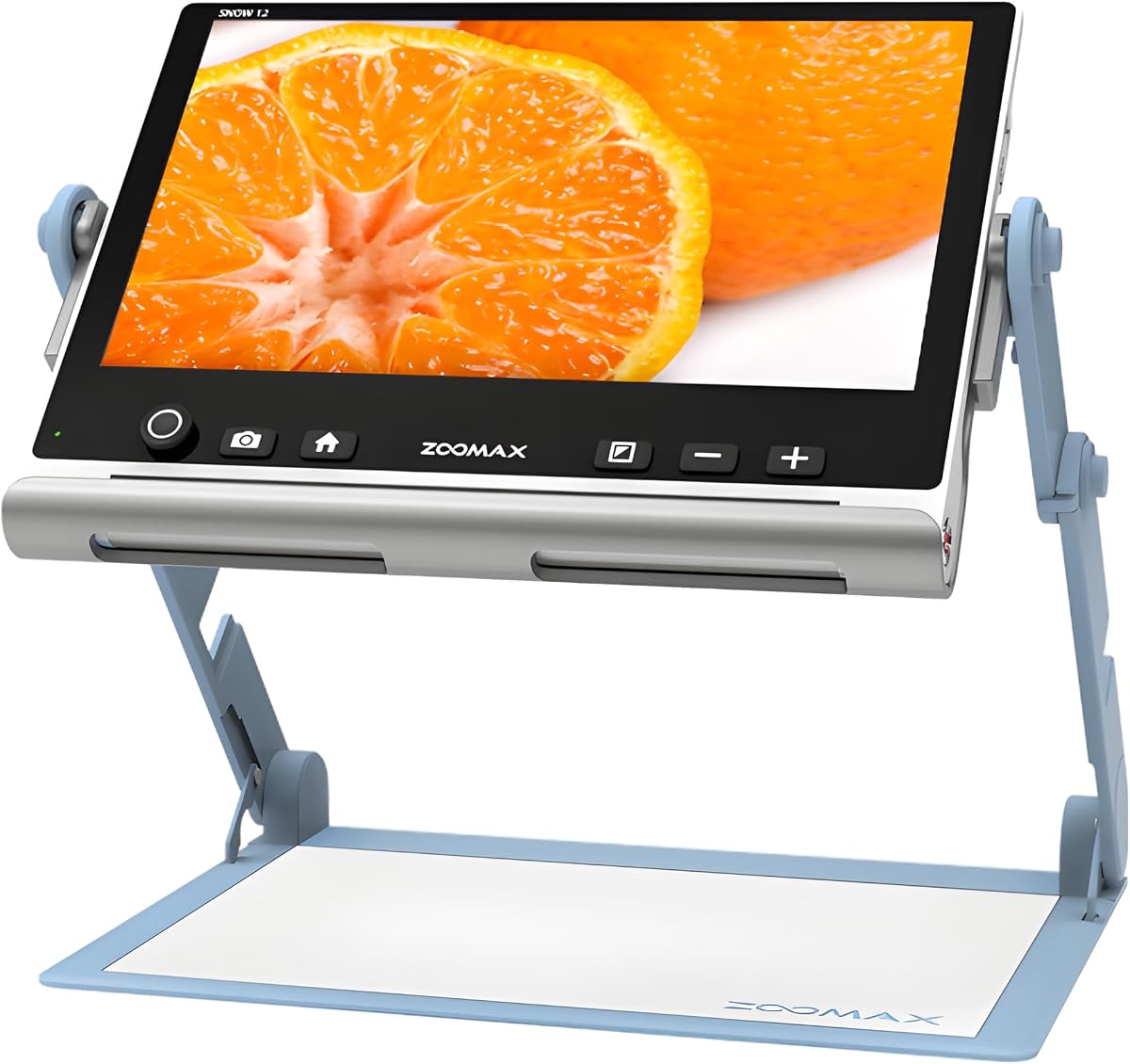
The Snow 12 Inch Video Magnifier by Zoomax stands out as a top choice for those seeking a larger display with advanced accessibility features. With a strong rating from users, it delivers on its promise of enhanced reading assistance through optical character recognition and text to speech technology.
We may earn a commission when you buy through this link, at no additional cost to you.
Its 12 inch HD display offers a spacious view that reduces the need for constant repositioning of text or objects. The OCR feature converts printed text into spoken words, supporting over 20 languages, which is invaluable for multilingual environments or users who benefit from auditory cues alongside visual magnification.
While the device is portable, its size and weight may be a consideration for users with limited dexterity or those who need to carry it for long durations. The foldable stand ensures stability on flat surfaces but might not suit all viewing angles without adjustment.
This magnifier is ideal for home use or stationary settings where a larger screen and text to speech capabilities are prioritized. It is particularly well suited for individuals with macular degeneration or other conditions requiring significant visual support and auditory feedback.
The built in OCR technology transforms printed text into speech, offering an additional layer of independence for users with severe low vision.
A 12 inch display provides ample space for reading documents or viewing objects without frequent screen shifts or zoom adjustments.
We may earn a commission when you buy through this link, at no additional cost to you.
The Eyoyo 3.5 Portable Digital Video Magnifier offers an excellent entry point for users seeking affordable visual aid without compromising essential features. With a high user rating, it is praised for its ease of use and effective magnification for daily reading tasks.
We may earn a commission when you buy through this link, at no additional cost to you.
Its compact 3.5 inch screen makes it easy to carry and handle, ideal for quick visual aid on the go. The device supports up to 25X zoom and includes eight adjustable color modes to enhance text visibility based on individual vision needs.
While the smaller screen may require closer proximity for detailed work, features like snapshot and screen lock allow users to capture and freeze images for later reference. The AV output also enables connection to a larger TV display for shared viewing.
This magnifier is best suited for users who need a portable, budget friendly device for occasional or short term reading assistance. Its design supports both handheld and tabletop use, making it versatile for various environments.
Weighing very little, this magnifier fits easily in a bag for use during travel or outings without added bulk.
Eight color options allow users to switch between modes like black on white to reduce eye strain during reading.
We may earn a commission when you buy through this link, at no additional cost to you.
The VEVOR Portable Digital Magnifier brings premium features to the table with its dual lens system and impressive zoom range. Although user feedback is mixed, the hardware specifications offer versatility for both close reading and distant viewing tasks.
We may earn a commission when you buy through this link, at no additional cost to you.
Equipped with 13MP near and far lenses, this device can handle everything from reading prescription labels to viewing signs across a room. The 5 inch HD screen displays images clearly, and the AV HDMI outputs allow connection to larger displays for enhanced visibility.
The foldable handle and stand provide ergonomic flexibility, but the variety of settings might overwhelm users seeking simplicity. Battery life is supported by a 2500mAh rechargeable cell, ensuring uninterrupted use during extended sessions.
This magnifier is best for users who need both near and far vision aid in one device and are comfortable navigating multiple settings. It is particularly useful for tasks requiring flexibility between close up and distant object magnification.
Separate near and far lenses allow users to switch between reading text and viewing distant objects without changing devices.
With up to 48X magnification, this model offers extreme enlargement for those with significant visual impairments.
We may earn a commission when you buy through this link, at no additional cost to you.
This 5 inch Digital Magnifier focuses on simplicity with its simplified button design, making it easier for elderly users or those with dexterity challenges to operate. It offers solid magnification and a variety of color modes to suit different visual needs.
We may earn a commission when you buy through this link, at no additional cost to you.
The device features an HD color LCD screen with professional image processing to restore colors and details accurately. It also includes a memory function that remembers user settings before shutdown, eliminating the need to adjust every time.
While the rating is moderate, the ergonomic handle and bracket allow for comfortable viewing angles without hunching. The inclusion of 26 color modes provides flexibility for users with color blindness or low vision requirements.
It is a practical choice for users who prioritize ease of use over advanced features. The handle can be installed for left or right handed use, adding to its accessibility for a wider range of individuals.
Reduced button count minimizes confusion, allowing users to focus on reading rather than navigating complex menus.
Settings are saved automatically, so users can resume their preferred magnification and color mode instantly after restarting.
We may earn a commission when you buy through this link, at no additional cost to you.
This portable magnifier delivers a clear viewing experience with its 5 inch HD LCD screen and up to 32X zoom. It is well rated for its ability to enhance text clarity and contrast for users with macular degeneration or low vision.
We may earn a commission when you buy through this link, at no additional cost to you.
The 26 customizable color modes allow users to tailor the display to their specific vision needs. Its ergonomic handle and foldable bracket support comfortable positioning, reducing the need to hunch over pages during reading.
Users appreciate the device's ability to connect to a TV for larger displays, though the unit itself is designed for portability. The high resolution screen ensures no distortion even at higher magnification levels.
It is a strong option for users seeking a balance between portability and performance. The foldable handle makes it easy to store when not in use, fitting well in a home office or travel bag.
The 800×480 screen delivers crisp images that maintain clarity even when text is enlarged significantly.
An ergonomic handle allows for secure gripping during extended reading sessions without causing hand fatigue.
We may earn a commission when you buy through this link, at no additional cost to you.
This 5 inch low vision aid emphasizes user friendliness with simplified buttons and an auto focus feature. It aims to make daily reading tasks like grocery shopping or reading menus easier for visually impaired individuals.
We may earn a commission when you buy through this link, at no additional cost to you.
The HD color LCD screen with professional image processing ensures that colors and details are restored accurately. Its ergonomic handle and bracket support comfortable positioning for both left and right handed users.
While reviews indicate moderate satisfaction, the device offers a range of color modes and the ability to connect to a TV. This can be helpful for those who prefer a larger display for better visibility.
It is a suitable choice for users who want a straightforward magnifier without complex settings. The simplified interface reduces the learning curve, making it accessible for seniors or children with amblyopia.
Auto focus helps maintain a clear image as the device moves over text, reducing the need for manual adjustments.
The integrated handle and bracket design allows for stable placement on pages at comfortable angles.
We may earn a commission when you buy through this link, at no additional cost to you.
The Eyoyo 5 Portable Digital Video Magnifier offers a reliable experience with its foldable handle and long lasting battery. It is designed for users who need extended operation without frequent recharging.
We may earn a commission when you buy through this link, at no additional cost to you.
Its 5 inch LCD screen supports 4X to 32X zoom and 17 color modes to enhance contrast and clarity. The device remembers preferred settings automatically, saving time for users who adjust settings frequently.
With a 4500mAh battery, it provides over 4 hours of continuous use, ideal for long reading sessions. The AV output feature allows connection to a TV for those who prefer a larger display.
This magnifier is well suited for users who prioritize battery life and ease of use. The foldable handle ensures comfort during extended use, making it a practical choice for daily tasks.
A 4500mAh battery supports more than 4 hours of continuous use, reducing interruptions during long reading sessions.
Preferred magnification and color settings are saved, so users do not need to readjust every time they power on.
We may earn a commission when you buy through this link, at no additional cost to you.
This 5 inch magnifier offers a wide array of 26 color modes, giving users ample choice to find the best contrast for their vision. It is praised for its straightforward interface and ergonomic design.
We may earn a commission when you buy through this link, at no additional cost to you.
The device features simplified buttons and a memory function to remember user habits before shutdown. This makes it ideal for seniors or those who prefer not to adjust settings repeatedly.
Its HD color LCD screen with DSP technology restores colors and details accurately. The foldable handle and bracket allow for comfortable positioning, reducing strain during reading.
It is a good fit for users who need a balance of color flexibility and ease of use. The ability to connect to a TV adds value for shared viewing or larger display needs.
With 26 color modes, users can switch between various contrasts to reduce eye strain and improve readability.
Large, prominent buttons and a memory function make operation intuitive for users of all ages.
We may earn a commission when you buy through this link, at no additional cost to you.
The Eschenbach SmartLux Digital Portable Magnifier is known for its quality and reliability among low vision aids. It offers HD video magnification with the added convenience of image capture for saving text or objects.
We may earn a commission when you buy through this link, at no additional cost to you.
With magnification levels from 5X to 12X and five viewing modes, it provides flexibility for different reading needs. Its lightweight handheld design makes it easy to carry and use in various settings.
While the zoom range is moderate, the focus on clarity and portability appeals to users who prioritize ease of handling. The included cleaning cloth ensures the lens stays clear for optimal performance.
This device is best for users who value brand reputation and compactness over extreme magnification. It is a strong choice for occasional use or for those who need a reliable handheld option.
Capture and save images of important text or labels for later review or sharing with family members.
Designed for handheld use, its light weight reduces fatigue during extended periods of reading.
We may earn a commission when you buy through this link, at no additional cost to you.
This 5 inch magnifier stands out with its 3X to 48X zoom range, catering to users who require extreme enlargement. It is designed with simplified buttons to make operation straightforward for daily tasks.
We may earn a commission when you buy through this link, at no additional cost to you.
The external battery supports over 4 hours of use, and the lightweight design makes it portable for dining or shopping. Its HD color LCD screen ensures clarity, though higher zoom may introduce some distortion.
The memory function and photo playback capability add convenience, allowing users to save and revisit important images. The AV output enables connection to a TV for a larger viewing experience.
It is ideal for users with significant visual impairments who need high magnification. The simplified controls and portable form factor make it accessible for seniors and those with limited dexterity.
Up to 48X zoom provides extreme enlargement for users with severe vision loss who cannot read with lower magnification.
Reduced number of buttons minimizes confusion and allows users to access key functions quickly and easily.
We may earn a commission when you buy through this link, at no additional cost to you.
Selecting the right digital magnifier involves considering several key factors that impact usability and comfort. Below are the most important aspects to evaluate before making a purchase.
Screen size affects how much text you can see at once. Larger screens like 12 inches reduce the need to move the device frequently, while smaller ones are more portable. Resolution ensures that images remain sharp at high zoom levels.
Look for a screen size that balances portability with readability, and ensure the resolution supports clear text without pixelation.
Different conditions require different levels of enlargement. Most devices offer 2X to 32X zoom, but some go up to 48X. Higher zoom is useful for severe vision loss but may reduce image clarity.
Choose a zoom range that meets your reading needs without compromising too much on screen quality or ease of use.
Many magnifiers offer multiple color modes such as black on white or yellow on blue. These enhance contrast and reduce glare for users with color blindness or sensitivity to light.
Check for models with customizable color options to find the combination that provides the most comfortable viewing experience for you.
If you plan to use the device outside the home, weight and size matter. Lightweight models with foldable handles are easier to carry and store in a bag.
Prioritize portability if you need the magnifier for shopping or travel, but ensure it still offers enough battery life for your needs.
Long reading sessions require reliable battery performance. Look for devices with rechargeable batteries that offer at least 4 hours of continuous use.
Check if the device supports external batteries or quick charging to avoid interruptions during critical tasks.
Features like OCR, text to speech, snapshot capture, and AV output add value. These can enhance independence and accessibility for different tasks.
Consider which features align with your daily activities and whether they justify the additional cost.
Simplified buttons and memory functions can make a big difference for elderly users. Avoid devices with overly complex menus that require constant adjustment.
Test the interface if possible to ensure it is intuitive and comfortable for your level of dexterity.
A durable build and good warranty support ensure long term value. Check for models with strong customer service and replacement options.
Invest in a reputable brand that offers reliable after sales support for peace of mind.
Start by charging the battery fully before first use. Place the device on a flat surface or hold it firmly depending on the design. Turn it on and adjust the magnification level to find the clearest view of your text or object.
Use the color modes to reduce glare and improve contrast. Many devices remember your settings, so you won't need to adjust them every time. For detailed reading, ensure adequate lighting to avoid shadows on the screen.
Clean the lens regularly with a soft cloth to avoid smudges. Store the device in a protective case when not in use. Recharge the battery every few days to maintain its lifespan and ensure it is ready when needed.
A digital magnifier is an electronic device that uses a camera and screen to enlarge text or objects. It captures an image through the lens and displays it magnified on the screen, often with adjustable zoom and color settings to enhance visibility for users with low vision.
Yes, digital magnifiers are widely recommended for macular degeneration. They provide adjustable zoom and high contrast modes that help users read printed materials that would otherwise be too small or blurry to see clearly.
Many models include AV or HDMI outputs that allow you to connect the magnifier to a television. This feature is useful for users who prefer a larger display or want to share what they are viewing with others.
Battery life varies by model, but most offer between 4 to 6 hours of continuous use. Some devices support external batteries or have energy saving modes to extend runtime for longer reading sessions.
Some advanced models include optical character recognition (OCR) and text to speech features. These convert printed text into spoken words, providing additional support for users with severe vision loss.
Use a soft, lint free cloth to gently wipe the lens. Avoid harsh chemicals or abrasive materials that could scratch the surface. Keeping the lens clean ensures optimal image quality and prevents blurring.
We have reviewed ten top digital magnifiers for low vision, highlighting the Snow 12 Inch for its large display and OCR features, the Eyoyo 3.5 for affordability, and the VEVOR 5 Inch for high zoom capabilities.
When choosing, prioritize screen size, magnification range, and ease of use based on your daily needs. Consider how often you will use the device and whether portability or advanced features like text to speech are important to you.
Remember that prices and availability change frequently, so check current listings before purchasing. Investing in the right magnifier can significantly improve independence and quality of life for anyone with low vision.