
ACEMAGICIAN S3A Gaming Mini PC
4.6Editor score
Ryzen 7 H 255 CPU
Radeon 780M Graphics
16GB LPDDR5 RAM
This guide compares the top 10 gaming mini PCs for Cyberpunk, evaluating performance, cooling, connectivity, and value to help you choose the best system.
Finding a gaming mini PC for Cyberpunk requires balancing raw power with compact design. You need strong CPUs, capable graphics, and efficient cooling to handle demanding visuals without taking up desk space.
We compared ten real products based on processor speed, GPU architecture, memory, and connectivity. Our analysis focuses on systems that deliver smooth frame rates and stable performance for modern gaming and creative work.
Each pick shows key specs, ratings, and unique features. Prices change frequently, so check current listings before buying. These selections cover budget, mid-range, and premium options for every setup.
4.6Editor score

4.6Editor score

3.5Editor score
The following table offers a side-by-side look at all ten products, highlighting core specs like CPU, GPU, memory, and storage to help you compare features at a glance.


The ACEMAGICIAN S3A Gaming Mini PC earns a 4.6 rating for delivering desktop-class performance in a compact design. It is powered by an AMD Ryzen 7 H 255 processor and Radeon 780M graphics, making it a solid entry point for gaming and content creation.
We may earn a commission when you buy through this link, at no additional cost to you.
Its standout quality is the balance of power and cost. With 16GB LPDDR5 RAM at 6400MT/s, the system handles multitasking and light gaming smoothly. The triple 4K display support via HDMI 2.0, DP 2.0, and USB4 Type-C makes it ideal for productivity setups.
Honest trade-offs include the fixed 16GB RAM, which may limit heavy multitasking or high-end modding in some titles. However, storage can be expanded up to 4TB, offering future-proofing for media libraries and large game installations.
Buy this if you want a reliable, quiet, and affordable mini PC for everyday gaming and work. Its 2-year warranty and lifetime support add peace of mind for long-term use.
The S3A offers HDMI, DP, full-function USB-C, and USB 3.2 ports for flexible connections to monitors and peripherals.
Customize your experience with Silent, Auto, and Performance modes to match your task needs and noise tolerance.
We may earn a commission when you buy through this link, at no additional cost to you.
The MINISFORUM G1 Pro Mini PC is an Editor's Choice for its desktop-class RTX 5060 GPU and Ryzen 9 8945HX CPU. This combination delivers approximately 25% higher performance compared to previous generations, making it perfect for AAA gaming and heavy workloads.
We may earn a commission when you buy through this link, at no additional cost to you.
Key strengths include 32GB DDR5 RAM and a robust cooling system rated for 300W dissipation. The GPU features 8GB GDDR7 memory and supports DLSS 4 Multi Frame Generation for realistic visuals. With quad 4K output support, it doubles as a powerful workstation.
The trade-off is the higher price, but you get professional-grade capabilities like 5GbE and Wi-Fi 7. These features ensure low latency and high bandwidth, essential for competitive gaming and large file transfers.
This system is best for power users who need maximum performance in a small footprint. If you prioritize raw speed and expandability for creative projects, the G1 Pro stands out as a top-tier choice.
The RTX 5060 features 3840 CUDA cores and enhanced RT Cores for superior rendering and gaming visuals.
Dual M.2 SSD expansion slots support up to 8TB, allowing you to add massive storage for games and media.
We may earn a commission when you buy through this link, at no additional cost to you.
The ROG NUC (2025) brings premium branding with an Intel Core Ultra 9 processor and RTX 5070 Mobile GPU. It promises generation-over-generation improvements and seamless gaming experiences, targeting enthusiasts who value aesthetics and raw specs.
We may earn a commission when you buy through this link, at no additional cost to you.
Strengths include the triple-fan cooling with dual vapor chamber and tool-free access for memory and storage upgrades. The Aura Sync RGB lighting lets you personalize your rig, blending gaming visuals with a sleek design in a compact 3L size.
Trade-offs are reflected in its 3.5 rating, which may hint at thermal challenges or price premiums. While the GPU is powerful, the compact chassis can struggle with sustained loads compared to larger systems.
Buy this if you seek a high-end, stylish gaming station with future-ready features like Thunderbolt 4. It is ideal for those prioritizing brand prestige and RGB customization alongside strong performance.
DLSS technology leverages RTX power to deliver breathtaking visuals and higher frame rates in supported games.
Thumb screws enable quick access to memory and storage, keeping your system ready for future needs.
We may earn a commission when you buy through this link, at no additional cost to you.
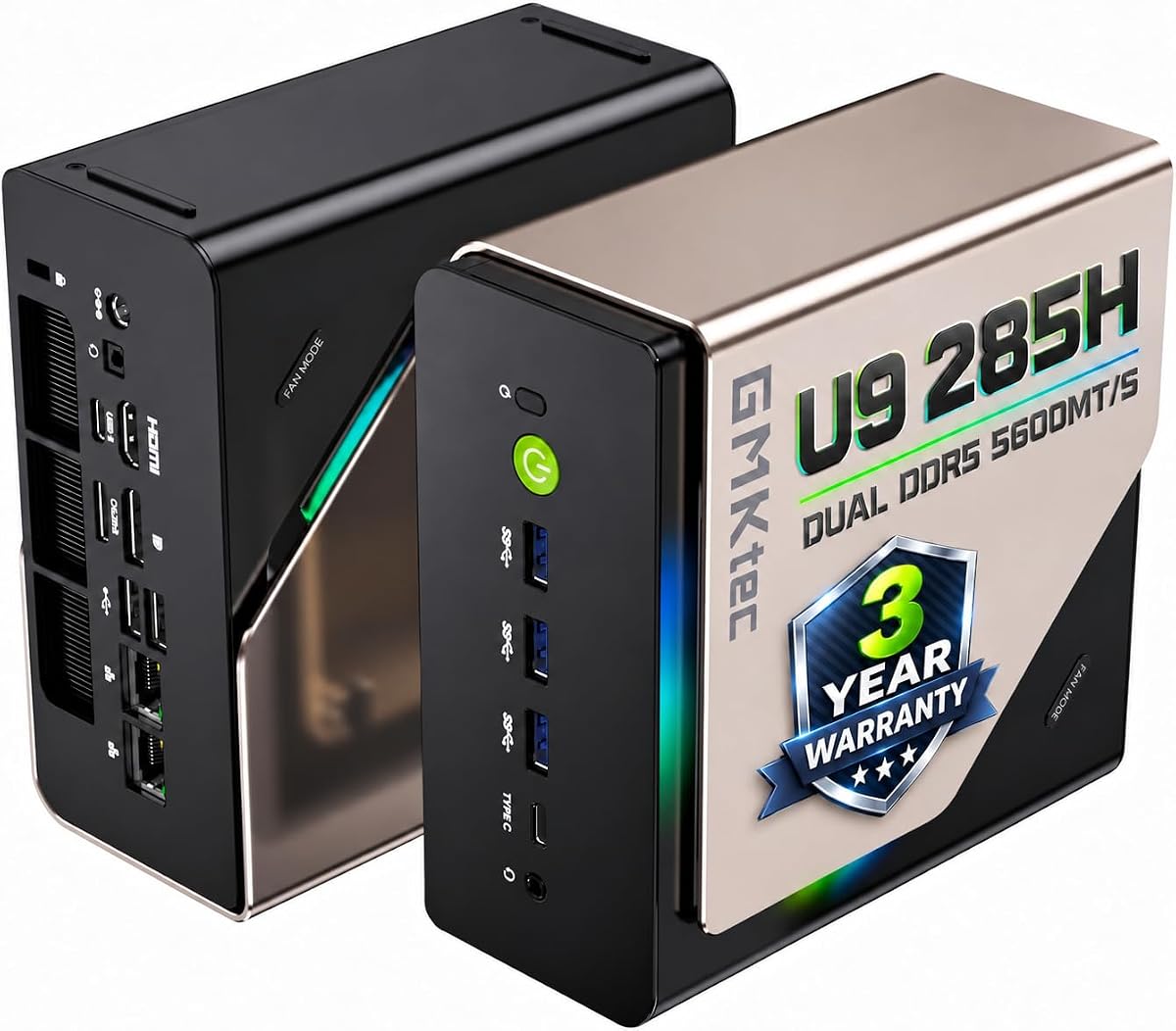
The GMKtec T1 AI Mini PC is a 4.4-rated system focused on AI acceleration and multi-display setups. It features the Core Ultra 9 285H CPU with an AI Boost NPU for 13 TOPS performance, ideal for creative workflows and smart tasks.
We may earn a commission when you buy through this link, at no additional cost to you.
Key strengths include quad-screen 8K output via HDMI 2.1 and DisplayPort 1.4, supporting expansive productivity. The Oculink port offers PCIe x4 speeds for external GPUs, enabling better frame rates for gaming if needed.
Trade-offs are the integrated Arc 140T GPU, which, while capable of AV1 encoding and modern games, falls short of dedicated GPUs in raw power. However, 32GB RAM and 1TB PCIe 4.0 SSD provide ample speed for multitasking.
This mini PC suits users needing AI tools, multi-monitor setups, or an eGPU pathway. It delivers strong value for professionals who want an AI-driven mini PC without compromising display flexibility.
The 285H NPU accelerates AI tasks and calculations, improving performance in creative and generative applications.
Supports 4-screen 8K output for a workstation that handles complex visual workloads with ease.
We may earn a commission when you buy through this link, at no additional cost to you.
The GMKtec K12 Gaming Mini PC scores a 4.4 for its Oculink port and solid Ryzen 7 H 255 CPU. This system is ideal for users who want a compact base with room to expand via an external GPU for higher frame rates.
We may earn a commission when you buy through this link, at no additional cost to you.
Strengths include 32GB DDR5 RAM for smooth multitasking and hardware encoding for AV1 video tasks. The dual cooling fans with RGB lighting provide efficient cooling and a personalized look. Three M.2 slots allow up to 24TB total storage.
Trade-offs are the reliance on Radeon 780M graphics for internal gaming, which can struggle with heavy titles at high settings. However, the Oculink port mitigates this by allowing external GPU connections with PCIe x4 speeds.
Buy this if you plan to add an eGPU or need robust networking and storage. It offers a balanced platform for creators and gamers looking for expandability and dual NIC flexibility.
Higher bandwidth PCIe x4 speeds ensure better performance and lower lag for external GPU setups.
Turbo CPU fan and DDR5 cooling fan keep the system frosty with just 35dB noise in quiet mode.
We may earn a commission when you buy through this link, at no additional cost to you.
The ASUS ROG GR70 Mini PC uses Ryzen 9000 Series processors and RTX 5070 GPU to deliver desktop-level gaming in a compact form. While it has an N/A rating, its specs promise ultra-smooth gameplay with high frame rates and low latency.
We may earn a commission when you buy through this link, at no additional cost to you.
Strengths lie in the custom cooling design that keeps temperatures down even under intense loads. Wi-Fi 7 and Bluetooth 5.4 ensure you stay ahead with modern connectivity, while the silver chassis fits seamlessly on any desk.
Trade-offs include the premium price and reliance on a mobile GPU, which may not match full desktop power in sustained workloads. However, the focus on silent operation and travel-ready design makes it a unique choice.
This is best for gamers wanting elite performance without bulk. If you prioritize aesthetics and next-gen wireless features, the ROG GR70 brings mega impact to a mini size.
Paired with RTX 5070, this system ensures lightning-fast reflexes and no dropped frames in matches.
Certified Bluetooth 5.4 and Wi-Fi 7 eliminate bottlenecks for syncing gear and booting into games.
We may earn a commission when you buy through this link, at no additional cost to you.
The BOSGAME P3 Pro Mini PC is a 4.6-rated system powered by the Ryzen 9 7940HS, offering strong performance for work and games. It comes preinstalled with Windows 11 Pro and supports diverse scenarios from office to home entertainment.
We may earn a commission when you buy through this link, at no additional cost to you.
Key strengths include the Radeon 780M graphics and triple screen display support via HDMI 2.0, DP 1.4, and USB-C. The 1TB PCIe 4.0 SSD provides fast loading, and an Oculink port allows future eGPU upgrades for better gaming.
Trade-offs are the 16GB DDR5 RAM and 1000M LAN speed. While sufficient for general use, heavy multitasking or large server tasks may benefit from upgrades. However, the build quality and warranty support add reliability.
Buy this if you need a versatile mini PC with strong CPU performance and display options. It offers great value for users seeking a balance of power and expandability without breaking the bank.
Three 4K60Hz outputs allow efficient multitasking across different windows and apps.
One-year warranty and lifetime technical support ensure you get help when needed.
We may earn a commission when you buy through this link, at no additional cost to you.
The GMKtec M6 Ultra Mini PC earns a 4.4 rating for office work and light content creation. Powered by Ryzen 5 7640HS, it delivers up to 30% better performance than older models, making it efficient for everyday tasks.
We may earn a commission when you buy through this link, at no additional cost to you.
Strengths include USB4 8K output, dual 2.5G LAN ports, and WiFi 6E for fast connectivity. The 16GB DDR5 RAM and 1TB SSD provide smooth daily performance, while the VESA mount supports flexible setups.
Trade-offs are the modest Ryzen 5 and Radeon 760M graphics, which suit casual 1080p gaming but not demanding titles. However, the dual LAN ports are perfect for firewall or NAS users who need reliable wired connections.
Buy this if you need a compact, efficient workstation for remote work or students. It balances performance, cost, and robust networking in a small chassis.
Two 2.5GbE ports allow faster connections and flexible configurations for home labs.
USB4 supports 8K output, high-speed transfers, and device connections in one port.
We may earn a commission when you buy through this link, at no additional cost to you.
The GMKtec EVO-T1 Mini PC is a 4.5-rated AI-focused system with 64GB DDR5 RAM and Core Ultra 9 285H CPU. It offers massive memory for heavy AI workloads and creative applications without swapping out data.
We may earn a commission when you buy through this link, at no additional cost to you.
Strengths include quad 8K display support and Oculink for external GPU upgrades. The 13 TOPS AI NPU accelerates INT8 calculations, ideal for generative AI, while the 1TB PCIe 4.0 SSD ensures quick load times.
Trade-offs are the integrated Arc 140T GPU which may struggle with high-end gaming. However, the RAM capacity and display options make it ideal for content creators who need power without a large desktop.
Buy this if you need maximum RAM and AI acceleration in a compact box. It serves professionals who demand memory and display flexibility over raw GPU performance.
64GB RAM reduces I/O bottlenecks and token latency for complex workloads.
4-screen 8K output provides crisp multi-display support for gaming and video editing.
We may earn a commission when you buy through this link, at no additional cost to you.
The GMKtec Ryzen 7 Mini PC earns a 4.5 rating for its balanced specs and expansion options. Powered by Ryzen 7 H 255, it delivers strong performance for multitasking and light gaming with reliable efficiency.
We may earn a commission when you buy through this link, at no additional cost to you.
Key strengths include 32GB DDR5 RAM and three M.2 slots for up to 24TB storage. Oculink and dual 2.5GbE LAN ensure you can upgrade graphics and maintain fast connections, while RGB lighting modes personalize your rig.
Trade-offs are the reliance on integrated graphics for gaming, which may need an eGPU for heavy titles. However, the cooling system ensures stability, and the 1-year warranty covers design and workmanship defects.
Buy this if you need a reliable mini PC with robust storage and RAM options. It offers a solid platform for gamers and creators who want a balance of power and customization.
2.5GbE LAN ports ensure stable transfers for firewalls and NAS setups.
13 RGB lighting modes let you customize your rig vibe for gaming or office use.
We may earn a commission when you buy through this link, at no additional cost to you.
Choosing the right mini PC for Cyberpunk depends on your performance needs, space constraints, and budget. Here are key factors to consider before making your purchase.
The CPU handles multitasking, physics calculations, and general system responsiveness. For gaming, a Ryzen 7 or Core i7 is ideal to avoid bottlenecks. Look for processors with 8 or more cores for future-proofing.
Prioritize CPUs with high boost clocks and efficient architectures to ensure smooth gameplay and stable temperatures.
Cyberpunk and other AAA titles demand strong graphics. Look for mini PCs with dedicated RTX GPUs for the best performance. If using integrated graphics, ensure the model supports modern APIs like DirectX 12 and DLSS.
Dedicated GPUs provide better frame rates, but integrated options can suffice for casual play at lower settings.
16GB RAM is the minimum for gaming; 32GB ensures smooth multitasking and modding. Storage should be at least 512GB PCIe 4.0 SSD for fast load times. Check for expandability if you plan to install many games.
Ensure your system offers easy upgrades for RAM and storage to extend its lifespan and adapt to future needs.
Compact designs can overheat under load. Look for dual-fan systems, vapor chambers, or advanced cooling solutions. Noise levels around 35-40dB in performance mode are acceptable for most users.
Effective cooling keeps performance consistent during long gaming sessions and prevents throttling.
Check for HDMI 2.1 or DP 1.4 for high refresh rates. USB4 or Thunderbolt support allows external GPUs and fast peripherals. Wi-Fi 6E or 7 ensures stable network connections for online play.
More ports mean better flexibility for monitors, keyboards, and other peripherals without needing hubs.
Some units come with Windows 11 Pro; others require separate installation. Ensure the BIOS supports your preferred OS and that drivers are available for your hardware.
A pre-installed licensed OS saves setup time and ensures security features are ready to use.
Look for at least a 1-year warranty to protect against defects. Lifetime technical support can be valuable for troubleshooting issues without needing advanced skills.
Good support networks ensure you can fix problems quickly and keep your system running smoothly.
Compare specs against price to find the best value. Budget models may save money but limit performance, while premium units offer longevity. Factor in potential costs for upgrades or external components.
Choose a model that balances current needs with future upgrades to get the best long-term return.
Set up your mini PC in a well-ventilated area to prevent overheating. Keep vents clear of dust and debris to maintain cooling efficiency. Using a VESA mount can save desk space and improve airflow around the chassis.
Regularly update your GPU and BIOS drivers from the manufacturer's website. These updates often include performance patches and bug fixes for games. Check manufacturer tools or Windows Update for new software releases.
Clean the internal fans and heatsinks every few months using compressed air. Ensure the power supply is turned off before accessing internal components. Proper maintenance extends the lifespan of your system and prevents hardware failures.
Yes, modern gaming mini PCs with RTX GPUs or strong integrated Radeon 780M graphics can run Cyberpunk at playable frame rates. Settings like FSR or DLSS help balance quality and performance. Ensure you have enough RAM and storage for the game.
Mini PCs with Ryzen processors and AV1 encoding support handle streaming well. The CPU handles encoding, freeing the GPU for game visuals. Use external capture cards if needed to manage resource load efficiently.
They can if placed in enclosed spaces. Proper ventilation and regular dust cleaning prevent overheating. High-end models include thermal throttling protection to maintain safe operating temperatures.
Many models have accessible M.2 slots for extra SSDs. Use a screwdriver to open the chassis if needed, following manufacturer instructions. Adding a second SSD increases storage without needing an external drive.
Oculink offers higher bandwidth at PCIe x4 speeds compared to Thunderbolt's x3, ideal for external GPUs. It provides lower lag for gaming setups. Thunderbolt is more common but slightly less performant for graphics.
16GB is the baseline, but 32GB is recommended for modern titles with mods or background apps. It prevents stuttering in open-world games. Check game requirements before upgrading.
We reviewed ten top mini PCs ranging from budget ACEMAGICIAN models to premium ROG systems. Each offers unique strengths in CPU, GPU, and connectivity to suit different needs.
Prioritize your needs: budget for storage expansion, mid-range for balance, or premium for highest performance. Check connectivity and warranty before committing.
Prices change often, so verify current listings and discounts before buying. These selections provide a strong foundation for gaming and productivity setups.