
USB C Docking Station Dual Monitor for HP,Laptop Docking Station 3 Monitors
4.3Editor score
Affordable triple display support
100W power delivery port
Multiple video output options
This comprehensive guide compares the top 10 docking stations for 3 monitors to help you find the perfect hub for triple display setups.
Finding the right docking station for 3 monitors can transform your workspace into a powerful command center. Whether you are a trader, designer, or developer, having multiple screens allows you to multitask efficiently without constant switching. The right hub connects all your peripherals through a single cable, reducing clutter and boosting productivity.
To compile this list, we evaluated ten real products based on their port selection, video output capabilities, charging power, and overall reliability. We looked at features like DisplayLink support, Thunderbolt compatibility, and Ethernet connectivity to ensure each option meets diverse professional needs. Our goal is to help you navigate the market with confidence.
Each pick in this guide showcases specific strengths, from budget-friendly options to premium enterprise solutions. You will find detailed reviews, pros, cons, and technical specifications for every product. Please note that prices and availability can change frequently, so check the latest details before making your final purchase decision today.
4.3Editor score

4.3Editor score

4.4Editor score
Compare the top ten docking stations side by side to see which one offers the best ports, video performance, and value for your specific triple monitor setup needs.


The Selore docking station stands out with its smart LCD screen that displays weather and charging status. It offers 17 ports in one compact unit, making it a powerhouse for multitasking. The triple 4K HDMI support is excellent for Windows users who need extended displays.
We may earn a commission when you buy through this link, at no additional cost to you.
Its standout feature is the integrated display that shows real-time info without needing your phone. The privacy mode button lets you turn off external monitors instantly, which is great for security. The 100W PD input ensures your laptop stays charged during heavy workloads.
However, macOS users only get mirror mode due to chip limitations. The adapter is also sold separately, which might surprise some buyers. Despite these small drawbacks, the port variety and unique smart features make it a top choice.
This dock is best for professionals who want extra convenience features like weather data. If you need a robust connection hub for three monitors on Windows, it delivers excellent value and performance.
The built-in Wi-Fi synced LCD screen keeps you informed about the weather and dock status at a glance.
The double-press privacy button allows instant screen off without locking your entire computer system.
We may earn a commission when you buy through this link, at no additional cost to you.
This USB C docking station offers impressive triple display support at a very budget-friendly price point. It includes multiple video outputs like HDMI, DP, and VGA to suit different monitor types. For basic office setups, it provides all the essential ports needed.
We may earn a commission when you buy through this link, at no additional cost to you.
The main strength is its affordability while still supporting 4K displays. The 100W PD charging ensures your laptop runs without issues. It is compact and easy to transport for those who travel between offices.
However, connecting the VGA port limits all screens to 1080P resolution. The USB ports are only 2.0 speed which is slow for large files. Still, for those on a tight budget, it is a functional triple monitor solution.
Buy this if you need cheap triple screen support for older monitors or basic tasks. It is ideal for students or home offices where high data speed is not critical.
This hub delivers triple video output capability at a fraction of the cost of premium models.
The mix of HDMI, DP, and VGA ports allows connection to older and newer monitors easily.
We may earn a commission when you buy through this link, at no additional cost to you.
The Plugable triple monitor dock is designed for business reliability and Mac compatibility. It supports Apple M1 through M5 chips using DisplayLink technology. This makes it one of the few docks that can drive three displays on a MacBook.
We may earn a commission when you buy through this link, at no additional cost to you.
It comes with a full 100W adapter and cables ready for use. The lifetime support team provides great peace of mind for professional users. It is TAA compliant which is important for government and enterprise contracts.
Installation requires drivers on Mac which is a small setup step. Also, it does not support protected video content like Netflix. Despite these limits, it is the best choice for Mac triple screen setups.
Choose this dock for corporate environments or Mac users needing three screens. It provides robust performance and reliable support for critical work tasks.
DisplayLink technology enables extended triple displays on MacBooks that usually support only one external screen.
TAA and NDAA compliance makes it safe for government and secure enterprise deployments.
We may earn a commission when you buy through this link, at no additional cost to you.
This Plugable station is built for hybrid teams needing reliable connections. It offers triple HDMI support and DisplayLink for Mac. This setup is great for data analysis and conferencing in offices.
We may earn a commission when you buy through this link, at no additional cost to you.
The enterprise-grade build ensures it works well in shared desks and IT managed spaces. It supports Windows, macOS, and ChromeOS with drivers. Gigabit Ethernet keeps your network connection stable during calls.
It does not work with Linux systems which limits some users. Streaming content is blocked due to HDCP restrictions. However, for business use, it remains a solid and supported solution.
This dock is perfect for offices with mixed laptop fleets. If you need stable connectivity for work calls and multiple screens, it delivers reliability.
Designed for hot-desking and managed office workspaces requiring secure and consistent connections.
Gigabit Ethernet port ensures fast and stable internet for video conferencing without Wi-Fi drops.
We may earn a commission when you buy through this link, at no additional cost to you.
The Selore hub offers fast data speeds with 10Gbps USB 3.1 ports. It supports triple 4K HDMI output for Windows laptops. The driverless plug and play setup saves you time on installation.
We may earn a commission when you buy through this link, at no additional cost to you.
Fast transfers are great for creative users moving large files to external drives. The one-touch screen control button helps switch modes easily. It also includes Ethernet for stable internet connections.
Mac users face limitations with extended displays as it works for mirror only. You must confirm your laptop supports DisplayPort Alt Mode for video. Still, it is a strong performance dock for Windows.
Choose this if you need high-speed USB and triple screens on Windows. It balances speed and connectivity well for most daily tasks.
10Gbps USB ports enable rapid file transfers for photographers and content creators.
Driverless operation on Windows allows immediate use upon plugging into your laptop.
We may earn a commission when you buy through this link, at no additional cost to you.
This Acer station comes with a powerful 110W adapter ensuring steady power. It supports three screens with two HDMI and one DP port. The build quality is premium with an aluminum body that dissipates heat.
We may earn a commission when you buy through this link, at no additional cost to you.
The 100W pass-through keeps your laptop fully charged. For Windows laptops supporting DSC, you can get triple 4K at 30Hz. It is a solid choice for high performance work.
Mac users are limited to mirroring only which restricts productivity. The 4K output depends on your laptop GPU capabilities too. Still, the included adapter and power make it convenient.
Buy this if you need robust power and a clean setup. It is great for those who want a single adapter solution for charging and data.
The included 110W adapter ensures stable power delivery for demanding multi-monitor workflows.
Aluminum casing helps keep the dock cool during extended use and adds durability.
We may earn a commission when you buy through this link, at no additional cost to you.
The TobenONE hub packs 18 ports into one device for maximum connectivity. It supports triple 4K at 60Hz which is faster than many competitors. Nine USB ports handle all your peripherals easily.
We may earn a commission when you buy through this link, at no additional cost to you.
This eliminates cable clutter and organizes your workspace efficiently. It is designed for Windows and ChromeOS users who need lots of connections. The power delivery keeps your laptop running smoothly.
Linux users will not find support here which is a downside. It is also optimized mostly for Windows environments. However, the port count is unmatched in this category.
This dock is ideal if you have many devices to connect. If you need speed and many ports for a home office, this is a great pick.
Triple 4K at 60Hz provides smoother visuals for editing and detailed work.
Nineteen ports ensure you can connect every keyboard mouse and drive at once.
We may earn a commission when you buy through this link, at no additional cost to you.
This TobenONE DisplayLink station allows up to four 4K displays if your laptop supports it. It includes a 120W adapter for high power needs. It works on Mac and Windows for great flexibility.
We may earn a commission when you buy through this link, at no additional cost to you.
The DisplayLink technology ensures stable extended displays across systems. It is excellent for trading or production work needing many screens. The USB speeds are fast for file transfers.
You cannot watch protected streaming content like Netflix due to DRM. Drivers must be installed for setup which takes a few minutes. But for multi-screen setups, it is powerful.
Choose this if you want four screens or need strong Mac support. It is a top tier option for professional workflows needing visual breadth.
Up to four 4K displays can be connected for extreme multitasking power.
Supports both macOS and Windows to fit diverse device environments easily.
We may earn a commission when you buy through this link, at no additional cost to you.
This Plugable dock provides excellent network speed with 2.5GbE Ethernet. It offers driverless setup for Windows which is very convenient. You can get one 4K and two 1080p screens for balance.
We may earn a commission when you buy through this link, at no additional cost to you.
It is great for traders or analysts needing fast data. The six USB ports cover all peripheral needs. It is simple to set up without extra software.
Mac users should avoid this as it does not work well with ARM systems. Triple screen resolution caps at 4K plus 1080p which is a tradeoff. But for Windows networks it is top tier.
Buy this if you prioritize fast internet and driverless convenience. It is a strong pick for Windows users needing triple monitors.
2.5Gbps Ethernet port speeds up internet connectivity for large data transfers.
No software installation required for Windows laptops to start using all ports.
We may earn a commission when you buy through this link, at no additional cost to you.
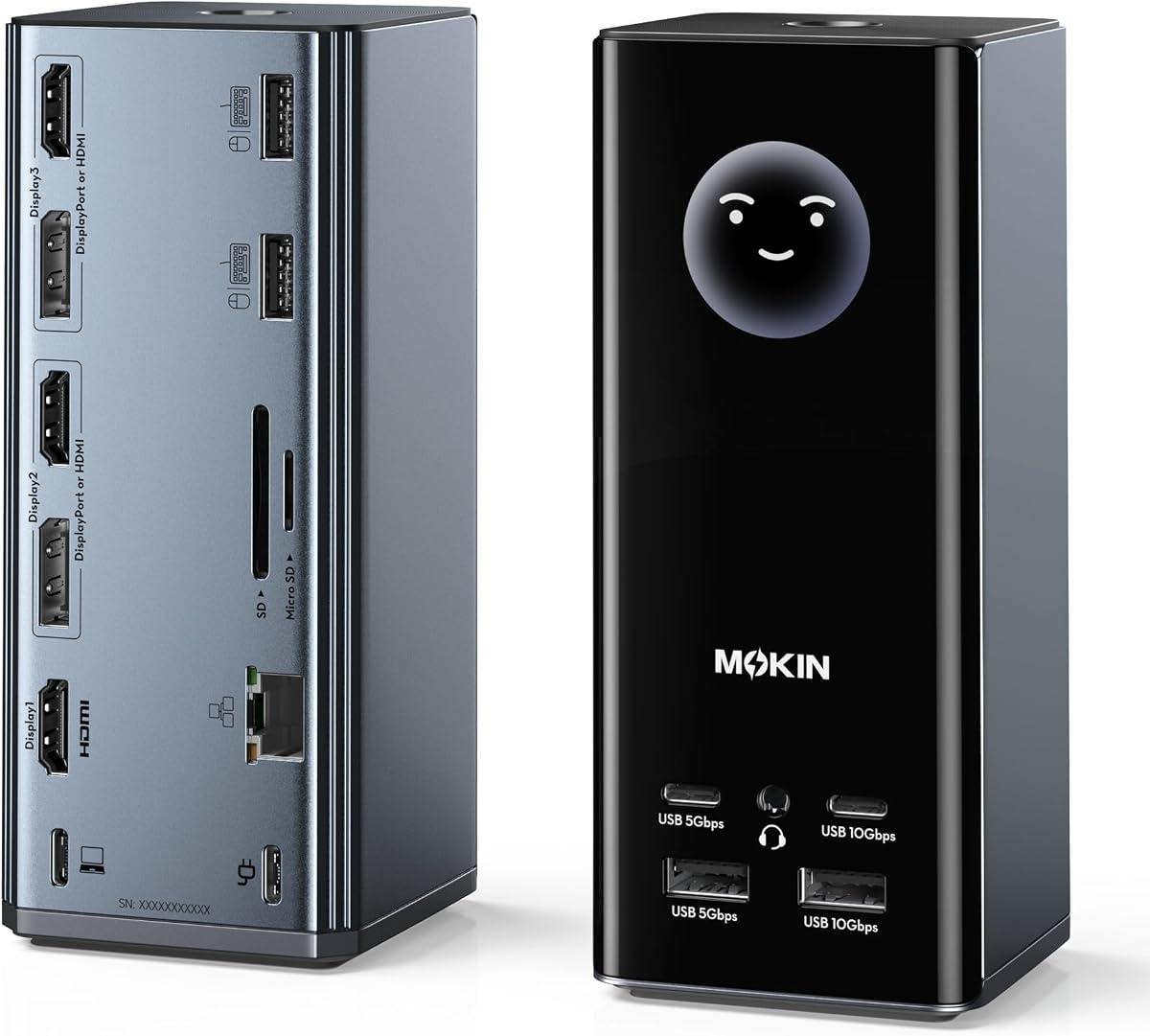
The MOKiN dock features an LCD screen that shows connection status and weather. It supports up to three 4K monitors for great visual space. It is similar to the Selore model with smart features.
We may earn a commission when you buy through this link, at no additional cost to you.
The smart screen helps you monitor charging and ports instantly. Privacy protection buttons allow you to lock screens quickly. It is a well rounded hub for daily work.
You may need firmware updates to change display settings. Mac users only get mirror mode here. But for Windows users the visual intelligence is a nice bonus.
Choose this if you want a smart dock that tells you status info. It is a good value pick with extra convenience features.
The LCD display provides real-time feedback on your dock status and environment.
Secure your work instantly by turning off screens with a simple double tap.
We may earn a commission when you buy through this link, at no additional cost to you.
Selecting the right docking station involves checking video compatibility, port speed, and power delivery needs.
Check if the dock supports your OS and GPU for three screens. Windows often needs MST while Macs need DisplayLink for extended displays.
Ensure your laptop supports DisplayPort Alt Mode or Thunderbolt for triple outputs.
Look for enough USB ports for your devices. USB 3.0 or 3.1 speeds are better for external drives.
More ports mean less clutter and easier connections for all peripherals.
Choose a dock with 100W PD to charge your laptop. High power ensures your system stays on during heavy use.
Always verify the adapter is included to avoid extra costs.
Gigabit Ethernet or 2.5GbE is vital for stable internet. This avoids Wi-Fi drops during video calls.
Wired connections are essential for professionals requiring reliable networks.
MacBooks need specific docks with DisplayLink for three displays. Standard MST often does not work on Apple Silicon.
Confirm driver needs for macOS before buying to avoid issues.
Aluminum bodies help with heat dissipation. Sturdy docks prevent wear over time.
Quality materials ensure the dock lasts through daily plugging and unplugging.
Driverless docks work best for plug and play. Some models need software for extra screens.
Consider setup ease if you prefer minimal configuration steps.
Features like privacy locks or smart screens add value. They improve convenience and security for your workspace.
These extras might justify a higher price depending on your needs.
Connect the dock to your laptop using the USB-C cable before turning on monitors. Ensure the power adapter is plugged in for stable charging.
Use Windows Display Settings or macOS Display Settings to arrange your screens. Set them to Extend mode for more workspace.
Keep the dock in a ventilated area to prevent overheating. Avoid stacking items on it during use to maintain airflow.
Most modern MacBooks only support one external display natively. You need a DisplayLink dock to extend to two or three screens. Drivers are required for this to work.
Many docks require a separate power adapter to reach 100W. Check the product details to see if it is included. Using a lower wattage adapter may limit charging.
MST stands for Multi-Stream Transport which allows multiple displays over one cable. It works well on Windows laptops. Macs do not support MST for extended displays.
Check your laptop specs for DisplayPort Alt Mode or Thunderbolt 4. Most modern business laptops support it. If unsure contact the manufacturer for confirmation.
Yes if your USB-C port supports video output. Look for DP Alt Mode or Thunderbolt on your ports. Standard charging-only ports will not work.
Macs mirror displays by default with MST docks. You need DisplayLink software to extend screens. Download it from the vendor site for setup.
The Selore Laptop Docking Station leads with smart features and wide ports. For budget buyers the HP compatible USB C dock offers triple support cheap. The Plugable enterprise model is ideal for Mac and business needs.
Prioritize power and video support based on your OS. Windows users have more options while Mac users need DisplayLink. Choose the dock that fits your port needs best.
Prices may change so verify the latest details before buying. Check current availability to ensure you get the best deal for your triple monitor setup.