
CENMATE Aluminum 4 Bay Hard Drive Enclosure
4.3Editor score
Aluminum alloy cooling design
Supports up to eighty TB
USB A and C ports included
Direct attached storage provides a reliable way to expand your digital capacity without network complexity. These enclosures connect directly via USB offering fast transfers and simple setup for creators and professionals needing immediate access to large datasets across multiple operating systems.
We evaluated ten leading models based on speed, build quality, and ease of use. Our analysis covers diverse configurations from four bay units to hybrid NVMe setups ensuring you find a solution that matches your specific performance and capacity requirements effectively.
Each selection highlights unique strengths like hot swappability or RAID support to guide your decision. Please note that availability and pricing fluctuate frequently so verify current details on the product pages before making your final purchase decision today.
4.3Editor score

4.2Editor score

4.1Editor score
As an Amazon Associate we earn from qualifying purchases.
This side by side comparison highlights the key specifications and unique features of each top rated enclosure to help you quickly identify the best fit for your storage expansion requirements.


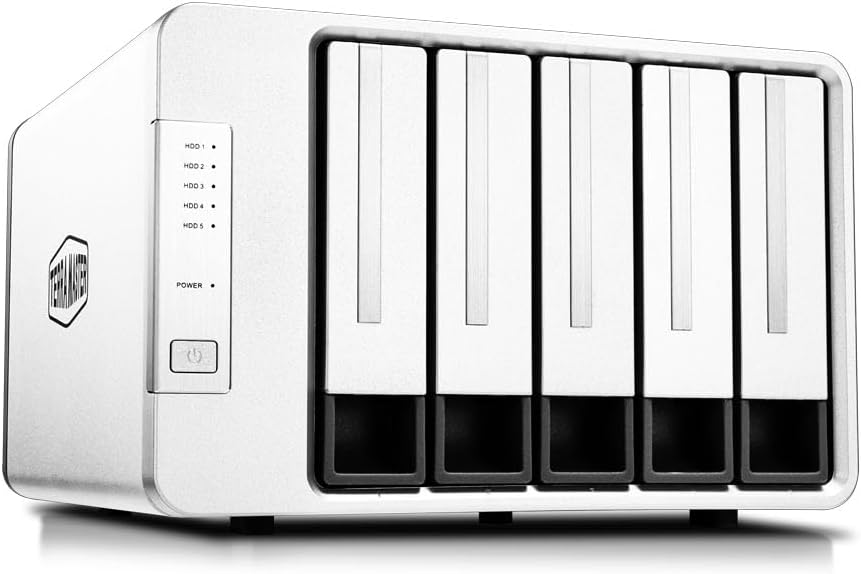


The TERRAMASTER D4-320 stands out as a top contender in the direct attached storage market with its impressive four bay design and high speed USB 3.2 Gen2 connectivity. It delivers a robust performance rating and offers significant capacity expansion for users needing fast access to large files without network dependencies.
We may earn a commission when you buy through this link, at no additional cost to you.
Its standout qualities include the ability to achieve read write speeds of up to one thousand sixteen megabytes per second when equipped with four hard drives. The enclosure supports hot swapping allowing you to replace disks without powering off the device which is essential for continuous workflows. Additionally the unique Push-lock design ensures trays remain secure during transport or operation.
While it lacks built in RAID functionality which limits redundancy options for critical data the simplicity of individual disk access suits many users well. The noise levels are managed well in standby mode dropping below twenty one decibels but active transfers may generate some fan noise which could be noticeable in quiet environments.
This unit is ideal for professionals and enthusiasts who prioritize speed and ease of use over complex redundancy features. Whether you are editing videos or managing backups the D4-320 provides a reliable and efficient solution for expanding your storage capacity quickly.
Utilizing USB 3.2 Gen2 protocol this enclosure achieves transfer speeds up to ten gigabits per second ensuring efficient handling of large files and reducing wait times during data migration.
The tool-free hard drive tray design with Push-lock security allows for easy installation and removal of drives while hot swapping support enables disk replacement without system downtime.
We may earn a commission when you buy through this link, at no additional cost to you.
The QNAP TR-004 is a powerful four bay storage solution designed to complement QNAP NAS systems while functioning effectively as a standalone direct attached storage device. It supports hardware RAID configurations which adds a layer of data redundancy and performance optimization that many standalone enclosures lack.
We may earn a commission when you buy through this link, at no additional cost to you.
Key strengths include its seamless integration with QNAP NAS for expanding capacity and its support for RAID 0 1 5 and JBOD modes via a physical interface. The USB Type-C connection ensures fast data transfer speeds and broad compatibility with Windows macOS and Linux systems. Lockable drive bays provide added physical security for installed drives.
One trade-off is its dependency on specific QNAP NAS models and firmware versions for full expansion features. Additionally you cannot install NAS applications on this unit limiting its functionality to storage expansion or external backup rather than a full networked server role.
This enclosure is best suited for existing QNAP users looking to expand their storage ecosystem or professionals who need hardware RAID capabilities without complex network setup. It offers a reliable bridge between direct storage convenience and networked storage flexibility.
The TR-004 supports hardware RAID 0 1 5 and JBOD providing data redundancy and performance benefits without requiring software configuration on the host computer.
Designed to expand QNAP NAS capacity this unit allows you to add storage pools seamlessly though files on moved drives may not be recognized across different devices.
We may earn a commission when you buy through this link, at no additional cost to you.
The TERRAMASTER D8 Hybrid introduces an innovative approach to external storage by combining four SATA bays with four M.2 NVMe slots in a single enclosure. This hybrid design allows users to leverage the massive capacity of HDDs alongside the high speed of SSDs for optimized data management.
We may earn a commission when you buy through this link, at no additional cost to you.
Its primary strength lies in the ability to tailor storage setups to data usage patterns. You can store frequently accessed hot data on NVMe SSDs for rapid access while keeping cold data on economical HDDs. The enclosure supports USB 3.2 Gen2 for ten gigabit per second transfer speeds and includes tool-free drive trays with a Push-lock design for convenience.
Despite its innovative features the product has a lower user rating compared to others in this lineup which may indicate some usability hurdles or compatibility nuances. Managing two types of drive interfaces in one unit requires more planning and understanding of your specific workflow needs.
This enclosure is ideal for power users who need a mix of speed and capacity without running two separate devices. If you work with large video files and archives this hybrid approach can significantly improve workflow efficiency by placing active projects on fast SSDs.
The D8 Hybrid supports four SATA drives and four NVMe SSDs combining massive capacity with high-speed performance in a single eight bay enclosure.
You can manually select where to store data based on usage frequency ensuring hot data lives on fast SSDs while cold data resides on high-capacity HDDs.
We may earn a commission when you buy through this link, at no additional cost to you.
The CENMATE Aluminum 4 Bay offers an accessible entry point for users seeking expand storage without breaking the bank. It supports both two point five and three point five inch drives up to a total of eighty terabytes making it versatile for various drive types and capacities.
We may earn a commission when you buy through this link, at no additional cost to you.
Its aluminum alloy construction helps dissipate heat effectively while the built-in fan provides active cooling during heavy transfers. The enclosure features USB 3.0 ports with both A and C options for broad compatibility and supports hot swapping for easy drive management. Users appreciate the plug-and-play nature requiring no additional drivers on Windows or Mac systems.
The main trade-off is the fan noise which can reach between forty and fifty decibels during operation. This may be too loud for quiet home offices or studios but is acceptable for general desktop use where background noise is less of a concern.
This unit is perfect for individuals and small businesses needing reliable extra storage on a budget. If noise is not a primary concern the CENMATE provides solid performance and flexibility for personal or enterprise storage expansion needs.
Designed for individuals and businesses this enclosure supports up to eighty terabytes of storage ensuring ample space for personal or enterprise use cases.
The aluminum alloy materials and built-in fan maximize data security by maintaining optimal operating temperatures for your drives during intensive transfers.
We may earn a commission when you buy through this link, at no additional cost to you.
The SABRENT 5-Bay enclosure stands out for its high-performance design featuring a dedicated ASMedia controller for each of the five bays. This ensures every drive maintains a stable independent connection which is crucial for consistent speed and reliability in professional workflows requiring multiple drives.
We may earn a commission when you buy through this link, at no additional cost to you.
Key features include a quiet PWM temperature-controlled cooling system that ramps up only when needed to keep noise low during everyday use. The enclosure supports tray-less hot-swap with per-bay power switches and activity LEDs for precise control. A rear USB-C port allows daisy-chaining a second dock and the internal auto-switching power supply eliminates the need for an external brick.
While it lacks hardware RAID support which limits redundancy options the robust build and independent connections make it a premium choice for those prioritizing speed and stability. The aluminum reinforced housing adds durability and the design supports Windows macOS and Linux seamlessly.
This is an ideal choice for professionals managing large media libraries or data sets who need maximum reliability and flexibility. The ability to daisy-chain docks and control each drive individually adds significant value for complex workstation setups.
A dedicated ASMedia ASM1351 controller for each of the five bays gives every drive its own stable independent connection for maximum reliability.
A rear USB-C port allows you to connect peripherals or daisy-chain a second dock expanding your storage ecosystem without requiring more host ports.
We may earn a commission when you buy through this link, at no additional cost to you.
The TERRAMASTER D8 Hybrid 2 is an updated hybrid enclosure that supports four SATA HDDs and four M.2 NVMe SSDs offering up to one hundred fifty terabytes of combined capacity. It has received a perfect user rating reflecting high satisfaction with its performance and features among owners.
We may earn a commission when you buy through this link, at no additional cost to you.
Its standout feature is the TerraMaster Power Management technology which allows you to switch between Power Save and Active modes with a single touch. This optimizes power efficiency and drive wake-up times balancing energy use with always-on workflow performance. The enclosure supports USB 3.2 Gen2 for ten gigabit per second speeds and includes free TPC Backupper software for data security.
While it does not have built-in RAID you can use third-party software if needed. The plug-and-play nature works well across macOS Windows and Linux making it versatile. However the complexity of managing hybrid drives might be a hurdle for less technical users.
This unit is best for users who want both speed and capacity with smart power management. If you need a flexible storage solution that adapts to your workflow energy needs this hybrid enclosure offers a compelling modern solution.
TerraMaster Power Management technology allows you to switch between Power Save and Active modes optimizing energy efficiency and drive wake-up times easily.
Supporting four independent HDDs and four independent M.2 SSDs it offers flexible storage expansion and simpler file management for third-party RAID software if needed.
We may earn a commission when you buy through this link, at no additional cost to you.
The TERRAMASTER D5-310 is a five bay enclosure that stands out for its hardware RAID control via a dedicated knob on the back. This physical interface makes switching between RAID 5 0 1 10 and single disk modes intuitive and reliable compared to software-based solutions.
We may earn a commission when you buy through this link, at no additional cost to you.
It supports a hot spare disk feature which automatically replaces failed drives in RAID configurations minimizing downtime and data loss risk. The enclosure supports up to one hundred twenty terabytes of storage and works seamlessly with Windows macOS and Linux without additional drivers. It includes TPC Backupper software for scheduled and incremental backups.
One limitation is its USB 3.1 Gen 1 interface capping speeds at five gigabits per second compared to ten Gbps on newer models. This may slow large file transfers. The user rating is also lower suggesting potential reliability or usability issues that prospective buyers should consider.
This unit is ideal for users who need hardware RAID reliability and large capacity without network complexity. If data security and redundancy are priorities and speed is secondary the D5-310 offers a robust solution for backups and archives.
A dedicated RAID knob on the back allows easy switching between RAID 5 0 1 10 and Single modes ensuring superior performance and reliability compared to software solutions.
Supporting up to five hard drives each with twenty four terabyte capacity the D5-310 delivers a total of one hundred twenty terabytes for extensive storage expansion needs.
We may earn a commission when you buy through this link, at no additional cost to you.
The WAVLINK 4-Bay enclosure is unique for its inclusion of an HDMI port allowing for up to 4K display output alongside storage expansion. This feature makes it a versatile docking station for workstations needing both extra storage and additional monitor connectivity via a single cable.
We may earn a commission when you buy through this link, at no additional cost to you.
It features USB 3.2 Type-C for ten gigabit per second transfers and supports up to eighty eight terabytes of storage with four bays. The aluminum shell ensures robust build quality while dual built-in fans activate at forty eight degrees Celsius to keep drives cool during intensive tasks. Independent power switches allow hot-swapping without shutting down the system.
The HDMI functionality depends on your host computer supporting video over USB-C which may not be universal. Additionally you may need mounting brackets for smaller drives which are not included. These minor limitations are outweighed by the connectivity options for compatible setups.
This enclosure is best for professionals needing a dock that combines storage with display capabilities. If you want to expand your desk setup without multiple adapters the WAVLINK offers a sleek high-performance solution.
Beyond storage the HDMI interface supports up to 4K resolution at sixty hertz creating a seamless workspace when your host supports video output over USB-C.
The USB 3.2 Type-C port reaches up to 10Gbps allowing you to handle massive files and high-volume data transfers with exceptional efficiency for personal and professional use.
We may earn a commission when you buy through this link, at no additional cost to you.
The ORICO 5 Bay enclosure is designed for ease of use with a magnetic chip cover that eliminates the need for screws or tools. This allows for quick installation and removal of drives making it convenient for users who frequently swap storage media.
We may earn a commission when you buy through this link, at no additional cost to you.
It supports up to one hundred ten terabytes of total capacity across five bays for both two point five and three point five inch drives. The enclosure features a six ball mill double-ball bearing fan for cooling and honeycomb holes on the rear panel to facilitate airflow. It connects via USB 3.1 Gen 1 Type-C for transfers up to five gigabits per second.
A noted limitation is that Linux systems may only recognize one drive at a time with multi-drive enclosures. This restricts its utility for Linux users who need full access to all drives simultaneously. For Windows and Mac users this is not an issue.
This unit is a solid choice for home storage expansion and media archiving. If you value quick access and a simple setup the ORICO 5 Bay provides reliable performance with robust protection features for your data.
The magnetic chips on the cover mean no screws and tools are needed allowing you to recognize hard drives in just three seconds.
Anti-over voltage over-current overheat short-circuit and leakage designs ensure the security of data transmission while indicator lights help monitor hard drive status.
We may earn a commission when you buy through this link, at no additional cost to you.
The QNAP TR-002 is a compact two bay storage device designed to serve as both standalone direct attached storage and NAS expansion for QNAP systems. It supports hardware RAID for data redundancy and offers a secure solution with lockable drive bays to prevent unauthorized access.
We may earn a commission when you buy through this link, at no additional cost to you.
Its small form factor makes it ideal for users who do not need massive capacity but still want hardware RAID protection. The USB Type-C interface ensures compatibility with modern computers and it works seamlessly with Windows macOS and Linux. Lockable drive bays add a layer of physical security which is valuable for office environments.
Since it only supports two drives the total capacity is limited compared to larger four or five bay units. The price per bay may also be higher than multi-bay alternatives. However for specific needs like small backups or portable storage this limitation is often acceptable.
This unit is best for small businesses or professionals needing a reliable secure storage device that fits easily on a desk. If you need basic RAID without the bulk of a large enclosure the TR-002 is a practical and robust option.
Supporting up to two drives of either two point five or three point five inch this compact device provides a smaller footprint for direct storage needs.
Designed to expand QNAP NAS capacity the TR-002 also works well as standalone external storage across Windows macOS and Linux platforms effectively.
We may earn a commission when you buy through this link, at no additional cost to you.
Selecting the right direct attached storage enclosure involves considering capacity speed and connectivity to match your specific workflow needs.
Determine the total storage capacity you need based on your data size and growth projections. Models vary from two bay units supporting smaller needs to five bay or hybrid setups capable of over one hundred terabytes.
Choose a unit that supports drive sizes up to your expected maximum to ensure future expansion without replacing the enclosure.
The interface protocol determines how fast data moves between your computer and the drives. Look for USB 3.2 Gen2 or USB 3.1 Gen 2 options which offer ten gigabit per second speeds for efficient handling of large files.
Ensure your computer has compatible ports to avoid bottlenecking performance and verify backward compatibility if older ports are the only option.
Check if the enclosure supports both two point five and three point five inch drives or specific types like SATA and NVMe. Some hybrid models offer flexibility while others focus on a single drive type for streamlined design.
Confirm that the bays allow for hot swapping if you need to change drives without powering down the system for continuous operations.
Decide if you need data redundancy through RAID configurations. Hardware RAID options provide protection against drive failures but may add complexity and cost compared to simple individual drive access.
If data security is critical prioritize units with dedicated RAID controllers or knobs for easy management without software dependencies.
Build materials like aluminum help dissipate heat better than plastic enclosures. Cooling fans are essential for high-density setups to maintain optimal drive temperatures during heavy transfers.
Look for temperature-controlled fans that adjust speed based on heat levels to balance noise and performance effectively.
Ensure the enclosure works seamlessly with your operating system whether Windows macOS or Linux. Most modern units are plug-and-play but verifying driver-free support is wise.
Check specific notes regarding Linux limitations as some models may not support all drives simultaneously on certain distributions.
Extra features like USB-C to USB-A cables daisy-chain support or HDMI ports add versatility. Daisy-chaining allows you to connect multiple docks if you need more storage than one unit provides.
Consider the availability of included cables and adapters to ensure you have everything needed for immediate setup.
Prices vary based on features and bay counts. Higher end models with hardware RAID and ten Gbps speeds cost more but may offer better long-term value for professional use.
Balance your budget with the features you need ensuring you do not pay for capabilities that do not align with your workflow requirements.
Begin by installing compatible drives into the enclosure trays ensuring they are firmly seated. Use the provided tools or tool-free trays depending on the model and connect the enclosure to your computer via the included USB cable.
Once connected the drives should appear on your desktop or in your file manager. Format them to a file system compatible with your operating system such as exFAT for cross-platform support if needed.
Maintain proper ventilation by placing the enclosure on a flat stable surface and avoid blocking fan vents. Regularly clean dust from the exterior and check firmware updates to ensure optimal performance and reliability.
Direct Attached Storage connects directly to a computer via USB while Network Attached Storage connects to a network allowing multiple devices to access data. DAS is simpler and faster for single users while NAS offers broader access and remote capabilities.
Most modern DAS enclosures are compatible with Mac systems without requiring additional drivers. Always verify macOS support in the product specifications to ensure seamless plug-and-play functionality.
Yes most DAS units are sold diskless meaning you must supply and install your own hard drives or SSDs. Check the product description to confirm if it includes drives or requires you to purchase them separately.
For cross-platform use exFAT is recommended. For Mac-only use APFS is optimal while NTFS works well for Windows systems. Formatting ensures your computer recognizes the drives properly for data storage.
Some models support daisy-chaining via additional USB ports allowing you to connect multiple enclosures. Check the specific product features to see if it supports this capability for expanded storage needs.
RAID adds redundancy to protect data from drive failures but is not strictly necessary for personal backups if you have other copies. For critical data RAID provides an extra layer of safety worth the added complexity.
Keep the enclosure vents free of dust and debris to ensure fans operate efficiently. Place the unit in a well-ventilated area and avoid covering it with materials that trap heat during operation.
Most enclosures come with their own power adapters for reliable operation. Some units have internal power supplies that eliminate external bricks but verify power requirements before purchase to ensure stability.
We reviewed ten top direct attached storage enclosures offering options for budget users and those seeking high performance. The TERRAMASTER D4-320 and SABRENT 5-Bay stood out for speed and reliability while the CENMATE Aluminum 4 Bay offers exceptional value for budget-conscious buyers.
Prioritize speed capacity and compatibility when choosing your unit to ensure it meets your workflow requirements. Consider factors like RAID support and cooling features if you handle large files regularly or need data redundancy.
Always check current product details and availability before purchasing as models and offers change frequently. Selecting the right enclosure will expand your storage efficiently and keep your data organized and accessible.