
Amzboy 15.6" Laptop
4.8Editor score
Fanless silent operation design
45W Type C PD charging
Expandable storage up to 1TB
Discover the best cheap laptop for recording music in October 2026. We compare processors, RAM, and connectivity to help budget musicians choose the right
Finding a reliable machine for music production without breaking the bank is a common challenge for aspiring producers. A good laptop needs enough processing power to handle digital audio workstations smoothly while maintaining portability for on the go sessions.
We evaluated ten affordable options based on their CPU performance, memory capacity, storage speed, and connectivity features essential for audio interfaces. Our goal was to identify models that balance cost with the technical requirements needed for recording and editing tracks effectively.
Each pick highlights specific strengths like multitasking capability or port variety to suit different studio setups. Please note that prices and availability can change frequently so verify current details before making your final purchase decision today.
4.8Editor score
4.3Editor score

4.3Editor score
This side by side comparison breaks down the key specifications of all ten selected laptops to help you find the most suitable machine for your home studio needs.




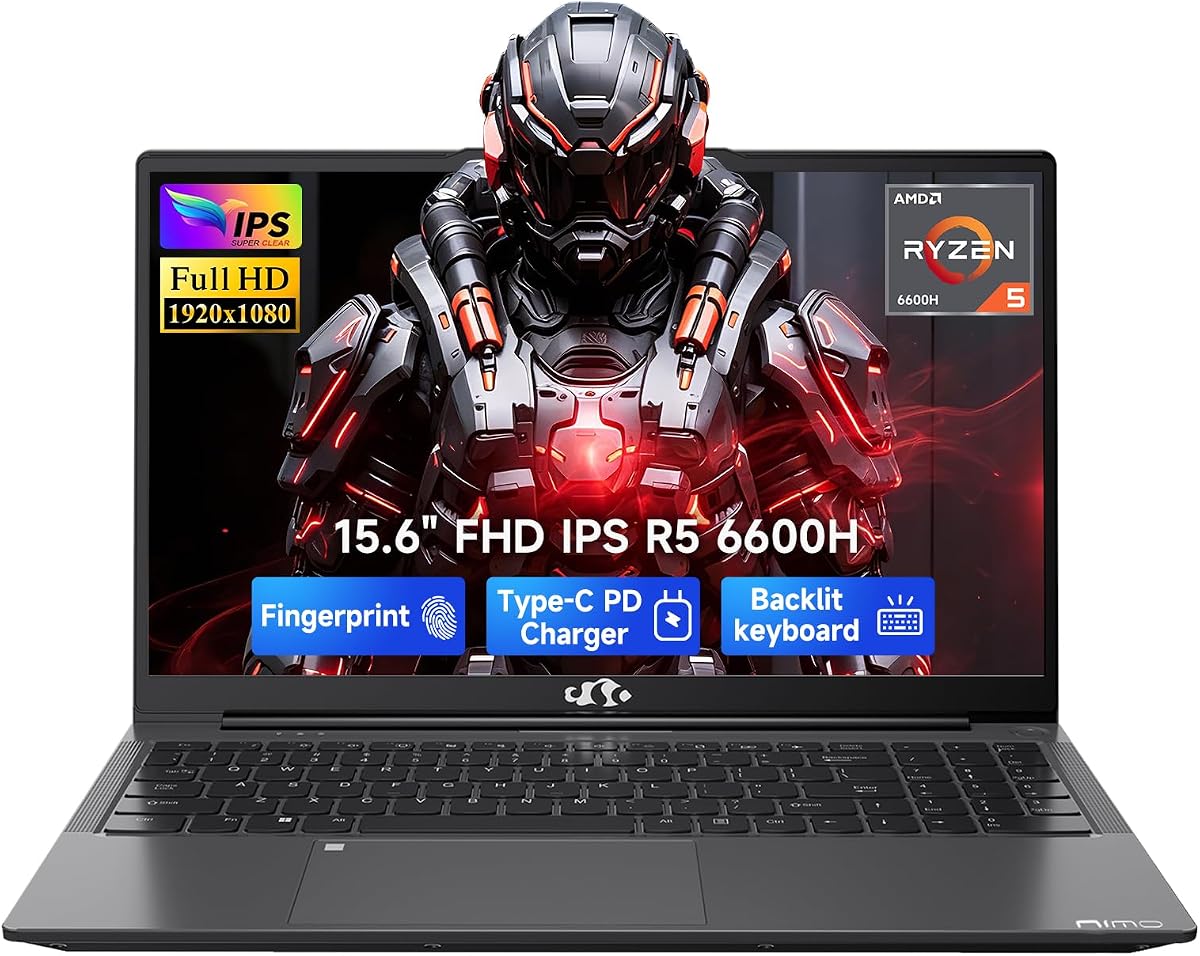
This laptop stands out as a top contender for budget conscious musicians who need genuine performance power. It carries an impressive rating and brings solid specs to the table that can handle digital audio workstations better than entry level rivals.
We may earn a commission when you buy through this link, at no additional cost to you.
The AMD Ryzen 5 6600H processor offers six cores and twelve threads which means you can run multiple plugins and tracks without major lag. Coupled with 16GB of DDR5 memory this system provides smooth multitasking essential for complex music production projects.
While it is not a powerhouse for heavy video editing the balance of power and cost makes it very attractive for audio focused tasks. You do get a backlit keyboard and fingerprint reader which add convenience and security to daily workflow sessions.
If you need a reliable machine that can grow with your studio setup this model is a strong recommendation. The upgrade room for RAM and storage ensures you can adapt the device as your music production needs become more demanding over time.
The six core CPU allows you to run virtual instruments and effects simultaneously without choking the system resources needed for clean recordings.
Dual SO-DIMM slots and M.2 2280 design let you upgrade RAM and SSD later so the laptop stays relevant as your project files grow.
We may earn a commission when you buy through this link, at no additional cost to you.
For those just starting out or working on very simple tracks this laptop offers a very accessible entry point into music creation on a budget. It holds a high rating for reliability despite its modest specs making it a safe choice for basic recording tasks.
We may earn a commission when you buy through this link, at no additional cost to you.
The fanless design is a major benefit for home studios where noise can interfere with microphone recordings. Since there are no moving parts inside the device it runs completely silent which helps maintain audio fidelity during sensitive capture sessions.
However the 4GB of RAM means you will need to manage your applications carefully while recording. You might find that running a full DAW with multiple tracks simultaneously could slow things down compared to models with higher memory capacity.
This device is best suited for users who prioritize silence and portability over raw processing power. If you need a quiet laptop for voice memos or basic editing this choice delivers value without the fan noise that plagues many budget machines.
The fanless build eliminates internal noise which is critical when recording vocals or acoustic instruments directly through the laptop mic.
Dual Type C and USB 3.2 ports allow you to connect external audio interfaces and drives without needing extra adapters.
We may earn a commission when you buy through this link, at no additional cost to you.
This model brings a premium feel to an affordable package with features that appeal to modern creatives who need a clean interface. It is rated well for its build quality and display performance which helps when viewing waveforms and editing timelines closely.
We may earn a commission when you buy through this link, at no additional cost to you.
The Pentium Gold 6500Y processor is capable of handling basic audio tasks efficiently while the SSD ensures quick boot times and fast file access. This combination reduces the wait time when opening large session files or exporting final tracks.
A unique feature is the manual privacy slider above the webcam which adds a layer of security during online collaboration sessions. Musicians often work remotely with producers so having control over the camera without software toggles is a thoughtful design touch.
If you value a crisp screen and a sleek form factor this laptop fits the bill for portable studio work. The ability to upgrade storage later ensures you can store more samples and project files without replacing the entire system soon.
The FHD IPS display provides accurate color reproduction which helps when syncing video cues or editing media with audio elements.
You can expand storage up to 512GB using a TF card or upgrade the SSD to 4TB NVMe for massive project libraries.
We may earn a commission when you buy through this link, at no additional cost to you.
This laptop is a practical choice for users who need immediate responsiveness without overspending on unnecessary power. The 12GB of RAM makes it stand out among similar budget models allowing you to keep multiple applications open while running a DAW.
We may earn a commission when you buy through this link, at no additional cost to you.
The included M.2 SSD slot is a significant advantage for long term use because it lets you expand storage up to 1TB easily. This means you can add room for your audio library and project files without replacing the entire laptop soon.
Connectivity is well covered with USB C HDMI and USB 3.2 ports which simplifies connecting external monitors and audio interfaces. Such options are crucial for a home studio setup where you often need to link peripherals quickly without dongle clutter.
It is best for students or beginners who need a balanced machine for school and music hobbies. The combination of decent memory and upgrade potential gives it a longevity that exceeds typical entry level devices in this price range.
With 12GB RAM you can run a browser for references alongside your audio software without significant performance drops.
The built-in M.2 slot supports upgrades to 1TB providing ample space for storing your growing collection of recorded tracks.
We may earn a commission when you buy through this link, at no additional cost to you.
This notebook is engineered to outperform entry level laptops by offering higher memory and faster processing speeds at a low cost. The 12GB of RAM allows for smoother multitasking which is helpful when managing audio tracks and reference material simultaneously.
We may earn a commission when you buy through this link, at no additional cost to you.
The anti-glare IPS screen is a welcome feature for long editing sessions because it reduces eye strain significantly. Wide viewing angles ensure that you see your waveform accurately from different positions during collaborative recording or mixing work.
Privacy is also considered with a built-in slider that lets you cover the camera lens physically when not in use. This adds peace of mind during remote meetings with producers or when simply want to ensure your privacy is protected without software.
If you need a lightweight machine that can handle moderate workloads this option is a solid pick for daily use. The balance of speed and portability makes it easy to move between rooms or take to different recording environments.
The high speed memory makes this notebook run up to 1.5 times faster than 8GB laptops when editing documents or streaming media.
Includes USB C HDMI and multiple USB ports to connect monitors storage and peripherals without needing extra adapters.
We may earn a commission when you buy through this link, at no additional cost to you.
This Chromebook offers an all day battery life that is great for musicians who record on the go or need to work during travel. Its lightweight design makes it easy to carry while the integrated dual array microphones ensure clear voice input for notes or ideas.
We may earn a commission when you buy through this link, at no additional cost to you.
While Chrome OS restricts native DAW software it can still be used for basic audio recording via web based tools. This makes it a viable option for capturing quick ideas or voice memos without needing a full desktop environment setup.
The secure nature of Chrome OS means you can focus on your work without worrying about malware or complex updates. This simplicity is a benefit for users who just want a reliable device for communication and light media tasks.
For those needing a secondary device for quick note taking or light editing this model serves well. Just keep in mind the storage limits may require cloud solutions if you plan to save large audio files locally.
Enjoy up to 13 hours and 30 minutes of wireless streaming which keeps you productive throughout the day without hunting for outlets.
The 14 inch HD display and dual array digital microphones let you video chat with vibrant clarity for remote collaborations.
We may earn a commission when you buy through this link, at no additional cost to you.
This laptop combines generous RAM and storage to offer a balanced performance for students and beginners. The 12GB of RAM ensures that you can handle moderate multitasking smoothly while the 256GB SSD provides enough space for system files and some projects.
We may earn a commission when you buy through this link, at no additional cost to you.
The full function USB-C jack supports charging and data transfer which reduces the need for multiple chargers. This feature is helpful for users who want a streamlined setup where one cable can handle power and peripheral connections efficiently.
Privacy protection is built into the device with a manual slider that covers the camera lens when not in use. This physical security adds confidence for those who use the laptop for video calls with collaborators or family members regularly.
If you need a reliable machine for daily tasks and light creative work this model is a solid choice. The ergonomic keyboard and spacious touchpad enhance the typing and navigation experience making long sessions more comfortable.
The 256GB SSD ensures ample space for running most applications and multiple workflows without needing immediate external drives.
Features USB-C HDMI and USB 3.2 ports to connect monitors storage and peripherals without extra adapters.
We may earn a commission when you buy through this link, at no additional cost to you.
This device is designed to provide a quiet operation which is beneficial in shared environments where noise can be a distraction. The 12GB of RAM and 256GB SSD ensure that system performance remains snappy for daily tasks and media viewing.
We may earn a commission when you buy through this link, at no additional cost to you.
The 170 degree hinge design allows for flexible viewing angles which can be useful when sharing screen content with others. Wide viewing angles on the FHD IPS display mean that colors remain consistent even when viewed from the side.
Quiet performance is a key selling point for students and professionals who work in libraries or offices. While it may not be completely silent under heavy loads it generally runs quietly enough to avoid disrupting nearby workers.
For users who need a quiet machine for online classes and light editing this laptop meets the requirement well. The dual Type-C ports offer versatile connectivity for modern peripherals without relying on older USB standards.
Features Pentium 6500Y and 12GB RAM for smooth multitasking and streaming and office tasks.
Built-in webcam cover and quiet performance ensure security and comfort for classrooms offices and home environments.
We may earn a commission when you buy through this link, at no additional cost to you.
This laptop is a straightforward option for users who need a reliable machine for daily work without extra features. The 8GB of RAM and 256GB SSD provide a decent baseline for running applications and storing files efficiently.
We may earn a commission when you buy through this link, at no additional cost to you.
The Full HD IPS display delivers vibrant colors and wide viewing angles which enhances the visual experience during long work sessions. This is helpful if you spend time browsing the web or watching videos between recording sessions.
Connectivity is well covered with multiple USB ports HDMI and USB-C to support external devices. This allows you to connect a monitor or external drive easily which can extend your workspace beyond the laptop screen.
If you need a simple and functional laptop for home or school use this model fits the bill. The ergonomic keyboard and spacious touchpad enhance typing and navigation making it comfortable for extended use.
The 256GB SSD provides ample space for storing system files and you can expand up to 4TB NVMe.
Features USB-C HDMI and USB 3.2 ports to connect monitors storage and peripherals without extra adapters.
We may earn a commission when you buy through this link, at no additional cost to you.
This laptop offers dependable processing for daily workloads making it a safe choice for students and light users. The Comet Lake processor provides enough power for web research and office productivity without demanding excessive power consumption.
We may earn a commission when you buy through this link, at no additional cost to you.
The 128GB SSD ensures quick startups and snappy file access which keeps the system responsive during typical tasks. While 6GB of RAM is modest it allows for smooth everyday responsiveness when paired with the fast SSD drive.
Security is addressed with a Kensington lock slot which lets you tether the laptop to a desk. This is a thoughtful safeguard for libraries cafes and shared spaces where physical security is a concern.
For users who need a lightweight and reliable device for basic tasks this model is a solid pick. The combination of portability and expandable storage options makes it versatile for various personal and professional needs.
Delivers ample power for online learning office productivity web research and HD video playback smoothly.
Multitask with ease thanks to 6GB of memory and expandable storage up to 512GB with TF card.
We may earn a commission when you buy through this link, at no additional cost to you.
Choosing the right laptop for music production involves balancing budget constraints with essential performance requirements.
The CPU is the heart of your music setup since it handles audio processing and plugin execution. Look for multi-core processors like Ryzen 5 or newer Intel Core models to ensure smooth playback and low latency.
Prioritize CPUs with higher clock speeds to reduce the risk of audio dropouts during recording sessions.
Memory is critical for loading sample libraries and running multiple tracks without lag. Aim for at least 8GB of RAM though 16GB is recommended for larger projects.
Sufficient RAM ensures that your DAW runs smoothly even when you open other applications like web browsers or reference tools.
Solid State Drives (SSDs) are essential for quick boot times and fast project loading. A 256GB SSD is a good minimum to store your OS and core DAW.
Ensure there is room for expansion via ports or slots so you can add external storage for your growing audio library later.
Ports like USB and USB-C are vital for connecting audio interfaces and external controllers. Check that your laptop has enough high speed ports to support your setup.
Thunderbolt or high speed USB-C options are preferable for low latency audio interfaces to minimize audio lag.
If you record on the go battery life matters for maintaining productivity without hunting for power outlets. Look for models that offer at least six hours of real world usage.
Longer battery life ensures you can work through a session uninterrupted by charging needs in less ideal environments.
A good display helps you see waveforms and edit tracks accurately. Full HD IPS panels provide clear visuals and wide viewing angles for comfortable work.
Prioritize screens with anti-glare coatings to reduce eye strain during long editing sessions.
Laptops that allow RAM or storage upgrades offer better long term value. This lets you extend the life of the machine as your needs grow.
Check if the device has accessible slots for adding memory or secondary drives before you buy.
Most professional DAWs are available for Windows and macOS so choose an OS you are comfortable with. Ensure it is up to date to support the latest software versions.
Avoid Chromebooks if you need to run native desktop audio software that is not web based.
To get the best audio performance set your DAW's buffer size to a higher value when recording and lower it when mixing. This prevents dropouts while allowing for smoother playback when editing.
Keep your laptop cool by using it on a hard flat surface during sessions. Overheating can cause the fan to spin faster which introduces noise into your recordings.
Regularly update your drivers and OS to maintain stability. Also use a surge protector when plugging in your audio interface to protect both devices from power spikes.
Yes you can record music on affordable laptops that meet minimum requirements. Look for at least 8GB of RAM and an SSD to ensure smooth performance in your DAW. Basic recording tasks are manageable on entry level machines.
RAM size is crucial for handling large sample libraries and multiple tracks. 8GB is the minimum but 16GB allows for better multitasking. Insufficient RAM can lead to slow load times and system crashes.
No a dedicated GPU is not necessary for audio recording and mixing. Integrated graphics are sufficient unless you are also doing video editing. Save your budget for CPU and RAM upgrades instead.
You need USB ports especially USB 3.0 or USB-C for connecting audio interfaces. Check that your laptop has enough high speed ports to support your peripherals. Avoid adapters that might add latency to your signal.
To prevent dropouts increase your buffer size in the DAW settings. Close background applications to free up CPU resources. Keeping the laptop cool also helps maintain consistent performance.
Many budget laptops allow storage upgrades via M.2 slots or additional bays. Check the specifications to see if you can add an SSD later. Some models support external drives via USB if internal upgrades are not possible.
We have highlighted ten diverse options that range from silent fanless designs to more powerful multitasking machines. The NIMO and Amzboy models stand out for their balance of performance and affordability.
Prioritize RAM and storage upgrades if you plan to grow your library over time. A good screen and solid ports also make daily work more comfortable and efficient.
Prices and availability shift quickly so verify the current details before buying. We hope this guide helps you find a laptop that supports your musical journey without breaking the bank.