
ORICO 5.25 Trayless Hot Swap Mobile Rack
4.1Editor score
Stainless steel construction
Tool-free mounting process
Front on/off button
This guide compares the top 10 hot swap SATA mobile rack units for quick drive access, durability, and compatibility in desktop and server environments.
Finding the right storage solution is crucial for modern computing setups. A hot swap SATA mobile rack allows you to easily add or remove drives without shutting down your system. This feature is essential for backup stations, media servers, and professional workstations needing flexible storage options.
We evaluated ten leading models based on build quality, ease of use, and compatibility. Our selection includes trayless designs, multi-bay enclosures, and options for both 2.5 and 3.5 inch drives. Each product was reviewed for its ability to protect drives and ensure smooth hot swapping operations.
Every pick in this list highlights specific strengths and ideal use cases. You will see detailed breakdowns of features like cooling, locking mechanisms, and connection speeds. Keep in mind that availability and pricing can change, so verify details before purchasing your next enclosure.
4.1Editor score

4.4Editor score

5.0Editor score
This side-by-side comparison highlights the key specifications and unique features of each selected hot swap SATA mobile rack to help you find the perfect fit for your needs.




The StarTech 3.5in SATA Trayless Mobile Rack stands out as a robust solution for frequent drive access. With a 4.4 rating, users appreciate its solid aluminum construction and reliable hot swap capabilities. It is designed specifically for 3.5 inch SATA drives in a 5.25 inch bay.
We may earn a commission when you buy through this link, at no additional cost to you.
Its trayless design allows for quick drive insertion without the need for separate trays or enclosures. Internal rubber shock absorbers protect your drives from vibration and impact during handling. The lockable drive bay adds a layer of security for sensitive data storage environments.
While it only holds one drive, the insertion rating of over 50,000 cycles ensures longevity even with daily use. The lack of a tray simplifies the process but might feel less secure to some users accustomed to sliding trays. However, the shock absorption mitigates this concern effectively.
This model is ideal for IT professionals and users who need to swap drives regularly without opening the case. Its durability and straightforward design make it a top choice for reliable, secure hot swapping. We recommend it for anyone prioritizing build quality and ease of use.
The solid aluminum construction combined with internal rubber shock absorbers ensures your drives remain safe during the hot swap process.
The lockable drive bay provides security while the TAA compliance makes it suitable for government procurement and secure environments.
We may earn a commission when you buy through this link, at no additional cost to you.
The ICY DOCK Dual 2 Bay 2.5 SSD & HDD Dock is a versatile enclosure for those using smaller drives. Rated 4.3 stars, it supports both SATA and SAS interfaces with a tool-less design for quick access. It fits into a standard 3.5 inch drive bay perfectly.
We may earn a commission when you buy through this link, at no additional cost to you.
Active Power Technology ensures LEDs only light up when a drive is installed, saving energy and reducing clutter. The individual eject buttons make it easy to identify which drive is being removed. This design streamlines the hot swap process significantly for IT technicians.
While it lacks a door, the door-less design speeds up swapping operations. Users should note it is specific to 2.5 inch drives up to 9.5mm height. The included warranty provides peace of mind for long-term usage in various computing systems.
This rack is perfect for system builders and data centers needing flexible 2.5 inch drive management. Its balance of features and affordability makes it a top contender for value seekers. Consider this if you have multiple SSDs or smaller HDDs to manage.
APT powers up individual LEDs only when a drive is installed, reducing power consumption and visual noise during operation.
Supports both SATA 6Gbps and SAS 12Gbps allowing you to mix drive types based on your performance needs.
We may earn a commission when you buy through this link, at no additional cost to you.
The StarTech.com 2 Drive 2.5in Trayless Hot Swap Mobile Rack offers a compact way to house two smaller drives. With a 4.1 rating, it transforms a single 3.5 inch bay into a dual hot-swappable interface. It supports all SATA SSDs and HDDs without extra drivers.
We may earn a commission when you buy through this link, at no additional cost to you.
Its open-top design aids in passive heat dissipation, which is crucial for maintaining optimal drive temperatures. The unit comes with necessary cables including SATA data and power adapters to get you started immediately. Eject buttons for each drive ensure you know which one you are removing.
The lack of a cover might be a concern for dust protection in some environments, but the ventilation helps performance. It is an ideal solution for IT professionals needing quick access to two drives in a limited space. The durability is backed by a 50,000+ insertion rating.
This backplane is recommended for users who need simple dual-drive access without the complexity of trays. It balances ease of use with thermal management effectively. If you need to swap two 2.5 inch drives regularly, this is a solid choice.
An open-top design and vented slot divider help prevent drive failure by maintaining optimal operating temperatures naturally.
Includes screw kit and SATA cables to ensure you have everything needed for immediate installation and operation.
We may earn a commission when you buy through this link, at no additional cost to you.
The Kingwin Tray-Less Hot Swap Mobile Rack Cage is designed for professional users needing secure dual drive access. Rated 4.5 stars, it supports both SATA and SAS interfaces with a key lock feature for data safety. It fits into a 3.5 inch floppy drive bay easily.
We may earn a commission when you buy through this link, at no additional cost to you.
The build combines high-quality ABS and metal materials for excellent heat dissipation and durability. Non-scratch SATA connectors ensure reliable connections over time with a high insertion rate. LED indicators help you monitor power and drive activity at a glance.
While the key lock adds security, it might be a slight extra step compared to simple latches. The unit is compatible with all PC and server cases making it versatile for various setups. It supports 2.5 inch drives of all common heights.
This enclosure is perfect for enterprise systems where physical security is a priority alongside performance. The combination of speed and protection makes it a reliable choice for cloud or backup servers. It delivers strong performance for demanding environments.
The key lock feature allows you to secure your drives physically preventing unauthorized access to sensitive data.
High quality ABS and metal materials maintain ideal operating temperatures while providing excellent heat dissipation.
We may earn a commission when you buy through this link, at no additional cost to you.
The ICY DOCK MB326SP-1B 6-Bay Mobile Rack is a top-tier solution for massive storage needs in a single bay. With a perfect 5.0 rating, it supports six 2.5 inch SATA or SAS drives seamlessly. The ExpressTray system ensures tool-less installation for every slot.
We may earn a commission when you buy through this link, at no additional cost to you.
Cooling is managed by dual upgradeable fans with three-speed control to handle the heat from six drives efficiently. Active Power Technology ensures energy is only used for installed drives. Individual LED indicators provide clear status updates for each of the six bays.
While it is a premium investment, the capacity and build quality justify the cost for serious users. It accommodates various drive heights from 5mm to 9.5mm making it highly versatile. The power connector setup is robust enough for all six drives.
This rack is ideal for media servers, NAS builds, or data centers needing compact high density storage. Its excellent reviews reflect reliability and thoughtful design. If you need maximum drives per slot, this is the ultimate choice.
Dual user-upgradeable fans with three-speed control ensure effective cooling for the high density drive configuration.
ExpressTray tool-less trays allow quick installation while maintaining stability with optional screw holes for added security.
We may earn a commission when you buy through this link, at no additional cost to you.
The ICY DOCK ExpressCage MB324SP-1B 4 Bay Mobile Rack offers a balanced capacity for most workstation needs. With a 4.6 rating, it fits four 2.5 inch drives into a single 5.25 inch bay. The durable metal enclosure ensures long-term reliability.
We may earn a commission when you buy through this link, at no additional cost to you.
Heavy-duty ABS trays and door latches provide a sturdy feel similar to full server racks. Individual blue LEDs help identify each drive status quickly. The locking latch design ensures connectors stay secure even when the unit is moved frequently.
Fan control allows you to adjust cooling based on your needs. While the fan helps with heat, it might be slightly audible in quiet environments. The support for drive heights up to 12.5mm is a bonus for thicker SSDs or HDDs.
This is a great choice for users who need more than two drives but not the full six. Its build quality and secure connections make it reliable for enterprise and home lab use. A solid middle ground in the lineup.
Locking latch design for connectors ensures secure connections that remain stable even during frequent hot swaps.
Accommodates 2.5 drives with various heights including 12.5mm making it compatible with a wide range of modern drives.
We may earn a commission when you buy through this link, at no additional cost to you.
The ORICO 5.25 Trayless Hot Swap Mobile Rack provides a straightforward solution for 3.5 inch drives. Rated 4.1 stars, it uses stainless steel for superior heat dissipation and durability. The tool-free process makes installation incredibly easy for any user.
We may earn a commission when you buy through this link, at no additional cost to you.
An on/off button on the front allows you to manage connection and sleep mode without software. This simplicity is great for quick backups or media swaps. It automatically detects under Windows systems making setup hassle-free.
While it lacks advanced features like locks or multiple bays, it excels at doing one thing well. The stainless steel construction ensures it lasts longer than plastic alternatives. It is a no-frills option that gets the job done effectively.
This rack is perfect for home users who need a simple extra drive slot without complexity. Its value and ease of use make it a smart purchase. Consider this if you just need reliable single drive access.
An on/off button allows you to switch between connection and sleep mode easily without reaching into the case.
Superior heat dissipation and durability are achieved through the use of stainless steel construction material.
We may earn a commission when you buy through this link, at no additional cost to you.
The Rosewill Internal Hard Drive Enclosure is a powerful expansion cage converting three optical bays into four drive slots. With a 4.3 rating, it supports both SATA and SAS drives efficiently. It uses a rear 120mm fan for effective cooling.
We may earn a commission when you buy through this link, at no additional cost to you.
Its smart space saver design allows for massive storage capacity in limited desktop environments. The rugged steel and ABS materials ensure years of reliable use. Hot swap functionality means you can replace drives without shutting down the system.
Compatibility is primarily with Rosewill models so verify your case before purchasing. The single fan helps manage the heat of four drives but may be loud. For the right setup it offers great value for capacity.
This is an excellent choice for users needing significant storage expansion in a desktop chassis. The ability to use 2.5 or 3.5 inch drives gives flexibility. It balances space saving with robust cooling features well.
Converts space of three 5.25 inch bays into four 3.5 or 2.5 drive slots for maximum storage density.
Engineered with a single rear 120mm exhaust fan that produces effective airflow to keep drives cool.
We may earn a commission when you buy through this link, at no additional cost to you.
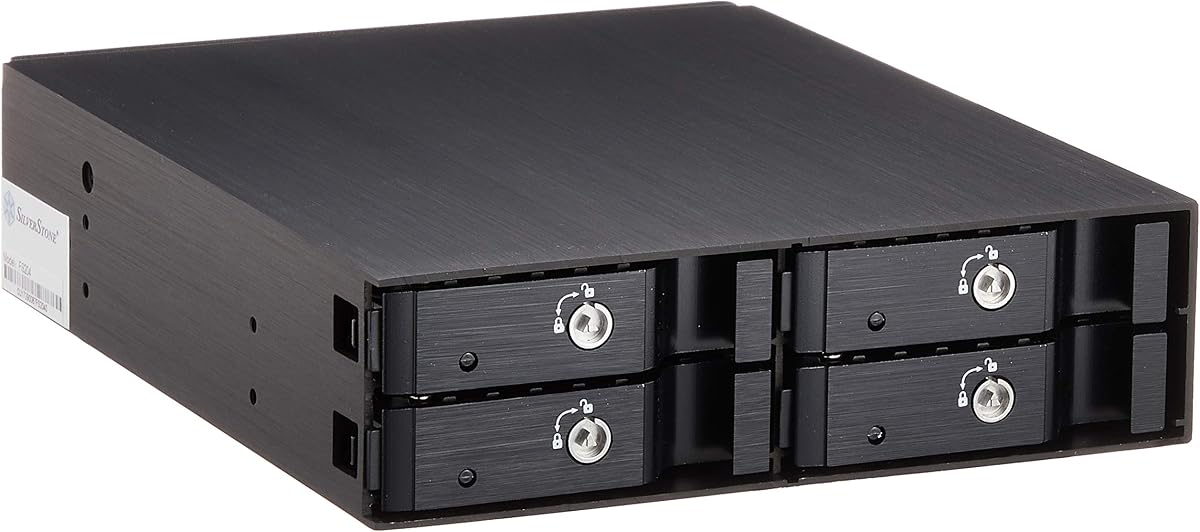
The Silverstone SST-FS204B Aluminium Trayless Hot Swap Mobile Rack combines aesthetics with functionality. With a 4.2 rating, it fits four 2.5 inch drives with individual metal key locks for security. The all-aluminum body offers a premium look and feel.
We may earn a commission when you buy through this link, at no additional cost to you.
Independent drive status LEDs help you monitor each drive easily. A built-in cooling fan ensures heat dissipation is effective during operation. This model is designed to fit any 5.25 inch drive bay seamlessly in most cases.
While the price is higher than plastic alternatives, the build quality justifies the investment for enthusiasts. The metal locks add significant security for individual drives. It is a sleek addition to any high-end desktop or workstation.
This enclosure is recommended for users who value design and security alongside performance. The aluminum finish resists wear and looks great. If you need a stylish and secure multi-drive solution this is a top option.
All aluminum body with a beautiful hairline brushed finish provides a professional look for any setup.
Individual metal key locks for each drive provide extra security for sensitive data storage needs.
We may earn a commission when you buy through this link, at no additional cost to you.
The LYNICESHOP 5-Bay Mobile Rack Backplane is an innovative design expanding three optical bays into five drive slots. With a 5.0 rating, it offers a space-saving configuration not found in standard racks. The aluminum alloy frame provides durability.
We may earn a commission when you buy through this link, at no additional cost to you.
Dual power supplies ensure safer and more stable operation for the connected drives. A built-in fan dissipates heat to extend the service life of the cage. It supports both SATA and SAS interfaces for flexible compatibility.
The design might require specific case modifications but the storage gain is significant. Excellent customer service supports users with questions or setup needs. It delivers high performance for the price.
This cage is perfect for users needing to maximize drive count in a limited space. It offers a solid balance of safety and capacity. If you need five drives where only three bays exist this is ideal.
Designed with dual power supplies making operation safer and more stable for your hard drives.
Designed with an optical drive bay to expand three bays into five hot-swap positions saving space.
We may earn a commission when you buy through this link, at no additional cost to you.
Choosing the right hot swap SATA mobile rack depends on your specific storage needs, drive sizes, and installation environment. This guide covers key factors to help you select the perfect model.
Ensure the rack supports your drive size such as 2.5 or 3.5 inches. Some models are trayless while others use trays. Check if it supports SATA or SAS interfaces based on your drive type.
Match the rack to your specific drive dimensions and connection type for optimal performance.
Decide how many drives you need to access simultaneously. Options range from single bay to multi-bay like 4 or 6 bays. Consider future expansion needs when selecting bay count.
Choose a bay count that fits your current setup and allows room for growth.
Trayless designs allow quick bare drive insertion but may feel less secure. Tray-based systems use tools or screws but offer better protection. Tool-less trays provide a balance of speed and stability.
Pick a mounting system that matches your workflow and security requirements.
Hot swapping generates heat so effective cooling is essential. Look for aluminum construction, vented designs, or built-in fans. Proper airflow extends drive life and prevents failures.
Prioritize models with robust cooling features for high drive density or busy usage.
High quality materials like steel or aluminum offer better heat dissipation and durability than plastic. Metal enclosures protect drives from shock and vibration more effectively. Check the insertion rating for long-term durability.
Opt for metal construction and high insertion ratings for better longevity and protection.
Some racks include key locks to prevent unauthorized drive removal. Latching mechanisms also secure drives during transport or use. If you store sensitive data, physical security is vital.
Ensure the model has locks or secure latches if data protection is a priority.
Individual LED indicators show power and activity for each drive bay. This helps identify which drive to remove during hot swaps. Active Power Technology reduces LED power usage when drives are not present.
Look for clear status indicators to make managing multiple drives easier and safer.
Verify that the rack fits your PC case bay size like 5.25 or 3.5 inch bays. Some expanders convert multiple bays so check dimensions carefully. Ensure space for connectors and cables inside the case.
Confirm physical fit with your case to avoid installation issues after purchase.
To install the rack, power down your system if the bay requires it. Align the unit with the open bay and secure it with the provided screws or clips. Connect the SATA power and data cables to the motherboard or controller card.
When swapping drives, wait until the system detects the drive before removal. Use the eject buttons to release the drive gently. Ensure you do not bend cables during the process to avoid connectivity issues.
Regularly check that the locking mechanisms work smoothly. Clean dust from vents to maintain optimal cooling. If your model includes a fan, ensure it runs properly to prevent overheating during high use.
In most cases you do not need to turn off your computer if your system supports true hot swapping. Ensure your OS is configured to handle safe removal properly. Always check the drive activity lights before ejecting a drive.
Yes most hot swap racks support both SSDs and HDDs as long as the size matches. Ensure you account for the physical thickness of the drives which may vary between types. Check height limits like 9.5mm for 2.5 inch drives.
Trayless racks hold bare drives directly for faster access. Tray racks hold drives on a sliding tray that requires screws or latches. Trayless is faster while trays offer better protection against vibration.
Many high-end racks support both SAS and SATA interfaces so check the specs carefully. Ensure your motherboard also supports SAS if using those drives. Most budget models focus only on SATA compatibility.
Use racks with built-in fans or aluminum bodies for better heat dissipation. Keep vents clean and ensure airflow reaches the back of the drives. Avoid placing the case in hot enclosed spaces.
Most use standard SATA power connectors from your power supply. Multi-drive racks may need more power so ensure your PSU can handle it. Some units include adapters to simplify connection.
Look for racks with key locks or secure latches to prevent accidental removal. Some models allow screwing drives to trays for extra stability. Physical security is important for shared environments.
These racks are designed for internal bays inside the computer case. For external access you might need a docking station instead. Internal racks are generally more stable for permanent setups.
This guide has covered the top 10 hot swap SATA mobile racks available in November 2026. From budget-friendly options to premium high capacity solutions there is something for every user. The StarTech and ICY DOCK models lead with robust features and reliability.
When selecting your next rack prioritize compatibility with your drive size and case bays. Cooling and security features should also be key considerations for long term use. Decide how many drives you need and choose a model that balances capacity with quality.
Always check current prices and availability as they may change frequently. Verify that the product meets your specific technical requirements before purchasing. With the right hot swap rack your storage flexibility and workflow will improve significantly.