
ASUS Pro WS WRX90E-SAGE SE EEB Workstation Motherboard
3.7Editor score
AMD Ryzen Threadripper PRO 7000 support
Seven PCIe 5.0 x16 slots
Dual 10Gb LAN ports included
This guide compares ten top ASUS Server Motherboard models for workstations and servers, highlighting connectivity, power, and management features for 2026.
Choosing the right server motherboard is critical for building reliable systems that handle demanding workloads without failure. ASUS offers a wide range of professional boards designed for stability and high performance in business environments.
We evaluated ten current models based on their socket support, expansion capabilities, power delivery, and remote management features. Our analysis focuses on how each board meets the needs of modern computing tasks like AI rendering and virtualization.
Each pick in this list shows specific strengths for different use cases from compact workstations to enterprise servers. Prices and availability change frequently so always check the current listing before making your final purchase decision today.
3.7Editor score

5.0Editor score
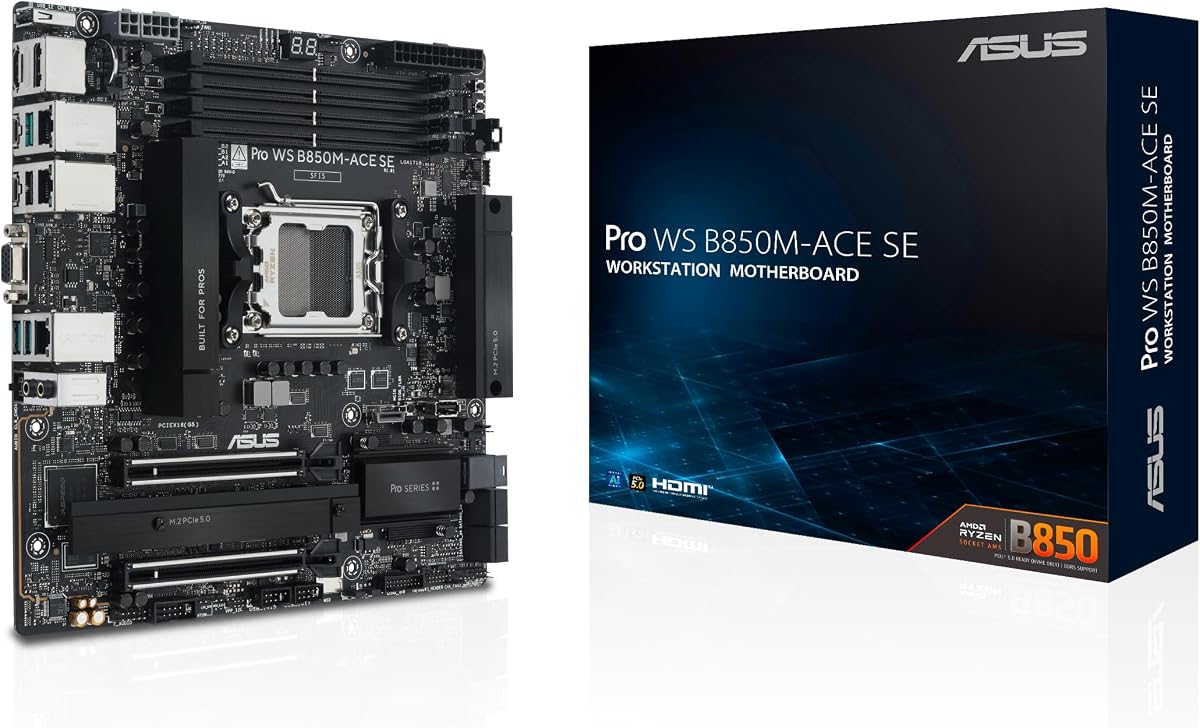
4.3Editor score
The following table provides a side-by-side comparison of all ten ASUS server and workstation motherboards reviewed in this guide to help you quickly identify the right model for your specific hardware needs.


This motherboard stands out as the top choice for power users needing extreme performance. It supports the latest AMD Ryzen Threadripper PRO processors with up to 96 cores. The rating reflects strong community feedback on its reliability under heavy loads.
We may earn a commission when you buy through this link, at no additional cost to you.
The board features seven PCIe 5.0 x16 slots which is rare in consumer grade hardware. This allows for multiple high-end GPUs or acceleration cards without bandwidth bottlenecks. The 32 power stages ensure stable power delivery even during intense overclocking scenarios.
Thermal management is handled by massive heatsinks with active fans on the VRM and chipset. This keeps temperatures low during long render sessions or virtualization tasks. The PCIe Q-release Slim makes installing large graphics cards much easier without tools.
Professionals in video production or scientific computing should consider this board for its raw power. It is tested for 24/7 operation ensuring it handles continuous workloads. While expensive it delivers unmatched value for high-end workstation builds.
The seven PCIe 5.0 x16 slots allow users to connect multiple GPUs or specialized accelerator cards simultaneously without sacrificing bandwidth efficiency.
Server-grade IPMI remote management with dedicated LAN port allows administrators to monitor and control the system remotely via hardware and software levels.
We may earn a commission when you buy through this link, at no additional cost to you.
This model receives top marks for its design focused on future AI computing needs. It supports the new Intel Xeon 600 processors for workstations. Users report high satisfaction with its stability and connectivity options.
We may earn a commission when you buy through this link, at no additional cost to you.
The NitroPath DRAM technology enhances memory performance significantly for ECC R-DIMM modules. This is crucial for applications needing precise data handling. The board also supports overclocking to maximize CPU capabilities.
Connectivity is a major strength with seven PCIe 5.0 x16 slots available. You get dual Intel 10Gb LAN ports for fast network transfers. USB4 and USB 20Gbps Type-C ensure modern peripheral compatibility.
This board is ideal for businesses building AI or data processing workstations. It comes with ASUS Control Center Express for real-time monitoring. The trusted stability ensures it runs 24/7 without issues.
Exclusive NitroPath DRAM technology enhances the performance of ECC R-DIMM DDR5 memory modules significantly for demanding workstation tasks.
Designed for the future of AI computing this board provides the power and connectivity needed for demanding AI applications effectively.
We may earn a commission when you buy through this link, at no additional cost to you.
This is the most affordable entry point for professional server grade features. It fits into smaller chassis thanks to its MicroATX form factor. The rating indicates solid reliability for business applications.
We may earn a commission when you buy through this link, at no additional cost to you.
It supports AMD Ryzen 9000 and EPYC 4005 Series processors well. You get two PCIe 5.0 slots and front USB 20Gbps Type-C. The onboard BMC AST2600 provides remote management capabilities easily.
Despite the compact size it includes essential features like U.2 and MCIO NVMe support. This allows for fast storage configurations in a smaller build. The 10G and 2.5G LAN ports offer flexible networking.
Small businesses needing a reliable workstation should look at this board. It is tested for 24/7 operation and has a comprehensive QVL. The price makes it accessible for budget conscious buyers.
The MicroATX form factor allows this server grade motherboard to fit into compact cases while still delivering robust performance.
Supports onboard BMC AST2600 along with ASUS Control Center Express IT management software for real-time monitoring and management.
We may earn a commission when you buy through this link, at no additional cost to you.
This CEB motherboard offers a balance between size and performance. It is ready for the latest Intel Xeon 600 processors. The board design focuses on AI computing connectivity needs.
We may earn a commission when you buy through this link, at no additional cost to you.
It supports ECC R-DIMM DDR5 memory enhanced by NitroPath technology. The seven PCIe 5.0 x16 slots provide massive bandwidth for expansion. You also get four M.2 slots and two SlimSAS ports.
Connectivity includes Realtek 10Gb LAN and Intel 2.5Gb LAN for versatility. It is ready for an IPMI expansion card for remote management. The power stages ensure stable dual PSU operation.
Users wanting a versatile board for workstations should consider this option. It is validated for extensive compatibility and tested for 24/7 use. The absence of an IPMI card allows custom configuration.
Hardware and software-level remote management is ready for IPMI expansion card plus real-time monitoring via ASUS Control Center Express software.
Ultrafast connectivity includes seven PCIe 5.0 x16 slots and multiple M.2 SlimSAS and USB4 options for high speed data transfer.
We may earn a commission when you buy through this link, at no additional cost to you.
This CEB workstation motherboard adds wireless connectivity with built-in Wi-Fi 7. It supports the AMD Ryzen Threadripper PRO 7000 WX-Series processors. The board is designed for users needing high power and speed.
We may earn a commission when you buy through this link, at no additional cost to you.
With 36 power stages it delivers robust power to the CPU and memory. You can support up to 1TB ECC R-DIMM DDR5 memory. Three PCIe 5.0 x16 slots allow multi-GPU configurations easily.
Remote management is handled via software support for ASUS IPMI expansion cards. The board includes front and rear USB 20Gbps Type-C ports. Massive heatsinks ensure cooling under heavy load.
Wireless connectivity users should consider this board for its modern features. It provides reliable stability for continuous operations. While not as rated as others it meets professional needs well.
Ultrafast connectivity includes WiFi 7 along with PCIe 5.0 x16 slots and 10 Gb LAN ports for high speed wireless and wired access.
Server-grade IPMI remote management hardware and software support for ASUS IPMI expansion cards plus ASUS Control Center Express software.
We may earn a commission when you buy through this link, at no additional cost to you.
This model is designed for the future of AI computing power needs. It supports the latest AMD Ryzen Threadripper 9000 and 7000 Series. The board offers flexible connectivity for demanding applications.
We may earn a commission when you buy through this link, at no additional cost to you.
It features 20 power stages with dual 8-pin connectors. You get three PCIe 5.0 x16 slots and one PCIe 4.0 x16. Four M.2 slots provide extensive local storage options.
Connectivity includes two USB4 ports and 10 Gb LAN. The SlimSAS NVMe support adds storage flexibility. Remote management is supported via ASUS IPMI expansion cards.
Users prioritizing AI performance and storage flexibility will like this board. It is tested for 24/7 operation for reliability. The USB4 ports ensure high speed data transfer.
Designed for the future of AI computing this board provides the power and connectivity needed for demanding AI applications.
Ultrafast connectivity includes USB4 (40Gbps) ports and four M.2 slots for fast data access and storage.
We may earn a commission when you buy through this link, at no additional cost to you.
This ATX motherboard supports the 13th Gen Intel Core processors well. It includes an IPMI expansion card for remote management out of the box. The design fits standard workstations and servers.
We may earn a commission when you buy through this link, at no additional cost to you.
It offers two PCIe 5.0 Safeslots and three M.2 slots. You get dual Intel 2.5Gb Ethernet for networking. The Thunderbolt 4 header supports high speed external devices.
Cooling is handled by a large VRM heatsink and M.2 heatsinks. It has Fan Xpert 4 for fan control and monitoring. The board includes software for port management.
Workstation builders needing IPMI should consider this ATX option. It provides solid security management features. The bundled card simplifies initial setup costs.
Advanced security management includes USB port management software blacklisting and Regedit on/off controls via ASUS Control Center Express software.
Next-gen connectivity includes dual PCIe 5.0 Safeslots and Thunderbolt 4 header support for fast peripheral connections.
We may earn a commission when you buy through this link, at no additional cost to you.
This server motherboard is designed for cost effective server builds. It supports the Intel Xeon E-2300 series processors. The MicroATX form factor saves space in small cabinets.
We may earn a commission when you buy through this link, at no additional cost to you.
It uses the Intel C252 chipset for reliable server performance. You get dual 10G Ethernet ports for fast network connectivity. It fits standard MicroATX cases easily.
This board is suitable for basic NAS or file server applications. It provides stable performance for entry level tasks. The price makes it a good option for budgets.
Users needing a compact server board for storage should consider this. It meets the needs for dual 10G LAN on budget. It is a reliable choice for small office servers.
ASUS P12R-M/10G-2T Intel Xeon E-2300 LGA 1200 Micro-ATX server motherboard provides reliable performance for small business needs.
We may earn a commission when you buy through this link, at no additional cost to you.
This is a true dual socket server motherboard for data centers. It supports two Intel Xeon processors of the 5th Generation. The board allows for up to 4TB of RAM capacity.
We may earn a commission when you buy through this link, at no additional cost to you.
You get dual Intel 10Gbps Ethernet ports for network speed. It supports up to 350 W TDP per CPU easily. The M.2 slots offer fast OS booting with PCIe 5.0.
Enterprise infrastructure management is handled via ASMB11-iKVM. The board ensures robust performance for virtualization or databases. It is built for heavy workloads.
Organizations needing high capacity memory and compute should look here. The dual Xeon support scales performance for complex tasks. It is a robust choice for professional servers.
16 x DDR5 4800 RDIMM slots allow up to 4TB RAM capacity for demanding data center applications.
E-ATX motherboard suitable for two Intel Xeon processors of the 5th Generation with LGA-4677 socket.
We may earn a commission when you buy through this link, at no additional cost to you.
This board targets business users needing standard workstation features. It supports 13th Gen Intel Core processors. The W680 chipset enables ECC memory support for reliability.
We may earn a commission when you buy through this link, at no additional cost to you.
It includes two PCIe 5.0 SafeSlot slots. The IPMI expansion card bundle provides essential management tools. You get three M.2 slots for SSD storage.
Connectivity includes two 2.5Gb Ethernet ports and USB 3.2. The board supports legacy display ports for compatibility. Cooling is handled by a large VRM heatsink.
Business users needing ECC memory should consider this board. It offers stable power delivery for daily workloads. The bundled IPMI card adds value for management.
Advanced power solution includes DrMOS and durable capacitors for stable power delivery with ECC memory support.
Complete cooling and display ports include HDMI DisplayPort and VGA for legacy peripheral compatibility.
We may earn a commission when you buy through this link, at no additional cost to you.
Selecting the right server motherboard requires evaluating several key factors that impact performance and reliability. This section explains what to prioritize based on your use case.
The CPU socket determines which processors your system can support. Ensure the motherboard matches your intended CPU generation for optimal performance. Modern sockets like LGA 4710-2 or sTR5 provide the latest cores.
Always verify the specific CPU generation supported before purchasing to avoid compatibility issues with your hardware.
Server workloads often require large amounts of memory. Look for boards that support ECC R-DIMM or RDIMM DDR5 modules. Maximum capacity can range from 1TB to 4TB depending on the model.
Check the maximum memory capacity and type to ensure it meets your virtualization or database needs.
PCIe slots allow you to add GPUs or network cards. Workstations needing AI acceleration require more PCIe 5.0 x16 slots. Enterprise servers need robust bandwidth for storage and network cards.
Count the available slots and their generation to ensure they fit your planned expansion strategy.
Network speed impacts data transfer rates between servers. High-end boards offer dual 10Gb LAN ports for faster connectivity. Budget models may only include 2.5Gb options.
Evaluate your bandwidth requirements to choose between 10Gb or 2.5Gb networking options.
The physical size of the board dictates which chassis you can use. EEB and CEB boards are large for servers while MicroATX is compact. Ensure your case supports the board dimensions.
Confirm the form factor compatibility with your existing chassis to avoid installation problems.
IPMI allows remote control of the server for maintenance. Some boards include dedicated LAN ports for BMC. Others require expansion cards for these features.
Look for IPMI support or expansion options if remote access is critical for your workflow.
Robust power stages ensure the CPU receives stable electricity. Active cooling is vital for high TDP processors and VRMs. Look for massive heatsinks and active fans for longevity.
Prioritize boards with strong cooling solutions to maintain performance during continuous operation.
Modern servers rely on fast storage like NVMe M.2. Check for PCIe 5.0 M.2 and SlimSAS slots for speed. Some models support U.2 or MCIO connections.
Choose storage interfaces that match the speed of your drives and application requirements.
Install the motherboard in a well-ventilated case with strong airflow. Secure it using the correct standoff screws to avoid shorts. Ensure the CPU and RAM are properly seated during setup.
Update the BIOS to the latest version for system stability. Use the provided software tools to monitor temperatures and power. This helps identify potential hardware issues early.
Keep the system clean by removing dust regularly from heatsinks. Check fan operation during startup and shutdown. Regular maintenance ensures long-term reliability for your server.
Yes most models in this selection support ECC R-DIMM DDR5 memory. This feature is crucial for data integrity in server environments. Always check the specific model specs for maximum capacity.
IPMI stands for Intelligent Platform Management Interface. It allows remote control and monitoring of hardware. Some boards have this built-in while others need an expansion card.
Yes several models are designed specifically for AI computing. They offer multiple PCIe 5.0 slots and robust power delivery. This ensures stable performance for GPU acceleration.
Smaller MicroATX boards fit standard cases easily. Larger EEB boards require specialized chassis for fit. Always check dimensions before buying to avoid incompatibility.
Use the built-in BIOS tools or official USB utility. Ensure you download the correct version for your specific model. Follow the manufacturer instructions carefully.
The robust VRM cooling and active fans help manage heat. Modern CPUs also have thermal throttling for safety. Ensure fans are functioning to prevent performance loss.
This guide reviewed ten top ASUS server motherboards ranging from compact workstations to enterprise servers. Each model offers distinct features for different professional needs.
Prioritize power delivery and expansion slots based on your specific workload requirements. Budget users might prefer the B850M-ACE while pros may choose the WRX90E.
Prices change frequently so verify current listings before purchasing. Always check for the latest BIOS updates to ensure compatibility.