
Dell 16" Touchscreen Laptop 2026
4.5Editor score
AMD Ryzen 7 250 Processor
16GB DDR5 RAM
16 Inch FHD Touchscreen
Finding the right all metal laptop can transform your daily computing experience. These devices offer superior durability, sleek aesthetics, and improved thermal performance compared to plastic alternatives. Whether you need a machine for work, creativity, or travel, metal construction ensures longevity and style.
We evaluated ten top models based on build quality, processing power, display clarity, and user feedback. Each selection undergoes scrutiny for its metal chassis integrity and overall value. Our goal is to provide a clear overview of what makes each option stand out in today's competitive market.
Each review highlights specific strengths and considerations to guide your decision. Note that availability and pricing may shift as new models launch. Check current listings for the most accurate information before purchasing your next all metal laptop for professional or personal use.
4.5Editor score

5.0Editor score

4.9Editor score
As an Amazon Associate we earn from qualifying purchases.
The following comparison table lists key specifications for each model to help you quickly identify the best fit for your workflow and budget requirements.


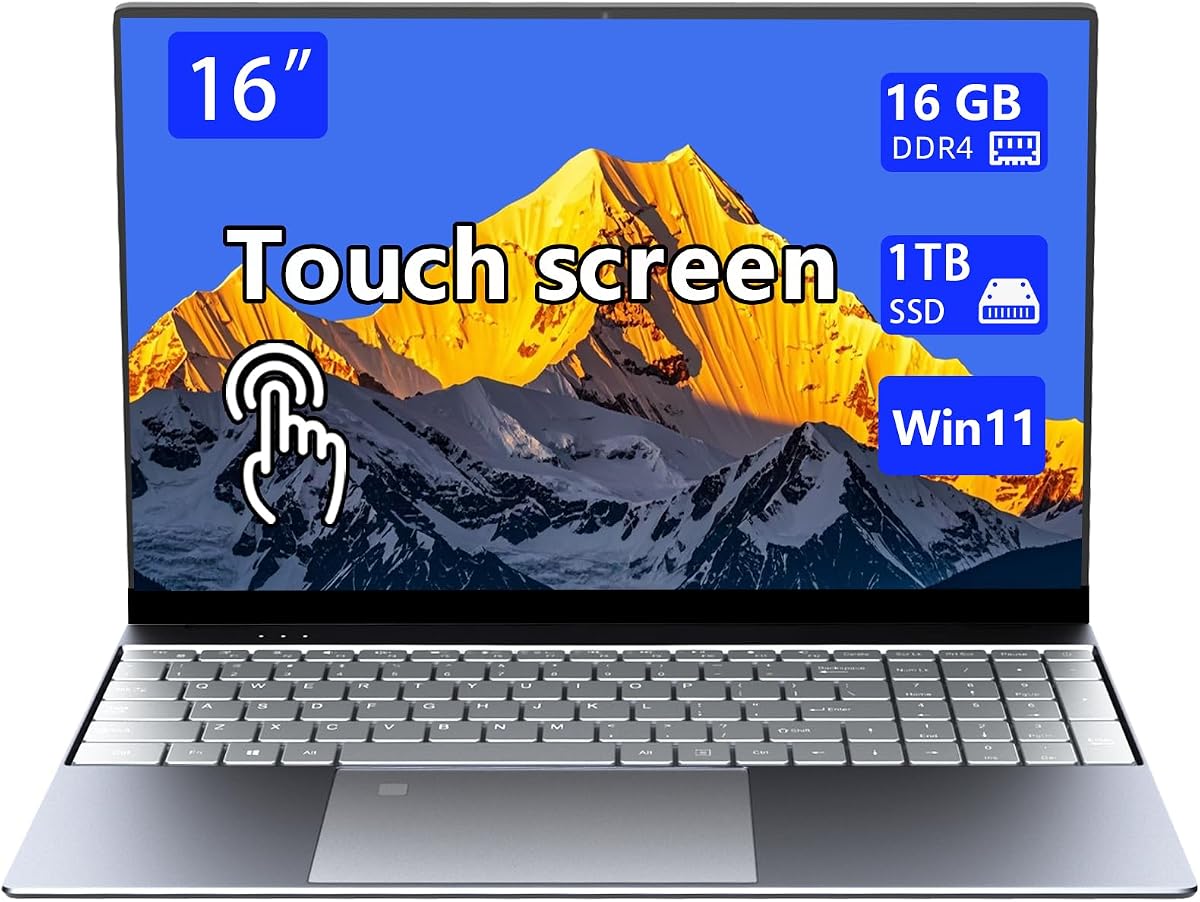


This laptop offers a rare combination of high RAM and massive storage within an all metal chassis. The N95 processor provides basic efficiency for office tasks and light design work. Its touchscreen capability adds a modern layer of interaction that speeds up daily navigation.
We may earn a commission when you buy through this link, at no additional cost to you.
The 32GB RAM ensures smooth switching between heavy applications like spreadsheets and design tools. The 2TB SSD offers ample space for archives without needing external drives. The metal body helps dissipate heat better than plastic, maintaining stability under load.
While the N95 is capable, it is not suited for heavy rendering or gaming. The screen resolution is standard for a 16-inch device. These trade-offs are acceptable given the low cost and high component count.
This model is ideal for users needing vast storage and memory for data archival on a budget. It fits well for accounting, inventory, or office roles. Ensure your workflow matches the processor capabilities before purchasing.
The 32GB RAM and 2TB SSD combination supports extensive multitasking and large file storage needs.
The all metal body enhances durability and cooling, while the touchscreen improves interaction efficiency.
We may earn a commission when you buy through this link, at no additional cost to you.
The Dell Latitude Rugged 5430 combines enterprise-grade durability with strong performance. It features a metal reinforced chassis designed to withstand harsh environments. The Core i7 processor ensures fast execution for complex business applications.
We may earn a commission when you buy through this link, at no additional cost to you.
With 32GB RAM and a 1TB SSD, this machine handles virtualization and large datasets effectively. The touchscreen adds flexibility for on-site work. Windows 11 Pro provides necessary security tools like BitLocker and Active Directory.
Its rugged nature adds weight, making it less ideal for casual daily commuting. Being a 2022 model, it may lack some latest connectivity standards. These factors are balanced by its reliability and repairability.
Business users needing a secure and durable device will find this a solid investment. It suits field work or office environments where longevity is paramount. Verify warranty terms for used units.
The reinforced metal chassis ensures reliability in demanding field and office environments.
High-end processor and RAM support demanding tasks, while Pro OS features secure data.
We may earn a commission when you buy through this link, at no additional cost to you.
HP OmniBook 3 14 inch delivers next gen AI features and a stunning OLED screen. The Snapdragon processor enables long battery life and instant wake. Its all metal body provides a premium feel and effective heat management.
We may earn a commission when you buy through this link, at no additional cost to you.
The 2K OLED panel offers deep blacks and vibrant colors ideal for media consumption. 16GB RAM supports smooth multitasking for general productivity. The Copilot key provides quick access to integrated AI tools.
Storage is limited to 256GB, which may require cloud reliance for large files. Some legacy apps may face compatibility issues on ARM architecture. These are acceptable for users prioritizing battery and display quality.
This laptop fits students and professionals needing a portable device with rich visuals. The battery life supports all day use without charging. Consider storage needs before committing to this model.
The OLED screen provides rich visuals, while AI features enhance productivity and note taking.
Long battery life and lightweight metal design make it ideal for travel and mobile work.
We may earn a commission when you buy through this link, at no additional cost to you.
NIMO 15.6'' AI Ready Laptop offers a budget metal top cover and essential connectivity. The N150 processor ensures silent operation for libraries or quiet offices. Its port range eliminates the need for dongles.
We may earn a commission when you buy through this link, at no additional cost to you.
The metal cover enhances durability against daily bumps. Windows Copilot AI aids in note summarization and light tasks. Privacy features include a physical webcam shutter for security in public spaces.
8GB RAM is adequate for standard tasks but may struggle with heavy workloads. The display is functional but not high contrast. These limitations are reasonable given the price point.
Students and casual users seeking reliable hardware will appreciate this balance. The warranty adds value for long term use. It is a practical choice for daily browsing and document work.
Full stack ports and lightweight design ensure convenience without adapter dependencies.
Webcam shutter and warranty provide security and peace of mind for users.
We may earn a commission when you buy through this link, at no additional cost to you.
This model provides an all metal chassis with decent RAM and storage for the price. The N95 processor supports standard office and browsing tasks. A backlight keyboard and fingerprint sensor add convenience.
We may earn a commission when you buy through this link, at no additional cost to you.
The metal body offers better thermal performance than plastic shells. 16GB RAM allows multiple applications to run without lag. The 1TB SSD provides enough room for media and files.
User ratings indicate potential quality control or performance issues. The processor may not support demanding creative work. These factors should be weighed against the low cost.
Light users needing a durable budget device might find this acceptable. Check recent reviews for current production quality. It suits basic needs where screen and storage size are priorities.
Metal body and large storage support daily productivity and media use effectively.
Ensure tasks match the processor capabilities before purchase to avoid limitations.
We may earn a commission when you buy through this link, at no additional cost to you.
HP Everyday Slim Laptop combines a thin design with essential office tools. The N150 processor offers efficiency for web and document tasks. Office 365 and 1TB OneDrive are included for productivity.
We may earn a commission when you buy through this link, at no additional cost to you.
Its lightweight construction makes it easy to carry. Wi-Fi 6 ensures fast and reliable connectivity. Battery life supports a full day of meetings and writing.
Local storage is limited to 128GB requiring cloud reliance for more data. This suits users comfortable with cloud storage. For heavy local files, external drives may be needed.
Students and remote workers needing a lightweight companion will benefit. The included software saves setup costs. Ensure you are comfortable with cloud based storage workflows.
Office 365 and OneDrive ensure users have necessary tools and storage immediately.
Light weight and long battery life support extended travel and study sessions.
We may earn a commission when you buy through this link, at no additional cost to you.
This laptop offers a Core i7 processor in an all metal design. The 16GB RAM supports smooth multitasking for various applications. The IPS display provides good color accuracy for general use.
We may earn a commission when you buy through this link, at no additional cost to you.
Metal construction adds durability and a premium look. Fingerprint and backlit keyboard features add convenience. HDMI and Type-C ports ensure broad connectivity options.
The CPU is from an older generation, which may limit efficiency compared to newer models. Bluetooth 4.2 is also outdated. These are acceptable if you prioritize raw performance over latest standards.
Users needing a balance of power and build quality will find this useful. It suits general office and creative work. Verify battery health when considering used units.
Core i7 and 16GB RAM enable responsive performance for multitasking.
Metal body and full ports ensure durable and versatile usage.
We may earn a commission when you buy through this link, at no additional cost to you.
Dell 16" Touchscreen Laptop 2026 delivers powerful performance in an all metal body. The Ryzen 7 250 ensures quick task completion and responsive multitasking. DDR5 RAM boosts speed and efficiency.
We may earn a commission when you buy through this link, at no additional cost to you.
The touchscreen adds versatility for creative work. The metal chassis ensures longevity and thermal control. Connectivity includes modern USB-C and HDMI for peripherals.
Storage is 256GB which may require expansion for large media. Weight is higher due to robust build. These trade-offs are expected for a premium workstation style machine.
Professionals needing desktop class power on a budget will value this. It fits design and coding tasks well. Consider external storage if local capacity is tight.
Ryzen 7 and DDR5 provide fast processing in a durable metal chassis.
Touchscreen and modern ports support flexible and creative workflows.
We may earn a commission when you buy through this link, at no additional cost to you.
This 2026 model provides a metal shell with decent RAM for general work. The N95 processor supports standard office and web tasks. IPS display offers good viewing angles for shared screens.
We may earn a commission when you buy through this link, at no additional cost to you.
Light weight helps with portability. The SSD ensures fast boot times. Type-C and USB ports simplify connection to external devices.
Storage is 256GB which fills quickly with media. The processor may struggle with heavy loads. These are acceptable for light students or office users.
Anyone needing a lightweight device for basic work will find it suitable. Verify storage needs before purchase. It is a cost effective option for daily tasks.
Thin metal build and IPS screen ensure comfort and visibility.
Fast SSD and 16GB RAM provide smooth general performance.
We may earn a commission when you buy through this link, at no additional cost to you.
FIREBAT Gaming Laptop Metal delivers high end performance in an all metal frame. The Ryzen 7 H255 processor enables heavy workloads and smooth gaming. 32GB DDR5 RAM ensures future proof multitasking.
We may earn a commission when you buy through this link, at no additional cost to you.
The WQXGA display offers vivid colors and sharp text. The metal body aids heat dissipation during sustained use. RGB keyboard adds aesthetic appeal for users.
It is more expensive than entry models but justifies cost with speed. Gaming focus may not suit all business users. These factors are minor for those needing power.
Creatives and gamers will find this a top choice. The metal build ensures long term durability. Consider your budget and performance needs before selecting.
Ryzen 7 and DDR5 RAM provide desktop level performance in a portable design.
WQXGA screen and metal chassis ensure visual quality and durability.
We may earn a commission when you buy through this link, at no additional cost to you.
Choosing the right all metal laptop involves evaluating build quality, processor performance, and display features. This guide outlines the key factors to consider.
Look for an all metal chassis made of aluminum or magnesium alloy. These materials offer better durability and heat dissipation compared to plastic. Ensure the hinges and lid are robust to prevent wear over time.
Select a processor that matches your workload. Intel Core i5 or i7 or AMD Ryzen 5 or 7 are suitable for demanding tasks. For light use, entry level processors like N95 or N150 suffice but avoid heavy workloads.
Aim for 16GB of RAM for smooth multitasking. Storage should be an SSD for speed, with 512GB being a standard minimum. Larger storage options are beneficial for media and large files.
Check resolution and panel type. IPS screens offer better color accuracy and viewing angles. A 16:10 aspect ratio provides more vertical space for productivity tasks.
Ensure the laptop has necessary ports like USB-C, HDMI, and USB-A. Full stack I/O reduces reliance on adapters. Verify if USB-C supports power delivery for charging.
Consider the battery capacity for all day use. Look for models with fast charging support to minimize downtime. Metal bodies may affect cooling but also protect the internal battery.
Check for fingerprint readers or IR cameras for secure login. Physical webcam shutters add privacy protection. These features are valuable for business and remote work use.
Review the warranty length and customer support options. A two year warranty offers peace of mind for hardware defects. Ensure there is accessible technical support for troubleshooting.
Use a soft microfiber cloth to clean the metal surface regularly. Avoid abrasive chemicals that may scratch the finish. For stubborn smudges, use a slightly damp cloth and dry immediately.
Ensure ventilation is not blocked by placing the laptop on soft surfaces like blankets. Use a hard flat surface to maximize cooling and prevent overheating during intensive tasks.
Manage power settings to extend battery life. Lower screen brightness and close unused apps when running on battery. Utilize sleep modes when not in use to preserve battery health.
Yes, all metal laptops generally offer better durability and impact resistance. They resist scratches better and dissipate heat more effectively than plastic. This leads to longer hardware lifespan and consistent performance.
An all metal body improves thermal efficiency and structural integrity. It provides a premium feel and protects internal components better. Metal also helps spread heat away from sensitive parts like the CPU.
Metal laptops can be heavier but modern alloys keep weight manageable. High end ultrabooks use lightweight magnesium or aluminum to balance strength and portability. Check specs to find a model that fits your travel needs.
Clean with a microfiber cloth and mild solution if needed. Avoid harsh chemicals that strip coatings. For screens use specialized screen cleaners to prevent damage to coatings.
Yes metal conducts heat better than plastic allowing internal components to stay cooler. This prevents throttling during high load tasks. It also protects your hands from excessive heat while typing.
Many models have M.2 slots for additional SSDs. However some ultrathin designs have soldered storage. Check the specifications for upgrade options before purchase to ensure future flexibility.
The top picks include the Dell 16" Touchscreen for performance and the NIMO 15.6" for value. Both offer strong metal builds and distinct advantages for different user needs.
Prioritize processor and RAM if you work with heavy applications. For casual use, focus on battery life and port features. Ensure the metal construction matches your durability expectations.
Prices and availability change frequently so verify current listings before buying. Use the comparison table to find the best fit for your budget. A suitable all metal laptop will serve you well for years.