
GIGABYTE B550 Gaming X V2
4.5Editor score
Affordable AM4 platform support
Reliable digital power phases
Solid thermal protection features
This guide compares ten top Gigabyte motherboards for AMD and Intel platforms, evaluating power design, connectivity, and thermal performance for diverse
Selecting the right foundation for your computer is critical for stability and performance. Gigabyte offers a vast array of motherboards catering to various needs from budget gaming to professional workstations.
We have analyzed technical specifications, user feedback, and benchmark data to identify the most reliable options available today. Our comparison focuses on power delivery, thermal management, and feature sets.
Each entry in this list highlights specific strengths and potential trade-offs to help you make an informed decision. Please note that availability and pricing can fluctuate frequently on the market.
4.5Editor score

4.4Editor score

4.2Editor score
The following table provides a side-by-side overview of the ten selected models. It highlights key specifications to help you quickly identify the hardware that fits your specific build requirements.


This motherboard stands out as a balanced choice for AMD Ryzen 7000 and newer series processors. It offers a robust power delivery system and excellent thermal management which ensures stable performance under load.
We may earn a commission when you buy through this link, at no additional cost to you.
The VRM design features 14+2+1 phases with high-quality components that handle demanding workloads efficiently. Thermal guards on the M.2 slots and substantial heatsinks keep temperatures in check during extended gaming sessions.
While it lacks some ultra-premium features like USB4, the inclusion of PCIe 5.0 and Wi-Fi 6E provides future-ready connectivity. The EZ-Latch system makes installing graphics cards and memory modules significantly easier for builders.
It is an ideal choice for users seeking a reliable foundation for a mid-to-high-end AMD gaming PC without overspending on unnecessary features or premium aesthetics.
The digital VRM solution ensures clean power to the CPU which is critical for maintaining boost clocks and stability.
Large heatsinks and thermal guards prevent throttling on both the processor and storage drives during heavy use.
We may earn a commission when you buy through this link, at no additional cost to you.
This model brings cutting-edge connectivity to the AM5 platform with Wi-Fi 7 and USB4 capabilities. It is designed for users who want the latest networking standards and high-speed peripheral support.
We may earn a commission when you buy through this link, at no additional cost to you.
The board features 16+2+2 power phases and a well-rounded thermal package. This ensures that even the most powerful Ryzen processors can run at maximum potential without thermal constraints.
While the price is higher than entry-level boards, the inclusion of dual USB4 ports and the fastest wireless standard available justifies the cost for tech enthusiasts.
Buyers should consider this if they need maximum bandwidth for external drives or want to future-proof their system with the latest wireless networking technology.
Wi-Fi 7 offers significantly lower latency and higher throughput which improves online gaming and large file transfers.
USB4 provides high-speed data and video output options which are essential for professional workflows and external GPUs.
We may earn a commission when you buy through this link, at no additional cost to you.
The PRO ICE model is designed for builders who prioritize visual appeal alongside high performance. Its all-white design creates a cohesive look in modern PC cases with glass panels.
We may earn a commission when you buy through this link, at no additional cost to you.
Beyond the looks, it offers the same robust power and connectivity as the standard X870 with USB4 and Wi-Fi 7. The thermal solution is comprehensive to handle high-end components effectively.
The premium price tag reflects the specialized colorway and top-tier feature set. It is an excellent choice for those building a high-end white gaming rig.
Consider this board if visual consistency is a major factor in your build and you require the latest AM5 platform capabilities.
The white PCB and heatsinks create a uniform look that pairs well with white cooling solutions and cases.
It does not compromise on power or connectivity providing all the features expected from a premium X870E board.
We may earn a commission when you buy through this link, at no additional cost to you.
This board is a powerhouse for Intel Core Ultra processors offering extreme power delivery and professional-grade connectivity. It is built for enthusiasts and professionals who need every possible feature.
We may earn a commission when you buy through this link, at no additional cost to you.
With 18+1+2 phases and a 10GbE LAN port it ensures stable power and ultra-fast wired networking. The Thunderbolt 4 support adds versatility for high-speed peripherals and docking stations.
The cost is significantly higher than standard boards but it justifies itself with top-tier performance and rare features. Thermal management is exceptional to support continuous high-performance operation.
This is the choice for users who want the absolute best for their Intel build and are willing to invest in premium capabilities.
The 10GbE LAN port allows for extremely fast file transfers on local networks which is vital for workstation environments.
Thunderbolt 4 ports provide universal connectivity for fast storage and high-resolution displays on a single interface.
We may earn a commission when you buy through this link, at no additional cost to you.
The Eagle AX offers a budget-friendly entry into the AM5 platform without sacrificing essential features like Wi-Fi and PCIe 5.0. It is a great choice for users focused on performance per dollar.
We may earn a commission when you buy through this link, at no additional cost to you.
It includes triple M.2 slots and DDR5 support which ensures compatibility with modern storage and memory. The thermal guards are sufficient to prevent overheating during typical gaming loads.
While it lacks the premium looks of the AORUS line it delivers reliability and performance where it counts. The power delivery is strong enough for most Ryzen 5 and 7 CPUs.
Buyers seeking a cost-effective AM5 board should prioritize this model for its balance of features and affordability.
This board allows users to access the latest AMD platform without paying the premium for high-end features.
Thermal guards on M.2 slots keep storage drives cool which prevents performance drops during data transfers.
We may earn a commission when you buy through this link, at no additional cost to you.
This board is ideal for those upgrading existing AM4 systems or building a budget PC with DDR4 memory. It maintains a strong reputation for reliability and features within the last generation AMD lineup.
We may earn a commission when you buy through this link, at no additional cost to you.
The power delivery is robust enough to handle Ryzen 5000 series processors efficiently. Q-Flash Plus allows BIOS updates without a CPU which is a great convenience for builders.
While it does not support the latest DDR5 memory it remains a powerful option for mid-range gaming builds. The inclusion of Wi-Fi 6 ensures stable wireless connectivity.
Consider this board if you have existing DDR4 components or prefer a lower-cost option for a capable gaming system.
Q-Flash Plus lets users update the BIOS without installing a CPU which simplifies compatibility with newer processors.
The AM4 platform still offers excellent performance for gaming and general tasks at a lower price point.
We may earn a commission when you buy through this link, at no additional cost to you.
The Eagle AX provides a reliable platform for Intel 13th and 14th Gen processors with essential modern features. It is a great choice for users who want to upgrade to DDR5 without breaking the bank.
We may earn a commission when you buy through this link, at no additional cost to you.
The thermal design and power phases are sufficient for mid-range chips like the i5 and i7. EZ-Latch features make hardware installation quick and straightforward for DIY builders.
It lacks some premium perks like Thunderbolt but offers solid performance for gaming and productivity. The Wi-Fi 6E ensures good wireless speeds for online activities.
This board is recommended for budget-conscious Intel users who still want access to the latest memory and wireless standards.
Supporting DDR5 allows for faster memory speeds which can boost system performance in memory-intensive tasks.
EZ-Latch makes installing cards and drives easier by reducing the need for forceful manual locking mechanisms.
We may earn a commission when you buy through this link, at no additional cost to you.
This motherboard strikes a balance between high performance and practical features for Intel Core users. The power delivery is robust enough to handle higher-end chips like the i9 efficiently.
We may earn a commission when you buy through this link, at no additional cost to you.
With four M.2 slots it offers plenty of storage options for those needing fast NVMe drives. The thermal solution keeps the system cool even during intense workloads or gaming sessions.
The price is higher than the Eagle but it justifies the cost with better power and more connectivity. It is a solid pick for users who want quality without going ultra-premium.
Consider this board if you want a dependable platform for a high-end Intel gaming or productivity PC.
Four M.2 slots allow for multiple fast SSDs which is ideal for large game libraries or data storage.
The 16+1+2 phase design ensures stable voltage delivery which is crucial for stable overclocking and performance.
We may earn a commission when you buy through this link, at no additional cost to you.
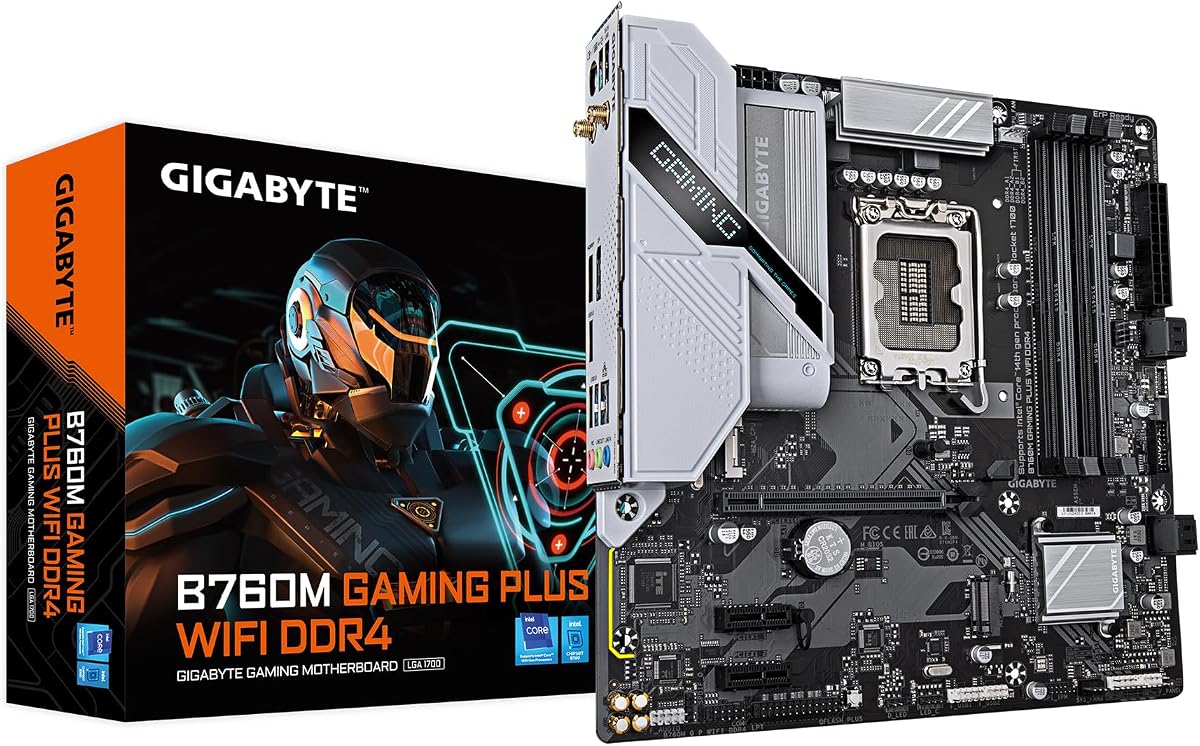
This micro-ATX board is perfect for smaller cases where space is a constraint. It delivers solid performance for mainstream Intel processors and includes essential wireless connectivity.
We may earn a commission when you buy through this link, at no additional cost to you.
It features Q-Flash Plus which allows for BIOS updates without a CPU making it user-friendly for builders. The thermal design is adequate for typical gaming and office use.
It does not have as many expansion options as full ATX boards but fits well in compact builds. The price is very reasonable for a WiFi-enabled board.
Buyers looking for a small form factor PC with reliable Intel support should consider this model for its practicality.
The M-ATX form factor saves space in cases while still offering necessary features for a complete system.
Q-Flash Plus ensures that even users without a current CPU can update the BIOS easily for better compatibility.
We may earn a commission when you buy through this link, at no additional cost to you.
This is one of the most affordable ways to build a capable AMD gaming PC. It offers all the essential features for Ryzen 5000 processors without unnecessary extras.
We may earn a commission when you buy through this link, at no additional cost to you.
The thermal armor protects critical components and Q-Flash Plus adds convenience for future updates. It is designed for builders who prioritize performance and value over aesthetics.
While it lacks onboard Wi-Fi the LAN port provides stable wired connectivity for those who prefer it. The power delivery is sufficient for most non-overclocked CPUs.
For entry-level gamers or budget builders this board offers a solid foundation without compromising on core functionality.
This board allows builders to save money on the motherboard to allocate more of the budget to the GPU or CPU.
It includes vital features like PCIe 4.0 and good VRM cooling which ensure reliable daily use and gaming.
We may earn a commission when you buy through this link, at no additional cost to you.
Choosing a motherboard involves weighing several key factors to ensure compatibility and performance for your specific needs.
Ensure the socket type matches your CPU whether it is AM5 for Ryzen 9000 or LGA 1700 for Intel Core 14th Gen. Check the support list on the manufacturer website for specific model compatibility.
Always verify socket alignment to avoid damaging your hardware during installation.
Modern motherboards support DDR5 which offers higher bandwidth and speeds compared to DDR4. If you are upgrading an older system DDR4 boards might be more cost-effective.
Verify the maximum memory capacity and speed support to ensure your RAM runs efficiently.
The VRM phase count indicates how well a board can power the CPU. Higher-end processors require more phases to maintain stable clock speeds under load.
Look for digital VRM solutions and robust heatsinks to prevent thermal throttling during intensive tasks.
Check for the number of M.2 slots and USB ports available. Modern builds benefit from multiple high-speed storage slots and front panel USB-C ports.
USB4 and Thunderbolt 4 support adds versatility for external devices and high-speed data transfers.
Integrated Wi-Fi 6 or Wi-Fi 7 provides convenient wireless connectivity without needing extra cards. Ensure the antenna support is included with the box.
Choose the latest standard if you want the best range and speed for online gaming or streaming.
ATX boards offer more expansion slots and connectivity while M-ATX and Mini-ITX save space in smaller cases. Match the board size to your case dimensions.
Consider cooling requirements as smaller boards may have tighter space for airflow and heatsinks.
Look for boards with large VRM heatsinks and M.2 thermal guards to keep temperatures low. Proper cooling is essential for maintaining performance over time.
Quality thermal design helps prevent component degradation and ensures system stability under load.
Features like Q-Flash Plus allow BIOS updates without a CPU which is useful for compatibility with newer processors. Look for intuitive user interfaces in the BIOS.
Good BIOS software simplifies tuning and system monitoring for advanced users.
Always handle the motherboard by its edges to avoid touching sensitive components. Static electricity can damage electronic parts so use a grounded mat or wrist strap during assembly.
Keep the board in a cool and dry environment to prevent corrosion and overheating. Ensure your PC case has adequate airflow to dissipate heat from the motherboard and CPU.
Regularly update the BIOS to gain bug fixes and security patches. Check the manufacturer website for the latest versions compatible with your specific model.
Gigabyte motherboards are compatible with CPUs that match the socket type. For example AM5 boards work with Ryzen 7000 and newer series while LGA 1700 works with Intel Core 12th to 14th Gen. Always check the CPU support list before buying to ensure compatibility.
Higher VRM phase counts help stabilize power delivery under heavy loads. While casual gamers might not notice a difference high-end CPUs benefit from better power for sustained boost clocks and overclocking.
Wi-Fi 7 offers significantly faster speeds and lower latency than Wi-Fi 6. It supports wider channels and advanced modulation which improves performance in congested networks. It is ideal for users who need the best wireless performance.
USB4 support is essential if you plan to use high-speed external storage or docking stations. Most standard users can work fine with USB 3.2 Gen 2. However if you need high bandwidth USB4 is a valuable feature.
Update your BIOS only when necessary to fix bugs or support new hardware. Frequent updates can introduce instability if not needed. Check the changelog on the Gigabyte website before proceeding with an update.
Q-Flash Plus allows you to update the BIOS without installing a CPU or RAM. You simply plug in the power and USB drive to perform the update. This is a convenient feature for troubleshooting compatibility issues.
M-ATX or Mini-ITX boards are best for small builds due to their compact size. They fit in smaller cases and still offer essential features like PCIe slots and M.2 ports for modern components.
Not all new motherboards require DDR5 as some B550 and Z790 models still support DDR4. DDR5 is standard on AM5 and high-end Intel boards but DDR4 remains a valid option for budget builds.
We reviewed ten top Gigabyte motherboards ranging from budget options to premium choices. The B650 AORUS Elite AX stands out as the overall best choice for AMD users.
Prioritize power delivery and thermal solutions based on your CPU choice to ensure system stability. Consider your connectivity needs like Wi-Fi and USB ports before making a decision.
Prices and availability can change quickly so check current listings to get the best deal. Use this guide to find a board that fits your specific build requirements and budget.