
NetumScan USB 1D Barcode Scanner
4.4Editor score
Plug and Play USB Connectivity
Durable ABS Construction
High Resolution CCD Sensor
Find the best Barcode Scanner for Library with our expert comparison of top models featuring wireless connectivity and durable designs for efficient tracking.
Libraries require reliable tools to manage vast collections efficiently. A quality barcode scanner streamlines check-in and check-out processes while reducing manual entry errors for staff members daily.
We evaluated leading models based on connectivity options and durability features. Our analysis covers wired and wireless solutions suitable for various library environments and integration needs.
Each pick highlights key strengths and real-world performance metrics. Prices and availability change frequently so verify current details before making your final purchasing decision today.
4.4Editor score

4.4Editor score

4.3Editor score
This side-by-side comparison highlights key specifications across ten top-rated scanners to help you find the right match for your library operations.




The NETUM Bluetooth Barcode Scanner delivers versatile connectivity options essential for library operations. With a solid 4.4 rating it supports 2.4G wireless Bluetooth and wired modes ensuring flexibility across devices.
We may earn a commission when you buy through this link, at no additional cost to you.
Its 2600mAh battery lasts through extended shifts without interruption. The CCD sensor handles worn ISBN codes effectively while the programmable buzzer allows silent operation in quiet reading areas.
Configuration requires scanning setting barcodes from the manual. While storage mode helps when out of range the setup adds minor initial steps.
Ideal for libraries needing reliable scanning with low disruption. This model balances cost and performance well for high volume check-in tasks.
The 2600mAh battery ensures continuous scanning for hours without frequent recharging needs during peak library hours.
Adjustable buzzer settings let staff silence beeps to maintain a peaceful atmosphere while scanning patron materials.
We may earn a commission when you buy through this link, at no additional cost to you.
The NetumScan USB 1D Barcode Scanner offers a straightforward solution for smaller libraries. Its 4.4 rating reflects dependable performance with a robust wired connection ensuring stable data transfer.
We may earn a commission when you buy through this link, at no additional cost to you.
Built with high-quality ABS this scanner withstands drops up to 2 meters. The CCD sensor excels at reading smudged or reflective codes without needing extra software installation.
Lack of wireless limits mobility but ensures reliability where cables are manageable. Budget conscious institutions will find this model delivers essential features without extra cost.
Perfect for fixed workstations needing basic scanning. Choose this if mobility is not a priority and simplicity is key.
The sturdy ABS construction survives accidental drops ensuring longevity even in busy circulation desks.
No drivers or apps are required just connect via USB to begin scanning immediately.
We may earn a commission when you buy through this link, at no additional cost to you.
The Tera HW0009 brings advanced features like an on-device screen for intuitive settings control. With a 4.3 rating it supports both 1D and 2D codes essential for modern library systems.
We may earn a commission when you buy through this link, at no additional cost to you.
Its charging cradle simplifies power management while the CMOS sensor handles reflective surfaces easily. Built-in receiver avoids dongle loss ensuring seamless wireless operation.
Premium pricing may be steep for tight budgets but the feature set justifies the cost for advanced needs. Cradle dependency adds minor bulk.
Best for libraries needing QR scanning and user friendly controls. Invest if workflow efficiency is paramount.
The built-in screen allows staff to adjust settings directly on the scanner without computer access.
Reading 2D QR codes prepares your library for evolving book tracking standards and digital content links.
We may earn a commission when you buy through this link, at no additional cost to you.
The Eyoyo Mini 1D Bluetooth weighs just 35 grams making it ideal for mobile library tasks. A 4.3 rating confirms reliable performance during patrols or inventory checks.
We may earn a commission when you buy through this link, at no additional cost to you.
Its vibration mode replaces beeps to avoid noise. The 650mAh battery lasts eight hours but may need mid-shift recharging depending on scan volume.
Portability comes at the cost of endurance. For staff moving constantly this lightweight device reduces hand strain significantly.
Select for roving staff or tight spaces. It is a practical tool for active circulation teams.
The ultra-light design prevents fatigue when scanning large volumes of books throughout the day.
Haptic confirmation ensures scans are registered without disturbing patrons in quiet zones.
We may earn a commission when you buy through this link, at no additional cost to you.
The Tera 5100 Purple features a visible battery indicator to prevent unexpected power loss. With a 4.5 rating it offers a 328ft range and strong dust protection for diverse environments.
We may earn a commission when you buy through this link, at no additional cost to you.
Its extended standby ensures readiness for infrequent use. The silicone cover protects against drops while the ergonomic design reduces wrist strain during long sessions.
Battery anxiety is eliminated but 1D limits modern code needs. The range is ideal for large library floor plans.
Ideal for staff needing peace of mind on power. Choose if range and durability are top priorities.
The dedicated indicator light shows remaining charge so you can plan charging before downtime.
IP54 rating and silicone grip safeguard against dust and drops in busy circulation areas.
We may earn a commission when you buy through this link, at no additional cost to you.
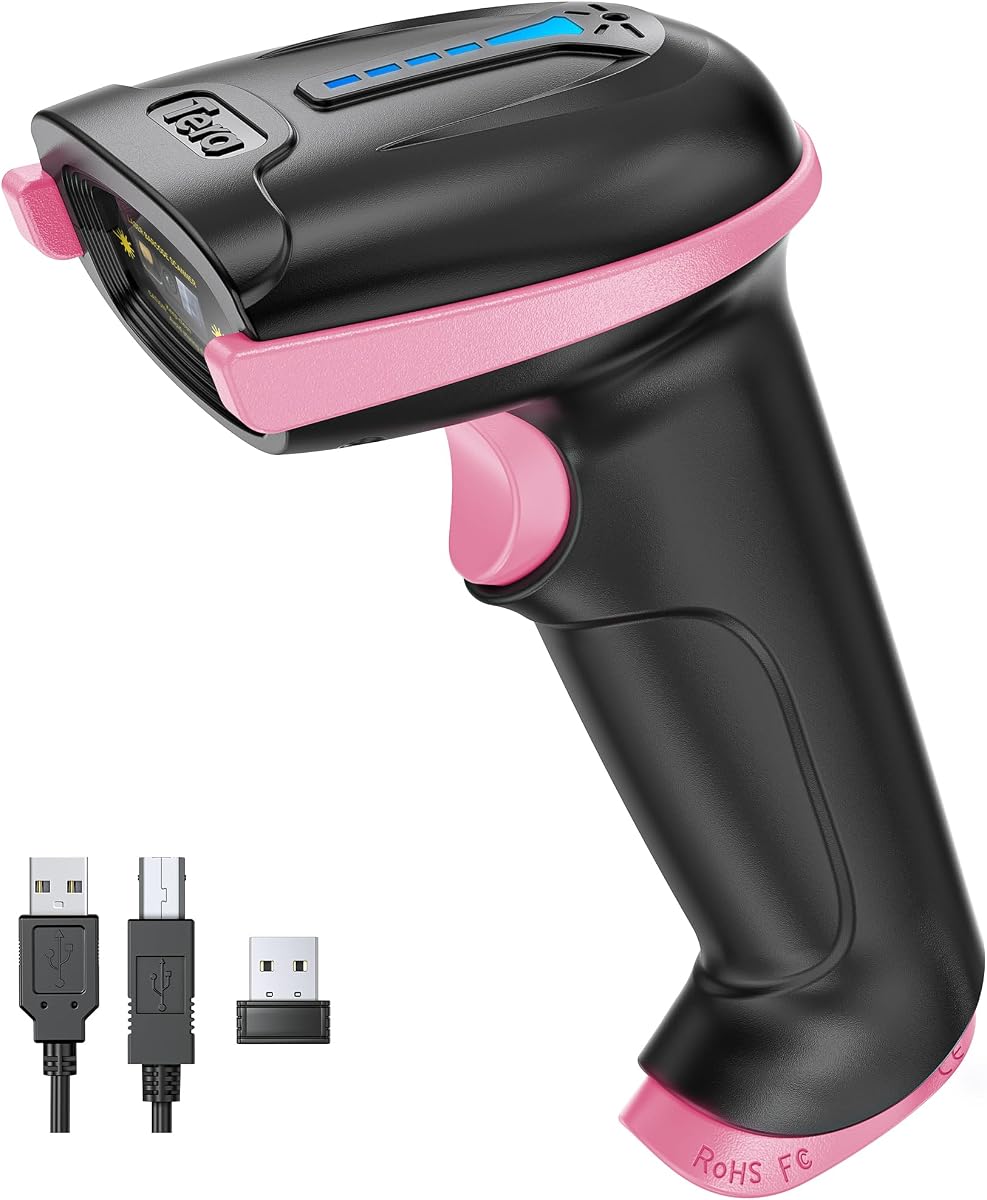
The Tera 5100 Pink matches the purple model but with a distinct look to reduce loss or improve ergonomics. It carries a 4.5 rating with identical high-performance specs.
We may earn a commission when you buy through this link, at no additional cost to you.
Battery lights and range remain top-tier. The design may appeal to teams preferring varied tool colors for identification purposes.
Identical functionality to purple makes it a great alternative if aesthetics matter. Same reliability for daily tasks.
Choose for branding or visibility needs. It offers the same power with a different visual identity.
Distinct color helps identify shared devices quickly on busy shelves or during multi staff scans.
Pink color does not compromise the robust features or range found in other Tera models.
We may earn a commission when you buy through this link, at no additional cost to you.
The WoneNice USB Laser focuses on raw speed with 200 scans per second. A 4.5 rating reflects its efficiency in high-traffic checkout or inventory scenarios.
We may earn a commission when you buy through this link, at no additional cost to you.
Its 2-meter cable provides enough reach for desk use. The 300 configurable options allow detailed customization for different data formats.
Wired only limits mobility but ensures stable data flow. Best where speed matters more than portability.
Ideal for static stations processing high volumes. Choose this for pure scanning velocity.
The laser scans quickly reducing wait times for patrons during peak library checkout hours.
Hundreds of settings let IT tailor scanner output to match library management software needs.
We may earn a commission when you buy through this link, at no additional cost to you.
The Symcode Wireless Laser supports multiple devices sharing one receiver. With a 4.4 rating it offers up to 328ft range and stores 100000 codes offline.
We may earn a commission when you buy through this link, at no additional cost to you.
Its rechargeable battery lasts days on standby. The network mode suits large libraries where several staff scan simultaneously without interference.
Offline storage is useful during network outages. Lack of screen limits on-device feedback options.
Best for large-scale operations. This choice maximizes efficiency across broad warehouse spaces.
Multiple scanners transmit to one receiver enabling team-based inventory checks without setup conflicts.
Store codes when out of range and sync later ensuring no data loss during network issues.
We may earn a commission when you buy through this link, at no additional cost to you.
The Eyoyo Mini Pink offers lightweight portability similar to its blue counterpart. A 4.3 rating confirms consistent performance for roaming library duties.
We may earn a commission when you buy through this link, at no additional cost to you.
Its pink design stands out for easy identification. Vibration mode ensures quiet scanning for patrons in sensitive areas.
Battery life is moderate so charge daily. Ideal for short shifts where appearance and mobility matter.
Perfect for staff who need to stay mobile. This adds a practical aesthetic touch.
Distinct color helps staff spot their device quickly in shared tool areas or on desks.
Fits easily in pockets or small bags enabling mobile scanning throughout library floors.
We may earn a commission when you buy through this link, at no additional cost to you.
The Anyeast scanner includes a stand for hands-free scanning on counters. A 4.0 rating suggests reliable performance for basic library inventory tracking tasks.
We may earn a commission when you buy through this link, at no additional cost to you.
Its adjustable stand helps position items for easy sensing. 2D support expands code compatibility beyond traditional linear marks.
Desk-bound use may limit flexibility but frees staff to type while scanning. Ideal for fixed entry points.
Best for static stations needing both hands. This simplifies scanning tasks significantly.
Hands-free operation allows staff to type or handle books while scanning happens automatically on the desk.
The adjustable stand adapts to different item sizes for better scanning accuracy.
We may earn a commission when you buy through this link, at no additional cost to you.
Selecting the right scanner depends on workflow needs and integration capabilities within your existing library systems.
Decide between wired USB for stability or wireless for mobility. Bluetooth and 2.4GHz wireless options let staff move freely but require battery management.
Choose wired if you need consistent power; wireless if mobility is critical for inventory checks.
Look for scanners with at least 8 hours of continuous use to avoid mid-shift charging. Larger batteries like 2600mAh provide longer standby time.
Prioritize capacity to match your daily scanning volume and shift length.
Ensure the scanner reads ISBN and standard 1D codes. Advanced models support 2D QR codes which may become common for digital resources.
Check compatibility with your library software to avoid future incompatibility.
Libraries see daily drops and spills. Look for drop ratings like 2 meters or protective silicone covers for long-term use.
Invest in ruggedized units to reduce replacement costs over time.
Confirm OS compatibility with Windows Mac or Linux systems. Some scanners have storage modes for offline data when networks fail.
Test compatibility with your specific library management platform before bulk purchasing.
For quiet zones select scanners with mute settings or vibration feedback. Loud beeps can disturb reading environments.
Check for configurable buzzer options to suit different library areas.
Plug-and-play models avoid driver installs. Configurable scanners allow custom prefixes suffixes to match database formats.
Prioritize minimal setup to save IT time during deployment.
Compare price points against needed features. Basic wired units are cheaper but wireless models offer flexibility for staff.
Balance budget limits with long-term operational benefits.
Begin by pairing the scanner with your computer via USB or Bluetooth following the manual. For wireless models scan the pairing barcode from the provided guide.
Test scan a sample barcode to confirm data entry into your system. Adjust trigger modes if your library prefers continuous or manual scanning.
Store the scanner in a dry clean area when not in use. Avoid extreme temperatures to protect battery health and electronic components.
Yes most models support 1D codes including ISBNs printed on covers. CCD sensors handle damaged or reflective prints effectively without needing line-of-sight.
Most scanners support major operating systems like Windows and Mac. Verify specific OS versions in the product details for compatibility.
Most scanners are plug-and-play requiring no driver installation. They appear as keyboard input devices so any text field works instantly.
Battery life varies from 8 hours to multiple days depending on usage. High capacity units like 2600mAh last significantly longer than smaller ones.
They integrate with most systems since they act as keyboards. Always confirm compatibility with your specific library management software before purchase.
Many models allow muting the beeper or using vibration mode. This prevents disturbances while still confirming scans for staff.
Our top picks balance performance and affordability with NETUM and NetumScan leading for different budgets. Tera offers advanced features for modern needs with 2D support.
Prioritize battery life and connectivity based on your workflow. Wireless models suit roaming staff while wired options maximize stability at desks.
Verify current prices and stock before buying as availability fluctuates. Choose a model that fits your specific library environment.