
GE BigEZ OneTouch
4.3Editor score
Color coded buttons
Backlit keys
Simple setup
Discover the top easy to use TV remote for seniors designed for simplicity. This guide compares ten models focusing on button size, layout, and compatibility.
Finding the right device for older adults can be challenging. Many standard remotes have too many small buttons that cause confusion. A good option simplifies controls to ensure comfortable viewing for everyone.
We reviewed ten top rated models designed with accessibility in mind. Each product was evaluated on button size, setup ease, and TV compatibility. Our goal is to highlight the most user friendly choices available.
Each pick below shows specific strengths for different needs and budgets. Prices and availability change often so please check the latest offers before buying. These selections aim to restore independence and joy to daily television watching.
4.3Editor score
4.2Editor score

4.4Editor score
This table provides a side by side comparison of all ten models. It highlights key features such as battery type, button count, and specific design elements to help you decide quickly.


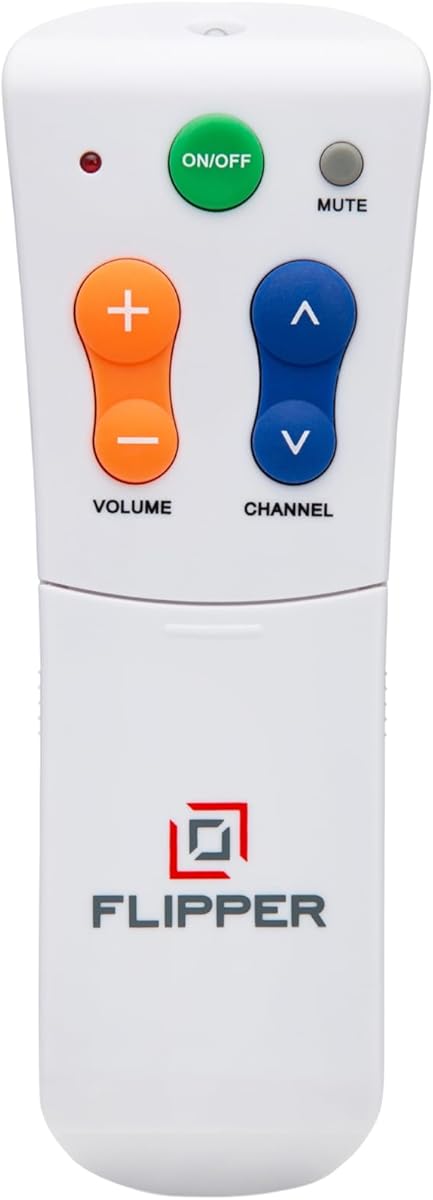
The Flipper remote stands out as a top choice for seniors and those with dementia. It features a highly simplified design with only four main buttons visible on the face. This approach eliminates confusion and helps users regain control over their entertainment experience.
We may earn a commission when you buy through this link, at no additional cost to you.
Its key strength lies in the color coding and large tactile buttons. Green is for power, orange for volume, blue for channels, and gray for mute. Additionally, you can program up to twenty five favorite channels to cycle through easily without memorizing numbers.
While it does not navigate streaming apps, this limitation simplifies use for traditional TV watchers. The hidden buttons allow for customization without cluttering the main view. It is a thoughtful design that prioritizes independence and ease of use.
This remote is ideal for caregivers seeking a reliable solution for elderly loved ones. It balances functionality with simplicity perfectly. If your primary need is basic TV control without app navigation, this is a strong investment for daily comfort.
Only four buttons are visible to reduce confusion and cognitive load.
Users can cycle through pre set favorite channels with simple up and down presses.
We may earn a commission when you buy through this link, at no additional cost to you.
The GE BigEZ OneTouch remote offers excellent value with its vision friendly features. It features a bright white body that is easy to spot. The backlit buttons ensure visibility in low light conditions without straining the eyes.
We may earn a commission when you buy through this link, at no additional cost to you.
Key strengths include color coded volume and channel buttons for quick identification. It supports five major brands out of the box and offers a simple setup process. The OneTouch method reduces programming steps significantly for users.
One trade off is the limited preset brand list compared to broader universal remotes. However, for Samsung LG Vizio Sony and Roku users it is perfect. The white design also helps prevent the remote from getting lost in dark furniture.
This model is best for seniors who need clear visual cues and straightforward setup. It is affordable and reliable for daily use. If visibility and ease of use are priorities, this remote delivers solid performance.
Backlit keys and high contrast colors make it easy to see in dim rooms.
OneTouch setup reduces confusion by automating the pairing for common brands.
We may earn a commission when you buy through this link, at no additional cost to you.
This remote is designed specifically for Samsung TVs and features auto backlit buttons. The keys stay lit for thirty seconds to ensure easy visibility in the dark. It comes with a silicone cover and a mount hook for added convenience.
We may earn a commission when you buy through this link, at no additional cost to you.
Its main advantage is the combination of lighting and protective accessories. The cover prevents damage from spills or drops while the hook ensures the remote stays accessible. Setup is instant with no programming needed for compatible TVs.
The trade off is that it is optimized for Samsung models rather than universal brands. However, for Samsung owners this specialized approach ensures reliable performance. The ergonomics are tailored for comfortable one handed use.
Buy this if you have a Samsung TV and need reliable night time control. It reduces the hunt for the remote and protects it from wear. The included accessories add significant value to the purchase.
Buttons light up when pressed to aid users with vision impairments.
The cover and hook prevent loss and physical damage effectively.
We may earn a commission when you buy through this link, at no additional cost to you.
The EZclicker Big Button Universal TV Remote focuses on tactile feedback and ease. It includes an extra large enter button and oversized controls for limited dexterity. The remote is lightweight and easy to handle for seniors.
We may earn a commission when you buy through this link, at no additional cost to you.
Its key feature is the physical feedback from pressing keys which confirms input. The layout is simplified to avoid clutter and confusion. Setup is quick requiring only volume and mute buttons for pairing.
It does not support streaming devices or cable boxes which limits flexibility. But for basic TV control it performs well. The black design is classic and fits any decor.
This remote is a solid choice for those who need clear physical feedback. It is an affordable way to simplify TV watching without extra complexity. Ensure your TV is on the compatible list before buying.
Raised buttons provide physical feedback for confident pressing.
The compact size makes it easy to carry and hold without strain.
We may earn a commission when you buy through this link, at no additional cost to you.
This remote stands out because it works right out of the box with no programming. It covers Samsung LG Vizio Sony Hisense Philips and Panasonic TVs. The design is simple with big buttons for easy visibility.
We may earn a commission when you buy through this link, at no additional cost to you.
Its primary strength is the lack of setup which saves time and effort. You just insert batteries and start using it immediately. A 90 day warranty provides peace of mind for the buyer.
It does not work with streaming devices or cable boxes which may limit some setups. But for direct TV control it is very convenient. The large enter button helps with navigation.
Ideal for anyone who wants instant functionality without technical steps. It is a reliable choice for basic TV usage across major brands. Check compatibility with your specific model to be sure.
No pairing or programming codes are required for immediate operation.
Compatible with most major TV manufacturers out of the box.
We may earn a commission when you buy through this link, at no additional cost to you.
The EZclicker TV Remote for Seniors is built for simplicity and accessibility. It features big buttons and tactile feedback to help users with dementia. The design is compact and lightweight for easy handling.
We may earn a commission when you buy through this link, at no additional cost to you.
Its key strength is the focus on essential functions without clutter. Setup is simple and it works with most major TV brands. The black finish is subtle and professional.
It does not support streaming apps which limits media options. However for basic channel switching it is effective. The tactile design helps users feel confident pressing buttons.
This is a good option for those needing a no fuss remote. It prioritizes comfort and simplicity over advanced features. Ensure your TV model is compatible before purchase.
Minimizes confusion by reducing unnecessary buttons and options.
Small size fits easily in hands and pockets for portability.
We may earn a commission when you buy through this link, at no additional cost to you.
This remote offers a clear layout with extra large buttons for visibility. It is designed for traditional TV use without voice control features. The buttons are clearly marked to reduce errors.
We may earn a commission when you buy through this link, at no additional cost to you.
Its strength is in the ergonomics and button size. It feels comfortable in the hand and is easy to press. The body is durable enough for daily use by elderly users.
It does not include voice features which may limit modern control. But for standard TV operation it is very effective. The design is straightforward and easy to learn.
Buy this if you prefer a physical button layout over voice commands. It is reliable and easy to read in various lighting. A practical choice for traditional setups.
Labels are distinct to help users identify functions quickly.
The shape fits naturally in the hand for reduced strain.
We may earn a commission when you buy through this link, at no additional cost to you.
The Philips BigEZ OneTouch remote emphasizes easy setup and visibility. It has backlit keys and color coded buttons for quick identification. The OneTouch method reduces programming steps for common brands.
We may earn a commission when you buy through this link, at no additional cost to you.
Its main strength is the user friendly setup and visual clarity. It works with Samsung LG Sony Vizio and Roku TVs. The black design is sleek and fits well in modern homes.
The brand list is somewhat limited which affects versatility. However for supported TVs it provides a reliable experience. The support team is available for help with issues.
This model is best for those who value easy setup and visual aids. It is a solid choice for basic TV control. Ensure your TV brand is supported before purchasing.
Automated pairing reduces the complexity of manual code entry.
Backlit keys and color coding improve usability in low light.
We may earn a commission when you buy through this link, at no additional cost to you.
This remote is designed for those who need very basic controls. It features large buttons and a simple layout for easy operation. It does not include voice features to avoid complexity.
We may earn a commission when you buy through this link, at no additional cost to you.
Its key strength is the focus on essential functions. It works with most brands for standard TV use. The design is straightforward and easy to understand for elderly users.
The rating is lower which may reflect limited features. But for simple TV switching it is adequate. The lack of extra buttons reduces confusion.
Buy this if your needs are minimal and budget is a factor. It is a no frills option for basic control. Check compatibility with your TV model before purchase.
Focuses on power volume and channel to reduce errors.
Provides basic functionality at a low cost point.
We may earn a commission when you buy through this link, at no additional cost to you.
The Anderic RR1004 remote features glow in the dark keys for low light use. It is simple and designed for standard IR TVs. The layout includes essential controls only.
We may earn a commission when you buy through this link, at no additional cost to you.
Its main strength is the learning function to copy existing remotes. The glow keys help visibility at night. It is pre programmed for LG TVs for quick setup.
It does not support RF or Bluetooth systems which limits advanced TV models. But for standard TVs it is reliable. The instructions are clear for basic setup.
This is a good choice for those needing night visibility and basic features. It is affordable and easy to use. Check your TV type is IR compatible.
Keys glow to assist users in dark or low light environments.
Allows copying functions from your existing remote for flexibility.
We may earn a commission when you buy through this link, at no additional cost to you.
Choosing the right remote requires considering specific needs like vision and dexterity. This guide breaks down the key factors to help you make an informed choice.
Large buttons with clear spacing are essential to prevent accidental presses. Look for designs that separate volume and channel controls for ease.
Prioritize models with oversized keys and distinct spacing for safe use.
Backlit keys help users find buttons in dim lighting conditions. Some remotes stay lit for a set time after pressing.
Choose a remote with auto backlighting for better night visibility.
Ensure the remote supports your TV brand and type. Universal models may not work with streaming boxes or RF systems.
Verify compatibility with your TV model before buying to avoid returns.
Simple setup reduces frustration for users with memory issues. Look for one-touch or no-programming options.
Opt for remotes that require minimal steps to pair with your TV.
Lightweight remotes are easier to hold for long periods. Durable materials prevent damage from drops.
Select a lightweight and sturdy design to reduce strain.
Check battery type and expected life to ensure convenience. Remotes using standard AA batteries are easier to replace.
Prefer models with common battery types to simplify maintenance.
Color coding and tactile feedback aid users with vision or dexterity challenges. Look for distinct colors for main functions.
Choose remotes with sensory aids for better user confidence.
Insert batteries with correct polarity as shown inside the compartment. Ensure contacts are clean for proper signal transmission.
Point the remote at the TV sensor and press buttons firmly to register inputs. Avoid pressing multiple keys at once.
Clean the remote regularly with a soft cloth to remove dust. Store it in a fixed location to avoid loss.
Most basic remotes listed are designed for traditional TVs only and do not navigate streaming apps. Some universal models may support basic IR inputs but avoid complex menus.
Most models use standard AA or AAA batteries which are widely available. Check the manual for specific requirements as designs vary by brand.
Many options feature simple setup methods like one-touch pairing or no coding. Some are pre-programmed for major brands out of the box.
Yes many models include backlit keys, large print, and color coding. These features help users with low vision identify buttons easily.
Some universal remotes can control cable boxes but others are TV only. Check compatibility before purchasing if you need multi device control.
Most remotes have a standard IR range of up to 30 feet. Ensure line of sight is clear for best signal strength.
The top picks balance simplicity with functionality to meet diverse needs. Each model offers unique features like backlighting or no setup requirements.
Prioritize visibility and button layout when selecting a remote. These factors directly impact daily comfort and independence.
Prices and availability change so verify details before buying. Choosing the right remote can significantly improve the viewing experience.