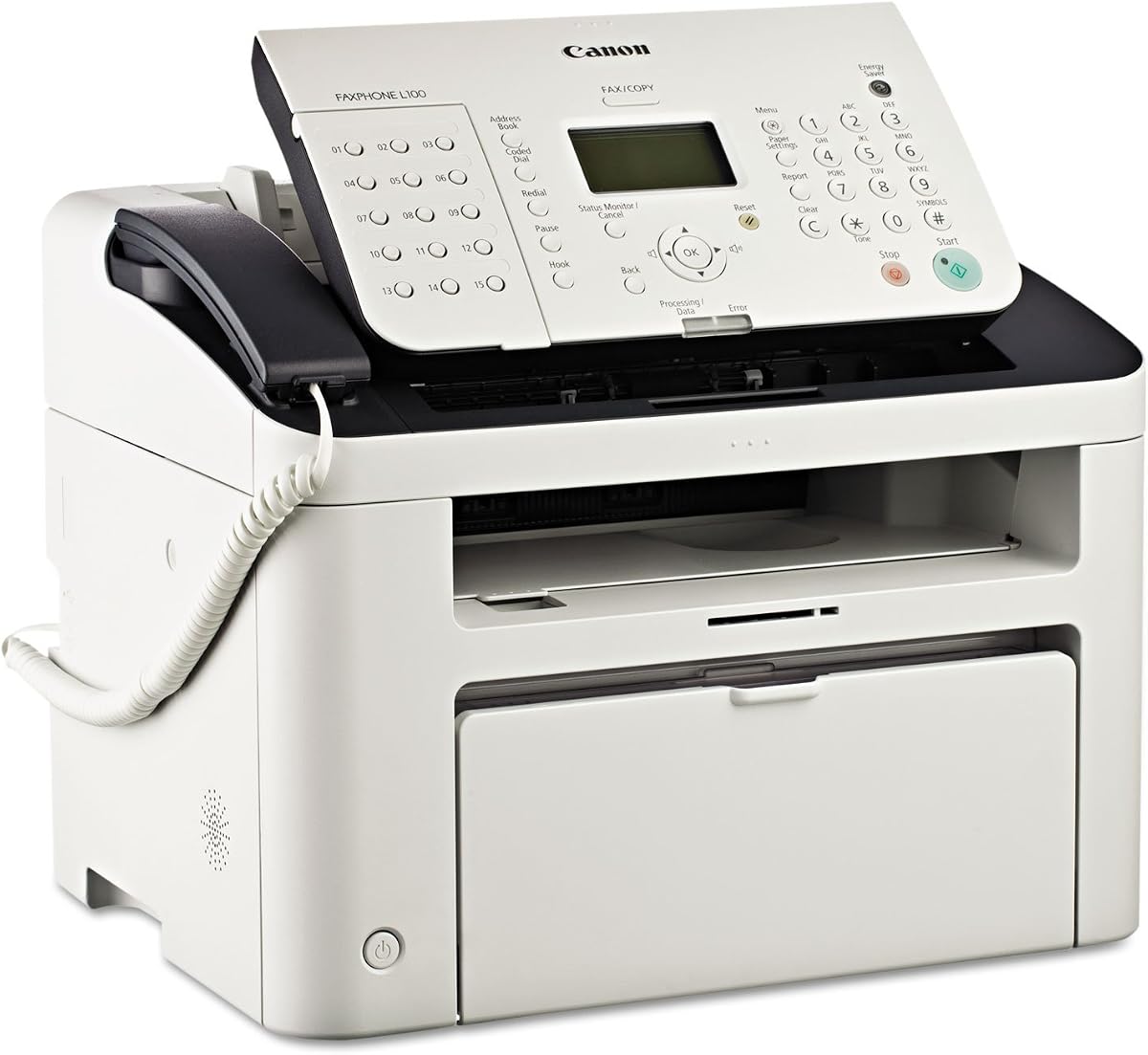
Canon FAXPHONE L100
4.1Editor score
19 PPM print speed
150 sheet paper capacity
Includes telephone handset
Finding a reliable fax machine with phone capabilities is essential for businesses that need secure document transmission. These devices combine printing, scanning, and telephony into one unit, streamlining office workflows efficiently.
We analyzed ten top-rated models based on performance, features, and user feedback. Our comparison covers laser and thermal options, focusing on speed, memory capacity, and ease of use for diverse office environments.
Each pick highlights specific strengths and ideal use cases for different needs. Please note that availability and pricing may change over time, so verify current details before making your final purchasing decision today.
4.1Editor score

4.4Editor score

4.0Editor score
As an Amazon Associate we earn from qualifying purchases.
The following table provides a side-by-side comparison of all ten models. We highlight key specifications to help you quickly identify the model that best fits your specific office communication requirements.


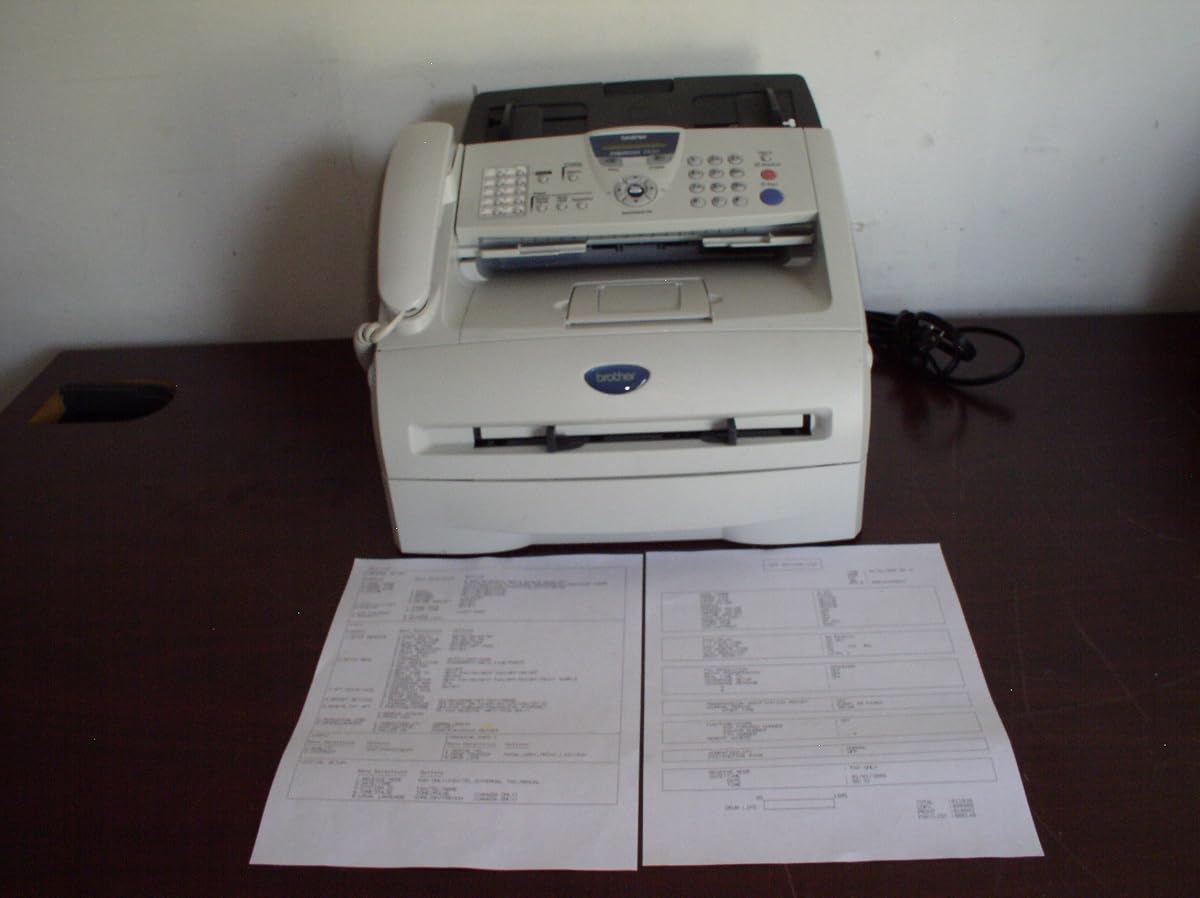

The Brother IntelliFax 4750e stands out as a top contender in the business fax category. With a solid 4.4 rating from users, it delivers consistent performance for high-volume offices that need reliability every single day.
We may earn a commission when you buy through this link, at no additional cost to you.
Its Super G3 fax technology ensures clear transmissions while the laser printing engine provides sharp documents. The 15 pages per minute copy speed keeps workflows moving efficiently without long delays during busy periods.
While it comes at a higher price point, the build quality justifies the investment. Some users note it requires more desk space than compact models, but the performance gains make this a worthy trade-off for serious business use.
We recommend this model for established businesses prioritizing speed and quality. It handles heavy loads well and reduces downtime. If you need a robust fax solution that integrates seamlessly into your office workflow, this is an excellent choice.
This machine includes advanced dialing and broadcast options that streamline communication for larger teams effectively.
Laser technology ensures crisp text and images on every fax sent or copied, maintaining professional standards.
We may earn a commission when you buy through this link, at no additional cost to you.
The Canon FAXPHONE L100 offers impressive value for small offices needing speed and capacity. Users appreciate the fast 19 pages per minute printing speed which significantly reduces wait times during daily document processing tasks.
We may earn a commission when you buy through this link, at no additional cost to you.
Its generous 150-sheet paper capacity and 30-sheet auto document feeder mean less reloading. The 512 sheets memory capacity allows you to store multiple faxes safely without losing data during power outages.
While it lacks some advanced features found in premium models, it covers the essentials perfectly. The monochrome laser output is clear enough for most business documents, and the included telephone handset adds convenience for calls.
This model is ideal for budget-conscious buyers who still want reliable performance. If your primary need is fast faxing and copying without breaking the bank, the L100 delivers solid results and dependable operation.
With 19 pages per minute, this unit keeps up with demand so your team spends less time waiting.
Ample paper and memory capacity reduce interruptions and ensure smooth operation during peak hours.
We may earn a commission when you buy through this link, at no additional cost to you.
The CimFAX A5 represents a modern approach to faxing by eliminating paper entirely. With a 4.0 rating, it appeals to eco-friendly users who prefer digital workflows and need flexibility in how they send documents.
We may earn a commission when you buy through this link, at no additional cost to you.
You can send and receive faxes directly from your computer or mobile phone anytime. The system automatically saves incoming faxes as PDFs to your local folder or forwards them to your email for easy access and storage.
Setting up the software may take a bit of time initially but it pays off in the long run. Some users note that certain advanced features might require additional configuration, but the lifetime tech support helps resolve issues quickly.
This is perfect for remote teams or digital-first businesses looking to reduce clutter. If you want to modernize your faxing process and save on paper costs, the CimFAX A5 provides a powerful and versatile solution.
Seamlessly integrates with existing digital systems to keep your office paper-free and efficient.
Send and receive faxes from anywhere using your phone or computer without needing a physical machine.
We may earn a commission when you buy through this link, at no additional cost to you.
The Brother FAX-575 is designed for personal use and home offices. It combines fax, phone, and copier functions in one unit. Users find it easy to operate making it suitable for those who need simple daily tasks.
We may earn a commission when you buy through this link, at no additional cost to you.
With a resolution of 400 x 400 dpi it produces clear black-and-white copies. The modem speed transmits pages in about 15 seconds which is acceptable for personal or low-volume business needs without excessive waiting.
Its 512 KB memory stores up to 25 pages so you can send faxes even when paper is low. However, compared to newer models the memory and speed are more limited but still functional for typical household use.
We recommend this for home offices needing basic reliability. If you need a straightforward device for occasional faxing and copying without complex features the FAX-575 offers good value and dependable performance for daily needs.
Designed for simplicity it allows anyone to send faxes or copies with minimal learning curve.
Fits easily on a desk or shelf making it ideal for smaller spaces or home offices.
We may earn a commission when you buy through this link, at no additional cost to you.
The renewed version of the Brother FAX-575 offers a cost-effective alternative for those on a tight budget. It retains the same features as the new model including fax phone and copier functions at a more accessible price point.
We may earn a commission when you buy through this link, at no additional cost to you.
Users appreciate the convenience of easy operation and the ability to handle standard fax tasks. The black-and-white copying resolution and transmission speed remain consistent providing a reliable experience similar to a brand new unit.
While the rating is slightly lower due to potential wear and tear it still performs well for basic needs. Buying renewed helps reduce electronic waste which is a positive environmental impact for conscious shoppers looking for savings.
This option is best for buyers who prioritize value over pristine condition. If you need a functional fax machine for light use and want to save money the renewed FAX-575 is a sensible and practical choice.
Get the same reliable features at a lower cost by choosing a professionally renewed unit.
Reducing e-waste by extending the life of electronic devices helps the environment significantly.
We may earn a commission when you buy through this link, at no additional cost to you.
The Brother MFC7240 is a robust multifunction device combining printing scanning copying and faxing. With a 4.2 rating users appreciate its speed and capacity which are well-suited for busy workgroups requiring versatile daily productivity.
We may earn a commission when you buy through this link, at no additional cost to you.
It prints at up to 21 pages per minute and holds 250 sheets in the tray. The 20-page auto document feeder makes scanning and faxing multi-page documents easier without manual feeding every single page at a time.
The high-resolution scanning capability ensures clear digital copies for archiving. While it lacks a network connection relying on USB may limit sharing in larger offices but for individual workstations it performs exceptionally well and reliably.
We recommend this for home offices or small teams needing speed. If you need a reliable all-in-one machine that handles high volumes efficiently the MFC7240 offers excellent value and consistent performance for daily tasks.
Combine printing scanning copying and faxing into one device to save space and simplify workflows.
Large paper trays reduce reload frequency so you can focus on work instead of machine maintenance.
We may earn a commission when you buy through this link, at no additional cost to you.
The Panasonic KX-FHD331 is a straightforward plain paper fax machine designed for basic needs. It supports caller ID and integrates with answering machines which makes it convenient for small offices tracking incoming calls efficiently.
We may earn a commission when you buy through this link, at no additional cost to you.
It uses a 9.6 Kpbs modem speed which is standard for basic transmission. The machine uses plain paper ensuring you do not need specialized thermal rolls for every document you receive or send regularly at work.
User ratings are lower indicating some reliability issues. However the 6-month warranty with exchange program provides some peace of mind. It remains a functional option for those prioritizing plain paper compatibility over advanced speed features.
This model is suitable for buyers needing a simple fax line. If you want basic fax and phone features without complex electronics the KX-FHD331 provides a standard solution for everyday office communication tasks.
Standard paper use ensures easy document storage and archiving without special consumables required.
Caller ID and answering machine interfaces help manage phone calls alongside fax transmissions effectively.
We may earn a commission when you buy through this link, at no additional cost to you.
The Brother PPF-2800 is designed for basic faxing needs using plain paper. It offers up to 10 pages per minute printing speed which is adequate for low-volume users who do not require rapid document processing tasks daily.
We may earn a commission when you buy through this link, at no additional cost to you.
Key features include a 20-page auto document feeder and memory that stores up to 90 pages. The 108-station auto dialing makes it easy to send faxes to frequent contacts without retyping numbers each time.
While the rating is moderate and speed is slower than laser models it serves basic tasks well. It can make up to 99 copies in one run which is helpful for duplicating documents for distribution to multiple people.
We recommend this for small offices with limited fax volume. If you need a simple device that handles basic faxing copying and auto dialing without needing fast speeds the PPF-2800 is a reliable standard option.
Store frequent numbers to send faxes quickly without manually entering phone codes every time.
Auto document feeder and generous memory allow for smoother processing of multiple pages at once.
We may earn a commission when you buy through this link, at no additional cost to you.
The Brother IntelliFax 2820 delivers high-quality laser faxing and copying capabilities. It features a 20-page auto document feeder and 250-sheet input capacity which supports moderate volume office environments needing consistent daily operation reliably.
We may earn a commission when you buy through this link, at no additional cost to you.
Its 8 MB memory can store up to 500 pages reducing the risk of data loss during power failures. The 14.4 Kbps modem ensures solid transmission speeds for sending documents to various business contacts without delays.
The 220-station auto dialing allows broadcasting to 270 locations which is efficient for announcements. While it lacks wireless connectivity the USB interface prepares it for future printing needs making it a versatile choice for modern offices.
We recommend this for users needing laser quality and memory. If you need a reliable laser fax that handles large jobs and offers broadcast features the 2820 provides strong performance and professional results for business use.
Holding up to 500 pages ensures no data is lost even if power goes out unexpectedly.
Send faxes to multiple locations at once to save time and streamline group communications easily.
We may earn a commission when you buy through this link, at no additional cost to you.
The Canon FAXPHONE L80 offers laser fax quality in a compact package. It includes a telephone handset and USB interface for easy connectivity. While print speed is 6 pages per minute it compensates with reliable laser output quality for text.
We may earn a commission when you buy through this link, at no additional cost to you.
The 33.6 Kbps modem is fast ensuring quick transmission of documents. This speed helps in sending faxes efficiently which is beneficial when you need to communicate time-sensitive information to partners or clients urgently.
User ratings reflect mixed experiences primarily due to the slow printing speed. However for those who fax more than print the quality and modem speed make it a viable option for specific office setups needing reliability.
This model suits buyers prioritizing laser quality and speed over print volume. If you need a device that sends faxes quickly and produces clear documents the L80 is a solid entry-level option for small business needs.
Laser technology ensures crisp text that is readable and professional for all your fax needs.
USB interface allows easy connection to computers for seamless integration into your workflow.
We may earn a commission when you buy through this link, at no additional cost to you.
Choosing the right fax machine with phone capabilities requires careful consideration of your office needs. We have identified eight key factors that will help you find a model that offers the best value and performance.
Transmission speed determines how quickly your faxes are sent to recipients. Higher speeds reduce wait times and improve workflow efficiency especially if you send many documents daily.
Look for models with fast modems to ensure timely communication with your clients and partners without unnecessary delays.
Adequate paper capacity means you will not run out mid-task. Models with 150 sheets or more reduce the frequency of refilling which keeps operations smooth during busy periods.
Choose a machine with enough trays to handle your expected volume without constant interruptions or downtime.
Memory storage allows you to send faxes even if the machine runs out of paper. Large memory prevents data loss during power outages so you never lose critical documents.
Prioritize models with sufficient memory to store multiple pages securely for reliable performance when needed.
Print quality affects the professionalism of your documents. Laser models generally produce sharper text than thermal ones which is vital for clear and legible business correspondence.
Select a machine that delivers crisp output to maintain your professional image in all faxed communications.
Modern offices require flexibility. USB and network connectivity allow you to integrate the fax machine into your existing digital systems and share it easily across devices.
Ensure the machine supports your current setup to enable seamless document transfer and efficient workflow management.
An ADF lets you scan or fax multiple pages without manual feeding. This feature saves significant time and reduces the risk of jams or errors during multi-page processing.
For frequent multi-page faxes look for a model with a reliable auto document feeder to streamline your tasks.
Caller ID integration helps you identify incoming calls and faxes. This allows you to prioritize important communications and manage your phone line more effectively.
Choose a model with caller ID support to improve your ability to handle incoming contacts efficiently.
Consider the maintenance needs such as toner replacement or paper jams. Machines with robust construction minimize downtime and reduce long-term operational costs significantly.
Pick a durable model that is easy to maintain to keep your office running smoothly without frequent repairs.
To get started load the paper tray and plug in the phone cord securely. Ensure the handset is connected properly so you can receive calls without any interruption or static issues.
Regularly clean the scanner glass to prevent streaks on your faxes. Use a soft lint-free cloth to wipe the surface and keep the machine free from dust for optimal performance.
Keep the software drivers updated if your machine supports PC connections. Updating software ensures compatibility with your operating system and helps prevent errors during fax transmission.
Most traditional models require a landline connection to transmit data. However some modern paperless options allow sending via internet or email which removes the need for a physical phone line completely.
For home office use a capacity of 50 to 150 sheets is usually sufficient. This range reduces refilling frequency without taking up too much desk space in smaller work environments.
Yes many advanced models support email integration. You can forward incoming faxes to email addresses or send faxes from your computer as PDF attachments using specific software or settings.
To clear a jam open the cover and remove any stuck paper gently. Avoid tearing the paper and check for debris. Follow the manufacturer instructions to ensure you do not damage the rollers.
Laser fax machines generally offer better quality and do not require special thermal paper. They are more durable and cost-effective over time for users needing clear professional documents regularly.
Routine maintenance includes cleaning rollers and scanner glass regularly. Replace toner cartridges as needed to ensure consistent print quality and avoid streaks on your documents.
We have reviewed the top ten fax machines with phone capabilities ranging from basic units to high-performance business models. Each pick offers distinct features to meet specific needs for various types of office environments.
Prioritize speed and memory if you handle high volumes regularly. For home offices a compact model with essential features may suffice. Identify your primary tasks before making a final selection for best fit.
Remember that pricing and availability change frequently. Verify the current details and compare offers before purchasing to ensure you get the best deal on the model that suits your needs best.