
Lenovo Chromebook S330
4.2Editor score
Long battery life up to 10 hours
Lightweight design under 3.5 lbs
Secure Chrome OS with automatic updates
Finding a reliable device for daily tasks without breaking the bank is essential for students and professionals alike. This guide highlights affordable options that balance performance, battery life, and portability for common computing needs.
We evaluated ten top-rated laptops based on processor speed, storage capacity, display quality, and user reviews. Each model offers unique strengths suitable for browsing, streaming, writing, and light multitasking without high costs.
Every recommendation includes detailed specs, pros, cons, and real-world usage insights. Prices and availability change frequently, so check current listings before purchasing to ensure you get the best value for your budget.
4.2Editor score

4.3Editor score
4.2Editor score
As an Amazon Associate we earn from qualifying purchases.
This side-by-side comparison helps you quickly identify key differences between our top ten budget laptop recommendations. Review specs like screen size, RAM, storage, and OS to find the perfect match for your daily workflow.


This HP Chromebook stands out as a reliable choice for everyday tasks with its strong battery life and fast charging capabilities. Its balanced performance makes it ideal for students and casual users needing dependability.
We may earn a commission when you buy through this link, at no additional cost to you.
The Intel Celeron N4120 processor handles daily browsing and document editing smoothly. The 14 inch HD display offers clear visuals while the lightweight chassis ensures easy portability between rooms or campuses.
While storage is limited to 64 GB, cloud storage integration compensates well. The basic HD screen may lack vibrant color compared to FHD panels but remains functional for reading and streaming content comfortably.
Buy this if you prioritize long battery life and a simple, secure OS for schoolwork and media consumption. It delivers consistent performance without demanding a high budget for basic computing needs.
Up to 14 hours of battery life supports all day use without needing frequent charging during travel or long study sessions.
Chrome OS provides automatic updates and built-in virus protection keeping your data safe without requiring extra antivirus software.
We may earn a commission when you buy through this link, at no additional cost to you.
This Amzboy laptop offers a rare combination of a large Full HD screen and a very affordable price tag. It suits users who want more screen real estate for multitasking within strict budget limits.
We may earn a commission when you buy through this link, at no additional cost to you.
The N4020 CPU and 128 GB eMMC storage handle standard tasks like web browsing and writing documents adequately. The Type-C PD charging adds modern convenience while the fanless design ensures completely silent operation during use.
Storage expansion through a TF card slot provides flexibility for media files. However, only 4 GB RAM may cause slowdowns if many browser tabs or apps run simultaneously demanding careful resource management.
Choose this if you need a wide screen for productivity on a tight budget and can tolerate occasional slowdowns. It delivers solid value for basic users prioritizing display quality over high performance.
The 15.6 inch Full HD display provides sharper images and more workspace than standard HD screens found in budget laptops.
Type-C PD fast charging lets you power the laptop and phone with one compatible charger simplifying travel setups.
We may earn a commission when you buy through this link, at no additional cost to you.
As a fresh 2026 edition this HP laptop brings modern connectivity standards and AI assisted productivity tools to the budget segment. Its inclusion of Microsoft 365 adds immediate utility for students and home offices.
We may earn a commission when you buy through this link, at no additional cost to you.
The Intel N150 processor delivers efficient performance for daily browsing and streaming tasks. With Wi-Fi 6 you benefit from faster wireless connections while the SSD ensures quicker boot times compared to eMMC storage alternatives.
Although it lacks existing reviews the specs suggest strong value for a new release. The HD display remains basic and potential buyers should verify real world battery performance through user feedback post launch.
Opt for this if you want the latest OS features and connectivity standards at an accessible price. It serves well for general use where reliability and updated software matter more than high-end specs.
Copilot AI integration helps summarize research and tasks enhancing everyday productivity without requiring separate subscriptions.
Wi-Fi 6 ensures faster data transfer and stable connections in crowded network environments like schools or coffee shops.
We may earn a commission when you buy through this link, at no additional cost to you.
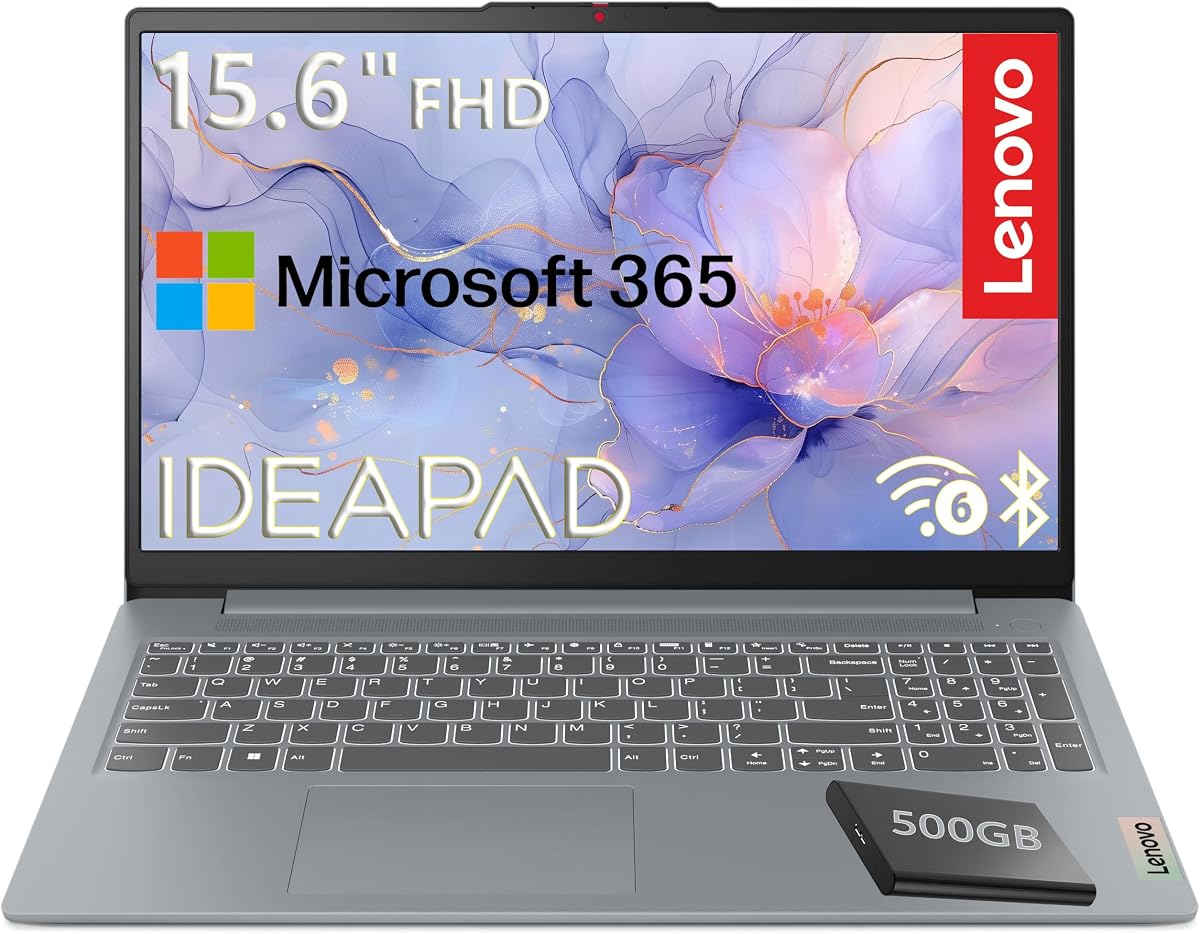
Lenovo emphasizes durability with this laptop offering military standard certification for tough daily use. It combines a sharp Full HD screen with generous storage options including an external hard drive for large media libraries.
We may earn a commission when you buy through this link, at no additional cost to you.
The N100 processor handles streaming and office tasks efficiently while the included Microsoft 365 subscription provides essential tools. The external drive ensures you can save photos and videos without worrying about limited internal space.
Windows 11 in S mode boosts security by restricting apps to the Microsoft Store but requires switching out for full flexibility. The extra hard drive adds weight but solves storage constraints effectively for users needing bulk data capacity.
Select this model if you need robust build quality and ample storage for files and media. It fits families or students requiring durable hardware that can withstand rough handling in backpacks and shared spaces.
The physical camera shutter and TPM security chip protect privacy and data integrity without extra software costs.
The portable 500 GB hard drive expands storage significantly allowing you to keep large video files offline easily.
We may earn a commission when you buy through this link, at no additional cost to you.
This HP Chromebook distinguishes itself with 8 GB RAM which is rare at this price point. It delivers smoother multitasking and app switching than typical 4 GB competitors making it ideal for power users on Chrome OS.
We may earn a commission when you buy through this link, at no additional cost to you.
The Intel N100 processor paired with 128 GB UFS storage ensures quick responsiveness and faster boot times. Chrome OS manages updates automatically removing the need for manual maintenance and keeping the system secure from threats.
While the display remains HD and lacks FHD vibrancy the anti-glare coating reduces eye strain during long sessions. Users reliant on offline native apps may find the OS limiting but it excels for web based workflows.
Pick this for its exceptional RAM capacity which future-proofs basic tasks significantly. It serves users who value smooth Chrome OS performance and quick responsiveness over high-resolution displays for everyday web usage.
With 8 GB RAM you can run multiple browser tabs and Android apps simultaneously without noticeable lag or slowdowns.
Universal Flash Storage provides quicker data access than traditional eMMC reducing wait times when opening files or apps.
We may earn a commission when you buy through this link, at no additional cost to you.
The Lenovo Chromebook S330 represents pure value focusing on essentials like portability and battery life. It is perfect for basic users needing a secondary device for quick browsing or travel without high costs.
We may earn a commission when you buy through this link, at no additional cost to you.
Powered by a MediaTek processor it handles light tasks well while the lightweight chassis makes it easy to carry. The simple OS ensures fast setup and minimal maintenance for non-technical users or children using the device.
Thirty-two gigabytes of storage is quite limited for media but cloud storage via Google Drive extends capacity. The older processor means it may struggle with modern web apps requiring more CPU power than basic browsing.
Choose this for its lowest entry cost and reliable battery life for short sessions. It suits casual users prioritizing mobility and simplicity over heavy processing power or extensive local file storage needs.
Two years of free Google Drive cloud storage helps expand limited local space for documents and photos easily.
Chrome OS updates automatically in the background so users never need to manage software patches or security settings.
We may earn a commission when you buy through this link, at no additional cost to you.
This essential model stands out by including a full year of Microsoft 365 which adds significant value for Word and Excel users. Its design emphasizes productivity tools like a dedicated Copilot key for quick AI assistance.
We may earn a commission when you buy through this link, at no additional cost to you.
The N150 processor handles standard office tasks smoothly while Wi-Fi 6 ensures fast connectivity. The included noise reduction tech improves call quality for remote workers making it a solid pick for home office setups.
Despite the strong software support the hardware remains entry level with limited RAM and basic display resolution. This trade-off is acceptable for users prioritizing application access and voice clarity over high-end graphics or multitasking performance.
Opt for this if you need reliable office tools and good call quality without extra software fees. It targets users seeking balanced functionality for remote work with essential productivity features pre-installed.
The bundled 365 subscription saves annual costs on software while enabling full Word and Excel access for productivity.
AI noise reduction filters background sounds during video calls ensuring clear communication in noisy environments.
We may earn a commission when you buy through this link, at no additional cost to you.
This Lenovo Chromebook offers a rare touchscreen interface at a budget price enhancing interaction with web apps and Android tools. The eight-core processor provides noticeably better performance than standard four-core rivals in daily workflows.
We may earn a commission when you buy through this link, at no additional cost to you.
The Full HD IPS display delivers vivid colors and sharp text improving the visual experience. Wi-Fi 6 compatibility ensures stable fast connections for streaming or downloads while the slim profile makes it easy to slip into bags.
Though storage is limited the touch capabilities enable intuitive navigation and gestures. Users must manage files carefully due to the small capacity and note that touchscreens can reduce battery life slightly compared to non-touch models.
Buy this for the added convenience of a touchscreen and strong processor speed within the Chrome ecosystem. It suits creative users who value visual interaction and quick responsiveness over massive storage capacity.
The touchscreen supports direct finger input for apps and browsers adding a layer of convenience to everyday web use.
An eight-core chip ensures smoother multitasking and app switching than typical budget four-core models found in this category.
We may earn a commission when you buy through this link, at no additional cost to you.
As a new 2026 release this Slim Laptop brings updated standards and reliable SSD performance to the budget range. It offers modern port selection and long battery life for users needing dependability for daily travel.
We may earn a commission when you buy through this link, at no additional cost to you.
The N150 processor handles daily tasks efficiently while the SSD ensures quick startup times. With multiple USB and HDMI ports it supports various peripherals without needing extra dongles making it versatile for home and office setups.
While specific reviews are absent the specs suggest a solid upgrade from older eMMC models. The HD screen remains a limitation for media but the overall package offers modern connectivity essential for current web-based productivity.
Choose this if you want a fresh model with fast storage and extensive ports at an entry price. It serves general users needing reliable connectivity and modern OS features without complex or expensive requirements.
Multiple USB-A and USB-C ports allow connection of monitors and drives without extra adapters simplifying workspace setups.
SSD technology provides faster data access and quicker app launches compared to slower traditional storage options.
We may earn a commission when you buy through this link, at no additional cost to you.
This laptop delivers an impressive 12 GB of RAM which is exceptional for entry-level budget models. It supports heavy multitasking like running many browser tabs or spreadsheets simultaneously without performance drops.
We may earn a commission when you buy through this link, at no additional cost to you.
The Pentium Gold processor handles standard tasks adequately while the IPS panel ensures wide viewing angles for better color accuracy. A physical privacy slider gives extra confidence during calls without needing software toggles or covers.
Despite the high RAM the CPU remains entry level so complex apps may not run faster. The unknown brand means fewer user reviews for reliability but the specs suggest strong value for memory-hungry students.
Pick this if RAM capacity is your main priority for multitasking on a budget. It fits users needing to keep many apps open at once without spending on high-end professional laptop hardware.
Twelve gigabytes of RAM allows you to run numerous applications and browser tabs at once without system slowdowns.
The physical camera slider lets you mechanically cover the lens providing peace of mind during video calls.
We may earn a commission when you buy through this link, at no additional cost to you.
Selecting the right budget laptop requires balancing performance needs with essential features. Consider these factors to find a machine that fits your daily workflow and budget constraints.
Most budget laptops come with Chrome OS or Windows 11. Chrome OS is simpler and more secure for web tasks while Windows offers broader software compatibility for school and work.
Choose Chrome OS for simplicity and security or Windows for full app support.
Entry-level processors like Intel N-series or MediaTek are sufficient for web browsing and streaming. Avoid older dual-core models and prioritize quad-core CPUs for better multitasking.
Aim for Intel N100 or equivalent four-core processors for smooth daily use.
Four GB of RAM is the minimum for basic tasks but eight GB or more allows smoother switching between apps. Limited RAM may cause lag when running many browser tabs simultaneously.
Prioritize 8 GB RAM if you plan to multitask heavily with multiple apps open.
Solid State Drives (SSD) or Universal Flash Storage (UFS) offer faster boot times than eMMC. Aim for at least 128 GB capacity to store local files comfortably.
Select 128 GB SSD storage for better speed and usable space.
Full HD (1080p) screens provide sharper text and images than standard HD. IPS panels offer wider viewing angles and better color accuracy for media consumption.
Choose a 15 inch FHD IPS screen if eye comfort is a priority.
For students and travelers weight matters significantly. Models under 3.5 lbs and 0.8 inches thick fit easily in backpacks without strain during long commutes.
Look for under 3.5 lbs for maximum portability during travel.
Real-world battery life varies by usage. Target models claiming 10 hours or more to ensure all-day use for classes or work without needing a power outlet.
Seek 10+ hours of battery life for all-day unplugged usage.
Check that the laptop has enough USB-A and USB-C ports for your peripherals. HDMI and SD card readers add convenience for external displays and file transfers.
Ensure at least two USB-A and one USB-C port for flexible connectivity.
Always keep your laptop on a flat hard surface to prevent overheating during long sessions. Avoid using it on soft beds or cushions that block ventilation fans and trap heat.
Use a soft microfiber cloth to clean the screen and keyboard regularly. Avoid harsh chemicals and apply gentle pressure to prevent damage to the display coating.
Close unused apps and browser tabs to maintain system performance and extend battery life. Use sleep mode when stepping away briefly rather than shutting down completely.
Many budget laptops feature sturdy chassis designs and some even have military-grade durability ratings. While they may not withstand extreme physical drops they are built to handle regular backpack transport and daily office use reliably.
Most budget models have soldered RAM and non-removable storage meaning they cannot be upgraded after purchase. Check specifications before buying to ensure the initial configuration meets your long-term needs.
Chrome OS works well for web-based research and Google Classroom while Windows 11 supports more specialized school software. Choose based on whether you need desktop apps or primarily web tools for your courses.
Some newer 2026 models include a one-year Microsoft 365 subscription but many do not. Verify product details carefully since free Office Online tools may be the only option for others.
Real-world battery life usually ranges from seven to ten hours depending on brightness and usage. Modern models often claim twelve hours or more for basic tasks like browsing and document editing.
Yes most models have built-in cameras and microphones suitable for Zoom or Teams. Look for those with noise reduction features for clearer calls and stable Wi-Fi 6 connectivity.
A lightweight protective sleeve and a portable mouse enhance comfort and protection. Consider a multi-port USB hub if the laptop lacks enough USB-A slots for peripherals.
Our top picks range from the durable Lenovo Chromebook S330 to the feature-rich Lenovo 15.6 FHD Laptop offering value across different user needs.
Prioritize battery life and RAM if you work away from power outlets or multitask heavily. Display quality and OS compatibility also play major roles in daily satisfaction.
Prices fluctuate frequently so verify current listings before purchasing to secure the best available deal for your specific budget and usage scenario.