
QUI Presentation Clicker with Volume Control
4.3Editor score
Low cost design
328ft wireless range
Plug and play setup
This guide compares the top ten laser pointer for presentations to help you find the best wireless presenter remote for classrooms offices and professional
Finding the right laser pointer for presentations can transform how you deliver keynotes and lectures. A reliable wireless presenter ensures you move freely while keeping your audience engaged with clear visuals and precise controls.
We evaluated ten top-rated clickers based on connectivity, battery life, laser visibility, and ease of use. Our team analyzed real user feedback and technical specs to build this definitive list for educators and professionals.
Each pick includes detailed pros and cons along with specific features that matter most. Prices and availability fluctuate often so check the latest offers before making your final decision for your next big presentation.
4.3Editor score

4.6Editor score

4.6Editor score
Here is a side by side comparison of all ten models we reviewed. This table highlights key specifications to help you quickly identify which device fits your specific presentation needs and budget.




This clicker stands out with a true green laser that cuts through bright projectors and whiteboards better than standard red dots. It also features a USB-C rechargeable battery so you never scramble for AAAs before class starts.
We may earn a commission when you buy through this link, at no additional cost to you.
Users love the magnetic receiver storage that snaps into the clicker body preventing lost dongles during busy lectures. The button layout includes dedicated volume controls and hyperlink options which power users appreciate for complex slide decks.
While it costs more than entry level models the rechargeable battery and bright green laser justify the investment for frequent presenters. The learning curve for extra buttons is minimal once you map them to your workflow.
If you teach or present often this tool ensures you look professional and prepared every time. The combination of visibility convenience and reliability makes it the top choice for educators and business professionals alike.
The 532nm green light delivers a crisp dot that remains visible even in well-lit lecture halls where red pointers often disappear.
A single hour of USB-C charging provides weeks of daily use reducing waste and eliminating the need for constant battery replacements.
We may earn a commission when you buy through this link, at no additional cost to you.
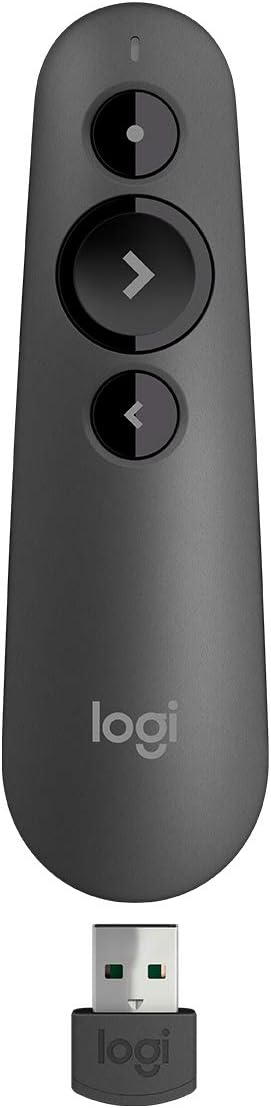
The R400 remains a solid choice for those who need a straightforward remote without extra bells or whistles. It offers a reliable red laser and intuitive buttons that work well for standard slide presentations.
We may earn a commission when you buy through this link, at no additional cost to you.
Its touch keys allow for quick navigation without looking down at the device which keeps your focus on the audience. The receiver docks inside the clicker preventing loss during transit between conference rooms.
However the red laser may fade on LCD screens or in bright settings which limits its use in modern classrooms. It also relies on AAA batteries which can run out unexpectedly if not monitored.
If you prefer a simple no-fuss tool from a reputable brand this model fits the bill. It is best suited for smaller rooms where screen brightness does not overpower the pointer.
The touch keys are designed for speed and simplicity allowing you to advance slides or go back with a quick tap.
A built-in docking bay keeps the USB receiver secure inside the device so you never have to search for it later.
We may earn a commission when you buy through this link, at no additional cost to you.
This remote offers a lot of functionality for a very low price making it attractive for budget conscious buyers. It includes volume control and hyperlink buttons which are rare at this price tier.
We may earn a commission when you buy through this link, at no additional cost to you.
The wireless range extends up to 100 feet allowing you to roam large conference halls without losing connection. The magnetic storage for the USB receiver adds a convenient touch that helps prevent misplaced items.
Build quality is functional but not robust compared to higher end options like Logitech. The red laser performs well on projectors but may struggle against bright monitors or whiteboards.
For occasional presenters or classrooms with tight budgets this model delivers essential features without breaking the bank. It is a practical choice when you need basic controls at a low cost.
With up to 100 feet of range you can move freely around a large room while maintaining a stable connection to your computer.
Beyond standard slide navigation this clicker includes volume and hyperlink buttons that add versatility to your presentation flow.
We may earn a commission when you buy through this link, at no additional cost to you.
The R800 is a high-end option designed for professionals who need to manage their time strictly during long talks. It features a green laser that shines clearly on any display including bright LCD screens.
We may earn a commission when you buy through this link, at no additional cost to you.
Its standout feature is the LCD timer which vibrates silently to let you know when you are running out of time without distracting the audience. The long wireless range ensures you can move freely throughout auditoriums.
While the battery life depends on AAA cells the convenience of the timer and visible laser often outweigh this minor inconvenience. The build quality is premium and the buttons are easy to locate by touch.
If you frequently give keynote speeches or timed presentations this tool helps you stay on track effortlessly. It is an excellent investment for anyone who values precision and reliability.
The LCD display shows your remaining time and uses silent vibrations to alert you so you never run over your allotted slot.
The green laser is significantly brighter than red and works on LCD and plasma displays where red pointers fail.
We may earn a commission when you buy through this link, at no additional cost to you.
This model stands out by offering Bluetooth connectivity alongside USB which is rare for presentation clickers. It runs for up to twelve months on a single AAA battery making it low maintenance for heavy users.
We may earn a commission when you buy through this link, at no additional cost to you.
You can use the Logitech Presentation App to customize button functions and set on-screen timers for better control. It works universally across Windows Mac iOS and Android which adds to its versatility.
The red laser is bright but may wash out on modern LCD screens which is a trade-off for the battery and connectivity benefits. Setup requires no extra tools but app features need installation.
For tech-savvy users who want flexibility across devices this remote is a strong contender. Its long battery life and dual connectivity make it future proof for many presentation needs.
Connect via the USB receiver or Bluetooth low energy to work with modern devices that lack USB-A ports.
When battery is low the device enters a power-saving mode disabling the laser to extend usage for an extra week.
We may earn a commission when you buy through this link, at no additional cost to you.
This clicker offers the longest wireless range in our comparison at 328 feet which is exceptional for its price point. It works instantly without software setup and includes a clip to attach to your notebook.
We may earn a commission when you buy through this link, at no additional cost to you.
The bright red pointer helps mark key points clearly on most backgrounds though it may struggle on LCD screens. It supports volume control and hyperlink functions which are useful additions at this budget.
While it lacks premium materials it gets the job done for casual presenters. The battery is not included so keep that in mind when budgeting for your purchase.
If you need a cheap reliable tool for occasional use this is a smart buy. The massive range ensures you can present from anywhere in a large hall without interruption.
Control your presentation from up to 328 feet away allowing you to interact with your audience across the entire room.
A convenient clip attaches to your pocket or notebook so you can carry it easily without needing a bag or case.
We may earn a commission when you buy through this link, at no additional cost to you.
This clicker supports both USB-A and USB-C receivers making it compatible with modern Macs and PCs alike. The green laser is bright and clear and the internal rechargeable battery lasts for weeks after a few hours of charging.
We may earn a commission when you buy through this link, at no additional cost to you.
You can reprogram the buttons to match your workflow using the free Norwii app which adds a layer of customization. The long wireless range supports movement in auditoriums or large training rooms.
The charging cable is not included which is a small oversight but the convenience of rechargeability makes up for it. Buttons are ergonomically placed with a larger forward button for easy touch identification.
For users with mixed devices this is a versatile and eco-friendly option. It combines modern connectivity with essential features at a reasonable price.
The 2-in-1 USB receiver fits both old USB-A ports and modern USB-C ports so you never need extra adapters.
A built-in lithium polymer battery charges via USB-C and lasts for weeks of daily use to reduce battery waste.
We may earn a commission when you buy through this link, at no additional cost to you.
Designed for portability this clicker fits comfortably in your pocket or bag for on-the-go presentations. It supports both USB-A and USB-C connections to accommodate different laptop models without needing dongles.
We may earn a commission when you buy through this link, at no additional cost to you.
The ergonomic shape with a rubberized grip makes it comfortable to hold for extended periods. The USB receiver hides safely under the battery cover so it stays with the device at all times.
The wireless range is shorter than premium models which limits movement to smaller rooms. The red laser is bright but may fade on modern screens which is a common limitation for this price tier.
If you need a tiny versatile remote that works with older and newer computers this is a solid pick. It is best for quick meetings or classrooms where you stay near the podium.
Its small size and lightweight build ensure it fits easily in a pocket or laptop bag for easy transport.
The dual receiver supports both USB-A and USB-C to ensure compatibility with various laptops and tablets.
We may earn a commission when you buy through this link, at no additional cost to you.
This model features a built-in receiver that accepts both USB-A and USB-C connections directly eliminating the need for external dongles. It offers volume control and a solid 100ft range for flexible movement.
We may earn a commission when you buy through this link, at no additional cost to you.
The ergonomic body with soft touch oil coating ensures a comfortable grip during long sessions. It works seamlessly with Mac and Windows without any software installation.
It relies on two AAA batteries which can be a drawback compared to rechargeable options. The receiver storage is magnetic but less robust than internal docking designs found on premium brands.
For users who want plug and play simplicity across different devices this is a strong option. It balances cost and functionality well for general office and classroom use.
The receiver includes both USB-A and USB-C connectors built right in so you can use it with any computer.
Control volume and slide changes with ease using dedicated buttons designed for comfortable ergonomic use.
We may earn a commission when you buy through this link, at no additional cost to you.
This clicker focuses on simplicity with a clean design and essential controls for standard presentations. It runs on one AAA battery which lasts about two months and weighs only 38 grams.
We may earn a commission when you buy through this link, at no additional cost to you.
The ergonomic layout makes buttons easy to find without looking down and the receiver stores inside the battery compartment to prevent loss. It supports a wide range of operating systems and software.
While it lacks advanced features like volume control or timers it covers the basics effectively. The red laser is sufficient for projectors but may not perform well on bright screens.
For users who want a no-fuss tool that is light and easy to carry this is a great choice. It is ideal for teachers or professionals who prioritize portability and simplicity.
At just 38 grams it fits easily in a pocket and adds no bulk to your daily carry bag.
Compatible with most systems including Windows Mac and Linux it ensures wide adoption without special setup.
We may earn a commission when you buy through this link, at no additional cost to you.
Selecting the right presenter requires balancing features like laser color, range, and battery life against your specific needs. This guide breaks down the critical factors to help you make an informed choice.
Green lasers are generally more visible than red ones especially on LCD or LED screens. Red lasers work well on traditional projectors but can fade in bright environments. If you present in modern offices or classrooms a green pointer will ensure your audience always sees your point.
Choose green for better visibility and red for budget-friendly traditional setups.
Range determines how far you can move from your computer. Basic models offer around 50 feet while premium ones reach 300 feet or more. For small meetings a shorter range is fine but for auditoriums or large classrooms look for at least 100 feet.
Prioritize 100+ foot range for large rooms to allow free movement.
Batteries can be AAA disposable or rechargeable via USB-C. Disposable batteries are convenient but create waste and may run out unexpectedly. Rechargeable models save money over time and are more eco-friendly but require planning to charge them.
Opt for rechargeable if you present often to avoid battery anxiety.
Most clickers use USB-A but modern Macs often use USB-C. Dual-receiver models or Bluetooth connectivity ensure compatibility across devices. If you use multiple laptops or tablets check that the receiver fits your ports.
Ensure USB-A and USB-C support or Bluetooth for modern laptop compatibility.
Basic clickers advance slides but advanced ones offer volume control hyperlink buttons or screen toggles. These features add versatility but can complicate the interface. Choose based on whether you need simple navigation or full control.
Get extra controls if you manage audio or complex slide interactions often.
Comfort matters when holding a device for long periods. Look for ergonomic shapes and rubberized grips. Premium models often use sturdier plastics that resist wear over time compared to cheaper budget builds.
Choose ergonomic designs with comfortable grips to reduce hand fatigue.
Some premium models include built-in timers with vibrating alerts to keep you on track during presentations. This is invaluable for keynote speeches or timed talks. Basic models rely on your own device for timekeeping.
Prioritize a built-in timer if you need precise time management.
Prices range from under $15 to $50. Lower price models work well for basic needs but premium features like green lasers or timers cost more. Decide what features are essential for your workflow to avoid overspending.
Balance your budget against essential features like laser color and battery type.
Before your first use remove the plastic cover from the battery compartment if using disposable power. Plug the USB receiver into your computer and wait for the LED indicator to confirm connection. Test the advance buttons to ensure slides change correctly.
To charge a rechargeable model connect it via USB-C and let it reach full capacity before use. If you are using a laser pointer avoid pointing it directly at eyes or animals as it can cause harm. Keep the device in a cool dry place when not in use.
Clean the exterior with a soft dry cloth to remove dust or fingerprints. Store the USB receiver inside its slot to prevent loss. Check battery levels before major events and replace or charge as needed to ensure a smooth presentation.
Most red laser pointers work well on traditional projection screens but can fade on bright LCD or LED displays. Green lasers are more visible and work across both projector types. Check screen brightness when choosing a model for best results.
Most clickers are plug and play so just insert the USB receiver into an available USB port. The operating system will automatically install drivers. If using Bluetooth go to system settings and pair the device like any other Bluetooth accessory.
The majority use AAA batteries which are easy to find. Some modern models use rechargeable lithium batteries via USB-C. Always check the product specs to confirm battery type before purchasing replacements or chargers.
Many models support tablets via Bluetooth adapters like USB-C receivers. iOS devices may require additional Lightning adapters. Always verify compatibility with your specific device OS and port type before buying to avoid connectivity issues.
This is usually due to low battery power or ambient light overpowering the beam. Check that you are pointing at a screen and not at white walls. Switch to a green laser if your screen is bright to improve visibility.
Range varies by model and environment but expect 50 to 100 feet in open areas. Walls and interference may reduce this range. Test your device in the actual room before presenting to ensure reliable signal strength.
Never point a laser at eyes or animals as it can cause injury. Use low power Class 2 lasers common in presentation tools. Store away from children to prevent misuse and follow manufacturer guidelines for safe handling.
Some advanced models allow button remapping via companion apps. Basic clickers have fixed functions. Check if software is required for customization before purchasing if you need specific workflow adjustments.
We recommend the Green Light Presentation Clicker as the top pick for its visibility and rechargeable design. Logitech offers reliable alternatives for those who prefer brand trust and specific features like timers.
Consider your primary use case whether it is classroom teaching or corporate meetings to prioritize features like range or battery type. A green laser might be worth the extra cost if you present often on modern screens.
Prices and availability change frequently so verify the latest deals before buying. Choose the model that best fits your budget and presentation style for maximum efficiency and confidence on stage.