
2Pcs Nano V3.0 Board
4.5Editor score
ATmega328P CH340G chip
USB-C power socket included
Compatible with Arduino IDE
This guide compares the top ten Arduino Nano Board options for makers, featuring detailed specs, performance insights, and value assessments to help you choose
The Arduino Nano Board remains a cornerstone for hobbyists and professionals seeking a compact microcontroller solution. Its small footprint belies robust capabilities, making it ideal for embedded systems, robotics, and IoT prototyping where space is at a premium. Choosing the right version ensures compatibility with your tools and project requirements.
We evaluated ten distinct Arduino Nano Board offerings based on chip architecture, connectivity options, and overall build quality. Our analysis covers classic ATmega328P models alongside newer variants featuring USB-C, Wi-Fi, and enhanced memory. Each product was assessed for ease of use, community support, and reliability in real-world applications.
Each pick below highlights specific strengths, whether you need budget-friendly bulk kits or advanced wireless capabilities. While pricing fluctuates due to market demand, these selections represent the current best value and performance tiers. Always verify current stock and compatibility before purchasing to ensure a smooth development experience.
4.5Editor score
4.6Editor score

4.6Editor score
The following table provides a side-by-side comparison of all ten Arduino Nano Board options. It highlights key specifications such as microcontroller type, connectivity standards, and unique features to help you quickly identify which board aligns with your specific project needs and technical requirements.


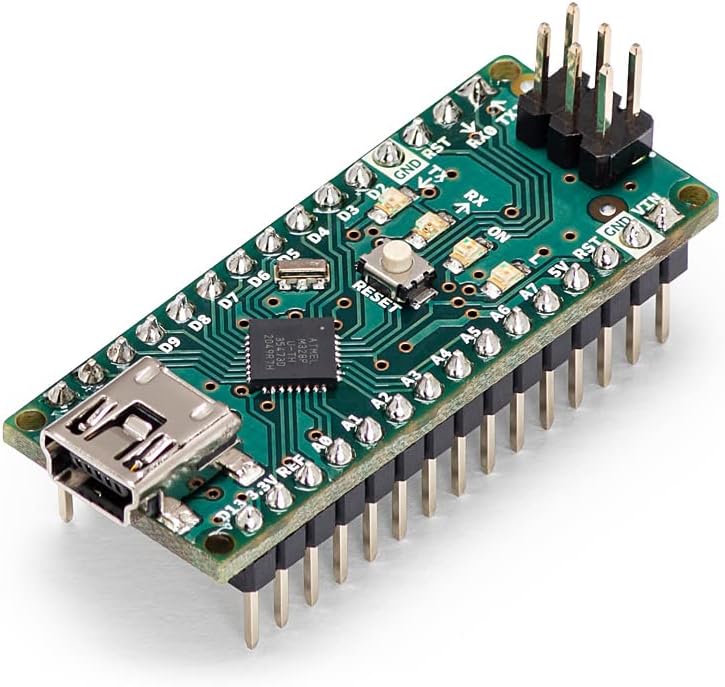
The official Arduino Nano [A000005] stands as the gold standard for compact microcontroller development. With a strong 4.6 rating from users, it offers reliable performance backed by the official Arduino ecosystem. Its design prioritizes stability and ease of use for both beginners and professionals.
We may earn a commission when you buy through this link, at no additional cost to you.
Key strengths include its 14 digital I/O pins and 8 analog inputs which provide extensive flexibility for sensor integration. The board is fully compatible with the Arduino IDE ensuring seamless code uploads and library access. Its compact form factor makes it ideal for wearable technology and portable applications.
While the price is higher than generic alternatives, the quality assurance justifies the investment for critical projects. The use of a mini-USB port is less modern than USB-C but ensures compatibility with existing cables. Overall, the reliability outweighs these minor inconveniences for most users.
This board is perfect for makers who prioritize stability and long-term project success. Whether you are building robots or automation systems, this Nano offers the robust foundation you need. We recommend it for anyone seeking an official, high-reliability Arduino experience.
Being an official product guarantees full compatibility with shields and libraries without modification.
Extensive pin layout supports a wide range of sensors and actuators simultaneously.
We may earn a commission when you buy through this link, at no additional cost to you.
The Arduino Nano ESP32 represents a significant leap forward in connectivity and processing power. Rated 4.6 by users, it combines the familiar Nano form factor with the powerful ESP32-S3 chip. This makes it a top choice for modern IoT projects requiring wireless communication.
We may earn a commission when you buy through this link, at no additional cost to you.
Its dual-core processor running at 240 MHz handles complex tasks like voice recognition and edge machine learning. The built-in Wi-Fi and Bluetooth 5.0 eliminate the need for external modules, saving space and wiring. MicroPython compatibility also opens up rapid development options for Python enthusiasts.
While it consumes more power than the classic ATmega boards, the connectivity benefits are substantial. The USB-C port ensures faster programming and better power delivery. Users should be prepared for a slightly different development environment compared to traditional AVR boards.
This board is ideal for smart home systems and connected sensors where wireless data transfer is critical. If you need advanced features in a compact package, the Nano ESP32 delivers exceptional value. It is our top pick for premium connectivity in a nano-sized package.
Built-in antennas allow immediate connection to networks without extra hardware.
Dual-core architecture supports multitasking and complex real-time data processing.
We may earn a commission when you buy through this link, at no additional cost to you.
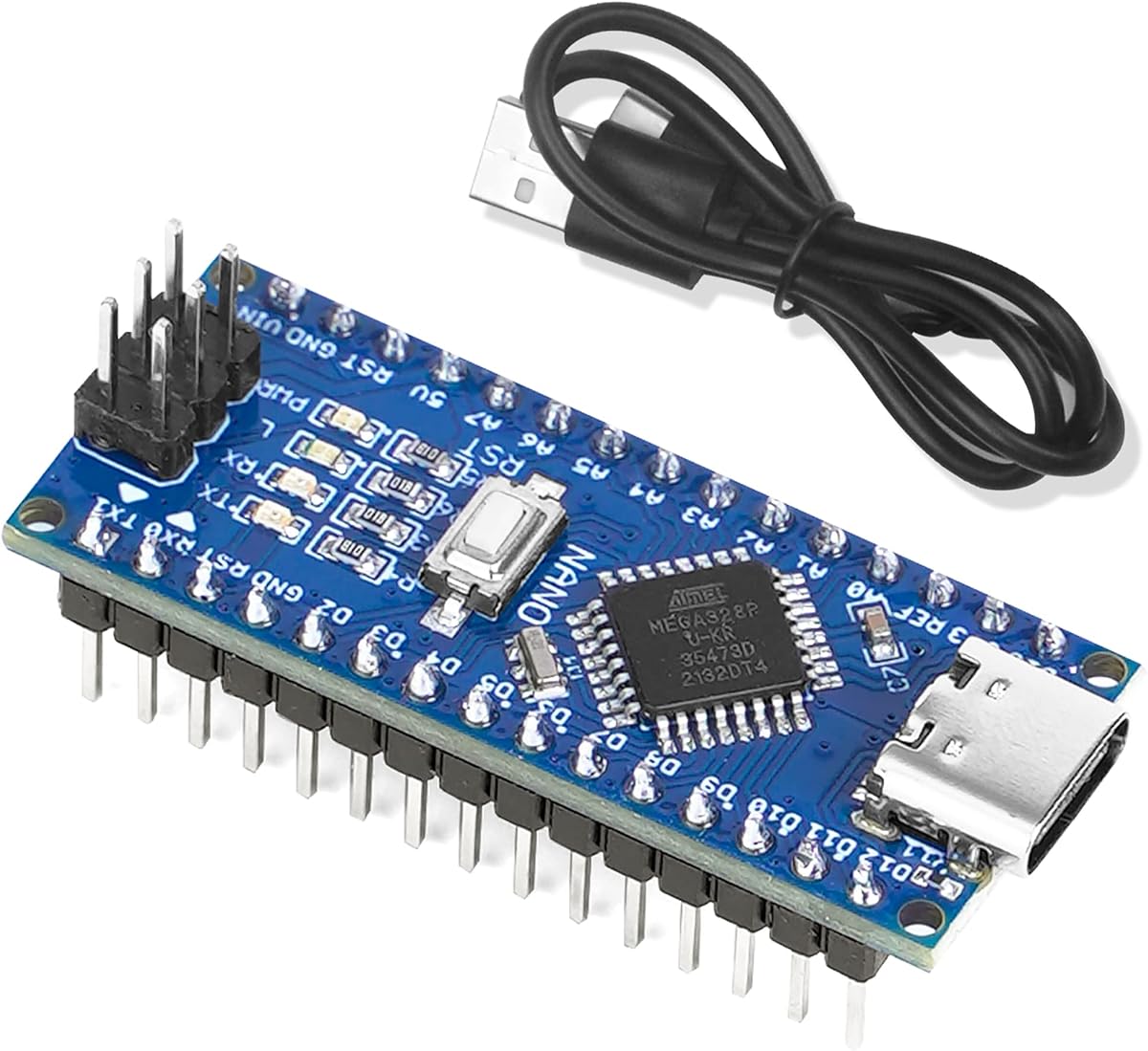
This 2-pack of Nano V3.0 boards offers incredible value for students and hobbyists needing multiple units. With a 4.5 rating, users appreciate the inclusion of USB cables and the modern USB-C port. The ATmega328P chip ensures full compatibility with existing sketches and libraries.
We may earn a commission when you buy through this link, at no additional cost to you.
The CH340G chipset provides reliable serial communication on Windows, Mac, and Linux systems. Having two boards means you can keep one on a breadboard while testing another, or back up your setup easily. The compact design fits perfectly into tight project enclosures.
While it lacks the official Arduino seal, the performance is nearly identical for most standard applications. The price point makes it accessible for bulk classroom projects or prototypes. Some soldering quality may vary slightly, but it does not impact electrical functionality.
This kit is perfect for beginners learning microcontrollers without breaking the bank. We recommend it for anyone needing multiple boards for distributed sensor networks. It is the best budget option that does not compromise on essential features.
USB-C port ensures easier cable management and broader compatibility with modern laptops.
Pricing two boards together reduces the average cost per unit significantly.
We may earn a commission when you buy through this link, at no additional cost to you.
This three-pack kit offers an excellent entry point for those needing several boards for different projects. Users rate it 4.6 due to its reliability and immediate plug-and-play capability. The LAFVIN brand has established trust for compatible clones in the maker community.
We may earn a commission when you buy through this link, at no additional cost to you.
Each board runs on the proven ATmega328P microcontroller ensuring stability and predictability. The CH340G driver replacement works smoothly across Windows, Mac, and Linux environments without complex setup. Supporting ISP download allows for firmware updates even if the bootloader fails.
The mini-USB connection is still widely supported but may require an adapter for newer laptops. The small footprint makes these boards ideal for wearable electronics where space is constrained. Overall, the value proposition is strong for bulk prototyping needs.
We recommend this kit for robotics teams or educators needing multiple units. It balances cost and performance effectively for a wide range of hobbyist applications. It is a dependable choice for standard Arduino development tasks.
Drivers install automatically on most systems for immediate project start.
Allows recovery of bricked boards using external programmers if needed.
We may earn a commission when you buy through this link, at no additional cost to you.
The Nano Every brings modern efficiency to the classic form factor with a new ATmega4809 chip. Rated 4.6 by users, it addresses memory and speed limitations of older models. It is designed for developers who need better performance without sacrificing the Nano's size.
We may earn a commission when you buy through this link, at no additional cost to you.
Key strengths include double the flash memory and faster clock speeds for complex data processing. The USB-C port aligns with current standards making cable management easier. It is fully compatible with the Arduino IDE easing the transition for existing users.
While mostly compatible, some assembly instructions may need adjustment due to the new chip architecture. Power efficiency is improved making it suitable for battery-powered devices. Users should consult migration guides when upgrading older sketches.
This board is ideal for advanced prototyping requiring more RAM and program space. It serves as an excellent upgrade path for projects outgrowing the classic Nano. We recommend it for anyone needing modern specs in a compact size.
Larger storage allows for complex libraries and data logging capabilities.
USB-C ensures forward compatibility and faster data transfer rates.
We may earn a commission when you buy through this link, at no additional cost to you.
ELEGOO products are known for quality and this 3-pack of presoldered Nano boards is no exception. With a 4.6 rating, it saves beginners the hassle of soldering header pins. The included USB-C cable ensures immediate usability for programming and power.
We may earn a commission when you buy through this link, at no additional cost to you.
The boards arrive ready to plug into breadboards which accelerates the prototyping process. The ATmega328P core maintains compatibility with the vast Arduino library ecosystem. ELEGOO provides practical guidance for driver setup ensuring a smooth experience.
While the price is slightly higher than unbranded options, the reliability and support are worth it. You eliminate the risk of poor solder joints on small pins. This is particularly helpful for students who may not have soldering experience yet.
We recommend this set for educational settings or quick project deployments. It offers the best balance of convenience and performance for general use. It is an excellent choice for those wanting ready-to-use components.
Pre-soldered headers remove assembly steps so you can start coding immediately.
Included cables mean you do not need to purchase additional accessories.
We may earn a commission when you buy through this link, at no additional cost to you.
This bulk pack provides three boards ideal for distributed sensor projects or large-scale prototypes. Rated 4.5 by users, it offers a cost-effective way to acquire multiple microcontrollers. The USB-C port modernizes the power input compared to older Mini-USB versions.
We may earn a commission when you buy through this link, at no additional cost to you.
The CH340G chip allows stable communication across all major operating systems. Automatic power detection ensures smooth switching between USB and external power sources. The compact design fits easily into standard breadboards without requiring adapters.
While generic, these boards perform reliably for standard Arduino sketches and experiments. You might need to install drivers manually depending on your OS version. For the price, the functionality matches official boards for most hobbyist applications.
We recommend this kit for makers building interconnected systems requiring many nodes. It is perfect for classroom environments where students need individual units. It is a solid choice for budget-conscious projects.
Automatic detection of power source simplifies wiring and debugging.
Bulk packaging makes it affordable to equip multiple projects simultaneously.
We may earn a commission when you buy through this link, at no additional cost to you.
The Nano R4 represents a significant architectural shift with the Renesas RA4M1 chip. Rated 4.5 by users, it offers vastly increased memory and speed for demanding applications. It is designed to handle advanced embedded systems with ease.
We may earn a commission when you buy through this link, at no additional cost to you.
The onboard programmable RGB LED provides visual feedback for debugging and user interaction. The Qwiic connector simplifies attaching sensors and actuators without soldering. Headers come pre-soldered allowing for instant integration into breadboard setups.
Transitioning to this board may require learning new libraries optimized for the Renesas architecture. The price is higher than classic models but justified by the performance gains. It is a powerful tool for professional-grade prototyping.
This board is ideal for educators needing powerful hardware for teaching. It is also great for projects requiring complex data handling. We recommend it for those looking for the latest in Nano technology.
RGB LED simplifies testing by providing instant status indicators.
Qwiic connector allows quick connection to various sensors without wiring.
We may earn a commission when you buy through this link, at no additional cost to you.
This version of the Nano R4 offers flexibility for custom integration with unmounted headers. Rated 4.2 by users, it suits those comfortable with basic soldering to integrate the board into custom PCBs. The castellated edges allow direct soldering to other boards.
We may earn a commission when you buy through this link, at no additional cost to you.
The Renesas RA4M1 chip provides the same performance power as the standard version. It includes the Qwiic connector and programmable RGB LED for enhanced functionality. Loose pins are included for users who prefer to solder at their own pace.
While the assembly work is higher it allows for a cleaner design in final products. The price is slightly lower due to the lack of pre-soldering. This is a great option for intermediate developers designing enclosures.
We recommend this board for projects requiring custom mounting or integration. It balances cost and modern features effectively. It is ideal for those wanting a professional build with custom hardware.
Castellated edges simplify connecting the board directly to a custom PCB.
Lower price point makes it attractive for custom manufacturing projects.
We may earn a commission when you buy through this link, at no additional cost to you.
This single module provides a compact solution for standalone projects needing a reliable microcontroller. Rated 4.6 by users, it is known for its consistent performance and support for modern USB-C connections. The OSOYOO brand offers a trusted alternative to generic clones.
We may earn a commission when you buy through this link, at no additional cost to you.
The board uses the ATmega328P-AU MCU which supports ISP downloads and USB power. Automatic power source detection ensures stable operation regardless of input type. It is fully compatible with Windows, Mac, and Linux systems for wide usability.
While sold as a single unit it includes necessary cables to start immediately. The design is breadboard friendly which simplifies the testing phase. It is a robust choice for single-node projects where bulk kits are not needed.
We recommend this module for hobbyists needing one reliable board for a prototype. It offers excellent quality for the individual price. It is a dependable option for focused development work.
USB-C connector ensures the board works with modern devices without adapters.
ATmega328P-AU provides a stable foundation for standard Arduino development.
We may earn a commission when you buy through this link, at no additional cost to you.
Choosing the right Arduino Nano Board involves understanding your project's needs regarding connectivity, power, and budget. This section breaks down the key factors to consider before making a purchase.
The core chip determines processing power and memory. Classic ATmega328P boards are sufficient for simple tasks, while newer ATmega4809 or ESP32 variants offer higher speeds and more memory. Select a chip that matches your computational requirements.
Match the chip power to your project complexity to avoid overpaying or underperforming.
USB-C is becoming the standard but many older models use Mini-USB. Ensure the port matches your available cables to avoid buying adapters. Newer boards with Wi-Fi like the Nano ESP32 provide wireless capabilities.
Check your cable availability and wireless needs before buying to streamline setup.
Most Nano boards have 14 digital and 8 analog pins but newer versions might increase this count. Verify that there are enough input/output pins for your sensors and actuators. This is critical for robotics and automation projects.
Confirm pin counts match your component list to prevent hardware limitations.
Standard Nanos operate at 5V but newer versions like the R4 might have different specs. Check if the board requires external regulators or has built-in voltage control. Proper power management is vital for battery-operated devices.
Ensure voltage specs match your power source to avoid damage or instability.
Some boards come with pre-soldered headers while others require you to solder them yourself. Pre-soldered boards save time but are less flexible for custom mounting. Castellated edges allow for direct PCB integration.
Decide if you need quick assembly or custom PCB integration before choosing.
While all boards work with Arduino IDE, newer architectures like Renesas might need board manager updates. Ensure the drivers and libraries are readily available for your operating system. Compatibility simplifies the learning curve.
Verify driver availability for your OS to prevent installation issues.
Official Arduino boards offer the best documentation but clones are often cheaper. Established brands like ELEGOO provide a middle ground with good reliability. Read reviews to confirm consistency in quality and support.
Balance cost against reliability by choosing a trusted manufacturer.
Buying in packs usually reduces the per-unit cost which is ideal for large projects. Single units are better for testing specific features without committing to bulk. Assess your project scope to determine the best purchase size.
Calculate the per-unit cost based on your project needs to save money.
Always plug the board into a USB port for power and programming before connecting external components. This ensures a stable connection and prevents accidental shorts during setup. Use the IDE to upload a simple blink sketch to test functionality.
When soldering headers use a low-temperature iron to avoid damaging the small pins. Press gently to ensure solid contact without bridging adjacent pins. For non-soldered boards use breadboard jumper wires to connect components.
Avoid exposing the board to high humidity or excessive heat as it can damage the chips. Store boards in anti-static bags when not in use to protect against static discharge. Regularly clean dust from the connectors using compressed air.
Yes the Nano shares the same ATmega328P microcontroller and architecture as the Uno making them largely interchangeable. Code written for Uno works on Nano with minor pin mapping adjustments. The form factor and I/O layout differ slightly.
Clone boards often use the CH340 driver which must be installed for Windows. Mac and Linux systems usually detect it automatically. Ensure you download the driver from the manufacturer before attempting to upload code.
You can use a USB OTG adapter to connect the Nano to Android devices. Special apps like ArduinoDroid support uploading sketches directly from a phone. This requires a compatible USB cable and proper driver support on the device.
The limit depends on the available pins and power. You can connect up to 14 digital and 8 analog inputs depending on your board. Multiplexing and I2C expanders allow connecting even more sensors.
Yes Nano Every uses the ATmega4809 chip with faster speeds and more memory. It supports USB-C and improved sleep modes. While compatible with Nano sketches some specific functions may need adjustments.
Most Nano boards support external power input between 7V and 12V. Exceeding this range can damage the onboard voltage regulator. Use a stable power supply to ensure consistent operation.
Open the Tools menu and select Board then choose Arduino Nano. Set the processor to ATmega328P for most models. If you see multiple options select the one matching your clone's chipset.
Yes many products use Nano due to its small size and ease of use. For mass production you might design a custom PCB based on the Nano's schematics. It provides a reliable platform for embedded systems.
We recommend the official Arduino Nano for reliability and the Nano ESP32 for advanced connectivity. Budget-conscious users will find great value in the 2-pack or 3-pack clone options. Each board offers unique strengths depending on your project goals.
Prioritize modern standards like USB-C and compatibility with your existing IDE. Ensure the memory and speed match your application's complexity. For most users a classic clone or official model provides the best balance.
Prices fluctuate frequently so check current deals before finalizing your purchase. Always verify the specs match your requirements to avoid returns. With the right Nano you can bring any creative project to life.