
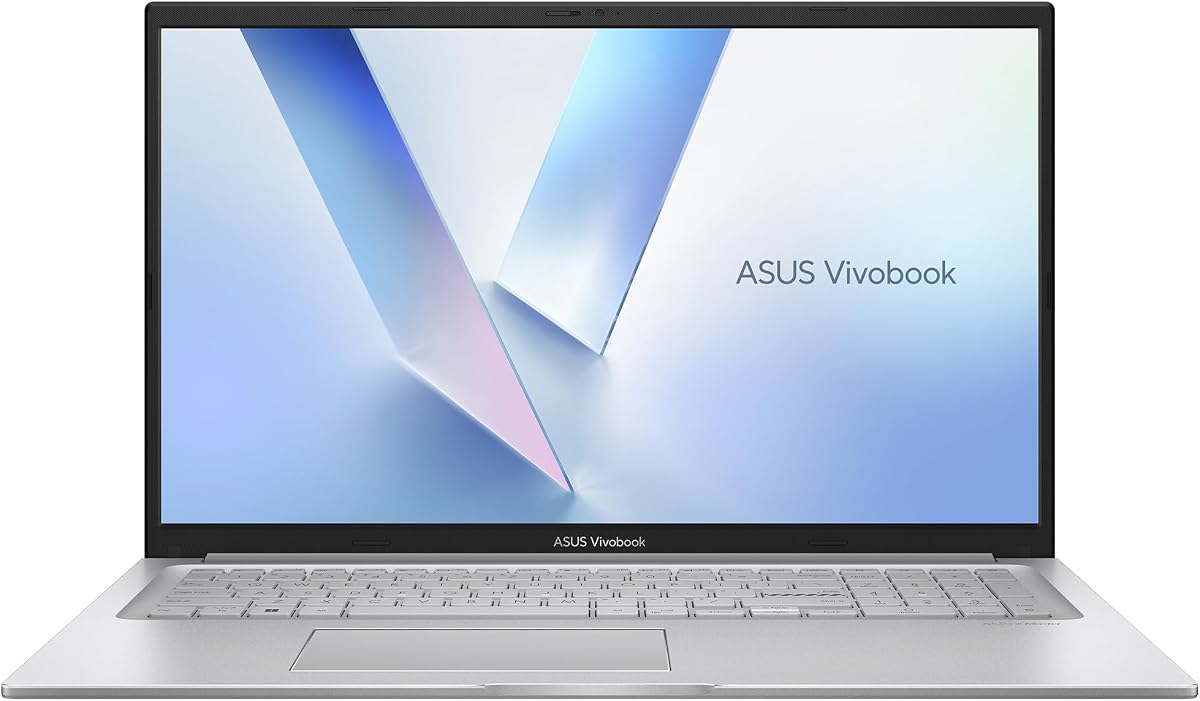
ASUS Vivobook Go 15
4.3Editor score
AMD Ryzen 3 Processor
15.6 Inch FHD Display
Military Grade Durability
Finding the right laptop can be overwhelming given the sheer number of options available today. The ASUS Vivobook Laptop series stands out for balancing performance and affordability. These machines cater to students, professionals, and casual users seeking reliable daily drivers without breaking the bank.
We evaluated ten distinct models based on processor power, memory capacity, storage speed, and display quality. Our analysis considers real-world usage scenarios like multitasking, media consumption, and creative work. We also weighed portability against screen size to ensure each pick meets specific user needs effectively.
Each selection highlights unique strengths such as AI readiness, battery life, or specific connectivity options. While prices fluctuate often, the value proposition remains consistent across these models. Readers should check current offers before purchasing to ensure they get the best deal available for their specific requirements today.
4.3Editor score

4.5Editor score

4.2Editor score
As an Amazon Associate we earn from qualifying purchases.
This side by side comparison highlights the key specifications of all ten models to help you find the perfect fit for your workflow and budget constraints efficiently.






This model stands out as a powerhouse designed for professionals who demand top-tier performance from their daily computing devices. It features a robust Intel Core i9 processor that handles complex simulations and creative software with ease. The integration of AI readiness ensures future-proofing for modern workflows that rely on intelligent automation.
We may earn a commission when you buy through this link, at no additional cost to you.
The 32GB RAM allows users to run dozens of applications simultaneously without experiencing slowdowns or lag. Storage is equally impressive with a massive 1TB SSD that boots the system in seconds and holds vast media libraries. The bundle includes a dedicated cooler to maintain peak frequencies during intensive tasks effectively.
While the performance is elite, the device does generate heat under stress which is mitigated by the included cooling accessory. Users should be aware that the high-end components come at a premium price compared to entry-level laptops. However, the productivity gains justify the investment for power users needing reliability.
Anyone needing a portable workstation for heavy data processing or video editing will find this laptop ideal. It balances raw power with necessary security features like fingerprint login. This device is highly recommended for those seeking a reliable machine capable of handling demanding professional projects efficiently.
Optimized for Next Gen AI workloads to deliver elite-level performance that leaves standard laptops behind.
Includes a specialized cooler to prevent thermal throttling during intense computational tasks.
We may earn a commission when you buy through this link, at no additional cost to you.
This laptop introduces the Qualcomm Snapdragon X platform which promises revolutionary efficiency for mobile computing tasks. Users can expect seamless multitasking thanks to the Hexagon NPU that handles AI workloads locally. The large screen makes it an excellent choice for spreadsheets and creative software needs.
We may earn a commission when you buy through this link, at no additional cost to you.
Battery life is a standout feature here allowing users to work unplugged for extended periods without interruption. The 16GB RAM ensures smooth performance even when running multiple browser tabs and background applications. Storage speed is optimized for quick file access and daily backup operations effectively.
Compatibility with legacy software might vary compared to traditional x86 processors which is a factor to consider. While the display is vibrant some users might prefer touch capabilities for certain workflows. The efficiency gains though offer a significant advantage for travel and remote work scenarios.
Professionals who prioritize mobility and battery endurance should consider this configuration strongly. It offers a unique blend of performance and efficiency that sets it apart from Intel based models. This is a solid pick for those looking to embrace the latest ARM architecture benefits immediately.
Designed with unparalleled power efficiency to deliver multi-day battery life for busy professionals.
Indulge in stunning visuals on a spacious 16-inch screen with crisp resolution for work.
We may earn a commission when you buy through this link, at no additional cost to you.
This lightweight notebook is designed for students and professionals who need a reliable machine for on the go work. The Intel Core i7 processor provides ample power for typical office applications and media consumption. Its 16-inch form factor strikes a good balance between screen real estate and portability.
We may earn a commission when you buy through this link, at no additional cost to you.
The vibrant display offers sharp visuals that reduce eye strain during long sessions of document editing. Memory is sufficient for smooth multitasking allowing users to switch between apps without delay. Connectivity options include USB-C and HDMI making it easy to connect to external monitors at meetings.
Integrated graphics are not suited for heavy gaming but work well for light creative tasks. The lack of a touchscreen might be a downside for users who prefer direct interaction with content. However the overall build quality and speed make it a practical choice for daily routines.
Buyers looking for a thin and light machine that handles business tasks efficiently will appreciate this model. It offers a reliable experience without the bulk of larger desktop replacements. This laptop is a great fit for general productivity and travel needs.
Lightweight portable notebook ideal for students and professionals moving between locations.
16-inch WUXGA display with vibrant colors and sharp visuals for clear viewing.
We may earn a commission when you buy through this link, at no additional cost to you.
This model is perfect for those who need a desktop replacement with a large workspace for productivity. The 17.3-inch display provides ample room for side by side window management and detailed work. It includes a numeric keypad which is essential for financial and data processing tasks.
We may earn a commission when you buy through this link, at no additional cost to you.
The device meets military standards ensuring it can withstand the rigors of travel and daily use. Fast charging technology allows users to get back to work quickly if the battery runs low unexpectedly. Audio quality is enhanced for media consumption making it a good all-rounder device.
Portability is reduced due to the larger dimensions and weight compared to 14 or 15 inch options. While performance is reliable for everyday tasks it may not handle intense rendering loads efficiently. The balance of screen size and features makes it a strong contender for office work.
Anyone needing a dedicated home office machine with a big screen will find this suitable. It offers value by combining storage and display size in a durable chassis. This laptop is recommended for users prioritizing screen real estate over travel convenience.
17.3 inch FHD display offers clear sharp visuals and wide viewing angles.
Built to meet US MIL-STD 810H military-grade standard for added confidence.
We may earn a commission when you buy through this link, at no additional cost to you.
This budget-friendly option delivers solid performance for basic tasks without costing a fortune. The Ryzen 5 processor is capable of handling daily computing needs including web browsing and video calls. It features a sleek design that fits well in casual and professional environments alike.
We may earn a commission when you buy through this link, at no additional cost to you.
Battery efficiency is supported by fast charging technology allowing quick top ups between meetings. The keyboard is tuned to reduce strain making typing more comfortable over long periods. Connectivity is robust with Wi-Fi 6E ensuring stable internet speeds for streaming and downloads.
The 8GB RAM is a limitation for power users running many apps simultaneously but works well for standard use. Users looking to expand storage or memory might find the options limited on some models. However for everyday tasks it provides a reliable experience without unnecessary costs.
Students and home users looking for a practical machine will find this model attractive. It balances cost with necessary features like fast charging and durable construction. This is a great entry point for the ASUS Vivobook ecosystem for budget conscious buyers.
Recharge battery up to 50% capacity in just 30 minutes quickly.
ErgoSense keyboard design reduces strain on your hands and wrists.
We may earn a commission when you buy through this link, at no additional cost to you.
This is an excellent entry-level laptop for those needing a reliable device for basic computing. It features DDR5 memory which offers improved performance over older DDR4 generations. The slim bezels make the screen appear larger and more immersive for media consumption.
We may earn a commission when you buy through this link, at no additional cost to you.
Storage is the primary limitation here as 128GB fills up quickly with modern operating system updates. Users may need to rely heavily on cloud storage or external drives for file management. Despite this the fast SSD ensures that the system runs smoothly for daily tasks.
Privacy features like the webcam shield provide peace of mind during video conferences. The lightweight design makes it easy to carry in a backpack or bag to school. It is a solid choice for users with minimal storage needs and tight budgets.
Families looking for a secondary computer or a student laptop will find this practical. It covers the basics well without extra cost for features not needed. This model is recommended for simple web browsing and word processing needs.
Webcam shield included for instant privacy during online calls and meetings.
Super slim bezel design offers a vibrant and immersive visual experience.
We may earn a commission when you buy through this link, at no additional cost to you.
This listing offers a unique opportunity to get a highly customized machine tailored to specific needs. The Core i9 processor ensures that the system can handle demanding workloads with ease. Buyers can choose memory and storage levels that fit their specific usage scenarios effectively.
We may earn a commission when you buy through this link, at no additional cost to you.
Security features like the fingerprint reader and webcam shield add layers of protection for sensitive data. The Windows 11 Pro operating system is beneficial for users needing advanced business features like remote desktop. The backlighting ensures the keyboard is usable in dim environments comfortably.
Because this is a customized bundle warranty terms might differ slightly from standard manufacturer policies. Users should review the coverage details carefully to understand what is protected. However the performance benefits are significant for those needing more than standard configurations.
Power users and developers will appreciate the flexibility to upgrade memory and storage. It serves as a robust workstation capable of running virtual machines and heavy software. This is an ideal choice for those needing a versatile machine for complex tasks.
Open seal for upgrading purposes allows tailored RAM and SSD options.
Windows 11 Pro provides enhanced security and business-ready computing tools.
We may earn a commission when you buy through this link, at no additional cost to you.
This compact laptop offers an unusual combination of high RAM with an entry-level processor. The 14-inch form factor is perfect for users who need maximum portability without sacrificing screen clarity. It is well suited for students and remote workers who travel frequently.
We may earn a commission when you buy through this link, at no additional cost to you.
Despite the lower end processor the generous RAM helps smooth out multitasking in many scenarios. Storage is abundant which is great for keeping media libraries and projects on device. Wi-Fi 6 connectivity ensures that streaming and downloads happen without bottlenecks.
The processor may struggle with heavy applications compared to i5 or i7 options. Users needing to run complex calculations or gaming might find it limiting. However for general productivity and browsing it provides a very fast experience due to the RAM.
Anyone prioritizing size and storage will find this configuration uniquely useful. It bridges the gap between portability and performance in a small package. This is a smart buy for those who value disk space and memory over raw CPU speed.
14-inch FHD display with IPS-level panel and anti-glare finish.
24GB high-bandwidth RAM to smoothly run multiple applications at once.
We may earn a commission when you buy through this link, at no additional cost to you.
This device is a key part of the new Copilot+ PC era offering advanced AI features. The Snapdragon X processor brings efficiency and performance to the small 14-inch chassis. Users benefit from the latest Windows features designed to enhance productivity through intelligence.
We may earn a commission when you buy through this link, at no additional cost to you.
The display offers sharp visuals that make it great for reading and detailed work. 16GB of RAM ensures that the system remains responsive during daily tasks. The build quality is consistent with ASUS standards making it a reliable choice for general use.
While the hardware is capable some software features are still rolling out across different regions. Users should be patient with full functionality availability depending on their location. However the promise of long battery life and speed makes it a forward looking device.
Early adopters of AI driven computing will appreciate this machine highly. It combines modern architecture with a compact design that is easy to carry. This laptop is a top choice for those looking to future-proof their computing setup.
Turn ideas into generated artwork and search across time with new AI features.
Snapdragon X processor ensures smooth multitasking and efficient computing.
We may earn a commission when you buy through this link, at no additional cost to you.
This model brings AMDs Ryzen AI 7 processor to the forefront of the Copilot+ PC lineup. It features an XDNA NPU designed for high efficiency in processing AI workloads locally. The display is crisp and bright making it suitable for entertainment and work alike.
We may earn a commission when you buy through this link, at no additional cost to you.
Battery life is optimized to last up to 12 hours on a single charge for full days of use. The Radeon graphics provide a level of visual fidelity that supports light gaming. This makes it a versatile machine for both work and leisure activities effectively.
Software support for certain features depends on updates which may arrive over time. Users should check regional availability to ensure full feature support upon purchase. The hardware is robust and capable of handling demanding tasks well beyond basic browsing.
Gamers and creators looking for a portable AI machine will find this interesting. It combines the benefits of AMDs architecture with the latest Windows features. This is a recommended option for those wanting powerful AI capabilities in a slim device.
Unleash performance with AMD XDNA NPU designed for ultimate efficiency.
Built with a powerful 42Wh battery for up to 12 hours of battery life.
We may earn a commission when you buy through this link, at no additional cost to you.
Selecting the right laptop depends on understanding your specific workflow and technical needs.
The processor is the brain of your laptop and dictates how fast it can handle tasks. Models with Intel Core i7 or i9 chips are best for heavy workloads like video editing. Those with i3 or i5 are sufficient for general browsing and document processing tasks.
Choose a processor that matches the intensity of your daily computing requirements.
RAM determines how many applications you can run simultaneously without slowdowns. 16GB is the sweet spot for most users today ensuring smooth multitasking. Budget models may have 8GB which is adequate but limits complex workflows.
Prioritize at least 16GB for future-proofing your computing experience.
Solid State Drives are essential for fast boot times and file access speeds. Look for NVMe SSDs which offer higher throughput compared to standard drives. Capacity should be at least 512GB to accommodate modern applications and media files.
Ensure you have enough space and speed for your specific data needs.
The screen is where you spend most of your time so resolution matters greatly. FHD is standard but WUXGA offers a 16:10 aspect ratio which is better for productivity. Color accuracy and brightness levels also impact the viewing experience significantly.
Select a display resolution that reduces eye strain during long work sessions.
Portability is often a key factor requiring good battery endurance. Efficient processors like those in Copilot+ models can last up to 12 hours. Standard models may offer less depending on usage intensity and screen brightness settings.
Check battery specifications if you plan to work away from power outlets often.
A good selection of ports saves you from needing extra dongles for peripherals. Look for USB-C support with power delivery for versatile charging and data transfer. HDMI and USB-A ports are still useful for legacy devices and external monitors.
Ensure the laptop has enough ports for your specific hardware setup.
Laptops that meet military-grade standards tend to be more resistant to shocks and drops. This is important if you travel frequently or work in varying environments. A sturdy chassis also ensures that internal components remain protected over time.
Look for durability ratings if the device will see heavy daily use.
Since typing is a primary input method comfort is a vital aspect to consider. ErgoSense keyboards found on Vivobooks offer good key travel and spacing. Backlit keys are also helpful for typing in low-light environments effectively.
Test the keyboard feel if possible to ensure it suits your typing style.
Keep your device clean by using a soft microfiber cloth to wipe the screen and chassis regularly. Avoid using harsh chemicals that might damage the anti-glare coating on the display or the frame material.
Store your laptop in a cool dry place when not in use to prevent overheating and moisture damage. Use a protective sleeve during transport to shield the unit from bumps and scratches in a bag.
Update your Windows system regularly to ensure you have the latest security patches and performance improvements. Managing software updates will keep your machine running smoothly and protect it from vulnerabilities.
For students, the Vivobook Go 15 offers a great balance of portability and performance. It has a lightweight design and sufficient power for research and writing tasks. The price point is also reasonable for a student budget.
Yes, higher end models with 16-inch screens and color accurate displays are suitable for light creative work. The AI capabilities in newer models also assist with generating content efficiently for creators.
To extend battery life, reduce screen brightness and disable unnecessary background applications. Using the fast charging feature regularly can also help maintain battery health over time.
Some models allow RAM upgrades while others have soldered memory. It is best to check the specific product specifications before purchasing to see if it is user upgradable.
Yes, most models include HDMI ports and USB-C ports that support video output. You can easily connect to monitors or projectors for presentations and expanded workspace needs.
Copilot+ PC features leverage AI to enhance productivity with tools like recall and live captions. This is available on select newer models designed to integrate deeply with Windows capabilities.
Standard manufacturer warranties are usually one year covering parts and labor. Some upgraded bundles may offer extended coverage options through third-party providers included in the listing.
Entry and mid models support light casual gaming. Integrated graphics handle older titles well but dedicated graphics are needed for heavy AAA gaming.
We have reviewed ten models ranging from budget-friendly to high-performance options. The Vivobook 15 with i9 offers the best raw power while the Go 15 is a smart budget choice.
When choosing, consider your primary use case and whether portability or screen size matters more. Ensure you select a model with enough RAM to last for the next few years effectively.
Always check the latest pricing before buying as deals fluctuate frequently. This guide provides a solid foundation for finding the right Vivobook for your specific needs.