This guide compares the top H270 motherboards for performance, gaming, and value, helping you choose the best board for your Intel 6th and 7th gen build.
As an Amazon Associate we earn from qualifying purchases. We may earn a commission when you buy through links on this page, at no additional cost to you. Read our affiliate disclosure.As an Amazon Associate we earn from qualifying purchases.Purchases through our links may earn us a commission, at no extra cost to you. Read our affiliate disclosure.
Selecting the right motherboard is crucial for any PC build, especially when working with older Intel platforms. The H270 chipset offers a balance of features and cost, supporting essential connectivity and storage options for reliable systems.
We have analyzed ten distinct H270 motherboards based on their specifications, user feedback, and feature sets. Our comparison covers everything from connectivity ports to cooling solutions to help you make an informed decision for your specific needs.
Each product in this list highlights unique strengths and potential limitations to guide your purchase. Please note that prices and availability can change frequently, so always verify the current details before finalizing your order.
Top 3 Picks for Best H270 Motherboards
Best Budget
MSI 7A64-001R Gaming Intel H270 DDR4 HDMI USB 3 Crossfire ATX Motherboard (H270 Gaming PRO Carbon)
4.0Editor score
Supports 7th and 6th Gen Intel Core processors
Features Mystic Light sync for customizable RGB lighting
The following table provides a side-by-side comparison of the ten selected H270 motherboards to help you quickly identify key specifications and differences across the lineup.
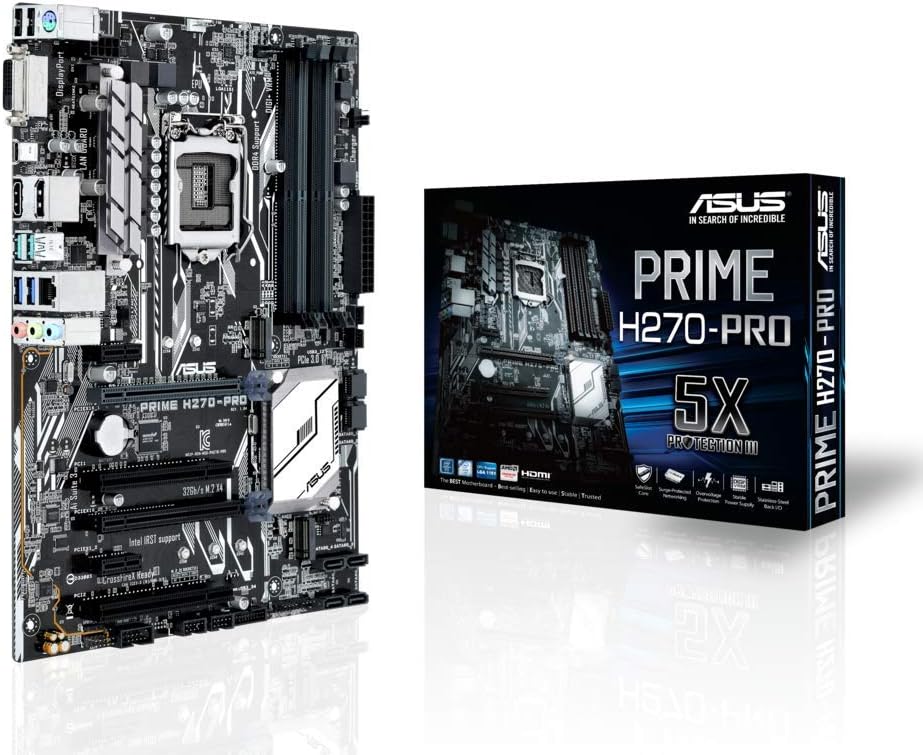
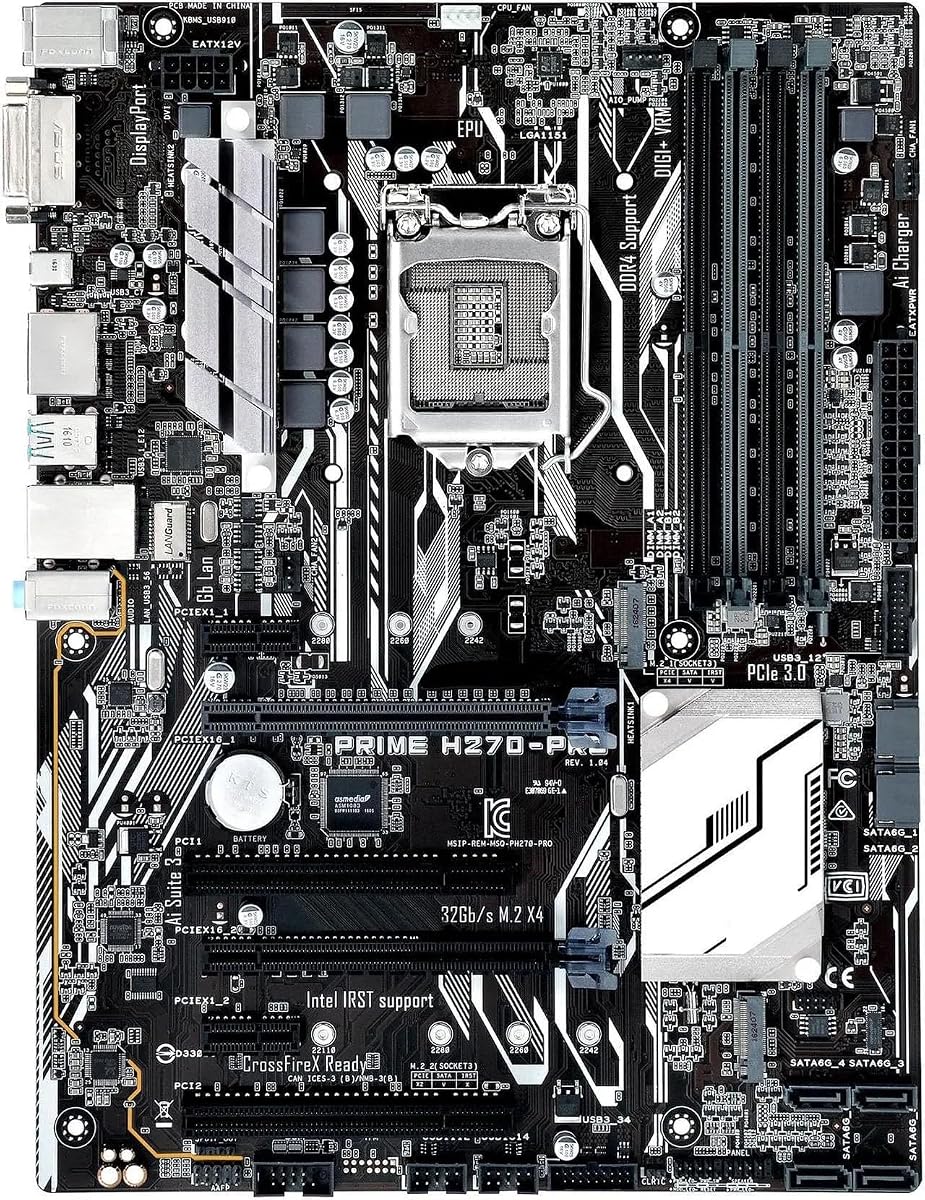
ASUS Prime H270-PRO DDR4 Intel H270 SATA ATX Motherboard
Intel H270 Chipset
LGA1151 Socket Support
Dual Channel DDR4 RAM
USB 3.1 Type C Port
The ASUS Prime H270-PRO stands out as a reliable choice for users seeking stability and connectivity on the H270 platform. With a rating of 4.3 stars, it is praised for its durable construction and extensive I/O options that cater to modern peripheral needs.
Pros
Excellent build quality with robust VRM
Comprehensive port selection for connectivity
Includes 5X Protection III safeguards
Clean layout for easy cable management
Reliable BIOS for stable performance
Cons
Higher price point than budget options
Limited RGB lighting features
We may earn a commission when you buy through this link, at no additional cost to you.
This motherboard features a solid power delivery system that ensures your processor runs smoothly under load. The inclusion of USB 3.1 Type-C alongside traditional USB 3.0 ports makes it versatile for various devices. Additionally, the 5X Protection III technology provides hardware-level safeguards against dust, moisture, and electrical surges.
While it excels in reliability, it may not be the top choice for users looking for extensive RGB customization or premium gaming aesthetics. The focus here is squarely on functionality and long-term system integrity rather than flashy visual elements.
If you are building a workstation or a dependable home PC, this board offers the right balance of features and durability. Its compatibility with 6th and 7th generation Intel Core processors ensures it meets the needs of a wide range of system configurations.
Robust Component Protection
The 5X Protection III feature ensures your system is protected against common electrical and environmental hazards.
Modern Connectivity Options
With USB 3.1 Type-C and multiple USB 3.0 ports, connecting fast storage and peripherals is seamless.
ASUS ROG Strix H270F Gaming LGA1151 DDR4 DP HDMI DVI M.2 ATX Motherboard with USB 3.1
Dual M.2 Slots
Intel Optane Compatibility
ROG SupremeFX Audio
AURA Sync RGB Lighting
The ASUS ROG Strix H270F brings high-end features to the mid-range H270 chipset, appealing to gamers and enthusiasts who demand performance and style. It boasts a 4.2-star rating for its blend of premium audio, cooling, and storage capabilities.
Pros
Dual M.2 slots for high-speed storage
Superior audio quality with SupremeFX
Comprehensive RGB lighting ecosystem
Safe Slot Core for GPU protection
Advanced cooling with FanXpert 4
Cons
Premium pricing may not fit all budgets
Complex BIOS for casual users
We may earn a commission when you buy through this link, at no additional cost to you.
One of the strongest aspects of this board is its dual M.2 support, which allows for faster boot times and application loading when paired with compatible SSDs. The ROG SupremeFX audio solution delivers high-fidelity sound, enhanced by high-quality Japanese capacitors for a better auditory experience.
Users should note that the premium features come with a higher cost and a more complex feature set. The extensive RGB controls and advanced fan management tools require some time to master, which might be overkill for simple office builds.
For those building a gaming rig where every bit of performance and aesthetics matter, this motherboard delivers a cohesive package. It supports AMD CrossFire for multi-GPU setups, making it a versatile platform for graphical power.
High-Speed Storage Expansion
Dual M.2 slots enable you to utilize the speed of NVMe drives alongside Intel Optane Memory.
Premium Audio Experience
The ROG exclusive SupremeFX audio system provides immersive sound with low noise and high quality.
MSI 7A64-001R Gaming Intel H270 DDR4 HDMI USB 3 Crossfire ATX Motherboard (H270 Gaming PRO Carbon)
H270 Chipset
Gaming LAN Protection
Mystic Light Sync
DDR4 Boost Technology
The MSI H270 Gaming PRO Carbon is an excellent option for budget-conscious gamers who still want essential gaming-oriented features. With a 4.0 rating, it is recognized for offering solid performance and customization without a high price tag.
Pros
Affordable price for gaming features
Includes Mystic Light RGB synchronization
Gaming LAN with hardware protection
Durable Steel Armor for memory
Good value for money ratio
Cons
Slightly lower build premium than higher models
Fewer rear I/O ports
We may earn a commission when you buy through this link, at no additional cost to you.
This board includes features like Mystic Light Sync, which allows you to control lighting across compatible components easily. The Gaming LAN protect feature helps prevent latency spikes caused by network congestion, ensuring smoother online gaming sessions.
While it offers great value, the board may lack some of the robust VRM cooling or extensive expansion slots found in more expensive options. Users should be aware that heavy overclocking might not be supported to the same degree as on premium boards.
For entry-level to mid-range builds, this motherboard provides the necessary tools to get a system running efficiently. It supports AMD CrossFire, allowing users to add a second graphics card for increased graphical power if needed.
Stable Network Performance
Gaming LAN with protection ensures your internet connection remains stable during critical online activities.
Visual Customization
Mystic Light Sync allows you to synchronize your motherboard lighting with other components for a uniform look.
The ASRock H270 PRO4 is a straightforward board designed for users who need reliability without unnecessary bells and whistles. It holds a 4.2-star rating from users who appreciate its functional design and consistent performance in daily tasks.
Pros
Solid build quality for daily use
Multiple PCIe slots for expansion
SATA Express support available
Straightforward BIOS interface
Good memory speed support
Cons
Basic aesthetics compared to gaming boards
Limited advanced features
We may earn a commission when you buy through this link, at no additional cost to you.
Key specifications include support for dual-channel DDR4 memory and multiple PCIe slots, which are useful for adding expansion cards like sound cards or network adapters. The inclusion of a SATA Express port provides an option for high-speed storage in legacy systems.
However, the board lacks some of the modern connectivity options found in newer models, such as USB Type-C or extensive RGB lighting. This makes it better suited for traditional builds where aesthetics and cutting-edge I/O are not priorities.
If you are looking for a workhorse board that simply gets the job done without complications, the H270 PRO4 is a strong candidate. It supports the 6th generation Intel Core processors effectively, ensuring compatibility with a wide range of CPUs.
Expansion Flexibility
Multiple PCIe 3.0 slots allow for diverse hardware configurations to meet specific user requirements.
Legacy Storage Support
The SATA Express port offers an additional pathway for connecting high-speed storage devices.
ASUS Prime H270-PLUS LGA1151 DDR4 HDMI DVI VGA M.2 H270 ATX Motherboard with USB 3.0
Dual M.2 Slots
USB 3.0 Front Panel
Safe Slot Core PCIe
Intel Optane Support
The ASUS Prime H270-PLUS is another strong contender from the Prime series, known for its high user rating of 4.4 stars. It emphasizes practical features that enhance usability, such as front panel USB 3.0 connectivity for easy access.
Pros
Strong user rating for reliability
Dual M.2 for fast storage
Front USB 3.0 convenience
Protected PCIe slots
Diverse OS support
Cons
No USB 3.1 Type-C on rear
Standard RGB options
We may earn a commission when you buy through this link, at no additional cost to you.
This board supports Intel Optane Memory technology, which can significantly boost system responsiveness when paired with an SSD. The Dual M.2 slots provide ample room for future storage upgrades without needing external enclosures or adapters.
While it lacks the USB 3.1 Type-C port found on the PRO model, the overall feature set remains competitive. The Safe Slot Core design reinforces the PCIe slots to prevent damage from heavy graphics cards during installation or use.
Ideal for users who want a blend of modern storage tech and reliable everyday performance, this board is a versatile choice. Its support for various Windows versions ensures compatibility with both new and legacy software environments.
Storage Optimization
Intel Optane support allows for hybrid storage solutions that speed up system boot and app loading times.
Reinforced Expansion
Safe Slot Core PCIe slots are engineered to withstand the weight of heavy graphics cards and other expansion cards.
The GIGABYTE GA-H270-Gaming 3 is tailored specifically for gamers who prioritize network performance and expandability. It has earned a 4.3-star rating due to its specialized Killer E2500 networking controller that prioritizes gaming traffic over other data.
Pros
Dedicated gaming network controller
USB 3.1 Type-C connectivity
Four memory slots for upgrades
Multi-GPU support included
Good audio subsystem
Cons
Design may be too aggressive for some
Complex fan management
We may earn a commission when you buy through this link, at no additional cost to you.
With support for 2-Way CrossFire, users can utilize two graphics cards to boost frame rates in supported titles. The inclusion of USB 3.1 Type-C on the rear panel ensures that you can connect modern devices at high speeds.
The four DIMM slots allow for significant memory expansion, which is beneficial for multitasking or gaming with large asset loads. However, the aggressive aesthetic and specific feature set might not appeal to users building a professional or office workstation.
If you are focused on achieving the best possible gaming experience on an H270 platform, this board offers the right mix of networking and hardware support. Its audio and power delivery are also designed to sustain performance during long gaming sessions.
Prioritized Network Traffic
Killer E2500 Networking automatically prioritizes gaming applications to reduce lag and improve latency.
Multi-GPU Capability
Support for 2-Way CrossFire allows you to link two graphics cards for enhanced graphical rendering.
This motherboard is designed specifically to address contact issues and damage that may occur to existing ASUS Prime H270-PRO units. It serves as a practical solution for users looking to extend the life of their current system hardware without full replacement.
Pros
Resolves contact and burnout issues
Optimized for multi-core processors
Enhanced thermal management
Stable performance design
Troubleshooting recommendations provided
Cons
Labeled as replacement not new build
No official brand specification
We may earn a commission when you buy through this link, at no additional cost to you.
The product features an optimized power design that supports multi-core processors effectively. Its advanced heatsink design ensures that heat is dissipated efficiently, which is crucial for maintaining system stability under heavy loads.
While it is a replacement unit, it includes troubleshooting recommendations to help users avoid common installation pitfalls. The commitment to quality assurance suggests that these units undergo testing to ensure they operate normally after installation.
For those dealing with specific component failures like short circuits or dust damage, this board offers a viable path to restoration. It focuses on functionality and stability, ensuring that the system returns to a normal operating state.
Targeted Component Repair
Designed to replace chips damaged by poor contact or burnout, allowing for continued system usage.
Thermal Stability
Advanced heatsinks increase heat dissipation to maintain stable performance under high-load conditions.
H270 Performance Motherboard 1151 Motherboard Inte H270 DDR4 64GB M.2 ATX Support i5-7400 i3-7300 i5-6600 i3-6300 CPU
LGA 1151 Socket
64GB DDR4 Support
M.2 Slot
ATX Form Factor
This H270 Performance Motherboard offers a functional platform for budget builds utilizing 6th and 7th generation Intel processors. While it does not have specific marketing features like RGB or advanced networking, it covers the essential requirements for a working PC.
Pros
Supports up to 64GB RAM
Includes M.2 storage slot
Compatible with 7th gen CPUs
Standard ATX dimensions
Affordable entry-level option
Cons
Limited documentation available
Basic feature set
We may earn a commission when you buy through this link, at no additional cost to you.
One of its key advantages is the support for up to 64GB of DDR4 memory, which is significant for a board at this price point. This allows users to run memory-intensive applications like virtual machines or large data processing tasks.
The inclusion of an M.2 slot provides a pathway for faster storage, even if the board lacks premium aesthetics. It is suitable for users who prioritize raw specs and affordability over brand name or software ecosystem.
If you are assembling a cost-effective build for school or office work, this board provides the necessary hardware interface. Ensure you verify the specific CPU compatibility listed to avoid any mismatches during the installation process.
High Memory Capacity
Support for 64GB DDR4 allows for robust multitasking and handling of demanding software applications.
Standard Form Factor
ATX size ensures compatibility with a wide range of standard PC cases and cooling solutions.
This H270 Motherboard provides a core platform for users seeking basic functionality with modern memory support. It adheres to standard specifications for the LGA 1151 socket, ensuring compatibility with a range of Intel processors.
Pros
Focuses on essential connectivity
DDR4 support for speed
Standard socket compatibility
Simple and clean layout
Value-oriented pricing
Cons
Minimal features listed
Lack of brand reputation
We may earn a commission when you buy through this link, at no additional cost to you.
The support for DDR4 memory allows for faster data access compared to older DDR3 generations. With a capacity of 64GB, it ensures that the system can handle multi-application workloads efficiently.
As a basic model, it may lack the extra features like advanced audio or gaming LAN found in branded models. However, for a system that primarily needs to run standard applications, these omissions are acceptable.
Ideal for budget builds or secondary systems, this board serves the purpose of connecting essential components reliably. It is a good choice for users who do not require high-end expansion or specialized software support.
Modern Memory Support
DDR4 support ensures that your system can utilize faster RAM modules for better overall performance.
Essential Compatibility
Standard LGA 1151 socket allows for easy CPU upgrades within the 6th and 7th generation families.
H270-PLUS Motherboard LGA 1151 H270 DDR4 64GB Support i3-6100 i3-6300 i5-6500 i5-7500 i7-6700 CPU M.2 ATX
LGA 1151 Socket
M.2 ATX Form
64GB Memory
Supports i3 i5 i7
The H270-PLUS Motherboard offers broad CPU support across i3 i5 and i7 models within the 6th and 7th generation families. It is designed to be a flexible platform for a wide range of system configurations and performance levels.
Pros
Supports i3 i5 and i7 CPUs
Includes M.2 slot
64GB RAM capacity
Standard ATX dimensions
Cost-effective solution
Cons
Limited marketing specs
Basic I/O features
We may earn a commission when you buy through this link, at no additional cost to you.
With an M.2 slot and 64GB memory capacity, this board balances storage speed and workload capability. It is suitable for users who want to upgrade their processor without changing the entire motherboard platform.
The ATX form factor ensures it fits in standard cases, making it easy to integrate into existing builds or new ones. While the features are basic, they cover the essential needs for a functional computer system.
For those looking to rebuild an older PC or start a simple project, this board provides the necessary compatibility and slots. It is a practical solution for users who prioritize component compatibility and storage speed over gaming features.
Broad CPU Compatibility
Support for i3 i5 and i7 processors allows for flexible performance choices based on your budget and needs.
Fast Storage Interface
The M.2 slot allows for the use of NVMe drives to improve system responsiveness and load times.
We may earn a commission when you buy through this link, at no additional cost to you.
Buying Guide – How to Choose the Best H270 Motherboard
Choosing the right H270 motherboard involves considering several factors to ensure it meets your performance and budget needs.
Chipset Compatibility
The H270 chipset is designed for 6th and 7th generation Intel Core processors. Ensure you check the specific CPU socket (LGA1151) to guarantee compatibility with your processor before purchasing.
Memory Support
Look for motherboards that support DDR4 memory since this is the standard for this generation. Most H270 boards support up to 64GB of RAM which is sufficient for most gaming and productivity tasks.
Storage Options
Storage speed is critical for system performance. Prioritize models that include M.2 slots for NVMe SSDs or SATA Express ports to take advantage of faster data transfer rates compared to traditional SATA III.
Connectivity
Check the rear I/O panel for USB ports. USB 3.1 Type-C is a valuable addition for modern devices but may not be present on budget boards. Ensure there are enough USB ports for your peripherals.
Expansion Slots
If you plan to use multiple GPUs or other expansion cards verify the number of PCIe slots available. Most H270 boards offer one primary PCIe 3.0 x16 slot and several smaller x1 slots for sound or network cards.
Cooling and Power
Thermal management is key to system stability. Look for boards with adequate heatsinks on the VRMs and fan headers. A robust power delivery system helps maintain stable performance under heavy loads.
Audio Quality
For users who value sound quality check the onboard audio solution. Some boards offer enhanced audio codecs with capacitors and noise protection which improve the listening experience for games and media.
Budget and Value
Set a budget that reflects your needs. While premium boards offer more features like RGB and advanced BIOS controls budget models often cover the essential specs needed for a functional system.
How to Use and Care for Your H270 Motherboard
Update the BIOS periodically to ensure compatibility with new CPUs and to fix any bugs. Always back up your BIOS settings before making changes to avoid losing your system configuration.
Frequently Asked Questions
What CPUs are compatible with H270 motherboards?
H270 motherboards are compatible with 6th generation (Skylake) and 7th generation (Kaby Lake) Intel Core processors. This includes models such as the i3 i5 and i7 series that utilize the LGA1151 socket.
Do H270 motherboards support overclocking?
No, H270 motherboards generally do not support CPU overclocking. If you want to overclock your processor you will need to look for motherboards with a Z270 or Z370 chipset.
Is M.2 storage support common on H270 boards?
Many H270 boards include at least one M.2 slot for storage. Higher end models may offer two slots or support for NVMe drives which provide faster boot times and file access.
What is the maximum RAM capacity for H270?
Most H270 motherboards support up to 64GB of DDR4 memory. This capacity is sufficient for high end gaming and professional workstation applications requiring large memory pools.
Can I use multiple graphics cards on H270?
Some H270 motherboards support AMD CrossFire for two graphics cards. However, support for NVIDIA SLI is limited or non-existent on this chipset so check specific specs before buying.
Does the H270 chipset support USB 3.1?
The native H270 chipset supports USB 3.0. Manufacturers can add USB 3.1 Type-A or Type-C ports via third-party controllers but this depends on the specific board model you choose.
Is it worth buying an H270 motherboard in 2026?
If you already have a 6th or 7th gen CPU the H270 platform is a solid choice for a cost effective build. For new builds starting from scratch consider newer platforms for better longevity.
How do I update the BIOS on an H270 board?
Most boards allow BIOS updates via a USB drive and the built-in utility. Visit the manufacturer's website to download the latest BIOS file and follow the instructions provided in the user manual.
Final Thoughts on Choosing the Best H270 Motherboard
Remember to check the current prices and availability before purchasing as these can fluctuate frequently. Verifying the compatibility of your chosen CPU and RAM is also essential to ensure a smooth build experience.
This guide compares the top Galaxy Watch 8 Chargers for 2026, reviewing compatibility, charging speed, safety features, and build quality to help you choose