
HBN Watt Meter Plug with Backlight
4.6Editor score
9 display modes for detailed data
Backlit LCD for night reading
Data storage for power outages
This guide compares the top 10 energy consumption monitors for PC to help you track usage, reduce bills, and optimize your home or office electrical efficiency
Finding the right energy consumption monitors for PC can help you understand exactly how much electricity your devices use. These tools provide detailed insights into power draw, voltage, and overall efficiency. By monitoring your usage, you can identify energy hogs and make informed decisions to lower your monthly bills and reduce your carbon footprint.
We compared ten top-rated monitors based on accuracy, ease of use, and feature sets. Our analysis covers plug-in meters, smart home integrations, and whole-house systems. Each product was evaluated for its ability to track real-time data, store historical records, and provide actionable insights for saving energy and money in various settings.
Each pick in this list shows unique strengths for different needs, from basic plug-in tracking to advanced whole-house monitoring. Whether you want to check a single PC or manage an entire home grid, there is a suitable option here. Please note that product availability and pricing can change frequently, so verify details before purchasing.
4.6Editor score

4.6Editor score

4.3Editor score
This side-by-side comparison highlights the key specifications and capabilities of each monitor. Use this table to quickly assess which device fits your specific monitoring needs, budget, and technical requirements for tracking power consumption effectively.


The Emporia Vue 3 Home Energy Monitor stands out as a top choice for users seeking detailed insights into their electricity usage. With a rating of 4.6, it offers reliable performance and robust features designed for whole-house monitoring. Its ability to track energy consumption in real time makes it a powerful tool for managing costs and efficiency across an entire home.
We may earn a commission when you buy through this link, at no additional cost to you.
This device excels in providing actionable data through its intuitive app. You can monitor up to 16 branch circuits, allowing you to pinpoint specific appliances that consume excessive power. The inclusion of solar and net metering support adds significant value for homes with renewable energy systems. Additionally, the UL certification ensures that the hardware meets rigorous safety standards.
While the Vue 3 is highly capable, it does require access to your circuit panel for installation. This may involve professional help if you are not comfortable working with electrical systems. However, the depth of data provided justifies this initial effort. The app retains data for extended periods, enabling you to track trends over time without losing critical information.
Ideal for homeowners looking to reduce energy bills and improve efficiency, this monitor offers a balanced mix of accuracy and ease of use. Whether you are interested in solar integration or simply want to track your daily consumption, this device delivers consistent performance. It is a strong recommendation for anyone serious about energy management.
The app provides live updates on your energy usage, allowing you to see how much power each circuit consumes instantly. This helps in identifying spikes and adjusting habits accordingly.
If you have solar panels, this monitor can track how much energy you generate versus consume. This feature is essential for optimizing your solar investment and managing net metering credits.
We may earn a commission when you buy through this link, at no additional cost to you.
The Upgraded Watt Power Meter Plug is a straightforward tool for monitoring individual appliance energy usage. With a rating of 4.6, it offers reliable readings for voltage, amps, and power consumption. Its simplicity makes it perfect for users who want to check specific devices without installing complex systems.
We may earn a commission when you buy through this link, at no additional cost to you.
This device features seven display modes, allowing you to toggle through various metrics like power factor and cumulative cost. The backlight ensures readability in dark environments, and the overload protection provides peace of mind by warning you when an appliance exceeds safe power levels. The memory function saves data even if the plug is removed.
The lack of smart connectivity means you cannot view data remotely, which may be a limitation for tech-savvy users. However, for manual tracking and quick checks, it is highly effective. The setup requires no tools, just plug it into the outlet and your appliance into the monitor. It is a practical choice for renters or casual users.
Recommended for anyone needing a basic, affordable way to track energy usage without cloud dependencies. It works well for high-energy appliances like heaters or gaming PCs. Its durability and ease of use make it a valuable addition to any household looking to save on electricity bills.
Seven display modes allow you to see different parameters such as watts, kilowatt-hours, and power factor. This versatility helps in understanding how your appliance affects your overall energy bill.
The built-in safety feature warns you when the power exceeds a set threshold. This can prevent potential hazards and protect your devices from damage due to excessive power draw.
We may earn a commission when you buy through this link, at no additional cost to you.
The SURAIELEC Outlet Watt Meter is designed for users who need precise measurements without the complexity of smart home systems. With a rating of 4.5, it delivers accurate readings across a wide voltage range. Its compact design ensures it does not block adjacent outlets, making it ideal for crowded power strips.
We may earn a commission when you buy through this link, at no additional cost to you.
One of its standout features is the 90-day data hold memory, which stores usage information even during power outages. The Class 1.0 accuracy standard ensures reliable readings for watts, volts, and amps. The backlight aids visibility in low light, and the space-saving design allows for convenient placement near any appliance.
While it lacks remote access capabilities, the local data storage is sufficient for basic tracking. You can calculate costs based on your local electricity rates, providing a clear picture of how much specific devices cost to run. The reset button makes it easy to start fresh measurements for new appliances without needing a reset tool.
Best suited for households that want a reliable, plug-and-play solution for monitoring individual appliances. It is perfect for checking the efficiency of older devices or identifying hidden energy drains. Its affordability and accuracy make it a solid choice for budget-conscious consumers seeking detailed energy insights.
Supports a wide range of voltages from 90 to 250V, making it suitable for various appliances and international use. This flexibility ensures consistent performance regardless of voltage fluctuations.
Stores up to 90 days of data internally, allowing you to review usage over time without needing a constant connection. This is helpful for tracking seasonal changes in energy consumption.
We may earn a commission when you buy through this link, at no additional cost to you.
The Meross Smart Home Energy Monitor is designed for tech enthusiasts who want deep integration with their smart home ecosystem. With a rating of 4.3, it offers powerful features like Home Assistant compatibility and local data storage. This ensures your energy data remains private and accessible without relying on cloud servers.
We may earn a commission when you buy through this link, at no additional cost to you.
It excels in optimizing solar energy usage by detecting surplus power and automatically routing it to high-energy appliances. This feature can significantly reduce electricity bills for homes with solar panels. The device tracks power, voltage, and current with high accuracy, providing detailed charts for analysis across different time periods.
While the setup process may require some technical knowledge to configure with Home Assistant, the benefits are substantial. There are no hidden subscription fees, and the system operates securely over your local network. This makes it an excellent choice for users who prioritize privacy and want full control over their data without ongoing costs.
Recommended for smart home users who value automation and privacy. It is particularly beneficial for solar homeowners looking to maximize efficiency. If you are comfortable with technical setups, this monitor offers a comprehensive solution that combines advanced analytics with robust security features.
Seamlessly integrates with Home Assistant to enable automated energy management. This allows you to create complex rules for device control based on real-time energy usage data.
Automatically detects solar surplus and directs power to devices like EV chargers or water heaters. This feature ensures you use the energy you generate, minimizing waste and reducing grid reliance.
We may earn a commission when you buy through this link, at no additional cost to you.
This monitor is specifically designed for managing energy usage in rental homes and shared apartments. With a rating of 4.4, it provides 16 sensors to track individual circuits accurately. This allows landlords or roommates to allocate electricity costs fairly based on actual usage rather than flat rates.
We may earn a commission when you buy through this link, at no additional cost to you.
The device supports Home Assistant for advanced automation and includes a privacy mode that allows operation without cloud connectivity. You can track real-time power usage for each room or common area. The detailed app history enables transparent billing, making it easier to resolve disputes over energy costs among shared occupants.
Installation may require some familiarity with circuit panels, as sensors need to be clamped onto main lines. However, the flexibility of the sensors allows for adaptation to different home setups. The system supports customizable electricity rate templates, accommodating time-of-use tariffs and holiday pricing for accurate cost calculations.
Ideal for property managers or households needing precise energy tracking for multiple users. The ability to run without internet access adds a layer of privacy and reliability. If you need to manage energy for several people in one building, this system offers the tools needed for fair and efficient allocation.
Designed specifically for rentals, this feature allows tracking of power usage per room or area. This transparency simplifies billing and ensures each tenant pays for their actual energy consumption.
Supports operation via MQTT without needing an internet connection or cloud server. This is perfect for users who want full control over their data privacy and local network security.
We may earn a commission when you buy through this link, at no additional cost to you.
The HBN Watt Meter Plug offers a cost-effective way to monitor energy usage without breaking the bank. With a rating of 4.6, it provides comprehensive metrics including power, energy, and voltage. Its simplicity makes it an ideal entry point for those new to energy monitoring.
We may earn a commission when you buy through this link, at no additional cost to you.
Nine display modes give you access to various parameters like power factor and apparent power. The backlit LCD ensures readability in any lighting condition, and the data storage function preserves information during power outages. The wide viewing angle allows you to read values from the side without needing to stand directly in front of it.
While it does not calculate costs automatically, it provides the raw data needed to estimate expenses manually. The plug-in design requires no installation, making it a plug-and-play solution. It is compact and fits easily behind furniture or desks. The reset button makes it simple to clear data when starting a new test.
Perfect for budget-conscious users who want detailed data without smart features. It is suitable for monitoring computers, TVs, and small appliances. If you want to check usage without spending much, this plug delivers reliable readings and a user-friendly interface at a low price point.
With nine different display modes, you can see power, voltage, frequency, and more. This breadth of information helps you understand the electrical behavior of your devices thoroughly.
All non-real-time data is stored internally. This ensures that usage history is not lost if the plug is unplugged or if there is a sudden power failure.
We may earn a commission when you buy through this link, at no additional cost to you.
The KETOTEK Watt Meter Power Meter Plug is praised for its detailed readouts and user-friendly interface. With a high rating of 4.7, it stands out as a reliable tool for tracking energy consumption. The one-click switching interface allows you to quickly access different parameters without complicated menus.
We may earn a commission when you buy through this link, at no additional cost to you.
It includes multiple protection features like overload and cost alarms, which alert you when thresholds are exceeded. The built-in chip stores data during power outages, ensuring you do not lose your tracking progress. This device is particularly useful for high-power appliances that might trip standard circuits.
You will need to enter your electricity rate manually to calculate costs, but the app does the math for you once set. The wide viewing angle ensures easy readability from different positions. Its compact design ensures it does not block adjacent outlets, making it convenient for tight spaces.
Best suited for users who prioritize accuracy and protection features. The alarm systems add a safety layer that basic models lack. If you want a dependable monitor that can help prevent overloads and track precise power usage, this unit is a strong choice.
This monitor alerts you when the load exceeds safe levels. This proactive warning helps prevent potential damage to your devices and protects your home's electrical system.
Uses a built-in high-precision chip to ensure reliable data storage. Even if power is cut, your data remains saved, allowing you to continue monitoring without interruption.
We may earn a commission when you buy through this link, at no additional cost to you.
The 2 Pack Watt Meter Power Meter Plug offers excellent value by providing two units in one package. With a rating of 4.6, these plugs are reliable for monitoring multiple devices simultaneously. The bundle is perfect for households that need to track energy across different rooms or appliances.
We may earn a commission when you buy through this link, at no additional cost to you.
Each unit features eight display modes, allowing you to toggle between various parameters like voltage and power factor. The fireproof ABS material ensures durability and safety, reducing the risk of overheating. The backlight aids reading in low-light conditions, and the easy reset function lets you clear data quickly when needed.
Data retention ensures that your measurements are saved even if the plug is removed or power fails. You can track cumulative energy use and costs with ease. The design is compact and fits most standard outlets. This bundle is a practical solution for those who want to monitor several appliances without buying individual units.
Recommended for users looking for a cost-effective bulk solution. It simplifies tracking for multiple devices like PCs, refrigerators, and gaming consoles. With two plugs, you can compare energy usage across different devices side by side efficiently.
The ABS material used is fireproof and anti-drop. This safety feature reduces risks associated with overheating, ensuring safe operation for extended periods.
Resetting the device is simple with a dedicated button press. This clears cumulative data and restores settings, making it easy to start fresh measurements without tools.
We may earn a commission when you buy through this link, at no additional cost to you.
The P4400 Kill A Watt Electricity Usage Monitor is a classic tool known for its simplicity and reliability. With a rating of 4.0, it remains a popular choice for those who prefer a straightforward device. Its large LCD display counts consumption clearly, making it easy to read at a glance.
We may earn a commission when you buy through this link, at no additional cost to you.
It is designed for use with AC 115-volt appliances and is compatible with inverters, adding versatility for different power sources. The four settings allow you to monitor usage by day, week, or month. This straightforward approach is ideal for users who want essential data without complex features.
While it lacks a backlight, the clear digital display is usually sufficient for standard lighting conditions. It calculates electricity expenses based on your settings, helping you understand long-term costs. The durability of this model has made it a staple in homes and offices for many years.
Best for users who appreciate simplicity and reliability over smart features. It is a great choice for checking the efficiency of older devices or verifying power savings. If you want a no-fuss device that gets the job done, this monitor is a dependable option.
The screen is designed to be easily readable, showing kilowatt-hour usage clearly. This visual clarity helps in monitoring consumption patterns without needing extra light.
Suitable for use with AC inverters, making it useful for tracking power in setups that use backup power or alternative energy sources.
We may earn a commission when you buy through this link, at no additional cost to you.
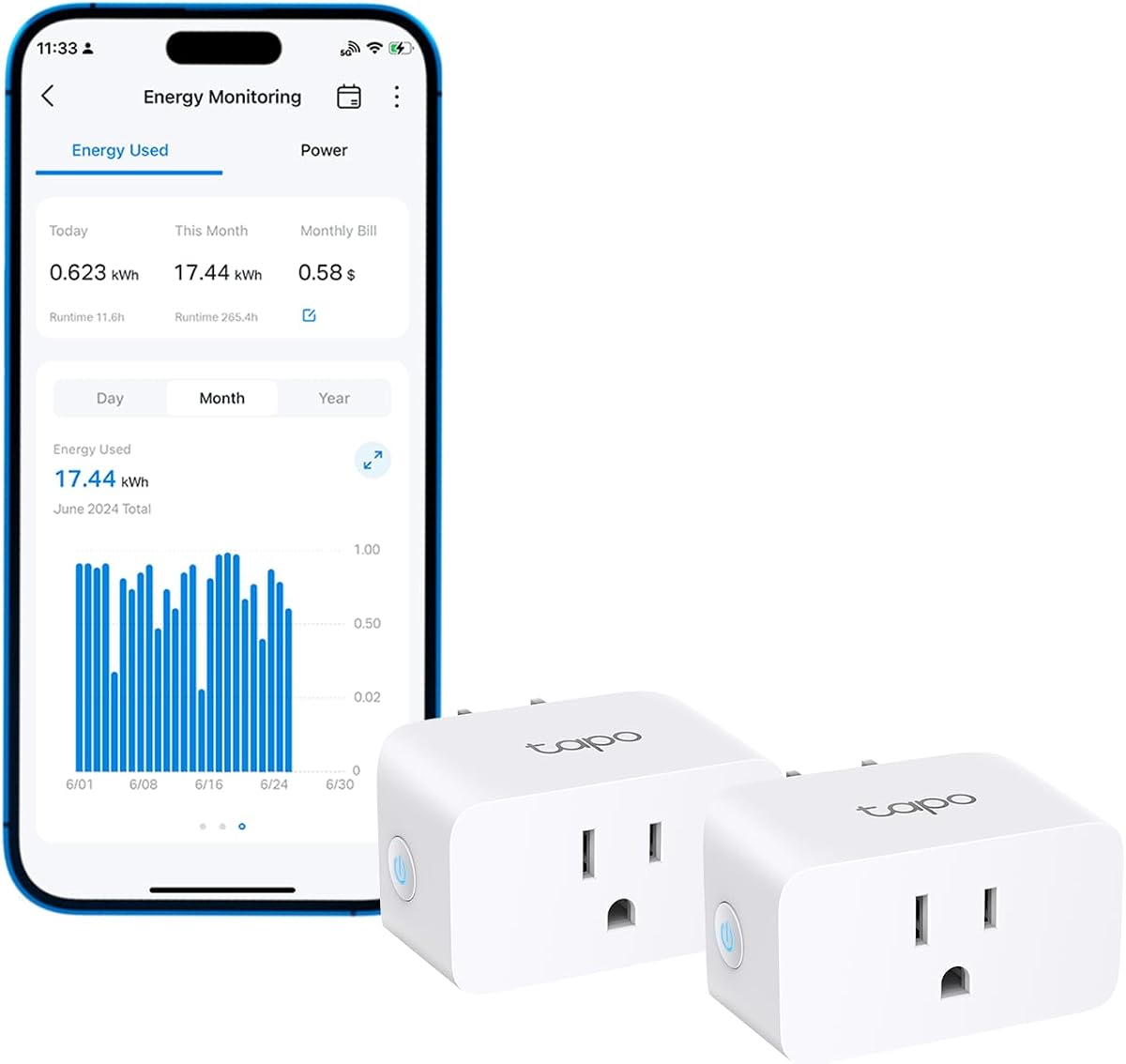
The Tapo Smart Plug Wi-Fi, Energy Monitoring offers a modern approach to tracking energy usage with smart features. With a rating of 4.5, it allows you to monitor usage through clear charts and statistics in the Tapo app. It supports both Alexa and Google Assistant for voice control convenience.
We may earn a commission when you buy through this link, at no additional cost to you.
This device includes safety features like auto shut-off to prevent electrical overload, making it safer than standard plugs. You can set schedules to operate devices during off-peak hours to save money. The ability to automatically cut power when devices reach a low-battery limit helps prevent overcharging.
While it requires Wi-Fi to access smart features, the app is intuitive and provides easy-to-understand energy tracking. The plug fits standard outlets and supports up to 15A. It is ideal for lamps, fans, and other household devices. The remote control feature allows you to manage devices from anywhere.
Perfect for tech-savvy users who want smart automation combined with energy tracking. It simplifies energy management through scheduling and voice commands. If you want to integrate power monitoring into a smart home setup without complex installations, this plug is a strong candidate.
Compatible with Alexa and Google Assistant, allowing you to control and monitor your devices using simple voice commands. This makes access to status updates seamless and hands-free.
The plug shuts off automatically if an overload is detected. This feature protects your connected devices and your home from potential electrical hazards.
We may earn a commission when you buy through this link, at no additional cost to you.
Choosing the right energy monitor depends on your specific needs, technical comfort level, and whether you want to track single devices or your entire home. Consider the following factors to find a solution that fits your requirements.
Accuracy is critical for ensuring that the data you rely on reflects reality. Look for devices that offer tight tolerances, such as +/- 1% or 2%, to avoid skewed readings. High precision ensures that your cost calculations and efficiency improvements are based on correct data.
Always check the product specifications for accuracy ratings before buying. This factor directly impacts how much trust you can place in the reported numbers.
Monitors range from simple plug-in models to systems requiring circuit panel access. Plug-in options are easiest to set up but are limited to single outlets. Whole-house monitors offer comprehensive tracking but may require professional installation.
Assess your comfort level with electrical systems. If you are not confident, choose a plug-in model or budget for an electrician.
Smart monitors provide remote access via apps, allowing you to check usage from anywhere. Some integrate with platforms like Home Assistant or support voice assistants. These features add convenience but may require a stable Wi-Fi connection.
Consider whether you need remote access or if local data is sufficient. Smart features are great for automation but add complexity.
Some devices store data locally on the device, while others send it to the cloud. Local storage offers better privacy and protection during internet outages. Cloud storage allows easier sharing and backup but raises privacy concerns for some users.
Evaluate your privacy needs and whether you want your data accessible via the internet or stored locally.
For homes with solar panels, ensure the monitor supports net metering. This feature tracks how much energy you generate versus consume, which is crucial for optimizing solar savings. Without this, you may miss out on potential credits or efficiency gains.
Verify solar compatibility if you plan to install panels or already have them. This capability adds significant value to your system.
Basic monitors show raw power data, while advanced ones calculate costs based on electricity rates. If you want to see dollar amounts directly, choose a model that lets you input your local rates. This simplifies budgeting without manual math.
Look for units with cost calculators if tracking dollar impact is a priority for your energy management.
Always check for certifications like UL or ETL. These ensure the device meets safety standards for electrical components. Using non-certified hardware can pose fire risks, especially with high-power appliances like PCs.
Safety should never be compromised for price. Always opt for certified hardware to ensure reliable and safe operation.
Prices vary widely from simple plugs to expensive whole-house systems. Consider how much you are willing to invest for the features you need. Sometimes a basic model suffices, while other times, advanced tracking is worth the cost.
Determine your budget early and compare features within that range to ensure you get the best value for your specific use case.
To get started, plug your monitor into a standard outlet and then connect your PC or appliance to it. Allow a few minutes for the device to initialize and display initial readings. Ensure the device is rated for your appliance's power needs to avoid overloading the monitor.
Regularly check the displayed data to identify trends in energy usage. Most devices allow you to reset cumulative stats periodically to start fresh tracking cycles. Clean the screen gently with a dry cloth to maintain visibility and prevent dust buildup.
If your monitor supports smart features, connect it to your Wi-Fi network through the corresponding app. Follow the manufacturer instructions for pairing to ensure data syncs correctly. Keep the firmware updated to benefit from the latest features and security patches.
Yes, most of these monitors are suitable for gaming PCs as they handle standard outlet power loads. Ensure the monitor's rated wattage exceeds your PC's power supply capacity for safety. These devices will help you track exactly how much energy your rig consumes under load.
For whole-house monitors that connect to your circuit panel, professional installation is highly recommended for safety. Plug-in models do not require an electrician and can be used immediately. Consult a professional if you are unsure about handling electrical components.
Accuracy varies by model, but many top-rated units offer precision within +/- 1% or 2%. Check product specifications to confirm the tolerance levels before purchasing. Higher accuracy ensures your savings calculations are reliable and precise.
Some advanced monitors support solar net metering and track energy generation versus consumption. If you have solar panels, choose a device with specific solar capabilities. This helps you optimize your usage based on renewable energy production.
Most plug-in monitors have memory functions that save data even when power is lost. However, real-time monitoring stops until power is restored. Check if the device has battery backup for continuous data tracking during outages.
Yes, certified monitors are designed for continuous use and include overload protection features. Ensure the device is UL or ETL certified for safety standards. Always follow the manufacturer guidelines regarding maximum load capacity.
Smart monitors with Wi-Fi capabilities allow you to view data remotely via mobile apps. Basic plug-in models usually only show data on the device screen itself. Check for smart features if remote access is important to your workflow.
Advanced monitors let you enter your local electricity rate to calculate costs automatically. For basic models, you may need to multiply kilowatt-hours by your utility rate manually. Using the built-in calculator simplifies tracking actual expenses.
We have reviewed ten top options ranging from simple plug-in meters to sophisticated whole-house systems. Each device offers unique features to help you track power usage and save money. The Emporia Vue 3 remains a top pick for comprehensive data, while the HBN Watt Meter provides excellent value.
When choosing, consider whether you need smart connectivity or just basic tracking. Safety certifications and accuracy should always be prioritized over cost. If you have a PC setup, ensure the monitor can handle the power demands without tripping.
Please note that product availability and pricing can change frequently. Always verify the latest details before purchasing to ensure you get the best current offer. With the right monitor, you can take control of your energy usage and reduce waste effectively.