
Label Maker Machine with 4 Tapes, Wire Label Maker Waterproof-Labels
4.3Editor score
Backlit LCD for low light
Laminated waterproof tape support
Lightweight handheld design
This guide compares the top label makers for network cables, evaluating durability, print quality, and features to help you choose the right tool for your
Choosing the right labeling tool is crucial for maintaining organized and safe network infrastructure. A good label maker ensures clear identification, preventing costly errors during maintenance or installation.
We compared ten leading models based on print resolution, tape compatibility, battery life, and ease of use. Our analysis focuses on industrial durability and user-friendly features for professionals.
Each pick highlights specific strengths like heat shrink support or Bluetooth connectivity. Prices and availability fluctuate regularly, so verify current offers before making your final purchasing decision today.
4.3Editor score

4.6Editor score

4.8Editor score
This side-by-side comparison evaluates all ten selected label makers across key performance metrics to help you find the perfect fit for your specific networking needs.


The Makeid P31S stands out as a top choice for professional network labeling. It offers high resolution thermal transfer printing ensuring durable results that withstand tough environments.
We may earn a commission when you buy through this link, at no additional cost to you.
Its thermal transfer technology creates labels resistant to oil, water, and weather for ten years. The rechargeable battery supports extended jobsite use without frequent recharging interruptions.
While the price is higher than budget models, the durability and compliance with ANSI TIA standards justify the investment for serious professionals managing complex cable systems.
This model is ideal for IT technicians needing reliable, standardized labels. Its balance of portability and advanced features makes it the overall best choice for network cabling.
Labels resist harsh chemicals and extreme temperatures ensuring long term visibility on exposed network infrastructure.
Meets ANSI and TIA EIA 606 A standards for electrical datacom and IT environments ensuring professional documentation.
We may earn a commission when you buy through this link, at no additional cost to you.
The VolenGo H1100 delivers essential features for network labeling at an accessible price point. Its backlit LCD screen ensures visibility even in dim server rooms or underground conduit spaces.
We may earn a commission when you buy through this link, at no additional cost to you.
It supports laminated tapes that resist water and abrasion making it suitable for environments where durability matters. The device is lightweight for easy carrying around the workspace.
Trade-offs include lower print resolution compared to industrial models and limited battery life. These are acceptable for occasional home or small office networking tasks.
This unit is perfect for beginners or those with limited budgets. It provides clear readable labels without requiring a significant financial commitment.
The backlit LCD screen helps users see labels clearly during night shifts or in dark wiring closets.
Its lightweight handheld form factor reduces hand fatigue during extended labeling sessions.
We may earn a commission when you buy through this link, at no additional cost to you.
The DYMO Rhino 5200 is a premium industrial tool designed for heavy duty network environments. Its large display and intuitive hot keys streamline the creation of complex label layouts.
We may earn a commission when you buy through this link, at no additional cost to you.
It supports barcode printing including Code 39 and 128 which is essential for asset tracking and inventory management in large data centers.
The main downsides are its weight and bulk which may limit portability in tight spaces. However, the build quality and feature set justify this for stationary workstation use.
Professional network engineers will appreciate its robustness and speed. It is the best premium choice for those prioritizing efficiency and detailed label formatting.
Hot keys automate text sizing and spacing saving time on repetitive industrial labeling tasks.
Built-in support for standard barcodes enables seamless integration with asset management systems.
We may earn a commission when you buy through this link, at no additional cost to you.
The Brother P-touch PTH111 simplifies electrical identification with dedicated one-touch keys for cable wraps and flags. This reduces the steps needed to create compliant labels.
We may earn a commission when you buy through this link, at no additional cost to you.
Its graphical LCD allows users to preview labels before printing minimizing waste caused by typos or formatting errors during installation projects.
While the AC adapter is a separate purchase limiting immediate power options, the battery power ensures mobility. The device is sturdy enough for workshop environments.
Technicians who need quick cable labeling will find this reliable. It balances ease of use with professional results effectively for general network needs.
Dedicated buttons for cable wrap and flag formats speed up the labeling process significantly.
Visual preview on screen allows correction before physical printing begins saving time and material.
We may earn a commission when you buy through this link, at no additional cost to you.
The BRADY M210 is recognized for its professional handheld design suitable for demanding network environments. It is built to withstand daily use by technicians in the field.
We may earn a commission when you buy through this link, at no additional cost to you.
While detailed specifications are less available, its high rating reflects consistent performance and reliability. It is trusted for producing clear and durable network cable labels.
The higher cost compared to generic brands is offset by the longevity and brand reputation. It is a solid investment for teams requiring dependable tools.
This device is best for organizations prioritizing brand reliability. It delivers consistent results for network identification tasks without unexpected downtime.
Brady is a known manufacturer in industrial identification ensuring trusted quality and support.
Its handheld form factor allows easy operation while wearing gloves or holding other tools.
We may earn a commission when you buy through this link, at no additional cost to you.
The Epson LABELWORKS LW-PX700 stands out with a lifetime warranty that offers unmatched security for professional buyers. It supports various tape types including heat shrink tubing.
We may earn a commission when you buy through this link, at no additional cost to you.
Its auto rewind feature saves time and reduces waste during high volume labeling projects. The device comes with a complete kit ready for immediate use.
Users may find the unit somewhat heavy and the specific tapes costly over time. However, the warranty coverage mitigates long term financial risks significantly.
This model suits professionals needing long term reliability and variety. It is excellent for data centers requiring multiple label formats and support.
The full service lifetime warranty ensures replacement without questions if the device fails during use.
Automatic tape rewind reduces manual effort and saves material on every label printed.
We may earn a commission when you buy through this link, at no additional cost to you.
The Brady M211 Kit introduces modern convenience with Bluetooth connectivity and mobile app integration. It allows users to print labels directly from smartphones or tablets.
We may earn a commission when you buy through this link, at no additional cost to you.
It includes a hard case for protection and a magnetic mount for hands free operation during busy tasks. This increases efficiency on active installation sites.
The high price and reliance on external devices may be a barrier for some. However, the durability against drops and shocks is exceptional for rough environments.
Tech savvy users will value this flexibility. It is ideal for mobile teams needing quick connectivity and robust protection against physical damage.
Connect wirelessly to phones for faster label creation without typing directly on the device.
Resistant to drops and shocks ensuring it survives tough worksite conditions effectively.
We may earn a commission when you buy through this link, at no additional cost to you.
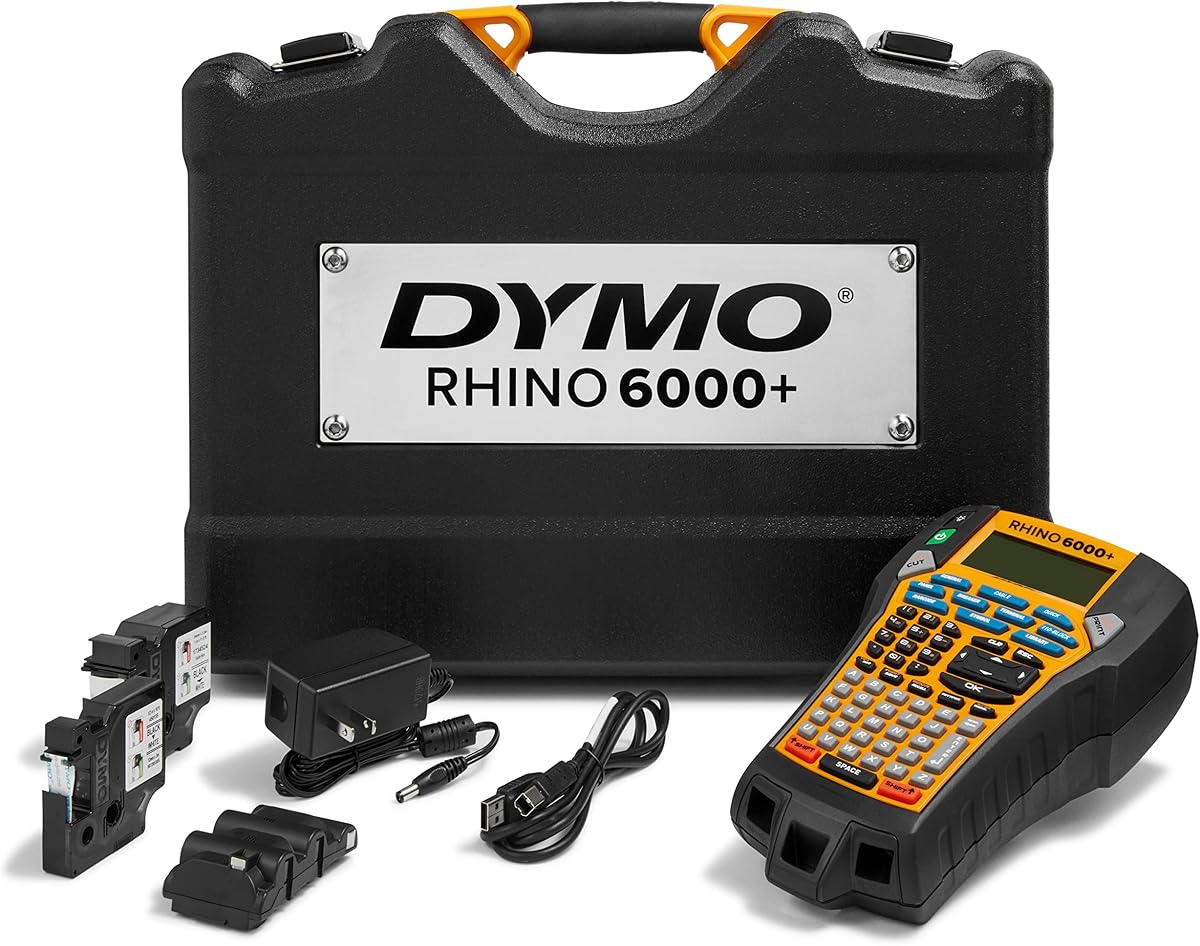
The DYMO Rhino 6000 supports complex layouts via PC software making it ideal for large scale network documentation projects. It offers precise control over label design and formatting.
We may earn a commission when you buy through this link, at no additional cost to you.
It meets ANSI and TIA standards ensuring compliance across professional environments. The rechargeable battery provides freedom from power outlets while working.
Users relying solely on manual input might find the PC dependency limiting. However, the ability to edit complex data digitally is a major advantage for large networks.
This unit is best for teams with existing IT infrastructure. It facilitates efficient creation of bulk labels through software integration.
Use DYMO ID software on PC for editing complex label layouts before printing.
Import bulk data via software to automate large batch label printing efficiently.
We may earn a commission when you buy through this link, at no additional cost to you.
The E1000 is specialized for heat shrink applications which are critical for high-end cable identification. Its modes are designed specifically for wire and cable management.
We may earn a commission when you buy through this link, at no additional cost to you.
It uses a familiar QWERTY keyboard for rapid text entry and offers USB C power for flexibility. The device saves tape with efficient label settings reducing waste.
Users might find the focus on heat shrink less flexible for general labeling. However, for professional electrical work it is a dedicated tool that delivers.
This is recommended for electricians prioritizing heat shrink compatibility. It ensures secure fits with its 2:1 shrink ratio and durable prints.
Designed specifically for heat shrink tubes ensuring tight secure fits on wires.
Narrower settings and batch printing reduce material waste significantly.
We may earn a commission when you buy through this link, at no additional cost to you.
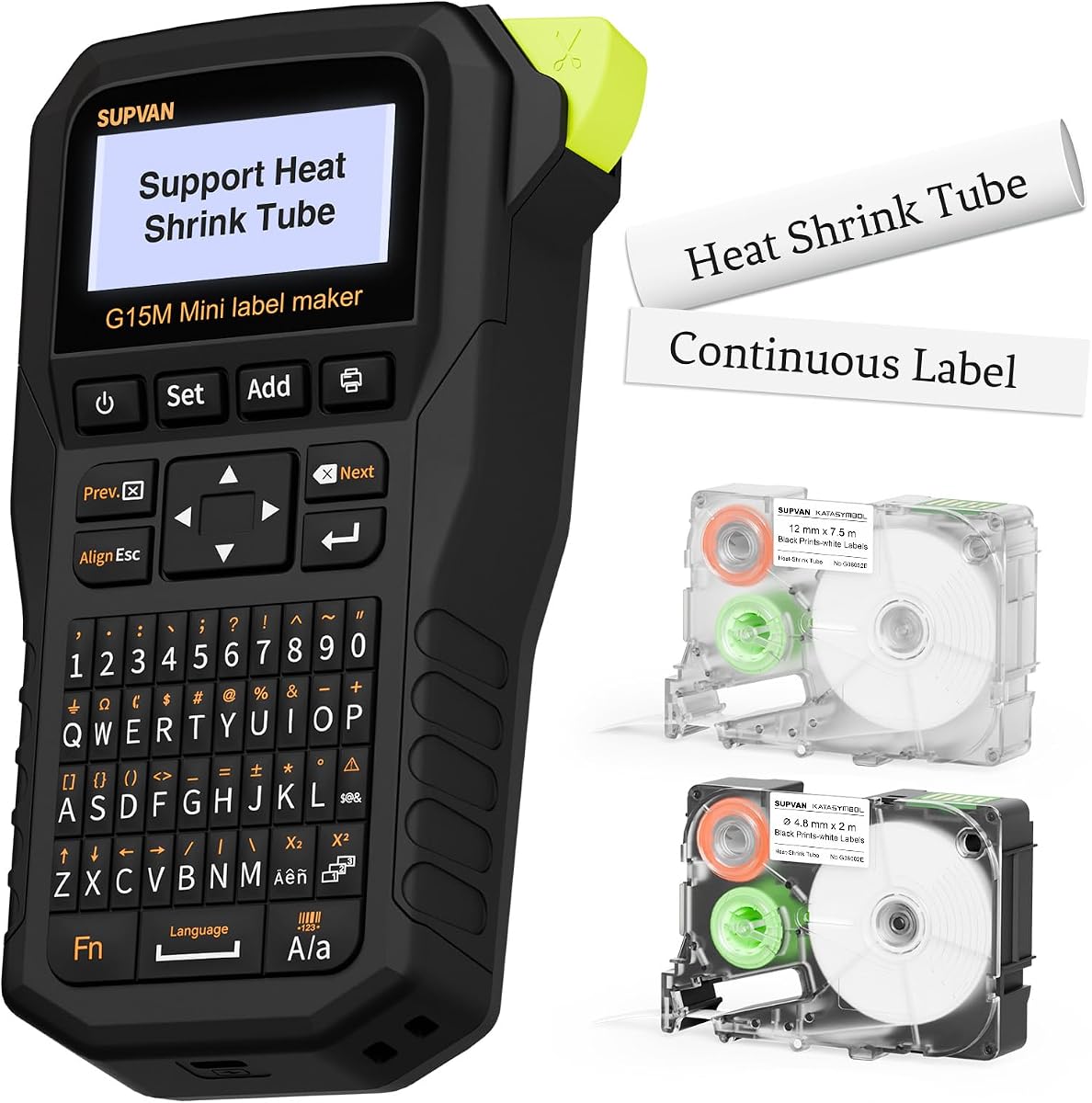
The SUPVAN G15M offers compact portability with a lightweight design suitable for on-the-go tasks. It supports heat shrink tubes and uses thermal transfer for durability.
We may earn a commission when you buy through this link, at no additional cost to you.
Its minimal margin printing saves material by reducing wasted tape space. The rechargeable battery lasts months on standby making it convenient for occasional use.
While it lacks advanced features of larger models it provides essential labeling functions effectively. It is a great secondary tool for quick tasks.
This model is best for home office or field use where size matters. It balances portability with durable label creation capabilities.
Prints with smaller margins saving material and improving efficiency per label.
The rechargeable battery provides up to 3 months of standby for frequent use.
We may earn a commission when you buy through this link, at no additional cost to you.
Selecting the right label maker involves understanding your specific requirements for durability, tape type, and connectivity. This section outlines the critical factors to consider before purchasing.
Network cables often require heat shrink or self-laminating tapes that resist oil and abrasion. Ensure the device supports the specific tape width and material needed for your environment.
Always verify that the machine accepts heat shrink tubing for wire and self-laminating wraps for equipment tags.
Higher DPI ensures sharper text and barcodes essential for professional identification. A resolution of 203 DPI is often sufficient while 300 DPI offers superior clarity for small fonts.
Opt for higher resolution if you need to print barcodes or detailed symbols for asset tracking.
Consider whether you need battery power or USB connectivity. Rechargeable batteries offer freedom while USB allows continuous use without worrying about battery drain.
For mobile work choose a model with a long-lasting rechargeable battery for convenience.
Interfaces with QWERTY keyboards or one-touch keys simplify the labeling process. Look for intuitive menus and clear displays to reduce errors during installation.
Prioritize models with preview screens to verify text before printing to save material.
Industrial environments demand robust devices resistant to drops and harsh chemicals. Look for waterproof and oil-resistant features in both the device and the output labels.
Check for warranty coverage and build quality to ensure the device withstands daily use.
Advanced users may require PC software for bulk imports or custom layouts. Connectivity options like Bluetooth or USB enable seamless data transfer from computers.
If you manage large networks, choose a model with software support for efficiency.
Prices vary significantly based on features and brand. Budget models offer basic functionality while premium units provide durability and specialized printing modes.
Balance the initial cost against the longevity and reliability required for your specific needs.
Professional tools should come with robust warranties like lifetime coverage or multi-year support. Reliable customer service ensures quick resolution of technical issues during projects.
Always review warranty terms and availability of replacement tapes before making a final choice.
Before starting ensure the tape cartridge is inserted correctly and the printer head is clean. Select the appropriate tape width for your cables to avoid printing errors.
Use the preview function to check alignment and text correctness before pressing the print button. This step helps avoid wasted labels during critical labeling sessions.
After use store the device in a dry place and remove batteries if not using for extended periods. Clean the print head with a lint-free cloth to maintain print quality over time.
Heat shrink tubing or self-laminating vinyl tapes are best for network cables. These materials resist oil, water, and abrasion ensuring labels remain legible in harsh environments.
Yes many models support Code 39 and Code 128 barcodes. Check the product specifications to ensure it meets your specific asset tracking requirements.
Many models are designed specifically for industrial environments. Look for units with durable casings and waterproof ratings to withstand tough conditions on the jobsite.
Most modern label makers use USB or Bluetooth for connectivity. Install the provided software to send complex data or bulk labels directly from your computer.
Battery life varies by model but many last weeks on standby. Some offer rechargeable batteries while others use AA cells for extended field use.
Yes standards like ANSI TIA EIA 606 A specify labeling practices. Many professional label makers are designed to meet these compliance requirements automatically.
Our review highlights the Makeid P31S as the top overall choice for its balance of resolution and battery life. For budget-conscious buyers the VolenGo H1100 provides excellent value and features.
When choosing prioritize tape compatibility and durability based on your specific workspace needs. Advanced features like software integration can significantly improve efficiency for large projects.
Always check current prices and availability as these models often vary across retailers. Investing in the right tool ensures your network infrastructure remains organized and compliant for years to come.