
NZXT H5 Flow
4.7Editor score
Perforated PSU shroud
Ultra-fine mesh panels
Two pre-installed fans
This expert guide compares the top 10 high airflow PC cases for October 2026, evaluating cooling performance, design features, and build quality to help you
Building a powerful PC requires more than just high-end components. The case you choose plays a critical role in how well those components perform over time. A high airflow PC case ensures that hot air escapes quickly and cool air enters efficiently, preventing thermal throttling and extending hardware life.
We evaluated the leading models on the market based on their ventilation design, fan configurations, and support for modern hardware. Our analysis focuses on cases that prioritize unrestricted air movement without sacrificing build quality or aesthetic appeal. We looked at real-world specifications and user feedback to curate this definitive list.
Each pick in this guide highlights unique strengths, from modular customization to massive fan support. Whether you need compact efficiency or full-tower cooling power, these options cover a wide range of needs. Please note that product availability and pricing can change frequently, so verify current details before purchasing.
4.7Editor score

4.8Editor score

4.8Editor score
The following table provides a side-by-side comparison of the top 10 high airflow PC cases. It highlights key specifications and features to help you quickly identify which model fits your specific build requirements.





The MONTECH AIR 903 MAX stands out as the top choice for builders prioritizing thermal performance. With a high rating from users, it delivers exceptional airflow right out of the box. The case design ensures that heat does not build up inside, which is crucial for modern high-performance hardware.
We may earn a commission when you buy through this link, at no additional cost to you.
Its key strength lies in the inclusion of four 140mm fans. These provide significant air movement without requiring immediate upgrades. The front panel mesh is optimized for minimal resistance, allowing cool air to reach components efficiently. Additionally, the chassis dimensions accommodate E-ATX boards and massive graphics cards comfortably.
While the glass side panel adds aesthetic appeal, it can be heavy to handle during assembly. The lack of a top dust filter means you may need to clean the interior more frequently. However, these are minor trade-offs considering the cooling performance and price point offered by this model.
This case is ideal for gamers and workstation users who need reliable cooling for powerful components. It balances build quality and performance exceptionally well. We recommend it as the best overall high airflow PC case for most builders in the current market.
The ventilated mesh front allows unrestricted air intake, keeping CPU and GPU temperatures low under heavy load.
Support for E-ATX and large GPUs ensures you won't outgrow this case even when upgrading to next-gen hardware.
We may earn a commission when you buy through this link, at no additional cost to you.
The NZXT H5 Flow proves that you do not need to spend a fortune to get effective cooling. It is designed for compact builds that still need to breathe well. The perforated PSU shroud is a standout feature that improves airflow to the power supply and rear components significantly.
We may earn a commission when you buy through this link, at no additional cost to you.
Its ultra-fine mesh on all sides filters dust while allowing air to pass through freely. This design choice helps maintain a clean interior over time. The pre-installed fans provide a quiet baseline, making it suitable for home office environments where noise is a concern.
The limited radiator support on top means you might need to use front mounts for larger liquid cooling setups. The fans included are functional but not the most powerful available. However, these limitations are acceptable given the budget-friendly nature and sleek aesthetic of the case.
This model is perfect for builders on a tight budget who value style and function. It works well for standard ATX builds and offers excellent entry-level thermal performance. We recommend it as the best budget option for those seeking reliable airflow without overspending.
The compact mid-tower form factor saves desk space while still accommodating full-size graphics cards and motherboards.
The fine mesh acts as a physical barrier against dust accumulation, reducing maintenance requirements.
We may earn a commission when you buy through this link, at no additional cost to you.
The Cooler Master HAF II 500 represents the pinnacle of airflow-focused design in the premium category. Its oversized 220mm fans move a tremendous volume of air, ensuring that even the hottest components stay cool. This level of performance justifies the higher cost for enthusiasts.
We may earn a commission when you buy through this link, at no additional cost to you.
Key strengths include the split-level cable management which creates extra room for airflow and cleaner routing. The MasterRail system allows for flexible fan and radiator placement. The dual-mode GPU holder offers stability for heavy cards, which is a thoughtful addition for high-end builds.
The large footprint means this case requires a substantial desk surface. The price is significantly higher than standard models, which may not fit all budgets. However, the unique cooling capabilities and robust construction make these trade-offs worthwhile for serious PC enthusiasts.
This case is best for users who demand top-tier cooling and have the space to accommodate it. It serves professional workstations and extreme gaming rigs well. We recommend it as the best premium choice for those who prioritize cooling performance above all else.
The Mighty40 cooling system with large fans reduces noise while increasing total airflow throughput significantly.
Split-level design maximizes space behind the motherboard tray, preventing cable congestion that blocks airflow.
We may earn a commission when you buy through this link, at no additional cost to you.
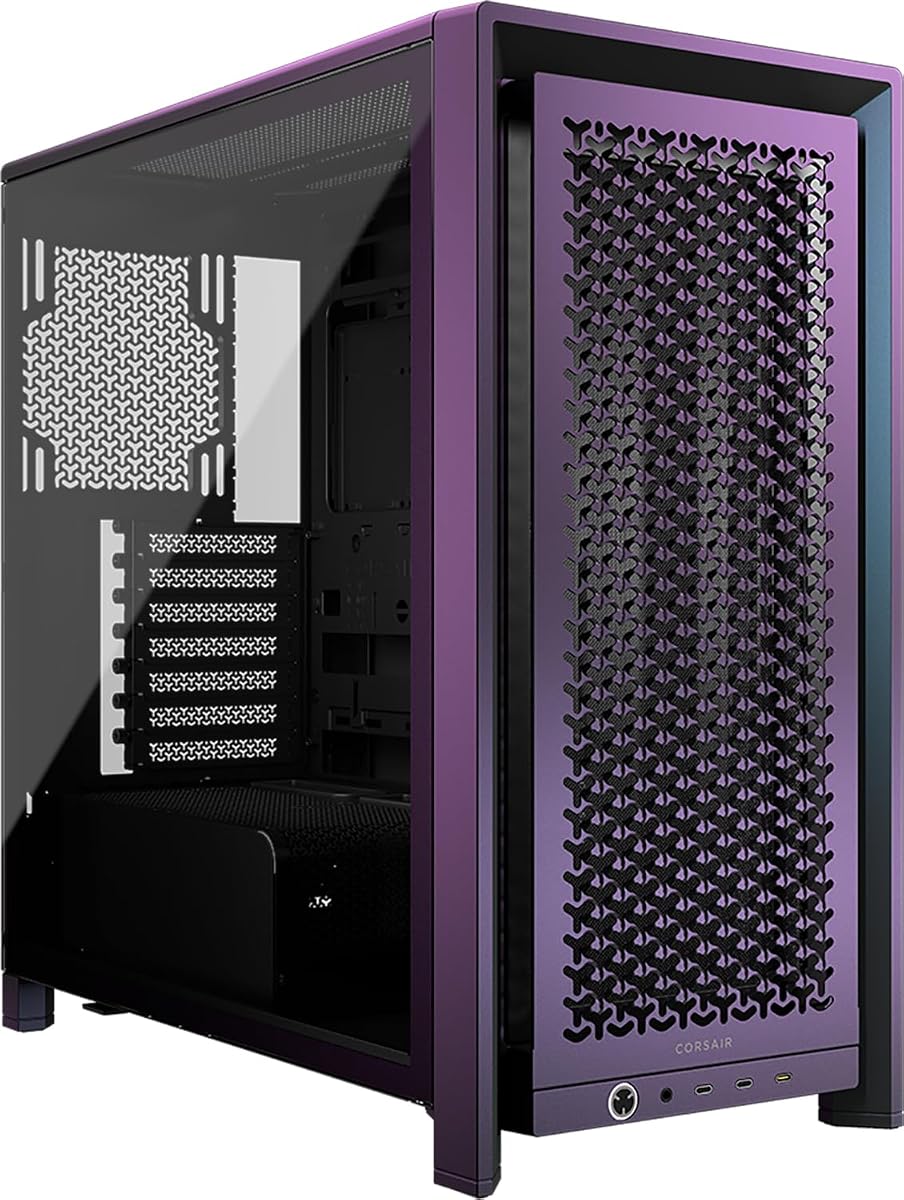
The CORSAIR 4000D RS ARGB brings a revolutionary approach to case customization. The FRAME system allows users to swap components like I/O panels and trays. This modularity ensures the case evolves with your needs. The 3D Y-Pattern panel is optimized for minimal airflow restriction.
We may earn a commission when you buy through this link, at no additional cost to you.
Its standout features include the InfiniRail system for flexible fan placement. This allows you to position cooling where it is needed most. The pre-installed RS ARGB fans offer daisy-chaining for easy setup. The side panel can be removed to add even more cooling potential.
While the modularity is unique, sourcing specific upgrades might cost more over time. The steel construction adds weight, making transport slightly difficult. These factors are acceptable trade-offs for the level of customization and performance this case provides.
This model suits users who value long-term flexibility and design. It fits well in modern builds that need efficient cooling and clean cable management. We recommend it for builders who want a case that can grow with their hardware upgrades.
The FRAME system lets you swap panels and trays, adapting the case to new tech without buying a new chassis.
The perforated front panel creates a low-obstruction path for cool air, improving thermal performance.
We may earn a commission when you buy through this link, at no additional cost to you.
The LIAN LI LANCOOL 216 RGB is engineered to handle large graphics cards with ease. It supports GPUs up to 392mm, ensuring compatibility with the latest high-end models. The dual 160mm front fans deliver massive air intake for effective cooling performance.
We may earn a commission when you buy through this link, at no additional cost to you.
Its modular I/O allows you to adjust motherboard position for better airflow. This flexibility helps optimize thermal performance for specific setups. The mesh panels cover front and top, maintaining consistent airflow across all components. Cable management tools make routing simple and efficient.
The fans included can generate some noise under high loads. The glass panels add weight to the chassis during assembly. Despite these minor issues, the cooling capability and component support make it a top contender for performance builds.
This case is ideal for gamers using large graphics cards. It balances aesthetics with functionality for those who prioritize cooling. We recommend it for anyone building a high-end gaming rig needing maximum airflow and space.
Ample clearance for massive graphics cards ensures no thermal bottlenecks due to physical constraints.
The modular motherboard tray allows vertical adjustments to improve cooling for high heat components.
We may earn a commission when you buy through this link, at no additional cost to you.
The Antec Flux Pro is designed for those who need maximum thermal headroom. It includes six PWM fans, ensuring high air volume throughout the chassis. This setup is perfect for systems with multiple heat-generating components. The multi-directional vent design prevents hot air pockets.
We may earn a commission when you buy through this link, at no additional cost to you.
Its ability to support simultaneous 420mm and 360mm radiators is impressive. This allows for extensive liquid cooling configurations. The iShift PSU mount optimizes internal space. The combination of metal, glass, and wood creates a unique and premium aesthetic texture.
The case size requires a dedicated space for your PC. Managing cables for six fans can be tricky without careful planning. However, the cooling capacity and design quality justify the effort and space required for this full-tower model.
This is the ideal choice for professional workstations. It supports E-ATX boards and offers superior cooling capacity. We recommend it for power users who need a case capable of handling intense thermal loads.
Supports massive dual radiators allowing for extreme liquid cooling setups without thermal compromise.
The mix of materials offers a textured look that stands out from standard steel or plastic cases.
We may earn a commission when you buy through this link, at no additional cost to you.
The CORSAIR 3500X RS ARGB combines stunning visuals with functional cooling. The panoramic glass wrap provides a clear view of your internal components. Despite the glass front, it maintains robust airflow through strategic mesh designs and fan placement. The three pre-installed RS fans ensure efficient cooling out of the box.
We may earn a commission when you buy through this link, at no additional cost to you.
It supports motherboard sizes from Mini-ITX to E-ATX, offering great versatility. The removable glass panels make accessing the interior easy. The high fan capacity means you can expand cooling if needed. It balances look and function better than most glass cases.
Glass surfaces show dust and fingerprints easily. Airflow is slightly restricted compared to full mesh cases. These are expected trade-offs for the aesthetic appeal. Overall, it provides a solid balance for those who want style and performance.
This case is great for builders who want to showcase their build. It suits mid-range to high-end systems well. We recommend it for those who prioritize a stunning view without sacrificing significant cooling performance.
The panoramic glass creates a seamless look that highlights internal components and lighting effects.
Strategic mesh areas ensure adequate airflow despite the large glass panels on the front and sides.
We may earn a commission when you buy through this link, at no additional cost to you.
The Lian Li V100-ATX is one of the few cases designed for back-connect motherboards. This feature allows for a completely cable-free interior look. It supports ATX and Micro-ATX boards with this option. The four pre-installed fans provide excellent cooling performance right from the start.
We may earn a commission when you buy through this link, at no additional cost to you.
Tool-less mounting mechanisms make assembly faster and easier. The case accommodates GPUs up to 420mm. The integrated ARGB strip enhances the visual appeal. It is a forward-thinking design for cleaner aesthetics. It fits standard and future hardware perfectly.
Back-connect motherboards are still emerging, so availability may be limited. The top radiator space is somewhat restricted. However, the focus on clean routing makes it stand out. It offers a unique advantage for modern aesthetic builds.
This model is perfect for those adopting new motherboard standards. It simplifies cable management significantly. We recommend it for anyone looking to build a clean, modern PC with hidden cables.
Back-connect support allows power and data cables to route behind the motherboard for a clean interior.
Tool-less side panels and mounts simplify the building process for first-time and experienced users.
We may earn a commission when you buy through this link, at no additional cost to you.
The NZXT H9 Flow features a dual-chamber design that separates the PSU and drives from main components. This separation improves thermal performance significantly. It supports up to ten fans for extensive airflow options. The panoramic glass allows you to see your clean, organized build clearly.
We may earn a commission when you buy through this link, at no additional cost to you.
The extra-wide channels and Velcro straps make cable routing effortless. It is compatible with back-connect motherboards. The support for massive radiators ensures cooling flexibility. The design prioritizes both function and sleek aesthetics. It is a modern take on case architecture.
The dual-chamber layout can make initial assembly slightly complex. The price is higher due to advanced features. However, the improved airflow and clean look justify the investment. It is a great choice for high-end builds.
This case suits users who prioritize organization and cooling. It is ideal for those wanting a modern look. We recommend it for anyone seeking a versatile and stylish case for powerful hardware.
Separating hot zones from main components ensures better air circulation and lower internal temperatures.
The dual-chamber design hides clutter while showcasing components behind clean glass panels.
We may earn a commission when you buy through this link, at no additional cost to you.
The CORSAIR Frame 4000D Vault is a limited edition release with unique finishes. Each unit is individually numbered for collectors. It retains the modular FRAME system for customization. The cooling capacity remains high with support for three 360mm radiators. This exclusivity makes it a standout piece.
We may earn a commission when you buy through this link, at no additional cost to you.
Its key features include the InfiniRail system for fan positioning. The 3D Y-Pattern panel ensures minimal airflow restriction. The build quality is premium. This case is about style and function. It appeals to those who value unique designs.
Limited editions often have higher prices and limited availability. Customization parts might require extra cost. However, the collector value and performance make it worthwhile. It offers a blend of exclusivity and technical capability.
This case is ideal for collectors and enthusiasts. It fits builds where visual uniqueness matters. We recommend it for those seeking a rare and high-performing chassis for their PC.
Individually numbered units in a strictly limited run create a unique ownership experience for collectors.
Despite the exclusive finish, it delivers standard modular flexibility and massive cooling capacity.
We may earn a commission when you buy through this link, at no additional cost to you.
Choosing the right high airflow PC case involves balancing thermal performance with build requirements. Here are key factors to consider.
Mesh panels allow air to pass freely while keeping dust out. Look for fine mesh that does not restrict airflow or cause noise. A front mesh panel is essential for cool air intake.
Always choose a case with perforated panels on the front and top for best thermal performance.
Pre-installed fans save money and provide immediate cooling. Ensure the fans support PWM control for speed adjustment. Consider cases with reverse intake fans for better airflow balance.
Verify the number and size of pre-installed fans before buying to match your cooling needs.
Liquid cooling requires adequate radiator mounts. High airflow cases usually support large radiators like 360mm or 420mm. Check front, top, and side mounting options.
Ensure the case supports your preferred radiator size to avoid installation issues.
Clean cables prevent airflow blockage. Look for wide channels, hooks, and straps for routing. A dedicated cable cover keeps the interior tidy.
Proper cable management ensures air flows efficiently without obstruction.
High airflow cases should support ATX or E-ATX boards. Check clearance for CPU coolers and graphics cards. Flexibility for future upgrades is valuable.
Confirm the case fits your motherboard size and allows for component growth.
Dust filters protect internal components from buildup. Mesh filters should be removable for cleaning. Filters improve long-term thermal performance.
Choose cases with easy-to-clean dust filters to maintain cooling efficiency.
Steel frames offer durability and strength. Glass panels are heavy but look good. Balance aesthetics with structural needs.
Select a material that suits your environment and handling preferences.
Separate PSU chambers isolate heat from main components. This design improves thermal efficiency. Look for perforated PSU shrouds.
A separate PSU zone helps maintain stable temperatures for sensitive parts.
Install all pre-installed fans securely to ensure optimal airflow direction. Verify that intake fans are on the front and exhaust fans on the rear or top. This creates a consistent air path that reduces heat buildup.
Clean dust filters regularly to prevent airflow restriction. Use compressed air to remove dust from mesh panels. A clean case maintains peak performance and prevents overheating.
Arrange cables neatly using provided straps and hooks. Keep cables away from fan paths to ensure smooth air movement. This simple step improves cooling efficiency and keeps the interior tidy.
High airflow ensures hot air is expelled quickly and cool air is drawn in continuously. This prevents components from overheating and throttling performance. It also extends the lifespan of hardware by maintaining stable temperatures.
Mesh panels filter large dust particles while allowing air to pass through. However, they may not block fine dust as effectively as sealed panels. Regular cleaning is still necessary to keep the interior clean.
A minimum of three fans is recommended for effective cooling: two intake on the front and one exhaust on the rear. More fans can improve airflow but may increase noise. Balance fan count with your specific thermal needs.
Yes, most high airflow cases support large radiators like 360mm or 420mm. Ensure the case has proper mounting points for your radiator. High airflow complements liquid cooling by exhausting heat efficiently.
Fans should pull air in from the front and exhaust hot air out the rear or top. This creates a linear flow that cools components directly. Consistent orientation prevents air turbulence and hot spots.
Glass panels can slightly reduce cooling compared to full mesh. However, modern designs include strategic vents to compensate. Ensure the glass case has front mesh to maintain adequate airflow.
We reviewed ten exceptional high airflow PC cases offering various features for different needs. The MONTECH AIR 903 MAX leads as the best overall option for its balance of cooling and value.
Prioritize mesh panels and fan configuration when selecting a case to ensure thermal efficiency. A case that supports your current hardware and future upgrades provides long-term value.
Prices and availability fluctuate frequently so verify current details before purchasing. Choose a model that fits your budget and cooling requirements for the best build experience.