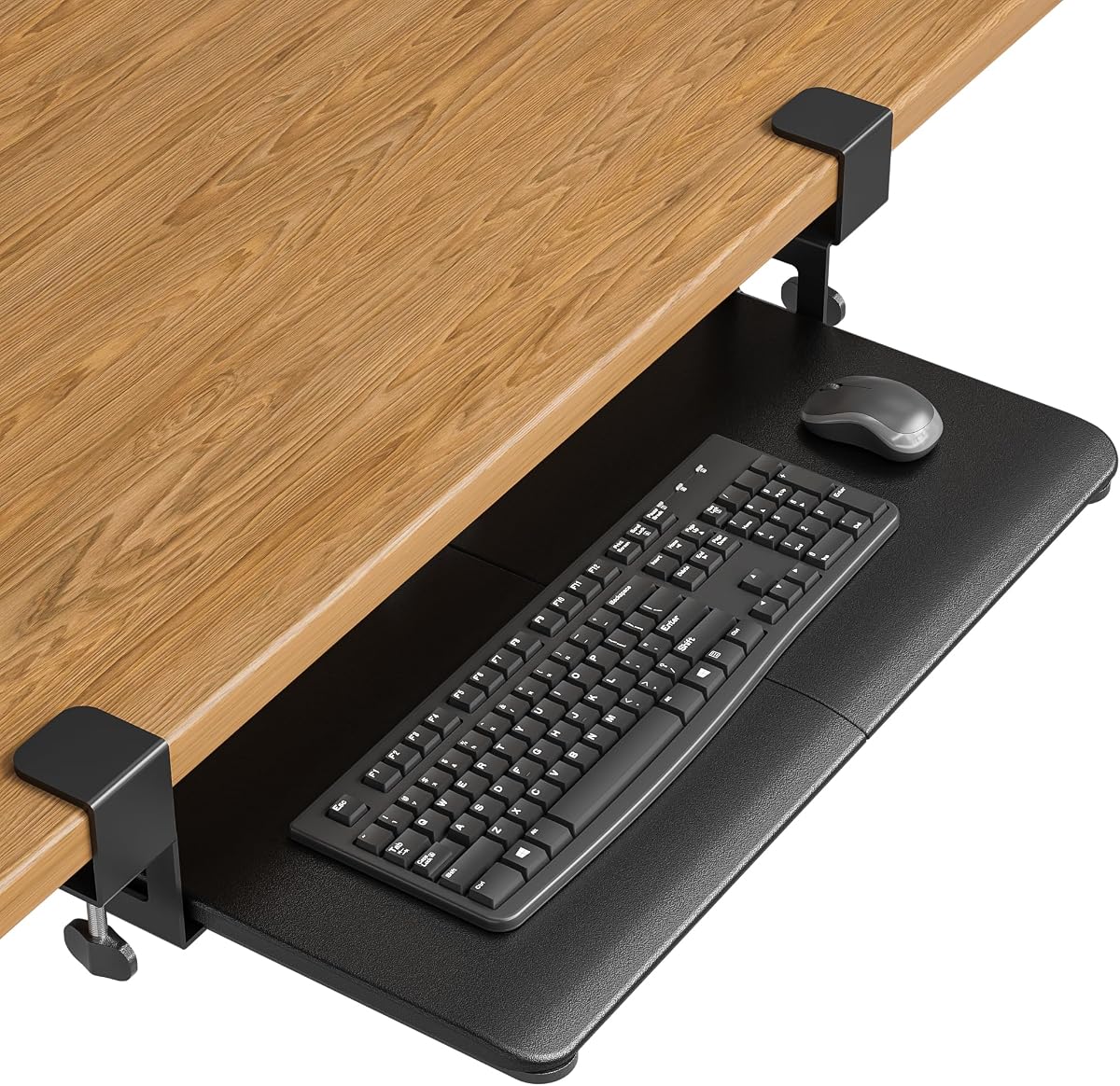
BONTEC Under Desk Keyboard Tray
4.4Editor score
No-drill installation
Spacious platform design
Affordable price point
Finding the right clamp on keyboard tray can transform your workspace by freeing up valuable desk surface area. These under-desk solutions allow you to position your input devices at a comfortable height, reducing strain on your wrists and shoulders during long work sessions.
We have carefully analyzed ten leading models based on build quality, adjustability, and ease of installation. Our comparison focuses on how well each tray fits different desk types, supports various keyboard sizes, and maintains stability during active use.
Each selection below highlights key features, pros, and cons to help you make an informed decision. Please note that product availability and pricing can change frequently, so checking the latest details before purchasing is always recommended for the best value.
4.4Editor score

4.4Editor score

4.3Editor score
As an Amazon Associate we earn from qualifying purchases.
The following table provides a side-by-side comparison of all ten selected products, highlighting their key specifications to help you quickly identify the model that best fits your specific desk setup and ergonomic needs.


This VIVO tray stands out as a reliable choice for those seeking to optimize their workspace without permanent modifications. With a solid 4.4 rating, it offers a straightforward solution for moving your keyboard and mouse off the main desk surface.
We may earn a commission when you buy through this link, at no additional cost to you.
The tray measures 26.8 inches wide, providing ample room for standard keyboards and mice. Its sturdy C-clamps attach securely to desks up to 1.25 inches thick, ensuring the unit stays in place even during vigorous typing sessions.
While it lacks advanced tilt adjustments, the fixed angle is designed to promote a neutral wrist position. The sliding mechanism allows you to pull the tray out when needed and push it back under the desk to reclaim valuable workspace.
Ideal for home office setups or shared workspaces, this model balances cost and functionality effectively. It is a strong recommendation for users with flat-edged desks who prioritize space-saving features and ease of assembly.
Moving your input devices under the desk frees up surface area for monitors, documents, or other essentials.
The adjustable C-clamps grip the desk edge tightly, preventing wobbling or shifting during use.
We may earn a commission when you buy through this link, at no additional cost to you.
This model introduces greater flexibility with height and width adjustments, catering to users who need precise ergonomic positioning. It accommodates thicker desks up to 3.4 inches, making it suitable for a wider range of furniture types.
We may earn a commission when you buy through this link, at no additional cost to you.
The tray is split into two parts, allowing you to position the keyboard and mouse independently. This can help reduce reach distance and improve comfort during long work hours. It also comes with integrated wrist pads for added support.
While the assembly is slightly more involved due to the adjustable brackets, the included instructions guide you through the process. The ability to customize the placement makes it a versatile choice for diverse office environments.
Recommended for users with thicker desks or those who require specific height settings for posture. It is a solid investment for anyone looking to fine-tune their workstation setup without replacing the entire desk.
Five height adjustment points let you find the perfect typing angle for your body.
Included wrist pads provide immediate relief without needing to buy accessories separately.
We may earn a commission when you buy through this link, at no additional cost to you.
Unique in its design, this tray features a single clamp that allows the platform to rotate 360 degrees. This flexibility is perfect for shared desks where you might need to turn the tray away when not in use.
We may earn a commission when you buy through this link, at no additional cost to you.
When you need to work, simply rotate it into position. When done, you can tuck it under the desk to keep your workspace clear. The single clamp setup makes installation quicker than models with dual clamps.
However, the rotation requires sufficient clearance around the desk edge, typically about 32 inches. This might limit its use in very tight corners or crowded offices. It is best suited for desks with open sides.
Ideal for users who value flexibility and quick access. If you share your workspace frequently, the ability to move the tray out of the way easily is a significant advantage for maintaining a tidy environment.
Rotate the tray to access it from different angles or store it away completely.
One clamp means less hardware to assemble, getting you up and running faster.
We may earn a commission when you buy through this link, at no additional cost to you.
The BONTEC tray offers excellent value for those on a budget who still want ergonomic benefits. It features a spacious platform that accommodates most keyboard and mouse combinations comfortably without feeling cramped.
We may earn a commission when you buy through this link, at no additional cost to you.
Installation is straightforward thanks to the no-drill C-clamps that protect your desk surface with included pads. It supports desks up to 1.97 inches thick, making it more versatile than some thinner options.
Keep in mind that the underside of your desk must be flat and unobstructed for the clamps to work correctly. Check your desk design before buying to ensure there are no crossbars or support beams blocking the mount.
This model is perfect for home offices or rental spaces where you cannot drill holes. It provides a cost-effective way to declutter your desk and improve your typing posture without breaking the bank.
Get ergonomic improvements without spending a fortune on expensive office furniture.
Non-slip pads keep the tray secure and prevent scratches on your desk finish.
We may earn a commission when you buy through this link, at no additional cost to you.
This premium model stands out with nine distinct tilt settings, allowing you to lock the tray at specific angles from -10 to 10 degrees. This level of control is rare in clamp-on trays and helps tailor ergonomics precisely.
We may earn a commission when you buy through this link, at no additional cost to you.
The swivel clamps can rotate 90 degrees independently, making it easy to install on corner desks or standard setups. It supports thicker desks up to 3.4 inches, offering robust compatibility with various office furniture.
While the adjustment system adds some complexity during installation, it provides long-term comfort benefits. The build quality feels sturdy, ensuring the tray remains stable even when tilted to more aggressive angles.
Best for users who prioritize ergonomics and have specific posture needs. If you spend many hours typing daily, the ability to fine-tune the tilt can significantly reduce wrist strain over time.
Nine settings allow you to find the exact angle that suits your wrist alignment.
Swivel clamps make installation flexible for corner desks or standard rectangular setups.
We may earn a commission when you buy through this link, at no additional cost to you.
Designed specifically for L-shaped workstations, this tray features swiveling C-clamps that accommodate the unique geometry of corner desks. It secures the tray to both sides of the corner, ensuring stability.
We may earn a commission when you buy through this link, at no additional cost to you.
The independent rotation of clamps allows for custom placement depending on your corner setup. This makes it easier to align the keyboard with your seated position while still saving desk space.
It is important to note that this model works best with desks up to 1.25 inches thick. If your desk is thicker, you may need to look at the adjustable variants that support greater thickness.
Ideal for anyone with a corner desk who struggles to find the right keyboard position. It transforms the awkward corner area into a functional typing space without crowding your main monitor area.
The unique clamp design fits securely around the corner edge without wobbling.
Rotate clamps to suit the exact angle of your specific desk corner configuration.
We may earn a commission when you buy through this link, at no additional cost to you.
This model adds a dedicated pencil drawer to the standard keyboard platform, offering convenient storage for small office supplies. It helps keep your under-desk area organized while maintaining the benefits of a keyboard tray.
We may earn a commission when you buy through this link, at no additional cost to you.
The drawer slides out independently, but note that the combined extension of the tray and drawer can be up to 18.5 inches. This means you need enough clearance under your desk to accommodate this depth comfortably.
Like other VIVO trays, it uses sturdy C-clamps to attach securely to desks up to 1.25 inches thick. The platform is designed to hold both keyboard and mouse, while the drawer takes care of pens and clips.
Perfect for users who need extra storage space without buying a separate organizer. It is a practical choice for keeping your workspace tidy while ensuring your typing tools remain within easy reach.
Keep pens and small accessories handy without cluttering the main desk surface.
Combines typing comfort with storage utility in a single under-desk unit.
We may earn a commission when you buy through this link, at no additional cost to you.
This tray features a generous 20 by 11.8 inch surface, providing plenty of room for large keyboards and mouse movement. A built-in back baffle prevents your keyboard from sliding off during intense typing sessions.
We may earn a commission when you buy through this link, at no additional cost to you.
It supports desks up to 2.76 inches thick, which is wider than many standard options. This makes it suitable for heavier or more substantial desk surfaces where thinner trays might fail to clamp properly.
The slide mechanism is upgraded for smooth extension and retraction, ensuring easy access whenever you need it. Reinforced clamps provide stability without damaging the desk surface, thanks to thick non-slip pads.
Ideal for those with larger keyboards or thicker desks. It offers a robust solution that balances width and depth effectively, making it a strong contender for users who need extra room to work comfortably.
The back baffle and non-slip pads ensure the tray stays secure and stationary.
Supports thicker desks better than many competitors, increasing your installation options.
We may earn a commission when you buy through this link, at no additional cost to you.
While primarily a desk extender, this model can function as a keyboard tray when placed at the right height. Its 90-degree folding design allows you to tuck it out of the way when you need full desk access.
We may earn a commission when you buy through this link, at no additional cost to you.
The reinforced K-shaped brackets support up to 44 lbs, making it more robust than standard keyboard trays. It can also hold printers, speakers, or extra storage, giving you more utility from one purchase.
Installation supports desks up to 3.5 inches thick, offering excellent compatibility with various furniture types. It includes a three-year manufacturer warranty, which adds peace of mind for long-term use.
Best for users who want a flexible platform that can double as a keyboard tray. If you need a sturdy surface for varied tasks and the ability to fold it away when not needed, this is a great choice.
Press release levers to fold the platform out of the way instantly.
Supports heavy equipment like printers, not just keyboards and mice.
We may earn a commission when you buy through this link, at no additional cost to you.
This model offers a lifetime warranty and US-based support, which is rare in this category. It features a wide 27 by 11 inch platform that accommodates full-size keyboards and provides ample mouse space.
We may earn a commission when you buy through this link, at no additional cost to you.
The push-pull slide-out design allows you to adjust the keyboard position smoothly. This is great for users who want flexibility in how close they want the keyboard during active typing versus rest periods.
It fits desks up to 2.2 inches thick, making it suitable for standard office furniture. However, note that it is not compatible with glass desks, so check your material before purchasing to avoid issues.
Ideal for anyone who wants long-term security with their purchase. The combination of a wide platform, smooth sliding, and a lifetime warranty makes it a standout choice for durability and reliability.
Enjoy peace of mind knowing the product is covered for a long period.
The slide mechanism is designed for daily use without sticking or resistance.
We may earn a commission when you buy through this link, at no additional cost to you.
Selecting the right clamp on keyboard tray involves considering several factors to ensure it meets your ergonomic and structural needs. This section breaks down the key aspects to help you make the best choice for your workspace.
The thickness of your desk is one of the most critical factors. Most trays support desks between 1 and 2 inches, but some premium models handle up to 3.5 inches. Always measure your desk edge before purchasing to ensure the clamps fit securely.
Measure your desk thickness to ensure the clamps can grip it properly without slipping or causing damage.
Many clamp-on trays require a flat, unobstructed desk edge. Models with beveled, rounded, or lipped edges may not support clamps correctly. Check your desk profile against the product specifications to avoid installation issues.
Ensure your desk edge is flat and unobstructed for the clamps to attach securely.
Consider the dimensions of the tray to ensure it fits your keyboard and mouse comfortably. Standard sizes range from 20 to 27 inches wide. Larger platforms provide more room for movement, while smaller ones save more space under the desk.
Choose a platform width that accommodates both your keyboard and mouse without feeling cramped.
Some trays offer height and tilt adjustments, which are valuable for ergonomics. Fixed trays are simpler but less customizable. If you have specific posture needs, look for models with multiple setting points or swivel features.
Look for adjustable trays if you need to fine-tune your typing angle for better comfort.
Most trays support around 11 pounds, which is sufficient for standard setups. If you plan to place heavy equipment like a printer or large monitor on the tray, check the weight limit to ensure stability and durability.
Verify the weight limit to ensure the tray can safely support your devices without bending or breaking.
Clamp-on installation is popular because it requires no drilling. However, some models might require more hardware or have complex brackets. If you prefer quick setup, look for trays with simple clamp designs and clear instructions.
Opt for simple clamp designs if you want to install the tray without permanent modifications or tools.
The construction material affects durability and stability. Metal frames are generally more sturdy than plastic ones. A stable platform prevents the keyboard from wobbling while typing, which is essential for precision and comfort.
Choose metal construction for better stability and long-term durability in a busy office setting.
A longer warranty period indicates manufacturer confidence in the product. Some brands offer lifetime warranties, while others provide one to three years. Consider the level of customer support available in case of installation or quality issues.
Prioritize products with longer warranties and accessible support for peace of mind over the product's lifetime.
Proper installation is key to ensuring stability. Make sure the desk surface is clean and free of debris before attaching the clamps. Tighten them securely but avoid over-tightening, which could damage the desk finish or strip the screws.
To maintain smooth operation, periodically clean the slide rails and check for any debris that might cause resistance. A small amount of lubricant can help keep the mechanism moving freely without attracting dust or dirt over time.
Avoid placing overly heavy items on the tray that exceed the weight limit. Regularly inspect the clamps and brackets for any signs of wear or loosening to ensure continued safety and stability during daily use.
Most clamp-on trays are not compatible with glass desks because the clamps need a solid material to grip. Glass surfaces can crack or slip, so it is best to look for a different mounting solution like a stand that does not require clamping.
No, most models are designed for no-drill installation using C-clamps. These clamps attach to the edge of your desk securely without making holes. Always check the product details to confirm the installation method before buying.
You typically need at least 12 to 15 inches of vertical clearance under the desk to slide the tray in and out. Measure the height from the bottom of the desk to the floor to ensure the tray fits comfortably.
Yes, most trays are wide enough to accommodate split keyboards, but you should check the specific width dimensions. Ensure there is enough space to slide both halves comfortably without hitting the desk edge or clamps.
Many trays require a flat edge for the clamps to grip. If your desk has a lip or bevel, you may need a different mounting method or a tray specifically designed for that edge type. Check compatibility notes carefully.
Some models offer height adjustments, while others are fixed at a specific distance below the desk. If height customization is important, look for models with vertical brackets or multiple setting points for the tray position.
In conclusion, the VIVO MOUNT-KB05E remains a top choice for its balance of price and functionality, while the Mount-It! tray offers excellent warranty support. Each product on this list brings unique features to different workspaces.
When choosing, prioritize ergonomic needs like tilt adjustments and platform size. Also, ensure your desk thickness and edge type match the product specifications to avoid installation headaches or compatibility issues.
Remember that product prices and availability can change. Always verify the latest details before purchasing to ensure you are getting the best deal for your specific setup and requirements.