
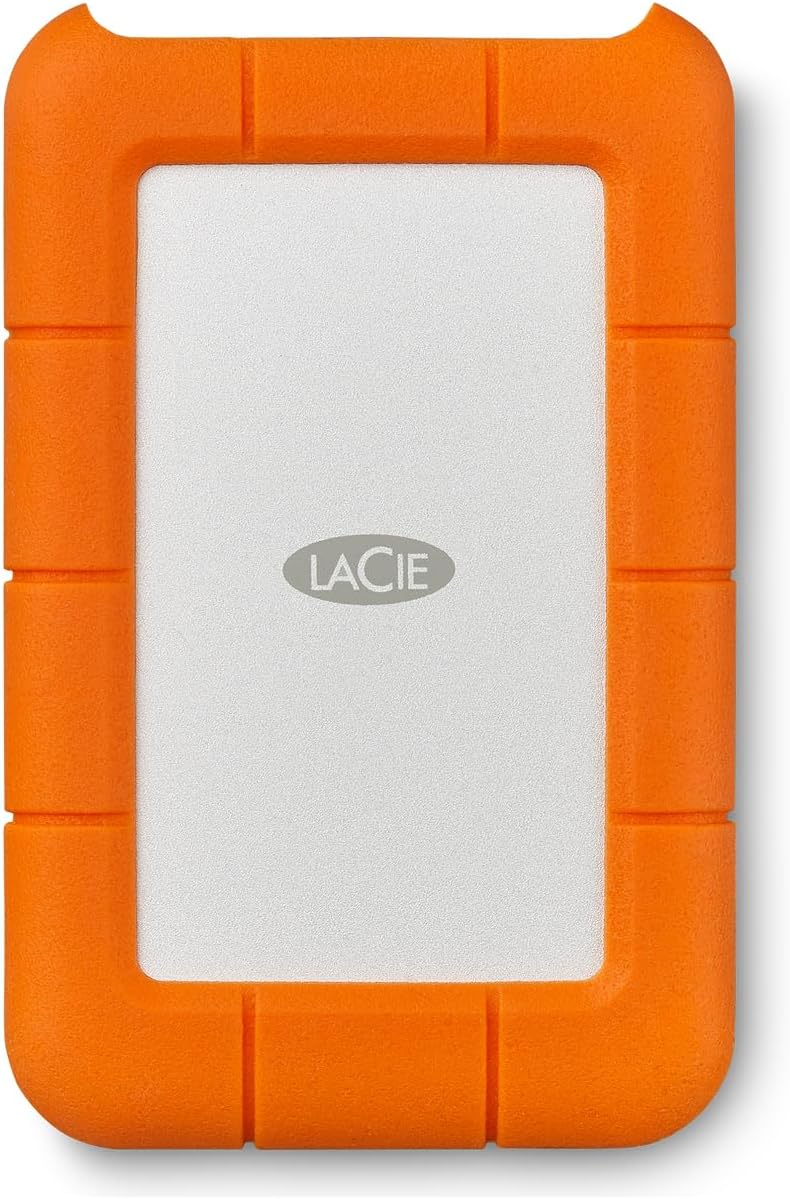
LaCie Rugged Mini 2TB
4.6Editor score
2TB storage capacity
USB 3.0 interface
Includes password protection
Finding reliable storage for professional creative work requires drives that withstand tough conditions. The Lacie Rugged External Hard Drive series offers proven durability and speed for demanding environments.
We evaluated ten current models based on capacity, interface speed, ruggedness ratings, and value. This list covers the full range from budget mini options to high-end Thunderbolt SSDs.
Each pick highlights key strengths, real-world trade-offs, and ideal use cases for photographers and video editors. Note that prices and stock availability change frequently on Amazon.
4.6Editor score
4.6Editor score

4.4Editor score
As an Amazon Associate we earn from qualifying purchases.
This side-by-side comparison lists every model evaluated in this guide with key specifications and links. Use this table to quickly identify the right capacity and interface for your workflow.


The LaCie Rugged Mini 4TB stands out as the top choice for professionals needing reliable portable storage. With a strong 4.6 rating and robust features, it balances capacity and durability perfectly for fieldwork.
We may earn a commission when you buy through this link, at no additional cost to you.
Its standout qualities include seamless compatibility with Mac, PC, iPad, and iPhone, ensuring versatile use across devices. The included Data Rescue Service adds peace of mind against accidental file loss or corruption.
While it lacks the blistering speeds of an SSD and requires a separate USB-C cable, these trade-offs are minor for most users. The compact 2.5 inch size fits easily in any bag while retaining rugged protection.
Photographers and videographers needing 4TB for on-the-go backups should prioritize this drive. Its proven resilience and broad device support make it the most versatile option in the Rugged lineup.
Works seamlessly with PCs, Macs, iPads, and iPhones for true mobility across your entire tech stack.
Data Rescue Service plan helps recover lost files quickly without costly third-party professional services.
We may earn a commission when you buy through this link, at no additional cost to you.
This 2TB model offers an excellent entry point into the Rugged family with a proven 4.6 user rating. It delivers reliable performance for basic backup needs without breaking the bank for users on a budget.
We may earn a commission when you buy through this link, at no additional cost to you.
Key strengths include USB 3.0 transfer speeds that are four times faster than USB 2.0. Built-in password protection helps secure sensitive data from unauthorized access when the drive is lost or stolen.
Mac users should note that reformatting is required for compatibility. While USB-C is more common now, USB 3.0 remains widely supported on most laptops and desktops for solid connection stability.
Those needing a reliable backup drive for a limited budget should choose this model. The included storage case adds extra value for protecting the drive in transit.
Delivers up to 4 times faster transfer speeds than USB 2.0 for efficient file backups and restores.
Built-in password protection keeps your files safe from unauthorized access if the drive is misplaced.
We may earn a commission when you buy through this link, at no additional cost to you.
The Rugged SSD brings SSD-level speed to the durable Rugged form factor, making it ideal for editing large 4K video files directly from the drive. Its 4.4 rating reflects high satisfaction among power users.
We may earn a commission when you buy through this link, at no additional cost to you.
With read speeds up to 950MB/s, this drive enables smooth real-time playback of high-resolution footage. The extreme durability, including 3 meter drop and water resistance, ensures it survives harsh field conditions.
The main trade-off is the higher price per terabyte compared to spinning drives. However, the performance boost and superior durability justify the investment for professionals where speed is critical to their workflow.
Editors needing to edit directly from a portable drive should choose this premium SSD. Its rugged build and fast speeds eliminate bottlenecks during demanding creative projects.
Read speeds of 950MB/s allow direct editing of 4K video without lag or frame drops.
Water resistance and 3 meter drop testing ensure reliability in rain, dust, and accidental falls.
We may earn a commission when you buy through this link, at no additional cost to you.
This model combines the iconic Rugged design with modern USB-C connectivity for fast transfers on new Macs and PCs. Its 4.4 rating confirms reliable performance for everyday backup needs and field storage.
We may earn a commission when you buy through this link, at no additional cost to you.
The USB-C interface ensures compatibility with the latest laptops without needing dongles, while still supporting older USB-A ports with an adapter. The 4TB capacity offers ample space for photo and video libraries.
While it lacks Thunderbolt speeds, it delivers solid performance for most general use cases. The compact build makes it easy to carry in a camera bag or laptop sleeve during travel.
Users with USB-C laptops should consider this drive for seamless connection and reliable storage. Its balance of speed and capacity makes it a versatile choice for modern workflows.
Natively supports USB-C for plug-and-play compatibility with the latest laptops and desktops.
4TB capacity provides plenty of room for large media files and system backups on the go.
We may earn a commission when you buy through this link, at no additional cost to you.
This 5TB drive offers the largest portable storage option in the lineup for those needing maximum space. While new and lacking extensive reviews, its specs promise reliable rugged performance with modern USB-C connectivity.
We may earn a commission when you buy through this link, at no additional cost to you.
The USB-C interface ensures compatibility with new Macs and PCs for fast data transfers. Its lightweight design makes it easy to carry anywhere from the office to remote field locations without bulk.
Users should note that it uses standard HDD technology, so speeds are lower than SSDs. However, the massive capacity makes it ideal for cold storage and large archive backups rather than active editing.
Professionals needing 5TB for extensive archives should choose this drive for its capacity. Its rugged design ensures your data stays safe regardless of where you work.
5TB provides plenty of room for large video files, system backups, and extensive photo archives.
Compact lightweight build allows easy transport between office, home, and remote shooting locations.
We may earn a commission when you buy through this link, at no additional cost to you.
Designed for professionals needing high-speed transfers, this Thunderbolt drive delivers up to 130MB/s with included cable. Its 4.5 rating reflects strong performance among video editors and power users.
We may earn a commission when you buy through this link, at no additional cost to you.
The integrated Thunderbolt cable wraps around the enclosure when not in use, keeping your kit tidy. Included Adobe Creative Cloud membership gives immediate access to essential editing tools for your workflow.
Mac users should note that Thunderbolt requires a specific port, though USB-C compatibility is also supported. The three-year limited warranty provides long-term peace of mind for your investment.
Editors needing fast direct editing should choose this drive for its speed. Its rugged durability and included software make it a complete package for pro workflows.
Integrated Thunderbolt cable provides speeds up to 130MB/s for editing high-resolution video directly.
One-month Adobe Creative Cloud membership offers immediate access to photo and video editing apps.
We may earn a commission when you buy through this link, at no additional cost to you.
This drive offers 8TB of storage with configurable RAID 0 or 1 modes for performance or redundancy. Its flat design makes it uniquely suitable for packing in tight gear bags and shipping envelopes.
We may earn a commission when you buy through this link, at no additional cost to you.
Self-encrypting password protection secures your projects from unauthorized access. The included Adobe Creative Cloud membership adds value for creators needing immediate access to editing tools.
Users should note that RAID 1 reduces usable capacity but provides data redundancy. The larger size may not fit small bags, but it is ideal for desktop backup or dedicated archive storage.
Teams needing 8TB with redundancy should choose this shuttle for its RAID flexibility. Its flat design and security features make it ideal for collaborative field workflows.
Configure RAID 0 for speed or RAID 1 for redundancy based on your project requirements.
Flat profile fits uniquely into jam-packed gear bags and shipping envelopes for easy transport.
We may earn a commission when you buy through this link, at no additional cost to you.
This drive offers unique dual FireWire 800 support alongside USB 3.0 for older Mac workstations. Its 3.8 rating reflects legacy users valuing compatibility over modern speeds and features.
We may earn a commission when you buy through this link, at no additional cost to you.
The dual FireWire ports allow daisy chaining for expanded storage setups. USB 3.0 support ensures it still works on most computers, though FireWire remains its main differentiator.
Mac users with older FireWire-only workstations should prefer this model for direct connection. However, for modern laptops without FireWire, newer USB-C drives are more practical options.
Those with legacy Mac workstations should choose this drive for its FireWire support. Its rugged design ensures durability even for older systems in active use.
Dual FireWire 800 ports connect directly to older Mac workstations without adapters.
Dual FireWire ports allow daisy chaining for expanded storage setups in complex workflows.
We may earn a commission when you buy through this link, at no additional cost to you.
This model provides Thunderbolt speeds in a compact 1TB form factor. Its 4.4 rating confirms reliable performance for creators needing fast access without needing large storage volumes.
We may earn a commission when you buy through this link, at no additional cost to you.
The included Thunderbolt cable wraps around the enclosure for easy portability. Adobe Creative Cloud membership gives immediate access to essential editing tools to enhance your workflow.
1TB is small for large video projects but ideal for scratch disks or project backups. The three-year limited warranty provides long-term protection for your investment.
Editors needing fast access for active projects should choose this drive. Its speeds and included software make it a complete package for pro editing.
Integrated Thunderbolt cable provides speeds up to 130MB/s for quick transfers.
One-month Adobe Creative Cloud membership offers immediate access to photo and video editing apps.
We may earn a commission when you buy through this link, at no additional cost to you.
This drive combines Thunderbolt performance with RAID capability for 4TB storage. Its 4.1 rating reflects solid performance among users needing reliable storage redundancy for professional work.
We may earn a commission when you buy through this link, at no additional cost to you.
The Thunderbolt interface delivers fast data transfers while supporting RAID configurations for data redundancy. USB 3.0 compatibility ensures it works with a wide range of computers for versatility.
Users should note it requires computer Thunderbolt ports for full performance. While older Thunderbolt versions are standard, newer Macs may need adapters for the connection.
Professionals needing RAID redundancy should choose this drive for its reliability. Its Thunderbolt speed and capacity make it ideal for demanding workflows.
Thunderbolt interface provides fast data transfers for efficient file management and editing.
Built-in RAID support allows configuring storage for redundancy and data safety.
We may earn a commission when you buy through this link, at no additional cost to you.
Selecting the right storage solution depends on your specific needs for speed, capacity, and environment. This guide outlines key factors to consider before purchasing.
Capacity determines how much data you can store. For photo backups, 2TB to 4TB is standard. For video editors, 5TB or higher is ideal for raw footage and project files.
Choose at least double your current storage usage to allow room for growth and temporary files.
USB-C offers modern fast transfers. Thunderbolt provides maximum speed up to 130MB/s for 4K editing. USB 3.0 remains compatible but slower for high-resolution workflows.
Select Thunderbolt if editing directly from the drive. Choose USB-C for general backups and modern laptop compatibility.
HDDs offer high capacity at lower cost. SSDs provide faster speeds and better durability. SSDs are ideal for active editing while HDDs suit archive storage.
Prioritize SSDs for performance and HDDs for budget. This guides balance cost and speed effectively.
The iconic rubber bumper protects against drops up to 4 feet. Rain and dust resistance ensures reliability in field conditions. Look for 3 meter drop ratings on premium models.
Always check drop and water resistance specs for your environment. Higher ratings ensure long-term reliability in harsh conditions.
Smaller 2.5 inch drives fit easily in camera bags. Larger RAID shuttles offer more storage but bulk. Consider your typical transport method when choosing size.
Opt for 2.5 inch form factors if carrying daily. Choose larger units for desktop backup and archive purposes.
Some models include password protection to secure sensitive data. Encryption helps prevent unauthorized access if the drive is lost. Always choose drives with built-in security.
Enable password protection on sensitive projects. This adds critical layers of security beyond physical ruggedness.
Most models come with 2 to 3 year limited warranties. Data Rescue services help recover lost files. Longer warranties indicate manufacturer confidence.
Choose drives with longer warranties for peace of mind. Rescue services add value against accidental file loss.
Adobe Creative Cloud memberships are often included. These provide free access to editing tools. Data Rescue services are also standard on many models.
Check included software for value. These bonuses can save money on professional tools.
Always eject the drive safely from your system before unplugging to prevent file corruption. This ensures all data is written correctly and keeps your files intact.
Store the drive in a cool dry place when not in use. Avoid exposing it to extreme temperatures or direct sunlight which may damage internal components.
Clean the exterior with a soft dry cloth to remove dust and dirt. Avoid harsh chemicals which may damage the rubber bumper or protective coatings.
The iconic rubber bumper protects against drops up to 4 feet, shock, dust, and water. This ensures data safety in tough field conditions and active workflows.
Mac users may need to reformat drives preformatted for Windows using APFS or Mac OS Extended. This allows full read-write access and compatibility with macOS features.
Yes, USB-C models work seamlessly with iPad Pro via USB-C cable. Ensure your iPad supports external storage and has sufficient power for the drive.
Most models come with Time Machine compatibility for Mac and basic backup support for PC. Specific software like LaCie Toolkit may be required for advanced features.
Most models include 2 to 3 year limited warranties covering hardware defects. Check specific product details as terms vary between different Rugged models.
Yes, especially Thunderbolt and SSD models which support direct editing of 4K video. HDD models are better for storage and backups rather than direct editing.
Data Rescue Service is a software tool included on many models to recover lost or corrupted files. It helps prevent permanent data loss due to accidental deletion.
Specific RAID Shuttle models support RAID 0 and 1 configurations. These allow redundancy or performance optimization. Regular models do not support RAID natively.
We recommend the LaCie Rugged Mini 4TB as the overall best choice for versatility and value. It balances capacity, speed, and durability perfectly for most users.
For editors needing maximum performance, prioritize Thunderbolt or SSD models despite the higher cost. Speed is critical for real-time playback and rendering workflows.
Remember to check current pricing and availability before buying as stock fluctuates. Ensure you select the right capacity for your needs to avoid future upgrades.