
HUION Note Digital Notebook
4.2Editor score
Real-time and offline sync
Battery-free pen included
Regular A5 notepad feel
Electronic sketch pads have revolutionized how artists and students capture ideas. These devices blend the tactile feel of paper with digital convenience, allowing for instant editing and sharing without the mess of traditional supplies.
We evaluated ten top-rated models based on display quality, pressure sensitivity, portability, and software compatibility. Our analysis focuses on real-world performance for sketching, note-taking, and creative projects across various skill levels and budgets.
Each pick highlights unique strengths and potential trade-offs to match your specific needs. Prices and availability change frequently, so verify current details before purchasing to ensure you get the best value for your creative workflow.
4.2Editor score

4.4Editor score

4.4Editor score
As an Amazon Associate we earn from qualifying purchases.
The following table provides a side-by-side comparison of all ten electronic sketch pads selected for this guide. We highlight key specifications to help you quickly identify the model that best fits your creative requirements and budget constraints.




The XPPen Magic Note Pad stands out as a leading electronic sketch pad for professionals and students seeking a standalone solution. With a 4.4 rating, it combines high resolution with natural feel. Its X-Paper display delivers a texture that mimics traditional paper, reducing the friction barrier often felt on glass screens.
We may earn a commission when you buy through this link, at no additional cost to you.
Key strengths include the 16384 pressure levels and tilt support, allowing for nuanced shading and line weight control. The device runs on Android 14, enabling access to a wide range of drawing apps via Google Play. This versatility makes it suitable for everything from casual doodling to complex digital illustration projects.
However, the price point is higher than basic LCD tablets, which might deter casual users. Additionally, transitioning to Android-based creative apps may require a brief learning curve for those used to desktop software. These trade-offs are acceptable given the hardware quality and the freedom of wireless creativity.
This device is ideal for artists who value mobility without sacrificing professional-grade tools. If you need an all-in-one sketchpad that replaces both paper and a computer drawing tablet, the XPPen Magic Note Pad is a top recommendation for serious creative work in 2026.
The AG nano-etching technology creates a surface that provides friction similar to pencil on paper, enhancing control during sketching.
Three distinct color modes allow users to switch between nature tones for notes and vibrant modes for detailed coloring tasks.
We may earn a commission when you buy through this link, at no additional cost to you.
The HUION Note is a unique electronic sketch pad that bridges the gap between traditional paper and digital storage. Rated at 4.2 stars, it appeals to those who love writing on paper but need digital backups. It uses a physical notebook with a special pen to capture handwriting digitally.
We may earn a commission when you buy through this link, at no additional cost to you.
Its standout feature is the seamless sync process. As you write on the A5 pad, the content is instantly converted to digital vectors on your device. The battery-free pen ensures you never run out of power mid-sentence. Audio recording synchronization helps capture lectures alongside written notes for comprehensive study.
A potential downside is that it relies on a mobile app for digital access, meaning the raw device itself doesn't display content like a tablet. It is also limited to text and simple lines rather than full artistic rendering. These limitations are minor for note-focused users but worth noting for artists.
This notebook is perfect for students and professionals who prioritize the writing experience over digital interfaces. If you want to keep using real paper while ensuring your notes are never lost, the HUION Note offers the best budget-friendly bridge to digital organization.
The pen requires no charging, relying on electromagnetic resonance to detect movement, ensuring it is always ready to write.
Record audio during meetings and sync it with your handwriting playback to relive the context of your notes later.
We may earn a commission when you buy through this link, at no additional cost to you.
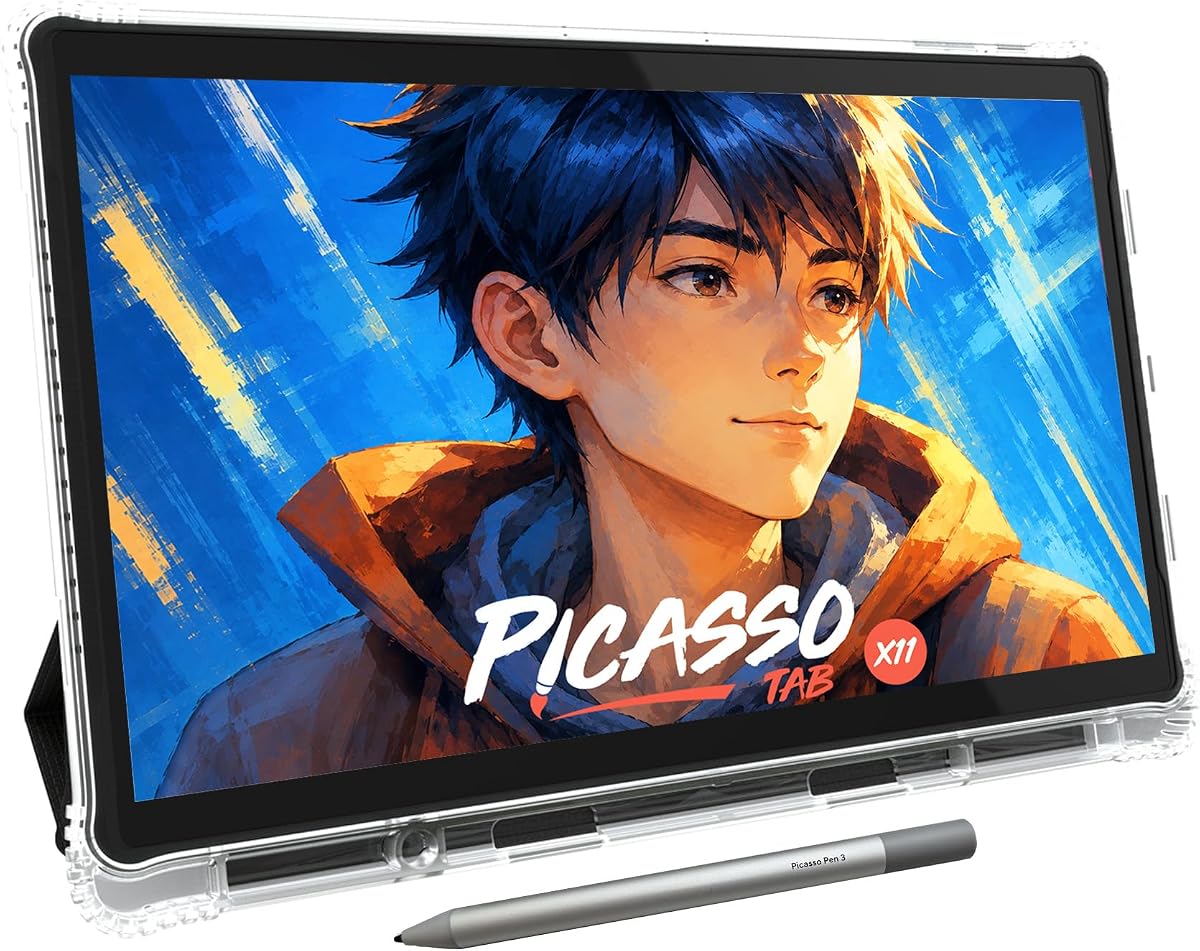
The PicassoTab X11 is designed specifically for those new to digital art or parents looking for an educational tool. With a 4.2 rating, it offers a large 11-inch screen at an accessible price point. It functions as a standalone tablet, removing the need for complex computer connections.
We may earn a commission when you buy through this link, at no additional cost to you.
The device comes preloaded with five creative apps and includes lifetime VIP access to Artixo tutorials. This educational focus makes it excellent for children learning to draw. The laminated screen reduces parallax, providing a more natural drawing feel compared to non-laminated competitors in this price range.
However, the 4096-level pressure sensitivity is lower than professional standards, limiting fine detail control for advanced artists. The software is optimized for learning rather than industry-standard professional tools like Photoshop. For beginners, these constraints are beneficial as they reduce complexity and focus on fundamentals.
This tablet is highly recommended for households with young artists or adults starting their creative journey. If you want a device that encourages creativity through guided lessons and offers a user-friendly interface, the PicassoTab X11 is a solid entry-level choice.
Integrated tutorials provide step-by-step guidance to help users improve their skills without needing external classes.
The full lamination minimizes the gap between the glass and display, making the pen feel closer to the pixels.
We may earn a commission when you buy through this link, at no additional cost to you.
The Kayoubi LCD Writing Tablet offers a massive 14.5-inch canvas for young creators. Rated at 4.6 stars, it is a favorite for parents wanting a mess-free alternative to paper. The large screen provides ample space for kids to express themselves without feeling constrained by size.
We may earn a commission when you buy through this link, at no additional cost to you.
Its primary function is simple: write or draw with the stylus and erase with one button press. The display is free from harsh blue light, protecting eyes during extended play sessions. It is an excellent tool for travel, keeping children entertained on road trips without the need for physical paper.
The limitation is that it does not save drawings digitally; once erased, the art is gone forever. It is also strictly a drawing board rather than a computing device. These factors make it less suitable for artistic development focused on saving work but perfect for play and practice.
Ideal for toddlers and school-age children, this tablet combines entertainment with environmental benefits. If you want a durable, portable, and cheap way to reduce paper waste at home, the Kayoubi LCD Writing Tablet is a reliable and highly rated solution.
The screen technology eliminates glare and harmful blue light, making it safe for kids to use for long periods.
A physical lock button prevents accidental erasure of favorite drawings, ensuring kids can enjoy their masterpieces longer.
We may earn a commission when you buy through this link, at no additional cost to you.
The Bravokids 10 Inch LCD Writing Tablet is a colorful electronic sketch pad designed for children aged three to eight. With a 4.6 rating, it provides a safe and engaging way for kids to practice writing and drawing. The colorful screen adds an extra layer of fun compared to standard black and white boards.
We may earn a commission when you buy through this link, at no additional cost to you.
Its design prioritizes safety and durability, featuring rounded corners and a screw-fixed battery door to prevent children from accessing small parts. Weighing only 150 grams, it is incredibly light and easy for small hands to carry. This portability makes it a perfect companion for travel or classroom activities.
While it offers a bright visual experience, it lacks advanced drawing features like pressure sensitivity or saving capabilities. It is strictly a practice and play tool. For young children focusing on motor skills and basic drawing, these limitations do not detract from its effectiveness as a toy.
This tablet is an excellent gift for parents looking to encourage creativity in a safe environment. If you need a lightweight, colorful, and affordable drawing pad for kids, the Bravokids model is a highly trusted choice for daily use.
By replacing paper notebooks, this tablet helps save thousands of sheets of paper over its lifespan, supporting environmental protection.
Kids can quietly engage in creative activities for hours, making it a useful tool for keeping them occupied during downtime.
We may earn a commission when you buy through this link, at no additional cost to you.
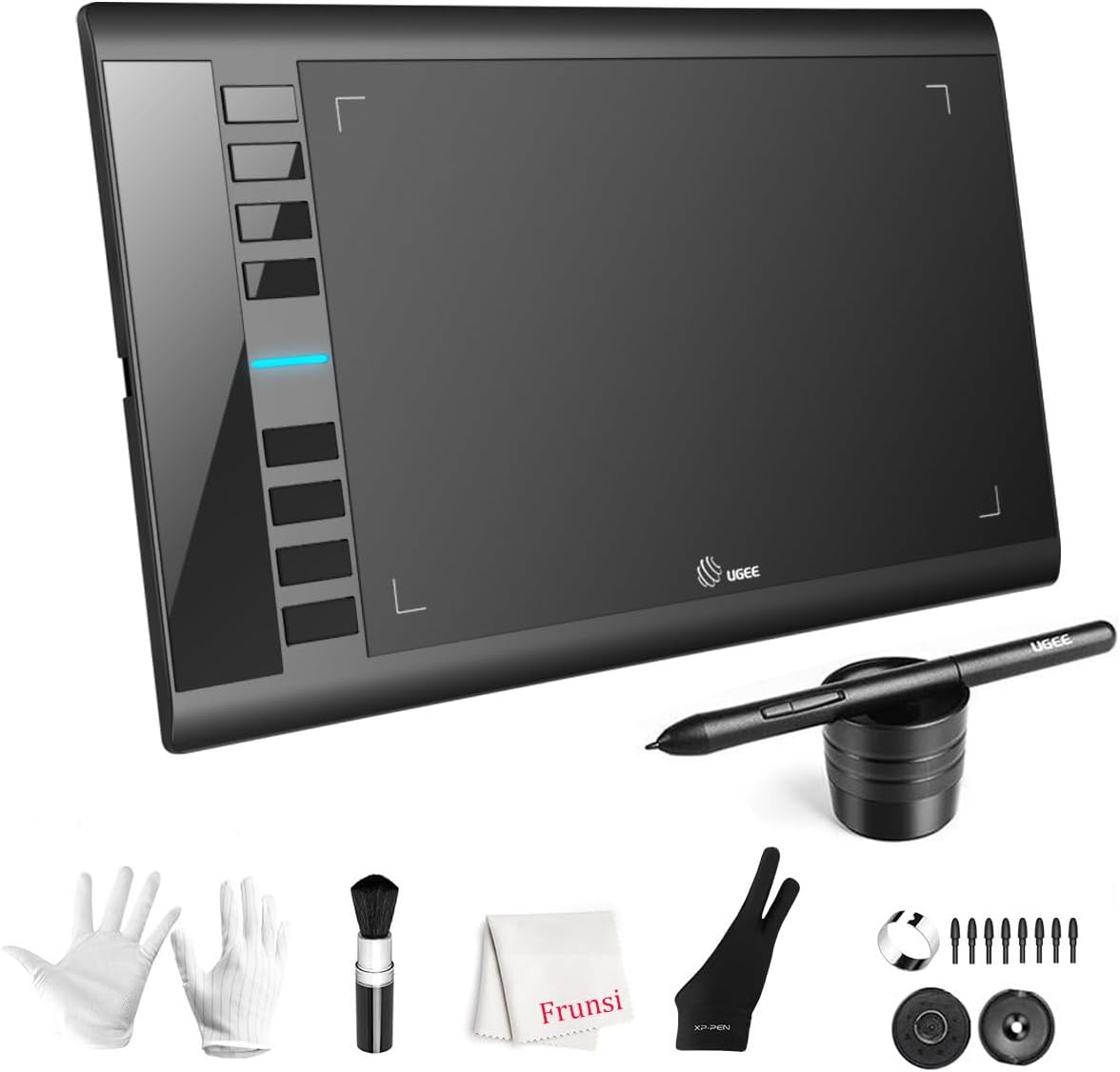
The UGEE M708 is a wired drawing tablet ideal for beginners entering digital art on a desktop. With a 4.4 rating, it offers a large active area at an entry-level price point. It connects to computers or laptops, providing a professional-grade drawing experience without the high cost of a monitor display.
We may earn a commission when you buy through this link, at no additional cost to you.
Key features include 16384 levels of pressure sensitivity and eight customizable express keys. These allow for precise control over brush strokes and quick access to commands like undo or zoom. It supports Windows, Mac, Android, and Linux, making it versatile for different workflows.
However, since it requires a computer connection, it is less portable than standalone tablets. Setup involves installing drivers which can sometimes be confusing for non-technical users. For artists working primarily at a desk, these minor inconveniences are outweighed by the performance and space it offers.
This tablet is perfect for students or hobbyists looking to learn digital painting without a significant investment. If you want a large, affordable workspace that supports major creative software, the UGEE M708 is a reliable choice to start your journey.
The eight shortcut keys on the side can be mapped to specific functions to speed up your workflow and reduce mouse reliance.
Works seamlessly with popular creative software like Photoshop and Clip Studio, ensuring you can use it right away.
We may earn a commission when you buy through this link, at no additional cost to you.
The Mafiti LCD Writing Tablet is a compact electronic sketch pad suited for quick notes or small doodles. Rated at 4.2 stars, its 8.5-inch screen is small enough to fit in a pocket yet large enough for functional writing. It is an excellent replacement for sticky notes or small notepads.
We may earn a commission when you buy through this link, at no additional cost to you.
It features a replaceable coin-cell battery that allows for over 100,000 uses before replacement. The built-in stylus doubles as a kickstand, enabling you to prop up the device for easy viewing or reading. Its ultra-thin design makes it easy to slip into a bag or backpack.
The small screen limits it to short notes rather than full illustrations. The included plastic stylus is basic but functional. While it lacks advanced digital features, its simplicity is its strength for quick, messy-free scribbling without needing a power outlet.
This tool is ideal for office workers or parents who need a quick way to jot down lists or messages. If you want a disposable-free solution for daily memos, the Mafiti LCD Writing Tablet provides a convenient and durable option for quick communication.
The coin-cell battery is easily replaced by removing the back button, extending the life of the device indefinitely.
The stylus dock acts as a stand to display notes to others, making it useful for sharing quick messages or reminders.
We may earn a commission when you buy through this link, at no additional cost to you.
The TEKFUN LCD Writing Tablet is designed for durability and portability, making it a top choice for travelers. With a 4.5 rating, its waterproof and anti-fall construction ensures it can withstand the rigors of road trips or flights. The 10-inch screen provides enough space for kids to stay occupied for hours.
We may earn a commission when you buy through this link, at no additional cost to you.
It boasts a battery life of up to six months on a single charge or replacement, reducing the frequency of maintenance. The lock switch prevents accidental erasures, ensuring drawings remain visible until you decide to clear them. This reliability is crucial when you are on the go and cannot easily replace items.
Like other LCD boards, it does not save images, and the battery will eventually need replacing. However, the ease of access to the battery compartment makes this manageable. For families looking for a robust travel toy that is easy to clean and maintain, this model stands out.
This is the ideal electronic sketch pad for vacations or long commutes. If you need a durable, lightweight, and easy-to-manage drawing tool for children that survives drops and spills, the TEKFUN LCD Writing Tablet is an excellent practical choice.
The device is designed to resist liquids, protecting internal components from accidental spills or rain during outdoor activities.
Weighing only 150 grams, it fits easily in travel bags without adding bulk, making it a perfect road trip essential.
We may earn a commission when you buy through this link, at no additional cost to you.
The Wacom Intuos Small is a professional-grade electronic sketch pad trusted by designers globally. With a 4.6 rating, it offers industry-leading precision and control. The battery-free pen technology ensures consistent performance without the need for charging, mimicking the natural feel of a pen on paper.
We may earn a commission when you buy through this link, at no additional cost to you.
This model comes with a bundle of creative software, allowing users to start working immediately. The active area is compact, making it easy to use on small desk setups. It is compatible with all major creative applications, ensuring flexibility for various professional tasks.
The small surface size might feel limiting for artists used to larger motions, and it requires a computer connection. However, for those learning professional tools, the ergonomics and pressure sensitivity are excellent. The included software adds significant value, saving money on initial tool acquisition.
This tablet is recommended for students and professionals needing a reliable desktop drawing solution. If you prioritize precision and brand reliability over portability, the Wacom Intuos Small provides a high-quality foundation for serious digital design work.
The EMR battery-free pen uses resonance to capture pressure and tilt, delivering a smooth and responsive writing experience.
Register your device to access exclusive creative tools and training resources, enhancing your learning curve and workflow.
We may earn a commission when you buy through this link, at no additional cost to you.
The XP-PEN Artist12 is a pen display that allows you to draw directly on the screen. Rated at 4.4 stars, it offers an 11.6-inch Full HD screen at a competitive price point. This direct drawing experience significantly reduces the learning curve compared to non-display tablets.
We may earn a commission when you buy through this link, at no additional cost to you.
It features 8192 pressure levels and a battery-free stylus, providing accurate control for detailed work. The screen is pre-covered with an anti-reflective protector to reduce glare. Six customizable shortcut keys on the side allow quick access to essential commands during creative sessions.
Since it must connect to a computer, it is less portable than standalone tablets. Cable management can be a minor issue depending on your desk setup. However, for home studios, the clarity and direct interface are superior. It bridges the gap between traditional art and digital tools effectively.
This device is perfect for illustrators and designers who want a screen-based workflow without a high-end budget. If you value seeing your strokes appear directly under the pen tip, the XP-PEN Artist12 is a high-value choice for professional illustration.
Drawing directly on the display eliminates hand-eye coordination issues, allowing for more natural and precise strokes.
The 1920×1080 resolution with 72% NTSC color gamut ensures vibrant and true-to-life colors for digital artwork.
We may earn a commission when you buy through this link, at no additional cost to you.
Selecting the right electronic sketch pad depends on your specific needs, budget, and skill level. Understanding the differences between standalone tablets, LCD boards, and pen displays will help you make an informed decision.
Electronic sketch pads generally fall into three categories: LCD writing tablets, standalone drawing tablets with screens, and pen displays that connect to computers. LCD tablets are monochrome or basic color and used for notes or kids. Standalone tablets have full OS support and color screens. Pen displays offer high resolution but require a host computer.
Choose a display type that matches your workflow. For casual notes or children, an LCD board is sufficient. For professional art, a standalone or pen display with pressure sensitivity is necessary.
Pressure sensitivity determines how well the device translates pen pressure into line thickness. Higher levels, such as 8192 or 16384, allow for finer control and more natural shading. Lower sensitivity is acceptable for basic writing or doodling but limits artistic depth.
Prioritize higher pressure levels if you plan to do detailed illustration or professional design work.
Consider where you will use the device. Standalone tablets offer full mobility with built-in batteries. Pen displays require power and a computer connection, making them stationary. Battery-free pens ensure you never have to charge your stylus, which is convenient for all-day use.
If you work on the go, look for lightweight designs and long battery life for the tablet itself.
Check if the device supports your operating system. Some standalone tablets run Android, while pen displays require Windows or Mac. Ensure your favorite creative apps are available or supported. Some devices come with included software that can save on initial costs.
Verify software compatibility before buying to ensure the tablet works with your existing creative ecosystem.
Screen size impacts your drawing experience. Larger screens allow for more natural arm movements, while smaller ones are portable. Display quality affects color accuracy and eye comfort. Look for anti-glare coatings and high resolution to reduce strain during long sessions.
Select a screen size that fits your workspace and offers enough resolution for detailed work.
Prices vary widely from under twenty dollars for LCD boards to hundreds for professional standalone tablets. Define your budget early to narrow down options. Remember that higher-end models often include warranties and better build quality that justify the cost.
Focus on value rather than just price to ensure the device lasts and meets your long-term needs.
Start by calibrating your pen settings to match your hand pressure. Most tablets come with a calibration tool that ensures lines appear exactly where you touch the screen. Proper calibration reduces frustration and improves drawing accuracy significantly.
Keep your screen clean to maintain clarity. Use a soft microfiber cloth to wipe away dust and fingerprints regularly. Avoid harsh chemicals that could damage the anti-glare coating. For LCD boards, gently clean with a dry cloth to avoid scratches.
Store your device in a protective case when not in use to prevent accidental drops. Avoid extreme temperatures that could damage the battery or screen. Always turn off the device completely if you plan to store it for extended periods to preserve battery health.
Yes, standalone electronic sketch pads like the XPPen Magic Note Pad work independently with built-in Android systems. However, traditional pen displays like the XP-PEN Artist12 require a computer connection to function. Check the specifications to confirm if a device is standalone or requires a host computer before purchasing.
Most electronic sketch pads are safe for children as they do not emit harmful radiation or blue light. LCD boards specifically are designed to be eye-friendly and free from harsh screens. Always ensure battery compartments are secured with screws to prevent small children from accessing batteries.
LCD sketch pads use liquid crystal displays that require pressure to write and usually do not need power for the display itself. LED or electronic display tablets use backlit screens that offer color and higher resolution but consume more power. LCDs are better for simple notes while LEDs are for art.
Traditional LCD writing tablets do not save drawings electronically; once erased, the content is gone permanently. Standalone tablets and pen displays allow you to save and export files to devices or cloud storage. Consider this feature if you need to keep your work.
Battery life varies by model and usage. Standalone tablets typically last 10 to 20 hours of continuous use, while LCD boards can run for months or years on a single coin-cell battery replacement. Always check battery specifications to match your usage habits.
Many professional drawing tablets come bundled with creative software or trial versions to help you get started. Standalone tablets usually pre-install drawing apps, while pen displays require you to install software on your connected computer. Check the product details for included software lists.
Choosing the best electronic sketch pad ultimately depends on your specific needs and how you plan to use the device. Whether you prioritize portability with a standalone model or precision with a desktop pen display, there is an option available to match your workflow.
Consider the balance between features and price. While professional models offer high-end tools, budget-friendly options like LCD boards provide significant value for casual users and children. Evaluate your requirements for storage, sensitivity, and connectivity to narrow your choice.
Remember that product availability and pricing change frequently across retailers. Always check current reviews and offers before making a purchase to ensure you are getting the most up-to-date version and the best possible deal for your creative needs in 2026.