
ASRock Intel Arc A380 Challenger ITX 6GB OC
4.3Editor score
Compact 2-slot ITX Design
AV1 Hardware Encode Support
ZerodB Silent Fan Mode
This guide compares the top GPUs for Small Form Factor Sff PC builds, evaluating performance, size, and power for compact gaming and professional systems.
Selecting the right graphics processor is critical for compact systems. You need powerful performance without sacrificing case compatibility or airflow. This guide helps you find the ideal match for your unique small chassis needs.
We evaluated ten top-rated cards based on dimensions, power draw, and real-world throughput. Our analysis focuses on cards that fit slim enclosures while delivering exceptional visual fidelity for users.
Each pick highlights specific strengths like cooling efficiency or connectivity options. Prices and availability fluctuate frequently so verify current details before purchasing. Use this resource to streamline your component selection process.
4.3Editor score

4.7Editor score

4.8Editor score
Compare key specifications across all ten selected graphics cards to find the best fit for your specific small form factor build requirements and budget constraints.




The ASUS SFF-Ready Prime GeForce RTX 5070 stands out as a top-tier option for enthusiasts pushing the limits of small chassis designs. With a rating reflecting high satisfaction, it delivers incredible power density without compromising thermal stability.
We may earn a commission when you buy through this link, at no additional cost to you.
Powered by the latest Blackwell architecture and offering 12GB of GDDR7 memory, this card handles modern gaming and creative workloads effortlessly. The Axial-tech fans utilize a smaller hub for longer blades, increasing downward air pressure for efficient cooling within tight spaces.
While it requires careful planning for PSU wattage, the 2.5-slot design balances performance and build compatibility effectively. The phase-change thermal pad ensures heat is transferred away quickly, maintaining boost clocks during extended sessions.
This card is ideal for builders seeking premium performance in a mini ITX case. It offers the best blend of next-gen features and form factor optimization available today for serious enthusiasts.
The Axial-tech fans and phase-change thermal pad work together to lower GPU temperatures significantly compared to standard designs.
With PCIe 5.0 and DisplayPort 2.1 support, this card future-proofs your build against upcoming hardware standards.
We may earn a commission when you buy through this link, at no additional cost to you.
The GIGABYTE RTX 5070 WINDFORCE OC SFF offers a premium experience for those prioritizing raw speed in a small chassis. With a high user rating, it confirms reliability and strong performance metrics in real-world scenarios.
We may earn a commission when you buy through this link, at no additional cost to you.
Equipped with 12GB of GDDR7 memory, this card provides ample bandwidth for complex textures and heavy gaming loads. The WINDFORCE cooling system maintains stability, ensuring consistent performance even under stress.
Users should note that the card demands a quality power supply and adequate case ventilation. While the cost is higher, the investment pays off through sustained high performance and future compatibility.
This choice is perfect for users who need maximum power in a compact frame. It combines flagship specs with a design tailored for small form factor builders.
The 12GB GDDR7 memory ensures smooth performance in demanding titles and productivity tasks without bottlenecks.
WINDFORCE fans are optimized to push air through compact chassis designs efficiently.
We may earn a commission when you buy through this link, at no additional cost to you.
The ASRock Intel Arc A380 Challenger ITX is an excellent choice for budget-conscious builders needing a silent small form factor graphics card. Its solid rating indicates dependable performance for entry-level gaming and home theater use.
We may earn a commission when you buy through this link, at no additional cost to you.
With AV1 hardware encoding support, it excels at streaming and video production tasks. The 0dB silent mode stops the fan completely at low temperatures, making it ideal for quiet office environments or media centers.
Although it may not match high-end cards in pure rasterization, its cost efficiency and small size make it a smart pick. It fits easily into mini ITX cases without requiring major case modifications.
This card is best for users seeking a reliable, quiet GPU for light gaming and media. It balances price and functionality better than many competitors in its class.
The 0dB Silent feature allows for complete silence during low-demand tasks like web browsing or video playback.
AV1 encode accelerates streaming workflows and content creation without taxing the CPU.
We may earn a commission when you buy through this link, at no additional cost to you.
The maxsun GeForce RTX 3050 6GB is a solid entry-level option for small form factor gaming builds. It offers a slim design that fits into many compact cases while maintaining respectable performance metrics.
We may earn a commission when you buy through this link, at no additional cost to you.
Featuring a low-profile design, it is perfect for ITX cases where space is limited. The PCIe 4.0 interface ensures it works well with modern processors, delivering smooth performance for esports titles.
Thermal performance is acceptable for light gaming loads, though it may struggle with sustained heavy rendering tasks. Users should ensure adequate airflow in their specific chassis to avoid thermal throttling.
This GPU is a great starting point for builders looking to upgrade from integrated graphics. It provides a balance of compactness and modern features at an accessible price.
The slim low profile design ensures easy installation in small chassis without compromising stability.
We may earn a commission when you buy through this link, at no additional cost to you.
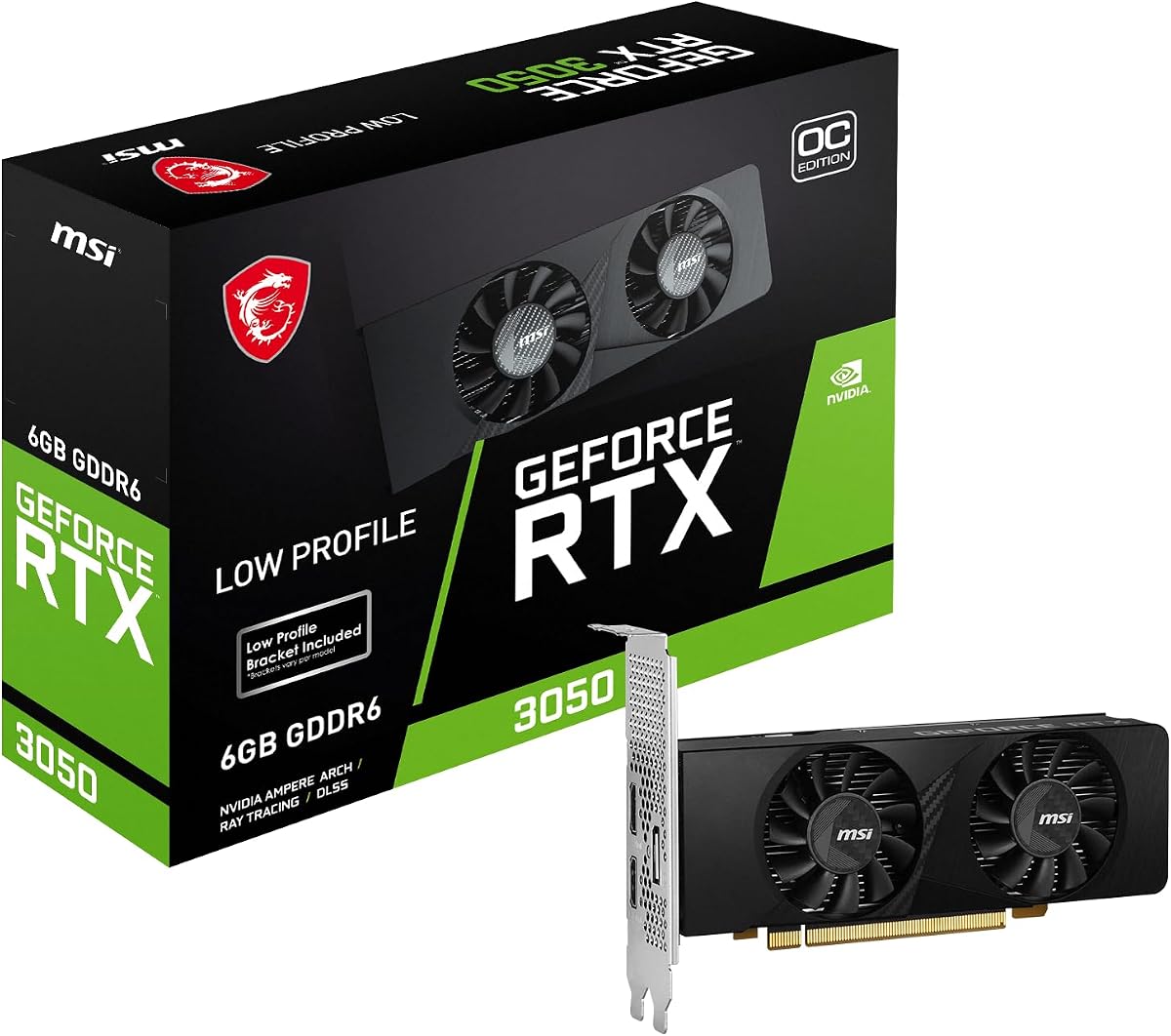
The MSI Gaming RTX 3050 LP 6G OC brings a reputation for reliability to small form factor builds. With a high user rating, it is known for consistent performance and solid build quality.
We may earn a commission when you buy through this link, at no additional cost to you.
Its Low Profile design allows it to fit into many slim chassis cases. The 1492 MHz boost clock provides a slight edge over reference models, enhancing gaming frame rates in lower settings.
While the VRAM is modest, it remains sufficient for most entry-level 1080p gaming. Users seeking a no-nonsense upgrade for office or light gaming PCs will find it dependable.
This card is recommended for those prioritizing build quality and simplicity. It delivers the performance needed for everyday tasks without unnecessary bulk.
The overclocked boost clock ensures consistent frame rates during extended gaming sessions.
We may earn a commission when you buy through this link, at no additional cost to you.
The PNY Nvidia RTX A400 4GB is designed for professional workflows in compact workstations. Its high rating reflects trust among users needing reliable performance for business applications.
We may earn a commission when you buy through this link, at no additional cost to you.
With a single-slot low profile design, it fits into extremely tight enclosures. It supports four Mini DisplayPort outputs, making it ideal for multi-monitor setups in limited space.
Power efficiency is a standout feature, consuming only 50W. This makes it perfect for environments where noise and heat are critical concerns.
This card is a top choice for professional users needing a silent, slim upgrade. It sacrifices gaming power for stability and specialized workstation compatibility.
Optimized for CAD and design apps, it ensures smooth performance in demanding business software.
We may earn a commission when you buy through this link, at no additional cost to you.
The MSI GeForce RTX 3050 LP 6G OC is known for its quiet operation and robust cooling. It is a great choice for users needing silent performance in a small chassis.
We may earn a commission when you buy through this link, at no additional cost to you.
Two fans and a huge heatsink ensure stable temperatures even in compact spaces. The Low Profile design saves space while maintaining efficient airflow for the GPU core.
The custom PCB is engineered for reliability, offering durability for long-term use. It supports 4K output, making it versatile for media consumption and light gaming.
This card is best for home office builds requiring silence and stability. It balances cooling efficiency with a compact footprint effectively.
Two fans with a large heatsink ensure low noise levels and consistent performance.
We may earn a commission when you buy through this link, at no additional cost to you.
The MSI Gaming RTX 5060 Ti 8G Shadow 2X OC brings next-gen architecture to small form factor builds. Its solid rating indicates strong performance and reliability for mid-range users.
We may earn a commission when you buy through this link, at no additional cost to you.
TORX Fan 5.0 technology stabilizes airflow to maintain optimal temperatures in tight spaces. The 8GB GDDR7 memory ensures smooth handling of modern gaming titles.
Users should verify their power supply requirements before installation. While it is larger than some competitors, it balances performance and thermal efficiency well.
This card is ideal for gamers seeking a balance of power and compactness. It offers the latest features for a premium mid-range experience.
TORX Fan 5.0 optimizes airflow to reduce noise while increasing cooling efficiency.
We may earn a commission when you buy through this link, at no additional cost to you.
The AMD Radeon Pro WX 4100 is a classic choice for professional small form factor builds. Its solid rating indicates reliability for tasks like CAD and 3D rendering in compact cases.
We may earn a commission when you buy through this link, at no additional cost to you.
It supports up to 5K displays and features ZeroCore Power technology for idle energy savings. The low profile design fits easily into slim chassis without modification.
Power consumption is extremely low, ensuring quiet operation and minimal heat output. It is not designed for gaming but excels in business workstation environments.
This card is best for users prioritizing silence and stability over raw graphics power. It provides dependable performance for specialized professional applications.
Certified for professional software, it ensures stability and performance in demanding tasks.
We may earn a commission when you buy through this link, at no additional cost to you.
The ASUS Dual Radeon RX 9060 XT 16GB offers high capacity memory for demanding gaming in compact systems. A strong user rating highlights its performance and build quality.
We may earn a commission when you buy through this link, at no additional cost to you.
With 16GB of VRAM, it handles modern textures and multitasking with ease. The 2.5-slot design and Axial-tech fans provide efficient cooling for consistent performance.
The Dual BIOS switch allows toggling between quiet and performance profiles. Users need to ensure their case supports the 2.5-slot width for proper installation.
This card is best for gamers needing significant VRAM in a relatively compact card. It balances power and cooling efficiency well for small builds.
16GB of VRAM ensures smooth performance in future-proofing heavy gaming and creative tasks.
We may earn a commission when you buy through this link, at no additional cost to you.
Choosing the right graphics card for a small chassis requires balancing performance with strict physical and power constraints.
The physical size of a graphics card is the first major constraint to check. Low profile cards are designed to fit into slim enclosures but may have limited airflow. Always compare the card's height and length against your case specifications to ensure it fits without obstruction.
Measure your chassis clearance carefully before purchasing. A card that is too long or wide can block airflow or fail to install properly.
Compact systems often use lower-wattage power supplies with limited connectors. Check the card's power rating and ensure your PSU can handle it without needing external cables. Many low profile cards are low power but may still require specific connectors.
Verify that your power supply has enough headroom to support the card's peak draw. This prevents instability and ensures system longevity.
Heat dissipation is harder in small cases due to limited airflow. Cards with passive cooling or single-fan designs must be chosen carefully. Active cooling solutions with optimized airflow are often necessary to maintain performance.
Look for cards designed specifically for SFF builds with efficient thermal designs. This helps avoid thermal throttling during extended use.
VRAM capacity impacts how well a card handles modern games and tasks. Small form factor cards often have reduced memory but still offer great performance for their size. Consider your workload needs to determine how much memory you truly require.
Match the memory to your intended use. Higher capacity is better for creative work or high-resolution gaming.
Ports like HDMI and DisplayPort determine how you connect monitors. Low profile cards often have limited ports but can support multiple displays. Ensure the card has the inputs you need for your specific setup.
Check the video standards supported by the card for the best compatibility. This ensures smooth output for your monitors and peripherals.
Reputable brands often offer better build quality and customer support. Warranty terms vary by model and manufacturer, so check what is covered. Reliable brands provide better protection for your investment.
Consider the support offered by the manufacturer. Good warranty coverage can save costs in the long run.
Small form factor cards can be more expensive per watt than standard cards. Balance your budget with the features you need for your specific use case. Value comes from performance per dollar and long-term utility.
Research the average prices to ensure you are paying a fair amount. A higher initial cost can be justified by better build quality.
When installing your GPU, ensure you have adequate space in your chassis. Align the card with the PCIe slot and secure it firmly to prevent movement during transport.
Monitor temperatures regularly using software tools. If you notice high heat levels, consider adjusting fan curves or improving airflow in your case.
Keep your system clean by removing dust periodically. Small cases can accumulate debris quickly, which can block vents and reduce cooling efficiency.
Most small form factor cases support Low Profile cards under 6.7 inches in height and under 7 inches in length. Always check your specific case dimensions before buying a graphics card to ensure compatibility.
Low profile cards generally have similar core performance but may throttle sooner under heavy loads due to thermal limits. They are optimized for efficiency and fit, not maximum sustained throughput.
Many SFF GPUs draw under 75W and can be powered directly by the motherboard slot. Some higher performance models may require an external power connector.
Standard full-size GPUs are usually too long or wide for SFF cases. Using them can block fans and airflow, so always choose a model specifically labeled as SFF or Low Profile.
SFF GPUs can carry a slight premium due to their specialized engineering. However, prices vary widely depending on performance and specific features required.
Use compressed air to blow dust out of the heatsink and fan blades regularly. Be careful to keep the fan still while blowing to prevent damage to the bearings.
The top picks offer a range of performance levels for every build style. The ASUS SFF-Ready Prime NVIDIA GeForce RTX 5070 stands out for high-end users.
Prioritize physical compatibility and cooling capabilities when making your decision. A card that fits well will perform better than one that is physically compromised.
Prices and availability change frequently so check current listings before you buy. Use this guide to narrow down your options and find the perfect match.