
MSR90 USB Swipe
4.2Editor score
Plug and play USB
3-track magnetic read
Durable swipe mechanism
This guide compares the top credit card swipers for businesses of all sizes, reviewing magnetic stripe readers, mobile terminals, and payment systems for
Credit card swipers are essential tools for modern businesses accepting payments. Choosing the right one ensures secure, fast transactions. Whether you need a simple magnetic stripe reader or a full mobile point of sale system, understanding the options helps you find the perfect fit for your specific needs.
We evaluated ten top-rated products based on compatibility, ease of use, and reliability. Our analysis covers budget-friendly magnetic readers, all-in-one terminals, and mobile solutions. Each product was assessed for its ability to handle various card types and integrate smoothly with existing business software.
Each pick highlights key features, pros, and cons to aid your decision. Note that prices may fluctuate over time. We recommend checking the current listings for the most up-to-date pricing and availability before making your final purchase decision for your business operations.
4.2Editor score

4.5Editor score

3.9Editor score
The following table offers a side-by-side comparison of the ten selected credit card swipers. Review the specifications and key capabilities to identify which device aligns best with your payment processing requirements and business environment needs.



The MSR90 USB Swipe is a reliable magnetic stripe reader designed for businesses needing a simple, effective card swiping solution. With a rating of 4.2 stars, it is favored for its plug-and-play functionality and robust reading capabilities across three tracks.
We may earn a commission when you buy through this link, at no additional cost to you.
Its USB emulation keyboard interface ensures compatibility with Windows and Mac systems without requiring additional drivers or software installation. The bi-directional swipe reading mechanism handles scratched or worn cards effectively, ensuring consistent performance even with less ideal card conditions.
While it lacks chip card support, which is a limitation in today's payment landscape, the MSR90 excels in its specific niche of magnetic stripe transactions. The LED indicator provides clear visual feedback during connection and swiping, enhancing user confidence during transactions.
This reader is ideal for small businesses or legacy systems that primarily rely on magnetic stripe cards. Its affordability and ease of integration make it a top choice for those seeking a straightforward card swiping tool without unnecessary complexity or high costs.
The USB emulation interface allows the MSR90 to work like a keyboard, ensuring compatibility with most software without extra drivers.
Bi-directional swipe technology ensures high success rates even with worn or scratched magnetic stripe cards.
We may earn a commission when you buy through this link, at no additional cost to you.
This USB magnetic stripe reader offers a straightforward solution for businesses needing basic card data entry. With a 4.2 rating, it is appreciated for its compatibility with various applications like Word and Excel, as well as POS systems.
We may earn a commission when you buy through this link, at no additional cost to you.
The device supports reading from all three tracks on high and low coercivity cards, making it versatile for different card types. Its configuration software allows for setting changes, providing flexibility for users with specific data entry requirements.
The red LED indicator light offers clear status updates, signaling connection and swiping actions. However, the lack of EMV chip support limits its use in environments requiring modern, secure payment processing standards.
Ideal for loyalty programs or access control, this reader is a practical choice for simple data capture tasks. Its plug-and-play nature ensures minimal setup time, making it suitable for small businesses or organizations with limited technical resources.
Reads ISO 7811, AAMVA, and DMV card formats, ensuring broad compatibility with various card types.
No software installation is needed for basic reading, allowing immediate use across Windows and Mac systems.
We may earn a commission when you buy through this link, at no additional cost to you.
The Square Terminal is a comprehensive mobile point of sale device that accepts all major credit and debit cards. With a high 4.5-star rating, it stands out for its ability to process chip cards in just two seconds and print receipts on the spot.
We may earn a commission when you buy through this link, at no additional cost to you.
Designed for cordless use, the built-in battery ensures all-day operation, making it perfect for businesses with mobile sales or multiple counters. It integrates seamlessly with Square's ecosystem, allowing for easy tracking of sales and management of inventory.
Although the initial cost is higher than basic readers, the Terminal offers significant convenience and security. It supports modern payment methods and ensures funds are available quickly, which is crucial for cash flow in small businesses.
This device is ideal for retail stores or service providers needing a reliable, standalone payment solution. Its ease of use and comprehensive features make it a top choice for businesses looking to modernize their payment processing efficiently.
Accepts chip cards, magnetic stripe, and contactless payments, ensuring all customer preferences are met.
Includes features to track sales and manage inventory, streamlining operations within a single device.
We may earn a commission when you buy through this link, at no additional cost to you.
The ETEKJOY USB 3-Track reader is a compact solution for businesses needing basic magnetic stripe card reading. With a 4.3 rating, it is appreciated for its USB interface and compatibility with various operating systems and applications.
We may earn a commission when you buy through this link, at no additional cost to you.
Its 145cm USB cord provides flexibility in placement, while the screw holes allow for secure fixing at the bottom. The device reads high and low coercivity cards, ensuring versatility in handling different card types securely.
The LED indicator light adds a visual cue for successful swipes, reducing errors during transactions. However, as a magnetic stripe-only device, it does not support modern chip card requirements, limiting its use in secure payment environments.
This reader is suitable for access control or loyalty programs where chip security is not a priority. Its affordability and ease of setup make it a practical choice for organizations needing reliable, basic card data entry tools.
Two 3mm-diameter screw holes enable secure installation to prevent accidental disconnection or theft.
Works with standard applications like Notepad and Excel, simplifying data integration without extra software.
We may earn a commission when you buy through this link, at no additional cost to you.
The Square Reader for magstripe is a compact solution designed for businesses using Apple devices. With a 4.6 rating, it is highly favored for its seamless integration with iOS and its ability to process payments quickly.
We may earn a commission when you buy through this link, at no additional cost to you.
It connects via USB-C, ensuring compatibility with modern Apple devices. The reader allows users to download the Square Point of Sale app for free, enabling instant setup without long-term commitments or complex configurations.
While it only supports magnetic stripe cards, the low cost and fast setup make it a top choice for small businesses. Funds are available as soon as the next business day, supporting efficient cash flow management.
This device is perfect for mobile vendors or small shops using iPhones. Its simplicity and affordability ensure that accepting card payments is accessible to businesses with minimal technical requirements or budgets.
Funds are available as soon as the next business day, keeping cash flow efficient for small businesses.
The free Point of Sale app helps track sales, manage inventory, and send digital receipts from one place.
We may earn a commission when you buy through this link, at no additional cost to you.
The 2xhome POSMATE Set offers two magnetic stripe readers in one package, ideal for businesses needing multiple card entry points. With a 4.1 rating, it is appreciated for its compatibility with various card formats like credit cards and driver's licenses.
We may earn a commission when you buy through this link, at no additional cost to you.
The 5ft cable length provides flexibility in connecting to the POS system or computer. It supports ISO and ANSI standards, ensuring broad compatibility with standard magnetic stripe card data structures for accurate reading.
However, it is crucial to note that these readers are not encrypted, making them unsuitable for secure financial transactions requiring encryption standards. This limitation restricts their use to non-secure applications like access control or internal tracking.
This set is a practical choice for small businesses requiring basic card reading capabilities across multiple registers. The affordable price point and dual-unit setup make it a cost-effective solution for organizations with limited security requirements.
Includes two readers, allowing businesses to equip multiple checkouts without purchasing individual units.
Compatible with ISO and ANSI standards, ensuring it can read common magnetic stripe cards effectively.
We may earn a commission when you buy through this link, at no additional cost to you.
The SumUp Plus Card Reader allows businesses to accept payments anywhere via Bluetooth and NFC technology. With a 3.8 rating, it is a popular choice for mobile vendors needing flexible payment processing on smartphones or tablets.
We may earn a commission when you buy through this link, at no additional cost to you.
Its ability to accept major credit and debit cards along with contactless payments ensures that customer preferences are met efficiently. The free SumUp App simplifies transaction management, offering a user-friendly interface for processing payments.
The lack of long-term contracts provides businesses with flexibility, but reliance on a smartphone for operation can be a constraint. Users must ensure their device has the necessary battery life and connectivity for uninterrupted service.
Ideal for food trucks or market stalls, this reader offers mobility and ease of use. While the rating is slightly lower, its features make it a viable option for businesses prioritizing flexibility and modern payment methods like NFC.
Accepts NFC and RFID payments, catering to customers who prefer contactless transactions for speed and safety.
The free SumUp App handles transactions seamlessly, allowing businesses to start accepting payments quickly.
We may earn a commission when you buy through this link, at no additional cost to you.
The PAX S300 v2 is a high-end payment terminal designed for merchants requiring robust security and versatile payment options. With a 3.9 rating, it stands out for its PCI PTS security standards and support for contactless and chip card transactions.
We may earn a commission when you buy through this link, at no additional cost to you.
Its large color touch screen and loudspeaker enhance the user experience, while the massive memory supports multimedia performance. The device encrypts all transaction information, ensuring compliance with stringent security requirements and protecting sensitive data.
The inclusion of both EMV chip and contactless capabilities makes it future-proof for evolving payment technologies. However, the higher price point and need for professional setup may be barriers for smaller businesses with limited technical resources.
This terminal is ideal for high-volume retailers or businesses in sectors requiring secure payment processing. Its comprehensive features ensure that transactions are handled securely and efficiently, meeting the demands of modern payment environments.
PCI PTS 3.x and SRED compliance ensures that all transaction data is encrypted and protected against breaches.
A 32-bit ARM11 processor and massive memory support exceptional multimedia performance for smooth operations.
We may earn a commission when you buy through this link, at no additional cost to you.
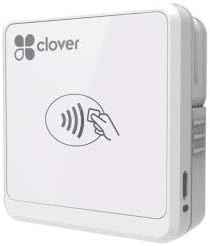
The Clover Go Contactless Reader is designed for businesses needing flexible payment processing without a dedicated merchant account. With a 4.0 rating, it is valued for its ability to handle EMV chips and contactless payments efficiently.
We may earn a commission when you buy through this link, at no additional cost to you.
It works with both iOS and Android devices, offering broad compatibility for mobile businesses. The reader supports contactless transactions, ensuring customers can pay quickly and securely using their preferred methods.
Quantities of this version are limited, as it may be end of life, but it remains a functional option for those seeking basic payment processing. Its ease of setup and lack of merchant account requirements simplify adoption for new businesses.
Ideal for small shops or startups, this reader provides essential payment capabilities with minimal overhead. While older, it remains a solid choice for businesses prioritizing convenience and compatibility across different mobile platforms.
This device allows businesses to start accepting payments without setting up a traditional merchant account, simplifying setup.
Compatible with both iOS and Android, ensuring flexibility for businesses using different mobile devices.
We may earn a commission when you buy through this link, at no additional cost to you.
The Dejavoo QD2 Mobile Wireless Terminal offers a secure payment processing solution for businesses needing mobility. Although it lacks a specific rating, it is designed to support secure transactions anywhere with wireless connectivity.
We may earn a commission when you buy through this link, at no additional cost to you.
Its 2.4-inch color LCD with backlight ensures clear visibility of transaction details. The terminal is compatible with chip cards and NFC, allowing for modern payment methods that ensure customer convenience and security.
However, using this device requires setting up a new merchant account with SwyftPAY prior to shipping. This prerequisite can add complexity to the setup process compared to standalone readers that do not need external accounts.
Ideal for businesses needing a full terminal solution, this device provides robust features for secure processing. The wireless capability ensures flexibility, making it suitable for environments where payment processing happens outside a fixed location.
Supports EMV and NFC technologies, ensuring that transactions are secure and compliant with modern payment standards.
The 2.4-inch color LCD provides clear visibility, making it easy for both customers and staff to review transactions.
We may earn a commission when you buy through this link, at no additional cost to you.
Selecting the right credit card swiper requires considering your business needs, security requirements, and budget. This guide outlines key factors to ensure you choose a device that meets your payment processing goals effectively.
Ensure the swiper supports the types of payments your customers prefer. Magnetic stripe readers handle legacy cards, while modern terminals should support EMV chips and contactless payments.
Check compatibility with current card standards to avoid transaction failures and maintain customer satisfaction.
Choose between USB, Bluetooth, or wireless options based on your setup. USB is simple for desktop POS, while Bluetooth suits mobile setups without cables.
Select the connection type that best fits your hardware and business environment.
Security is critical in payment processing. Look for devices that meet PCI PTS standards and encrypt transaction data to protect sensitive customer information.
Prioritize secure devices to avoid potential breaches and ensure compliance with legal requirements.
Ensure the device works with your current software or mobile devices. Compatibility with Windows, Mac, iOS, and Android simplifies integration.
Verify OS support to avoid setup issues and ensure smooth operation.
Consider both the upfront cost of the hardware and any associated transaction fees. Some devices are cheaper but come with higher rates, while others may have higher upfront costs with lower rates.
Balance initial costs with long-term savings to optimize your business expenses.
Look for plug-and-play devices that do not require complex drivers or configurations. Easy setup saves time and reduces technical burdens.
Choose devices with user-friendly interfaces to streamline the onboarding process.
If you operate outside a fixed location, consider mobile terminals or Bluetooth readers. Battery life and size matter for on-the-go payments.
Select portable devices if you need to accept payments at events or multiple locations.
Reliable customer support is essential in case of technical issues. Check if the manufacturer offers help for setup or troubleshooting.
Prioritize brands with strong support networks to ensure smooth business operations.
To use a credit card swiper, connect the device to your computer or terminal via the specified method, such as USB or Bluetooth. Install any necessary drivers if required, though many modern devices are plug-and-play.
Swipe the card through the magnetic stripe slot smoothly and consistently. For chip cards, insert the card into the slot as directed by the terminal. Ensure the device is properly aligned to avoid read errors.
To maintain your device, keep it clean and free from debris. Regularly check the cable and connections for wear and tear. Avoid exposing the swiper to extreme temperatures or moisture to prolong its lifespan.
Not all swipers support all card types. Basic readers handle magnetic stripe cards, while advanced terminals support chip and contactless payments. Check compatibility before purchasing.
Plug the USB reader into an available port on your computer. The system should recognize it automatically as a keyboard input. No additional software is usually needed.
Magnetic stripe readers are less secure than chip readers. They are susceptible to skimming. For better security, consider upgrading to EMV-compliant devices.
Keep the reader clean and avoid physical damage. Store it in a safe place when not in use. Regularly check for wear and tear on cables.
Yes, many modern readers use Bluetooth or Lightning/USB-C connectors to pair with smartphones. Ensure your device is compatible with your phone's operating system.
Some devices require a merchant account, while others may include one with the service. Check the terms of the specific device or service provider before purchasing.
Check that the card is swiped correctly and the device is connected. Restart the device and software. If issues persist, clean the magnetic stripe of the reader.
Yes, mobile card readers like the Square Reader or SumUp Plus are designed for on-the-go payments. They connect wirelessly to smartphones or tablets for flexibility.
This guide highlighted ten top credit card swipers, ranging from budget-friendly magnetic readers to premium mobile terminals. The Square Terminal stands out as an all-in-one solution, while the MSR90 offers affordability.
Prioritize security and compatibility to ensure seamless transactions. Consider your business size, processing needs, and budget when making a decision. The right device can enhance customer experience and streamline operations.
Remember that prices and availability may change. Always verify current listings and terms before purchasing. With careful selection, you can find a reliable credit card swiper that meets your business needs.